Pages

Showing posts with label virus. Show all posts

Oct 19, 2012

All this week’s Facebook news that’s fit to share

Facebook under magnifying glass

Facebook emoticons, anti-virus software, and a Want button lawsuit are just some of the Facebook stories that may have slipped by your radar this week.

Facebook is a platform built on constant iterations — which means its easy to miss new site features and noteworthy updates. We’ve collected this week’s biggest Facebook stories so you don’t have to.

Facebook gets emotional

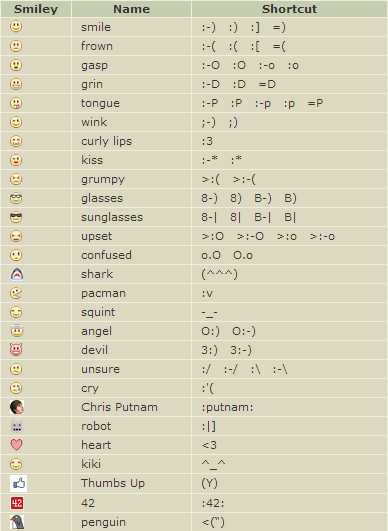
fb emoticonsEmoticons have come along way since we first started using character-number combos to virtually clue others into our feelings. Many messaging apps have started including higher quality, fun options for throwing them into your chats, and Facebook is now doing the same. The social network quietly rolled out a hefty catalog of emoticons that you can add into comments on your friend’s posts this week, although they can’t be published to status updates yet. As for mobile devices, when we tested out the feature on Facebook’s iOS app, the emoticons appeared on the Web app, while it failed to display on the iOS app — however, in Facebook’s Messenger app, there is a + icon that pulls up the new additions. 

You can check out the full list of Facebook-supported emoticons below or head over to fbsmileys.com.
facebook emoticons

Somebody “Wants” to sue Facebook

want button wantbuttondotcom

Facebook wasn’t the first to launch a “Want” button, and CVG-SAB, a company based in Michigan responsible for wantbutton.com, is suing Facebook for infringing on the newly announced tool. CVG-SAB’s “Want” button was launched in September 2010 primarily with e-commerce partners like Shopify, and since has grown to boast more than 160 million want-button views. The claim further states that the similarities between the design of Facebook’s button and wantbutton.com’s button are uncanny and already causing confusion among retailers. Wantbutton.com, in fact, offers a Facebook integration, where items that have been wanted appear on a Facebook user’s Timeline. Whether the complaint will hurt Facebook’s upcoming Collections feature remains to be seen — but our gut tells us the brand-boosting mechanism will launch with the Want button intact, lawsuit or no.

Facebook goes globe-trotting
facebook global brand page

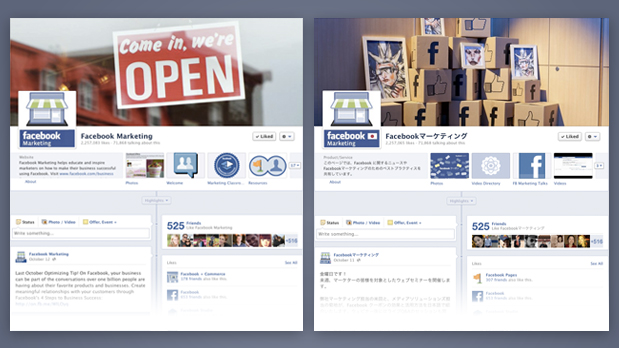
International brands are about to get a boost from the latest Facebook brand page update, which finally rolled out of beta. Facebook was testing international brand pages that can target posts and even languages at the local level. If you live in South Korea, for example, by default you’ll see a Facebook brand page written in the Korean language, as well as geo-targeted Facebook posts that followers from other countries may not be able to see. The update enables companies to manage their brand pages under one roof without resorting to creating multiple accounts or monitoring analytics for multiple pages.

Goodbye, Facebook phone number loophole
identify account on facebook

You might recall from last week’s privacy-focused roundup an item about Suriya Prakash, who discovered that a reverse-lookup feature could, if abused, easily uncover Facebook account information based on the phone numbers associated with Facebook profiles. Facebook claimed to have patched up the problem by limiting the number of times that someone could search for phone numbers, although Prakash said that these measures were insufficient and easy to work around.

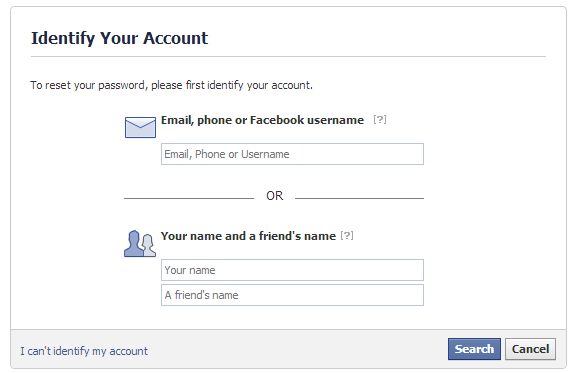
With the realization that anyone could use the reverse phone number lookup feature, find a user’s phone number, and bypass Facebook’s Login Approval system to reset a password, Facebook took precautionary measures this week. Now if you have the two-factor authentication feature set up and have forgotten your password, you’ll be required to input a phone number, email address, or user name. In order to regain access to your account, you will have to use the email address associated with it or create a new one — no more temporary passwords will be sent to your phone.

Reverse-lookups of the same phone number that’s used for password-reset authentications is now blocked off from appearing in Facebook’s search engine. However, if you’ve published your phone number publicly on your Timeline where other users can see it, you won’t be protected. You should be sure the privacy settings here, under “How You Connect,” are no longer set to “Everyone.” 

Facebook fights viruses with free software

facebook antivirus partners

Facebook’s Anti-Virus Marketplace was launched earlier this year and included free trial subscriptions from partners McAfee, Microsoft, Sophos, and Symantec. This week the social network is added seven additional partners to the Anti-Virus Marketplace including AVG, Avira, Kaspersky, Panda, Total Defense, and Webroot.

The partnership isn’t however just about offering users free services to uncover and get rid of malware and viruses. Facebook is using its anti-virus partner’s data to bolster Facebook’s URL blacklist system, which according to Facebook, “scans trillions of clicks per per day, and before each click, the system consults the databases of all our AV Marketplace partners to make sure the website you are about to visit is safe.” With the inordinate volume of content shared on Facebook, you never know when a malicious site is disguised as a simple URL.


Source : digitaltrends[dot]com

Sep 5, 2012

Are You Monitoring Your Mac Computer?

Macs are known for being impervious to viruses, unlike their PC counterparts, which are vulnerable to all types of malicious software without the right anti-virus protection. However, this added protection often lulls many Mac users into being complacent when it comes to taking security measures to protect their computer and its contents. Although Apple operating systems are less susceptible to spyware, adware, and other malicious programs, they can be abused by unscrupulous or unrestricted users. You should consider the benefits of remotely monitoring your Mac if you fit into one of the following stereotypes:

The Busy Businessman

As a multitasking businessman it can be easy to forget to power down your Mac before leaving the office. With a remote monitoring service/app you can easily access your Mac from anywhere you can connect to the internet, on any device that can load a conventional web browser – including smartphones and tablets. You can even remotely log out of your user account, view and kill active processes, or shut down the computer altogether. This makes it easy to keep unwanted eyes from prying into your business data. Furthermore, you can remotely view, download, modify, and use files/programs that are stored on your Mac, so you can have the office computer with you wherever you go.

The Protective Parent

Remote monitoring takes your parental control capabilities to the next level. Instead of simply setting up web filters that may or may not block all forbidden content, you can actually view a child’s activity in real-time or review detailed logs of past activity complete with screenshots that you can set to be taken at custom intervals. Using remote monitoring apps/services in combination with parental control filters is the best way to ensure that your children are protected from inappropriate content while browsing the internet. Also, you’ll no longer have to worry about whether your kid has actually been doing their homework or watching YouTube; you can view all of the programs/windows they’ve opened, see how long they were used, and quickly discover any files that were created or modified.

The Demanding Techie

Web designers, software developers, programmers, and other online service providers often own and manage more than one computer and/or operating system. Most techies have a smartphone, netbook, or tablet that they use to compute while on-the-go, but still need to have access to important files, emails, and applications that are stored on their home/office computers. Advanced software tasks can sometimes take hours to complete, and it’s nice to be able to check up on the progress of operations while you’re away from the Mac. In addition, with the ability to remotely use your Mac’s processing capabilities and RAM you can launch and operate resource-intensive programs through the web browser of the device you’re using to connect to the online control interface, essentially giving your mobile device the computing power of your Mac. Remote Mac monitoring should be utilized by any techie that simply can’t afford to be away from their main powerhouse computer for too long.

Author Bio: Toby Keszler is a part-time blogger, mobile tech enthusiast, and currently blogs for SniperSpy MAC Monitoring Software, a cutting-edge app that allows you to easily monitor your Mac computer.

Tags: Computer Monitor, Computer Monitoring, Computer Security, Mac Computers

Source : techtalkafrica[dot]com