
Pages

Showing posts with label notifications. Show all posts

Nov 10, 2012

Facebook starts testing nested comments, sound notifications

Facebook Login Close-up

Rolling out a couple new features to a subset of users this week, Facebook is testing more in-depth commenting as well as sound alerts for notifications.

Mentioned on Mashable this week, Facebook  has started testing threaded comments on the Web version of the social network. Rather than posting a replay at the end of a long string of comments, this allows Facebook users to directly reply to comments within a conversation that’s on a user’s Timeline page. Beside the Like button on individual comments, Facebook has placed a “Reply” link to open up a comment box. After the reply is submitted,  a smaller version of the user’s profile picture will be positioned underneath the original comment. In addition, there’s another new link called “Write a Reply” that appears underneath the newly nested comment. Facebook has also added a “Hide Replies” button on the original post to allow users to hide that portion of the conversation.
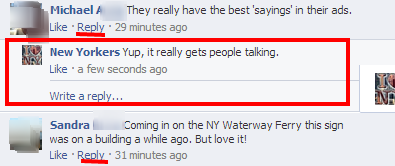
Facebook threadedIn a statement released to Mashable, Facebook corporate communications manager Meredith Chin confirmed the testing process stating “We are testing a new way to add comments to a post on Facebook. Now you will be able to reply to another comment as well as the original post.”

Assuming nested replies works in conjunction with the notifications feature, Facebook users won’t have to tag someone’s name in the reply in order to get their attention. This will also be useful when conversations tend to veer off course from the original post or when brands need to specifically reach a fan. Threaded commenting has been a feature offered through Facebook’s comment plugin for third-party sites, but Facebook has yet to roll out the updated function on the site despite user requests for it. Facebook is currently testing threaded comments on a select group of profile pages, but users can see it in action on this Thai page.

Interestingly, the threaded comments feature currently doesn’t work on the mobile version of the social network quite yet according to ZConnection. Facebook users will simply see a chronologically stream of comments rather than the threaded version that appears on the Web version of the site. It’s possible that this could lead to confusion when replying to a comment within the mobile interface. 

Detailed by Venturebeat, Facebook is also testing a new sound alerting a user that a notification has arrived. This feature is currently being tested on a select group of profiles and there’s no indication from Facebook representatives that the social network will roll out the feature to a wider group. This feature would be ideal for Facebook users that want to be alerted the second that they get a reply to a particular comment, but it could become annoying for someone that receives twenty or more notifications a day. 

The good news is that Facebook has included an option to turn off the sound. If the notification sounds have been added to your profile during this testing phase, you can visit Account Settings and click on “Notifications” to manage the feature. Click the “View” link on the tab in order to reveal a checkbox for the sound notification feature. Check out the YouTube video below to hear the notification feature in action.


Source : digitaltrends[dot]com

Oct 3, 2012

Is Scottevest the biggest smartphone case ever, or a really dorky jacket?

Hate taking your smartphones out of your pocket upon new notifications? Scottevest's Quick Draw pocket lets you access them through the fabric.

With colder weather approaching, many of us are already thinking about preparing the right clothes for the season. The most important criteria are that the clothes must be both stylish and functional. So when we caught wind of the Scottevest Fleece 7.0 jacket, we couldn’t help but wonder: is this thing technically just a fleece with cool features, or the biggest gadget case ever?

Scottevest Fleece 7.0 pocketHere’s how Fleece 7.0 (we didn’t realize there were that many versions before) works. As many of you will be stuffing your hands inside your jacket pocket during the winter, it’s only convenient that you don’t have to remove your hand from that warm little nook when your smartphone rings. Instead of pulling your phone out, removing your non-conductive glove, and checking your messages, you can just flip the pocket over to reveal a transparent fabric that will allow you to access your phone without pulling it out of the pocket. The Quick Draw pocket, as Scottevest coins it, is made with Clear Touch fabric that is conductive enough to let you control your touchscreen device through the layer. Whether this will interfere with your screen while the phone is just rubbing against your belly, however, we’re not so sure.

Scottevest Fleece 7.0 blackAside from the Quick Draw pocket, Scottevest Fleece 7.0 also has a myriad of pockets to store all your must-have gadgets on the go. Basically, it’s another way to get on a flight without checking your bag for just tech accessories alone. With a whopping total of 23 pockets, including a loophole for your earphones to hang at the collar while connected to your pocketed device and a pocket big enough to hold an iPad and a water bottle, Fleece 7.0 seems like a surefire way to keep warm — whether from the heat of your gadgets or the fleece itself. The jacket sleeves are also removable to convert into a vest for those comfortable fall days.

While the idea of novel and technically useful, in terms of real world practicality, this jacket might just make you the biggest geek ever. Can you imagine hugging someone with your iPad sitting at your ribcage? What about the square body shape from all the stuffed gadgets in your jacket? For the die-hard gadgeteers, perhaps function defeats style. We’ll leave you that thought to ponder while we slip back into our no-pocket fleece blanket with a nice cup of tea. Ah, fall.

Intrigued by the Fleece 7.0? The item is available for pre-order today at $160 in your choice of black or red fleece, with a shipment date estimated for the end of the October.


Source : digitaltrends[dot]com

Sep 6, 2012

Mobile LinkedIn apps get updated with new features

The Android and iOS mobile LinkedIn apps got new updates today. They bring new features, notifications and languages.

If you are using one of those mobile apps, the update should be waiting for you in your Play/App Store.

Here is the official change log for the new LinkedIn version:

    On iPhone and Android:
  • Get notified: We will keep you notified in real-time when someone likes what you’ve shared on LinkedIn, views your profile, accepts your invitation, and much more.
  • Company pages goes mobile: Find out which connections work at the companies you care about, see recent news and updates from the company, and learn about current job openings.
  • Don’t want your employer to know you’re looking?: We’ve recently added access to job listings and jobs you may be interested in directly within your mobile update stream.
    On the iPad:
  • We speak 6 new languages: Did you know more than 60% of our members are based outside the US? Today, we launched in French, German, Italian, Spanish, Brazilian Portuguese, Korean. More to come.
  • Notifications and Company Pages: Also available on iPad!

Here are the links for LinkedIn apps: iOS • Android


Source : blog[dot]gsmarena[dot]com

Sep 4, 2012

Facebook apps get personal with new Notifications API

Facebook gives apps the ability to send personalized notifications, but reminds developers that users are in control - fingers crossed.

Don’t you love that feeling when you open Facebook or the mobile app to see that the world is lit up? The little red box catches your eye telling you how many people love you and how many new photos you look great in? Get ready for that feeling to change; Facebook announced on their blog Friday a new way for application developers to get your attention with the Notifications API. 

The API has been tested and is now entering beta. It provides developers with the coding capabilities to send personalized messages to you through your Notifications. These notifications could be in response to specific actions taken by you or your friends who are users of the app, or they could just be general messages with a more personal feel. Any application that you’ve authorized can use the API to communicate with you via your Notifications hub without requesting any additional permissions.

Apps also have the power refer to any other User ID that has authorized it, so your friends’ names may show up in your Notifications, and any app you have authorized can include your User ID in your friends’ notifications. Try to remember that when you decide to authorize the Match.com app.

The tone of Facebook’s announcement and the official documentation for the feature strongly encourage developers to focus on delivering users “high-quality app notifications.” In the API’s documentation, Facebook reminds app developers that users are still in control of the notifications they receive. By clicking the X in the notification, users have the ability to opt out of receiving notifications from a particular app. If the user makes the decision to opt out, they are then provided the opportunity to “Report app for spam.”  The blog post informs developers that “Apps with exceedingly high turn off rates for notifications may be classified as spam and disabled.”

 Facebook also introduced a Notifications Best Practices guide for app developers with the headline: “Quality Matters.” The guidelines make suggestions for appropriate use and provide guidelines for length and syntax of notifications.

To the end of delivering only highly effective notifications to users, an additional feature is debuting alongside the Notifications API in the Insights Dashboard (the page where developers can access analytics about their apps). Notifications analytics will be added under the Traffic category so that developers can see “data such as click to publish ratio, number of accepted and rejected notifications, in addition to your mark as spam rate.”

The focus on the user experience is welcome and if the recommendations are followed, they’ll benefit the app developers as well, with fewer spam reports and a way to interact on a personal level with users. With the existing ability to block notifications from certain groups and apps, along with the spam reporting features, Facebook seems to be making an earnest effort to balance user control over the content they’re sent and third parties’ ability to send it. Nevertheless, this will likely change the way we view new notifications — right now, they are essentially people-focused; bite-sized news about how our friends are interacting with us. Trying to introduce how our apps are interacting with us is a mental switch that isn’t likely to go over all that smoothly. 


Source : digitaltrends[dot]com

Sep 3, 2012

How to shut off Android notifications

If you're sick of spam Android notifications then identify the apps responsible and get rid of them. We explain how to find offending apps and stop push notifications.

One of the main strengths of the Android platform has always been the notifications system. Sadly some app developers seem to abuse it in order to spam you with promotional messages, enticements to fire up their app, and plain old pointless updates. The obvious answer is to uninstall the offending software, but what if it’s an app or a game that you enjoy using? There must be another way right? Let’s find out.

Turning off notifications in Android 4.1 Jelly Bean

If you’re lucky enough to be rocking Jelly Bean on your Android device, then feel free to dance round the room in celebration. Your task is easy. The fact that Google worked in a system for identifying the app responsible and turning notifications off forevermore in the latest version of Android is a pretty clear sign that notification spam is becoming a problem.

When an offending notification pops up, simply long press on it and App info will pop up. Tap on that and you’ll be taken straight to the app management screen where you can uncheck the Show notifications box and free yourself from spam. It does mean that all notifications from that app will be turned off. As the warning states “If you turn off notifications for this app, you may miss important alerts and updates.”

Turning off notifications in older versions of Android

The horrible truth with older versions of Android is that you are at the mercy of the app developer. Each individual app handles its own notification system. To see whether you can turn off or customize your notifications you need to fire up the app in question and hit the Menu button. You should find a notifications option in Settings. There is no standard, so it could be anywhere, or it might not be an option at all.

Big apps like Facebook have a whole range of notification options so you can decide on alerts, vibrations, and choose ringtones, as well as dictating exactly what should trigger an alert. Some apps don’t have any notification options at all.

Customizing notifications

If you have the option to set a ringtone for your notifications within an individual app’s settings, then you can get around the main annoyance they cause, which is making you think something important has popped up on your phone. Set the same ringtone for non-essential updates and you don’t need to turn notifications off, but you’ll instantly know it isn’t that text you’re waiting for.

It is also a good idea to set different ringtones and vibrations for different things so you have a good idea whether it’s something you need to check or not. Most people have ringtone and vibrate for calls, and maybe just vibrate for texts and emails. You might find additional options depending on the phone you have. For example, the Samsung Galaxy S3 allows you to set up your own vibrate patterns and assign them to different contacts.

How do I know which app is responsible?

Some of the most pernicious notifications, which usually proclaim things like “Win a free iPad,” are not obviously from any specific app. If you’re getting spam like this and you don’t have Android 4.1 then you could resort to using another app to locate the offending spammer.

Try out the free AirPush Detector app and you should be able to identify which app is spamming you with those push notifications. You will have to uninstall the app responsible in order to stop the problem.

There’s also an app called Addons Detector, which allows you to check which ads and tools your apps are using. It can identify apps using push notifications and a bunch of other kinds of advertising as well.

Another good app to use is Lookout Ad Network Detector. It’s another free app that will scan your apps and identify any of them that are using common ad networks. You can find out what information is being gathered and what kinds of ads are being served and uninstall them if you don’t like the look of what they are up to.

Got any other tips? Please post a comment and share them.


Source : digitaltrends[dot]com