Pages

Showing posts with label android. Show all posts

Nov 14, 2012

That was fast: Google already launches Android 4.2 update to fix Google Voice bug

Google has already released an update for Android 4.2 that fixes bugs with Google Voice.

Android 4.2 may be Google’s newest mobile operating system update, but new doesn’t always mean perfect. The latest iteration of Jelly Bean has reportedly caused issues with Google Voice, but the search giant has already issued a fix.

Within 24 hours of its release, Google launched an update for the operating system that fixed inaccuracies with Google Voice. The app has experienced problems ever since the fresh, treat-themed upgrade launched alongside Google’s new Nexus 4 handset and Nexus 10 tablet. Some complaints said that the bug would Force Close a text message if you tried to add a new contact at the same time. This text messaging glitch appears to be the most significant issue, but the update is believed to address any and all compatibility problems between Android 4.2 and Google Voice.

Luckily, the majority of Android users have probably never even encountered this inconvenience. Android 4.2 is only currently available for the Samsung Galaxy Nexus and the LG Nexus 4, which means that the bug has only affected a small number of Android users. The updated operating system will also ship with the Nexus 10 tablet that debuted on Tuesday and almost instantly sold out in the U.S. and UK within minutes (though we don’t know how many sales it took to sell out).

Android 4.2, initially believed to be called Key Lime Pie, represents the next major software upgrade for Android devices. Google introduced the previous edition of Jelly Bean, Android 4.1, at its I/O conference in June along with its Nexus 7 tablet. The search engine giant emphasized the “buttery smooth” interface that users would experience with Jelly Bean, and its new iteration promises the same.

The update boasts new features such as the ability to open multiple windows and apps simultaneously and Android Beam integration. This is Google’s term for its Near-Field Communication (NFC) capability, which lets users share photos, YouTube videos and other content by touching Android devices back-to-back. One of the most noteworthy additions is the new Photo Sphere camera, which takes snapshots in various directions and stitches them together to form one big picture.

While this may seem exciting, it could take a while for the update to completely roll out. Google recently announced that the Nexus S and Motorola Xoom will not be getting Android 4.2, and data collected by the company shows that Android 4.1 is still barely present on most devices.


Source : digitaltrends[dot]com

Nov 9, 2012

7 Google Android Apps to Protect Your Phone from Virus

Google Android is one of the most popular operating systems in the mobile world. As an open source platform it allows others to modify the system files and develop applications. Unfortunately this can result in security threats to the very device that stores all your personal information. Protecting your personal data is easy with one of these free securities and antivirus applications offered for Android.


Antivirus Free
The Antivirus Free application will protect your phone from any malicious apps and viruses by discovering new apps installed on your system and cross-referencing them with a database. The app will request certain permissions which all for an easy installation and function.

Avast! Mobile Security
This application is a fully featured antivirus and anti-theft security application. The avast! application has an automatic virus scans and alerts for infected URL’s. In addition, if your phone is rooted you can add a firewall, control anti-theft features with remote SMS commands.

AVG Antivirus free

The AVG Antivirus is a free security application that protects your smartphones and tablets in real-time, from any viruses, malware and spyware or online corruption. In addition, this app has a task killer, phone locator, app lock and real-time scanner.

Dr.Web Antivirus Light 
This application will not effect your mobile phone operating system performance or reduce the batter life. Dr. Web Antivirus Light uses a distinctive process for discovering new virus families based on previous threats which reduce the size of the virus database.

Lookout Security & Antivirus
On a daily and weekly basis the Lookout application will scan your mobile phone for viruses. In addition, Lookout will scan the root folder of your mobile phone and solve any other problems relating to holes in security.


NetQin Mobile Security & Antivirus
The NetQin application identifies new applications installed and check a database for malicious apps. The functions and use are practical and user-friendly. In addition, there is an anti-theft feature which will allows you to track your robbed phone through Google Maps.

Zoner Antivirus Free
The Zoner Antivirus application provides protection against trojans, worms, spyware, adware, malware and viruses. In addition, the application offers theft protection which enables you to control remotely your device through SMS messages.

It could be devastating if your mobile phone is lost, stolen, or compromised by a virus. It is free and easy to protect all your information stored in your Google Android with one of these antivirus applications.

Tags: Anti-theft Security, Antivirus Free, Automatic Virus Scans, Avast! Mobile Security, Dr.Web Antivirus Light, Google Android Apps, Lookout Security & Antivirus, Mobile Phone Operating System Performance, NetQin Mobile Security & Antivirus, Security Holes, Trojan Worms, Zoner Antivirus Free

Source : techtalkafrica[dot]com

Nov 8, 2012

Humble Bundle 4 for Android released

The Humble Bundle is back on Android and brings with it some great new games never before seen on the platform. If you don’t know what Humble Bundle is, it’s a collection of games where you get to decide what the final price should be. Once you pay, one part of the money goes to the developers, one part to charity and the remaining to the people at Humble Bundle. Along with being able to choose the price, you can also select who gets how much share of the money.

In the latest Humble Bundle 4 for Android, you get a collection of five great games, including Splice, Eufloria, Waking Mars, Crayon Physics Deluxe and Superbrothers: Swords and Sworcery EP. Moreover, if you pay over the average amount of $5.96, you also get Machinarium.

But wait, there’s more. Along with the Android versions of these games, you also get a Steam key for each of these games so you can play them on your PC or Mac. And each game also comes with its soundtrack.

If all that sounds enticing to you, head over to the website from the source link below and purchase the bundle before the time runs out.


Source : blog[dot]gsmarena[dot]com

Angry Birds Star Wars now available for download

After teasing it for over a month, Rovio has finally released Angry Birds Star Wars. The game is available for download on iOS, Android and OS X and although a Windows Phone and Windows 8 versions are promised neither are currently available for download.

The game is priced at $0.99 on iOS for the iPhone version and $2.99 for the iPad version. Meanwhile, Android has two versions, one that is free but comes with ads and another ‘HD’ version, which despite the name looks identical to the standard version but costs $2.99 and does not include ads. The OS X version costs $4.99.

After playing it for a few minutes prior to writing this article, the game seems very similar to the standard Angry Birds, which means not all that exciting. Of course, I plan to play further and hopefully it gets better. You can expect a full review later this week.


Source : blog[dot]gsmarena[dot]com

Nov 7, 2012

Motorola gives you the keys to its Atrix HD with the new Developer Edition

Motorola Atrix HD Review hardware android screen

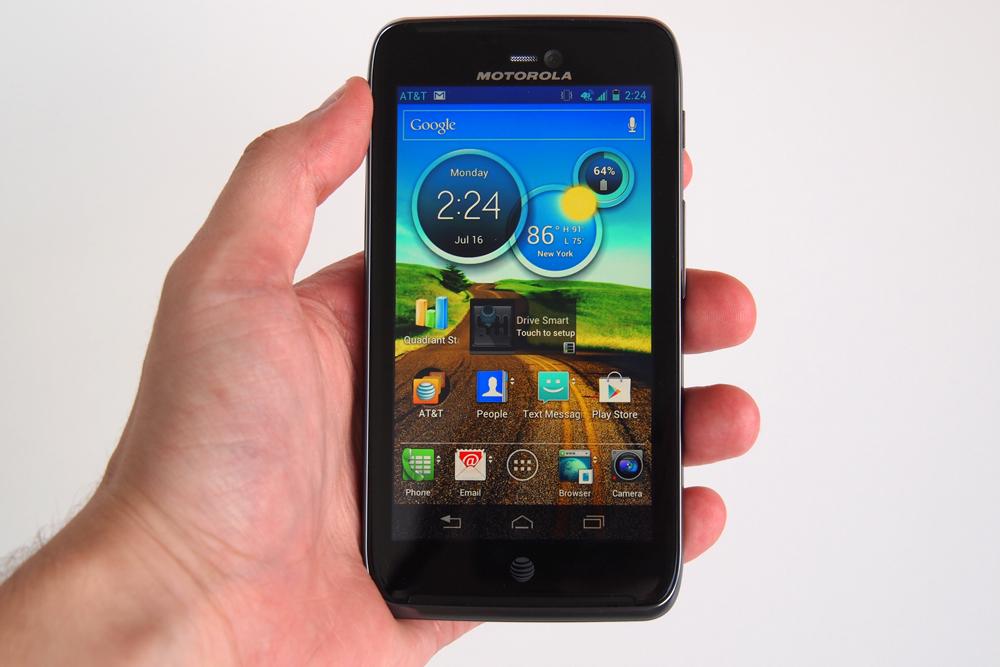
Motorola has announced a special Developer Edition of its Atrix HD Android phone. Designed for those who want to customize their Atrix HD, it comes with the option of unlocking the bootloader, allowing the installation of custom software.

Motorola is sure to please developers and those amongst us who like to customize our Android phones with its latest device, the Atrix HD. “Hold on,” you’re probably thinking, “that’s already been announced once.” Indeed it has, but this time it’s a special Developer Edition.

What makes the phone special is its unlockable bootloader, which in English, means once Motorola has provided a unique code to unlock the handset, owners are free to install their own custom versions of Android, run test versions of apps, and generally customize the phone to their heart’s content.

This isn’t the first time Motorola has offered such a phone either, with both the Razr, Razr M and the Razr HD all receiving Developer Editions in the past. Being given the keys to the Android kingdom isn’t without its price though, as once you’ve started fiddling with the bootloader, you can say goodbye to your warranty. Our advice is, be sure you know what you’re doing before you start.

Motorola’s Atrix HD was announced in July this year, and we gave it an impressive 8/10 in our review, highlighting in particular the excellent $100 price tag with AT&T. For that you get a 4.5-inch touchscreen with a 1280 x 720 pixel resolution, a 1.5GHz Snapdragon processor and an 8-megapixel camera. A relatively untouched version of Android 4.0 Ice Cream Sandwich is installed as standard, but there’s no word on when 4.1 Jelly Bean will arrive.

Don’t expect to pick up the Developer Edition as cheaply as AT&T’s deal though, as it’s not available on contract. It won’t be priced as low as the new Nexus 4 either — a phone that’s also easily unlocked.

Motorola hasn’t provided a release date or a price for the Atrix HD Developer Edition, and suggests those interested should register for updates on its website.


Source : digitaltrends[dot]com

Nov 5, 2012

Samsung Ativ and Galaxy Tab 2 10.1 coming to AT&T Nov. 9

Samsung and AT&T announce the Ativ and Galaxy Tab 2 for a November 9 release, bringing new Android and Windows 8 devices to the carrier this week.

If you were planning to buy a tablet this holiday season, rest assured you’ll have plenty of variety to choose from when you head to the stores on Black Friday. Today AT&T has announced two more tablets to hit stores on November 9: The Windows smart PC Samsung Ativ, and latest member of the Android-powered Galaxy family, the Samsung Galaxy Tab 2 10.1. The Samsung Ativ will retail for about $8o0, and the Galaxy Tab 2 10.1 will cost about $500 — neither of which require a contract for purchase. 

The Samsung Ativ comes as the first of Microsoft’s beefier Windows 8 tablets to hit the market in contrast to its Windows 8 RT tablets released late in October. The tablet features an included clamshell keyboard for high-speed typing when you need it, and a multi-touch display to take full advantage of the Windows 8 UI experience. The device also features an Intel Atom 1.5GHz dual-core processor, 64GB of internal memory, and 2GB of RAM all viewed from a crisp 11.6-inch display. Clocking in at $800, this tablet is a small fortune, but runs the robust Windows 8 OS for a totally mobile and productive experience.

The Galaxy Tab 2 10.1 serves as Samsung’s sequel to their Galaxy Tab 10.1 released back in 2011, and features Android 4.0 (Ice Cream Sandwich), an external storage slot, and a slightly beefier battery all viewed from a high resolution 10.1-inch screen. At $500, the Galaxy Tab 2 is certainly not the cheapest Android tablet out there, but nonetheless a feature rich one. Read our full DT review on the Galaxy Tab 2 10.1 for more info.

To encourage new customers, AT&T is offering a promotional discount for those who buy two qualifying Samsung devices this holiday season. With a new 2-year agreement, customers can get an instant $100 discount for buying any Samsung Galaxy Smartphone along with any Samsung smartphone or tablet of equal or lesser value. As Sprint also announces its roll-out of the Galaxy Tab 2 10.1 for November 11, it’s safe to say AT&T is trying to grab some essential territory before the rest of the carriers release their tablets for the forthcoming holiday season. 

The tablet market this holiday season is well inundated with devices of all shapes and sizes, ranging from the iPad Mini to Windows 8 smart PC — the only question is figuring out which one is right for you, and just what the wake of the coming holiday-season tablet war will bring to the market.


Source : digitaltrends[dot]com

Nov 1, 2012

Watch out Apple, Google Play now has 700,000 apps too

google-play-store

It's reported that Google Play now contains 700,000 apps, which means it equals Apple's figure provided for its iTunes App Store. With Android activations growing too, Android could soon overtake iOS here too.

It’s being reported that there are now 700,000 applications available inside the Google Play store, which sees the two giants of the app world — Google and Apple — tied for first place. Although not officially confirmed by Google, CNet.com says its own sources agree with Bloomberg’s original report.

This means there has been an influx of 25,000 new apps since September, when Google announced the Play store was home to 675,000 apps, and that it had seen 25 billion of them downloaded since it opened in late 2008.

Apple also states the iTunes App Store contains 700,000 apps, a figure it has repeated at both the launch of the iPhone 5 and the iPad Mini, and each time prefacing the figure with either “more than” or “over.” The last number Apple officially provided was back in June, when it announced there were 500,000 apps to download.

This is the first time the two major app forces have been tied, with Apple traditionally maintaining its lead over Google. However, the growth of Google Play mirrors the growth of Android as a platform, which recently reached 900,000 activations per day and is expected to tip over the magic one million mark at the end of this, or early next year.

The amount of available apps is a crucial figure for marketing teams, as it can be used to show the operating system has a vibrant community behind it. However, quantity doesn’t always mean quality, and with interest in tablet-only apps at an all-time high, Apple still has the upper hand, with more than 200,000 of its app total being optimized for a bigger screen.

Now Google has caught up with Apple, it also serves to illustrate the gulf between the two industry leaders and their competition. Earlier this week, Microsoft told those gathered for the launch of Windows Phone 8 that its application store, the newly christened Windows Phone Store, contained 120,000 apps. A figure expected to grow at a faster rate now that the new Windows Phone SDK has been released.

As for BlackBerry App World at the end of September, 105,000 apps were reported to be available, up from 90,000 in July.

Will Apple be happy to concede another one of its trophies to Google? Probably not, so expect a revised figure from them soon, perhaps when it releases iTunes 11.


Source : digitaltrends[dot]com

Google Earth for desktop gets tour guide feature and additional 3D imagery

Google Earth 7 is now available for download, with the Mountain View company adding the tour guide feature from the Android and iOS versions together with a load of new 3D imagery.

The latest version of Google Earth for desktop computers was rolled out on Wednesday, bringing many of the features that Android and iOS users of the virtual-globe software have been enjoying for a few months now.

Version 7 brings with it the tour guide feature, which Google describes as “a local expert”. To try it out, look for thumbnails appearing at the bottom of the screen as you’re viewing various locations around the world. These thumbnails indicate that a tour has been created. Click on one that looks appealing and you’ll be taken on a virtual flyover of the landmark or location, with various relevant facts and figures pulled from Wikipedia showing up on screen.

As you might expect, the feature works best with cities where buildings have been rendered in 3D by Google, rather than in locations like Paris which are still waiting for a makeover. Flying around an Eiffel Tower showing up as flat as a pancake is, of course, no fun at all. The Golden Gate Bridge in San Francisco and Rome’s Colosseum, on the other hand, both offer a superb demonstration of the feature. To view the buildings in 3D, you need to first check the 3D Buildings box in the layers column on the left side of the screen. To find out more about which landmarks are currently viewable in 3D, check out Google’s dedicated webpage here.

Locations updated with 3D imagery on Google Earth 7 include those that have been available on Android and iOS devices for several months such as Boulder, Boston, Charlotte, Denver, Lawrence, Long Beach, Los Angeles, Portland, San Antonio, San Diego, Santa Cruz, Seattle, Tampa, Tucson, Rome and the San Francisco Bay Area (including the Peninsula and East Bay).

And there’s more – from Wednesday additional 3D imagery is showing up for a number of other places including Avignon, France; Austin, Texas; Munich, Germany; Phoenix, Arizona; and Mannheim, Germany.

“The experience of flying through these areas and seeing the buildings, terrain and even the trees rendered in 3D is now consistent across both mobile and desktop devices, making all of your virtual travels more realistic than ever,” Google Earth product manager Peter Birch said in a blog post announcing the update.

Uou can download Google Earth 7 here.


Source : digitaltrends[dot]com
Oct 25, 2012

Letterpress, a new game for iOS from the creator of Tweetie

If you’ve used the Twitter client Tweetie or the official Twitter apps for iOS, Android and OS X, you have one person to thank for them: Loren Brichter. Brichter rose to fame with his excellent Twitter app, Tweetie, for iOS and Android. These apps were so good that Twitter acquired him and his apps and since then he made the Twitter apps for iPhone, iPad, Android and OS X.

Last year, Brichter left Twitter to continue working for his own company, Atebits. He has been secretly working on his own app since then and yesterday it was finally released on iOS. Say hello to Letterpress.

Letterpress is a two player, online multiplayer game similar to Scrabble, where you have a grid of 5×5 tiles consisting of letters. Your goal is to form words using these letters. The word should have at least two characters and you cannot repeat words. Once you select your letters, they get assigned by your team color. The opponent then has to do the same.

If you choose from the white tiles, that is those that have not been used, you get one point per tile. If you steal tiles from your opponent, you get one point and the opponent loses one point per tile. Once stolen, the tiles turn the color of your side. If you use your own previously used tiles, you don’t get any points. Eventually, you have to use up all the tiles on the board and the one with the highest score wins.

The premise is pretty simple but despite that the game is fun to play. What I really like about this game is how well made it is. From the UI design to the slick animations, everything is top-notch and shows that a great deal of care went into making the game.

Now here’s the best part: Letterpress is completely free for download. There is an upgrade option for which you have to pay $0.99. which lets you use various themes for the board and you can also play multiple games at the same time but even without upgrading the game feels complete.

Click here to download the game on your iPhone, iPad or iPod touch. You’ll need a Game Center ID to play the game.


Source : blog[dot]gsmarena[dot]com

Oct 19, 2012

Acer Iconia Tab A110 arriving in the US and Canada on October 30 for $230

We have reported several times in the past about the 7-inch Acer Iconia Tab A110 Android tablet. We knew that the tablet was going to be priced competitively, somewhere around the $200 mark.

Now Acer has finally announced the pricing and launch date for the US and Canadian market. The Iconia Tab A110 will be launching on October 30 and will be priced at $229.99.

For that price, you get a tablet with a 7-inch, 1,024 x 600 resolution display, NVIDIA Tegra 3 processor, 1GB RAM, 8GB internal memory with a microSD card slot, front facing camera, HDMI-out, 7.5 hour battery life and Android 4.1 Jelly Bean out of the box.

Compared to the Nexus 7, the only advantages the Acer Iconia Tab A110 has are the microSD card slot and the HDMI out but is it worth spending the $30 extra for? Not to mention get a lower resolution display and none of the stock-Android, quick update business you get with the Nexus 7? I don’t think so.


Source : blog[dot]gsmarena[dot]com

Oct 12, 2012

Madfinger releases Shadowgun: DeadZone beta

Madfinger has released the public beta of Shadowgun: DeadZone, a multiplayer version of the superb Shadowgun currently available on iOS and Android. Shadowgun: DeadZone is currently available for free (until the beta test lasts) and is only available on Android devices running NVIDIA Tegra 3 chipset.

DeadZone is an exclusive, multi-player only version of the standard Shadowgun. You play in similar environments as Shadowgun but you now have multiple characters to choose from and instead of dumb AI enemies you will be against much tougher human ones.

Since the game is in beta, some of the features aren’t working and the performance may not be the best. The game is also operating on a limited number of servers right now. The purpose of this beta test is to try out the game and give feedback to Madfinger, so that they can improve the final version.

If you have a phone or a tablet running Tegra 3, hit the source link to download the game. If you find any issues, report them at deadzone@madfingergames.com.


Source : blog[dot]gsmarena[dot]com

Oct 11, 2012

Google releases new Play Store update, brings some much needed changes

Google has released v3.9.16 of the Play Store application for Android and with it come some useful new features. One of the new features is the ability to delete apps from your ‘All’ apps list within ‘My Apps’. Anyone who has been using Android for a while will know that this list is cluttered with useless apps that you only downloaded once and then deleted but are now permanently part of that list. Well, not anymore.

Applications in this list that are currently not installed on your device will now have a delete button next to them, so you can instantly remove them from the list. Moreover, you can now press and hold over these items and delete a whole bunch of them simultaneously.

Another useful new change is that the Play Store app finally remembers your position in a list. Before, if you scrolled down a list and clicked on an item and then went back, you’d go at the top of the list. This would be extremely frustrating of you had scrolled down a lot. Now, the app remembers your position, so you can go back and continue scrolling down from where you left off.

Other minor changes include new notification icons that appear when there is an update available, along with expandable notification option. Your phone will now also show the icon for the app that you updated instead of the same generic icon it showed before. The new Play Store app is also smaller in size than previous versions.

The update is rolling out now so you’ll have to wait for it to arrive on your device. Alternatively, you can click on the source link below and head over to Android Police, who have uploaded the APK for your downloading pleasure.


Source : blog[dot]gsmarena[dot]com

Oct 10, 2012

Google+ app updated on iOS and Android

Google has pushed out a new update for their Google+ app on iOS and Android. One of the key new features in the iOS version is support for the iPhone 5 and iOS 6. Another new feature is Google+ page owners now being able to view, post and comment from the mobile app.

Lastly, you can also edit your posts, save photos to camera roll and search for people and posts on the iPad.

The Android version also gets the ability to let page owners view, post and comment and along with that there is also a new ‘Find People’ option to discover people and topics more easily. There’s also a new homescreen widget. For some reason the Android app stopped loading posts after updating and just says ‘No posts found’ on my device but your mileage may vary. Probably just some temporary bug and should be fixed soon.

You can download the apps from the respective links below.


Source : blog[dot]gsmarena[dot]com

The QWERTY is back with the LG Mach

LG Mach

Sprint has announced the LG Mach, a new QWERTY slider Android smartphone that sits just below the Motorola Photon Q in the network's range.

The QWERTY slider form factor still has its fans, and Sprint wants to make sure they’re well catered for on its network, so it has introduced the new LG Mach. Now, with a name like that, you’re probably expecting incredible performance, but while the Mach isn’t a basic phone, it’s not quite up there with the range-toppers of today.

What we’ve got is a 4-inch touchscreen with an 800 x 480 pixel resolution, which slides to the side to reveal a big QWERTY keyboard, providing users with the best of both worlds. You’ll have to be prepared to compromise on size and weight when comparing it to its touch-only peers though, as the LG Mach is a chunky beast at 12mm thick and 168 grams.

Deep inside the phone is a 1.2GHz, dual-core processor and 1GB of RAM, while the operating system is Android 4.0 Ice Cream Sandwich. Although LG doesn’t talk about it in the press release, CNet.com says the Mach will be upgradeable to Android 4.1 Jelly Bean, but doesn’t offer any timescale.

There is a 5-megapixel camera on the rear of the phone, which can also shoot 1080p video, plus a basic 0.3 megapixel forward-facing video call lens above the screen. LG makes a point of highlighting the Mach’s eco-friendliness, saying it’s 56-percent recyclable, and has been given the seal of approval by a couple of environmental foundations too.

The Mach will connect to Sprint’s 4G LTE network and other features include Bluetooth 4.0, a 1700mAh battery, 8GB of internal storage memory, GPS, a microSD card slot and NFC.

As unusual as the LG Mach’s form factor may be these days, it’s not alone on the market, and one of its closest rivals is also offered through Sprint. The Motorola Photon Q has a slightly larger screen at 4.3-inches, an 8-megapixel camera and a 1.5GHz, dual-core processor, so the LG Mach will likely come in at a slightly lower price. It does win over in one key area though, as the Mach is ever-so slightly lighter and slimmer than the Photon Q.

Sprint hasn’t provided any release information or pricing structure at all, so if you’re interested in the phone, you’ll need a little patience.


Source : digitaltrends[dot]com

Best Android Apps [Part 1]

Android apps are mobile softwares specifically developed for operating on the Android OS or operating system. This is probably the most popular platform used in tablets, cellphones along with other mobile devices. Google’s OS has an open source nature which directly means that users can download and install numerous fantastic applications on their phones and tablets. Most of the top Android apps are free, and there are free versions of the paid ones, so users can always choose to make the most of the Android apps store without having to worry about the finances involved. Last time, we posted something on Best iPhone Apps, feel free to check it out.

Back in 2008, the first ever Android-powered handset was released and since then the Android app store has become one the most visited marketplaces for downloading of applications. Back when it first started out, the Android Market for apps was quite minimalistic as compared to the Apple store for applications. Today, the store offers millions of applications for quick and easy download.

In the crowded Android Market, finding the best and top rated apps can be quite a challenge. This is where a compressive list of apps comes in handy. The apps are usually rated based on how many downloads it has recorded and the general public reviews collected. Here is a list of best apps for Android phones and tablet PCs based on user reviews and number of downloads:

1) Seesmic for Twitter (Free)

There are many Twitter applications on Android, including an official one by Twitter itself, but Seesmic has been popular for numerous reasons. It provides unlimited support for several accounts and a home-page widget shows the newest tweets in real time. The design is very professional and it is quite user friendly, this app is free but there’s a pro version you can get for £1.89 available here

2) Samsung ChatOn (Free)

While there are plenty of messaging tools for the Android platform, Samsung’s ChatOn take the cake. With multi-platform support and the ability to incorporate social networking features, ChatOn has clients available for older, non-smart Samsung phones as well.

3) Flicker (Free)

Flickr is one of the best Android apps for users who like all their news, tweets and updates in one place. The app supports Twitter and Facebook sharing and users can click pictures from within Flicker. There is a set of Instagram-like filters as well. If you can get it free, why not, this app is available for free

4) FX Photo Editor ($3.99)

The FX Photo Editor is a great photo editing tool. It is packed with filters, cropping tools and frames and also lets users tweak their pictures with various other resourceful features and tools. There is a free version as well that comes with fewer features.

5) BeWeather (Free)

Although there are various weather apps for users to choose from, BeWeather is often considered one of the best android apps. It displays the current weather in vibrant HD weather animations. Users are also given many customizable clock and weather widgets. Weather applications are always a huge hit with smartphone users and these also come in handy.

6) Postman SMS Spam Blocker (Free)

Users who prefer a good text message spam filter and blocker can download the Postman SMS Spam Blocker for free. This app automatically filters unwanted text messages so that they never actually reach you. Filtering out spammy and unwanted texts is one of the biggest concerns for smartphone owners. With an application like Postman SMS Spam Blocker, the task becomes simple and hassle-free.

7) doubleTwist Alarm Clock ($1.99)

This is one of the most beautiful and feature-rich alarm clock apps for Android. Unlike most other alarm clock apps, this one is paid but its layout makes it worth the money. doubleTwist has been popular for releasing some of the best known Android apps.

8) Google Maps (Free)

One of the top Android apps for navigation is the Google Maps Navigation app. Designed for users with Android 1.6 or above, the application offers turn-by-turn navigation and route calculations are done as soon as the trip starts. Users are on target even when the GPS signal is lost.

9) Dropbox (Free)

Dropbox gained a lot of popularity when it was introduced for the iOS platform and its Android version has also become highly popular, making it one of the best apps for Android. The app allows users to sync files across all their devices with ease. Although everything is not as automated as users would have hoped, it is still a great app.

10) Photon ($0.99)

For users who love puzzle games, Photon is one of the best android apps. If you loved games like Bejeweled or Chuzzle, then Photon is something that you must download on your Android phone or tablet. The game is easy to play and poses quite a challenge to even the most seasoned of players.

Report an error

Tags: android apps, Android Games, best android apps, best apps for android, top android apps

Source : techtalkafrica[dot]com

Oct 4, 2012

DT Daily: Facebook hits 1 billion, TomTom heads to Android

Facebook hits 1 billion users, TomTom navigates its way to Android, Taken 2 hits theaters to terrible reviews, the Mars Curiosity rover joins Foursquare, and the first presidential debate sets a new Twitter record.

Related Links:


Source : digitaltrends[dot]com

TomTom launches navigation app for Android, forgets HD resolution support

TomTom has launched its popular offline navigation app for Android today. Packing most of the features of its iOS counterparts, the TomTom Android app features spoken turn-by-turn directions in multiple languages as well as speed camera alerts and Traffic info.

On top of that, TomTom promises it’ll provide lifetime map updates, with at least four releases per year. It all sounds great, but there’s a catch – the app doesn’t have the greatest device compatibility.

TomTom has confirmed to TheVerge that in its current version, its navigation app will only run on devices with Android 2.2 or higher and a resolution of either 800 x 480 or 854 x 480 pixels. However, the company says it is “committed to supporting higher resolutions on an ongoing basis.”

Currently, the US & Canada and Western Europe editions of the app cost $49.99 each, which is $10 less than the TomTom apps for iOS. Keep in mind that the app is quite storage hungry with the maps for US & Canada requiring 2.3GB of storage space.

Anyhow, TomTom launched a promo video to celebrate the launch of their Android app. Check it out.


Source : blog[dot]gsmarena[dot]com

Oct 3, 2012

Sandia’s MegaDroid goes public

What has 300,000 Android Operating Systems and helps tech professionals predict how mobile devices would react in a crisis? It's a massive project called MegaDroid, based in California.

What do you call an artificial system that simulates a network of hundreds of thousands of Android devices, allowing to predict the behavior of said devices in case of new app, malware or unforeseen technological breakdown? If your answer was “The Matrix,” then somewhere the Wachowski siblings would like to thank you, but the real answer is something far more entertaining than any amount of Keanu Reeveses staring blankly at the screen. World, meet the MegaDroid.

The MegaDroid is the creation of researchers at California-based Sandia National Laboratories, and virtually simulates 300,000 separate Android devices in an attempt to analyze the reactions of large-scale networks to any number of situations. According to computer scientist John Floren, the MegaDroid is completely insulated from all other networks in the world, but nonetheless offers a realistic network environment inside itself, complete with full domain name service, Internet relay chat server, web server and multiple subnets. It even includes a fake GPS system so that the fictional users of the multiple Android devices being simulated can be tracked in different environments to see whether environment would have any effect on the particular data being studied, and also whether areas without WiFi or Bluetooth impact service significantly.

The need for MegaDroid is explained by Floren very simply: “You can’t defend against something you don’t understand,” he says, pointing to the system’s use in running simulations that will allow Android users to be protected against cyber attack or disruption of service from more benign sources. It’s something echoed by Sandia’s David Fritz, who says that, although “smartphones are now ubiquitous and used as general-purpose computing devices as much as desktop or laptop computers,” they remain easy targets for those seeking to disrupt the system. “No-one appears to be studying them at the scale we’re attempting,” he added.

Continuing, Fritz said that “It’s possible for something to go wrong on the scale of a big wireless network because of a coding mistake in an operating system or an application, and it’s very hard to diagnose and fix. You can’t possibly read through 15 million lines of code and understand every possible interaction between all these devices and the network.”

MegaDroid uses data gleaned from 2009′s MegaTux project, in which Sandia ran a million virtual Linux machines (They have also created MegaWin, which runs multiple Windows OSs simultaneously; clearly, they find mass production very attractive). The experience helped when it came to duplicating the surprisingly complex Android code, with Google’s coding running on top of Linux. Sandia plans to make much of MegaDroid open source once the bugs have been worked out, with Fritz explaining that decision with remarkable ease. “Tools are only useful if they’re used,” he said. What would you do with 300,000 Android devices…?


Source : digitaltrends[dot]com

Sep 27, 2012

Bad Piggies now available on iOS, Android and Mac OS X

Rovio’s next anticipated title – Bad Piggies – is now available for download. The first platforms to get it are iOS, Android and Mac OS X.

The gameplay of Bad Piggies is closer to Amazing Alex puzzle game, rather than the Angry Birds platformer.

Bad Piggies (SD, HD) is free on Android, costs $0.99 (SD) and $2.99 (HD) on iOS, while the Mac version will set you back $5. Rovio is preparing Windows 8 and Windows Phone 8 versions as well, but the pricing and the availability is yet to be announced.


Source : blog[dot]gsmarena[dot]com

Sep 26, 2012

Google updates Chrome for desktop and Android

Google has released updates for Chrome across the board with a new version for Windows, OS X and Android respectively. On the desktop, Chrome, now updated to v22, gains the Mouse Lock API, which lets you play games inside the browser window without having to worry about the mouse pointer escaping the window or bumping into the sides. Basically the pointer will be locked to the window of the browser. You can try it out with this demo.

Other changes include additional enhancements for the upcoming Windows 8 and improvements for HiDPI or Retina display users on the new MacBook Pro.

On the Android side, Chrome, now updated to v18, adds support for devices running on Intel’s x86 architecture. Right now there are only a handful of those, with the Motorola RAZR i probably being the only one running Ice Cream Sandwich right now (and thus can support Chrome).

Although not a particularly fresh piece of news, Google also updated the iOS version of Chrome a few days ago and added support for iOS 6 and the new iPhone 5.


Source : blog[dot]gsmarena[dot]com