Pages

Showing posts with label updates. Show all posts

Nov 9, 2012

This week’s best app updates

App update roundup ios productivity apps

Missed all the new app updates this week? Here's a roundup of the week's best additions that are the clear must-haves on your smartphone.

Man, there were a lot of apps that got some update love this week. Did you manage to download them all? If not, have a look through our roundup and see for yourself whether or not these changes seem urgent to your needs. We know, data gets expensive, so feel free to spread them out as you see fit.

Tumblr
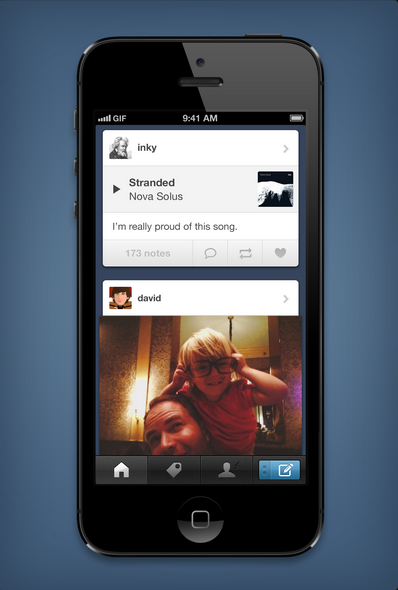
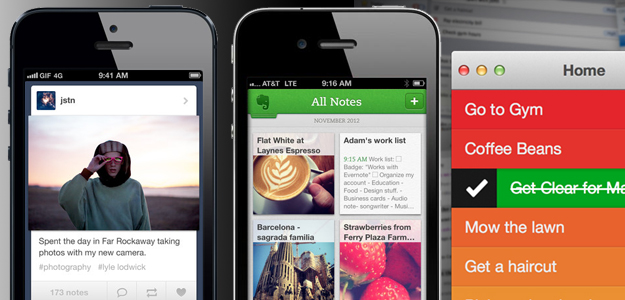
With the latest iOS update, Tumblr is now “completely native,” meaning a faster and more responsive interface for you iPhone users. The update also comes with a new notifications board that lets you see exactly who liked, reblogged, commented, or replied to your posts. One of the more interesting updates, however, is animated GIF playback. This will be great for all you LOLcat lovers now that animated GIFs will play automatically from the dashboard without needing a separate tap. Gesture shortcuts also include right swipe to return to the previous screen, and holding a tap to open up more options.

Evernote

Evernote got a nearly complete refresh with its new update, offering a new homescreen, navigation interface, and existing notes list. “Our goal with the redesign was simple: make all major functions accessible within two taps,” Evernote writes on its blog. You’ll find this with a shortcut navigation to your content, and a tap on the header to browse the section. The Notebook section is one of the most improved aspects, gathering all the notes you’ve ever created or have been shared under one hood. Additionally, you can sort your notes by tags or places – the latter of which will bring up a map of plotted notes according to their location info. There are also shortcuts (“Quick Notes”) on the top of the homescreen to help you quickly add new notes and take photos. This Evernote 5 update will be compatible with the iPad mini as well, and is free across iOS platforms.

Foursquare

You know how Facebook lets you tag friends you’re at an event with when you check into spaces? Well, now you can do the same on Foursquare, even if your friend isn’t a Foursquare user. The hot link will just sync to your friend’s Facebook account instead – where your friend can either approve or hide the Facebook notification for a wall post.

In addition to the social aspect update, users can also rate establishments on a scale of 1 to 10 to help explorers get a gauge on the venue’s rating. The number rank will appear in a color square next to the name of a location under your Explore tab. The update is available only on iOS, but Android users should be receiving the same love shortly.

Clear for Mac

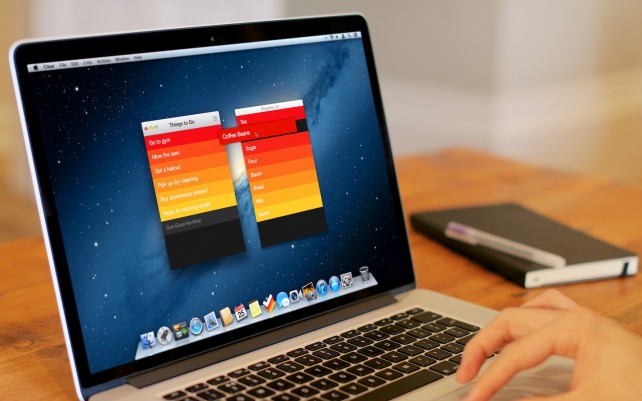
Clear is a hotly popular app on the iPhone, and this week, the beautiful to-do lister app comes to the big screen: your MacBook. The Mac edition will include all the touch gestures available on your iPhone if you own a later edition of MacBooks that have gestures built into the touchpad. This means you can still perform all the left and right swipes to “clear” a task and drag items around to reorder them. After you finish setting up your lists on the Mac, the app also syncs with your iPhone so you can access lists on the go. To make accomplishing tasks even more fun, you can fudge with the preferences to set sounds and theme colors to make you want to use the app more.

Pinterest

Starting your holiday shopping early but don’t want anyone to find out you’re using Pinterest to save your to-buy lists? The new Pinterest updates for iOS and Android will now include Secret Boards so you can create up to three privatized boards made for your eyes only. You can also share them with a few santa helpers to get the holiday season rolling, or turn the secret boards public after you’re finished putting the last pieces on the board. The option can be found right when you create a new board, or at the bottom of your app homepage.

Pulse News

Pulse 3.0 is here for both Android and iOS, complete with a sleeker mobile interface and a new search feature to help you browse more efficiently. With the search side bar, you can sort news by sources (Reddit, Tumblr, Google, Flickr, Facebook, etc.) and there’s an infinite scroll so you can keep dragging down for more stories. Seriously — as many as you can stomach in one sitting.

Editing pages is also simpler thanks to the side bar, which allows you to add, edit, and reorder to your customizable needs. Basically, the mobile version gets the same personalization options the Web service Pulse.me already has, so if you’ve an avid fan of the Web edition, now you’ll have the same features on the go.


Source : digitaltrends[dot]com

Nov 1, 2012

Finally, you can now search the Facebook App Center

Facebook Gifts charity

Facebook added a few updates today: The social network has added search and sponsored results to its App Center, and announced 11 partners to its Facebook Gifts program.

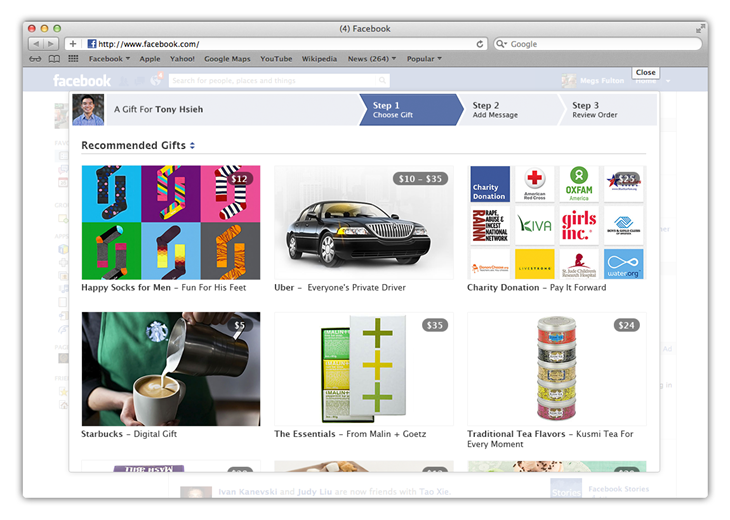
Among other announcements today, Facebook finally introduced a search function to its App Center to aid in discovering new Facebook apps. Sponsored Results will also now start showing up when you search the Facebook App Center. Lastly, with the Facebook Gifts event in New York City having been canceled altogether due to Hurricane Sandy, Facebook made the intended announcement anyway to reveal that 11 new charity partners have been added to its Facebook Gifts program. Facebook users can now make charitable contributions on Facebook Gifts to these select charities. Let’s take a closer look at the three announcements. 

Facebook App Center search 

Just as its important for developers to get their apps visible real estate in the Apple App Store and for SEO marketers to get their sites to the top of Google’s search engine, it’s vital for developers to climb to the top of Facebook’s App Center — search and discovery for new apps is incredibly important to their success. Facebook announced today on its developer blog that the social network is finally rolling out a keyword search engine to help with the discovery of published apps within Facebook’s App Center.

“All listed app detail pages will be included in our search index, and no changes are necessary for developers,” Zhen Fang a manager at Facebook, writes in the blog post. Developers won’t be required to make any updates to apps for Facebook to start indexing them. It should help developers get their apps discovered amid the sea of apps offered to attract some of the 220 million monthly users that visit the App Center.

Of course, it also means it will be easier for user to find apps in the first place. At the moment, the only way to view official Timeline Apps is to sort through this page. And if you want to see all the available apps, you’re left to scroll endlessly. This is a much-needed, update to make the App Center a legitimate platform. 

Sponsored Results available in App Center

Facebook made a brief splash with Sponsored Results, which the social network introduced in August. The new advertising product promoted search results in its search engine based on targeted keywords. It enabled third party related apps to be listed, for instance, when you searched Instagram. Today, Facebook announced that Sponsored Results would be coming to the App Center. Developers can, beginning today, promote their apps in the App Center by “targeting Facebook entities, including Facebook Pages, Places, Apps and subscribe-enabled users.” One thing to note about this feature is that it only works on Facebook’s desktop app, and not on its mobile apps.

Gifting charities on Facebook

facebook list of charities for gifts

Facebook’s Gift announcement set to take place at FAO Schwarz in New York City today was canceled due to Hurricane Sandy. It was rumored that Facebook was simply announcing more partners to its program, and for the most part that hunch was correct. Conicidentally enough, the announcement set weeks in advance comes in the aftermath of a devastating hurricane, which Facebook has taken note of:

“We are especially pleased to be launching this test now – when so many people are looking for new ways to help the victims of Hurricane Sandy, or assist those most in need around the holidays,” Facebook product design engineer, Jared Morgenstern, writes in a blog post.

Now you can make charitable contributions using Facebook Gifts to 11 charity partners that Facebook unveiled today. It’s the first expansion of its Gifting platform that now can be used not only for sending gifts for your friend’s special occasions, whether it’s a birthday or an anniversary, but for donations as well. 

Some of you may yet have Facebook Gifts, but don’t fret. Facebook is rolling out the feature gradually and Morgenstern assures us that it’s “coming to you very soon.”

You can check out the list of charity launch partners below:

  • American Red Cross
  • Blue Star Families
  • Boys & Girls Clubs of America
  • DonorsChoose.org
  • Girls Inc.
  • Kiva
  • LIVESTRONG
  • Oxfam America
  • RAINN
  • St. Jude’s Children’s Research Hospital
  • Water.org

Source : digitaltrends[dot]com

Oct 19, 2012

Ubuntu 12.10 Quantal Quetzal released

Following their biyearly tradition of releasing major updates to their OS, Canonical has released the newest version of Ubuntu, 12.10 Quantal Quetzal.

Among the chief new features is the ability to set websites as web apps and pin them to the launcher. You can have websites such as Gmail or Facebook pinned to your launcher and then open them just as you would open an application.

The other new feature is the inclusion of online search for your accounts within the Dash. Earlier you could only search for local files within the OS but now you can type any query and Ubuntu will search your online accounts such as Flickr, Google Drive, etc. as long as you log in to them from within the OS.

Lastly, there is a new Preview option for files within the Dash that lets you preview them without having to open the file.

As usual, Ubuntu 12.10 is completely free to download and install and you can get it from the link below.

Here’s a bit of trivia. When the Ubuntu 12.10 was released yesterday, the homepage said ‘Avoid the pain of Windows 8′. Now if you go to the homepage, it says ‘Your wish is our command’. Wonder what made Ubuntu suddenly change their wording.


Source : blog[dot]gsmarena[dot]com

Oct 18, 2012

Google Play Store updated, brings wishlists

Google seems to be on a roll with its app updates, and the latest one to receive new features is the Play Store. The official repository app now features wishlists and supports removing apps from My Apps list.

Wishlists are a powerful addition to the Play Store and you can easily add items to yours via the Bookmark icons on the individual apps’ screens. Once you’ve added an app to your wishlist, you can view it from Options -> My Wishlist.

It’s not limited to apps either – you can add anything that’s available in the Play Store like music, movies, TV shows, magazines and books.

It wouldn’t be surprising if in the near future Google allows your friends and family to buy you the stuff that’s in your wishlist as a gift. That would be a whole new level of cool.


Source : blog[dot]gsmarena[dot]com

Oct 11, 2012

Google Maps Street View gets ‘biggest update ever’

Google Street View

Google Maps Street View just got its biggest update ever.

Google Maps’ Street View feature just got a whole lot bigger, with updates to 250,000 miles of roads around the world, and double the number of special collections, which give users 360-degree views of international landmarks, parks, and other attractions. The “biggest Street View update ever” comes just after Google added Street View functionality to the iOS Web app.

Countries whose roads are now far more exposed to the world include Macau, Singapore, Sweden, the U.S., Thailand, Taiwan, Italy, Great Britain, Denmark, Norway, and Canada. New special collections are now available for South Africa, Japan, Spain, France, Brazil, Mexico, and others. Google points users to new updated locations, “like Catherine Palace and Ferapontov monastery in Russia, the Chiang Kai-shek Memorial Hall in Taiwan, or Stanley Park in Vancouver.”

To view the full gallery of Street View Collections, click here.

While nothing can replace physical travel, Street View is one of the prime examples of how the Web is making the world a smaller place. Now, those of us with little chance of ever visiting the Western Wall in Jerusalem, or the Amazon rain forest in Brazil, can at least know what these destinations look like, in all their Street View cam glory.

Of course, it’s impossible to mention anything maps related without a peek under the band-aid at the still-festering wound that is Apple’s Maps app. The company continues to promise that things are getting better — though it’s going to be quite a while before we’re able to call this problem fixed. In the mean time, we just have to wait and hope that Google is putting as much effort into building a version of Google Maps for iOS 6 as it is trolling the streets of Macau.


Source : digitaltrends[dot]com

Sep 26, 2012

Google updates Chrome for desktop and Android

Google has released updates for Chrome across the board with a new version for Windows, OS X and Android respectively. On the desktop, Chrome, now updated to v22, gains the Mouse Lock API, which lets you play games inside the browser window without having to worry about the mouse pointer escaping the window or bumping into the sides. Basically the pointer will be locked to the window of the browser. You can try it out with this demo.

Other changes include additional enhancements for the upcoming Windows 8 and improvements for HiDPI or Retina display users on the new MacBook Pro.

On the Android side, Chrome, now updated to v18, adds support for devices running on Intel’s x86 architecture. Right now there are only a handful of those, with the Motorola RAZR i probably being the only one running Ice Cream Sandwich right now (and thus can support Chrome).

Although not a particularly fresh piece of news, Google also updated the iOS version of Chrome a few days ago and added support for iOS 6 and the new iPhone 5.


Source : blog[dot]gsmarena[dot]com

Sep 25, 2012

Foursquare update delivers all your friends’ check-ins — anywhere, all the time

foursquare logo

Foursquare's latest update allows you to see all of your friend's check-ins regardless of their location, but offers a feature to filter out their updates should you choose to do so.

Foursquare has had the unique challenge of pivoting its check-in platform, once the social-location darling, into something that can compete on a larger scale. The check-in has become an exhausting process that users are running awy from, and Foursquare’s robust, feature-full relaunch in June was all about making its app a more seamless, frictionless experience. The update announced today adds a relatively minor tool that enables users to keep real-time check-in notifications on or off.

foursquare notification

The feature is a simple on and off toggle that has been included on the profile pages of your friends where you can select “Nearby,” “Off,” and “Always On.” Selecting “Nearby” will notify you only of check-ins that your friends have entered near your current location. “Always On,” however, notifies you on your Foursquare newsfeed of your friend’s check-ins from all location. You can also turn off notifications from your friends entirely.

There’s more to this than meets the eye. Check-ins have more or less been declared a dying breed, and this has clearly made some trouble for Foursquare. The app has started focusing on making itself a hub for finding out what locations friends are frequenting and for recommending new restaurants or venues. 

The latest update fits well into the scheme of Foursquare’s new strategy. All updates from your friends can be pushed to your newsfeed, should you choose to receive these notifications, and you can see exactly what they’re up to. It fuels the social strategy behind the company’s pivot. At the same time, the update compels users to engage with their friend’s updates, which is a boon to Foursquare and of course its advertisers. For example, by being able to view all of your friends’ check-ins you’re more inclined to discover new venues.

Given the heightened visibility to user location, there are bound to be new privacy concerns about how much information Foursquare is able to reveal. But realize that Foursquare isn’t among the so-called SoLoMo apps, like Glancee or Highlight, which are frictionless ambient social networks that will find anyone with the same app around you regardless of their affiliation with you. Once you’ve opened up Foursquare, you can decide to check-in to a location or choose not to do so. 


Source : digitaltrends[dot]com

Sep 13, 2012

Instagram updates mobile website: Are full profiles next?

instagram desktop app

Instagram has rolled out a new design to its mobile website to more closely match its full site's design, adding hope to the rumor that profile updates are next in line.

With the Instagram and Facebook deal finally approved by the Federal Trade Commission, Instagram has unveiled its latest update to its platform. Instagram’s mobile website will now sport a new look and feel that closely reflects what you’d find when viewing photos on Instagram from your desktop browser.

instagram mobile page update

Before this update, users have not been able to interact with the mobile pages on Instagram. But this update changes all that. The “Like” and comment buttons are now larger, making them easier to use. And at the top right hand corner of Instagram’s mobile pages, you’ll find an “Open in App” button which will open the same Instagram page that you’re currently browsing within the native app on your smartphone.

More importantly, it also provides more evidence to the rumor that Instagram has its sights set on porting the functionalities you’d find on its mobile app to the Web.

In June, Instagram silently rolled out a new update to user Web profiles incorporated interactive buttons for liking and commenting on photos. To its user’s disappointment, that update had not yet addressed the demand for a profile page and discovery features, despite the existence of such features on the mobile app.

But that could all change in the near future as the company is now officially a part of Facebook.

In July, web designer, Cole Reinke, noticed a curious feature when logged into his account on Instagram.com. Typically users signed into Instagram’s browser app can only edit their profile information, but Reinke’s account had a non-functional “View Profile” button that disappeared as quickly as it surfaced.

If it’s true that that Instagram was testing out a profile page for the Web, we’re hoping that the complete transition of converting Instagram’s native app to the Web will come in the next update, now that its mobile and desktop pages are now cohesive. 


Source : digitaltrends[dot]com

Sep 6, 2012

Mobile LinkedIn apps get updated with new features

The Android and iOS mobile LinkedIn apps got new updates today. They bring new features, notifications and languages.

If you are using one of those mobile apps, the update should be waiting for you in your Play/App Store.

Here is the official change log for the new LinkedIn version:

    On iPhone and Android:
  • Get notified: We will keep you notified in real-time when someone likes what you’ve shared on LinkedIn, views your profile, accepts your invitation, and much more.
  • Company pages goes mobile: Find out which connections work at the companies you care about, see recent news and updates from the company, and learn about current job openings.
  • Don’t want your employer to know you’re looking?: We’ve recently added access to job listings and jobs you may be interested in directly within your mobile update stream.
    On the iPad:
  • We speak 6 new languages: Did you know more than 60% of our members are based outside the US? Today, we launched in French, German, Italian, Spanish, Brazilian Portuguese, Korean. More to come.
  • Notifications and Company Pages: Also available on iPad!

Here are the links for LinkedIn apps: iOS • Android


Source : blog[dot]gsmarena[dot]com

Sep 5, 2012

Twitter announces an embeddable tweet timeline

Twitter embedding

Now you can embed a "Tweet Timeline" on any website as you would a YouTube video or Storify widget, and updates will arrive in real-time.

Twitter today announced on its blog that citizens of the Web can now share tweets from certain hashtags or users via an embedding code. Much like Storify or Kickstarter, both of which have little widgets you can incorporate into your online post, the new feature will be fully interactive — allowing viewers to click for a direct link to the source as well as favorite, reply, or retweet right from the embedded box.

“Whether it’s an author’s Tweets alongside their blog, a hashtag about an event like #DNC2012, or a list of competitors at the US Open, Tweets add a live, real-time dimension to articles, news reports, and the web at large,” Twitter writes on its blog. “These new embeddable timelines enable publishers, writers, developers, and any Twitter user to drop a rich, interactive piece of Twitter into their websites.”

Here’s an example of our Twitter feed embedded into the post. As you can see, hashtags are clickable and will bring you to the search feature on the Twitter site itself. If there are any photos of videos, expanding the tweet will also display the media as you’d typically find on your Twitter stream.

Tweets by @DigitalTrends

You can customize your Twitter timeline by going to the settings page on your account. Under widgets, you can add the Twitter handle of the person(s) you want to timeline, a hashtag, or your favorites, or your lists. Be forewarned that since the update arrives in real-time, vague hashtags may show some inappropriate or irrelevant tweets considering the amounts of users on the Twitterverse.

The new feature will undoubtedly be a useful tool for engaging the audience and conversation, and possibly add flavor to existing posts by combining the public reactions and comments from Twitter straight to your story. Of course, if you want to just pick and choose particular tweets to support a point in your post, Storify may still be a better route despite its nonexistent real-time capacity.


Source : digitaltrends[dot]com

Aug 21, 2012

Instacube is a digital photo frame feeding real-time Instagram pictures

Instacube Instagram photo frame

Get real-time updates of your Instagram feed on this stylish digital photo frame which looks like a life-size Instagram logo.

Personally, I find that digital photo frames are a waste of electricity. Who wants to look at the same photos repeating itself over and over again, only to manually replace the memory card with new photos every so often? The introduction of Instacube addresses this issue: instead of adding photos to a digital frame yourself, Instacube will update your photos in real-time, reading off your Instagram feed based on the friends you follow, photos you’ve liked, or just your own pictures.

Instacube wireless digital photo frame for InstagramThe completely wireless digital photo frame looks similar to the Instagram logo itself, displaying pictures three times the size of what you might find on your mobile phones. The LCD touchscreen frame allows users to sift through photos as they’re fed to the frame in real-time, and connects to the Web via Wi-Fi. You can set Instacube to show photos of a certain hashtag so you can discover new photos in a faster pace of updates. To “like” a photo that you randomly come across on the giant display, there’s even a designated heart-shaped button at the top to give those photos some lovin’.

Instacube, currently a Kickstarter project, aims to not only market as a home decor item, it also wants companies to start embracing the technology in their businesses. For example, a clothing store could advertise a certain hashtag and for every photo a customer uploads with that keyword, their pictures would display in the store’s Instacube. These photos can be entered as part of a contest or campaign to promote brand visibility. This possibility of branding and interactivity makes Instacube not only your average digital frame, it might actually be fun to play with.

Instacube has 4GB of internal memory — should you want to display your own pictures — runs in 256GB of RAM, and has a 7.5-inch screen displaying 600 x 600 pixel resolution. It will run on rechargeable lithium ion battery so you can carry and move it around as you please. No word on how long the battery actually lasts before it needs a recharge.

To own an Instacube, should the Kickstarter succeed in one month’s time, you’ll have to fork up $99 of funding to receive your first edition of the wireless digital frame. These limited edition, discounted frames are quickly running out, and once they do the frames will begin to cost $149 apiece. The product aims to launch in the second quarter of 2013.

Watch the video below to learn more about Instacube.


Source : digitaltrends[dot]com

Aug 18, 2012

Mobile Weekly Wrap: Apple vs Samsung, Android’s malware mess

Samsung versus Apple

Our first weekly wrap up of mobile news and apps.

It’s almost always a busy week in the ever-changing world of mobile, with news rolling out faster than Android updates. It’s easy for a few stories to slip through the cracks. Whether you couldn’t refresh your RSS feeds fast enough to catch it all or you just finally finished thawing yourself from a cryogenic nap induced to survive the heat waves, we’ve collected all of that’s worth noting from the week that was August 12 through 17, 2012. Enjoy!

News Wrap Up

The portable product world can be a crazy place. Apple and Samsung might as well place a joint patent the concept of feuding, because it’s clear they don’t plan on stopping any time soon. It’s been so unbearably bad, the judge on the case has openly urged the two companies to settle their differences. She’s also accused Apple’s legal team of hitting the crack pipe a little too hard after they announced their intentions of calling 22 witnesses to the stand, so we assume she’d like Apple and Samsung to find peace for her own sanity as well as the good of the companies. 

While Apple and Samsung continue to barrage one another with verbal bullets in the court room, it looks like Android that is the true Wild West of mobile operating systems. According to reports from security software developer Kaspersky Lab, the amount of malware making its way onto Android devices increased by threefold over Q2 of 2012. Now would be a good time to get yourself some protection.

Apps and Games of the Week

No matter what your mobile device of choice is, sifting through the app market on a daily basis can be difficult. Most of the time it feels like cleaning out a cat’s litter box–even when you get rid of all the non-essentials, most of the time you’re left with…well, you know. But that doesn’t mean there’s not a few gems to be found.

Food Network On the Road (Free, iOS) – Entering the ever competitive world of food recommendations comes the television juggernaut Food Network. Get suggestions from your favorite on-air personalities for the best food stops wherever you may be.

Postcard (Free, iOS) – It’s always more exciting to get a piece of physical mail than an email–assuming it’s not a bill. Fill your friends’ mailboxes with personalized postcards made on your iOS device but manifested physically.

WWE (Free, iOS/Android) – Do you smell what this app is cooking? Get all the latest updates on your favorite wrestlers, including exclusive content during Monday Night Raw broadcasts.

Dunkin’ Donuts (Free, iPhone/Android) – If you’re barely awake enough to pay for your coffee and donuts in the morning, this app is for you. Pay right from the app and pick up your order hassle free.

PDF Note Taker ($3, iPad) – Whether you type out your notes or prefer to handwrite them, this app will convert them into attractive, easy to open PDFs.

Pinterest (Free, iOS/Android) – The online pin board phenomena is now mobile. Take Pinterest with you and keep the pinning coming not matter where you are.

Notification Ad-Blocking (Free, Android) – For users of free versions of apps, the ad notification is an all too familiar event. Keep malicious ads from popping up with this personal pop-up blocker.

Tread of the Dead ($1, iOS) – There’s plenty of zombie games out there, so it takes a lot to stand out. This title puts a new tilt on stopping the undead.

Horn ($7, iOS) – This game may be published by Zynga, but it’s so unbelievably gorgeous that it’s sure to distract you from whatever moral dilemma you may have in the process of buying it.

Tavern Quest (Free, iOS/Android) – Love fictional, fantasy worlds with dragons? Love restaurant simulations? This game lets you play as a entrepreneurial dragon with his own tavern.


Source : digitaltrends[dot]com

Aug 16, 2012

Google+ and Google Maps for Android get updated

Google released updates for two of their major apps on the same day. The first is the Google+ app, which gets some cool new features. The first one is that the Google+ app now allows teenagers to create and join Hangouts from their mobile, which not possible before due to age restrictions.

Another cool feature is that the mobile app now allows you to do Hangouts on Air using your smartphone, something that could only be done on desktop before. In case you are not aware, Hangouts on Air lets you create webcasts over Google+.

Other changes include floating timestamp in Photos view, shortcuts for post creation that pop up at the top if you scroll up and the ability to report abuse in Events.

Moving over to Google Maps, the first thing you’ll notice after you install the update is that it has a new icon, which for some reason does not show up on the Play Store page on either the phone or the web site.

This update also brings changes to the Transit feature and now you can choose a particular type of transportation system and only show transit lines for that system. There is also an updated layout for station pages.

Google has also updated the region highlighting, that includes the following changes:

  • Now, whenever you search for a city or postal code, the borders of that region are highlighted.
  • Under My Places you’ll notice we’ve added new tabs, which will help you access all your information from a single place; from your saved maps for use offline to your starred places and Custom Maps created on your desktop.
  • If you enable Location History, you’ll be able to browse the places you’ve been on a daily basis with an updated Location History dashboard.

You can download both the apps from the respective links below.


Source : blog[dot]gsmarena[dot]com

Aug 13, 2012

Arrival Of Google Panda Marks The Beginning Of Content Revolution

The year 2012 has been extremely eventful for Google. With over four updates in the name of Google Panda  and Penguin, Google managed to filter hundreds and hundreds of websites through its advanced ranking factor. Each update was modified as per the results of the previous filter. In this article, I am going to highlight a few things that explain the nature of Google’s Panda in some light. Also, the article will talk about certain measures one can take to keep safe from the search engine ranking disaster.

The Objective

With its recent algorithm updates, Google has attempted to add a slight touch of “human” monitoring to its web relevance algorithms. The system has added factors such as content readability, site bounce rates, and genuine relevance to map the quality of a website. Fortunately, Google has achieved a healthy percentage of success in this attempt. Google Panda has managed to identify user-friendly websites than just web-crawler-friendly websites.

Websites’ Elements That Google Panda Dislikes

Google Panda works like cops. It is not responsible for honoring good quality content but for identifying and punishing poor-quality content. It does not allow low quality websites (having useless links, duplicate content etc), to rank. Unlike other Google algorithms, for Google Panda, keywords is not everything. Hence, if a website has poor quality content or duplicate content on most of its pages then it will definitely go down in the search engine rankings. Now what we need to focus here on, is what exactly defines low quality content.

  • Duplicate content : First of all, it is duplicate content. Google Panda hates plagiarism. It does not believe in providing same information again and again by changing a few words here and there to get a pass from plagiarism detectors.  It needs, fresh, informative and genuine content.
  • Quality of links : Secondly, Google Panda looks at quality of links, a website has received. Also, it will judge the content quality of the sites which are linked to the page. Hence, having safe links of genuine websites that do make sense to your website, is very crucial. Naturally, this is a major challenge for most SEO services providers and website owners.
  • Advertisements:  All SEO services experts and website owners must refer to the fact that the count of advertisements on your page can disturb your page rankings. It is quite surprising to note that Google Panda  may also hurt a high-quality content website’s ranking, if it has extensive Google AdWords program. The idea is to balance advertisements and content on each and every page of a website. This is why most experts suggest to seek assistance of professional Google Panda and Penguin compliant SEO services. 

Avoiding the Panda Slap

The search engine optimization industry calls Google Panda punishment- Panda slap. If you get hit by Panda slap, then not only your Google rankings go down but you also are forced to deal with the whopping loss of 50% of your regular traffic. This will definitely result in a major blow on your overall revenue. Hence, it is imperative to keep safe from low quality articles and weak links.

The conclusion

Google brought Panda algorithm to keep the Internet space free from the crowd of scraper sites. It does that by punishing the websites from which such content is scraped. So, every website owner looking forward to getting ranked must come up with healthy websites. Good quality content, ideal linking and balanced advertising are the initial stepping stones that one must cover.


Source : techtalkafrica[dot]com

Aug 9, 2012

Android 4.1 Jelly Bean ported to the T-Mobile G1

The opensource nature of the Android OS means new updates are often found running on older phones before they officially hit the newer devices.

Keeping with that tradition, today we are about to see the very latest version of Android running on the very first commercially sold Android phone. Yes, you are about to see Jelly Bean running on the T-Mobile G1.

This hack was put together by the folks at SoCal Devs and they have details on how to go about doing it on xda-developers forums. While it’s not exactly Project Butter (more like Project Stutter) nor is it particularly stable, the phone does seem to be able to run it somehow.

If you still have this phone lying around you can try this hack and have some fun with it. Just don’t expect to be able to use it on a daily basis.


Source : blog[dot]gsmarena[dot]com