Pages

Showing posts with label today. Show all posts

Nov 14, 2012

Facebook rolls out the share button to mobile users

Designed to encourage mobile users to share more types of content with their friends, Facebook is rolling out a new share button for the mobile interface.

Detailed by Techcrunch earlier today, Facebook has launched a share button on the mobile version of the social network and is planning to add sharing capabilities to both the iOS and Android applications at a later date. While the ability to share a particular article, video or picture is commonplace on the Web version of Facebook, mobile users can simply tap on the new share link in order to pass along an interesting piece of content to their friends. When a user brings up the mobile version of the social network, they will notice a new Share button to the right of the Like and Comment buttons. 

Tapping the new share button brings up an interface that allows the user to write a comment that goes along with the shared content. In addition, the user can isolate the post to a specific subset of their friends through groups or post it publicly in order to reach all subscribers.

Once the user is satisfied with the post, they confirm the sharing action by tapping the Share button in the top right corner of the screen. Alternatively, cancelling the post returns the user to the news feed. The new share button is only appearing within the News feed at this point. When visiting a personal page of a friend or a brand, the share button hasn’t been incorporated within the design yet.

The launch of the new sharing feature marks a trend in Facebook’s strategic approach to mobile. While the inclusion of the sharing button isn’t a technical achievement by any means, the priority of improving Facebook’s mobile interface is evident. According to Facebook’s third quarter results, the social network has approximately 600 million active mobile users each month. In addition, about 120 million of those active users check Facebook exclusively through a mobile device. The addition of the share button on the mobile version of the site could result in a spike in the amount of articles, videos and pictures that are shared each day. 

With the addition of the share button for mobile users, this brings Facebook more in line with social network competitor Twitter. On the web version of Twitter, users are encouraged to retweet posts and share them with friends. It will be interesting to see if mobile users on Facebook transition from the Like action to the Share action. Potentially,  it could significantly increase the amount of shared content people find in their News feeds each day and possibly drown out other status updates from friends and family.

However, it could be extremely helpful to brands and advertisers since the share action is more valuable when attempting to spread a particular piece of content. In a related story noted by The Next Web, Facebook is also rolling out a new feed that allows a user to view posts from brands and other pages into a completely separate feed. While posts from those pages will still appear within the News feed, users can visit this page in order to view recent updates only from liked pages.


Source : digitaltrends[dot]com

Run with – or against – anyone in the world in real-time with Yog

yog web page

Yog, launching today out of beta, is a mobile social network for runners that allows users to run with or against each other in real-time.

If you need a running buddy or someone to challenge you, the Yog network  is more than happy to turn your workout into a cooperative or  competitive effort. The iPhone app connects you with other runners, so you can join them, or race them, depending on your motivation. 

Fresh out of 2011’s class of GE and OMD’s incubator, the social running application for iPhone is launching officially out of beta today after 14 months of testing. Yog was founded by self-professed Yoggers and co-founders Will Dennis, Yog’s backend and Web “ninja,” and Peter Pelberg, who tells me he’s the guy who handles everything but the code. More officially speaking, Dennis is the CTO and Pelberg the CEO of Yog.

There are plenty of running and fitness apps out there that brandish the title of “social” simply because they allow you to push your workout stats to Twitter or Facebook. But Yog is actually social because it turns your solitary run into a shared experience. And based on this social framework, “motivation” was built into the app by incorporating features that encouraged habit and peer pressure – two social characteristics, Pelberg concluded, that drive human motivation.

yog set up

Yog lets you run with anyone in the world in real-time. Yoggers with the app can set up a date, time, and distance that they’d like to run, and then invite friends from your iPhone contact list or Facebook friends to join the running group. But what makes the experience social is that these runs are publicly viewable on Yog’s system. Anyone who sees the invite shared using Facebook, Twitter, email or other channels can add themselves to the group whether or not they have Yog’s iPhone app downloaded.

For instance an interested runner from New Zealand, who may not necessarily be friends with you but happened to stumble on your Facebook post through a mutual friend, can join in on the run. If a runner doesn’t have the app, an email or text message with a link to download Yog will be sent to them and proceed to add them to the group.

The run itself begins promptly on the designated date and time, but group participants can run from anywhere in the world. In fact, Yog’s beta stage had global testers from four continents and 25 countries. The only requirements for you to participate is that you have to have your iPhone on hand while running (which would could see being a bit cumbersome), and you must be running outdoors. Pelberg confirms that for now, the app won’t work on treadmills since the co-founders are outdoor runners and encourages users to enjoy the great outdoors. And to curb cheaters who would think to ride a car or a bike, which would completely defeat the purpose of self-improvement, Yog automatically disqualifies runners who exceed the fastest recorded mile time ever run in human history.

yog live runs

During the race, each runner’s distance is updated in real-time and displayed on a progress bar showing the distance that has been covered by each user. 

“We see this social aspect as being both beneficial to people that are just starting to run and need motivation and need somebody to run with, and for competitive runners, we see it as a great training tool to rally people around training for 5ks, 10ks, half marathons, and up to ultra-marathons,” says Pelberg. Runs can be as short as 0.1 miles and as long as 50.9 miles.

At the end of each race, runners can view what place they came in, as well as personal metrics like calories burned, average miles per hour, pace, and other statistics. While Yog itself is a free app, access to your statistics requires a one-time $0.99 fee that lasts until perpetuity.

“We see this physical act of exercise as a tremendous platform on which to build a really rich digital experience that changes the way you run and think about running,” he tells me. “Everybody on our system is running together; that’s our currency. We’re creating an entirely new running experience.”

Yog’s working on adding features as well. On the immediate agenda, the Yog team has built the backend architecture for user profiles, “so that we’re able to understand and populate a user profile when we implement that down the line.” But profiles won’t be surfaced just yet since the team plans on implementing features in babysteps.

Down the road, leader boards, self-improvement metrics, skill-based matching, and Wahoo armbands are ideas that the team is toying with and could make it into the app in the near future.

Yog is available in the Apple App Store.


Source : digitaltrends[dot]com

Nov 9, 2012

Google blocked in China?

Google has apparently fallen afoul of Chinese authorities, with the site and related services seemingly being blocked in their entirety across China as of today.

Google is, apparently, no longer available in China.

What seems to be happening, somewhat surprisingly, is that Chinese authorities are blocking Google’s search engine and other services, including Gmail, Maps and cloud document storage, bringing to a head a conflict that has been brewing since 2009. The blockage was initially noticed by Google, with its Transparency Report website logging a suspicious drop in web traffic in China earlier today. According to Google, the sudden drop was so significant that it was initially believed that something had perhaps gone wrong technically, but a spokesperson told reporters that “we’ve checked and there’s nothing wrong on our end.”

According to Greatfire.org, a site that tracks Internet activity and access in the region, Google and affiliated sites and services have been blocked by authorities, with attempts to reach Google-related sites being re-routed to different sites located in Korea. A spokeswoman for the Chinese consulate in New York, however, told Bloomberg Businessweek that she had not been informed of any such move, and referred all future inquiries to Beijing, where offices were closed due to time zone differences and all attempts to get confirmation went unanswered.

This isn’t the first time that Google services have been blocked by the Chinese authorities; the company’s YouTube has actually been entirely unavailable since 2009 following conflicts over content, and other services have been taken on- and offline on irregular bases in recent years. Two years ago, Google moved its Chinese search engine facilities to Hong Kong after a disagreement with authorities around cyber-attacks that may have originated in China.

Google actually addressed the problems with occasional outages of service in a blog post on the Official Google Search Blog earlier this year, writing that “over the past couple years, we’ve had a lot of feedback that Google Search from mainland China can be inconsistent and unreliable,” and noting that after investigating the complaints, “we’ve noticed that these interruptions are closely correlated with searches into a particular subset of queries.” The response at the time was to add a new feature that would warn users if a particular search was likely to trigger censorship action by Internet watchdogs, something that undoubtedly did little to please Chinese authorities.

This latest, and seemingly blanket, blockage of Google services happens just as Chinese authorities convene the 18th Chinese Communist Party Congress, a grand meeting that occurs once ever decade and started on Thursday of this week, with more than 2,000 Communist party delegates from across China meeting in Beijing with a mission to appoint a new generation of leaders. Whether or not the timing is a coincidence or some particular attempt to crackdown on what are deemed subversive online behavior during this time remains to be seen.


Source : digitaltrends[dot]com

Nov 8, 2012

LG introduces impressive new 21:9 UltraWide monitor

LG today announced the launch of the world's first 21:9 UltraWide monitor; and with the ability to break down the 29-inch screen into four split screens, the company has our attention.

Whether you’re a hardcore multitasker, a tech fanatic, or simply just a bit myopic, LG has a new monitor to pique your interest. The EA93 UltraWide Monitor is a whopping 29-inches wide and boasts a 21:9 aspect ratio. The company says it’s the world’s first monitor with that format. 

LG is focusing on the new product’s multitasking capabilities for its launch. Not only does the impressive size mean plenty of space for however many documents, files, or windows you might have open at once, but the EA93 also has a feature called 4-Screen Split, which allows you to divvy up screen real estate into quarters, with the ability to separately customize each section. That could make this monitor a possible alternative for people who use a dual-screen setup. In fact, it has a Dual Link-up option to connect the monitor to two external devices, which means you could have a similar setup to multiple monitors without any variation in color or image quality. It also features a DVI-D port and two HDMI connectors.

The company insists that the UltraWide monitor can perform double duty as a machine for work and personal use. The aspect ratio makes the EA93 an excellent choice for watching movies. With a maximum resolution of 2560 x 1080, the IPS display is designed for people who live and die by intense visuals. Although LG has not given a price point for this impressive monitor, it is due to roll out in South Korea early this month before making its way to the US market. 

LG has been making waves with its efforts to improve screen quality this year. The company has gone very small with a 5-inch LCD screen with high definition and 440ppi, and insanely big with a whopping 84-inch Ultra HD television. Between these updates, Apple’s proliferation of Retina displays, and other companies working hard to offer comparable technologies, computing will only be getting easier on the eyes.


Source : digitaltrends[dot]com

How to create your own Reddit community

How to make a subreddit

Reddit has become the social news titan it is today thanks to regular users creating interesting, fun (sometimes frightening) communities. Here's how to become the moderator of your own subreddit.

Over the past few years, social news website Reddit has become one of the most popular, powerful, and controversial destinations on the Web. But unlike corporate-run Internet giants, Reddit’s massive success comes from its decentralized nature, which allows any user to create his or her own community (known as a “subreddit”), with its own central topic, rules, and character. This is also what makes Reddit such an irresistible time-suck, with layer upon layer of new subreddits to explore and participate in. But there’s no reason to just lurk along the sidelines: Getting in on the Reddit moderator action is easier than you might think. Here’s everything you need to know about launching your own subreddit.

Step 1: Log in and click

If you don’t already have a Reddit account, you can easily create one by clicking. (It only takes a couple seconds, and you don’t need to add an email address if you so choose.) Once you’re logged in, just click the “Create you own community” button, which appears along the right side of the website.

Step 2: Original idea

The first thing you’ll need is a name for your subreddit. It can be as long or as short as you like (though, as a Web rule of thumb, shorter is usually better). Something easy to remember and descriptive of the community’s topic of choice is recommended, but it could simply be a good name or memorable. In other words, it can be whatever you want. But the name you choose will have a large impact on whether your subreddit becomes successful.

subreddits

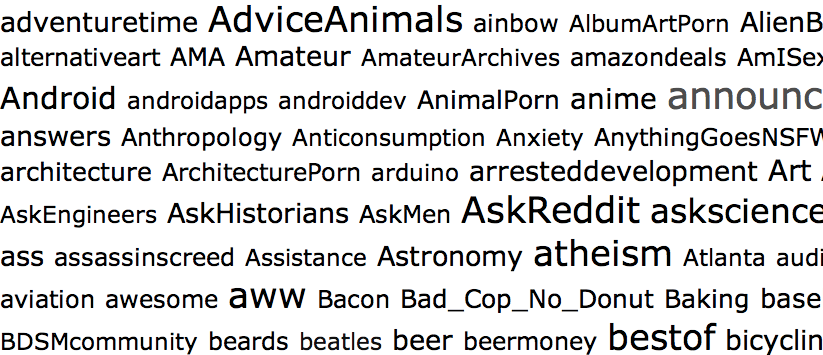
 Coming up with a good subreddit name is, by far, the most difficult part of this whole process. According to MetaReddit, there are currently 187,384 subreddits, which means your big idea may very well have already been taken. If it has, come up with another idea. There’s no sense in simply littering Reddit with pointless communities.

To check if your subreddit name idea is available, click here to search all subreddits. If nothing comes up under whatever name you type in, move on to step 2.

Step 3: Fill it out

Once you’ve decided upon a name for your subreddit, you’ll need to actually make the dang thing. This involves nothing more than filling out a number of fields in a Web form, checking a few boxes, and clicking “create.” But to give you confidence, here’s what you need to know.

subreddit-2

Name: This is where that brilliant original idea you just came up with comes into play. In this field, the name should have no spaces between words. Case size does matter, however, so capitalize the letters you want to appear capitalized.

The main thing to remember, however, is that you cannot change the name – ever. So triple-check that it’s right before hitting “create.”

Title: This does not have to be the same as the name, but it can be. Unlike the name, spacing does matter for the title. And you can also feel free to add in a tag line as well, since length does not matter. The title can be edited later if you want to tweak it or change it in any way.

Description: Here, you can describe what your subreddit is all about. It’s viewable to the public, so this should also serve as a pitch to draw in other people who might be interested in subscribing.

Sidebar: The side can be used to provide subscribers with links to other subreddits or other websites. Some subreddits list the rules of the subreddit (if you choose to have particular rules), the description, and any other relevant information in the sidebar as well. And like the title and description, the sidebar can be edited at any time.

Language: From my tests, it appears as though the language setting does nothing.

Type: You have three types of subreddits you can create: Public, restricted, and private. Public lets anyone subscribe, and is the most common type of subreddit. Restricted allows you to decide who can post links and who cannot. And private is only visible to Reddit users you invite to join. Chances are, you want to make your subreddit public – but once again, this option can be changed.

Content options: You can limit the types of content to only links, or only text posts (that link to a comments page on your subreddit). But I’d recommend allowing “any” type of post, at least to start. If the community evolves, and you want to set a restriction later, you can.

Wiki: Here, you can set restrictions on who can change the subreddit’s settings. The safest option is “disabled.”

Other options: Here you can decided whether to put an over-18 age restriction on your subreddit (which you should do if you plan to make it of the NSFW variety), whether to allow it to show up as a default subreddit for users (which is a good way to help your community grow), and whether to show thumbnails of images on submitted posts (which is good to do if your subreddit is image-heavy).

And that’s it! Click the “create” button, and you’re officially a Reddit moderator of your own subreddit.

Step 4: Promote!

Once you’ve created your subreddit, you’ll need to let other redditors know it exists. One good way is to submit a link to your subredd to the /r/NewReddits community. Another way is to post links in related communities. For example, I run the /r/GermanShepherds subreddit. I got the word out there about it by mentioning it in comments on /r/dogs or /r/dogtraining, and other related communities. So, if possible, find other subreddits that mesh well with your new community, and start spreading the word.

Odds & ends

Now that you’re a moderator, you’ll have access to “mod mail,” which is usually populated with messages from users whose submissions were caught by Reddit’s spam filter. You can access mod mail by clicking the Reddit alien head icon next to your regular user mail, or though a link in the “Moderator Tools” section that appears along the right side of your subreddit page. From there, you can also check subreddit stats, view reported links, add new moderators, and other fun administrative tasks.

Source : digitaltrends[dot]com

Twitter Asks Users to #Reset Passwords, Citing Hacking Issues

ht twitter logo jef 120321 wblog Twitter Asks Users to #Reset Passwords, Citing Hacking Issues

Twitter Logo (Twitter)

Twitter may have had a record 20 million tweets about the election on Tuesday, but there are some problems in paradise today for the social media service.

Many Twitter users received an email notification from Twitter asking them to reset their passwords after an unknown website or online service compromised the accounts of many users. A few high-profiled accounts, including TechCrunch’s, were affected.
Once users reset their passwords, naturally, they took to the Twitterverse to complain about having to do it.

“We’re committed to keeping Twitter a safe and open community. As part of that commitment, in instances when we believe an account may have been compromised, we reset the password and send an email letting the account owner know this has happened along with information about creating a new password. This is a routine part of our processes to protect our users,” Twitter said in a statement on its blog.

Twitter, however, admitted that it reset more passwords than it should have. “In this case, we unintentionally reset passwords of a larger number of accounts, beyond those that we believed to have been compromised. We apologize for any inconvenience or confusion this may have caused,” the company said.

Twitter also encouraged users to read about how to protect their accounts and make their passwords secure. To reset your password, Twitter recommends users type in the link into your browser to reset your password. Often, hackers can access your password by tracing the original link from the notification.

Many argue that Twitter, like Google, should implement stronger security, including two-factor authentication, which, if enabled, forces users to type in two passwords.  ”We’ve certainly explored two-factor authentication among other security measures, and we continue to introduce features, such as https, to help users keep their accounts secure,” Twitter told TechCrunch.


Source : abcnews[dot]go[dot]com

Nov 6, 2012

Nikon unveils D5200 DSLR, borrows from pricier D7000

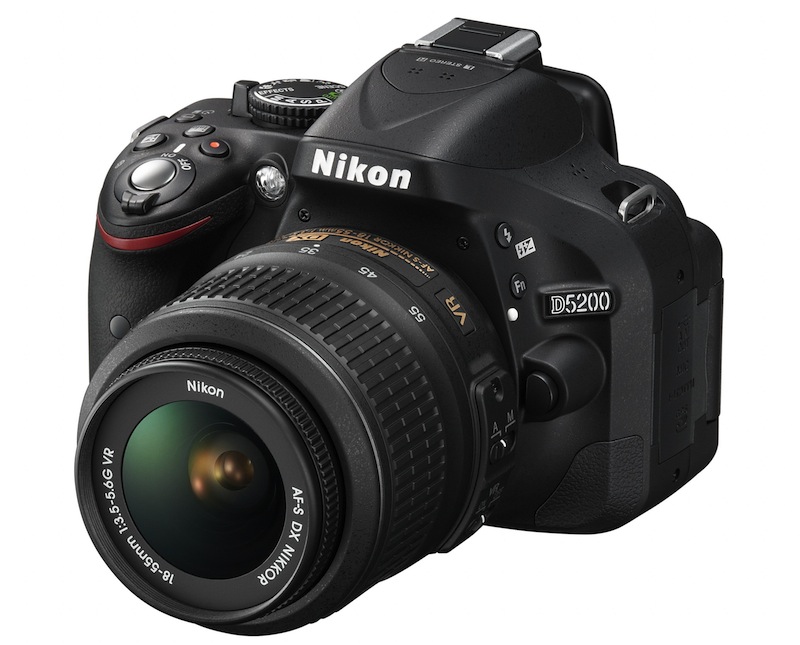
It's been a busy year for Nikon's DSLR range, with the Japanese camera company today announcing its fifth model since January. The new D5200 shooter is an improved version of the D5100 and incorporates several features found on Nikon's more advanced D7000 device.

Nikon unveiled the latest addition to its DSLR range on Tuesday. The D5200 is an improved version of the D5100 that it released 18 months ago, though the earlier model will continue to roll off the production line – for the time being, at least.

The new consumer-level DSLR shooter pulls a number of features from Nikon’s pricier D7000 camera, including its 39-point autofocus system (up from the 11 points found on the D5100) and 2016-pixel RGB metering sensor.

Buyers of the new camera might want to consider investing in some beefy SDHC/SDXC cards and hefty external hard drive, with its new super-sized 24.1-megapixel APS-C sensor guaranteeing snap-happy photographers rapid memory usage with the large picture files the camera will be serving up.

The frames-per-second rate of the D5200 shows a slight improvement over the D5100, increasing from four shots to five thanks to its new Expeed 3 processor.

For camera operation, Nikon is promising that the device’s newly designed graphical user interface will be “easier and more intuitive” to operate than previous versions, with ‘classic’ or ‘graphic’ options to choose from.

Anyone wanting to make use of its 1080p movie capabilities can now shoot at rates of up to 60 fps, and will also be able to utilize its new built-in stereo microphone for improved sound over the older D5100.

Owners of iOS and Android devices who want to receive pictures wirelessly from the camera can do so with the optional WU-1a adapter, which also allows remote shutter control.

As with the older model, the new mid-range camera incorporates a 921k-dot TFT LCD screen that flips out, twists and turns, making it more likely you’ll get the picture you’re after when shooting at arms’ length over the top of people’s heads.

For those who prefer a dash of color with their camera bodies instead of the usual black, the Japanese camera giant is offering the D5200 in two other flavors – bronze and red.

Pricing for the new device hasn’t yet been confirmed, though it’s expected to arrive in stores in December.


Source : digitaltrends[dot]com

Nov 2, 2012

How To Easily Share Large Files over the Internet

In this modern day and age, the Internet can do just about anything you need it to do. Probably one of the most useful and powerful capabilities that the Internet has today is the ability to share large chunks of information. Online file sharing is occurring more and more every day, the web of today has given people the ability to transfer very large files over the Internet.  Thousands, if not millions, of internet users send files every day to their family, friends, colleagues or employers. Email now allow bigger files to be transferred, but there are still some very great limitations to this.

It is usually not of any complexity or hassle when you are sending text files over cyberspace, yet as cameras and camcorders engage through a megapixel race, some files and documents may be attached with pictures that make the document quite large in terms of MB consumed. For users who aren’t really experienced and savvy when it comes to using the computer, much less the Internet, here is a step-by-step guide on how to share large chunks of data online.

One of the simplest means is to upload documents to your existing site. I do this all the time, the process is impeccable when it comes to sharing files with images attached to them. After the document is posted. The receiver of the file will need to have the correct software program installed in his home PC to open the document you sent. To save the file, simply right click on the Windows tab and select Save As. Sadly, this technique is not compatible with video or MP3 – formatted documents, since such files initiate an electronic reaction from a media player.

Another simple technique is to utilize FTP or File Transfer Protocol. The process is quite simple, pretty fast and easy to setup. You will log in to a website with a username and password, and then upload a document or two. Send an email to your preferred receiver with the website link, sometimes passwords can be setup, but aside from this there isn’t a lot to configure on these FTP setups. The receiver will then log in and transfer the documents to his/her own home PC or simply download using the link provided. For Windows OS, this can be as effortless as running the document on the site, then opening the destination on the PC and then dragging -and-dropping back and forth, you can use a utility called Filezilla or Cute FTP, I prefer Filezilla because it’s free, CuteFTP is not free but they will give you 30days free trial

Another way to get large files shared over the Internet is through splitting them up inside of a zip file. Zip files allow users to split files up into many different file sizes. There are lots of file hosting services, but many of them have limitations on size for free users. That is why you might want to break up the size of these files. Winzip is a good application for breaking up files compressing or zipping them, not only does winzip allow you to zip and unzip files but it also has the ability to give your files banking-level AES encryption

Another possible strategy for sending large files through the web is through a website known as Send This File.com. Subscriptions are necessary, yet standard plans are complimentary. Paid subscribers have faster upload and download capabilities, however. You simply upload your document to a database. An email will then be forwarded to your receiver. If he/she is also subscribed to the services of Send This File.com, he/she will simply have to log in, and then download the document from there. So far, people who’ve used the services of this particular website have not yet encountered any specific limits on how many documents they can send in a particular time frame or limits on how large one file can be.

Introduction to SendThisFile from SendThisFile on Vimeo.

Lastly, use peer – to – peer document sharing programs like BitTorrent which uses a far more sophisticated system in terms of transferring documents.

There are actually a number of ways to achieve results here but users really have to decide on the speed and level of difficulty before they choose a method. Some people would prefer to set up their own website. This can be something that takes money except if you have one already. Lots of the file sharing sites are free, however One thing that folks have to realize with this method is that the end users that receive the file must know about zip files or have programs like Winzip or Winrar. If they don’t have a zip program they cannot extract the file.

Tags: File Sharing

Source : techtalkafrica[dot]com

iPad mini today launches today, Apple eyeing 1.5 million units sold over the weekend

Despite being a couple of weeks behind schedule, the iPad mini sales open today, but only in the US and only in black.

Never mind the delay, Apple is expected to sell around 1.5 million units of its 7.85″ slate. Gene Munster at Piper Jaffray has made the projection and he believes Apple will hit that number before the weekend’s over.

Spectacular as this sounds, it’s actually not as much as the third gen iPad managed to sell at launch, rounding off 3 million units. The main reason for that, Mr. Munster believes, is the lack of 4G LTE models available at launch.

He also accounts for the fact that the compact size is still a relatively new concept for the general consumer and that:

Consumers will gradually realize the benefits of the smaller form factor, which will drive adoption, although it may not take form in lines for tomorrow’s launch.

The base iPad mini costs $329, with the 32GB and 64GB version going for $429 and $529, respectively. The Wi-Fi+Cellular model starts at $459 for the 16GB.

You can see how the iPad mini compares to the hottest Android competitors by checking out our iPad mini vs Nexus 7 vs Kindle Fire HD comparison table.


Source : blog[dot]gsmarena[dot]com

Nov 1, 2012

Finally, you can now search the Facebook App Center

Facebook Gifts charity

Facebook added a few updates today: The social network has added search and sponsored results to its App Center, and announced 11 partners to its Facebook Gifts program.

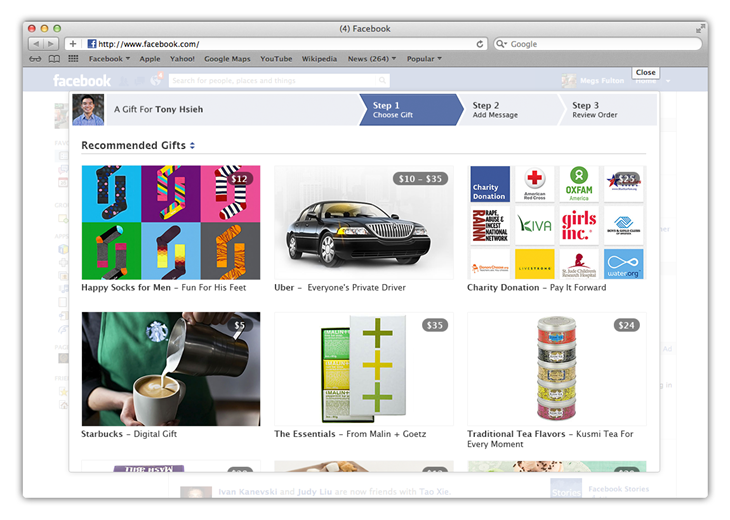
Among other announcements today, Facebook finally introduced a search function to its App Center to aid in discovering new Facebook apps. Sponsored Results will also now start showing up when you search the Facebook App Center. Lastly, with the Facebook Gifts event in New York City having been canceled altogether due to Hurricane Sandy, Facebook made the intended announcement anyway to reveal that 11 new charity partners have been added to its Facebook Gifts program. Facebook users can now make charitable contributions on Facebook Gifts to these select charities. Let’s take a closer look at the three announcements. 

Facebook App Center search 

Just as its important for developers to get their apps visible real estate in the Apple App Store and for SEO marketers to get their sites to the top of Google’s search engine, it’s vital for developers to climb to the top of Facebook’s App Center — search and discovery for new apps is incredibly important to their success. Facebook announced today on its developer blog that the social network is finally rolling out a keyword search engine to help with the discovery of published apps within Facebook’s App Center.

“All listed app detail pages will be included in our search index, and no changes are necessary for developers,” Zhen Fang a manager at Facebook, writes in the blog post. Developers won’t be required to make any updates to apps for Facebook to start indexing them. It should help developers get their apps discovered amid the sea of apps offered to attract some of the 220 million monthly users that visit the App Center.

Of course, it also means it will be easier for user to find apps in the first place. At the moment, the only way to view official Timeline Apps is to sort through this page. And if you want to see all the available apps, you’re left to scroll endlessly. This is a much-needed, update to make the App Center a legitimate platform. 

Sponsored Results available in App Center

Facebook made a brief splash with Sponsored Results, which the social network introduced in August. The new advertising product promoted search results in its search engine based on targeted keywords. It enabled third party related apps to be listed, for instance, when you searched Instagram. Today, Facebook announced that Sponsored Results would be coming to the App Center. Developers can, beginning today, promote their apps in the App Center by “targeting Facebook entities, including Facebook Pages, Places, Apps and subscribe-enabled users.” One thing to note about this feature is that it only works on Facebook’s desktop app, and not on its mobile apps.

Gifting charities on Facebook

facebook list of charities for gifts

Facebook’s Gift announcement set to take place at FAO Schwarz in New York City today was canceled due to Hurricane Sandy. It was rumored that Facebook was simply announcing more partners to its program, and for the most part that hunch was correct. Conicidentally enough, the announcement set weeks in advance comes in the aftermath of a devastating hurricane, which Facebook has taken note of:

“We are especially pleased to be launching this test now – when so many people are looking for new ways to help the victims of Hurricane Sandy, or assist those most in need around the holidays,” Facebook product design engineer, Jared Morgenstern, writes in a blog post.

Now you can make charitable contributions using Facebook Gifts to 11 charity partners that Facebook unveiled today. It’s the first expansion of its Gifting platform that now can be used not only for sending gifts for your friend’s special occasions, whether it’s a birthday or an anniversary, but for donations as well. 

Some of you may yet have Facebook Gifts, but don’t fret. Facebook is rolling out the feature gradually and Morgenstern assures us that it’s “coming to you very soon.”

You can check out the list of charity launch partners below:

  • American Red Cross
  • Blue Star Families
  • Boys & Girls Clubs of America
  • DonorsChoose.org
  • Girls Inc.
  • Kiva
  • LIVESTRONG
  • Oxfam America
  • RAINN
  • St. Jude’s Children’s Research Hospital
  • Water.org

Source : digitaltrends[dot]com

Curalate’s Promote tool takes the pain out of Pinterest contests for marketers and users

Curalate launches its Promote promotion module today to solve the pain points of running contests on a visual social network like Pinterest.

Pinterest is every social media marketer’s dream come true. Still, it’s something of a misunderstood tool, not to mention that there are few resources available to brands to help with their campaigns. Today Curalate, a social media monitoring and analytics service for image-based marketing, is solving that pain point with the launch of “Promote.” Brands can now take the guess work out of hosting contests and promotions on Pinterest, while tracking how well the campaigns are doing.

The inherent problem with creating an analytics platform to track the virality of pins on Pinterest is due to the image-based nature of the network. What brands want to know is, “What’s my most popular product on Pinterest, and in what color is it popular?” But the answer to that isn’t as simple as it seems. “That’s a very difficult question to answer for a brand today,” says Curalate CEO and co-founder Apu Gupta.

Tracking the comments and text accompanying a pin is unreliable. When a Pinterest user talks about an image that they’ve pinned, Gupta explains, most won’t say “I love this sweater from JCrew.” They’ll say “I love this sweater.” And you might think that URLs are a way for a brand to track pins, but you’d more often be wrong than right. If a user has pinned a scarf from a catalog page feating a cornucopia of scarves in 10 colors, it wouldn’t be possible to figure out algorithmically what color scarf has been pinned from that page.

This is where Curalate comes in, and it gets interesting. Curalate tracks where the images are being shared on the visual social network from pins to repins. Its robust analytics platform is powered by a sophisticated algorithm that examines every pixel in a pinned image, and matches that image to a database of images to determine what type of product was pinned by a Pinterest user. “We look at several million images daily and compare that to billions of images that we already know about,” says Gupta.

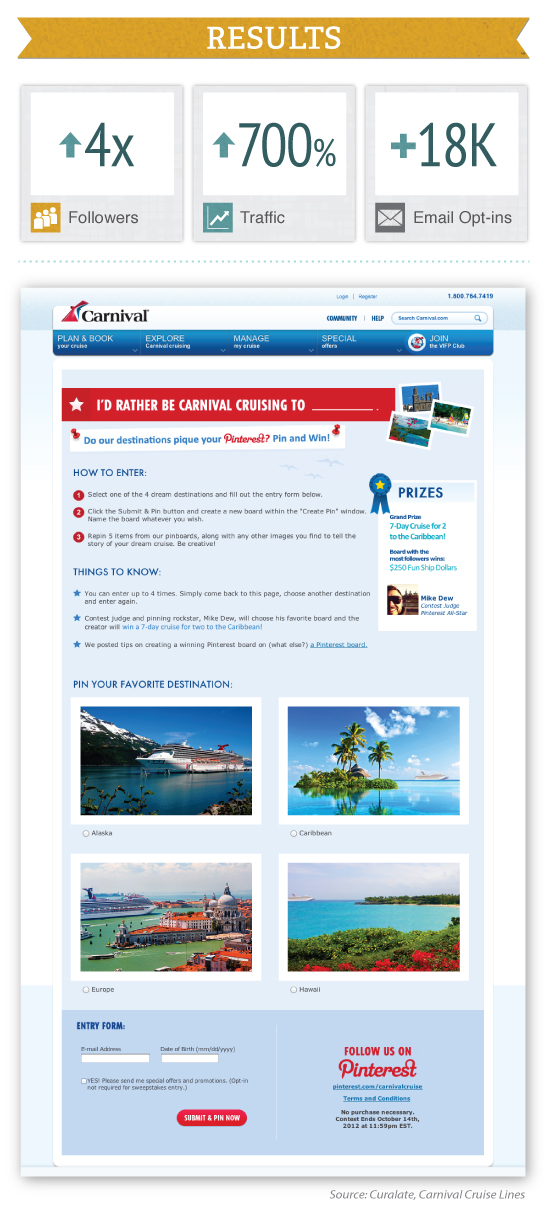
Promote is a new product feature launched today by Curalate. The product combines Curalate’s analytics technology with Promote to offer brands a frictionless way for creating and running promotional contests using Pinterest. Without a service like Curalate, Pinterest contests are a complicated ordeal; Gupta says they are broken. “The way that brands try to run these contests places a lot of burden on the consumers.” The contest process even for us, when Gupta described the process was overwhelming. To submit an entry for a Pinterest contest, participants may be asked to name their board in a specific way, hashtag pins, and pin multiple pins. Once that’s done, participants typically are required to email the brands with the location of their pins. It’s a logistical nightmare for both contest participants and the brand hosting the contest.

Gupta pointed us to a case study that represented Curalate’s capabilities during the beta testing phase with its client, Carnival Cruise. During an 11-day entry period, Carnival Cruise saw a fourfold increase in followers, 700 percent boost in traffic to its site, and 18,000 email opt-ins (45 percent of entrants).

Pinterest, compared to Facebook and Twitter, is still a fledgling social network with just an estimated 12 million users (as of May 2012). But a recent study by BizRate Insights sheds light on the power that it packs as a key driver for commerce. It’s the fourth largest driver of traffic, and 70 percent of users are on Pinterest to figure out what to purchase. Just 17 percent of Facebook users could state that as a reason for using Facebook. And 43 percent use Pinterest to keep up with brands and retailers, compared to just 24 percent of Facebook users. For this reason Pinterest is an enticing marketing platform for brands looking to sell their services or products.

Giving the interest in photo-sharing lately (Instagram is quickly becoming a hub for marketers) Gupta reveals to us that Pinterest is just one platform that the company is working with at the moment, and hopes to expand its service to other visual social media marketing channels in the near future.

 You can view an example of a Curalate Promote contest below:

carnival cruise


Source : digitaltrends[dot]com

Oct 29, 2012

Starbucks rolls out test of wireless charging stations in Boston

starbucks

Definitely more convenient than hunting down a power outlet while holding a latte, Starbucks and Duracell are testing wireless charging at retail stores.

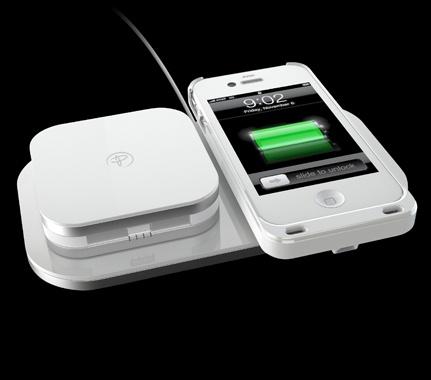
Detailed on Boston.com earlier today, the Seattle-based coffee giant Starbucks is launching a pilot program that will install wireless charging stations at seventeen franchise locations around the city of Boston. Partnering with Duracell, Starbucks management is utilizing inductive charging technology and installing large Duracell Powermats within the tables at retail stores. In order to take advantage of wireless charging, customers will either need to purchase a Power Matters Alliance (PMA) compatible wireless power case or borrow a loaner case from a Starbucks employee. Duracell currently makes PMA-compatible cases for the iPhone 4 and iPhone 4S as well as the Samsung Galaxy S III Android smartphone.

Duracell Powermat wireless chargingWhen asked about the new technology rolling out at Boston locations, Starbucks chief digital officer Adam Brotman stated “We’re building the Powermat technology into some of the tabletops, just to get a sense for how our customers will react, compared to having to plug their mobile devices into the wall. A few weeks into the test, we’ll do some in-store giveaways, and we will have some behind the counter available to loan out.” 

Starbucks plans to roll out a minimum of eight Powermats per store in order to gauge customer demand and the first stores to receive the upgrades are located within Boston’s financial district. As more people start using the wireless charging stations instead of the power outlets within each store, it’s likely that it will free up charging space for customers with laptops or other devices.

AT&T has also started to sell PMA-compatible cases and Delta airlines has started installing wireless charging spots around gates at major airports within the United States. Earlier this year, General Motors announced that the company would be adding a PMA-compatible powermat station into Cadillac, Chevrolet, and Buick automobiles. In addition, popular venue Madison Square Gardens in New York City has added hundreds of wireless charging locations as a service to visitors.  


Source : digitaltrends[dot]com

Meet Windows Phone 8 in a detailed video overview from Microsoft, pokes iOS and Android

Today is a pretty important day for Microsoft, as the company is launching the latest iteration of its Windows Phone mobile platform.

And to make sure that everybody understands and learns all about the new features Windows Phone 8 packs, Microsoft’s Corporate VP of Windows Phone, Joe Belifore stands in front of the camera for a lengthy 18-minute video showcase of the OS.

Dubbing it the “most personal smartphone around”, Mr. Belifore uses an HTC Windows Phone 8X and a Nokia Lumia 920 to demo nearly all the feature Microsoft’s mobile OS offers. He also doesn’t miss the opportunity to poke iOS and Android for the lack of live tiles and the ability to feed you with new information.

So, get some popcorn and watch the video below. Scroll after 1:00 for the iOS and Android commentary.

Have some popcorn left? Thirsty for even more in-depth review of Windows Phone 8? No problem, just check out our extensive review of Microsoft’s new mobile platform.


Source : blog[dot]gsmarena[dot]com

Oct 26, 2012

The iPad and iPad mini delivery dates already pushed back 2 weeks

The iPad mini has only started selling today but it’s already on backorder with the next shipments due for no sooner than 2 weeks across the world. The only exception is the US where the black version will still be delivered on the promised November 2nd.

It’s either that the white version is immensely more popular in the US or there were fewer white units available. Having a look across European Apple stores however, shows us that both the white and black versions are back-ordered already in the UK, Germany, France, Spain and Italy.

The situation with the 4th generation of the 10-inch iPad is identical in Europe, with only the US iPad still holding strong for a delivery on November 2nd. It’s clear which of the two iPads is the hotter product, at least on the US market.

Apple Store US, UK, DE, FR, IT, ES


Source : blog[dot]gsmarena[dot]com

Apple carries out the UK court order, posts “Samsung didn’t copy us letter” on its website

Today Apple executed the UK’s High Court order that ruled the company should acknowledge that Samsung didn’t copy the iPad’s design in its Galaxy Tab slates.

Apple posted a link on the UK front page of its website to a “Samsung/Apple UK judgement” page, where it has posted the UK Court of Appeal’s ruling.

Just to refresh your memory, the court order states that the text should be published in a font no smaller than Arial 11 and Apple has done just this.

In the acknowledgement, Apple confirms that Samsung didn’t infringe on its iPad patents and hasn’t copied the tablet’s design in the UK, but also states other courts, like the one in Germany, have ruled the opposite.

Still, we can’t imagine Apple taking much joy in doing what it had to do – the letter may not sound like a sincere apology, but having to post such a thing on its website at all must have hurt quite badly.


Source : blog[dot]gsmarena[dot]com

Oct 25, 2012

How To Find and Get a Job on LinkedIn

Knowing how to find a job on LinkedIn is essential in today’s economy. The first step would be by creating a profile on LinkedIn website, this profile will include your employment history (including current job) as well as your education. Including keywords and skills that pertain to you.

image courtesy of flickr, Shekhar Sahu

The next step you have to take would be to build your LinkedIn network, the more connections the better chance of being called up for an interview. Connect with people whom you know and have a business relationship with. Getting recommendations from them would also be very helpful as it shows trust in your abilities. f you see a hiring manager at a company you would like to apply to, see if you know anyone he knows and find a way to connect with him or her.

Gavin Llewellyn on LinkedIn

image courtesy of flickr, Gavin Llewellyn

Those steps highlighted above will at least get you started and possibly get you leads. Next you would want to apply for jobs. LinkedIn is really a great site to find the jobs you want. You can search profiles in your area, pertaining to your field and qualifications.

See Also: How to Get a Job Using Social Media

You could also check the company pages included on LinkedIn to see if they are hiring. It even lists the most recent hires, you can see where they came from and their qualifications, you could message them and ask for tips and tricks in landing a job with that company. By now you should have a substantial list of places you would like to work at.

Next you would apply for available jobs at the companies that you have so far discovered in the previous steps. LinkedIn is a very powerful site for finding and obtaining a job, if you know how to use it properly you will have a lot of success. It should be remembered that the most important thing is connections. With high unemployment, employers are seeing a lot of resumes come in. So spending as much time as you can building connections will help you so much. If you properly know how to use LinkedIn, you will almost certainly find employment if you are persistent.

See Also: How To Look For a Job With Facebook

Tags: LinkedIn Facebook Jobs, LinkedIn Job Hunting, LinkedIn Jobhunt, LinkedIn Jobsearch

Source : techtalkafrica[dot]com

The Danes do it again: Beovision 11 is certainly a sight to see

Bang and Olufsen's BeoVision 11 is beautiful and highly-functional - but is it valuable?


Today, Bang and Olufsen announced that its BeoVision 11 television – the company’s first-ever Smart TV – will be arriving in U.S. showrooms this month. The television will hope to titillate stateside consumers enough to make a splash in the luxury electronics sphere.

 The TV senses ambient light in a 360-degree range and adjusts the picture accordingly, tweaking the brightness and/or contrast to optimize for the conditions. It also boasts an adaptive contrast system that the company claims can showcase detail that would normally be washed out by light, or dampened by dark. Rounding up the specs is the 3D-enabled TV’s 240Hz LED-lit LCD screen, equipped with a glare polarizer for brighter rooms.

Bang and Olufsen didn’t want to disappoint its audiophile fans, either, so, BeoVision 11 has been outfitted with six speakers, each powered by a dedicated 32-watt ICEpower amplifier.

At first glance, its design is striking. Interestingly, the large face-mounted speaker set beneath the screen almost makes the TV look like it adopts the older 4:3 screen format. We’ve yet to decide if it’s different for utility’s sake, or different for different’s sake, but if you have trouble integrating strange/sleek design into your home, don’t fret —  BeoVision 11 comes with a floor stand and a wall bracket, both of which are motorized and adjustable.

Unfortunately, this is the part where we come to the price – and if you’re not affluent, you might be peeking through your fingers. The BeoVision 11 is available in 40-inch, 46-inch and 55-inch models at Bang & Olufsen stores this months with prices beginning at $6,000.


Source : digitaltrends[dot]com

Microsoft officially releases Windows 8 and Windows RT

Today Microsoft stepped on stage and released its Windows 8 and Windows RT to the tech world in what was largely conceived as the biggest Windows release ever. Availability starts today and active Windows 7 customers can upgrade starting from $39.99.

Microsoft talked OS features, integration along a wide variety of devices, the services that are launching alongside the OS and demoed all of them.

Windows 8 is released with a couple of services in tow. Those are Xbox Music, Videos, Games and also Skype. All Windows 8 users will get unlimited streaming of music via Xbox Music free of charge.

Microsoft’s speakers (CEO Steve Ballmer included) were keen tp repeating that the Windows 8 PCs are the “Best PCs Ever”. There are around 670 million PCs currently, which are compatible with Windows 8 and Ballmer expects around 400 million to come out with Windows 8 out of box.

The Windows 8/RT store was also a big part of the event. Currently there are around 7000 apps available, which isn’t as good as Apple’s numbers but Steven Sinofsky pointed out that the Windows Store has the most number of apps for an app store on its launch day.

A big part of the Windows 8/RT release was the emphasis on touch – the fact it can support a mouse and hardware keyboard but that it was ultimately designed to work as a touch-only OS. pre-Win8 ultrabooks as well as post-Win8 tablets and notebooks were used to demonstrate that.


Source : blog[dot]gsmarena[dot]com

Behold! The Microsoft Surface skateboard

Microsoft Surface skateboard

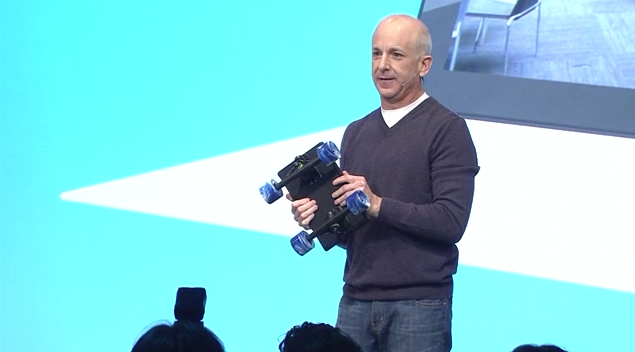
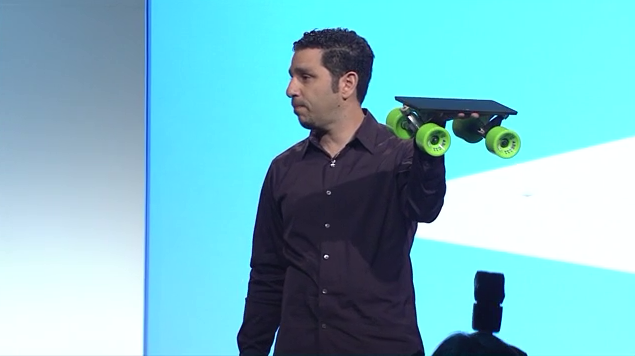
During its Surface press conference today, Microsoft showed off the most capable tablet ever made. The new Surface is actually a skateboard.

Today, Microsoft unveiled one of the most expensive skateboards ever made. After demonstrating the durability of the Surface tablet by dropping it on stage (onto carpeted floor, might we add), Microsoft’s Panos Panay showed us another way he and Windows 8 chief Steven Sinofsky have been testing the durability of the new magnesium-encased tablet. The team pasted skateboard trucks onto a regular Surface and converted it into a skateboard. A skateboard! Though they didn’t do any kickflips or ollies on stage, we did see a picture of Sinofsky sporting a massive helmet standing on the homemade sports equipment. For some reason, it didn’t seem too crazy that tablets can become laptops, and since laptops have learned Yoga, why can’t a Surface become a deck?

Microsoft Surface skateboard

No, you can’t buy a Surface skateboard, but we wish you could. It could be one hell of an optional accessory. Maybe the trucks could attach with industrial grade magnets like the TouchCover. And you don’t have to worry about falling after a tough grind either. The Surface can hit the ground in 72 different ways without breaking, or so we learned today. Actually, after three hours of Microsoft press conferences, this might have been the only thing we actually learned. But… skateboard! That’s hip, right?

Somebody should call Tony Hawk. He may have found the next great way to make a skateboarding game.


Source : digitaltrends[dot]com

Oct 23, 2012

Microsoft launches four new Windows 8 video ads, warming up for October 26

Microsoft doesn’t seem to be bothered by Apple’s huge event today and went on releasing four new ads for Windows 8.

The video ads are global and are going to be aired in 42 countries joined by printed ads, outdoor posters as well as their online counterparts to help boost user awareness and quick adoption of Microsoft’s latest computer OS.

The advertising agency responsible for the videos is Crispin, Porter and Bogusky and here’s what the agency’s Chief Creative Director Rob Reilly had to say about the ads.

We selected music from up and coming bands. We didn’t want to use overly popular songs because we wanted to bring the viewer on a journey of discovery, both through the storytelling and the music that accompanies these stories. Sometimes, as in “Express Yourself,” by Labrinth we found a new take on a classic old song, much like the reinvention of Windows.

Enough chit-chat, let’s get on with the videos.

Windows 8: Best Coast

Windows 8: Parkour

Windows 8: You and Me Together

Windows 8: Party

Microsoft will be officially launching what is undoubtedly its most bold Windows release in its history on October 26, so mark your calendars.


Source : blog[dot]gsmarena[dot]com