Pages

Showing posts with label roundup. Show all posts

Nov 9, 2012

This week’s best app updates

App update roundup ios productivity apps

Missed all the new app updates this week? Here's a roundup of the week's best additions that are the clear must-haves on your smartphone.

Man, there were a lot of apps that got some update love this week. Did you manage to download them all? If not, have a look through our roundup and see for yourself whether or not these changes seem urgent to your needs. We know, data gets expensive, so feel free to spread them out as you see fit.

Tumblr
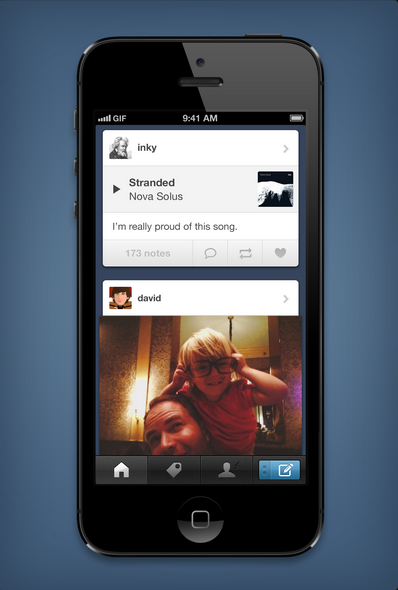
With the latest iOS update, Tumblr is now “completely native,” meaning a faster and more responsive interface for you iPhone users. The update also comes with a new notifications board that lets you see exactly who liked, reblogged, commented, or replied to your posts. One of the more interesting updates, however, is animated GIF playback. This will be great for all you LOLcat lovers now that animated GIFs will play automatically from the dashboard without needing a separate tap. Gesture shortcuts also include right swipe to return to the previous screen, and holding a tap to open up more options.

Evernote

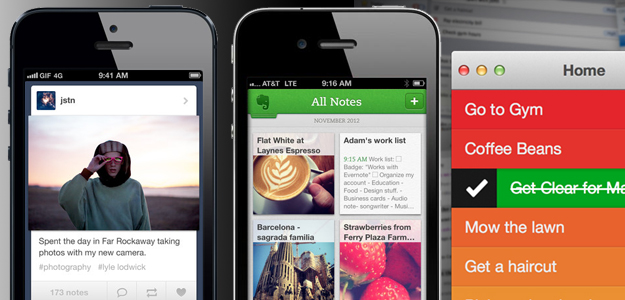
Evernote got a nearly complete refresh with its new update, offering a new homescreen, navigation interface, and existing notes list. “Our goal with the redesign was simple: make all major functions accessible within two taps,” Evernote writes on its blog. You’ll find this with a shortcut navigation to your content, and a tap on the header to browse the section. The Notebook section is one of the most improved aspects, gathering all the notes you’ve ever created or have been shared under one hood. Additionally, you can sort your notes by tags or places – the latter of which will bring up a map of plotted notes according to their location info. There are also shortcuts (“Quick Notes”) on the top of the homescreen to help you quickly add new notes and take photos. This Evernote 5 update will be compatible with the iPad mini as well, and is free across iOS platforms.

Foursquare

You know how Facebook lets you tag friends you’re at an event with when you check into spaces? Well, now you can do the same on Foursquare, even if your friend isn’t a Foursquare user. The hot link will just sync to your friend’s Facebook account instead – where your friend can either approve or hide the Facebook notification for a wall post.

In addition to the social aspect update, users can also rate establishments on a scale of 1 to 10 to help explorers get a gauge on the venue’s rating. The number rank will appear in a color square next to the name of a location under your Explore tab. The update is available only on iOS, but Android users should be receiving the same love shortly.

Clear for Mac

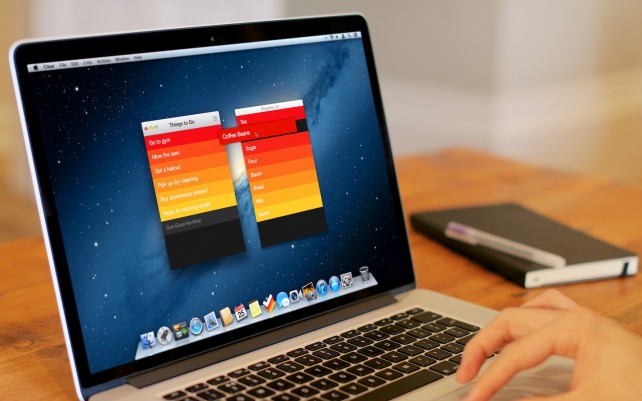
Clear is a hotly popular app on the iPhone, and this week, the beautiful to-do lister app comes to the big screen: your MacBook. The Mac edition will include all the touch gestures available on your iPhone if you own a later edition of MacBooks that have gestures built into the touchpad. This means you can still perform all the left and right swipes to “clear” a task and drag items around to reorder them. After you finish setting up your lists on the Mac, the app also syncs with your iPhone so you can access lists on the go. To make accomplishing tasks even more fun, you can fudge with the preferences to set sounds and theme colors to make you want to use the app more.
Pinterest

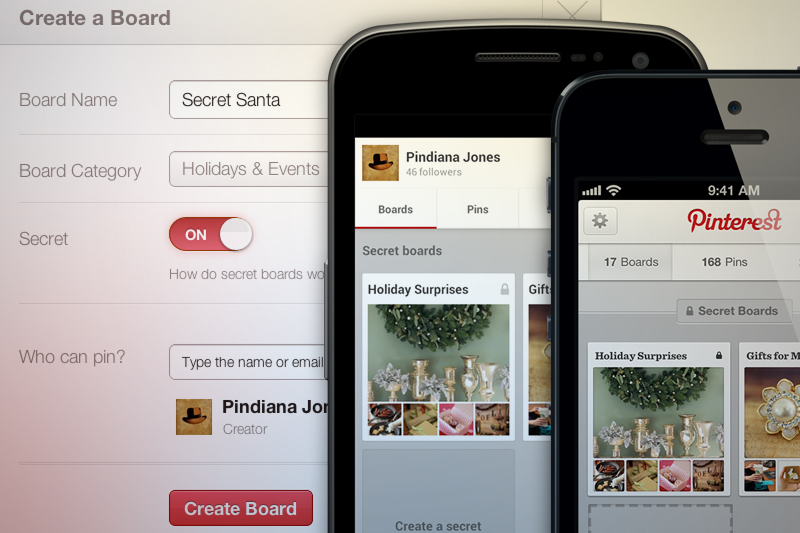
Starting your holiday shopping early but don’t want anyone to find out you’re using Pinterest to save your to-buy lists? The new Pinterest updates for iOS and Android will now include Secret Boards so you can create up to three privatized boards made for your eyes only. You can also share them with a few santa helpers to get the holiday season rolling, or turn the secret boards public after you’re finished putting the last pieces on the board. The option can be found right when you create a new board, or at the bottom of your app homepage.

Pulse News

Pulse 3.0 is here for both Android and iOS, complete with a sleeker mobile interface and a new search feature to help you browse more efficiently. With the search side bar, you can sort news by sources (Reddit, Tumblr, Google, Flickr, Facebook, etc.) and there’s an infinite scroll so you can keep dragging down for more stories. Seriously — as many as you can stomach in one sitting.

Editing pages is also simpler thanks to the side bar, which allows you to add, edit, and reorder to your customizable needs. Basically, the mobile version gets the same personalization options the Web service Pulse.me already has, so if you’ve an avid fan of the Web edition, now you’ll have the same features on the go.


Source : digitaltrends[dot]com

Sep 23, 2012

Tagg the Fitbit for dogs, mountable action live-cams, Evernote meets Moleskine and more from Pepcom Holiday Spectacular

Tagg fitbit for dogs

From toys for your dogs to the new Moleskin with Evernote integration, here's our roundup of the gadgets coming up this holiday season.

Tons of exhibitors, so many gadgets to sift through. We were present at the Pepcom Holiday Spectacular tradeshow which gave us previews of what’s coming up this season in consumer tech, and here are the products we think you should keep an eye out for. At least we will.

Tagg: GPS and Fitbit for your pups

Tagg pet trackerIf your dog has a habit of running away, the Tagg pet tracker system will do Fido some good by helping you keep track of his whereabouts. Tagg collar runs on a GPS system to let you know exactly where your dog is at all times, and you can set the parameters of where you think it’s okay for your pet to be. If Fido steps outside this boundary, you’ll get a text alerting you of the situation, and use the accompanying app to locate your pet. 

Now we know what you’re thinking: What if this thing runs out of battery? Tagg has a “sleep” integration that will put the collar to energy conservation mode to keep the battery from draining when the GPS isn’t quite necessary. This means that if the Tagg collar is located near the charging base, the collar will be in sleep. When the collar is detected to be too far from that range or goes off your set parameters, only then will the device begin using the charge. In standby mode, the collar can last up to 30 days while constant use can extend up to a week — so unless your dog runs away constantly, you’ll probably only need to charge the Tagg collar twice a month.

Newly updated is an upcoming fitness tracking integration to see how much activity your dog is getting a day. You’ll get an overview of the level of activeness your pet receives per day to keep him healthy and fit. For $100 plus an $8-per-month subscription, Tagg is essentially a smartphone and a Fitbit for your dog. Not a bad time and money investment for man’s best friend.

Looxcie action live-cam

Looxcie HD cameraWe’ve seen GoPro cameras that promise to deliver quality photos while you’re on your most extreme adventures. We’ve also seen livestream webcams that are mediocre at best. Looxcie wants to be the best of both worlds by providing you full 1080p capacity streaming while allowing you to mount the lightweight camera anywhere you go.

The camera connects either via Bluetooth or Wi-Fi, and optionally via your data plan to run your live stream. You can also access the video streams in your history if you want to revisit old clips (say, a web show you host weekly) and share them either publicly or with those you carefully select.

What’s also integrated into Looxcie is camera sensors and Bluetooth capacity, meaning the device can double as a Bluetooth headset and a point-and-shoot. You can also leave Looxcie recording a video without saving, but press a special button to retrace the last 30 seconds of what you just saw. “For example, I can leave the camera running while I’m watching my son play soccer,” Looxcie CEO Romulus Pereira tells me. “And I can press this button to record just the part where he makes the goal.” Makes perfect sense for those who witness strange things all the time, wishing they had a camera to capture what just happened. Looxcie HD Explore launched this past week at $330 a set.

Duracell Powermat and smartphone cases

Duracell Powermat casesFor those who want to combine extra battery power with a protective smartphone case, Duracell Powermat 24-Hour System is definitely one hot item making a buzz in the consumer tech market. The $100 set comes with a charging station, a portable backup battery pack, and a chargeable smartphone case. All you have to do is leave the battery pack and case (with or without your phone already inside) on top of the power mat overnight for charge. When you’re ready to go for the day, just pick the gadgets up and go.

The set comes in a variety of candy-coated colors and is currently available for the Samsung Galaxy S3 and iPhone 4/4S. The iPhone 5 edition is in development, with plans of a release sometime by Q1 of 2013.

Evernote and Moleskine

Launching October 1st, the Evernote integration with Moleskine notebooks may just change the way we incorporate physical note-taking into our digital lives. From what Evernote demonstrated to us at Pepcom, the app is able to recognize the moleskin pages by reading the hues of the paper and the dotted lines so that when you snap a picture to load into your phone, Evernote can make your notes brighter, clearer, and easier to store. The smart stickers can also programmable to set as tags for particular types of notes, such as Recipes, To-Do’s, Receipts, Deadlines, and more.

Evernote Moleskin app

Alternatively, you can also take your own picture with your phone’s camera app and upload it within the Evernote app. You can group photos and edit them as you please when they’re all ready in your Evernote list, and of course, shareable to your friends and family. Not to mention the elephant logo embedded in the leather cover looks exclusive, beautiful, and just plain cool. The app integration will be available for both iOS and Android. Our Molly McHugh is excited… aren’t you?

Keep an eye out for one or more of the above items as we hope to get review units shortly.


Source : digitaltrends[dot]com

Sep 7, 2012

Best Windows Phone Games

best windows phone games mobile smartphone

Microsoft might be a distant third in the mobile race, but that doesn't mean there aren't plenty of fun, addicting games for the Windows Phone. Check out our roundup of Best Windows Phone games.

It’s not often that one can say Microsoft is an underdog. The company is one of the largest in the world and easily the most notable name in personal computing. But when it comes to the mobile phone market, Microsoft has yet to make a noticeable dent. After some tough attempts at breaking in, they may have finally found a nice niche with the Windows Phone. The operating system still isn’t knocking on iOS or Android’s door, but it has picked up dedicated user base. Keeping fans in the fickle phone market can be tough, but Microsoft have kept their users happy. Perhaps a great selection of games for those on the go have helped. Here’s some of our favorite games for Windows Phones.

angry birds icon windows phone 7 gameAngry Birds ($1)

What is a list of great mobile games without Angry Birds? While it might be an obvious choice, it’s that way for a reason. Angry Birds is undoubtably one of the most fun and addictive games that you can house on your handset. Load up some flying feathered friends and send them for a ride as you try to topple the fortresses of pigs that have stolen precious eggs. It’s about as much of a classic as one can get in the young world of mobile games, but none of its original appeal has worn off.

angry birds screenshot windows phone 7 game

fruit ninja icon windows phone 7 gameFruit Ninja ($1)

Every warrior has to start somewhere — you can’t just go out and start breaking boards and cinderblocks on day one. There’s no better way to work your way up to unleashing your inner kung-fu than with Fruit Ninja. The concept is silly and the construct is simple, but don’t be surprised if you fire up this game at the start of a commute and you go a few extra stops just to keep playing. Fruit of all sorts comes flying across the screen and its your job to chop it up as fast as possible, launching juice in all directions. If only making fruit salad was this fun.

fruit ninja screenshot windows phone 7 game

little acorns icon windows phone 7 game appLittle Acorns ($3)

There are few things more determined than a squirrel that wants to protect its stash of nuts. Little Acorns gives you the chance to help out a furry friend by guiding him through 80 levels in attempts to prepare for winter. Little Acorns channels the gameplay of classic platformer mechanics and the undeniable appeal of an adorable squirrel to create a game experience that is tough to put down. How can you not help the little guy get ready for the oncoming cold? Especially when it’s so fun.

little acorns screenshot windows phone 7 game app

pool pro online 3 windows phone 7 app gamePool Pro Online 3 ($3)

Pool is a game that has been around for generations, ever since the cavemen used sticks to hit rocks into holes in the ground. While that information is completely unfounded, here’s something that is true: Pool Pro Online 3 is a blast. It takes the familiar game of pocket billiards and really emphasizes the “pocket” part by putting it on your phone. Then it cranks up the competition with online play against friends or strangers. Work your way up the leader boards to prove you’re a true pool shark.

pool pro online screenshot windows phone 7 game app

feed me oil icon windows phone 7 game appFeed Me Oil ($1)

One occasionally has to wonder just way oil tycoons make so much money for just happening across the strange black liquid. If Feed Me Oil gives any insight into what a oil worker has to deal with on a daily basis, whatever they make isn’t enough. The game presents a weird world where the ground is alive with crazy creatures that crave crude oil. You’ll have to direct the black gold from a broken pipe to the mouths of these odd little characters. Use the tools provided, but mostly use your brain to make it through this quirky puzzler.

feed me oil screenshot windows phone 7 game app

istunt 2 icon windows phone 7 game appiStunt 2 ($3)

Watching extreme sports events can often make one tempted to attempt the action they see on screen. Save yourself the embarrassment of performing a flurry of face plants by getting iStunt 2. The game takes you to the virtual slopes and puts you in control of a snowboarder that is more than capable of pulling off the most insane of in-air moves. With a great physics engine, awesome action, and game bolstering boosts, iStunt 2 has all the excitement of sliding down the slope with none of the dangers of having a piece of plastic strapped to your feet.

istunt 2 screenshot windows phone 7 game app

tiki towers icon windows phone 7 game appTiki Towers ($3)

Visit any zoo and take a look at the monkeys. They are fascinating creatures for a variety of reasons. Sometimes it’s because how close their actions mirror our own and sometimes it’s because they fling around inappropriate items. The monkeys in Tiki Towers are a little more sophisticated than that. These primates have built some bamboo-based creations to help them navigate some puzzling and tough terrain in hopes of discovering lost treasure. Play through 45 levels across 5 islands as you help the monkeys achieve their ultimate goal.

tiki towers screenshot windows phone 7 game app

zombies!!! icon windows phone 7 app gameZombies!!! ($5)

The idea of a zombie apocalypse has become a bit marginalized by its overuse in pop culture. One can’t take a trip to the movie theater, flip channels, of walk into a trendy t-shirt shop without seeing something referencing zombies. But don’t let the over-saturation fool you, the threat is out there. Nothing makes it more apparent than Zombies!!!, a game that puts you right in the middle of an undead uprising. Fight through infested territories as you try to survive the onslaught of corpses. It’s a blast and great training for the day the inevitable real life infection spreads.

zombies!!! screenshot windows phone 7 game app


Source : digitaltrends[dot]com