Pages

Showing posts with label cover. Show all posts

Oct 27, 2012

How Microsoft’s Surface just might kill the iPad

Surface killing ipad header

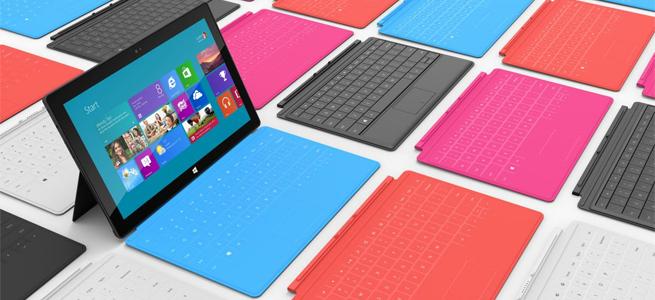
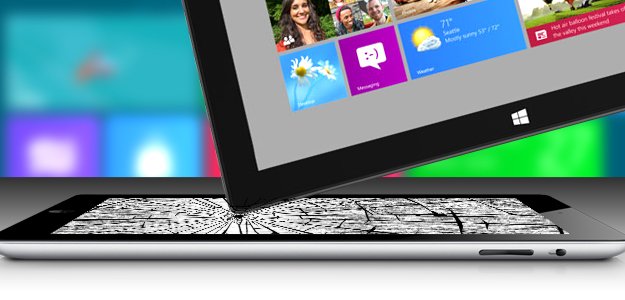
With real productivity apps, a clever keyboard cover and a well-engineered design, the Surface tablet stands a real chance of cutting into iPad sales… if Microsoft will throw enough money at the marketing.

All these “killer this” and “killer that” comparisons get out of control. Every new challenger is hyped as the killer of what came before. But sometimes, it’s true. The iPad really turned out to be a PC killer; folks bought iPads instead of buying new PCs, and that market took a pretty big hit. Apple pulled this off by building something that changed the rules for a PC, and we saw it differently.

Where the PC was about performance, the iPad was about portability. Where the PC was about mice and keyboards, the iPad opted for touch, and where the PC was generally about productivity, the iPad was about entertainment.

But it forced a hard choice that most of us didn’t really want to make: tablet or laptop? This was because the iPad was really a netbook that swapped the keyboard and mouse for a touchscreen, and the iPad’s shortcomings made it a very difficult product to live on exclusively. Most iPad buyers had to keep their PCs or buy MacBooks, and that took what was already an expensive solution and increased it.

With the Surface, Microsoft is trying to reverse the deck and do to Apple what Apple did to it.

Productivity

The Surface comes with Microsoft Office, the unchallenged, dominant desktop productivity product in the market. In fact, the ARM-based Surface actually bundles in Office, so you get productivity capability out of the box, putting it ahead of most PCs. But let’s not stop there, because unlike Apple, Microsoft isn’t being as restrictive of apps that fall into their turf. For instance, the apps can share data, so you can be looking up restaurants on one screen, and then simply click to bring up navigation, or some other app that can use the information from that initial screen. Microsoft also designed in a high degree of accuracy, so you can use a stylus, a tool typically preferred over a finger for creating art or editing pictures. These aren’t netbooks with touchscreens instead of keyboards, they are full PCs. That generally means you should be able to leave the laptop at home or in the office more often.

Designed from the inside out

Apple designs from the outside in. While this does result in beautiful products, it also results in painful problems like Antennagate, or cost problems, which may explain why the iPad mini is priced a whopping 60 percent above the rest of the market. This is also why the first iPhone, when it was presented, was pretty much a pretty brick that took months to get working. When car companies take this approach, you get rolling art that costs a fortune to maintain and isn’t very reliable.
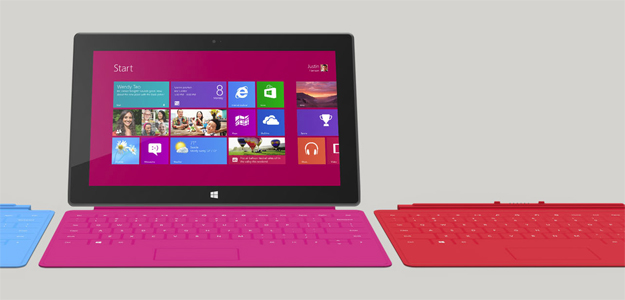
Surface tablet microsoft windows 8Microsoft made big point of designing from the inside out. Engineers got the product properly equipped, adequately reinforced, and balanced before designers wrapped the result in a pretty case. The end result is a tablet with a screen optimized for movies and video, a balance that makes it feel lighter than it is, and a full set of features. (It’s missing a 4G radio, but because only about 10 percent of tablets have WAN radios turned on.) Microsoft even put in a fast-charge battery, so you can go from dead to near full charge in around two hours. Oh, and another in-your-face move is that while Apple uses magnetic plugs to charge for their laptops (which uniquely saves the laptop if you trip over the cord), it doesn’t appear on the iPad. The Surface does have this magnetic design. When Apple and Microsoft signed the last cross licensing agreement, Microsoft agreed not to copy the iPad. Instead, it ripped a part off the MacBook to improve its own tablet. Now that really is getting in Apple’s face.

The necessity of a keyboard

A few years back, before the iPad, Bill Gates and Steve Jobs were on stage, and Bill said something to the effect that tablets were the future for mobile PCs. Steve pretty much said that only idiots would buy a tablet, because a keyboard was simply too irreplaceable.

Now, both the iPad and Surface tablets have optional magnetic covers, but only Microsoft’s comes with a built-in keyboard. This makes it look like the Surface Tablet is a better presentation of Jobs’ vision than the iPad, and that is about as “in your face” as we can get.

I think it would be fun to run the clip of Steve Jobs calling tablets without keyboards stupid right after a clip of Tim Cook talking about tablets with keyboards as the ugly result of refrigerators and toasters mating, and then follow it with the number of iPad keyboards sold (the market for this has turned out to be impressively large).

Marketing is key

After seeing the cringe-worthy Olympics ads that Apple did, I’m convinced that a lot of talented people left the company after Steve Jobs passed. This gives Microsoft the potential to out-market Apple this round. Kathleen Hall’s advertising team at Microsoft is considered one of the best in the business, but Microsoft traditionally underfunds advertising. If it does that here, this potential Apple killer will follow the Zune into the dustbin of history. The initial TV ads are good, but they’ll need Apple-like seeding and sustained marketing programs (read: loads of cash) to assure this “killer” product reaches its potential. If it opens its wallet wide enough for that, Microsoft may do to Apple what Apple did to it with the iPod, iPhone and iPad, and find that revenge can be oh so sweet.


Source : digitaltrends[dot]com

Oct 17, 2012

Delivery of cheapest Surface slips to three weeks, Touch Cover rejected by consumers?

Of the various Surface models currently available, it appears the early adopters have been most taken by the cheapest, $499 32GB version. And that's the one without the Touch Cover keyboard, an accessory which Microsoft has been promoting hard since the tablet was first unveiled.

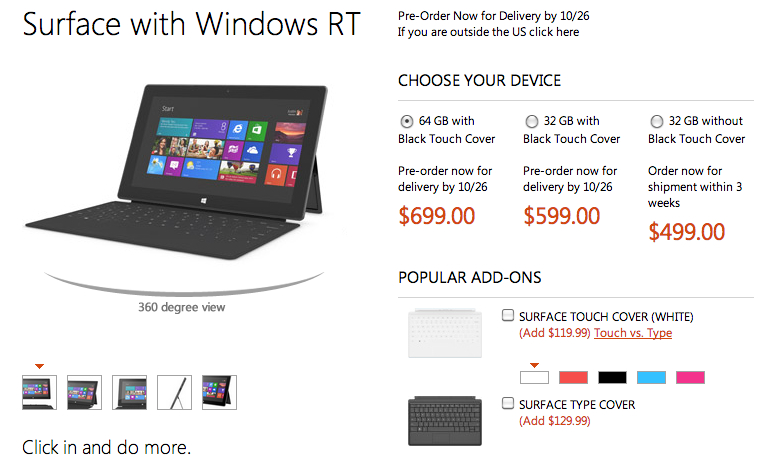
Anyone considering placing an order for the least expensive version of Microsoft’s new Surface tablet (ie. the $499 32GB model running Windows RT that comes without the ultra-thin Touch Cover keyboard) might have to wait as long as three weeks to receive the device, according to its page on the Microsoft Store website. It originally showed October 26 – the day the tablet officially launches – as the delivery date.

The $599 32GB version with the Touch Cover, and the $699 64GB version also with the Touch Cover, are, at the time of writing, still showing a “by October 26” delivery date.

It’s tempting to think there’s been an early rush by consumers for Microsoft’s new tablet, but as noted by Cnet (via Neowin), without knowing exactly how many of the tablets are built, boxed and ready to ship, it’s hard to accurately gauge how much demand there really is for the device at this early stage.

It does appear, however, that the early adopters are ignoring the Touch Cover, opting for just the tablet. If they change their mind at a later date, they can of course pick up a Touch Cover for $119, or a Type Cover, best described as a more conventional keyboard compared to the Touch Cover, for $10 more.

This may be of some concern to Microsoft, which has been making a big deal of its accompanying cover/keyboard since it first unveiled the Surface back in June – indeed, an ad for the new tablet, shown for the first time Monday night, featured the cover/keyboard as much as the tablet.

The Wall Street Journal reported Tuesday that the computer giant has placed orders to manufacture between three and five million Surface tablets from now until the end of this year. But whether Microsoft can persuade people to part with their cash for one of them is what industry watchers are waiting to find out.

One thing’s for certain though – consumers looking to purchase a tablet this holiday season will be spoilt for choice, with big-hitters Microsoft, Apple, Google and Amazon, as well as a slew of other tech companies, all set to battle it out in the coming weeks in what has suddenly become an incredibly busy, as well as crowded, tablet market.


Source : digitaltrends[dot]com

Oct 16, 2012

Microsoft reveals Surface tablet will start at $500

Microsoft has revealed that the pricing for its Windows RT Surface tablet starts at $500, with an added $100 if you want to shell out for a keyboard cover.

The pricing and specifications of the new Surface tablets were briefly revealed at Microsoft’s online store today on a page that was quickly pulled. The 32GB version of the ARM-based Surface tablet running Windows RT (a version of Windows 8) will set you back $500. If you want the TouchCover keyboard case in black then you can add another $100. The 64GB version with the black TouchCover keyboard case will set you back $700.

You’ll be able to pick up additional TouchCovers in a range of colors for $100 a pop and the TypeCover keyboard will go on sale at $130.

Microsoft is gearing up for a major advertising push into the holiday season and The Wall Street Journal is reporting that the company has placed orders to produce 3 to 5 million of these devices in the fourth quarter. That’s reportedly on a par with the numbers Amazon and Google ordered of the Kindle Fire and Nexus 7 respectively, but way below the 10 million iPad minis that Apple has supposedly ordered.

We expect the tablets to go on sale on October 26 in Microsoft stores immediately following the Microsoft Windows 8 event on October 25.

The 32GB Surface RT is hitting the same price point as the iPad 16GB at $500. The tablet war is well and truly on. The speculation about the pricing for the Surface tablets has been rife; at one stage we were hearing a possible price of just $200. With the long-rumored iPad mini widely expected to be announced on October 23, Microsoft could have a hard act to follow. Can the Surface make a splash at this price point? We’ll find out very soon.

In the meantime, check out the first Surface TV ad which ran on U.S. television on Monday night.


Source : digitaltrends[dot]com

Sep 24, 2012

Was Apple aware of the iPhone 5 build quality issues?

The chipping issues of the anodized aluminum back cover of the new iPhone caused a real storm this weekend and it seems the saga is not going to end anytime soon. Apple’s latest smartphone turned out to be way less durable than its predecessor and that made quite a lot of its early adopters angry.

And while build quality issues are not uncommon in an industry where time is so precious and technology is oftentimes pushed close to its limits, Apple might not be an innocent victim here. The latest development leads us to believe that the company was fully aware of the sensitive nature of the iPhone 5 back panel, but still proceeded with its manufacturing.

One of our readers brought to our attention the following video, which was created before the iPhone 5 was announced. The worker at the Foxconn factory who published the photos of the new iOS smartphone before it went official, said that most of the iPhone 5 units he and his team were producing were faulty – with good ones being just 10%.

If all the workers in the factory knew that the back can be scratched easily, there’s no way the guys over in Cupertino weren’t aware of the issues and yet they still went ahead with the launch.

The good news is that you can always return your iPhone 5 if you are unhappy with it for a full refund. According to the video, though, you should just wait until October, when units of higher quality will supposedly come to the market.


Source : blog[dot]gsmarena[dot]com

Aug 29, 2012

Sony Xperia Tablet S impressions: Cool features, lame price

Sony Xperia Tablet S with keyboard cover

We go hands on with Sony's new Xperia Tablet S, which comes with an IR TV remote app, a guest mode for kids, and a keyboard cover.

If at first you don’t succeed, try, try again. This is the motto at Sony, whose representatives described the tablet market as a learning experience when they showed me their second stab at a full-size iPad competitor, the Xperia Tablet S (SGPT121US). The new tablet retains much of the charm and design of last year’s Tablet S, with a few key enhancements. This time around, Sony is pushing new features like a universal remote, a Watch Now app that recommends shows on TV, child content controls, and new small apps, which enable limited multitasking on the Android tablet.

A refined design

Sony Xperia Tablet S home screenNaturally, the first thing I noticed when I got to hold the new Xperia Tablet S a few weeks ago, was how much of an improvement it is over the original. While the first Tablet S was one of the only unique looking tablets on the market, it was also a bit thick. This new design retains the odd folded-back look of its predecessor, but thins everything out, making it both memorable and more convenient to use. It’s still a fully plastic tablet, but outside of the iPad, few tablets are made of metal.

The UI of the tablet is mostly the same, though it’s running on Android 4.0 (Ice Cream Sandwich) this go round, which is a subtle improvement over Android 3.2 (Honeycomb). The UI is similar to Sony phones, with blues, whites, and blacks dominating the color palette, but it’s certainly an improvement over the purple look that the last Sony tablets had. 

The screen size is, again, 9.4 inches, which is a really unique size for an Android tablet. I never got much hands-on time with the first Sony tablet, but I’m a fan of tablets in the 8-9 inch range and the Sony tablet is almost there, measuring smaller than the 10.1-inch usual screen size for an iPad competitor. (The iPad itself measures 9.7-inches diagonally.) I will have to test out more apps on it, but the Sony apps, of course, ran quite well on this screen size, and it was comfortable to hold. And hey, they tell me it’s “Splash Proof” as well, which is neat, right?

Small apps & kid control

Like Samsung, Sony is trying to help Android do more, and that means multitasking. The Xperia Tablet S has several “small apps” built into it, like a calculator, Web browser, voice recorder, timer, and infrared remote. These apps are pretty much interactive widgets that can work alongside already running applications, much like Samsung has done. I wish I had a picture to show you, but we were not allowed to photograph at the event and Sony has not revealed any pictures yet. Supposedly, any widget you install can be used as a Small App, though details on this feature are still a bit fuzzy.

Android still requires a single Google login, but Sony has devised a system where you can lock access to certain apps for kids or friends who might want to use your tablet, essentially making secondary profiles for up to 10 other users. This “Guest Mode” is a cool idea that hasn’t been explored much. You definitely might not want your kid messing around inside your Mint.com app, for example.

TV control

Though I am a cord cutter, Sony executives said that one of the most popular features of the first Tablet S was its infrared sensor, which allowed it to act as a universal remote. This feature is back and improved. The new Xperia can control Sony products as well as TVs by other manufacturers, if you’re not a die-hard Sonyist.

Sony Xperia Tablet S IR TV remote

Sony Xperia Tablet S Watch Now app

Sony has also upped the ante, and now has a “Watch Now” app. I don’t believe this app works outside of Sony TVs, but reps weren’t sure. In any case, it attempts to recommend shows that are on TV now that you might like, slowly learning your preferences as you use it. The interface had a Windows 8 quality to it, as does Sony’s new Social feed reader app. Squares and grids are in. 

Keyboard and iMac-like stand

Sony Xperia Tablet S standI usually don’t commend on accessories, but Sony has some interesting add-ons for the Xperia Tablet. The first is a screen cover that doubles as a keyboard, much like the one that Microsoft wowed us all with on its new Surface tablet. I haven’t been able to use Microsoft’s version of this keyboard, but I found Sony’s to be awkward and too flat. Perhaps after using it more, I’d get used to it, but it didn’t give off a great first impression, especially at a $100 price tag. The other big accessory was a stand that turns the Tablet S into an old swiveling iMac you might have seen on store shelves half a decade ago. It’s a unique way to use a tablet and it will be interesting to see if anyone bites.

Good tablet, but expensive

The big downside to the Xperia Tablet S, like many Android tablets these days, is that Sony has decided to stick to a $500 initial price point — the same price as the iPad. By pricing it in Apple’s range, Sony is telling us that it wants to go toe to toe with the iPad and that’s a tough proposition. Not only because the iPad’s app library is richer than Android’s, but also because Sony hasn’t been able to match the Retina screen resolution of the iPad, instead opting for a typical 1280 x 800 pixel screen (though it looks nice). A Tegra 3 quad-core processor, 16GB of internal flash memory, and 1GB of RAM round out the specs, which aren’t bad, but are also roughly equal to the $250 Nexus 7 tablet by Google. 

Sony’s new Xperia Tablet S goes on sale on September 7, but pre-orders start today.


Source : digitaltrends[dot]com

Aug 23, 2012

Archos 101 XS is out in November, along with Android 4.1 Jelly Bean update

Archos has announced the 101 XS tablet, which comes complete with a dual-purpose keyboard/cover, and will soon be upgraded to Android 4.1.

Archos has announced a new tablet, the 101 XS, which will go on sale in the coming months. In addition to a large screen and a dual-core processor, the 101 XS has a keyboard dock reminiscent of both Asus’s Transformer range and Microsoft’s recently revealed Surface slates.

The 101 XS — which at 8mm thick, lives up to the “extra slim” boast that Archos says the XS in its name stands for — has a 10.1-inch touchscreen with a 1280 x 800 pixel resolution, while inside is a TI OMAP 4470 dual-core chip with a clock speed of 1.5Ghz, and 1GB of RAM.

There’s 16GB of internal memory, but this can be increased by another 64GB using the microSD card slot, plus there’s a 1.3-megapixel forward facing camera, but no rear camera.

Other features include Bluetooth 4.0, a microUSB port and a mini HDMI, Wi-Fi, a wide array of pre-installed apps such as the full version of Office Suite Pro 6 and Angry Birds, plus access to the Google Play store.

So, fairly standard so far, but there are a few points that make the Archos 101 XS stand out in a very crowded space. The first is the Android operating system, which is 4.0 Ice Cream Sandwich right now, but will become 4.1 Jelly Bean before November this year. Archos has also taken the sensible decision not to cover Android in a custom skin, but to leave it as naked and free as Google intended.

As is the current fashion, the Archos 101 XS will come with a keyboard dock inside the box, but rather than be an extra component to carry around, it clips over the tablet when not in use and acts as protective cover. Called the Coverboard, it uses magnets and a folding stand to secure the tablet in place, and only adds 5mm to the overall thickness when covering the screen.

Archos will put the 101 XS on sale by the end of next month in the UK, then in the USA by November, when it will cost £299 and $399 respectively. With a November release date penciled in for the US, it could arrive with Jelly Bean already installed too.


Source : digitaltrends[dot]com