Pages

Showing posts with label keyboard. Show all posts

Oct 27, 2012

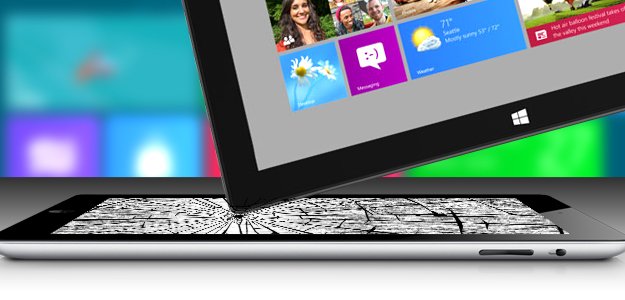
How Microsoft’s Surface just might kill the iPad

Surface killing ipad header

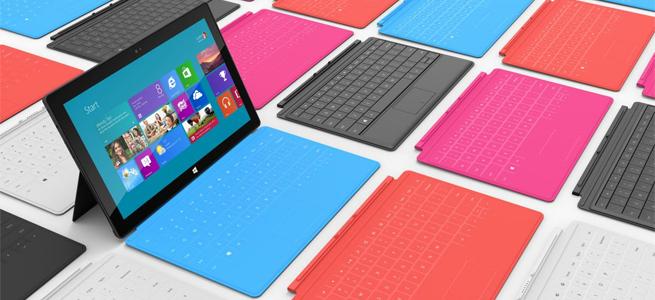
With real productivity apps, a clever keyboard cover and a well-engineered design, the Surface tablet stands a real chance of cutting into iPad sales… if Microsoft will throw enough money at the marketing.

All these “killer this” and “killer that” comparisons get out of control. Every new challenger is hyped as the killer of what came before. But sometimes, it’s true. The iPad really turned out to be a PC killer; folks bought iPads instead of buying new PCs, and that market took a pretty big hit. Apple pulled this off by building something that changed the rules for a PC, and we saw it differently.

Where the PC was about performance, the iPad was about portability. Where the PC was about mice and keyboards, the iPad opted for touch, and where the PC was generally about productivity, the iPad was about entertainment.

But it forced a hard choice that most of us didn’t really want to make: tablet or laptop? This was because the iPad was really a netbook that swapped the keyboard and mouse for a touchscreen, and the iPad’s shortcomings made it a very difficult product to live on exclusively. Most iPad buyers had to keep their PCs or buy MacBooks, and that took what was already an expensive solution and increased it.

With the Surface, Microsoft is trying to reverse the deck and do to Apple what Apple did to it.

Productivity

The Surface comes with Microsoft Office, the unchallenged, dominant desktop productivity product in the market. In fact, the ARM-based Surface actually bundles in Office, so you get productivity capability out of the box, putting it ahead of most PCs. But let’s not stop there, because unlike Apple, Microsoft isn’t being as restrictive of apps that fall into their turf. For instance, the apps can share data, so you can be looking up restaurants on one screen, and then simply click to bring up navigation, or some other app that can use the information from that initial screen. Microsoft also designed in a high degree of accuracy, so you can use a stylus, a tool typically preferred over a finger for creating art or editing pictures. These aren’t netbooks with touchscreens instead of keyboards, they are full PCs. That generally means you should be able to leave the laptop at home or in the office more often.

Designed from the inside out

Apple designs from the outside in. While this does result in beautiful products, it also results in painful problems like Antennagate, or cost problems, which may explain why the iPad mini is priced a whopping 60 percent above the rest of the market. This is also why the first iPhone, when it was presented, was pretty much a pretty brick that took months to get working. When car companies take this approach, you get rolling art that costs a fortune to maintain and isn’t very reliable.
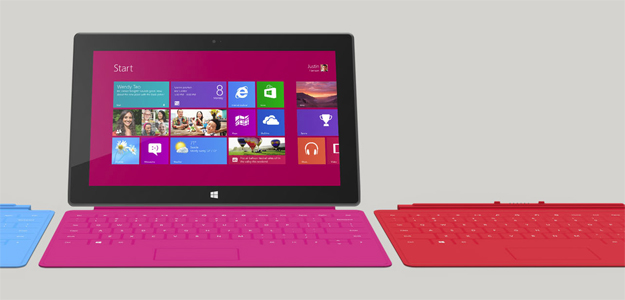
Surface tablet microsoft windows 8Microsoft made big point of designing from the inside out. Engineers got the product properly equipped, adequately reinforced, and balanced before designers wrapped the result in a pretty case. The end result is a tablet with a screen optimized for movies and video, a balance that makes it feel lighter than it is, and a full set of features. (It’s missing a 4G radio, but because only about 10 percent of tablets have WAN radios turned on.) Microsoft even put in a fast-charge battery, so you can go from dead to near full charge in around two hours. Oh, and another in-your-face move is that while Apple uses magnetic plugs to charge for their laptops (which uniquely saves the laptop if you trip over the cord), it doesn’t appear on the iPad. The Surface does have this magnetic design. When Apple and Microsoft signed the last cross licensing agreement, Microsoft agreed not to copy the iPad. Instead, it ripped a part off the MacBook to improve its own tablet. Now that really is getting in Apple’s face.

The necessity of a keyboard

A few years back, before the iPad, Bill Gates and Steve Jobs were on stage, and Bill said something to the effect that tablets were the future for mobile PCs. Steve pretty much said that only idiots would buy a tablet, because a keyboard was simply too irreplaceable.

Now, both the iPad and Surface tablets have optional magnetic covers, but only Microsoft’s comes with a built-in keyboard. This makes it look like the Surface Tablet is a better presentation of Jobs’ vision than the iPad, and that is about as “in your face” as we can get.

I think it would be fun to run the clip of Steve Jobs calling tablets without keyboards stupid right after a clip of Tim Cook talking about tablets with keyboards as the ugly result of refrigerators and toasters mating, and then follow it with the number of iPad keyboards sold (the market for this has turned out to be impressively large).

Marketing is key

After seeing the cringe-worthy Olympics ads that Apple did, I’m convinced that a lot of talented people left the company after Steve Jobs passed. This gives Microsoft the potential to out-market Apple this round. Kathleen Hall’s advertising team at Microsoft is considered one of the best in the business, but Microsoft traditionally underfunds advertising. If it does that here, this potential Apple killer will follow the Zune into the dustbin of history. The initial TV ads are good, but they’ll need Apple-like seeding and sustained marketing programs (read: loads of cash) to assure this “killer” product reaches its potential. If it opens its wallet wide enough for that, Microsoft may do to Apple what Apple did to it with the iPod, iPhone and iPad, and find that revenge can be oh so sweet.


Source : digitaltrends[dot]com

Oct 17, 2012

Delivery of cheapest Surface slips to three weeks, Touch Cover rejected by consumers?

Of the various Surface models currently available, it appears the early adopters have been most taken by the cheapest, $499 32GB version. And that's the one without the Touch Cover keyboard, an accessory which Microsoft has been promoting hard since the tablet was first unveiled.

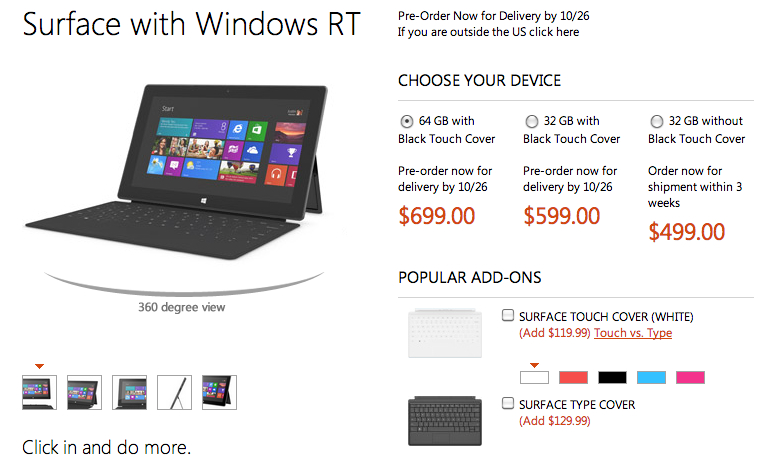
Anyone considering placing an order for the least expensive version of Microsoft’s new Surface tablet (ie. the $499 32GB model running Windows RT that comes without the ultra-thin Touch Cover keyboard) might have to wait as long as three weeks to receive the device, according to its page on the Microsoft Store website. It originally showed October 26 – the day the tablet officially launches – as the delivery date.

The $599 32GB version with the Touch Cover, and the $699 64GB version also with the Touch Cover, are, at the time of writing, still showing a “by October 26” delivery date.

It’s tempting to think there’s been an early rush by consumers for Microsoft’s new tablet, but as noted by Cnet (via Neowin), without knowing exactly how many of the tablets are built, boxed and ready to ship, it’s hard to accurately gauge how much demand there really is for the device at this early stage.

It does appear, however, that the early adopters are ignoring the Touch Cover, opting for just the tablet. If they change their mind at a later date, they can of course pick up a Touch Cover for $119, or a Type Cover, best described as a more conventional keyboard compared to the Touch Cover, for $10 more.

This may be of some concern to Microsoft, which has been making a big deal of its accompanying cover/keyboard since it first unveiled the Surface back in June – indeed, an ad for the new tablet, shown for the first time Monday night, featured the cover/keyboard as much as the tablet.

The Wall Street Journal reported Tuesday that the computer giant has placed orders to manufacture between three and five million Surface tablets from now until the end of this year. But whether Microsoft can persuade people to part with their cash for one of them is what industry watchers are waiting to find out.

One thing’s for certain though – consumers looking to purchase a tablet this holiday season will be spoilt for choice, with big-hitters Microsoft, Apple, Google and Amazon, as well as a slew of other tech companies, all set to battle it out in the coming weeks in what has suddenly become an incredibly busy, as well as crowded, tablet market.


Source : digitaltrends[dot]com

Oct 16, 2012

Microsoft reveals Surface tablet will start at $500

Microsoft has revealed that the pricing for its Windows RT Surface tablet starts at $500, with an added $100 if you want to shell out for a keyboard cover.

The pricing and specifications of the new Surface tablets were briefly revealed at Microsoft’s online store today on a page that was quickly pulled. The 32GB version of the ARM-based Surface tablet running Windows RT (a version of Windows 8) will set you back $500. If you want the TouchCover keyboard case in black then you can add another $100. The 64GB version with the black TouchCover keyboard case will set you back $700.

You’ll be able to pick up additional TouchCovers in a range of colors for $100 a pop and the TypeCover keyboard will go on sale at $130.

Microsoft is gearing up for a major advertising push into the holiday season and The Wall Street Journal is reporting that the company has placed orders to produce 3 to 5 million of these devices in the fourth quarter. That’s reportedly on a par with the numbers Amazon and Google ordered of the Kindle Fire and Nexus 7 respectively, but way below the 10 million iPad minis that Apple has supposedly ordered.

We expect the tablets to go on sale on October 26 in Microsoft stores immediately following the Microsoft Windows 8 event on October 25.

The 32GB Surface RT is hitting the same price point as the iPad 16GB at $500. The tablet war is well and truly on. The speculation about the pricing for the Surface tablets has been rife; at one stage we were hearing a possible price of just $200. With the long-rumored iPad mini widely expected to be announced on October 23, Microsoft could have a hard act to follow. Can the Surface make a splash at this price point? We’ll find out very soon.

In the meantime, check out the first Surface TV ad which ran on U.S. television on Monday night.


Source : digitaltrends[dot]com

Oct 4, 2012

First impressions of the Windows 8 Acer Iconia W700 tablet

Acer announces its latest tablet, the Iconia W700, complete with a cradle dock, Bluetooth keyboard, and of course, Windows 8 compatibility.

As Acer continues to roll out its announcements on its latest Windows 8 lineup, we give you more hands-on impressions of the fresh new products right off the presses. Today, Acer unveils the Iconia W700 tablet complete with an 11.6-inch display in full 1080p high definition at a resolution of 1920 x 1080. The Iconia W700 will come in your choice of Intel Core i5 or i7 Ivy Bridge processor, and of course, the 10-point touch capacitive feature that will allow you to make the most out of Windows 8′s Metro UI.

One of the first things we noticed about the Iconia W700 is how modular the system is. The full set comes with a standing dock and a separate Bluetooth keyboard, both of which will allow you to use it like a PC at home or in your office. You can tilt the cradle dock up from 20 degrees to 70 degrees, depending on your viewing preference. Of course, you can also adjust the dock to stand vertically or horizontally.

Take it out of its cradle and you’ve got a tablet that’s approximately half an inch thich and weighs 2.3 pounds — not too much lighter than the Acer Aspire S7 ultrabook announced two days prior. However, the Iconia W700′s got a few more integrations that make it more of a mobile device than the Aspire S7. Case in point, the built-in G-Sensor, E-Compass, and Gyro-Meter — all of which are meant to help with location-based apps so you can check into a Foursquare joint, find your friends on Google Latitude, search nearby restaurants on Yelp, or the like, in as small amount of time as possible.

Spec-wise, you’ve got your choice of 64GB or 128GB SSD with 4GB of memory, a back-facing 5 megapixel camera that can record 1080p HD videos, and a 1-megapixel front facer that can capture 720p videos. The tablet also has a MicroHDMI and a VGA adapter if you want to hook it up to a projector. One of my personal favorite components of the set is that it comes with its own leatherette case that can pack up the dock, keyboard, and tablet all in a neat place. This makes it perfect for travel, and it’s nice to not have to spend extra on a decent case that can store all the little components and accessories.

The Acer Iconia W700 will be available on October 26 starting at $800.


Source : digitaltrends[dot]com

Aug 31, 2012

HP announces Envy X2 Windows 8 tablet with keyboard dock, we take it for a spin

HP’s most interesting announcement at IFA this year is the Envy X2 – a Windows 8-based tablet with a keyboard dock.

The Envy X2 slate features an 11.6-inch IPS touchscreen with 400-nit brightness and 1366x768px resolution. It’s powered by Intel’s Clover Trail processor and comes with 8MP camera and 64GB internal memory. There is support for Beats Audio as well.

The Envy X2 body and dock are made entirely of aluminum giving everything a premium look. The keyboard dock weighs about 725 grams and packs an additional battery, 2xUSB ports, an HDMI TV-out and an SD slot.


HP Envy X2

The slate itself weighs a bit less – about 680 grams which is even more impressive given the solid aluminum shell and the size of the whole thing.


HP Envy X2

HP Envy X2 has “an innovative hinge with magnets that smoothly guide the tablet into place” and we can confirm indeed that the slate fits easily into the dock and you’ll have no problem using it as a laptop.


Source : blog[dot]gsmarena[dot]com

Aug 30, 2012

Toshiba’s Windows 8 PCs include ‘laptablet,’ ultrawidescreen notebook, Ultrabooks

Toshiba Satellite U925t laptop tablet laptablet

Windows 8 will bring out some variety in Toshiba laptop line, with announcements including a “laptablet” with sliding keyboard, a super wide notebook with a 21:9 aspect ratio, and more Ultrabooks.

Toshiba has shown that it’s prepared for Windows 8 by revealing five launch products. The most revolutionary of these is the Satellite U925t “laptablet,” which we’ve already had hands-on time with, but the company has also announced four other products.

Toshiba Satellite U845W widescreen laptopOne is a familiar but unusual sight – the Satellite U845W. Toshiba’s ultra-wide laptop will be largely the same as before. It will have the same 1792 x 768 display and the same internal hardware. Toshiba claims it makes a particularly good laptop for Windows 8 because of its extra-wide display and large touchpad with Windows 8 gesture support.


Toshiba Satellite U925 media laptop windows 8This older product is joined by the Satellite U945, a previously announced Ultrabook. It will pack a 14-inch display, low-voltage Intel Core processors and a 32GB solid state drive backed up by a 500GB mechanical unit. Thickness comes in at .78 inches and weight is a bit under four pounds. As with the U845W, the U945 will have full Windows 8 gesture support.

Another new laptop in the pipe is the Satellite P845t. This 14-inch model is not an Ultrabook, but a standard multimedia laptop. As such, it offers a Core i5 processor instead of a slower, low-voltage version. Other features include Windows 8 gesture support, a 750GB hard drive and Harman/Kardon stereo speakers.

toshiba LX825 all in one desktop windows 8 pcLast and least portable is the LX835. This all-in-one computer boasts a 23-inch 1080p touchscreen with full gesture support. It also has an optional TV tuner, Onkyo surround sound speakers, HDMI-In (useful for connecting a console or tablet) and third-generation Intel processors. This new entry will compete head-to-head with HP’s TouchSmart and Lenovo’s IdeaCentre all-in-ones.

All of these new products will be hitting store shelves the day Windows 8 launches – October 26. Pricing is unannounced.


Source : digitaltrends[dot]com

Lenovo expands its line of Android tablets

Lenovo topped off its IFA 2012 fall announcements with two new tablets and the return of the keyboard dock.

In its IFA announcement today, Lenovo showed off a few new(ish) Android tablets that will hit shelves this fall. There’s new 7-inch, 9-inch, and 10.1-inch designs. Below are pictures and rough specs for each of the tablets, but that’s all we really know at this point.

Lenovo IdeaTab A2107

Lenovo IdeaTab A2107

The A2107 appears to be Lenovo’s complete budget tablet. We don’t have a price yet, but with a single-core processor, it would have to be a lot cheaper than the $200 Nexus 7 to warrant consideration. Even then, it’s iffy to choose a single-core tablet. We look forward to trying it out, though.

  • Screen: 7-inch, 1024 x 600 pixels
  • OS: Android 4.0
  • Processor: 1GHz Cortex A9 single core
  • Memory: 16GB, 1GB RAM
  • Cameras: 2-megapixel rear, 0.3-megapixel front
  • Battery life: 10 hours

Lenovo IdeaTab A2109

Lenovo IdeaTab A2109

Though it looks suspiciously like Lenovo’s S2109, this is a new tablet that may be just the right size with a screen that clocks in at 9 inches, which is quite close to the size of the Galaxy Tab 8.9, one of our favorite Android tablets.

  • Screen: 9-inch, 1280 x 800 pixels
  • OS: Android 4.0
  • Processor: Quad-core 1.2GHz Nvidia Tegra 3
  • Memory: 16GB, 1GB RAM
  • Cameras: 3-megapixel rear, 1.3-megapixel front
  • Battery life: 8 hours

Lenovo IdeaTab S2110

Lenovo IdeaTab S2110

This tablet was shown at CES this past January, but is only now making its way to the United States in full. It’s mostly a reaction to Asus’s semi-popular Transformer tablets, which come with a keyboard dock. Hopefully the dock has been improved since CES, where we found it to be somewhat flimsy.

  • Screen: 10.1-inch, 1280 x 800 pixels
  • OS: Android 4.0
  • Processor: 1.5GHz dual-core
  • Memory: 32GB, 1GB RAM
  • Cameras: 5-megapixel rear, 1.3-megapixel front
  • Battery life: 10 hours, 20 hours with keyboard dock

Source : digitaltrends[dot]com

Toshiba unveils Windows 8 Satellite U920T ultrabook, we take it for a spin

Toshiba announced a new ultrabook on IFA – the Windows 8-running Satellite U920T. It is a convertible with sliding keyboard, which can easily transform from a tablet to a laptop.

The device features a 12.5-inch IPS touch display (up to 5 fingers) with 1366×768 resolution and you can choose between Intel Core i3 or i5 internals.


Toshiba Satellite U920T

You can opt for up to 256GB SSD drive and up to 8GB DDR3 RAM. The rest of the specs include Wi-Fi, Bluetooth, GPS, HDMI port, compass, gyroscope and ambient-light sensor.


Toshiba Satellite U920T

Toshiba Satellite U920T weighs about 1.45 kg and is 19.9mm thick. The 128GB SSD version of the U920T will cost €940, but the availability details are yet to be confirmed.


Toshiba Satellite U920T


Source : blog[dot]gsmarena[dot]com

Smartype – the key(s) to faster typing?

Are you more of a 40-words-per-hour typist than 40-a-minute? If so, the Smartype keyboard, with its built-in screen, could help you work more efficiently.

If you’re a two-fingered typist who spends more time looking for letters than actually hitting them, then a new kind of keyboard from KeyView may be able to help.

The keyboard, called the Smartype, features a narrow screen located just above the top row of keys, which displays what you’re typing as you type. Its maker claims the Smartype keyboard reduces typing errors, helps users type faster, and reduces eye and neck strain. And because you’re not constantly searching for letters or correcting mistakes, it should also help you to concentrate better on the task in hand.

The screen can also be used to display information such as your Facebook or Twitter feed. Email notifications, weather data and even stats relating to your computer’s performance can also be shown.

smartype keyboard

For beginner typists, the Smartype could well provide a path to faster typing, as presumably you’d get a better feel for the keys more quickly than if you’re always glancing up at the screen and back down again at the keyboard.

Touch typists, on the other hand, will probably find it of limited use, unless the idea of using the screen as an information portal appeals.

The Smartype keyboard isn’t yet available, though according to its website, it’s coming soon. No price is stated either.

If you’re the kind of person who yearns to be more Usain Bolt than Timmy the tortoise when it comes to bashing the keys, do you think the Smartype might be the answer?

[via The Verge]


Source : digitaltrends[dot]com

Aug 29, 2012

Sony Xperia Tablet S impressions: Cool features, lame price

Sony Xperia Tablet S with keyboard cover

We go hands on with Sony's new Xperia Tablet S, which comes with an IR TV remote app, a guest mode for kids, and a keyboard cover.

If at first you don’t succeed, try, try again. This is the motto at Sony, whose representatives described the tablet market as a learning experience when they showed me their second stab at a full-size iPad competitor, the Xperia Tablet S (SGPT121US). The new tablet retains much of the charm and design of last year’s Tablet S, with a few key enhancements. This time around, Sony is pushing new features like a universal remote, a Watch Now app that recommends shows on TV, child content controls, and new small apps, which enable limited multitasking on the Android tablet.

A refined design

Sony Xperia Tablet S home screenNaturally, the first thing I noticed when I got to hold the new Xperia Tablet S a few weeks ago, was how much of an improvement it is over the original. While the first Tablet S was one of the only unique looking tablets on the market, it was also a bit thick. This new design retains the odd folded-back look of its predecessor, but thins everything out, making it both memorable and more convenient to use. It’s still a fully plastic tablet, but outside of the iPad, few tablets are made of metal.

The UI of the tablet is mostly the same, though it’s running on Android 4.0 (Ice Cream Sandwich) this go round, which is a subtle improvement over Android 3.2 (Honeycomb). The UI is similar to Sony phones, with blues, whites, and blacks dominating the color palette, but it’s certainly an improvement over the purple look that the last Sony tablets had. 

The screen size is, again, 9.4 inches, which is a really unique size for an Android tablet. I never got much hands-on time with the first Sony tablet, but I’m a fan of tablets in the 8-9 inch range and the Sony tablet is almost there, measuring smaller than the 10.1-inch usual screen size for an iPad competitor. (The iPad itself measures 9.7-inches diagonally.) I will have to test out more apps on it, but the Sony apps, of course, ran quite well on this screen size, and it was comfortable to hold. And hey, they tell me it’s “Splash Proof” as well, which is neat, right?

Small apps & kid control

Like Samsung, Sony is trying to help Android do more, and that means multitasking. The Xperia Tablet S has several “small apps” built into it, like a calculator, Web browser, voice recorder, timer, and infrared remote. These apps are pretty much interactive widgets that can work alongside already running applications, much like Samsung has done. I wish I had a picture to show you, but we were not allowed to photograph at the event and Sony has not revealed any pictures yet. Supposedly, any widget you install can be used as a Small App, though details on this feature are still a bit fuzzy.

Android still requires a single Google login, but Sony has devised a system where you can lock access to certain apps for kids or friends who might want to use your tablet, essentially making secondary profiles for up to 10 other users. This “Guest Mode” is a cool idea that hasn’t been explored much. You definitely might not want your kid messing around inside your Mint.com app, for example.

TV control

Though I am a cord cutter, Sony executives said that one of the most popular features of the first Tablet S was its infrared sensor, which allowed it to act as a universal remote. This feature is back and improved. The new Xperia can control Sony products as well as TVs by other manufacturers, if you’re not a die-hard Sonyist.

Sony Xperia Tablet S IR TV remote

Sony Xperia Tablet S Watch Now app

Sony has also upped the ante, and now has a “Watch Now” app. I don’t believe this app works outside of Sony TVs, but reps weren’t sure. In any case, it attempts to recommend shows that are on TV now that you might like, slowly learning your preferences as you use it. The interface had a Windows 8 quality to it, as does Sony’s new Social feed reader app. Squares and grids are in. 

Keyboard and iMac-like stand

Sony Xperia Tablet S standI usually don’t commend on accessories, but Sony has some interesting add-ons for the Xperia Tablet. The first is a screen cover that doubles as a keyboard, much like the one that Microsoft wowed us all with on its new Surface tablet. I haven’t been able to use Microsoft’s version of this keyboard, but I found Sony’s to be awkward and too flat. Perhaps after using it more, I’d get used to it, but it didn’t give off a great first impression, especially at a $100 price tag. The other big accessory was a stand that turns the Tablet S into an old swiveling iMac you might have seen on store shelves half a decade ago. It’s a unique way to use a tablet and it will be interesting to see if anyone bites.

Good tablet, but expensive

The big downside to the Xperia Tablet S, like many Android tablets these days, is that Sony has decided to stick to a $500 initial price point — the same price as the iPad. By pricing it in Apple’s range, Sony is telling us that it wants to go toe to toe with the iPad and that’s a tough proposition. Not only because the iPad’s app library is richer than Android’s, but also because Sony hasn’t been able to match the Retina screen resolution of the iPad, instead opting for a typical 1280 x 800 pixel screen (though it looks nice). A Tegra 3 quad-core processor, 16GB of internal flash memory, and 1GB of RAM round out the specs, which aren’t bad, but are also roughly equal to the $250 Nexus 7 tablet by Google. 

Sony’s new Xperia Tablet S goes on sale on September 7, but pre-orders start today.


Source : digitaltrends[dot]com

Aug 23, 2012

Archos 101 XS is out in November, along with Android 4.1 Jelly Bean update

Archos has announced the 101 XS tablet, which comes complete with a dual-purpose keyboard/cover, and will soon be upgraded to Android 4.1.

Archos has announced a new tablet, the 101 XS, which will go on sale in the coming months. In addition to a large screen and a dual-core processor, the 101 XS has a keyboard dock reminiscent of both Asus’s Transformer range and Microsoft’s recently revealed Surface slates.

The 101 XS — which at 8mm thick, lives up to the “extra slim” boast that Archos says the XS in its name stands for — has a 10.1-inch touchscreen with a 1280 x 800 pixel resolution, while inside is a TI OMAP 4470 dual-core chip with a clock speed of 1.5Ghz, and 1GB of RAM.

There’s 16GB of internal memory, but this can be increased by another 64GB using the microSD card slot, plus there’s a 1.3-megapixel forward facing camera, but no rear camera.

Other features include Bluetooth 4.0, a microUSB port and a mini HDMI, Wi-Fi, a wide array of pre-installed apps such as the full version of Office Suite Pro 6 and Angry Birds, plus access to the Google Play store.

So, fairly standard so far, but there are a few points that make the Archos 101 XS stand out in a very crowded space. The first is the Android operating system, which is 4.0 Ice Cream Sandwich right now, but will become 4.1 Jelly Bean before November this year. Archos has also taken the sensible decision not to cover Android in a custom skin, but to leave it as naked and free as Google intended.

As is the current fashion, the Archos 101 XS will come with a keyboard dock inside the box, but rather than be an extra component to carry around, it clips over the tablet when not in use and acts as protective cover. Called the Coverboard, it uses magnets and a folding stand to secure the tablet in place, and only adds 5mm to the overall thickness when covering the screen.

Archos will put the 101 XS on sale by the end of next month in the UK, then in the USA by November, when it will cost £299 and $399 respectively. With a November release date penciled in for the US, it could arrive with Jelly Bean already installed too.


Source : digitaltrends[dot]com

Aug 16, 2012

SwiftKey 3 Keyboard update brings two new themes, additional language support

Popular aftermarket Android keyboard SwiftKey has issued yet another update, which adds a couple of new features. The most noticeable are the two new themes, Sky blue and Fuchsia.

Other than the themes, the latest update also adds support for two new languages – Malay and Urdu, along with voice input for Ice Cream Sandwich and Jelly Bean and finally some bug fixes.

The overall typing experience is still the same as before, which means it is mostly excellent but the keyboard still often gets ahead of itself by entering additional words you did not intend do.

The update will be available to anyone who has the keyboard installed or you can download it from the link below.


Source : blog[dot]gsmarena[dot]com

Razer announces DeathStalker keyboard and Kraken headphones

Razer has announced two new products for the gaming populace. The first is a keyboard called DeathStalker that comes with Razer’s Switchblade UI on a touchscreen display placed next to the keyboard. We first saw this UI on Razer’s Switchblade concept and then on the Razer Blade laptop and the Star Wars: The Old Republic gaming keyboard.

The DeathStalker keyboard comes with the same basic system that has ten configurable keys on top to which you can assign any function. Each key has a color display within that shows the icon of the function you have assigned to the key. Below the keys is the LCD touchscreen that displays game related information and can also work as a trackpad to control your mouse pointer.

Other than this, the DeathStalker comes with chiclet-style backlit keys and anti-ghosting for up to 10 simultaneous key presses, 1000Hz ultrapolling, braided fiber cable, fixed wrist rest and Razer Synapse 2.0 support, which is Razer’s cloud service for syncing your accessory settings across multiple computers.

There are two models of the DeathStalker, the standard model and the DeathStalker Ultimate. The Ultimate model comes with the aforementioned Switchblade UI with the ten customizable keys and LCD touchscreen. On top of that it also has tri-colored backlight (standard model has just green color) and five additional macro keys on the left of the keyboard. The standard model does come with a numberpad, though, that is missing on the Ultimate model.

The DeathStalker Ultimate is priced at $249.99/€249.99 and will go on sale in September worldwide. The standard model is priced at $79.99/€79.99 and will go on sale worldwide sometime in Q4, 2012.

The Kraken is the newest pair of gaming headphones from Razer. Comfort seems to be the key feature here and Razer goes as far as to say that it is the most comfortable gaming headset, ever. It comes in the same shade of radioactive green as the previous Orca but thankfully there is a black version of it as well, which looks way better.

There are two models available for the Kraken, with the Pro model coming with a built-in retractable microphone that houses in the left earcup. It uses a single 3.5mm input jack designed for smartphones and newer notebooks but you can use it with traditional dual outputs on a PC using the provided splitter.

The Kraken Pro will go on sale worldwide in September for $79.99/€79.99. The standard model will be available in the US in September and worldwide in October for $59.99/€59.99.


Source : blog[dot]gsmarena[dot]com