Pages

Showing posts with label productivity. Show all posts

Nov 9, 2012

7 Technology Gadgets For Better Productivity

It doesn’t matter if you’re a student, CEO or an entrepreneur, there are tech gadgets that will make your life simpler and move productivity smoothly. The following list will help to organize and produce great results.

Samlex Pure Sine Wave Inverter

If you’re working mostly on the road or a student living in a dorm room, here is a phenomenal gadget. Power inverters will direct DC power (as batteries) into AC power, as electricity. You’re able to use an electric razor, toaster, coffee pot and other small appliances with an inverter. This inexpensive gadget, will make your life much easier; you won’t have to worry again about finding an outlet.

Intuit Quickbooks Pro

All business owners have to be very careful with expenses. Keeping account of money activity is the bottom line to productive managing. An accounting software is an important investment. Intuit will help you stay on budget, makes it easy to file taxes and gives you great advice on money management.

Ingenico Payment Terminal

via ingenico

If you’re not always in front of your computer but you have customers who want to make payments, a payment terminal is ideal for you. Great investments will help to produce even greater results. You no longer will have to worry about carrying cash or waiting until you’re back in your office to receive a payment.

Apple IPhone

This tech gadget doesn’t even have to be explained. The IPhone is the greatest invention next to the computer. It has a very clear display, camera, video recording, voice recognition and a processor. You’ll want to get rid of the landline telephone in your office once you start using an IPhone.

Brother Multifunctional Printer

This printer is a business in a box. It’s a printer, copier, fax, and scanner. It not only saves you the clutter, it keeps you organized and efficient. It saves on electricity and will go into power saving mode, when not in use. It’s prints black and white and color. It’s lightweight, portable and has built in networking and wireless capabilities.

Pocket eDGe 7.0 Dualbook

End of paper books for lewro

image courtesy of lewro

The Pocket Dualbook is a reader and a tablet all in one. It’s much easier to carry than a laptop. and conveniently tucks away in the most slim briefcases. If you need to take notes at a meeting or review and update market material and review information about a client you’re coming to meet, this gadget will be a great buy.

iGo Portable Projector


This convenient little gadget works with Mac and Windows software. You’ll be able to show your presentation to your clients as you eat lunch. It’s small, durable and the display screen is clear and concise so that nothing is missed. The sound clarity is brilliant and your work will be presented professionally and successfully.

These are my endorsements to make your professional life easier and more productive. You can never be ready “enough” when it comes to business.

Tags: Accounting Software, Apple Iphone, Brother Multifunctional Printer, iGo Portable Projector, Inexpensive Gadget, Ingenico Payment Terminal, Intuit Quickbooks Pro, Pocket eDGe 7.0 Dualbook, Power Inverters, Samlex Pure Sine Wave Inverter

Source : techtalkafrica[dot]com

Oct 27, 2012

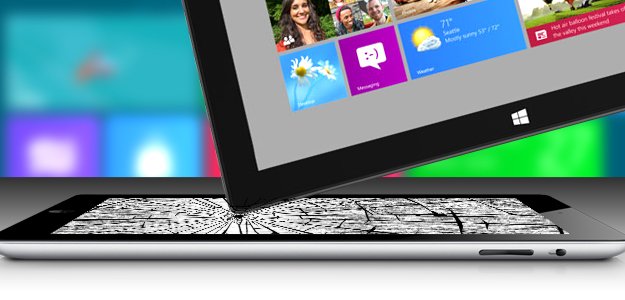
How Microsoft’s Surface just might kill the iPad

Surface killing ipad header

With real productivity apps, a clever keyboard cover and a well-engineered design, the Surface tablet stands a real chance of cutting into iPad sales… if Microsoft will throw enough money at the marketing.

All these “killer this” and “killer that” comparisons get out of control. Every new challenger is hyped as the killer of what came before. But sometimes, it’s true. The iPad really turned out to be a PC killer; folks bought iPads instead of buying new PCs, and that market took a pretty big hit. Apple pulled this off by building something that changed the rules for a PC, and we saw it differently.

Where the PC was about performance, the iPad was about portability. Where the PC was about mice and keyboards, the iPad opted for touch, and where the PC was generally about productivity, the iPad was about entertainment.

But it forced a hard choice that most of us didn’t really want to make: tablet or laptop? This was because the iPad was really a netbook that swapped the keyboard and mouse for a touchscreen, and the iPad’s shortcomings made it a very difficult product to live on exclusively. Most iPad buyers had to keep their PCs or buy MacBooks, and that took what was already an expensive solution and increased it.

With the Surface, Microsoft is trying to reverse the deck and do to Apple what Apple did to it.

Productivity

The Surface comes with Microsoft Office, the unchallenged, dominant desktop productivity product in the market. In fact, the ARM-based Surface actually bundles in Office, so you get productivity capability out of the box, putting it ahead of most PCs. But let’s not stop there, because unlike Apple, Microsoft isn’t being as restrictive of apps that fall into their turf. For instance, the apps can share data, so you can be looking up restaurants on one screen, and then simply click to bring up navigation, or some other app that can use the information from that initial screen. Microsoft also designed in a high degree of accuracy, so you can use a stylus, a tool typically preferred over a finger for creating art or editing pictures. These aren’t netbooks with touchscreens instead of keyboards, they are full PCs. That generally means you should be able to leave the laptop at home or in the office more often.

Designed from the inside out

Apple designs from the outside in. While this does result in beautiful products, it also results in painful problems like Antennagate, or cost problems, which may explain why the iPad mini is priced a whopping 60 percent above the rest of the market. This is also why the first iPhone, when it was presented, was pretty much a pretty brick that took months to get working. When car companies take this approach, you get rolling art that costs a fortune to maintain and isn’t very reliable.

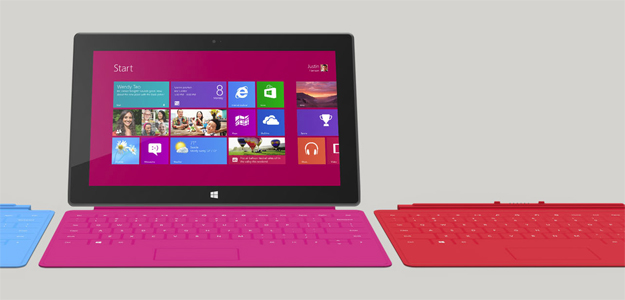
Surface tablet microsoft windows 8Microsoft made big point of designing from the inside out. Engineers got the product properly equipped, adequately reinforced, and balanced before designers wrapped the result in a pretty case. The end result is a tablet with a screen optimized for movies and video, a balance that makes it feel lighter than it is, and a full set of features. (It’s missing a 4G radio, but because only about 10 percent of tablets have WAN radios turned on.) Microsoft even put in a fast-charge battery, so you can go from dead to near full charge in around two hours. Oh, and another in-your-face move is that while Apple uses magnetic plugs to charge for their laptops (which uniquely saves the laptop if you trip over the cord), it doesn’t appear on the iPad. The Surface does have this magnetic design. When Apple and Microsoft signed the last cross licensing agreement, Microsoft agreed not to copy the iPad. Instead, it ripped a part off the MacBook to improve its own tablet. Now that really is getting in Apple’s face.

The necessity of a keyboard

A few years back, before the iPad, Bill Gates and Steve Jobs were on stage, and Bill said something to the effect that tablets were the future for mobile PCs. Steve pretty much said that only idiots would buy a tablet, because a keyboard was simply too irreplaceable.

Now, both the iPad and Surface tablets have optional magnetic covers, but only Microsoft’s comes with a built-in keyboard. This makes it look like the Surface Tablet is a better presentation of Jobs’ vision than the iPad, and that is about as “in your face” as we can get.

I think it would be fun to run the clip of Steve Jobs calling tablets without keyboards stupid right after a clip of Tim Cook talking about tablets with keyboards as the ugly result of refrigerators and toasters mating, and then follow it with the number of iPad keyboards sold (the market for this has turned out to be impressively large).

Marketing is key

After seeing the cringe-worthy Olympics ads that Apple did, I’m convinced that a lot of talented people left the company after Steve Jobs passed. This gives Microsoft the potential to out-market Apple this round. Kathleen Hall’s advertising team at Microsoft is considered one of the best in the business, but Microsoft traditionally underfunds advertising. If it does that here, this potential Apple killer will follow the Zune into the dustbin of history. The initial TV ads are good, but they’ll need Apple-like seeding and sustained marketing programs (read: loads of cash) to assure this “killer” product reaches its potential. If it opens its wallet wide enough for that, Microsoft may do to Apple what Apple did to it with the iPod, iPhone and iPad, and find that revenge can be oh so sweet.


Source : digitaltrends[dot]com

Sep 26, 2012

Facebook adds Dropbox integration to Groups to become a file-sharing force

dropbox and facebook groups

Facebook edges into productivity tool territory by adding Dropbox integration to Groups.

Today Facebook and Dropbox announced they’re teaming up to offer file storage and sharing to Facebook users. “Today we’re psyched to announce that you can share stuff from Dropbox right inside Facebook Groups!” the Dropbox blog reads. “Now you can share notes with your study group, add the latest game schedule to your basketball team’s group, or post a birthday video to your family’s group at lightning speed from wherever you are.”

After connecting your Facebook and Dropbox accounts, users will be able to pull up the contents of their Dropbox folders and pick and drop content into Facebook Groups. Everything added to a Group from Dropbox will also be viewable via smartphones and tablets.

add file from dropboxUsers have already had the ability to upload files to Groups, but it’s been a limited feature (anything shared, for example, had to be under 25MB). The Dropbox partnership means more types of media – like video – will be uploadable and that size cap will dramatically increase.

The deal is pretty win-win-win, though if anybody’s coming out ahead it’s easily Dropbox. The market for cloud storage and sharing is heating up, and while Dropbox has become a venerable name in this space competition from Box, Skydrive, and Google Drive has been significant. A tie to Facebook is a big benefit, though, and means that anyone using Groups as a real sharing function is going to go ahead and connect to their Dropbox account or get one. The move also means Facebook probably doesn’t have any serious cloud ambitions.

The win for Facebook, obviously, is that Groups is getting beefed up and could become a much more viable collaboration tool. Social business and productivity tools are making a big push and getting ridiculously high valuations – think Yammer, Evernote, and juggernaut Salesforce. Of course, the hurdle is that Facebook has an image and that image is social… just social. But you can’t claim to be a productivity feature unless you build out productivity features, so it’s a smart move. And that last win, clearly, is for users. The new feature will be rolling out starting today. 


Source : digitaltrends[dot]com

Aug 29, 2012

Drag and drog app platform Tiggzi adds database functionality

drag and drop tiggzi

WIth an emphasis on a productivity-rich UI and its new database functionality, Tiggzi competes for app developers platform love.

There is no doubt in anyone’s mind that the app economy has uprooted how we think about the technology market. In a landscape formerly dominated by hardware titans and products that targeted the IT crowd and not the everyday consumer, the app has become not only a legitimate startup idea but the foundation of the hottest, fastest-growing industry — mobile. 

Which is why it stands to reason that there’s plenty of interest not only in developing apps but in developing tools for developing apps (say that three times fast). Apps are supposed to be inherently simple and enjoyable on the user-end — and now that’s being applied to the developer side of things as well. 

One startup attempting to infuse some ease and accessibility into this process is Tiggzi. Founded last year, the company falls under the umbrella of software engineering company Exadel, and it’s a cloud-based mobile app platform that relies on the simplest of the simplest actions for app creation: Drag and drop. 

“We started Tiggzi as a prototyping tool so that developers could create their UI,” says head of community and developer relations Max Katz. “We just realized, ‘Well we can’t go much further than just building the UI with that.’ So it grew from there.” 

With Tiggzi, you’re launched into a digital workshop where, to put this in the simplest terms possible, you drag and drop the elements you want over to the device image. You can use these functions to create iOS, Android, HTML 5, and Windows Phone apps. 

Of course, while the action itself is familiar and easy, don’t confuse Tiggzi with something you can pick up sans developer skills. “At the end of the day this is a development tool, and you’ll need to have Web development skills,” Katz says, adding that HTML, Javascript, and CSS proficiency are generally what you’ll find necessary to use Tiggzi. But these skills, combined with the action-orientation and immediacy of Tiggzi turn it into a great productivity tool for developers. 

The fact that Tiggzi is entirely cloud-based and runs in the browser with no download or install necessary is also part of its allure. 

New to Tiggzi is its database. The platform previously announced it would be adding some a backend and storage for developers’ Tiggzi-made apps. It also comes with plugins so that developers can auto plug pre-made functionalities into their apps — as an example, Katz showed me how a developer could pull and put in the AT&T sms messaging feature via the available plugin. 

“We started as just the builder, but the backend services make us a platform,” says Katz. “A lot of companies have the backend, but they don’t have the builder, but we have both. We can offer the entire stack.” 


Source : digitaltrends[dot]com

Aug 24, 2012

The Evernote evolution continues with Evernote Business and Moleskine ‘Smart Notebook’

Evernote 2012 Trunk Conference

The productivity platform continues to assert itself with a new niche, Corporate-focused application and a smart notebook from Moleskine.

Today, Evernote kicked off its second annual developer Trunk Conference, complete with a little numbers showing off and some big announcements for the productivity platform. Before diving into the new launches, here’s a quick look at Evernote’s growth:

  • Evernote now has 40 million users
  • 15,000 developers are using the Evernote API
  • 8 in-house Evernote-made apps

For quite awhile now, it’s been clear that Evernote is more than just an app. What began as a mobile answer to the legal yellow pad has evolved into a rich, note-taking, memory-making ecosystem that is multi-device and function focused. That’s in part largely thanks to its devotion to developers, who have created a rich variety of apps to keep Evernote current, useful, and competitive. Evernote users don’t have to settle for stagnancy. Some recent fundraising hasn’t gone unnoticed either, which CEO Phil Libin explained to me earlier this year as a sweet spot where the company “can take the most risks, experience, and do what we love.”

Evernote Business

And today we’re getting to see some of the fruits of their labor and the effects of this fundraising. First new development: Evernote Business, which “includes everything Evernote has to offer with a number of powerful new features designed exclusively to meet the needs of our business users,” says the company. Evernote is already a popular platform for corporate use, but it’s traditionally worked in a much more personal sense. This means Evernote will start competing with the likes of Yammer, Asana, and Do from Salesforce – although it’s a paid service, not a free one with premium features, and will cost $10 a month.

Evernote business appAmong the new tools are features like an admin console, a billing system, and easy on-boarding for current users. Interested in beta testing? You can sign up here, otherwise you’ll have to wait until December when it’s formally launched.

Smart Notebook

Also announced at the Truck Conference was the Evernote Smart Notebook by Moleskine. Evernote’s job is to eliminate the need for last-gen note-taking (e.g. with paper and and writing utensil), but the collaboration between old and new could easily be a popular one for the almost-converts who just can’t put down the pen.

Evernote Moleskin smart notebooksmart notebook stickers“We’ve partnered with Moleskine to develop a new, limited edition Evernote Smart Notebook that’s designed specifically for the new Evernote iOS application,” says Evernote. “Together, we created a gorgeous notebook that includes a number of special features that allow you to take your ideas off the written page and place them right into Evernote, where they’ll be searchable, organized and available forever.”

The two have come together to design a special type of page that the new Evernote iPhone app can very clearly read. It creates a high contrast visual so the image you’ll have in the app is far more life-like than other pictures of text you take, and it’s supposed to be able to accurately recognize handwriting as well.

It also comes with Smart Stickers, which the app will read for auto-labeling your written entries.

The Smart Notebook is definitely a bit of a novelty item, but at $30, it’s an interesting and affordable one – and there are plenty users (ahem… this one right here) who can’t give up the physical act of list-making just yet. 


Source : digitaltrends[dot]com