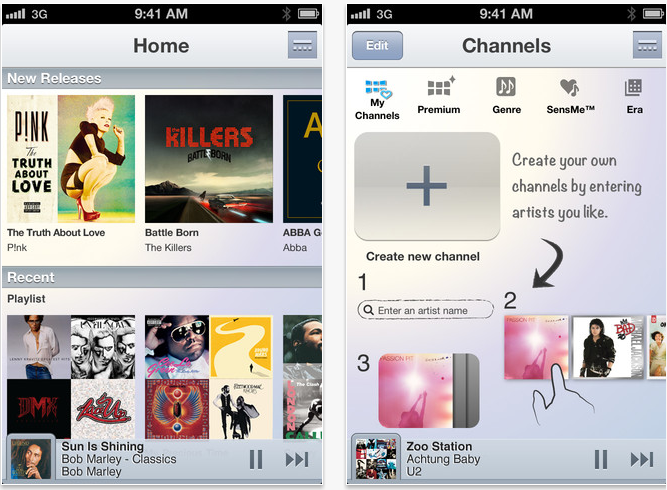
With a new update to Sony's Unlimited Music service on iOS devices, including the addition of music channels and redesign of the homepage, we got a hands-on look at a premium subscription of the music streaming service.
Music Unlimited has been around as a Spotify competitor since May, when we covered the launch of Sony’s streaming-music service. The app offers a comparable pricing model at $4.99 per month for the basic paid plan and $9.99 for the premium subscription, and has a library of 18 million licensed tracks that are available in 17 different countries. Streaming veterans Rdio and Spotify, for the record, each offer more than 18 million songs as well.
Competition be damned, we go hands-on with the Sony streaming service and its iOS update. Using the $9.99 service for iPhone, we wanted to see if the latest version of Music Unlimited can breath a little life into a platform whose name isn’t among the cream of the music streaming crop.
Interface and navigation
Music Unlimited’s iPhone app’s look and feel hasn’t been changed for the most part since launch, but there has been a retooling of a couple of the iOS app’s hubs, the new homepage being the most noticeable change. A list of random channels – pre-set music stations – and playlists used to be featured up front. Now you’ll find a category for “New Releases,” and recently played playlists and channels. At the very bottom of the homepage you’ll find a category called “You Might Like,” where Music Unlimited’s recommendation engine suggests artists based on your listening history. As a long time Spotify user, Music Unlimited’s iOS app’s homepage is arguably a familiar sight from color down to the album tiles.
Navigation remains fool-proof. A navigation button on the top right corner of the screen opens up additional tabs labeled “Channels,” “Charts,” “My Library,” and “Settings.”
 Under the hood
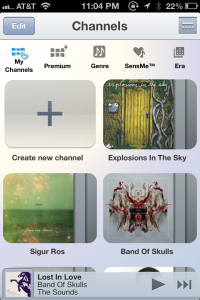
Music Unlimited pays particular attention to its curation of music, and this is where the service actually does its competitors one better. The variety and number of curated channels (the equivalent of Spotify’s Stations) is a tempting service for lovers of radio and preset channels and refrains from inundating users with too much variety. For instance you can discover music based on chart topping tracks under “Charts,” access a list of Top 100 tracks from different genres from within the “Premium” tab, or take a trip as far back as the 1950s through the “Era” channel. The service also recognizes a trend in mood-based music curation by integrating mood driven channels like “Energetic,” “Emotional,” and “Morning.”
If you want to get creative, you can also make your own channel simply by selecting a favorite artist, and letting Music Unlimited’s engine do the rest. A Sony spokesperson explained that the custom channels worked “based on the analysis and categorization of musical traits across the service’s global library of music.” Still, I easily preferred the quality of music Spotify’s under-the-hood engine recommends. Music Unlimited’s engine runs on Gracenote, and while it sufficed, it was never quite able to surface music I really wanted to hear. Obviously this is subjective, and you might find Gracenote’s engine up to your standards.
Finding and adding music to your library is as simple as opening up the navigation tab, searching for an artist, album or track, and selecting the track. And a new feature that iOS users will enjoy in the latest update is the ability to add tracks to a custom playlist.
Hiccups
A couple of caveats that I noticed was that I had to drill down three times into a search result before I could add the song. On top of this, when I was playing a track on a channel and wanted to skip to another track or play a new channel altogether, I encounter a bug on numerous occasions that would freeze the track until I navigated to a different tab to break out of the glitch. And again, the recommendations that Music Unlimited surfaced were pretty consistently disappointing for me — although, I have to reiterate this has more to do with personal taste than anything else. But it still seems like the streaming app’s ability to find what I want to listen to just isn’t quite up to par.
Verdict: Good… but is it good enough?
Music Unlimited could easily function as a Spotify substitute if you’re needing one, particularly among those of you who enjoy preset music and genre-based music stations. The setup and function of the two have much in common: The like and dislike icons that helps the engines learn about your musical taste, the general look and feel of the interfaces, and even the pricing strategies are alike. And while Spotify’s business has taken off since its stateside launch (as of May, the service had 15 million active users, three million of whom pay for the service, for the record), Sony’s own effort is holding its own: Sony’s spokesperson revealed to Digital Trends that since its launch in May the service has amassed over one million active paid subscribers.
Source : digitaltrends[dot]com