Pages

Showing posts with label channels. Show all posts

Oct 25, 2012

Sony updates its Music Unlimited app for iOS – can it compete with the current stars of streaming?

music unlimited iphone

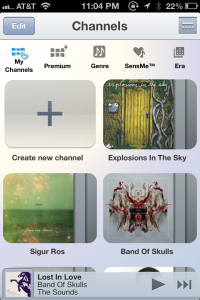
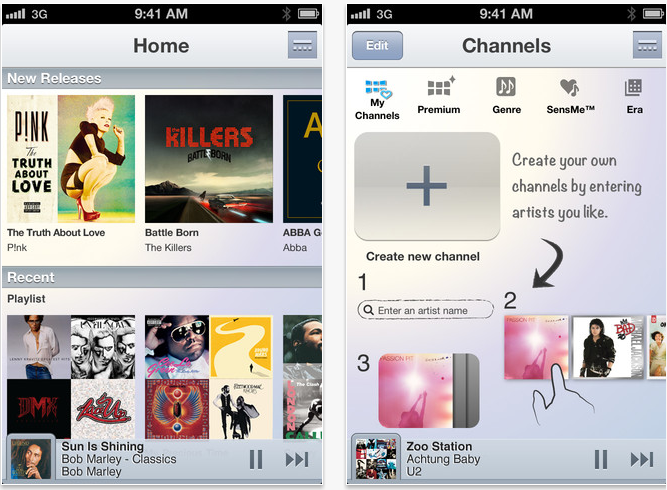
With a new update to Sony's Unlimited Music service on iOS devices, including the addition of music channels and redesign of the homepage, we got a hands-on look at a premium subscription of the music streaming service.

Music Unlimited has been around as a Spotify competitor since May, when we covered the launch of Sony’s streaming-music service. The app offers a comparable pricing model at $4.99 per month for the basic paid plan and $9.99 for the premium subscription, and has a library of 18 million licensed tracks that are available in 17 different countries. Streaming veterans Rdio and Spotify, for the record, each offer more than 18 million songs as well.  

Competition be damned, we go hands-on with the Sony streaming service and its iOS update. Using the $9.99 service for  iPhone, we wanted to see if the latest version of Music Unlimited can breath a little life into a platform whose name isn’t among the cream of the music streaming crop. 

Interface and navigation

Music Unlimited’s iPhone app’s look and feel hasn’t been changed for the most part since launch, but there has been a retooling of a couple of the iOS app’s hubs, the new homepage being the most noticeable change. A list of random channels – pre-set music stations – and playlists used to be featured up front. Now you’ll find a category for “New Releases,” and recently played playlists and channels. At the very bottom of the homepage you’ll find a category called “You Might Like,” where Music Unlimited’s recommendation engine suggests artists based on your listening history. As a long time Spotify user, Music Unlimited’s iOS app’s homepage is arguably a familiar sight from color down to the album tiles.

Navigation remains fool-proof. A navigation button on the top right corner of the screen opens up additional tabs labeled “Channels,” “Charts,” “My Library,” and “Settings.”

music unlimited channelsUnder the hood

Music Unlimited pays particular attention to its curation of music, and this is where the service actually does its competitors one better. The variety and number of curated channels (the equivalent of Spotify’s Stations) is a tempting service for lovers of radio and preset channels and refrains from inundating users with too much variety. For instance you can discover music based on chart topping tracks under “Charts,” access a list of Top 100 tracks from different genres from within the “Premium” tab, or take a trip as far back as the 1950s through the “Era” channel. The service also recognizes a trend in mood-based music curation by integrating mood driven channels like “Energetic,” “Emotional,” and “Morning.”

If you want to get creative, you can also make your own channel simply by selecting a favorite artist, and letting Music Unlimited’s engine do the rest. A Sony spokesperson explained that the custom channels worked “based on the analysis and categorization of musical traits across the service’s global library of music.” Still, I easily preferred the quality of music Spotify’s under-the-hood engine recommends. Music Unlimited’s engine runs on Gracenote, and while it sufficed, it was never quite able to surface music I really wanted to hear. Obviously this is subjective, and you might find Gracenote’s engine up to your standards. 

Finding and adding music to your library is as simple as opening up the navigation tab, searching for an artist, album or track, and selecting the track. And a new feature that iOS users will enjoy in the latest update is the ability to add tracks to a custom playlist.

Hiccups

A couple of caveats that I noticed was that I had to drill down three times into a search result before I could add the song. On top of this, when I was playing a track on a channel and wanted to skip to another track or play a new channel altogether, I encounter a bug on numerous occasions that would freeze the track until I navigated to a different tab to break out of the glitch. And again, the recommendations that Music Unlimited surfaced were pretty consistently disappointing for me — although, I have to reiterate this has more to do with personal taste than anything else. But it still seems like the streaming app’s ability to find what I want to listen to just isn’t quite up to par. 

Verdict: Good… but is it good enough?

Music Unlimited could easily function as a Spotify substitute if you’re needing one, particularly among those of you who enjoy preset music and genre-based music stations. The setup and function of the two have much in common: The like and dislike icons that helps the engines learn about your musical taste, the general look and feel of the interfaces, and even the pricing strategies are alike. And while Spotify’s business has taken off since its stateside launch (as of May, the service had 15 million active users, three million of whom pay for the service, for the record), Sony’s own effort is holding its own: Sony’s spokesperson revealed to Digital Trends that since its launch in May the service has amassed over one million active paid subscribers.


Source : digitaltrends[dot]com

Sep 17, 2012

Shazam now recognizes 160 television channels to enhance TV viewing experience

shazam

Shazam announced its foray into providing auxiliary content to enhance your television viewing experience in over 160 channels.

Shazam, boasting over 250 million users worldwide, announced today that the app will now support television programming on just about any channel, at any hour.

You may have noticed during American Idol, the Super Bowl, or the London Olympics that a Shazam icon would appear at the bottom corner of your TV screen, during a participating commercial or programming. If you’ve ever bothered to press on “Touch to Shazam,” during a show, additional information about the programming would pop-up on your mobile device. With today’s announcement, Shazam users will be able to access complimentary content through over 160 participating television channels and its users won’t be required to own any cable or satellite television subscriptions.

A Pew Research study from its Internet and American Life Project, which we reported on earlier, is evidence to the growing demand by consumers for additional content that accompanies the television viewing experience. In fact, 52 percent of adult cellphone owners will supplement their television watching with their smartphone. 

Now for those of you that use the Shazam app used while watching television, you’ll be able to find further details about the show that you’d otherwise be forced to tediously Google. Shazam’s television integration will determine what music is playing from the show’s soundtrack, what actors and actresses appear in the program (including other shows that the actors have appeared in), and relevant links to the show’s IMDB and Wikipedia pages, and the official website. You’ll find some interactive and social features that you could access during the downtime during commercials including the latest celebrity gossip about the show and stars, trivia about the show, and a live Twitter feed where viewers can read or weigh in on what other fans are saying about the program.

And if it’s a sporting event that you’re watching, in lieu of cast information you’ll be provided stats, scores, and schedules.

“Over the last year, Shazam has been testing and learning what works by building dozens of custom interactive second-screen experiences for select television shows and events,” Shazam Chief Revenue Officer, Doug Garland, said in a statement. “We’ve applied what we’ve learned to our newly expanded service, and will continue to work closely with our network partners and show producers to build special, unique second-screen experiences for their tent-pole television events and many of the most popular shows on TV.”

Shazam’s also doing what it can to boost its own social integration, a necessity for most apps today. In the coming weeks, Shazam also make its way on your Facebook newsfeed and Timeline when your friends are tagging the shows that they’re watching.


Source : digitaltrends[dot]com

Aug 29, 2012

Flipboard rolling out six curated video channels to boost content

Flipboard TV

Flipboard is rolling out curated video channels for its popular news reader app, covering subjects such as news, science, music, fashion and cooking.

A day after announcing it now has 20 million users, Flipboard is introducing curated video channels to its news reader.

The hugely popular app, which presents news content in an attractive magazine-style format, is rolling out six new TV sections, powered by popular YouTube channels.

Topics include news, science, music, fashion and cooking, among others. The existing video sections, provided by an array of sources, will of course continue to be available to users.

“Whether you enjoy inspirational talks, science experiments or live music, these curated video sections are guaranteed to entertain and inform, wherever your interests lie,” Flipboard said in a post on its blog.

At the time of writing, the channels weren’t showing in its ‘contents’ section and could only be accessed via links on its blog post about the new feature (through ‘Inside Flipboard’). If the new section is being added via an app update, it hasn’t shown up for iOS users yet. Android users should be able to update already, according to the version showing in the Google Play store.

Stats revealed by Flipboard on Tuesday show that three billion pages have been flipped in the two years since the app became available, with users spending an average of 86 minutes a month perusing its content.

Channel info

Here’s a full list of Flipboard’s new curated channels:

Cooking TV: For foodies and aspiring home chefs, these how-to cooking videos can add skills to your culinary repertoire. Learn the basics like Chow.com’s “How to Make the Creamiest, Cheesiest Mac ‘n Cheese” or try quirky recipes like Food Network TV’s “Chicken and Waffles on a Stick.”

Influencer TV: Hear about big ideas from leading innovators and creative thinkers. Influencers TV includes a TED Talks lecture on creating awe by Rob Legato, the Visual Effects Supervisor for “Titanic” and “Hugo.” For shorter fare, check out Big Think videos on “The Search for Life on Mars” and “Seeing Sound, Tasting Color: Synasthesia.”

Music TV: Keep up with what the kids—and hip people of all ages—are listening to these days. Watch the latest indie music videos on Noisey and follow NPR Music’s Tiny Desk Concert series for intimate sessions with emerging artists. Pitchfork TV catches live show moments, including “Bjork Dedicates ‘Declare Independence’ to Pussy Riot.”

Science TV: Feed your curiosity with cool experiments and surprising scientific facts. VSauce will answer “What if the Earth were Hollow?” and “What If Everyone Jumped at Once?” On SciShow, find out “Why Our Brains Love Junk Food” or other scientific explanations for everyday dilemmas.

News TV: With News TV, stay updated on current events via leading news outlets. Get storm and earthquake alerts from Associated Press and ABC News. CBS News follows the 2012 presidential campaigns and Al Jazeera provides international news.

Catwalk TV: Get the latest fashion trends, fresh off the catwalks in Paris, Milan, Tokyo, New York City and more. YouTube channels like Fashion TV and Videofashion cover global runways and rising models. See new campaigns from individual designers, like Alexander McQueen’s “Menswear Autumn/Winter 2012.”


Source : digitaltrends[dot]com

Aug 28, 2012

Best YouTube Channels

best youtube channels online video

So many YouTube videos, so little time. With our curated Best Youtube Channels list, these are the Web entertainment you can't miss.

Who needs cable television when there’s quality entertainment on the Web? If you’re constantly getting links from friends about new YouTube videos and viral clips, perhaps you can be the first to share something interesting by following these awesome YouTube Channels. Categorized by archetypes, we hope these channels will be useful from whether you need instructional videos or updates of the latest news.

For the scientist

Minute Physics

Want to learn all there is about physics but don’t have a long attention span? Minute Physics makes science easy to understand with each video never going on for more than several minutes (the most is around seven minutes, but that’s a rarity; most average around 1:30). The channel helps explain everything from “What is Fire?” to the recent discovery of the Higgs Boson. Now, you don’t have to feel lost when your geek friends discuss scientific topics and easily follow along.

Nurd Rage

Scientific explanations might be cool, but everyone knows it’s the experiments that drew us all to actually attending class back in grade school. Nurd Rage fulfills those fantasies by conducting neat experiments that are probably not recommended for you to try at home. This way, you can live vicariously through the professional while still learning a thing or two.


For the web culture-obsessed

PBS Off Book

Do you want to know everything there is about the art behind pop culture-related things? For example, what’s the buzz with 8-bit graphics or Lego sculptures? Why do people freak out over viral videos and what makes Reddit so popular? PBS Off Book will explain it all to you with a new video every Thursday exploring these web-related topics.

What’s Trending

For those who keep up with the latest pop culture news, What’s Trending is an awesome variety show that discusses exactly what the title suggests. Host Shira Lazar puts on a live stream every day at noon pacific time and 3 p.m. eastern, along with some YouTube videos at its channel featuring online personalities or must-see clips of the week. The channel covers every topic related to pop culture: sports, music, movies, video games, gadgets, and more.

Next Media Animation TV

NMATV Paul Ryan youtubeNext Media Animation TV, shortly known as NMATV, is best suited for those who enjoy WTF animation to go along with updates of the most relevant social news. The channel switches around several different newscasters, but they all narrate a varied range of topics accompanied by hilarious graphical interpretations. NMATV is based in Taiwan, so Chinese narrations are also available should you want to hear your news in a foreign language. The quirky animations have been featured in several television programmings and networks, including The Daily Show with Jon Stewart, Adult Swim, and Spike TV.

For the foodie

My Drunk Kitchen

Cooking should be fun, and if you’re of legal drinking age, that fun comes along with a nice alcoholic beverage of choice with your meals. My Drunk Kitchen accomplishes both at the same time, featuring host Hannah Hart as she comedically stumbles her way to creating a dish while consuming random types of alcohol per episode. After all, doesn’t everything taste better when you’re drunk? A must watch for the modern chef-wannabe.

Cooking with Dog

Despite what the title might lead you to believe, Cooking With Dog doesn’t actually involve cooking dog meat but rather, cooking with a dog as your companion. It’s a quirky Japanese-based show with instructions on how to make intricate meals, such as cute dessert crepes, shrimp tempura, ramen noodle soup, and green tea ice cream. It’s the original Cooking Mama… plus dog co-host.

For general tutorials and tips

A.J. Wood “The Adobe Wan”

Got your hands on a fancy copy of Creative Suite and no idea what to do with it? A.J. Wood, or the self-dubbed Adobe Wan, provides a series of tutorials to help you learn tricks, tips, and tools to get the most out of your software. The tutorials range from beginner level, such as learning to use the Navigation in Photoshop, to more complex, like how to use the Clone Stamp tool for maximized results. The channel is great for those who wonder about all the various tools available on Creative Suite, and how exactly to use them to your advantage.

DietHealth

No gym? No problem. Those who enjoy working out in the comfort of their own home and find a variety of exercise programs on DietHealth’s YouTube channel best to target muscle groups they want to work out the most. Some healthy food recommendation videos are slipped in between workout routines to help you become and overall fitter and healthier person. Many of the workouts posted on DietHealth are also beginner-friendly, with moves you can do on your own with minimal equipments.

Videojug

If you have a random question on how to accomplish a certain task, be it how to cry on cue or how to clean windows with lemons, Videojug can tell you in step-by-step details. Some of the videos are tutorials of things you never knew you wanted to know the steps of, but once it’s there, you can’t help but watch Videojug’s advice — which happens to come complete with dry humor. Don’t you want to know how to make fake blood? Strangely enough, I do. 

We’ll keep this list updated as times change, but if you have any you’d like to contribute, feel free to discuss in the comments!


Source : digitaltrends[dot]com

Aug 27, 2012

YouTube silently rolls out episode listings for original programming

youtube episode guide feature

YouTube has released a new episode guide feature that will simplify the process of watching subsequent episodes.

YouTube is undoubtedly showing signs of heeding the needs of its original programming channels. Digital Trends has noticed a notable change on the video pages for episodic series that should make browsing YouTube that much more convenient.

youtube episode guide feature close upThe silently introduced feature, known to YouTube’s source code as “watch context,” enables users to browse through a list of the episodes in a series. The feature can be found within a box on the top right corner, above “Suggestions” on a video’s page. In the example above, only two subsequent episodes are listed, with a header identifying the show’s season number. The bottom of the box displays a link that leads to the show’s main page, listing all episodes available.

Before the introduction of this feature, content creators have been adding URLs of other episodes in the body of the video’s description, or including annotations at the end of each video typically through an in-video link. Otherwise, if a link to the next episode was not included, viewers would have to manually search for relevant episodes or hope they appear under recommended videos.

From what we can tell, the “watch context” box only accompanies an episodic series. Of course, this feature was built for the specific purpose of navigating one series at a time, but the decision to add a new feature exclusively for web series begs us to wonder if it’s foreshadowing the future of YouTube. How many other native features made just for original programming channels and relevant videos are currently in the works?

It isn’t news that YouTube is cautiously evolving into an original programming hub. But in our opinion, it’s seems Google has been reluctant to design an interface that would be devoted to the needs of its channel partners — at least not in one fell swoop. YouTube’s existing interface can be best described as a jack-o- all-trades; it meets the basic needs for viewing original programming and non-Web series videos. The design is made to ensure all content creators and their products are visible on YouTube. New features such as playlists and episode guides are just some of what YouTube has introduced to benefit both viewers and creators.

While the “watch context” box should come as a blessing to YouTube users, at the end of the day, it’s still about revenue for Google. Advertisers are generally more attracted to premium content, and will pay premium dollars for placement within episodes. With these motivations, new features like the episode guide will contribute to maximizing time spent on continuously watching premium content. We will expect more add-ons that will keep users hooked on YouTube to pop up in the near future.


Source : digitaltrends[dot]com