Pages

Showing posts with label restrictions. Show all posts

Oct 19, 2012

How to bypass video region restrictions in under a minute

How to skip region restrictions with a proxy

Accessing your favorite movies or TV shows on the Web isn't always easy due to a pesky thing called region restrictions. Here is a beginner's guide to using a proxy to skip over the technical wall and start enjoying content from around the world.

I’m not going to lie to you: My girlfriend and I are big, sappy, aristocrat-loving “Downton Abbey” fans. So when season three debuted in September, we could hardly wait to start watching. Problem is, the show is currently only available to viewers in the U.K., and won’t make its way stateside until January 6, 2013. Impatient, we frantically began searching for a way around this useless (to us) hurdle — but we weren’t willing to start downloading things illegally.

Such is the dilemma of many Web users who try to access U.S.-made content from their respective international homes. Hulu, ABC, NBC, and even “The Daily Show” are blocked in many countries not called the United States. This is also true of music services like Spotify, and a wide range of other sites and services across the Web. Similarly, those of us in the U.S. cannot use BBC iPlayer, or, in the case of “Downton Abbey” fans, iTV Player.

Now, there are quite a few solutions to the problem of region restrictions. Unfortunately, the most user-friendly options, like a Virtual Private Network (VPN), usually cost money (not a lot, but some), or are complicated to use if the most technical thing you’ve ever done with your PC is install Firefox. There are also options like Tor, the anonymization software that masks your identity. And this is a fine option, but does involve downloading and getting to know additional software.

Fortunately for those of us who are not technical wizards, there is a quick and easy way to bypass region blocks in less than a minute, for free. I’m talking about using a proxy, and it’s surprisingly simple to use. (If you already know all about proxies and how to use them, feel free to move along — this one isn’t for you.)

Proxy basics

Before we get into the how-to bit, some background: Each time you go online, your computer is assigned an IP address. Your IP address, which is transmitted to every website you visit through your browser, tells these sites what your physical location is. This is why region blocks work — they simply forbid any computer with an IP address outside a particular geographic region from accessing content. By using a proxy, you actually change the IP address that your browser transmits to the Web.

The simplest way to use a proxy is to visit the mildly-NSFW-named VPN provider Hide My Ass (HMA), which allows you to simply past a URL into its Web Proxy tool and start browsing under a different IP address. Under the “advanced settings” tab, you can choose which country you want to appear to be browsing from. Website Proxify offers a similar service, as well. Easy though it may be, however, this solution will not work with certain websites. And, because so many other people are trying to use the same proxy address as you, load times slow to a slug-like pace.
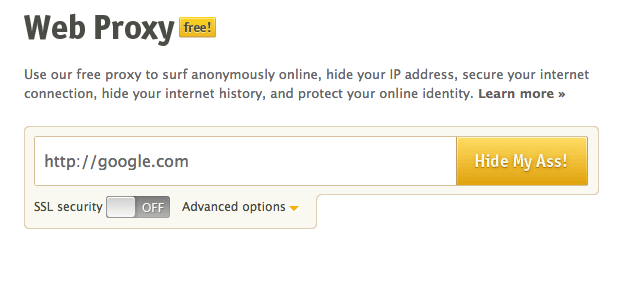
HMA web proxy

Another solution is to establish your own proxy through your Web browser. You can either do this through the browser itself, or by downloading a plugin, like Proxy Switchy for Chrome, or FoxyProxy for Firefox.

To use any of these options, you’re going to need to find a proxy IP address and port. HMA generously offers a constantly updated list of these, which you can find here. You’ll want to pick a proxy that is from the country as the content you want to access. (So for “Downton Abbey,” I would choose a U.K.-based proxy.) Also check to make sure the “speed” and “connection” categories are good — if they’re not, you will experience a maddening series of interruptions.

How to use FoxyProxy

After going through a headache of glitches, we found the very best option is to use Firefox, and install the FoxyProxy add-on. Once you’ve done that, head over to the HMA proxy list page. Select your country of choice. Under the “Protocol” options, de-select “socks4/5.” (Just for simplicity’s sake.) Then hit “Update Results.”
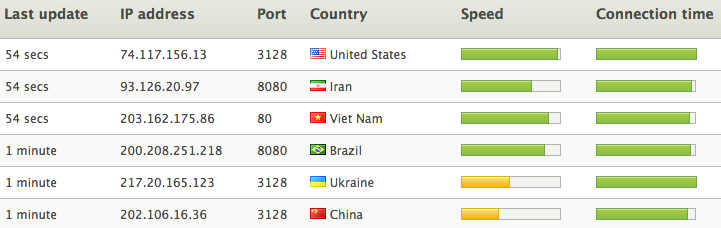
HMA proxies

At this point, you will also want to open FoxyProxy by hitting the icon that appears to the right of the URL box. Click “Add New Proxy.” Next, head back over to the HMA page and find a proxy that looks good (the bars next to the country name should both be green). Once you’ve selected one, copy the IP address, and paste it into the “Host or IP Address” field in the FoxyProxy window. Go back to HMA, and copy the “port” number that appears next to the IP address you’ve chosen. Paste the port number in the “Port” field in the FoxyProxy window. Then click “Ok.” (Don’t worry, you’re almost done.)

foxyproxy 1

A notice will then pop up saying “you didn’t enter and enable any whitelisted (included) URL patters.” For our purposes, you can just ignore that — click “OK.” At the top of the FoxyProxy window, click on the drop-down menu next to “Select Mode,” then select the option that includes the IP address you just entered. Click close — and you’re done! Start streaming.

foxyproxy 2

If you want to turn off the proxy, just click the FoxyProxy button, and change the mode to “Completely disable FoxyProxy.”

The downsides

Now, cheating the system never works out flawlessly. The first thing you MUST consider are your local laws. In the U.S., it is legal to use proxies. In other countries, it might not beso check to make sure you’re in the clear before doing any of this. And, at the very least, you will likely be violating the terms of service of the websites you visit. In short: Whether or not this is legal doesn’t necessarily make it right.

Even if using a proxy is legal, and you don’t mind the ethical gray areas, you’re probably going to have to change the specific proxy you use on a regular basis. Free proxies, like those available through HMA, often get shut down, or are just too slow for streaming puposes. That said, you can get access to high-quality proxies through FoxyProxy, but it’ll cost you a few bucks a month for a subscription — totally worth it, if you plan to leap over region restrictions on a regular basis.

Image via Pell Studio/Shutterstock


Source : digitaltrends[dot]com

Oct 3, 2012

Squeezed out by Twitter, Tweetbot makers introduce the App.net-friendly version, Netbot

netbot from tweetbot

After Twitter's API restrictions hurt its alpha testing, Tweetbot makers went the developer-friendly route with Netbot, the App.net iPhone and iPad apps.

Fan-favorite iOS Twitter client Tweetbot recently announced it would be shutting down its alpha testing as a result of Twitter’s recent API restrictions. Initially, Tweetbot developer Tapbots reassured us all that the application would be just fine, and the team was working closely with Twitter on the project. Unfortunately that was not the case, as user tokens became limited and so did Tweetbot’s ability to functionally test its app.

So while Tweetbot for Mac waits in the proverbial wings, Tapbots decided to take action where it could – over at App.net. The anti-Twitter, microblogging platform has been developer-friendly from the get-go, launching in reaction to tide of API restrictions Twitter began whispering about early last summer. App.net recently announced it would be incentivizing — allowing developers to build for its platform by offering them a crack at a $20k pool.

App.net also recently dropped its user fees from $50 a year to $36 a year, or $5 a month. The quick assumption there is that the platform is trolling for new users as its initial hype begins to fade, but App.net is spinning this as good news, saying it’s nearing 20,000 users, easily surpassing its 10,000 paying members goal.

Of course, it’s still no Twitter – which, this summer, was estimated to have more than 300 million registered users. But given the platform’s distancing from developers, it’s only natural that app builders are starting to look elsewhere, Tapbots included.

netbot for iphoneWhich is what brings us Netbot. “If you love Tweetbot and are on App.net, you’ll want Netbot,” co-founder Paul Haddad wrote in a blog post introducing the new client. “We’ve been working very closely with App.net. Their goals of always putting users first resonates with what we believe at Tapbots. Even though App.net is currently a small network, we expect big things from them and are proud to be a part of the community.”

Haddad says App.net is also working on bringing expected features like push notifications and private messaging to the platform, and once available, they will be integrated into Netbot as well.

netbot for ipadNetbot for iPhone and iPad is available today (both cost $4.99 — Tweetbot for iPhone is $2.99, for the record), and the app is incredibly reminiscent of what we all fell in love with in Tweetbot for iPhone (the long-awaited iPad version was in the works when the Twitter hammer fell). App.net iOS users will absolutely want to turn to this client for their mobile use. Getting Tapbots – a very respected and creative team – on board with the platform speaks well of where mobile development for App.net is going and the kind of talent it’s attracting. But it’s important to remember that App.net is not a Twitter-as-we-know-it-now killer – it’s just trying to resurrect what Twitter was and could have been. 


Source : digitaltrends[dot]com

Sep 21, 2012

IFTTT removes Twitter Triggers in wake of API violations

With Twitter's API restrictions, IFTTT users will have until September 27, before Twitter Triggers are disabled.

 ifttt no twitter

With Twitter’s API guideline changes, popular mix-and-match app pushing service IFTTT is now among the services that have been dealt a blow. If you have recipes set up that include Twitter as a trigger, you’ll find them disabled come September 27.

IFTTT sent out an email yesterday notifying its users of the upcoming changes due to the enforcement of Twitter’s new API guidelines. While Twitter Triggers (an IFTTT feature that works by pulling Tweets from Twitter’s cloud onto other services) has been restricted, IFTTT will continue supporting the ability to publish Tweets.

The Twitter guideline that IFTTT specifically refers to, and that the service is affected by, is section 4A: “Exporting Twitter Content to a datastore as a service or other cloud based service, however, is not permitted.” Instead, Twitter data can be extracted as a spreadsheet or PDF, both which are rudimentary forms of storing information that would be not be wise to be implemented into any third-party services. Does anyone really want an excel sheet of tweets?

In the email sent to IFTTT users, the company explained its respect for Twitter’s decision. “We’ve still got a long way to go, and to get there we need to make sure that the types of connections that IFTTT enables are aligned with how the original creators want their tools and services to be used,” IFTTT’s CEO, Linden Tibbets, wrote in the email. Many other third party developers, however, don’t share the same sentiment about Twitter’s latest moves.

Last month, developers and Twitter users expressed their discontent with the new changes through a petition to “protest” Twitter’s restrictions to its API. Services like Tweetbot were forced to shut down new feature implementations in the wake of the API changes, while other developers have resorted to filing complaints with the Federal Trade Commission asking them to review Twitter’s restrictions.

IFTTT’s situation might doesn’t quite bear the same significance as other shut down apps, however. As TechCrunch first pointed out, based on the Twitter policy, which has been outlined above with regard to exporting Twitter content, IFTTT may have been violating Twitter’s Terms of Service policy all along.

The changes are going to affect many IFTTT users considering the popularity of the platform, but until the end of the month rolls around, you’ll have time to figure out what recipes you’ve created with Twitter as the trigger. Luckily IFTTT says it will continue to build for Twitter. “We’re sad to see [Twitter] go, but remain excited to build features that work within Twitter’s new policy,” Tibbets added.


Source : digitaltrends[dot]com

Sep 17, 2012

Twitter roadkill: Photo-sharing apps ousted today, who’s next?

twitter api restrictions

Photo-sharing sites get the boot as Twitter continues to tighten things up.

Earlier this month, Twitter officially unveiled its new API. After months of talking about talking about new restrictions for third party developers, the network finally anted up and put things in specific terms. The short of it: Developers have until March 5 to comply with the rules – which more or less heavily restrict the creation or use of anything duplicating Twitter’s core function – or else.

No surprises here. The blog post heard round the tech world late last month put everyone on warning, announcing that services that use the Twitter API to mimic or recreate the service (which, for the record, is a very vague statement and a thin line… a thin line which Twitter will interpret as it sees fit) are on the outs. And the reason why is incredibly clear: Twitter wants eyeballs on its site because it’s a media company now with partnerships and big ad deals. And if users are looking at a third party client, all that money will slip away. Of course, if Twitter would update its proprietary app with the features we’re being driven to outside services for… but that’s a whole other issue, and one that still puts third party developers out to pasture.

“It’s not surprising, it’s what we all expected,” Bottlenose creator and CEO Nova Spivack told me when Twitter officially announced the new Rest API. And it isn’t, and neither are the limitations for alternative Twitter clients but now it’s time we take a look at the carnage being left in Twitter’s wake thus far.

First up, big changes for services like YFrog and Twitpic, which take and post pictures to Twitter, are being run out. According to Buzzfeed, Twitter reached out to tell developers this was coming. (Which is something of an unprecedented move: When Twitter first introduced its own photo sharing feature, third parties were given no warning). Twitter will be removing support for outside photo-sharing apps, a change likely coming in the next issued updates – so  you can say goodbye to most of the photo-sharing services on this list. (For the record, Posterous is owned by Twitter).

twitter list photo sharing“Because of twitter’s actions against devs the past year we kind of thought this was going to happen at some point, and Twitter did reach out to us to let us know which I really appreciate,” TwitPic founder Noah Everett tells me. “I understand why they are going this route since they are under pressure to make ad dollars; however, obviously we do wish they wouldn’t pull choices away from their users. The majority of our uploads come from other sources, so this doesn’t affect us much, and we’re still going forward strong.”

It might not be surprising that this is happening; it lines up with Twitter’s new agenda and photo sharing spells big traffic. But I have to question how core this is to the Twitter experience – the proprietary platform didn’t even introduce its own photo feature until last year. It definitely wasn’t part of the original Twitter core function, and it’s remained so silent about its evolutionary focus that claiming this to be a key cog of the Twitter machine seems like a stretch.

This is a big switch-up that immediately will impact users, but here are a few other specifics suffering from the Twitter ecosystem changes:

  • RSS, XML, and Atom support is being ended. This is more the end of function rather than feature, and will be a developer-facing issue rather than something that impacts end users, but it’s worth mentioning.
  • Tweetbot is having yet more problems with its beta because of the Twitter limitations. Basically anyone who is trying to grab the client after already having authorized it might be out in the cold until the final version is available. You can check out this blog post for troubleshooting help, but it’s possible you just have to wait.
  • Big, popular sites have lost access – we’ve already covered this, but it’s still sort of a head-shaking move on Twitter’s part: Tumblr, Instagram, and LinkedIn can no longer use the site to find friends or in LinkedIn’s case send tweets to its own platform.
  • Twythm CEO Ben Thomson recently wrote a guest post about how he had to rewrite much of how his application functions – the bigger picture here being that Twythm, a service that allows you to post what you’re listening to, something Twitter has no foot in, changes the way tweet timelines are displayed, so it’s on the outs. It’s just an example of how the new rules can be interpreted and hurt outside applications.

I don’t want to add to the Twitter hate-fest that’s been brewing since the company started making these moves, but it’s important to reflect on what’s happening to individual services right now, and to look at how it could affect future ones. Remember how Twitter said it was going to introduce its own fully-featured analytics client? Does that mean that applications currently doing this – of which there are many – should start watching their backs?

It’s questions like this we’ll have to keep asking as Twitter continues to evolve and interpret its own function. 


Source : digitaltrends[dot]com