Pages

Showing posts with label sites. Show all posts

Nov 9, 2012

Watching online porn is a good way to get yourself blackmailed by a hacker

Porn ransomware

Browsing online porn sites has become increasingly dangerous thanks to a precipitous rise in "ransomware" viruses, which lock down victims' computers, and demand they pay hundreds of dollars for the ability to regain control of their machines.

Watch online porn? Of course you do. Nothing wrong with that. You’re only human. But we have to warn you: Perusing the NSFW side of the Web could land you with a nasty computer virus that allows criminal hacker gangs to take control of you PC, and hold it hostage until you cough up cash.

Known as “ransomware,” this type of nefarious software is one of the most rapidly spreading threats on the Internet, according to a new report from cybersecurity company Semantic (PDF). The reason: It is an easy way from cybercriminals to make money.

“This malware is highly profitable, with as many as 2.9 percent of compromised users paying out,” the report says. “An investigation into one of the smaller players in this scam identified 68,000 compromised computers in just one month, which could have resulted in victims being defrauded of up to $400,000 USD.”

Semantic researchers Gavin O’Gorman and Geoff McDonald, who authored the ransomware report, say that hacker gangs are likely raking more than $5 million a year by extorting their victims. “The real number is, however, likely much higher,” wrote the researchers.

While about 16 different versions of ransomware viruses exist, says Semantic, they all work in relatively the same way. Hackers trick users into installing the virus on their computer by either installing malicious code on websites, or simply buying ad space on (usually porn) sites, and then running ads that link to a page infected with the ransomware. Once a user clicks the ad, it is secretly installed on their machine through the browser.
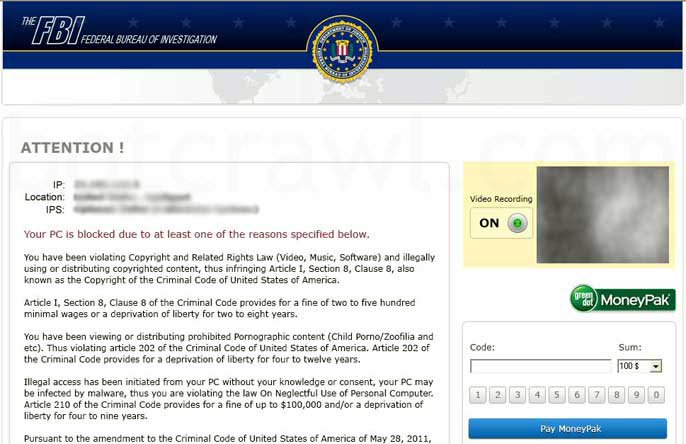
FBI ransomware

After the virus has successfully installed, things immediately go wrong. The ransomware automatically disables a number of key programs that render the computer inoperable by the user. An image will pop up on the screen that is made to look like it’s from a law enforcement agency, like the FBI. The image will tell the user that their computer has been blocked, and they must pay around $200 within 72 hours, or risk arrest for failing to pay a fine for “viewing or distributing prohibited pornographic content”

“Because the compromised individual may have indeed been browsing a pornographic website prior to infection, the message carries some more weight,” the report says. “In addition, the nature of the message may be embarrassing to some, encouraging them to get rid of it at any cost.”

Users tricked by the scheme will then purchase an electronic payment PIN, and enter the number into a box on their computer screen. The hackers can then retrieve the payment. Not surprisingly, however,  the hackers rarely uphold their end of the bargain, and victim’s computers remain locked.

According to Semantic, the number of ransomware infections in the U.S. has skyrocketed over the past few months, jumping from about 1-2 percent of total worldwide infections in March to 20-50 percent of infections, as of September.

Fortunately, there are a number of easy ways to avoid infection. First, don’t click any ads on porn sites. Second, make sure all your programs and plugins (like Flash and Java) are all up to date. And finally, install anti-virus software (this is a good free one), which will easily detect any ransomware and clean it off your machine.


Source : digitaltrends[dot]com

Oct 29, 2012

How You Can Host your Website on Google For Free

Google offer users a simple way to host their site by using Google Sites. To do this, you will require a Google account to sign in. This can be done by creating a Gmail account. You have the option to use many pre-built templates or create a site from scratch. This is a very simple process


Navigate to the Google Sites page and enter your sign in information. Click the Sign in button and you will see the Sites page. If this is your first time on the page, click the Create button to continue. Click a template option that you want to use for your site. If you do not want to use a template, click the option for Blank template. Enter a name for your site and then type the security code at the bottom of the page.

Click the Create Site button at the top of the page to continue. Google will then take a moment to set up your site. When this process is complete, you will be taken to your new Google Sites Page. Click on the Edit Page button in the menu bar at the top of the screen. The page editor is similar to a text editor. This means that you can type text on the screen or add new elements. You should see a toolbar appear on the screen.

Click the Insert button to add elements to your new page. You have the option to add many elements to your page such as an image, a link, and other common elements. Gadgets are also available that include an option for Recent posts. Options from Google can also be placed on your page. This includes the use of a calendar, a chart, a document, a Picasa photo and even Adsense.

If you want to change the appearance of your page, click the Layout option. Once you have added your selections, click on the Edit sidebar link. This will take you to the Manage Site page. You can add many options and change features from this area. Click the Change site layout to make any changes that you require.

Click the Preview button to see your changes before they go live. When you ate satisfied with all of the changes, click the Save button at the top of the page. If you so not want to save your changes, you need to click on the Cancel button. Click the Home button to go back to the main Sites page.

Tags: Google App Engine, Google Sites, Google Webhosting, Webhosting

Source : techtalkafrica[dot]com

Oct 27, 2012

How to Block Adult Websites From Kids

While it has tons of advantages, the internet can turn out to be a nightmare, especially for parents. There are many educational sites for your children on the web, but on the other hand, inappropriate sites are also everywhere. This in turn makes the internet very unsafe for children.

There are a number of things that you can do in such situations. You’ll require website-blocking applications and the web addresses of the inappropriate sites. Of course, these requirements will only be meaningful when you have an active internet service, a computer, and an internet browser.

The first step involves keeping an eye on the history files of your internet browser. History files usually list all the sites that have been visited over a certain period. Details such as the date a site was visited and the web address of the site are provided. This will give you a clear picture of which sites you deem inappropriate. You can find the history files by clicking the history tab on your internet browser.

Once you’ve taken note of the inappropriate sites, you’ll need to change your privacy settings.

Step 1: Open your internet explorer

Step 2: Once in the Menu Bar, You need to click Tools → Internet Options → Content.

Step 3: Once you are in the Content Advisor box, click Enable, Click the Approve sites Tab and Enter the addresses of the website, then Click never and then ok

The next step is to make sure that you select Users can see websites that have no ratings, enter an easy-to-remember password. and Click OK to easily surf the web

Though this method will partly block the sites that your child has been visiting that you are aware of, it won’t block him/her from visiting new inappropriate sites. You’ll thus be required to take more measures.

A website-blocking application has the ability to automatically determine the website that someone is trying to access through a computer. If the website is blacklisted, it can’t be viewed by your child. Additionally, website-blocking software can also anonymously track which sites your child has been visiting. Better yet, you have the option of setting your own security levels. This can thus be quite useful when you have children of different ages.

Though website-blocking software can be quite efficient, they squeeze unnecessary additional costs from your pocket. Finding the right Internet Service Provider can save you all this trouble. There are some Internet Service Providers (ISPs) that have high –tech website-blocking applications which filter out inappropriate content. The best thing about them is that you need not worry about knowing all the inappropriate sites so that you can add them to a “blocked sites” list. More often, these ISPs dedicate some of their workers to manually visit the unknown sites that have been viewed by your child and block the sites if any inappropriate content is found.

Because the internet has several loopholes, all these methods won’t guarantee you that your child won’t visit inappropriate sites. Blocking inappropriate content from your children doesn’t always rely on getting expensive website-blocking software and getting your internet service from reliable ISPs. Sometimes, talking to your children about the downside of inappropriate content is all that you need to do. Moreover, you can place the computer in a more open location where any attempt to view inappropriate content will always be hampered.

Tags: Adult Site Blocking, Adult Sites, Adult Websites, Website Blocking

Source : techtalkafrica[dot]com

Oct 15, 2012

Exact Match Domain (EMD) Penalty and How To Recover

Google is at its algo again and this time around, it is turning the knob down within their algo to devalue those sites that were enjoying top rankings in Google’s SERP just because they have the keywords in their domain name. I call it a good move because SEO people were just making a mockery of the SERP for some high value search terms by coming up with as many exact match domains with slight variations as possible Even if you still search for some popular terms like “content writing” etc you can still see sites with two or three hyphens with exact match anchor texts are enjoying top ranking in the SERP. Hopefully in the next update, Google will get them down.

Without any shred of doubts, exact match domains have always been the bone of contention among online marketers. As sites with exact matched keywords were enjoying some sort of unfair advantages, people start buying domains by either adding some modifiers in between or by adding as many dashes in them as possible. So, we started encountering sites like this – http://www.best-online-seo-company-uk.com and their likes. And of course not to forget those spammy .info, .mobi and other TLDs. The whole SERP was getting spammy and Google has to intervene.

So, I hope you have understood why EMD penalty was unavoidable. Now the question is what to do if your website gets penalized by this algo shuffle. Of course, there are no hard and fast rules, but still you cannot simply sit back and see you website getting devastated by this updates.

It is not a manual penalty: Since the whole thing is algorithmic, you should not be wasting your time sending reconsideration request to Google. This is not going to help you.

And This is not a penalty: Yes, this update is not about penalizing websites as experts are claiming; rather this update is all about leveling the field by reducing the value of some exact matched domains. In majority of cases, these exact match domains were in the SERP just because they have those phrase in their URLs.   So, when Google takes out the value for having certain key phrase in their URLs, these sites automatically face huge loss of visibility. Exceptions apart, these exact match domains were crap sites, good for nothing.  So, it is basically a good riddance.

301 Redirection will not exonerate your sins: Those of you who are into the belief that by 301 redirecting to a new domain will solve the issue are living in a state of denial. Since the domain value of your website has busted, by 301 redirecting to a new domain, you will never be able to get back the rank. It is not that easy.

This is how you can get back the rankings -

Continue the good work. I mean come up with great content, build great community and earn some high quality links.
Forget about the domain value rather focus on branding. Create a brand image, invest some time in promoting your website in social media websites and make your readers feel good.
Get rid of bad or low quality content.

And please forget about speedy recovery. Domain value of your website has got removed and you need to build it from the scratch. So, it is going to be another uphill battle.

Michael Evan is a blogger by passion and he likes travelling a lot. He is a regular contributor at - http://www.insidershostreview.com/

Report an error

No tags for this post.
Source : techtalkafrica[dot]com

Sep 24, 2012

How To Do SEO On Your Website After Penguin

With the fact that Google Penguin update is affecting many sites, it is reasonable if you are afraid that your sites might be the next victims of the Penguin. To know whether your sites hit by Penguin update or not, take a look at your sites’ traffic data, if you see a significant drop on search-related traffic compared to one or two days before, then your sites got the slap.

Google Penguin update is an update intended to remove websites that bombard Google search results with spammy web pages. The final goal is of course providing searchers with more relevant search results. So, regardless of whether you have been hit by the Penguin update or you are figuring out the most effective ways to keep your sites safe, here are five tips to do SEO after Penguin update.

1. No-index low quality pages

As you all know, duplicate content always leads to problems or a penalty. I know it is time consuming if you have to evaluate a site that already has thousands of pages. However, you have to do that to deal with duplicate content issue. If you find some pages that give no value to visitors, you’d better no index those pages immediately.

2. Diversify your anchor texts

Getting links from hundreds or thousands of sites with the same anchor texts is a sure way to get red flag from Google. From now on, though you want to target certain keywords, diversifying your anchor texts is important. Mixing your targeted keywords with your brand and using synonyms of your targeted keywords are some of the ways to diversify your anchor texts.

3. Diversify your link profiles

If you are still doing the practice of buying links only from popular websites with PR 1 and higher, you’d better modify it because Google sees it as an unnatural link building campaign. To remain safe, make sure that your link building campaign gets links from low PR, high PR, small, big, unpopular and popular sites. It is also important to get links from social media sites like Twitter and Facebook.

4. Pay attention to the pattern of your link growth

Most webmasters usually have a monthly budget for link building campaign. Having a budget is good to manage your spending but not for SEO, why? Having a monthly budget indirectly makes a pattern on the number of links you get each month, and again, Google sees it as an unnatural link building effort. The safest strategy is not to have a certain link growth pattern. Random link building campaign is better for now, but keep in mind not to over optimize your sites.

5. Provide quality content for visitors

As mention above, Google wants to provide quality and relevant search results for searchers. If you cannot post quality contents that give benefits to your visitors then it is better not to post anything. If you cannot write quality contents, invest your money on hiring freelance writers to write quality contents for your sites.

As a conclusion, Google Penguin update wants to wipe out spammy web pages from the search results. If you want your sites to survive, correct or remove any spam-like web pages in your sites.

Bio: This guest post is from John Ramos who writes for Websling.com. John helps many beginners through his articles about search engine optimization and website development.

Tags: Penguin, SEO advice, SEO Strategies, SEO Tips

Source : techtalkafrica[dot]com

Sep 17, 2012

Twitter roadkill: Photo-sharing apps ousted today, who’s next?

twitter api restrictions

Photo-sharing sites get the boot as Twitter continues to tighten things up.

Earlier this month, Twitter officially unveiled its new API. After months of talking about talking about new restrictions for third party developers, the network finally anted up and put things in specific terms. The short of it: Developers have until March 5 to comply with the rules – which more or less heavily restrict the creation or use of anything duplicating Twitter’s core function – or else.

No surprises here. The blog post heard round the tech world late last month put everyone on warning, announcing that services that use the Twitter API to mimic or recreate the service (which, for the record, is a very vague statement and a thin line… a thin line which Twitter will interpret as it sees fit) are on the outs. And the reason why is incredibly clear: Twitter wants eyeballs on its site because it’s a media company now with partnerships and big ad deals. And if users are looking at a third party client, all that money will slip away. Of course, if Twitter would update its proprietary app with the features we’re being driven to outside services for… but that’s a whole other issue, and one that still puts third party developers out to pasture.

“It’s not surprising, it’s what we all expected,” Bottlenose creator and CEO Nova Spivack told me when Twitter officially announced the new Rest API. And it isn’t, and neither are the limitations for alternative Twitter clients but now it’s time we take a look at the carnage being left in Twitter’s wake thus far.

First up, big changes for services like YFrog and Twitpic, which take and post pictures to Twitter, are being run out. According to Buzzfeed, Twitter reached out to tell developers this was coming. (Which is something of an unprecedented move: When Twitter first introduced its own photo sharing feature, third parties were given no warning). Twitter will be removing support for outside photo-sharing apps, a change likely coming in the next issued updates – so  you can say goodbye to most of the photo-sharing services on this list. (For the record, Posterous is owned by Twitter).

twitter list photo sharing“Because of twitter’s actions against devs the past year we kind of thought this was going to happen at some point, and Twitter did reach out to us to let us know which I really appreciate,” TwitPic founder Noah Everett tells me. “I understand why they are going this route since they are under pressure to make ad dollars; however, obviously we do wish they wouldn’t pull choices away from their users. The majority of our uploads come from other sources, so this doesn’t affect us much, and we’re still going forward strong.”

It might not be surprising that this is happening; it lines up with Twitter’s new agenda and photo sharing spells big traffic. But I have to question how core this is to the Twitter experience – the proprietary platform didn’t even introduce its own photo feature until last year. It definitely wasn’t part of the original Twitter core function, and it’s remained so silent about its evolutionary focus that claiming this to be a key cog of the Twitter machine seems like a stretch.

This is a big switch-up that immediately will impact users, but here are a few other specifics suffering from the Twitter ecosystem changes:

  • RSS, XML, and Atom support is being ended. This is more the end of function rather than feature, and will be a developer-facing issue rather than something that impacts end users, but it’s worth mentioning.
  • Tweetbot is having yet more problems with its beta because of the Twitter limitations. Basically anyone who is trying to grab the client after already having authorized it might be out in the cold until the final version is available. You can check out this blog post for troubleshooting help, but it’s possible you just have to wait.
  • Big, popular sites have lost access – we’ve already covered this, but it’s still sort of a head-shaking move on Twitter’s part: Tumblr, Instagram, and LinkedIn can no longer use the site to find friends or in LinkedIn’s case send tweets to its own platform.
  • Twythm CEO Ben Thomson recently wrote a guest post about how he had to rewrite much of how his application functions – the bigger picture here being that Twythm, a service that allows you to post what you’re listening to, something Twitter has no foot in, changes the way tweet timelines are displayed, so it’s on the outs. It’s just an example of how the new rules can be interpreted and hurt outside applications.

I don’t want to add to the Twitter hate-fest that’s been brewing since the company started making these moves, but it’s important to reflect on what’s happening to individual services right now, and to look at how it could affect future ones. Remember how Twitter said it was going to introduce its own fully-featured analytics client? Does that mean that applications currently doing this – of which there are many – should start watching their backs?

It’s questions like this we’ll have to keep asking as Twitter continues to evolve and interpret its own function. 


Source : digitaltrends[dot]com

Sep 6, 2012

Using Pinterest To Find New Things To Enjoy

I’m constantly on the search for cool things to do, to watch, to enjoy. I spend plenty of time online, searching through different sites for fun ideas to try out, new foods to make, new deserts to destroy, and just fun things in general. Being a member of several of the bigger social media sites out there, it’s easy to waste hours if you aren’t careful – yet have nothing to show for it.

Enter Pinterest. When I found this site, I was blown away at the ease at which I suddenly was finding all sorts of new things to try and do. If I want a new recipe to try out, I go to Pinterest. If I want some new idea for kid’s projects, I go to Pinterest. If I just want to check out some beautiful photos from around the world or gorgeous classic cars, I go to Pinterest. The site simply holds what I want, when I want it. So how do you use Pinterest to find new things? Here are some things that I do:

Secret #1: Watch the Feed

Just like Facebook, Pinterest has a feed. If I just want to see what’s posted right now by whoever, I keep it on that main page. You can find all sorts of great things here, from any category that you can think of on the site. On the feed, I’ve found superb ideas for fun dinners, great baby gifts, awesome holiday crafts, beautiful artwork, and my next vacation destination (which right now is Tahiti). By simply keeping the feed up and refreshing, you never really know what’s going to come across your view.

Secret #2: The Popular Feed

In this area, you are going to find things that lots of people are posting about. This can be anything from artwork to TV shows, DIY ideas to travel plans, maps to kid photos – there really is no real rhyme or reason to what you’re going to find here. I enjoy finding things here because it’s a great way to know what’s trending all around the web, with your friends, and it holds all types of things throughout the different categories.

Secret #3: Different Categories Hold Fun Things

If I’m in search of something specific, I head to the categories section. You can narrow down your search to a specific category, such as food and drinks or holidays. I love to head to the foods area if I’m wanting something different for dinner. I head over to the travel area if I want to check out beautiful sights around the world that need to go on my “need to see” list. I head over to the DIY and crafts section if I’m looking for new craft plans and patterns to try at home. There’s no shortage of what you can find here in the different categories.

Also, I love the categories area simply for the fact that it can help make sense of the madness sometimes. The feed and the popular area can get massive, if you aren’t careful you may end up watching just to find something familiar, and never find it. Plus, I’ve gotten to where I end up heading off the site by watching the feed for too long as it gets jumbled up. Categories make it more clear, and you can find better ideas by narrowing down what you want.

Secret #4: Not Bad Being A Follower

The people that I follow have the same interests as me, in one category or another. So sometimes it’s fun just to scour through the different people that I’m following to see what’s new that they have posted. It’s easy to narrow down what you want to check out if you’re already following certain people with the same interests. If you aren’t following a lot of people yet, start in the categories section and start following people that are posting things you like. Pretty soon, you will have a mass of people that you follow.

Secret #5: Walk Away

Yes, you read that right, walk away. Sometimes I just go cross eyed by looking at the different feeds, and I have to get up and walk away. I can come back later or the next day and boom – there is what I was searching for. Just getting away and clearing your mind can easily help you focus on what you really need.

Your Own Secrets

Of course, you will find your own ways of searching out what you love on Pinterest. Just using the site can help you find plenty of great things that revolve around your own interests and loves. Instead of playing Facebook games or tweeting about this or that, try searching through Pinterest and see what you can find to love too.

Author Bio: With four kids and a Girl Scout troop to help occupy, finding fun ideas for all ages is a must for Mandi Weems. As a freelancer, she has plenty of time online to find ideas, search out new things to do, or find things that can keep her grounded. Of course, Pinterest is one of her favorite places to find virtually anything, but she also loves www.theartfulcrafter.com for finding great kid-friendly ideas.

Tags: Pinterest Ads, Using Pinterest

Source : techtalkafrica[dot]com

Sep 4, 2012

Top 7 Article Marketing Websites For Traffic

Article marketing is a very effective way to bring traffic to your website. The benefits are two-fold. You can receive traffic directly from your articles posted on other sites, and you can get a boost in the search engine results for your website also increasing traffic.

Here are the top 7 article marketing websites for traffic.

Ezine Articles

Ezinearticles.com is the number one article directory. It has been around for a very long time and has a lot of great features that has kept it number one on many marketers’ lists. You can submit your well-written articles in dozens of available categories. Ezine Articles has a lot of organic traffic right to their site and often ranks high in the search engines. Plus, your articles can be used on other people’s sites for more traffic.

Ezine Articles allows you to have different pen names. This works well for a variety of different reasons such as if you have different types of marketing to do for different websites or products. Your articles need to be at least 400 words and well-written. Set up a profile so that people can learn more about you and find your website. This is an important step for any article marketing site you use that has such a feature. You can also upgrade to premium membership for more features and benefits.

Go Articles

Goarticles.com is another directory that gets a lot of traffic and use by article marketers. If you want exposure for your business, use this article directory as much as possible. It’s very easy to get a membership started, and the submission process is simple as well. Your articles may also be republished by other sites for added exposure.

Idea Marketers

Ideamarketers.com has a variety of helpful services. Publishing marketing articles is just one of them. They have a wide variety of categories you can choose to publish in. This site also allows you to submit press releases which can be very beneficial to your business.

Article Base

Articlebase.com is free to join and gives you another outlet for basic article submission. It’s very similar to other sites that give you free exposure, more traffic, and credibility to your name. It has a good amount of traffic making it great to add to your article marketing rounds.

Hubpages

Hubpages.com is a little different than the above article directories. When you set up a hub, you do more than submit an article. You can write articles and add pictures, links to products, reviews, and other interactive media. The strength of Hubpages is when you build a lot of hubs and interlink them. You also need to maintain a certain score in order for your links to be do-follow.

Squidoo

Squidoo.com is another site like Hubpages where you create lenses. You can promote your business and earn money directly from your hub. Get involved in the community to improve your lenses and build more traffic.

Infobarrel

Infobarrel.com is a newer site that has become increasingly like Hubpages and Squidoo. Designing your pages is similar, but they are strict about varying the types of articles you write. Gain a lot of exposure through Infobarrel by adding pages frequently. They also have monthly contests where you can win free gift certificates by writing more.

Tags: Article Directory, Article marketing, Article Sites, Article Submission, Do Follow Article Submission, Free Article Sites

Source : techtalkafrica[dot]com

Aug 29, 2012

25 Best Websites of 2012

25 Best Websites of 2012

The Internet has become a major source of entertainment, social media, ideas and tools. This year, many new sites have blown up and become the big hit. Other sites have continue on to be some of the most visited sites for years. Here are the best websites of 2012:
1. Google:
With Gmail, google voice and google plus, everything from searching, communicating and sharing interesting ideas is available on one site.
2. Twitter:
Twitter’s popularity is growing, especially in 2012. Twitter is a place to share what;s up in your life quick and easy.

3.Facebook:
The number one social media site provides everything from sharing news, photos, and much more with your friends.

4.Youtube:
Youtube is still growing in popularity, and is taking place of the TV with awesome media.

5.Tumblr:
Tumblr is a major blogging site for teens and adults looking to share their interests.

6.Pintrest:
Pintrest blew up just this year. It allows you to “pin” your favorite pictures and things, and create your own portfolio of what you love.

6.Yahoo news:
People love to catch up on the latest news, and Yahoo is the place to do it this year.

7.Pandora:
Pandora is an interesting way to find new music. It gives you new songs to listen to based on your music taste.

8.Yahoo! Omg!:
The best site for gossip and news in the Hollywood lights!

9.Amazon:
Amazon is the perfect place to purchase all you want for a cheaper price. It’s the worlds largest e-commerce website.

10.Brotips:
Brotips is a fun and quirky site filled with tips for guys in a picture form. It’s entertaining and fun to read.

11.Dropbox:
A free service allowing you to share and save your photos, documents and more in one place.

12.Wikipedia:
Wikipeda is still a top website in 2012 for all of the information you could ever need.

13.Craigslist:
Craigslist is a way to shop in your area for used or new products, or even things such as homes and cars.

14.Flickr:
Love photography? Flckr is the best place to post your pictures and view others without copyright problems.

15.Metrolyrics:
Metrolyrics is a simple spot to find lyrics.

16.Hubpages:
An easy way to publish and earn money.

17.About:
About is a guide to all you need to know, whether you need information on ab workouts or the the top schools in the country.

18.Paypal:
Paypal is the safest place to store your money, send it and use it to purchase online.

19.Photobucket:
Store your photos and share with others on photobucket.

20.Groupon:
An easy website to find great deals and discounts on items, events and vacations.

21.Match.com:
Now you can search online and become compatible with someone nearby through match!

22.Allrecipes.com:
The best site for a wide selection of amazing recipes.

23.Hulu.com:
Watch your favorite TV shows and movies online, some even for free, with Hulu.

24.Etsy:
Etsy is a new site dedicated to selling and buying handmade goods.

25.Livestrong.com:
Find health and exercise tips for any sport!


Source : techtalkafrica[dot]com

Aug 28, 2012

UKNova is the latest victim of FACT and the MPAA’s global BitTorrent crackdown

UKNova Logo

BitTorrent tracker UKNova has been forced to close down, following a cease and desist letter from the Federation Against Copyright Theft.

While sites such as The Pirate Bay and Demonoid may spring immediately to mind when discussing BitTorrent, there are plenty of other, smaller trackers out there too.

However, as of today, there’s one less, as threats from the Federation Against Copyright Theft (FACT) have forced private torrent tracker UKNova to shutdown.

UKNova’s situation was a little different from those sites mentioned above, in that it never defiantly rallied against the authorities, or publicly flaunted any legally dubious activities.

It existed to provide those without access to UK television the chance to catchup with shows they would otherwise be unable to watch. It benefited expatriates and anglophiles alike, but crucially, it made a point not to host commercially available content.

These so-called “ethical” guidelines included an upload ban on anything available on CD, DVD/Blu-ray or content broadcast as pay-per-view.

Not that this saved them from the watchful eye of FACT, as it has issued a “cease and desist” letter to UKNova, telling them “all links or access to content provided by UKNova are infringing, unless it can be proven that explicit permission from the copyright holder for that content has been obtained.”

UKNova trackers scrapped

According to a UKNova site member, posting on Neowin’s forums, the site published a statement saying that while it believes “legally and morally” the site has done nothing wrong, it’s “not in a position to be able to risk lengthy and costly court battles to prove this.”

UKNova, which began operating in 2003, is in the process of closing down its trackers, and although the site’s forum will remain open, the pages related to torrents will be removed.

Site administrators told TorrentFreak.com that FACT mentioned a large UK satellite provider and a football production company as the big guns behind the cease and desist letter. Using the process of elimination based on FACT membership, TorrentFreak.com assumes this to be Rupert Murdoch’s BSkyB and the Premier League.

Sharing content originally broadcast on television has long been considered, by the general public at least, something of a grey area; primarily due to the commercial availability of VHS and DVD recorders. Sites such as UKNova feel like a modern extension of this, particularly if no other way exists to view or purchase said content.

FACT and the MPAA obviously disagree, and UKNova’s closure proves that claims of “ethical” behavior don’t carry much weight, especially if you don’t have the resources to defend yourself in court.


Source : digitaltrends[dot]com

Aug 27, 2012

French VPN – Why Do You Need It?

Why Do You Need VPN to View French Sites?

If you want to view a French site you might find that you will need to choose French VPN.  The reason why is simply because if you are outside of France, you won’t have a French IP address and not having this means you are stuck because you can’t view French sites.  However with French VPN, you will be able to get your hands on a French IP address and use French sites.

What is more, you don’t have to be in France in order to get the new IP address, you can be in your very own home in Spain, Switzerland, Scotland, New Zealand America or any other country in the world.  No matter where you are you will get access to French sites with a French IP address.  The most important thing to remember is that VPN will allow you to view the sites you want to view and VPN is legal to use also.

Using French VPN

Remember if you are planning on viewing any French site outside of the country you may find it to be a very difficult task indeed.  If you do however want to try, you should look for French VPN.  This is going to be the best and probably the only option that you will have today especially if you are outside of France.  The laws over the use of the internet are very strict in many countries and it is the same in France so if you do plan to visit the country frequently or just wants to view French sites, you will need to choose a French virtual private network service.  This is the one way that you are going to be able to get a French IP address – unless you plan to move to the country but of course that might not be an option, so for now, VPN is the only option you will have.

Don’t worry if you have never used VPN before, there is nothing to worry about and everything can be set up within minutes.  It doesn’t take long and you can certainly enjoy the sites and freedom online like never before – and you might be able to get access to french television catch up sites which means all the French TV you want.  Go ahead and enjoy getting a French virtual private network connection.

This Guest post was written by Marks who writes about VPN service on his site bestvpn.co.uk


Source : techtalkafrica[dot]com

Aug 23, 2012

Aug 7, 2012

Cheating 2.0: A look at social media’s influence on infidelity [Infographic]

cheating lovers

A new infographic from divorce lawyer group Total Divorce shows how dumb social media practices can lead to an ugly divorce.

Thanks to the proliferation of dating sites like Match, OkCupid and eHarmony, finding love online is more popular than ever. Not surprisingly, however, having relationships online also means that social media networks have become an instigator for cheating, and a cauldron of evidence for divorce lawyers looking to peg lovers with bad behavior.

Increasingly, divorce lawyers gather evidence from social media for divorce courts. According to a infographic created by Total Divorce, an online divorce lawyer network, 81 percent of members of the American Academy of Matrimonial Lawyers have reportedly used “confronting information” from social networks in divorce proceedings. More specifically, 66 percent of the evidence is found on Facebook, 15 percent found on Myspace, and 5 percent found on Twitter.

So what type of evidence could a divorce lawyer find that implicates you in a lie? Total Divorce, and online divorce lawyer network, offers some scenarios that take place all too often.

For example, if you’re in a custody battle with your spouse, who claims that you’re an unfit parent due to your alcoholism or pot-smoking habits, and forget to delete those Facebook photos of you swigging from a bottle of Grey Goose or puffing a joint, evidence like that is bound to show up in court. Or if your spouse took to a dating site like Match.com prior to a custody battle, with a profile presenting his or herself as a single bachelor or bachelorette without children, odds are this kind of damning information will be used in the court room.

This should serve as yet another reminder that, as far as social networks are concerned, absolutely nothing remains private, even if your privacy setting blocks certain individuals. Friends of significant others often rat out “suspicious activity.” Messages to the opposite sex, which your significant other might construe as cheating, often end up as evidence. Even fights that play out through Facebook comments take the stand. And don’t forget the fact that many of these Facebook posts make their way onto other sites on the Web, like Reddit.

So what does Total Divorce suggest for avoiding such follies? The obvious: Question what say before you publish, create separate social circles, and turn off your location-based services when attending “less than reputable establishments.” At the end of the day, how you handle yourself online is simple, and applies whether or not you’re in a relationship: Publish content that you wouldn’t mind your parents, siblings, employers, acquaintances or children seeing. Don’t set yourself up for a future where you’re going to have a bad time.

Check out the infographic below:

Social Media Divorce


Source : digitaltrends[dot]com