Pages

Showing posts with label activities. Show all posts

Nov 9, 2012

Facebook Friendship Pages gets much-needed, long awaited Timeline face-lift

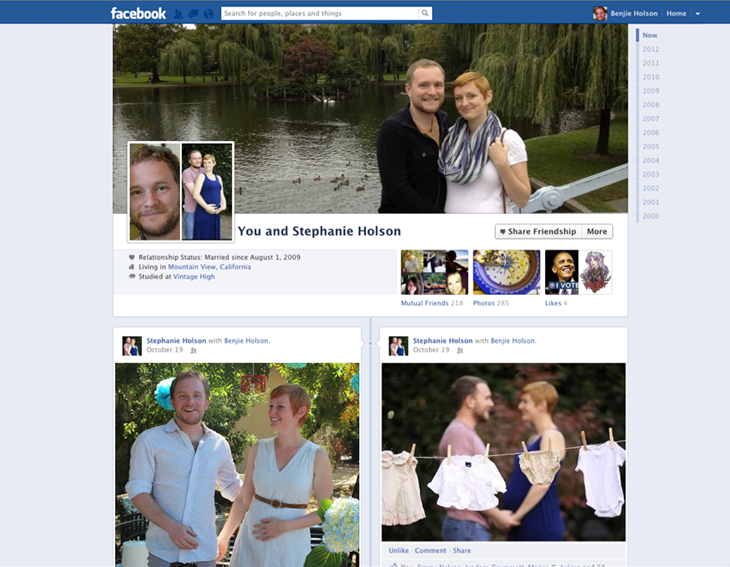
Friendship Page Screen Shot

Facebook will gradually roll out a new design, inspired by Timeline, to its Friendship Pages.

A fairly forgotten and relatively neglected feature are Facebook’s Friendship Pages. Conversations and activities exclusive between you and a friend are logged and presented in Facebook’s old wall format, but Facebook announced it’s working on a gradual and much-needed face-lift for this feature.

The redesign of the page will parallel Facebook’s Timeline look, including the cover photo, friends, photos, events, and likes. Of course since you’re sharing a page with your friend, all these features will be tailored to you and this person’s mutual relationships and common interests. Photos will show up in the format of images that you and your friend have both been tagged in, and you’ll be able to see the same Facebook pages you’ve liked.

The idea behind Facebook’s Friendship Pages is that they act as a reminder of how, where, and when you and a friend met, or a nostalgic moment. But when the Friendship Timeline is released worldwide, it might encourage users to maintain relationships since the design of Timeline, which emphasizes images, is inherently personalized.

The value in Friendship Pages is more apparent if you’re in a relationship with a significant other. All the memories that you’ve shared are immortalized on a page dedicated to your relationship, where you can track your conversations without digging through your own Timeline history. On the other hand, the last thing any broken-up couple would want to see is a rehash of all the good times.

There are two ways to access your Friendship Page. If you look at a friend’s Timeline, you need to click on a gear icon at the top of their page to open up a dropdown menu. The first option there is “See Friendship,” which will open up the Friendship Page. The second access point is through your friend’s list on your own Timeline. If you click on the box labeled “Friends,” you’ll notice a link titled “See Friendship” that accompanies each of your friend’s profile photos.

If your relationship status isn’t set to single, you can visit facebook.com/us to find you and your significant other’s Friendship Page.

Facebook Timeline and its advertising products have been the primary focus for the network as of late. It’s worth reminding you that the platform has been hard at work with feature updates intended to boost user engagement in its auxiliary services like Facebook Groups, Facebook Messenger, Calendar, and now Friendship Pages.


Source : digitaltrends[dot]com

Oct 16, 2012

Path update lets existing users fill their page with Facebook, Foursquare, Instagram data

facebook path

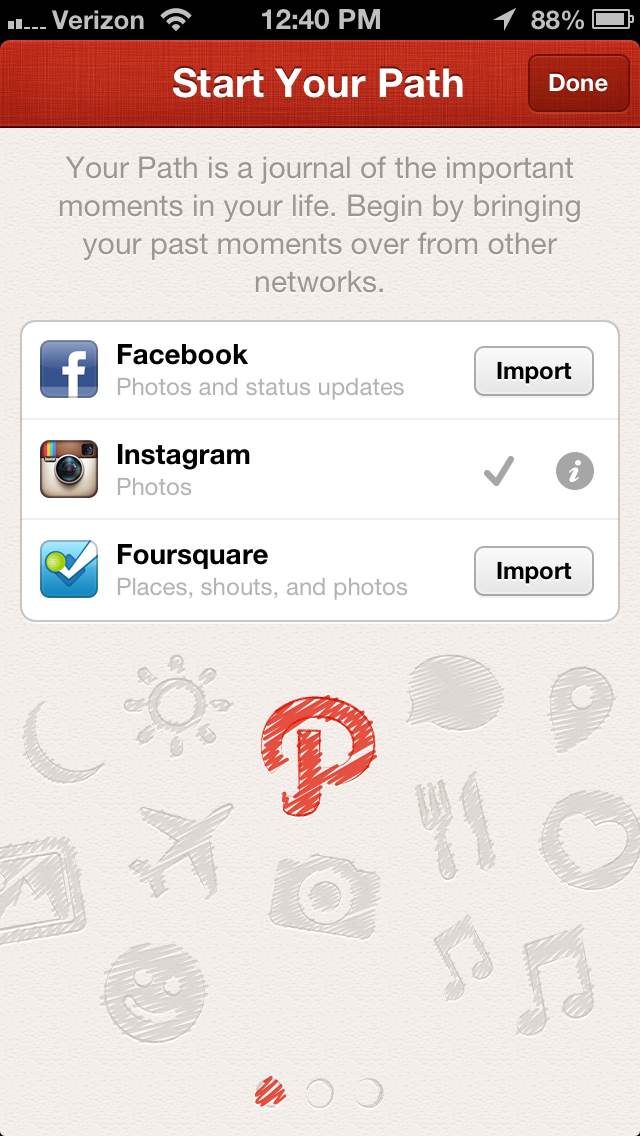
Path's iOS 6 update will allow existing users to add their Facebook, Instagram, and Foursquare activities to their log.

Up until now, Path users who wanted to fill their accounts with Facebook, Instagram, and Foursquare data could only do so when they signed up for a new account. The most recent update now allows existing users to import data from the three major social networks so you don’t have to start over if you really want to link all the accounts together.

What the iOS 6 update does is essentially allow you to pretend to make a new account, giving you the option to “Start Your Path” all over again and access the Import button for the three services under the Settings page. After the import, depending on the size of the data which you are syncing over to Path, it could take several minutes for your account to list all the moments from the three services you just hooked up.

While the update is helpful to Path users, this sync will inevitably clutter most users’ home feed, logging in every single action from the three big social networks. Luckily, if you’re like most people and only have a limited amount of friends left on Path, this journal won’t look too bad. But if you have plenty of friends who are constantly updating the Path logs, prepare to scroll an incredible amount just to get through a day’s worth of activities. Each log for an Instagram photo already takes up a good amount of display real estate, fitting about a photo and a half per screen. And yes, this is on the iPhone 5′s enlarged screen. 

Either way, it’s to Path’s credit to allow users the option to make that choice if they want to, and the import integration will be useful to existing users who want to remain on the app and make it as content-filled as humanly possible.


Source : digitaltrends[dot]com

Sep 30, 2012

Struggling to engage readers with your Google Plus Account – here is how to do this

Your facebook fan page is bustling with users’ activities and it is soul satisfying to see that all your hard work and sacrifices have finally started paying you off. But when you look around and see the Google Plus Profile, the dismal picture sucks out all the happiness of your heart. Yes, I know Google Plus is a different ball of Wax and marketers are still by and large clueless how to promote their brands via this new product from the house of Google. Though I am no expert, here I am going to give you some tips that you can give a go if you wish to see some difference in this dismal picture:

Follow People who are active: You should not be following people who might not be that much interested in your product or service. For say if you say if you are selling baby products, you should not be targeting teenagers because most perhaps they might not be interested in giving a thump-up to your Google Plus profile.  But yes, I am well aware of the difficulties associated with finding the targeted readers who will appreciate your hard work and will help you spread your words far and wide.  However, with “Google Plus” Search, thing can be made a little less harsh.

Just make a search with any keyword in the given search box located at the top of Google Plus and you will be flooded with real time updating stream.  And right below the Keyword in the search box, you will find another box asking you to specify the search. Just make a selection from the options available and you will have all the information at your disposal. Here we will be selecting “People and Pages” option from the Dropdown menu to have the details of all the people and pages that have the keywords we have targeted in their profiles.

Now, if you wish to find the most popular post around the topic, you can select “Spark” option or alternatively, you can select “Google+ Post” to find posts made around that keywords.

So, now you have got ample option to find targeted people who are most perhaps interested in what you share and what you sell.

Do Comment:  You know why people are not active on your Google Plus page? Because you do not encourage them to do so. To build a platform buzzing with activities of the users, you need to be actively involved in the process.  Just following the right people is not going to do the magic, you need to invest some time to interact with the targeted audience. Share some thought provoking insights and I believe they will start following you and your brands.

And whenever someone leaves a message in the Google Plus, you need to take some out of your busy schedule and get into the conversation. It will encourage them to come back to your Google Plus page again and again.

Be there in hangout: Doing a hangout is a great way to meet with new people and share your views. Moreover, it helps you build a great relationship with the targeted audience and give the whole marketing campaign a new lease of life. Face to face conversion is far more engaging and encouraging than just sending out ordinary press release or emails. This will make people connect to your brands and will forester a long lasting relationship.

Yes I know you may be introvert in nature but you should give “hangout a chance”. Now, if you do not know bean about where to start this hangout thing, do not stress. Just do it and you will just be awesome.

Produce something shocking and share worthy: Just sharing great quotes or articles on Google Plus page is not going to do the magic. To make the most of this beautiful and equally powerful platform, you need to come up with some awesome updates crafted by your own imagination.

Your updates should be adding some real value to visitors. You can easily draw attention of the visitors by doing something awkward or by sharing some controversial things without crossing the red line. The bottom-line is you need to get them dragged to the conversion by any means. So, add some spice in the updates, offer discount codes, share some videos etc.

Michael Evans is a passionate writer and he is a associated with Globalserve. He has written several articles on Cyprus Taxation.

Tags: Google Plus

Source : techtalkafrica[dot]com

Aug 13, 2012

Daily Best Practices to Stay Safe Online

As more and more people are getting connected to and undertaking critical daily activities on the Internet, a lot more risks are emerging posing threats to sensitive and private information we manage online.  In the online security chain, however cutting-edge security gadgets we deploy at different layers, a seemingly benign interaction on the Web could lead to devastating outcomes such as loosing our critical credentials and conceiving malware that compromises our devices.

The most difficult vulnerability in the online security arena is the human vulnerability which is easily exploited by attackers. By sticking to simple measures and staying ‘reasonably paranoid’ we can significantly raise the bar against attackers and stay more vigilant against manipulations. Although impractical to absolutely quantify, it is repeatedly suggested that most of the attacks can be avoided if people consistently adhere to the following simple but effective measures:

Think Before You Click

Be cautious whenever you click a link on: any page, pop-up dialog, email text, and social media applications. The risk is that after a click, you have lost the control and just because of the single click you did, you might end up with: malware downloaded on your device and steals your credentials, you get redirected to another page with more dangerous attacks, the link you clicked is automatically shared with your friends on social network without you noticing it and hence propagating the infection to your friends, friends of friends, an so on. Clicking on email attachments also requires careful examination even if the email is from someone you know and trust, because the antiviral software of the mail provider may not thwart all attacks (specially the new ones).

Stay Up-to-Date

On a daily basis (if not hourly), the must-to-update list includes antiviral software, operating system, web browser, and browser extensions (e.g., video player, PDF renderer). Most of the current providers, allow doing the updates online and some (e.g. Google Chrome Browser) even allow silent update without bothering you as a user.

Have Strong Password Policy

Passwords should be complex enough to challenge password cracking techniques and memorizable by the owner. A commonly suggested mix requires alphabets (uppercase and lowercase), digits, and special punctuations (e.g., ?, $, &, !) and the length should be eight characters or more. Never imagine using a dictionary word as a password because it is just a piece of cake for password cracker software. Be sure not to use a password that people who know you can guess (e.g., your lover’s name, phone number). Studies show that many people are still using the same (and very obvious) password across multiple websites.

The disaster with this is obvious. Once you lose your password you risk giving a master key to open all the doors you have locked. Under no circumstance, you have to write down your password somewhere or tell it to any other person. There is one more thing to keep your passwords more robust – change your passwords with reasonable frequency and in situations you are suspicious that your password might have been compromised. There is this analogy about passwords and pants which humorously conveys most of the message “Passwords are like pants. You shouldn’t leave them out where people can see them. You should change them regularly. And you shouldn’t loan them out to strangers.”

Be Cautious of What You Publicize about Yourself

The rule of thumb is that you have to limit the amount of personal information you make publicly available on the Internet, especially via social networks. You never know, your basic information(e.g., email address, phone number, location)may be harvested and used in malicious activities such as spam campaigns and phishing scams. Never disclose any confidential, personal or financial information unless and until you can confirm that and request for such information is legitimate. Review your bank, credit card, and credit information frequently for irregularities and report immediately to your bank in case you observe suspicious activities.

Avoid banking or shopping online from public computers (e.g., Internet Cafes) which are likely to be compromised with malware and may have a wrongly configured or unencrypted Wi-Fi connections. Use HTTPs when connecting via Wi-Fi networks to your email, social media and sharing websites. Check the settings and preferences of the applications and websites you are using. Look for the green browser address bar, HTTPS, and recognizable trust marks when you visit websites where you are required to login or share any personal information.

This is a Guest Post written by Birhanu Mekuria Eshete for Tech Talk Africa, Birhanu is an enthusiast of technology in general and ICT in particular. He is currently specializing for my PhD in Cyber-Security with emphasis on analysis and detection of malicious activities on the Web.


Source : techtalkafrica[dot]com