Pages

Showing posts with label people. Show all posts

Nov 14, 2012

Turns out, the White House’s online petition tool is sort of unmonitored

Government jobs are hard, and people don't always have time to deal with your online silliness. Such is the case with this White House petition to legalize weed.

Freedom of speech is a powerful thing in the United States of America. Without it, you wouldn’t be able to protest, campaign, or get away with this gem that a community member on 4chan dug up. Thanks to this petition to “legalize crystal fucking weed,” we now know people who work in the White House are just like most of us: They’re very busy and do not have time to screen your online shinnanegans. 

Turns out, it’s not very hard to create a petition on Mr. President’s very own website. There’s a whole section of Whitehouse.gov that lets we the people announce what we would like to see the Decider In Chief do some deciding upon, and if the required signature threshold is achieved (25,000), according to the site, ” … it will be reviewed and the administration will issue a response.” So, somebody did their due diligence – save for, you know, any copy editing for grammar, structure, or coherence – and let their voice be heard about a sincere desire to … um … legalize some “crystal fucking weed.” Whatever that is. 

You would think the White House would have a systematic spell check to track cuss words at the very least, but this petition managed to stay online long enough to garner at least – wait for it – 420 votes before someone on Obama’s website staff got wise.

As of 9:38 a.m ET the petition has been removed, with the site claiming it was a violation of the terms of participation. Which is a shame, because we were just 20,000 or so votes shy of finding out what POTUS had to say on this crucial topic. After all, the petition is tagged under “Job Creations.” At least readers in Washington and Colorado can get nice and blazed while discussing it amongst themselves. 

[Image via]


Source : digitaltrends[dot]com

Dropbox lets you win 100GB for sharing your story

Dropbox, the current top dog in cloud storage solutions, is celebrating its 100 millionth account by offering free cloud storage to people who share their Dropbox story.

If yours is one of the top ten favorite stories, you will get 100 GB of cloud storage for life. If it makes it in the top one hundred favorites, then you get a consolation prize of 10 GB for life.

So what is a Dropbox story? A high school football team in Utah uses it for studying game films and scouting reports. An elementary school music class uses it to share their music with students in other countries.

We mostly use it for cat pictures and stuff.

Head over here to check out other peoples’ submitted stories, and maybe you’ll get enough inspiration to put up one of your own.


Source : blog[dot]gsmarena[dot]com

Nov 10, 2012

Tips for Writing an Exceptional Blog Post

I have my own blog’ – this is commonly said by many people these days. But is it that easy to create a blog? Writing a blog post may sound to be an easy task but there are minute details that a blogger has to consider while writing the blog. Whether the blog will meet the target audience’s needs, whether the post will be able to provide you enough info – are some of the tiny details that every blogger needs to pay attention on. Isn’t that so?

Your blog’s success greatly depends on the content of the blog. You have to provide an exceptionally rich content, if you desire to see your blog post in the first ranking of the search result. The market is really competitive and attracting readers to your post demands excellence on the part of writing. How about getting some tips on writing a blog post?

Here are some simple tips to help you in writing an attractive blog post so that audience not only read it but also return to your blog further.

Guidelines for Increasing the Blog Post

Decide upon Your Goal:

Selecting the right tone for your blog is a vital task. Every blog is written for a specific group of audience and hence, it is very essential to know what the content of your blog will be. It is the content of your blog post that will determine your goal. Getting loads of viewers is what every blogger aims at. Besides the goal, expectations of target audience are also what the bloggers have to concentrate on.

Is your blog meant for laughter and fun or is it for the professional audiences? Decide upon the target audience and then select the appropriate tone for your blog. Try out different style, tone, topics and combinations to have an enduring impact on your readers!

Make the Blog Informative:

Endless topics are discussed over the web. Hence, you have to create a captivating blog so that readers get some reason to spend some time on your site. To make your blog interesting, you need to add new information to the same old mundane topics. Giving reviews, opinions and thoughts is an effective way to engage the readers to your blog.

Discuss your own view about the topic your blog deals with. Readers will be bound to comment and express their views on your blog. So, just go ahead!!!

Catchy Headings:

Attractive heading, eye-catching title, these are some things you always hear; right? But do you know why this is repeated all the time? Lately, social networking has grown like wild fire. We get almost everything on Facebook Wall. If you can make your post interesting, your blog will be crowded with readers.

Adding Images

Besides the title, you need to make your blog text attractive by adding images together with the text. A post with a nice image will surely be impressive in the first glance. Using images in blogs optimizes the post for the search engines. Want free images? Go to Flicker.com and add images suiting your blog!

This is not the end! There are multiple tips that can improve your blogging and improve the audience for your blog.

Author Bio: This is a guest post submitted by Charles Malcolm. for any kinds of tips and advice, you can call up the computer help desk. You will get real help in all subjects.

Tags: Blogging Methods, Blogging Secrets, Blogging Strategies, Blogging Techniques, Blogging Tips

Source : techtalkafrica[dot]com

Nov 9, 2012

How to Find The Other Websites of a Person?

People will always have the urge to try and find out what their friend from high school is doing. Whether it is a long lost friend or simply just trying to find another person’s website, it has become quite a task to try and find another person’s website. Though the internet has been growing, it is still quite tough to try and find another person’s website. Unless you have the exact URL, it is virtually impossible without these simple tips.

Facebook Is Always Helpful

When it comes to finding people, Facebook just might be the best option. All you will need to do is sign in and make sure that you know how to use the search features, well there’s nothing really there, just enter the person’s name in the search box above. Once you find them, it is then time to search their page and see if they have a section with their website. If you are not able to find it, you will probably have to message or add that person to get the information.

A Google Search

This is by far the easiest, fastest, and most effective method out there. However, it will take a lot of time for you to try and find the website since there are so many results. There will be millions of results and so it can be tough to really narrow it down. You will only be lucky if the person you are looking for has a unique name. However, if you are looking for someone with a common name like John Smith, you will have a very hard time trying to get what you need. Websites like pho.to can actually tell you who is behind a website,

Please note there are other limitations to this, if someone is using privacy protection for instance, it can make it difficult to know they are actually associated with that website by just “googling” or searching the whois database, of course there are lots of other ways to get this such as by questioning the WHOIS database but this can actually work if you know at least one website of that person and want to find out other websites owned by that person that are hosted on the server, reverse ip can do that, this website is a good place to start

Try Google+

Google+ is slowly becoming a bigger website and people need to realize that this is essentially the future of social networking. However, Facebook and Twitter are more than likely not going anywhere and so you should really think about focusing on Google+ more when it comes to trying to find a person’s website. Since Google+ is more on marketing and networking, you just might be able to find the person that you are looking for.

LinkedIn & Other Professional Sites

There are plenty of sites that will offer you a free service that will help you to search for people. Whether it is for business purposes or you are just looking to contact someone, you can use sites like LinkedIn or Manta to try and find them. However, these two sites are more focused on business owners and will not really give you much information on your long lost friend from middle school. That is why this method is only useful for those that need to find someone because of businesses.

Tags: Facebook, Google Search, How To Find Web sites, Searching A Friend, Social Media Networking, Website Search

Source : techtalkafrica[dot]com

Nov 7, 2012

Domain Privacy Options: Free or Premium

In recent years, purchasing an Internet domain and launching a website have become incredibly easy and affordable, even for people who aren’t computer experts. With just a few clicks, anyone can reserve a URL and purchase hosting for their site; this is usually inexpensive, particularly for savvy shoppers who take advantage of a godaddy promo code or other discount during checkout.

Despite this, some parts of the domain registration process, including decisions about domain privacy, may still seem a little mysterious to neophytes. This article explains the distinction between free privacy options and premium “who is” privacy controls sold by firms such as GoDaddy.com.

Domain registrars are legally obligated to collect personal information about their customers, and to make that information publicly available in databases called “WHOIS” directories. Many people, however, are reluctant to provide this information due to concerns that it will be harvested by identity thieves, scammers and other unscrupulous individuals. Consequently, many prefer to pay an extra fee for “private registration”, by which their chosen domain registrar is given legal ownership of the domain. It is therefore the registrar’s information that’s listed in the WHOIS directory, rather than details about the individual controlling the domain.

Paid domain privacy options usually cost around $10 per year; many companies offer discounts to customers who purchase privacy for several years at a time. Others waive the fee entirely if the customer also purchases or transfers several domains at once. There are also free domain privacy services that claim to provide similar protection, and many people are confused about which type of privacy protection is right for them.

There is no single answer. Do a little research and try to answer this question: does the company providing the privacy protection sell its customers’ contact information to other organizations? Many people are horrified to learn that domain privacy providers list their own information on a site’s WHOIS record, but will sell their clients’ REAL information to other businesses!

Remember that domain privacy firms DO collect your personal information because they’re legally required to do so; however, they are NOT obligated to divulge this information unless compelled by a court order. Some companies are fiercely protective of their customers’ privacy, but others will divulge the true WHOIS information with only a little outside pressure. Investigating this will help you choose wisely.

It’s important to understand that there are also several “do-it-yourself” privacy options for domain owners who don’t want to pay for a private WHOIS listing. Individuals concerned about releasing their name and home address may elect to rent a P.O. Box and register their domains using that contact information. The WHOIS database lists a contact email address for each domain owner; many don’t wish to reveal this information because they don’t want to offer their email up to potential spammers and phishers. The solution to this is simple; set up a separate email address for the WHOIS listing. You can even have the incoming messages forwarded to your regular email inbox, eliminating the need to log into multiple accounts every day.

BIO: Daria Cortese is a freelance writer and technology enthusiast who lives near Philadelphia with her husband and five cats.

Tags: Domain Privacy, Free Domains, Premium Domains

Source : techtalkafrica[dot]com

Top Google+ ShortCuts for Better Experience

Google+ is a growing entity that has people busy writing userscripts and Firefox and Chrome add-ons so that they can tweak layouts, add the necessary new tools and change the overall feel and look of the social network. Even though the Google+ interface is solid, the user can have a lot of fun including some great add-ons and tricks to make it easier and more fun to use.

Google+Ultimate is a Chrome add-on that can totally change the look and use of Google+ by placing the status bar at the page top and a sidebar on the left that contains friends and circles available for chatting with both float elements that stay in place as the user scrolls down the page.

Google+Tweaks is another Chrome add-on that exists as a userscript for Firefox user with Greasemonkey installed. Here are 10 reasons why Google+ is gaining so much momentum as it has already crossed over 10 million users. This list includes extensions that are useful and will improve the users networking experience on Google+. These have been chosen from the perspective of a user, even though there are many other extensions.

1. The Chrome Web Store: The extension is a surplus which adds Google+ to pop up windows. With this clever device, you do not have to open the browser to comment or view on any posts.

2. Start G+: It will help the user to share articles written on Facebook or Twitter coming directly from Google+ post interface.

3. Image Sharing: Google+ has Picasa already integrated into it and images can be shared from any albums. A simple extension called Photo Zoom can give the user quick and easy zooming for photos within Google+ Stream. All the user has to do is hover above the image and Photo Zoom will load the picture enlarged.

4. G+ Extended: Shortcuts called keyboard shortcuts are handy and help with improving productivity. This extension provides extra keyboard shortcuts which makes better use of Google+

5. Hiding Wanted Comments: This is where Comments Toggle comes into play. There might be an extended list of comments that may not be interested to the viewer. Comments Toggles will conceal the comments and they can only be viewed by togging from the interface.

6. Google Plus Usability Boost: The extension will add some CSS styling to Google+ interface. It does so by taking each post, grouping them in segments along with comments.

7. Social and Share Buttons: When finding articles on Google+ they can be shared on other social networks by using the Share+ Social Buttons for Google+.

8. Notification Count: This is an extension showing new notifications that have been received on Google+. It can be found on the top navigation bar. The user does not even need to open the Google+ account. When the notification button is clicked, it will actually take the user to the account.

9. Google+ Ultimate: Ported from a userstyle, this extension can remove elements from Google+ accounts when viewed on Chrome.

10. Google+ Helper: All posts on Google+ will receive two links through this extension. One link is to tweet a post while the other is used to translate. Google translate helps the user easily update in other languages.

Tags: Google, Google Plus, Google Plus Shortcuts, Google+ Shortcuts

Source : techtalkafrica[dot]com

Nov 6, 2012

How To Add and Claim Your blog to Technorati

The common reason that people start a blog is to gain exposure and recognition. However, not that many people realize that it is not as simple as they thought it would be. It is not a matter of setting up a blog and then just writing about stuff. there are tons of blogs that start up and are never viewed once. In order to gain a lot of traffic, you have to seek it and pursue it. One of the ways that you can gain exposure is by submitting your blog to blog networks. One notable blog network is Technorati.

Technorati is a highly popular blog network. Thousands of people use it everyday to search for blogs. Adding your blog to Technorati is quite simple. First, if you haven’t yet, sign up as a user. You just have to click the “register” or “join” link in order to be taken to the page where you enter in all of your information. While signing up, make sure that you choose a username that is easy to remember as well as catchy. Make sure that you enter a valid email address.

As you sign up, there is a section that allows you to add your blog. Make sure you include your complete URL. While adding your blog, you want to fill in your blog title, site description, categories and tags. After that, you must proceed to the next step which is where you claim your blog. This is part of the process of verifying your blog. You will receive an email that contains a code for you to publish in a new post. Make sure that it appears in your RSS feed as well. After you have posted, go back to Technorati and click the “verify claim ticket” link. This will get Technorati to verify your blog.

Technorati is one of the simplest sites to use for adding your blog. this is one of the main strengths of Technorati. A lot of people use this site because it is very simple to submit your site for. After submitting your site, you want to keep up with the updates. If your site is not regularly updated with good content, your ranking will drop and you will lose views. Another strength to Technorati is that it is not just a blog directory. There are other activities that you can take part in that will be very beneficial to you.

Tags: Blog Submission, Technorati, Technoratti Submission

Source : techtalkafrica[dot]com

Oct 31, 2012

T-Mobile and AT&T to Share Networks in Areas Impacted by Hurricane Sandy

ap people using payphones after sandy thg 121031 wblog T Mobile and AT&T to Share Networks in Areas Impacted by Hurricane Sandy

Image credit: John Minchillo/AP Photo

Times of national disaster not only can bring together people, but also rival technology companies.

This afternoon, AT&T and T-Mobile have announced that they will be working together in the wake of Hurricane Sandy to provide more service and coverage in areas hit by the storm. The two cellular providers will share networks and roaming capabilities in New York and New Jersey, an AT&T spokesman told ABC News.

AT&T and T-Mobile customers will be able to place calls as they usually do. The calls just might be carried over a network they don’t subscribe to. For instance, T-Mobile customers in New York City who have had very little service during the storm aftermath will now be able to place calls over AT&T’s network.

In each case, calls will be carried over the most operational network in the area.

“This agreement is possible because AT&T and T-Mobile use the same underlying wireless network technology,” AT&T spokesman Mark Siegel told ABC News. “Which network a customer is on will be completely transparent. The customer won’t even notice.”

There will be no extra costs to users, and no roaming fees or extra line items on bills.

Both AT&T and T-Mobile use the same GSM and UMTS network technology.

Verizon and Sprint use different technology, so they aren’t involved in this arrangement.


Source : abcnews[dot]go[dot]com

Oct 26, 2012

How Can I Block Websites in Mozilla Firefox?

A lot of people have been working on the problem of blocking websites since the dawn of the internet era. There are a few ways to go about this, and people have spent an equally long time finding countermeasures. You can either go with a site-by-site basis, or a bulk package that is preconfigured to block common bad sites. There are ways to go about either, and they can be combined with ease.

The single most common website blocker is Adblock Plus. Adblock, a plugin available for most browsers, is primarily designed to block ads. It is one of the most popular methods out there, and you can black list entire sites rather than just the ad sections. Adblock is not the best choice to block entire sites, but you can use it that way. Its main advantage is that you can have great control, like blocking access to sites or sections of sites on some pages but not others.

FayerWayer en Firefox sin Adblock Plus

Webpage visited With Adblock Plus off

FayerWayer en Firefox con Adblock Plus

Webpage visited with Adblock Plus on

Flickr images courtesy of guido_cc

Another simple easy way to block sites is with another plug-in, Blocksite. Figuring out how to use Blocksite is much easier than with Adblock, Although Adblock is far more popular. Blocksite does one thing and one thing only, it lets you create a black or white list to filter what sites you can use. This will even prevent you from clicking on links to those sites in the links. A blacklist simply prevents you from using sites included in the list, and is the most popular blocking method. A whitelist is more severe, you can only use the sites in the whitelist if you make one. This option is best if you only want to visit a handful of sites and are fine with manually adding exceptions. To see how to use the plug-in, you enter the preferences, and select the main options such as, blacklist or whitelist, and enabled. Then, click “add” to add a website. The filter list supports the “*” symbol, which is a wild card. It means anything can go there of any length, adding “*.com” would filter every .com site on the internet.

Step 1

Step 2

Step 3

Images made available by Wips.com s.r.o. via mozilla

The last resort to make absolutely certain that your computer will never go to a particular website is to modify your “hosts” file. This is not recommended, as it is complicated. If you forget how to do it, you’ll have a hard time figuring out what change later. If you want to do it, the change will mean that no program can go to that website domain name.

In your windows directory, usually at c:windowssystem32driversetc , you will find a file called “hosts”. Open this file with notepad. It will give you instructions on how to add a website. Add the site you wish to block and set the number to, 127.0.0.1, which tells the computer that you are the website. This will prevent it from leaving your machine.

As a final note, this does not filter the site’s IP address, something even more advanced. If you get that far in you might need an expert.

Tags: Mozilla Firefox, Website Blocking

Source : techtalkafrica[dot]com

How To Safely Watch Free TV Shows Online

Little did developers realize so many years ago that what they would find themselves allowing years later is the biggest exchange of information imaginable on daily basis. So much that people do not have to ever leave their computers for the content and entertainment they are looking for.

If you are someone that rather enjoys television, you might have not even realized the massive amount of content that is available online for you. No matter which show you might be looking for, you should be able to find it with limited trouble just by browsing online. How to do this, though, might not be something that is as simple as opening a window on the computer.

Streaming Boxes

You are now able to stream to your TV with streaming boxes such as Apple TV via Airplay

Roku TV

There are now streaming boxes such as Apple TV and Roku which are available in the market, Roku’s $50 streaming box for instance comes with an impressive lineup of content, which icludes but not limited to Amazon Instant, Netflix, Pandora, NHL Game Centre, Hulu Plus, HBO Go, MLB.TV, NHL GameCenter, Epix, Crackle, Picasa, Flicker, Mog, Rdio, TED Talks, Revision3, TWiT.TV, NASA, just to name a few. You can take a look at the full list of the content available on Roku’s site, Unfortunately, YouTube is not yet available but it’s available on Apple TV

Roku XR and my cheap ass DVD player

Flickr image courtesy of robertnelson

Apple TV

Apple TV on the other hand started as a relatively limited streaming-video box, but with constant update, this box has become transformed from what we could call a glorified Netflix player to one of the best streaming-video boxes available today. Just like with any other apple product, this product is twice the cost of Roku ($99 in the US), I bought mine for £99 in the UK but you get what you paid for which is high quality and a very good browsing experience that could be described as first class for movies and TV shows.

Apple TV -Update

Apple TV 2G (2010)
Flickr image courtesy of methodshop.com and nakagawa

Tips

You need to be careful about finding content on the internet, often times this great content that you stumbled across is carrying a Trojan virus or something similar that can quite literally destroy your computer. This is not something that should keep you from hunting out the real and legitimate sites, because these are in fact worth your time. The point in saying this is that you should always be operating an antivirus program that can scan your computer in real time for incoming threats.

Simply searching those key terms “watching tv free online” should generate numerous websites that can get your search started. However, many of these websites are going to ask you to download things or complete participating offers for membership to the site. While downloading things should not be too much to ask, especially if you are running your scanner, you should shy away from completing participating offers to watch tv online.

These are often coupled with spyware and adware that can access personal information of yours, and you never end up close to getting what you were hoping for in the first place. Remember that there are websites that are actually offering free streaming television online, and you do not need to jump through any hoops to find them and access what they have to offer. All it does take, is a little bit of patience.

As regards to the earlier mentioned downloading, this often means a particular player that is designed to play the files that they have created with the content. This is not an uncommon thing, and many streaming websites only upload their content with specific file types. So it should not necessarily be a red flag when asked to download a player.

Whether you are looking for classic television programming from the 70s or 80s, or even a show that might have aired the night before last,  ”How to” is as simple as finding the website, but be mindful of some precaution that should be taken.

Tags: Free Shows, Free TV, TV For Free, Watch TV

Source : techtalkafrica[dot]com

How to Find Your Facebook ID

As of March 2012, an estimated 901 million people are active users on Facebook, the most popular social media network on the planet, I believe this number has increased to over 1 billion people. The social networks has taken great measures to manage each users account with a number of features to provide their members with security and privacy while using their accounts. When a new member sets up their Facebook account for the first time, the system immediately assigns the Facebook user with an ID number.

For whatever reason, users may want to know how to retrieve their Facebook ID. The steps to do this are simple, and just a few clicks away.

How to Find Your Facebook ID Number

1) Log into your Facebook account.

2) You should be able to see your name beside your profile picture at the upper right corner, click on it

3) There are two ways of doing this, you can either hover your mouse over your profile photo or click on your profile photo and wait for the page to load.

5) Go to the URL bar in your browser with your mouse and slide it along the bar; you should see a string of
numbers appear.

6) Look for the set of numbers that follow after the word “fbid=”.

7) This is your Facebook ID number.

Social networking websites such as Facebook has one priority which is to help their account users stay connected with their family and friends, and also have endless opportunities to meet new people along the way. Email, phone numbers, and physical addresses can all be easily accessed with an active Facebook ID. The Facebook ID number especially comes in handy if you’re a person who uses Facebook applications on a regular basis. It also allows you to compare your social ranking with your friends’ ID’s as well.

Also See: How To Enable Your Facebook Timeline: Fast & Easy

A Facebook user who wants to know how to find their ID number by means of an app can retrieve it by following these instructions:

1) Log into your Facebook account

2) In the search box, type “What is My ID?”. Locate the top search result from your query in the drop-down
menu.

3) You will see the phrase, “Go to App”, click the tab and then click “Allow”.

4) Your Facebook ID will appear.

To locate Your Facebook Fanpage ID, you can follow similar steps

Tags: Facebook ID, Find Facebook ID, Get Facebook ID

Source : techtalkafrica[dot]com

Oct 25, 2012

How to Get a Job Using Social Media

How to get a job using social media is a recent topic in job seeking conversations. The innovation of social media is allowing people to find work every day. Getting a Job using social media is easier than you think. Social media helps you connect to the right employers because many companies are using social media as a tool to scout for talent. Some job seekers are using the traditional way of finding jobs and it is giving them negative results. Using social media as a tool to find a job enables you to beat the trend of failure. Understanding who you are and how your skills translate into the job market will help you find the job you’ve been waiting for.

Job Search

Flickr image courtesy of glokbell

Social media websites allow you to create a unique profile that showcases your skills. After you have created your profile you can start relationships with other job seekers or people that are employed at the location you want to work at. Realistically, job seekers find and learn about jobs through other people, not so much computers. If you develop a personal relationship with employers through various social media websites your chances of getting hired will increase. Social media benefits not only job seekers but employers because it eliminates cold calling.

Here are some websites that can help you develop relationship with other job seekers and employers.

LinkedIn is a great website for job seekers. When you create a profile, it’s recommended that you upload all your email contacts. LinkedIn allows you to filter your job search to keep the results relevant to your set of skills. With this website, job seekers can perform background research on each company. Finding background research on each company helps job seekers because employers will notice that “homework was done” during interview.

vCard in LinkedIn

Flickr image courtesy of topgold / Bernard Goldbach

Facebook

One the most popular websites on the planet Facebook has a job board overlay known as InTheDoor.com. This tool connects Indeed.com job board database and your Facebook social graph.

Technology has enabled us to apply for jobs on the go. More job seekers are using smart phones like IPhone and Android to look for work. These smart phones can help you look for jobs around the area you are currently located in. If you have an IPhone, you should download an application named Layar. Once this application is installed you should search for a tool name JobAmp Mobile. This allows for a convenient way to search for jobs while you walk around your city.

Having paper resumes isn’t always the best choice when preparing for your job search. A recent survey from OfficeTeam survey, suggested that eventually paper resumes will be replaced by social media and its profiles on networking sites. Profiles let job seekers be creative and really show their uniqueness to employers. Having the right profile helps you stand out in an application pool that is unfortunately increasing every day.

Tags: Social Media Job Hunting, Social Media Jobhunt, Social Media Jobs, Social Media Jobsearch

Source : techtalkafrica[dot]com

Get your read-it-later on with Pocket’s new Mac app

Pocket for Mac is officially released, and makes viewing multimedia easier, faster, and more refined for those saving on the go.

From commuting to appointment waiting to leisure, people are always looking for different ways to kill time by reading, viewing, and saving things from the Web. Read-it-later apps like Instapaper and Readability have dominated the market, but Pocket — formerly Read It later — continues to push ahead and win over users with its simplicity. If you’re one for saving articles on top of multimedia, Pocket may be your best bet at a beautiful way to save webpages for later viewing, complete with a tagging system to help organize your links. Now that the app’s come to the Mac platform, you can sync your iOS or Android accounts so saved pages can be viewed on-the-go, or saved on your mobile device to be read back on your desktop.

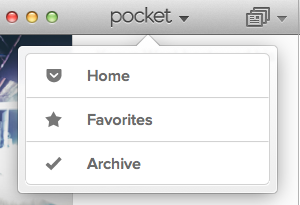
Pocket for Mac is as intuitive an app as you can imagine when it comes to saving pages. To get started, simply copy the link of the webpage you’re trying to store, and click File > Save Item from Clipboard, or shortcut Command+S. Your list of saved pages displays on a vertical screen to the left of the Pocket window, with the content on the right when you select.

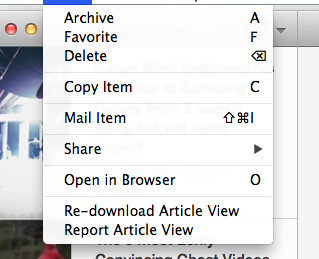
Neat additions to the Mac version of Pocket is definitely the one-key shortcut, such as A for Archive and F to Favorite. You can also tag each page so they’re easier to search the more you accumulate saved links. Videos also translate nicely onto Pocket, especially if you already have Flash installed on your Mac. The app allows you to view the video straight out of its interface, otherwise requesting that you download necessary plug-ins to play multimedia. I personally haven’t run into file type errors, as most publications will post videos from YouTube or Vimeo anyway, and those seem to work just fine.

If you want to share a link after already viewing the content, the Item > Share button also does a good job of sending the item out to Twitter, Facebook, Evernote, and Buffer. It’s even got a tweet attribution when you send it from Pocket, which is a small but useful touch.

Overall, Pocket does a good job recognizing pictures in an article, article link, headline, byline, and publication. One function I wish was available is the ability to rename files, such as a photo I saved from a blog that didn’t have a get an assigned name, according to Pocket. Between constantly traveling and attempting to save things to read later, Pocket makes a nice alternative for those who enjoy minimal design with multimedia capability, and the willingness to learn some cool shortcuts and make saving for later quick and painless. Pocket for Mac is available now for free via the App Store.


Source : digitaltrends[dot]com

Bad manners? UK store stops serving customers yakking on mobile phones

cell phone ban

Staff at a store in England have become so annoyed with people talking on their mobile phones at the cash register that they're now refusing to serve them.

The County Stores in south-west England says on its website that visitors will be able to find, among its many offerings, “a bakery, our delicatessen counter, a small and friendly butcher, quality chocolates and coffee.” They’ll also find a notice informing them that should they approach a cash register while talking on a mobile phone, they won’t be served.

Staff at the store, which has been in business since 1836, have become so fed up with distracted customers yakking away on their handsets that in the end the notice seemed like the only solution.

“Quite simply, if someone’s on their phone, we’ll serve the next person,” store assistant Sharon Kidd told the Daily Mail. “People refusing to hang up when it’s their turn to be served is happening increasingly, and…..the queue can get quite long.”

Kidd said that on the whole that the policy has been well received by customers, with only one or two visitors getting upset after being ignored.

The owner of the store, Hugh Duder, understands his workers’ disgruntlement at visitors who appear unable to take a break from their mobiles, saying, “It’s disrespectful to be on the phone when you want to get served, and the counter assistants shouldn’t have to put up with it.”

The store isn’t first in the UK to adopt such a policy. Earlier this year Darren Groom, owner of a coffee shop in Norwich in eastern England, decided to “strike a blow for basic manners” by putting up a sign indicating that he would refuse to serve customers talking on a phone.

Groom explained that he’d become fed up with people expecting him to be able to lip read their order.

“In the shop we need to ask a few questions, like whether they’re having it in or taking it away, whether they want whole milk or not, sugar or not,” he told the BBC, adding “When people come in we like to say ‘hello’. It’s nice if people respond to that. They should have the basic manners to converse with us.”

In the case of retail stores, it’s possible the issue of customers talking on their phone while at the cash register is a bigger annoyance than many people realize. However, beyond sticking up notices, there’s little staff can do. If only cell phone jammers weren’t illegal….

[Image: Arcady / Shutterstock]


Source : digitaltrends[dot]com

Oct 24, 2012

Online newspaper publicly shames bad drivers with mobile app

parking on sidewalk

Harnessing the power of mobile smartphones to bring about public humiliation, a digital newspaper in Russia is going after poor drivers.

Created by an online newspaper in Moscow called The Village, people within Russia can use a mobile application called Parking Douche to inform the public about poor drivers that like to park on sidewalks or other areas that aren’t acceptable for parking a vehicle. After someone downloads the application to their Android smartphone, they can start taking pictures of a driver that’s parked their vehicle illegally. The application requires the person to take two pictures of the vehicle. The first picture should be a wide view to demonstrate the car owner’s poor parking skills and the second picture should be a close up photo of the driver’s registration plate.

parking douche appThe application automatically converts the picture of the registration plate to a text field and asks the smartphone owner to check the validity of the registration plate number. In addition, the user can select the exact color of the car using a color field on the touchscreen as well as the general body shape of the car. Using GPS within the smartphone, the exact location of the parked car is also noted by the application.

After uploading all the data to the newspaper, people that live in the immediate area will start to see pop-up advertisements on The Village and other partner sites. While reading an article, a pop-up advertisement shows a replica of the car’s design and color in addition to the exact registration number on the vehicle’s plate. The caption reads “This parking douche annoys you on this site like he does on ‘Street Name’.

The Village then encourages people to share the poorly parked car on Facebook to get rid of the advertisement. In order to avoid annoying readers of the newspaper that don’t live in the immediate area of the illegally parked car, the advertisements are specifically localized by IP address. Only people living in the immediate area will see the advertisement. Due to requests from people in countries like the United States, Japan, Germany and the United Kingdom, management at The Village has made the application open-source software.


Source : digitaltrends[dot]com

Oct 23, 2012

What’s the worst password of 2012? It’s still “password”

password

Continuing to be a prevalent problem in regards to online security, people still love to use "password" for their password.

Retaining the number one spot as the least secure password for yet another year, people that continue to use the phrase “password” as their personal password remain at the highest risk when it comes to hacking. Detailed in SplashData’s annual report, the three phrases ”password,” “123456,” and “12345678,” have continued to dominate the top three spots on the list. Rounding out the top ten worst passwords of 2012, phrases include “abc123,” “qwerty,” “monkey,” “letmein,” “dragon,” “111111,” and “baseball.” SplashData chooses the rankings of these common security phrases based off what hackers are posting to the Internet. For instance, nearly half a million usernames and passwords for Yahoo users were posted on the Internet during July 2012.

security password loginRegarding the lackadaisical online security utilized by many people around the world, SplashData CEO Morgan Slain stated “At this time of year, people enjoy focusing on scary costumes, movies and decorations, but those who have been through it can tell you how terrifying it is to have your identity stolen because of a hacked password.”

Slain continued “We’re hoping that with more publicity about how risky it is to use weak passwords, more people will start taking simple steps to protect themselves by using stronger passwords and using different passwords for different websites.”

New entries to the 2012 list include “jesus,” “ninja,” and “password1.” Phrases that have fallen off the list from last year include “superman,” “passw0rd,” and “bailey.” The entire 2012 list of the 25 worst passwords looks like:

  • password 
  • 123456 
  • 12345678 
  • abc123
  • qwerty
  • monkey
  • letmein
  • dragon
  • 111111
  • baseball
  • iloveyou
  • trustno1
  • 1234567
  • sunshine
  • master
  • 123123 
  • welcome 
  • shadow 
  • ashley 
  • football 
  • jesus 
  • michael 
  • ninja
  • mustang 
  • password1

zoidberg-passwordIf you are using any of these security phrases for an online account, it’s highly recommended that you switch to a more secure phrase. In order to create a safer password, SplashData suggests using security phrases with at least eight characters while utilizing a variety of characters within the phrase.

This could include using a common phrase that’s broken up by underscores between words or substituting symbols for letters within a word. For instance, the phrase “p@$$w0r6″ is more secure than typing out the word using all letters.

Splashdata also recommends using multiple passwords across different types of sites. For instance, using the same security phrase on a social network as you do when accessing your online banking could become problematic if the social network is hacked. If a user has difficulty remembering passwords across multiple sites, there is a variety of software that can manage security phrases and automatically fill in the password data when visiting a site. However, Web browsers such as Google Chrome and Mozilla Firefox have offered this feature for quite a while.

In reference to security phrase creation, Slain said “Even though each year hacking tools get more sophisticated, thieves still tend to prefer easy targets. Just a little bit more effort in choosing better passwords will go a long way toward making you safer online. It just takes a few extra moments to make a password better. If you get started now and make it a resolution to keep it up, your life online will be safer and more secure in 2013.”


Source : digitaltrends[dot]com

Survey: British kids text non-stop, add strangers to Facebook friends’ lists

A new survey in the UK has revealed that kids aged between 12 and 15 know more people on Facebook than you, even if they had around 70 complete strangers on their friends list - but they're not bothered about that.

How many of your Facebook friends have you actually met?

The answer, I suspect, depends on many factors: the amount of time you spend online and what you use Facebook for, amongst many others. But a new study from the UK has found that the average 12 to 15 year old in Britain has never met one out of every four of their Facebook friends – but, despite that, more than 90 percent of them feel confident about their level of online security.

The study comes from British telecommunication and media regulator, Ofcom. Titled Children and Parents: Media Use and Attitudes, it demonstrated the amazingly high use of technology in modern communications between pre- and early-teens in the United Kingdom. For example, the report reveals that texting is the most popular form of communication between those aged between 12 and 15, with the average youth in that age group sending almost 200 texts a week, double the average of the same age group in 2011. In terms of gender, that breaks down as girls being the far more prolific texters, sending around 221 messages per week on average, with boys sending approximately two thirds of that amount; both genders are far above the adult average, however, which is closer to somewhere in the region of 5o texts per week.

The percentage of smartphone ownership has also risen significantly in that age group, up 50 percent when compared with last year. Ofcom now estimates that around two thirds of Britons aged between 12 and 15 owns a smartphone. “Areas such as texting and smartphone ownership [among teenagers] are fast outstripping the general population,” said Claudio Pollack, Ofcom’s consumer group director. “This highlights the challenge that some parents face in keeping up with their children when it comes to technology, and in understanding what they can do to protect children.”

Overall, around 80 percent of parents in the UK feel that they have appropriate levels of control over their children’s Internet usage, even though less than 50 percent have any form of parental controls installed on the devices their children use to access the Internet. With the survey reporting that 80 percent of kids ages 12-15 (and 40 percent of kids aged 5 to 15) have both Internet access and their own social media profiles, that’s perhaps something that may change in the coming months. Of the 80 percent of 12 through 15 year-olds, those with social media accounts have an average of 286 online friends – even though, as pointed out above, they would only consider three quarters of that number “actual” friends, with an average of 72 complete strangers being attached to each account. Nevertheless, 93 percent of those asked feel that they are confident in their personal security online.

The full report is available here; it would be fascinating to see a similar study performed in the US, and see how well the percentages line up – and use that as a guide towards a seemingly more trusting, less personal Internet future.


Source : digitaltrends[dot]com

Oct 19, 2012

Meteor Shower: Scientists and Treasure Hunters Look in California for Debris

ht meteor shower jp 121018 wblog Meteor Shower: Scientists and Treasure Hunters Look in California for Debris

Wednesday night

So where did it come down?  People in the San Francisco Bay area are still puzzling over the fireball that went shooting across the sky Wednesday evening, making an audible boom and, perhaps, spreading debris across the suburbs and vineyards north of the city.

Scientists said the object was a meteor, most likely an errant hunk of rock from the asteroid belt between Mars and Jupiter, traveling in an orbit that happened to send it tearing into the atmosphere over California.

Astronomers have been trying to calculate its trajectory from eyewitness reports, and there’s been natural disagreement over where any meteorites — fragments of a meteor that survive entry into the atmosphere and reach Earth’s surface — might have come down.  Bill Cooke of NASA’s Meteoroid Environment Office in Alabama said he thought most debris would have ended up out in the Pacific.  Peter Jenniskens of the SETI Institute, a meteor hunter by background, suggested debris may have crashed near California suburbs such as Novato or Martinez.

But in a case like this, calculations only do you so much good.  If you’re interested in meteorites, there is only one thing to do — go out and look for them.

So Jenniskens, according to his office, was out in the field today, looking for shards of rock that, to the trained eye, would likely have been survivors of a trip from space.

His office said he would be organizing people who came on their own to look.  One person, asking not to be quoted since meteorites are Jenniskens’ subject, said this is a delicate issue.  Fresh meteorites are rare — so they have a market value.  So, this person said that Jenniskens, searching in the name of science, may find himself in a race against other meteorite hunters who see the potential for profit.


Source : abcnews[dot]go[dot]com

Oct 17, 2012

Samsung Galaxy S III and Apple iPhone 5 square off from the inside of a blender

The rivalry between Apple and Samsung just moved to a whole new dimension, people! The popular YouTube series “Will It Blend” featured the Samsung Galaxy S III and the Apple iPhone 5 side by side to determine which one blends better.

For those of you who have followed this particular channel in the past, there is no need to tell you that it is the $500 Blendtec blender which ends up as the winner. I must however note that the Samsung Galaxy S III appeared to hold its ground against the blades much longer than the iPhone 5. See for yourself in the video below.

What do you think? Would the “Will It Blend” outcome determine which smartphone will you pick?


Source : blog[dot]gsmarena[dot]com

Oct 16, 2012

Beats By Dre Releases Pill Bluetooth Speaker and Executive Headphones for Holidays

What do you do when you have 56 percent of the premium headphone market in the U.S.? What do you do when people everywhere are wearing the red wired headphones with the B insignia? You make products, that’s what you do.

Today Beats by Dre is releasing two new products for the holiday season — its Executive noise-canceling headphones and a new portable Bluetooth speaker called the Pill. In 2008, when Beats released its first product, Monster Cable was granted a five year contract to make Beats-branded headphones. These two new products are the first releases for Beats without the Monster partnership.

“This marks our first release as an independent Beats. As we define who we are as a company, the fundamental business of great sound experience and great design stays,” Luke Wood, president and COO of Beats, told ABC News in an interview.

And that’s our first impression of the new products, which will be introduced by Dr. Dre and Jimmy Iovine, the founders of the company, in New York City today. The Pill is a Bluetooth speaker no bigger than a bottle of shampoo, and it is shaped just like a pill. Yet with four drivers it blasts out some pretty powerful sound. It also has an NFC chip inside so that you can link an NFC-enabled phone, like the Galaxy S 3, with the speaker by just tapping it on the back. (It didn’t work with a Galaxy Nexus, however.) At $199, it costs less than Jawbone’s Jambox, but the sound didn’t seem as full.

If you’re looking for a more private listening experience, there are the new Executive noise-canceling headphones. The $299 headphones are well-made and comfortable to wear; the earpieces are covered in brushed aluminum, and lined inside with hand-stitched leather. Like other Beats headphones, the Executive requires AA batteries, and there is an on/off switch. On a cross country flight the headphones made the background noise of the plane and a crying baby disappear and provided very full sound when we listened to music or watched an episode of “Breaking Bad.”

Both the Pill and the Executive headphones are available today.


Source : abcnews[dot]go[dot]com