Pages

Showing posts with label timeline. Show all posts

Nov 9, 2012

Facebook Friendship Pages gets much-needed, long awaited Timeline face-lift

Friendship Page Screen Shot

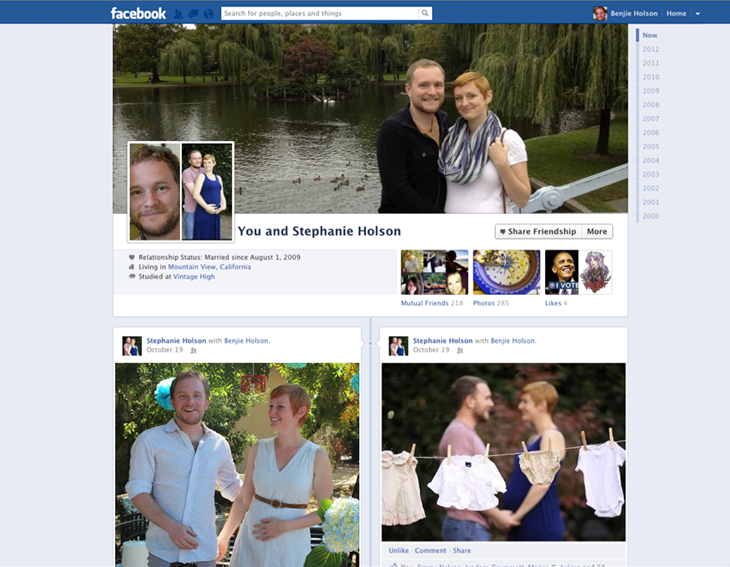
Facebook will gradually roll out a new design, inspired by Timeline, to its Friendship Pages.

A fairly forgotten and relatively neglected feature are Facebook’s Friendship Pages. Conversations and activities exclusive between you and a friend are logged and presented in Facebook’s old wall format, but Facebook announced it’s working on a gradual and much-needed face-lift for this feature.

The redesign of the page will parallel Facebook’s Timeline look, including the cover photo, friends, photos, events, and likes. Of course since you’re sharing a page with your friend, all these features will be tailored to you and this person’s mutual relationships and common interests. Photos will show up in the format of images that you and your friend have both been tagged in, and you’ll be able to see the same Facebook pages you’ve liked.

The idea behind Facebook’s Friendship Pages is that they act as a reminder of how, where, and when you and a friend met, or a nostalgic moment. But when the Friendship Timeline is released worldwide, it might encourage users to maintain relationships since the design of Timeline, which emphasizes images, is inherently personalized.

The value in Friendship Pages is more apparent if you’re in a relationship with a significant other. All the memories that you’ve shared are immortalized on a page dedicated to your relationship, where you can track your conversations without digging through your own Timeline history. On the other hand, the last thing any broken-up couple would want to see is a rehash of all the good times.

There are two ways to access your Friendship Page. If you look at a friend’s Timeline, you need to click on a gear icon at the top of their page to open up a dropdown menu. The first option there is “See Friendship,” which will open up the Friendship Page. The second access point is through your friend’s list on your own Timeline. If you click on the box labeled “Friends,” you’ll notice a link titled “See Friendship” that accompanies each of your friend’s profile photos.

If your relationship status isn’t set to single, you can visit facebook.com/us to find you and your significant other’s Friendship Page.

Facebook Timeline and its advertising products have been the primary focus for the network as of late. It’s worth reminding you that the platform has been hard at work with feature updates intended to boost user engagement in its auxiliary services like Facebook Groups, Facebook Messenger, Calendar, and now Friendship Pages.


Source : digitaltrends[dot]com

Oct 18, 2012

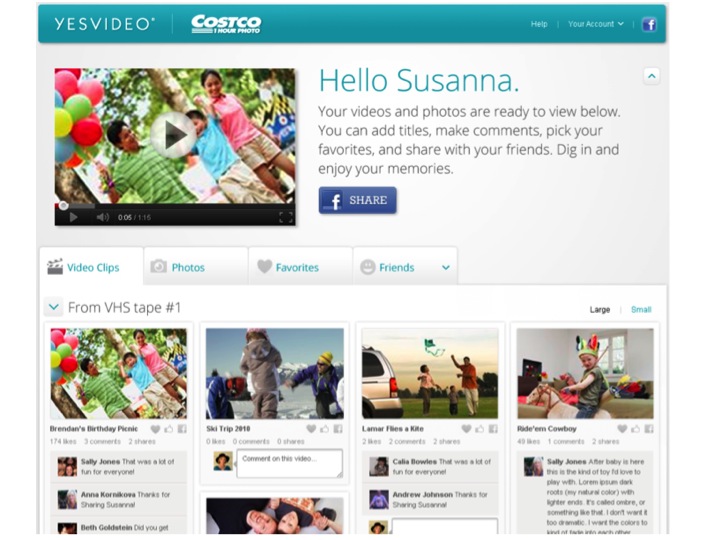
Video conversion service YesVideo can now send your preserved memories to Facebook Timeline

yesvideo profile

YesVideo converts vintage media into a digital format, and it's adding new social features that will allow customers to publish indexed footage to their Facebook Timeline.

If you have old VHS tapes, 8mm, miniDV, or photos, you’ve probably looked for a way to digitize the priceless memories from your life — and one of those ways is YesVideo, a conversion service that takes your ancient media and brings it into the 21st century. And starting today, YesVideo is adding a new feature that will allow you to publish those memories and any other archaic media to your Facebook Timeline.

You can submit your vintage videos at any of YesVideo’s at CVS/pharmacy, Walgreen’s, Walmart, and Costco retail locations. The footage is sent to YesVideo’s San Clara or Atlanta locations, where it’s digitized and uploaded to the platform’s cloud for you to view and share. While YesVideo’s primary focus is its cloud hosting service, the company sends you a DVD copy, alongside the original media as well. 

yesvideo commenting

To make the experience more social, YesVideo’s Facebook Timeline integration will show up on your profile in a couple ways. First, if you log into YesVideo using Facebook Connect and comment or like a friend’s video, those actions will be published to your Timeline. Second, YesVideo is using Facebook’s Open Graph to offer you a quick way to share clips of the converted footage on your own Timeline. To share a video, you just click the “Share” button on your YesVideo profile page, add whatever metadata your choose, and publish the media to the corresponding date on your Timeline. It’s worth mentioning that the visibility of content published from YesVideo to Facebook is restricted strictly to your friends.

YesVideo is also introducing a feature that indexes your video algorithmically so your content is easily digestible. What this means is that your converted videos uploaded to YesVideo will automatically be broken down into bite-sized clips (called chapters). You’re more likely to share shortened footage than publish the 65 minutes of video that’s converted on average for each YesVideo customer.

YesVideo’s Timeline integration was a natural progression for the company, says CEO Michael Chang. Chang says that based on initial testing, the company has “really seen some explosive growth on Timeline.” Users were already publishing an average of three times more videos in the last two months alone. In August, users shared just 2.3 YesVideo videos on Facebook, and during the Timeline integration trials this month that figure jumped to 6.7 videos. YesVideo users seem to appreciate the collaboration of these two services in general, as 37 percent of them have been logging into the platform through Facebook Connect, so tying the two closer together is a natural next step. 

There’s a spillover effect for Facebook as well, as the partnership will help fill out the Timeline. While the last five or so years of your Timeline might be bursting with content, years prior are likely fairly empty. Facebook encourages you to share important historical events in your life including your new job, marriage, or even your birth using the “Life Events” tab. These are all moments possibly documented through video or photographs that YesVideo can seamlessly port over to the Timeline, while also digitally preserving. Talk about killing two birds with one stone.

“We’re posting content like your birth, your first steps, playing with grandma, first birthday, second birthday, and third birthday,” says Chang. “We’re getting that kind of stuff posted to Timeline.”

According to Chang, YesVideo digitizes over 1.5 million videos per year, and with its indexing feature, turns that into approximately somewhere between 75 million and 150 million clips a year. The company is on track to make $60 million in retail revenue (this being YesVideo’s brick-and-mortar operations), which makes up 95 percent of the business.

Next on the agenda is offering an open API so third-party developers can create additional tools, like video editing. “We think of ourselves as more of a platform, so we’re going to start opening up the platform to third-parties,” says Chang.

Chang also hinted at a few features on the road map: “This idea that you have all your home videos and access to your extended family’s old home videos and you sit down and log into your Google TV for instance or your Roku box and voila, you’ve got your home videos that you can share with your family or on your mobile device.” The future of YesVideo, he says, is the idea that “personal home media is an entertainment category for customers.”


Source : digitaltrends[dot]com

Sep 5, 2012

Twitter announces an embeddable tweet timeline

Twitter embedding

Now you can embed a "Tweet Timeline" on any website as you would a YouTube video or Storify widget, and updates will arrive in real-time.

Twitter today announced on its blog that citizens of the Web can now share tweets from certain hashtags or users via an embedding code. Much like Storify or Kickstarter, both of which have little widgets you can incorporate into your online post, the new feature will be fully interactive — allowing viewers to click for a direct link to the source as well as favorite, reply, or retweet right from the embedded box.

“Whether it’s an author’s Tweets alongside their blog, a hashtag about an event like #DNC2012, or a list of competitors at the US Open, Tweets add a live, real-time dimension to articles, news reports, and the web at large,” Twitter writes on its blog. “These new embeddable timelines enable publishers, writers, developers, and any Twitter user to drop a rich, interactive piece of Twitter into their websites.”

Here’s an example of our Twitter feed embedded into the post. As you can see, hashtags are clickable and will bring you to the search feature on the Twitter site itself. If there are any photos of videos, expanding the tweet will also display the media as you’d typically find on your Twitter stream.

Tweets by @DigitalTrends

You can customize your Twitter timeline by going to the settings page on your account. Under widgets, you can add the Twitter handle of the person(s) you want to timeline, a hashtag, or your favorites, or your lists. Be forewarned that since the update arrives in real-time, vague hashtags may show some inappropriate or irrelevant tweets considering the amounts of users on the Twitterverse.

The new feature will undoubtedly be a useful tool for engaging the audience and conversation, and possibly add flavor to existing posts by combining the public reactions and comments from Twitter straight to your story. Of course, if you want to just pick and choose particular tweets to support a point in your post, Storify may still be a better route despite its nonexistent real-time capacity.


Source : digitaltrends[dot]com