Pages

Showing posts with label feature. Show all posts

Nov 14, 2012

RIM introduces BBM Voice to help convince you and your friends to come back to BlackBerry

BlackBerry BBM Voice

Research in Motion has added an interesting new feature to BlackBerry Messenger named BBM Voice, which lets you call fellow BBM users for free provided your phone is connected to a Wi-Fi network. It's a great idea, provided your friends also use BlackBerry phones.

Research in Motion knows it needs to win back the general public’s support, and it also knows that one way to do so is by coming up with a feature that will save someone money. BlackBerry Messenger was that feature several years ago, as it made use of the BlackBerry network plan you had to pay for anyway, and provided “free” text message conversation with fellow BlackBerry owners.

Now though, a high percentage of the dedicated BlackBerry owner’s friends use iPhones and Androids, rendering BBM a relic from better days past. Now RIM has come up with BBM Voice, which it claims is “for the times when you want to hear a friend’s laughter instead of reading LOL.”

That’s right, BBM has become Skype, as it now offers the chance to call your BBM friends through version 7 of the software, using only a Wi-Fi connection. There are no geographical borders and no time limits, and as it doesn’t count towards your monthly bill, no extra charges either.

RIM makes no mention of whether BBM Voice will break free from a Wi-Fi connection and use a 3G/4G data connection in the future. It’s hardly a surprise, as networks — particularly in the U.S. — are rarely enamored by features that lose them money.

BlackBerry Messenger will show who in your contact list is available to call using BBM Voice, and a split screen display lets you send text messages or files at the same time, plus the service is compatible with Bluetooth headsets too; setting it up perfectly as a way to work collaboratively while away from the office. Those not using a BlackBerry for business will appreciate the chance to avoid massive international roaming bills too.

So, free messages and free calls, all through a single app. Sounds great, right? It is, but — and here’s the problem — to take advantage of BBM Voice, your friends and colleagues all have to have BlackBerry phones too, and as we’ve established already, they’re now using iPhones and Androids.

BBM Voice is a beta program at the moment, but you can bet it will have been perfected by the time BlackBerry 10 arrives after January 30 next year, as being able to say “free calls and messages with BlackBerry 10” should help people take notice of the new OS. All RIM needs is for those people to convince their friends/family/acquaintances/dog it’s a good idea too.


Source : digitaltrends[dot]com

Xiaomi is working on a $64 Android-based set-top box called MiBox

Xiaomi is a young company that made a name for itself with affordable, feature-rich Android phones but is branching out now. Its new product is called the Xiaomi MiBox, an Android-based set-top box.

Typically for Xiaomi, the MiBox is priced quite attractively – $64 (RMB 399). Unfortunately, the company is yet to expand its availability beyond China.

The set-top box will have access to 30,000 movies and TV shows (the source of the videos is unknown). The MiBox will also play Android games, including Plants vs. Zombies, and will feature Douban Music support.

The MiBox hooks up to the TV using a standard HDMI cable and has an Ethernet port for Internet connectivity and a USB port for connecting external storage. There’s a remote control in the box, but you can also stream content from your Android or iOS phone (AirPlay is supported too).

It’s not clear what kind of hardware powers the device, but Xiaomi have used Exynos and Snapdragon S4 Pro chipsets in their phones so far. The supported video formats are – RM / RMVB, MKV, TS, FLV, AVI, VOB, MOV, WMV, MP4 at up to 1080p.


Source : blog[dot]gsmarena[dot]com

Nov 9, 2012

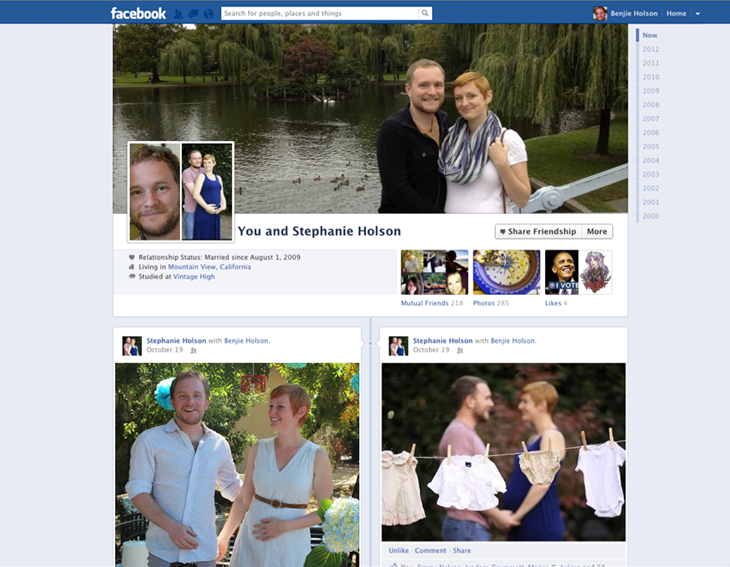
Facebook Friendship Pages gets much-needed, long awaited Timeline face-lift

Friendship Page Screen Shot

Facebook will gradually roll out a new design, inspired by Timeline, to its Friendship Pages.

A fairly forgotten and relatively neglected feature are Facebook’s Friendship Pages. Conversations and activities exclusive between you and a friend are logged and presented in Facebook’s old wall format, but Facebook announced it’s working on a gradual and much-needed face-lift for this feature.

The redesign of the page will parallel Facebook’s Timeline look, including the cover photo, friends, photos, events, and likes. Of course since you’re sharing a page with your friend, all these features will be tailored to you and this person’s mutual relationships and common interests. Photos will show up in the format of images that you and your friend have both been tagged in, and you’ll be able to see the same Facebook pages you’ve liked.

The idea behind Facebook’s Friendship Pages is that they act as a reminder of how, where, and when you and a friend met, or a nostalgic moment. But when the Friendship Timeline is released worldwide, it might encourage users to maintain relationships since the design of Timeline, which emphasizes images, is inherently personalized.

The value in Friendship Pages is more apparent if you’re in a relationship with a significant other. All the memories that you’ve shared are immortalized on a page dedicated to your relationship, where you can track your conversations without digging through your own Timeline history. On the other hand, the last thing any broken-up couple would want to see is a rehash of all the good times.

There are two ways to access your Friendship Page. If you look at a friend’s Timeline, you need to click on a gear icon at the top of their page to open up a dropdown menu. The first option there is “See Friendship,” which will open up the Friendship Page. The second access point is through your friend’s list on your own Timeline. If you click on the box labeled “Friends,” you’ll notice a link titled “See Friendship” that accompanies each of your friend’s profile photos.

If your relationship status isn’t set to single, you can visit facebook.com/us to find you and your significant other’s Friendship Page.

Facebook Timeline and its advertising products have been the primary focus for the network as of late. It’s worth reminding you that the platform has been hard at work with feature updates intended to boost user engagement in its auxiliary services like Facebook Groups, Facebook Messenger, Calendar, and now Friendship Pages.


Source : digitaltrends[dot]com

Nov 4, 2012

Apple to add movie ticket booking through Siri in iOS 6.1

Continuing the integration with important third-party applications, Apple is said to include another new feature in Siri in the upcoming iOS 6.1 update. While currently you can get movie ticket reviews and timings with iOS 6.1, in future you will also be able to purchase tickets through Siri.

This new feature comes courtesy of Fandango. You will see a button to purchase tickets in Siri when you search for show times or movie reviews. Moreover, you can also speak directly to Siri and ask to book the tickets for a particular movie.

Once you do that, the device will launch the Fandango app and your tickets will be booked. If you don’t have the app installed, you will get an option to download it from the App Store.

This feature will only available in the US for a while and won’t be compatible with all the theaters.


Source : blog[dot]gsmarena[dot]com

Nov 1, 2012

Google Earth for desktop gets tour guide feature and additional 3D imagery

Google Earth 7 is now available for download, with the Mountain View company adding the tour guide feature from the Android and iOS versions together with a load of new 3D imagery.

The latest version of Google Earth for desktop computers was rolled out on Wednesday, bringing many of the features that Android and iOS users of the virtual-globe software have been enjoying for a few months now.

Version 7 brings with it the tour guide feature, which Google describes as “a local expert”. To try it out, look for thumbnails appearing at the bottom of the screen as you’re viewing various locations around the world. These thumbnails indicate that a tour has been created. Click on one that looks appealing and you’ll be taken on a virtual flyover of the landmark or location, with various relevant facts and figures pulled from Wikipedia showing up on screen.

As you might expect, the feature works best with cities where buildings have been rendered in 3D by Google, rather than in locations like Paris which are still waiting for a makeover. Flying around an Eiffel Tower showing up as flat as a pancake is, of course, no fun at all. The Golden Gate Bridge in San Francisco and Rome’s Colosseum, on the other hand, both offer a superb demonstration of the feature. To view the buildings in 3D, you need to first check the 3D Buildings box in the layers column on the left side of the screen. To find out more about which landmarks are currently viewable in 3D, check out Google’s dedicated webpage here.

Locations updated with 3D imagery on Google Earth 7 include those that have been available on Android and iOS devices for several months such as Boulder, Boston, Charlotte, Denver, Lawrence, Long Beach, Los Angeles, Portland, San Antonio, San Diego, Santa Cruz, Seattle, Tampa, Tucson, Rome and the San Francisco Bay Area (including the Peninsula and East Bay).

And there’s more – from Wednesday additional 3D imagery is showing up for a number of other places including Avignon, France; Austin, Texas; Munich, Germany; Phoenix, Arizona; and Mannheim, Germany.

“The experience of flying through these areas and seeing the buildings, terrain and even the trees rendered in 3D is now consistent across both mobile and desktop devices, making all of your virtual travels more realistic than ever,” Google Earth product manager Peter Birch said in a blog post announcing the update.

Uou can download Google Earth 7 here.


Source : digitaltrends[dot]com

Oct 26, 2012

Guys, Facebook Collections isn’t gone, just under further ‘development’

facebook collections

Facebook Collections may have temporarily disappeared, but a representative says the feature isn't getting shut down. Instead, a mobile version is under development, which isn't possible unless the feature comes off the site entirely first.

Yesterday, TechCrunch first reported that it noticed Facebook Collections, a Pinterest-esque feature where users can group photo collections from Brands, similar to the form of “Liking” something was missing. We reached out to Facebook to confirm that Collections isn’t particularly gone, but is going under further evaluation before the social network can proceed with how to launch the product (if at all).

“Product development on Collections has not stopped,” a Facebook representative tells us. “Instead we have completed our initial test of Collections and are now analyzing the data to inform product development. For many of the product tests we do, we periodically pause the test to assess how to best progress with the product’s rollout.”

The rep goes on to elaborate that Facebook is working on a mobile edition on which Collections was previously not available. “We want to build out the mobile experience as well as make enhancements, which we can’t do unless we remove the functionality from external users.”

If you haven’t noticed Collections, you’re not missing much. It’s basically a way for Facebook to monopolize on good marketing and social networking strategies from other websites so Facebook users don’t need to leave the site to enjoy such features. But with the sudden disappearance of Collections, either the team is trying to develop it into something more original than the Pinterest scheme, or it may eventually realize the feature won’t really work well on Facebook. For one, Facebook isn’t necessarily a go-to marketplace, and while brands use it to promote and tease products, users aren’t exactly buying things off the site like they used to with Facebook Gifts. Still, as a now-public company, it is the social network’s responsibility to monetize as best it can, so perhaps this truly is the beginning of the Facebook commercial market on a consumer level.

There are no words on when we can expect to hear about Facebook Collections again, although the limited initial testing probably means not too many of you have even used the feature. For now, it remains in flux — though one thing is certain: Facebook is hell bent on turning a dime by targeting the elusive social shopping market.


Source : digitaltrends[dot]com

Oct 25, 2012

Samsung to bring Multi-Window view to the Galaxy S III in December

Remember the Multi-Window feature that debuted on the Galaxy Note II? As it turns out the Galaxy S III owners might get a chance to join the multitasking action with the upcoming Android 4.1.2 update.

According to SamMobile, the update is coming in December and in addition to the Multi-Window functionality will also bring bug fixes and stability improvements.

For those unfamiliar with the feature, it allows you to have two applications open on the screen at any one time and operate both at the same time. It works great on the 5.5-inch Galaxy Note II, but we’ll see how well it’ll work on the Galaxy S III once the update hits the device.


Source : blog[dot]gsmarena[dot]com

Oct 17, 2012

With hidden features exposed, Pinterest quickly rolls out user blocking and other updates

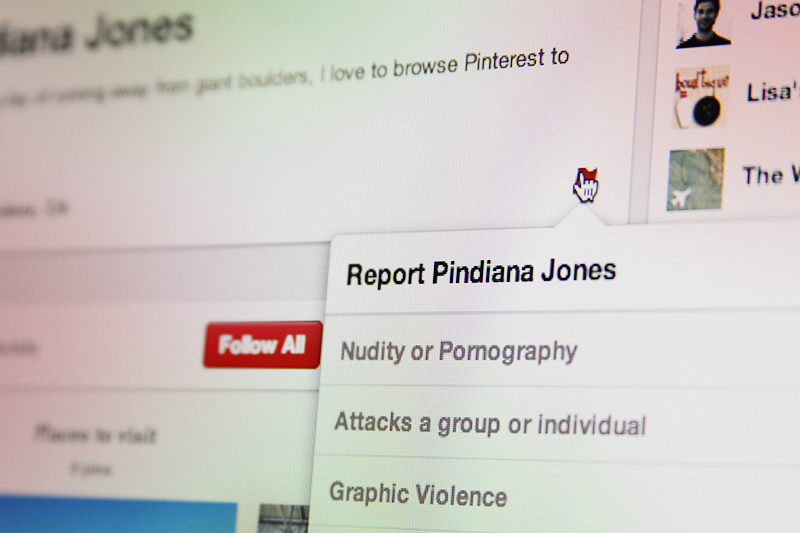
pinterest report

Earlier Pinleague discovered Pinterest's hidden blocking feature, and the social network responded by making blocking and reporting users publicly available.

The third most requested feature on Pinterest is the ability to block users from following or seeing pins. The feature, according to Pinterest, has been in the works for awhile. By chance, Pinterest marketing company Pinleague discovered today that the ability to block users was hidden from sight but there nonetheless. We can assume that the Pinterest team was testing out the new feature behind the scenes prior to its release, but now it’s announced and publicly available for users.

Before the announcement however, you could access the feature by simply editing Pinterest’s source code using your browser, which would surface the blocking feature. After hearing about the loophole, we headed straight to our own Pinterest page, but by that time the team was wise to our ways and had already released the blocking tool.  

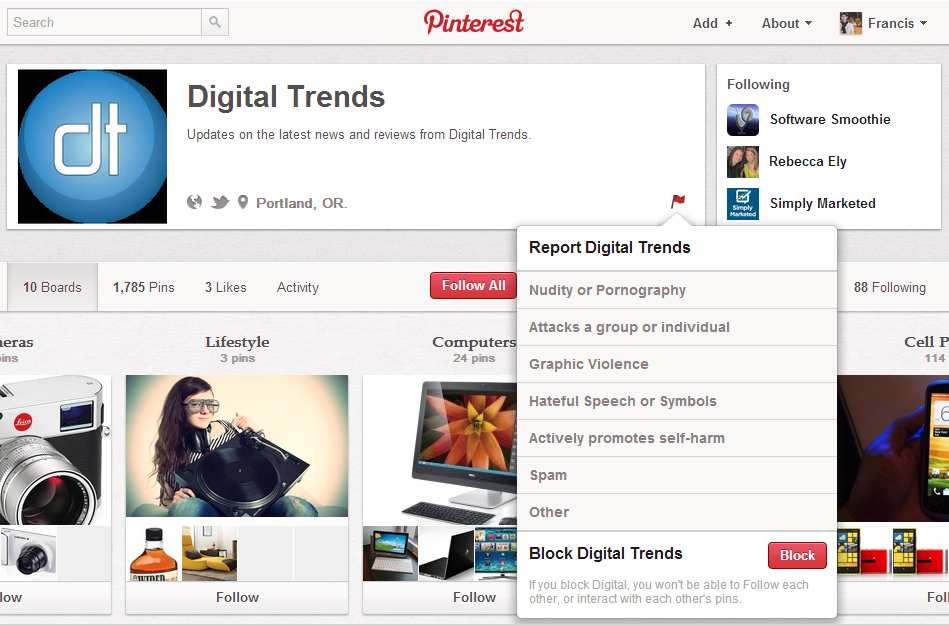
digital trends pinterest block feature

Pinterest maintains a section on its site where users can offer new feature suggestions. The popularity of features is gauged by user votes, and developers take the feedback into consideration before deciding on what should or shouldn’t be implemented. The block user suggestion was ranking quite high, but is now nowhere to be found.

A blog post by Dannie Chu, Pinterest software engineer, explains the block feature’s integration, among other updates.

“Blocking prevents both of you from being able to follow each other’s boards as well as like, repin, and comment on each other’s pins. When you block someone, the other person is not automatically notified. However, a blocked person will know they’ve been blocked if he or she tries to follow you or interact with your pins.”

To block a user, you just need to hover over the flag icon on the bottom right corner of a user’s profile. At the very bottom of the box that pops up, you’ll see a bright red button for “Block [username].” According to Pinterest, you might not yet see the flag icon on its desktop app but it’s going to be rolling out shortly to all users. As for its mobile app, the block and report a user will appear in the next mobile update.

In addition to blocking, the team has launched a feature that will now enable you to report users, and not only individual pins. The report feature comes with a selection of types of reports you can file from “nudity or pornography” to “spam.” The “report user” feature was the eighth most popular feature requested by users and in fact hasn’t been taken down from the request page as of press time. It’s surely a tool that will help Pinterest and graphic artists fight copyright issues that plague that site; if a user is a repeat offender, now their account status and not just guilty pins will be punished. 

The last new update enables users to have greater control over settings to let you further filter the types of emails that you receive from Pinterest.


Source : digitaltrends[dot]com

The AQ SmartSpeaker carries AQ Audio’s banner across the pond

AQ Audio has chosen to use its wireless AQ SmartSpeaker to break into a crowded American marketplace. It's most unique feature is the ability to offer Apple AirPlay functionality outside of a wireless network. A single speaker runs $180, but a stereo pair will cost consumers $350.

First impressions are always important, so its says a lot that U.K.-based AQ Audio selected the AQ SmartSpeaker for its freshman effort in the states. As we’ve noted in previous posts, the wireless speaker ring has plenty of hats in it, so lets take a look at how the AQ SmartSpeaker plans to distinguish itself on this side of the pond.

First off, AQ Audio is lauding its AQ Direct technology, a currently exclusive offering which allows you to take AirPlay outside and liberate it from the network. Expect to see more of this functionality from familiar US brands in the near future.

The speaker is also cross-platform compatible, working with both Windows and Android. Toss in a $180 price-point and you’ve got what looks like a pretty attractive package deal – but not so fast. That’s the price for a single speaker, which the company claims can deliver sufficient sound. Still, they’re marketing the right/left channel separation potential provided by having two speakers, that way – says AQ Audio – you can get “true hi-fi sound.”

Unfortunately it will also cost you. Doubling your fun will run you $350. The AQ SmartSpeaker is available now through aquadio.com or through Amazon.


Source : digitaltrends[dot]com

Oct 11, 2012

Google Maps Street View gets ‘biggest update ever’

Google Street View

Google Maps Street View just got its biggest update ever.

Google Maps’ Street View feature just got a whole lot bigger, with updates to 250,000 miles of roads around the world, and double the number of special collections, which give users 360-degree views of international landmarks, parks, and other attractions. The “biggest Street View update ever” comes just after Google added Street View functionality to the iOS Web app.

Countries whose roads are now far more exposed to the world include Macau, Singapore, Sweden, the U.S., Thailand, Taiwan, Italy, Great Britain, Denmark, Norway, and Canada. New special collections are now available for South Africa, Japan, Spain, France, Brazil, Mexico, and others. Google points users to new updated locations, “like Catherine Palace and Ferapontov monastery in Russia, the Chiang Kai-shek Memorial Hall in Taiwan, or Stanley Park in Vancouver.”

To view the full gallery of Street View Collections, click here.

While nothing can replace physical travel, Street View is one of the prime examples of how the Web is making the world a smaller place. Now, those of us with little chance of ever visiting the Western Wall in Jerusalem, or the Amazon rain forest in Brazil, can at least know what these destinations look like, in all their Street View cam glory.

Of course, it’s impossible to mention anything maps related without a peek under the band-aid at the still-festering wound that is Apple’s Maps app. The company continues to promise that things are getting better — though it’s going to be quite a while before we’re able to call this problem fixed. In the mean time, we just have to wait and hope that Google is putting as much effort into building a version of Google Maps for iOS 6 as it is trolling the streets of Macau.


Source : digitaltrends[dot]com

Sep 26, 2012

Instagram evidently phasing out live filters with iOS 6 update

Instagram iOS update no live filter

The update for Instagram on iOS 6 is here, and while it fixes the resolution issue, you'll notice one big feature missing: Live filters.

Those who have purchased the iPhone 5 may have already noticed that several apps that have not received their iOS 6 updates are often cut off in display, leave a large chunk of black blocks to fill in the shorter display of the iPhone 4. Instagram finally fixed this issue with its iOS 6 update, but that’s not the only thing users noticed. Sorely missing is the live filter feature, which allowed iPhoneographers to apply an overlay of their intended filter in live camera view before snapping a photo. If you’re one of the Instagrammers who frequent this functionality, tough luck. Instagram has updated its “known issues” section of the Help Center to reflect the following message:

“As of the current release (v3.1), Instagram does not support live filters on the iPhone 5. Going forward, live filters will be phased out as we work to improve the Instagram experience for all users.”

We’re not sure how exactly removing live filters is an improvement, considering this added functionality was one of the bigger focus of past Instagram updates for iOS. For fans of live filters, this will also prove to be a dilemma for whether or not they should update the app. On one hand, you can only avoid the update for so long, and the black bars that cut off on iPhone 5′s screen continues to be awkward without the update. On the other, updating means you might lose a feature you’ve come to use more commonly. Could you possibly stand to not see the world in Instagram filter after all?

Who knows, perhaps phasing out live filters is for the best. After all, my Android version of Instagram crashes often enough even without live filters so the company definitely has bigger issues at hand that might require the removal of this functionality overall — across all platforms — to make the app less buggy.

Image credit: The Next Web


Source : digitaltrends[dot]com

Sep 25, 2012

Foursquare update delivers all your friends’ check-ins — anywhere, all the time

foursquare logo

Foursquare's latest update allows you to see all of your friend's check-ins regardless of their location, but offers a feature to filter out their updates should you choose to do so.

Foursquare has had the unique challenge of pivoting its check-in platform, once the social-location darling, into something that can compete on a larger scale. The check-in has become an exhausting process that users are running awy from, and Foursquare’s robust, feature-full relaunch in June was all about making its app a more seamless, frictionless experience. The update announced today adds a relatively minor tool that enables users to keep real-time check-in notifications on or off.

foursquare notification

The feature is a simple on and off toggle that has been included on the profile pages of your friends where you can select “Nearby,” “Off,” and “Always On.” Selecting “Nearby” will notify you only of check-ins that your friends have entered near your current location. “Always On,” however, notifies you on your Foursquare newsfeed of your friend’s check-ins from all location. You can also turn off notifications from your friends entirely.

There’s more to this than meets the eye. Check-ins have more or less been declared a dying breed, and this has clearly made some trouble for Foursquare. The app has started focusing on making itself a hub for finding out what locations friends are frequenting and for recommending new restaurants or venues. 

The latest update fits well into the scheme of Foursquare’s new strategy. All updates from your friends can be pushed to your newsfeed, should you choose to receive these notifications, and you can see exactly what they’re up to. It fuels the social strategy behind the company’s pivot. At the same time, the update compels users to engage with their friend’s updates, which is a boon to Foursquare and of course its advertisers. For example, by being able to view all of your friends’ check-ins you’re more inclined to discover new venues.

Given the heightened visibility to user location, there are bound to be new privacy concerns about how much information Foursquare is able to reveal. But realize that Foursquare isn’t among the so-called SoLoMo apps, like Glancee or Highlight, which are frictionless ambient social networks that will find anyone with the same app around you regardless of their affiliation with you. Once you’ve opened up Foursquare, you can decide to check-in to a location or choose not to do so. 


Source : digitaltrends[dot]com

Sep 24, 2012

Apple TV update adds shared photo streams, AirPlay audio support

Apple TV (feature)

Definitely the first major feature release since the launch of Hulu Plus, Apple has rolled out a new version of iOS for Apple TV today.

Detailed extensively on the support section of Apple’s site, Apple has released iOS 5.1 for the Apple TV earlier today. The updated operating system brings a barrage of new features including shared photo streams, support for account switching and AirPlay improvements. In order to access the shared photo streams feature, the Photos app must be launched. Within the Photos app, the Apple TV owner will find all photo streams shared with the account as well as their personal iCloud photo stream. From this interface, the user can unsubscribe to a shared stream or launch into a slideshow of the photos in a shared stream. In addition, shared photos streams can be used as the main screensaver when the Apple TV isn’t in operation.

Apple TV (hand)Regarding iTunes account switching, this has been included to allow multiple members of a household to access different content tied to a specific account and perhaps stored within the cloud. After adding two or more accounts within the Settings section of the operating system, the user can switch between multiple accounts easily.

As for AirPlay improvements, Apple now allows users to send audio content from the Apple TV to AirPlay-enabled speakers and other devices. The user will be able to see all AirPlay-connected devices on the home network when accessing the AirPlay menu under the Settings application.

Beyond those main additions to the new version of iOS, Apple has added the ability to search through movie trailers as well as view showtimes at local theaters within the United States. Similar to user interfaces on Rotten Tomatoes or Google’s movies section, the user only needs to enter a zip code to view showtimes at local theaters. Apple has added three new screensavers called “Cascade, Shrinking Tiles, and Sliding Panels.” Specifically for the hearing-impaired community, Apple has added Subtitles for the Deaf & Hard of Hearing (SDH) support as well as improvements to the interface when selecting subtitles. 

Apple TV 2012 review remoteBesides stability improvements and bug fixes, the final new feature that may please iPhone or iPad owners is the ability to reorder application icons on the screen. While the icons for Movies, TV Shows, Music, Computers, and Settings have to stay fixed to their current positions, applications like Netflix and Hulu Plus can be relocated on the screen.

In order to access this function, the user uses the direction pad to highlight a specific app icon and holds down the Select button on the remote. Once the application’s icon starts wiggling, the icon can be moved to a different location within the user interface. This can be particularly handy for moving unused apps to the bottom of the page.

In order to manually update the operating system on the Apple TV, the user needs to open the settings menu and locate “Update Software” under the general options section. After selecting the download option, the Apple TV will take a few minutes to download the updated version of iOS and install the software. It’s normal for the Apple TV to automatically restart after the new operating system is installed. The new version of iOS has been designed for both the second and third generation Apple TV devices.


Source : digitaltrends[dot]com
LinkedIn rolls out skill endorsements, and it’s as easy as one-click

linkedin endorsement

LinkedIn now allows users to endorse their network's skills and expertise with one click.

LinkedIn has introduced a new one-click endorsement feature that makes it quick and easy to promote your friend or colleague’s skills.

You’ll notice on your LinkedIn page that skills and expertise have taken up a significant amount of real estate, in effect pushing down your experiences to highlight them, as well as your endorsements. Now, your LinkedIn network can choose to endorse you simply by selecting the plus sign associated with the skill and expertise. Your network can even elect to recommend a skill that you haven’t added to your profile page.

Each person that endorses a skill on a LinkedIn page has their profile photo tagged next to the action as well. Those who have endorsed you will appear at left of the skill’s title and you can view all endorsements in a new window if you want.

In addition to endorsing individuals one by one, you can choose to endorse multiple connections at once.

When you receive an endorsement from your contact,you’ll be notified on the site as well as via email.

This new method should provide a simpler and less invasive way of offering kudos for someone’s work, though it does give visitors to your profile a look at the skills that you claim to have and how many of your co-workers, employers, or friends will vouch for them. Unlike with recommendations, LinkedIn isn’t yet allowing you to ask your network for endorsements.

If there’s one feature that we can liken it to, it would have to be Klout’s +K influence feature, which allows you to indicate which of your Klout connections are topic experts. You could also see the resemblance to Facebook’s Like button, where in this case it’s tailored specifically to your skill set.

The endorsement feature has debuted in the United States, India, New Zealand, and Australia in the English language, but the feature will support other languages in the coming weeks. It appears that LinkedIn is currently rolling it out gradually as some users have the feature enabled on their profile while others do not.

You can view LinkedIn slide show below for more information on LinkedIn Endorsements.


Source : digitaltrends[dot]com
Sep 22, 2012

Twitter’s new Lifeline feature helps users in Japan access emergency information

twitter-logo-black

Twitter launched a new feature today called Lifeline to help users in Japan access relevant information during an emergency.

Twitter’s new Lifeline feature lets users find and follow local accounts that upload important information during emergencies. All that’s needed is a postal code, typed into the service, and Twitter will create a list of resources for you. As of right now the feature is only available to Twitter users in Japan, but there are plans to expand Lifeline into other countries. Presumably this expansion will rely on government cooperation and will probably focus first on countries prone to natural disasters.

The new feature generates a list of Twitter accounts actively posting emergency information. This curated list could include city, district, or national government accounts being updated with official announcements important to the public. It won’t be restricted to government, however, and will likely bring attention to local media and utility companies so people in Japan will be informed of service disruptions and breaking news surrounding the event.

Twitter isn’t the first social media site to venture into this field either. Facebook introduced a similar service to Japan earlier in the year, called “Disaster Message Board”, that allows users to indicate whether they are safe during a natural disaster or other emergency situation. Friends and family can then check Facebook to see the status of their loved one, rather than waiting for a phone call or some other form of communication.

These social media features seem to be responding to the announcement from the Department of Homeland Security in the US after last year’s earthquake in Virginia. At the time, it was recommended the public use text messaging, email, Facebook, or Twitter to check up on friends and family, rather than voice calls. The department claimed this would help clear up phone lines crucial to emergency personnel’s response to the disaster.

“Since Twitter often becomes a de facto lifeline during crises everywhere, we hope to eventually expand this functionality to more locations around the world,” Jinen Kamdar, Twitter product manager, told The Next Web.

According to Kamdar, Twitter has entered a partnership with the Prime Minister’s Lifeline Commission, as well as regional governments in Japan. The Lifeline feature hasn’t been used yet, and hopefully it won’t have to be for a very long time, but it seems like a very important addition to Twitter’s growing platform. What do you think of the new feature? How quickly do you think it will spread around the world?


Source : digitaltrends[dot]com

Sep 21, 2012

Starbucks coming to Apple’s Passbook before October

Coffee giant Starbucks is the latest company to announce its intention to integrate its app with Apple's new Passbook mobile wallet feature.

When Apple unveiled the latest version of its mobile operating system back in June, its new Passbook app was trumpeted as one of its main features.

Passbook acts as a kind of digital wallet, a place for users to store and organize tickets, boarding passes, store cards and coupons.

iOS 6 launched this week, introducing millions of owners of Apple’s iPhone to the new app. Of course, it’s useless without companies supporting it, and the early indications are that, over time, plenty of businesses will go with it.

A number of airlines, for example, are thought to be gearing up to integrate with Passbook – American Airlines has already confirmed its intention – while today Starbucks announced it would be offering Passport support by the end of this month.

The news came via the coffee chain’s Twitter feed on Friday. Many regular Starbucks customers may already be paying for their drinks using the company’s existing app, which also allows users to manage their Starbucks Card balance, top up their card, and send friends eGifts, among other things. In 2011, the Starbucks app, available for iPhone, Android and BlackBerry devices, accounted for 26 million transactions.  

Passbook integration could make the process of handing over your hard-earned readies even simpler, with, for example, the app opening automatically when the phone detects its owner’s arrival at a store. But if you’re a fan of Starbuck’s current app, which evidently already has some pretty major functionality, does integration with Passbook sound like such a big deal?

For a closer look at Passbook and its chances of becoming a true digital wallet, be sure to check out Geoff Duncan’s in-depth piece on the new app here.


Source : digitaltrends[dot]com

Facebook rolling out search history controls… which begs the question, why do we need them?

facebook search

Facebook announces you now have new control over your Facebook searches, which strongly suggests a strong focus on search is in the network's future.

In what seems like the Nth feature release this weekend, Facebook has announced an update to its Activity Log. The Activity Log, if you remember, was introduced last year, giving users a way to see a concrete list of their Facebook actions and give us increased control over their visibility.

activity log searchesNow, Facebook is also including the ability to view and remove search history on the site as we see fit. “You’ll be able to see the searches you’re making on Facebook. Just as you can choose to delete any of your posts, you can use the same inline control on Activity Log to remove any of your searches at any time,” Facebook explains, via press release. “It’s important to remember that no one else can see your Activity Log, including your search activity.”

Before the update (which hasn’t been entirely rolled out just yet but will be over the next few weeks), the Activity Log would give data like posts you’d commented on, photos you’d posted, things you’d liked – but anything entered into the search bar wasn’t visible. Now, along with a list of those actions, you’ll see what (or, more likely, who) you searched for, and have the ability to delete it.

Right now, no one can see his or her own or other users’ Facebook searches. It’s all entirely private, or at least hidden from our eyes. When you search for your high school best friend, there’s no record (at least not user-facing) of that search – which is why this new tool feels like a preemptive measure. Why would Facebook give us a product that essentially gives us a high degree of control over a list of searches and how visible they are unless we needed it? What this change indicates should be pretty clear: Facebook will be saving your search history and also giving you edit capabilities. I reached out to Facebook for comment but had not heard back as of press time. 

Facebook has landed itself in hot water before by introducing features that make our every social-network related move more shareable and more detectable. Usually, the cycle goes as follows: Facebook introduces feature, backlash occurs, Facebook scales back said feature with privacy in mind. For instance, Sponsored Stories weren’t opt out to begin with… and then suddenly, one lawsuit later, they were.

It stands to reason that Facebook is introducing the new feature in advance of something more to come – CEO Mark Zuckerberg did recently allude to the network’s search ambitions. “It’s one of the kind of obvious things that would be interesting for us to do in the future,” he has said. 


Source : digitaltrends[dot]com

Sep 12, 2012

iOS 6 now feautres in-app navigation updates, hints at better multitasking capabilities

A new feature has made its way through iOS 6 that takes advantage of the increased horsepower under the iPhone’s hood.


Image courtesy of AppleInsider

More specifically, the latest version of iOS now supports directions from the Maps app to pop-up on top of the screen regardless on which app you happen to be in.

For example, if you happen to be walking and listening to music, a bar on the top of the screen appears to tell you when to make your next turn. Interestingly, this could be used by third-party apps as well.

I am sure in less than 5 hours, Tim Cook and the rest of the Apple team will be showcasing this and more interesting stuff that’ll be debuting on the iPhone 5.


Source : blog[dot]gsmarena[dot]com

Sep 10, 2012

Why the MacBook Pro with Retina Display Sucks

In mid-2012, Apple dropped yet another one of its Apple-bombs—the kind which involves showcasing a gadget that adds this or that feature, but subtracts this or that functionality, and with a spec sheet that’s just enough to pique fanboy interest without really pushing the envelope for innovation. That’s exactly what Apple did in introducing the MacBook Pro with Retina Display.

MacBook Pro with Retina Display #nerdgasm
Photo Credit: Hummy

http://www.flickr.com/photos/hummy/7686492544/

Some 3 months into the life of the MPRD—let’s just call the notebook this, for convenience (see even the name is cumbersome)—and people still don’t really know what it’s for and who exactly the product is targeting. Plus, once you get past the overrated Retina Display, you’ll see that this model is not innovating anything at all. In fact, with its many sacrifices to meet the thin form factor, it might even be a step backward.

This Retina Display is Overrated

It’s a little foolish to pass off this MBP model as an entirely different product instead of a part of the series, just because this happens to have a Retina Display. This feature does not a separate category make.

Consider this: the iPhone 4S sports a Retina Display; it’s smallish 3.5-inch screen crams a 640×960 resolution, making for a lush 326 ppi pixel density (although the HTC Rezound beats this soundly with its own screen’s 342 ppi). That’s what makes the text pop out and colors vibrant on that mobile device. The Retina Display on the MPRD, on the other hand, is at a mere 220 ppi.

Another interesting thing to note is that the Retina Display on this MacBook Pro has failed to impress considerably—that is, unless you stack it up next to another laptop that doesn’t have Retina Display. On its own, it takes a bit of time to fully appreciate just how crisp everything looks. That’s perfect for people who read a lot on their devices, work on design programs, and other visual-related activities.

However, there are also some aspects where the Retina Display can become a drawback. For example, most websites right now aren’t optimized to cater to Retina Displays. In addition, many people whose productivity lies on other aspects of their laptops won’t be able to maximize the use of this very expensive laptop. If one works in a virtual office as a writer or as someone who takes calls, for example, then there’s really no point in getting the MPRD.

Omissions

So that the laptop gets lighter than the standard MBP (though not by much) and almost as thin as the MacBook Air, some things were sacrificed, namely the optical drive, Ethernet port, and FireWire port. If you know you won’t be able to work with just the SSD, some memory expansion via the SD card slot, and an external hard drive, consider some other alternative. There are two Thunderbolt ports and two USB 3.0 ports, though.

Non-repairable

It’s one thing to be expensive, but it’s a whole other thing to be virtually un-repairable—at least not by your own hands. When you manage to get into the internals of the MPRD, you’ll find a bunch of proprietary screws that keep you from accessing certain parts. The battery is glued into position such that any attempts at removal or replacement will come with a risk of damaging the trackpad or the battery itself. Your RAM is soldered right onto the logic board, so you’d better upgrade to the RAM you feel you’ll need right when you purchase the unit because you’ll be stuck with it.

Unless you’re after the much-hyped Retina Display (but really, why?), it’s really not worth the bundles of money you’ll be shelling out for the MacBook Pro with Retina Display. Either go for the MacBook Air or leap straight to the powerhouse MacBook Pro, depending on your needs. For its price—$2,200 for base model—the MPRD sucks, but it is powerful enough and built solidly enough to justify purchasing.

Tags: Apple, Retina Display

Source : techtalkafrica[dot]com

Sep 7, 2012

Here’s what the Nokia Lumia 920 PureMotion HD+ display tech is all about

Yesterday, we talked in length about the new variation of the PureView technology found on the new Nokia Lumia 920. But that’s not the only new feature that Nokia introduced with the phone.

Nokia also announced a display related feature that they like to call PureMotion technology. We are about to find out what it is and how it will help you in real life.

Back in the lab

Now the PureMotion technology on the Lumia 920 includes a bunch of stuff but at its core it concentrates on the response time of the LCD panel. Now in display technology, response time is the name given to the time it takes a pixel to go from black to white and back. The shorter this time, the better the display.

But how short does it really have to be? Well, an ideal display would have a response time of 0ms but that’s not practically possible. Now most displays have a refresh rate of 60Hz, that is the display is refreshed with new information 60 times per second. Now every second has 1000 milliseconds, so at 60Hz, each frame gets around 16.77ms before the next one comes in. If a display fails to switch pixel value under that time, you see visual blurring on the screen.

Having said that, you usually need more time for every frame because the frame has to be written to the display. So if a display has a response time that is slightly under 16.77ms, it would still exceed the time it takes to write one frame in practice, causing motion blur.

Due to this the response time has to be as low as possible, preferably under 10ms. This is where PureMotion comes in. Nokia uses a Response Time Compensation or overdrive process to provide temporary higher voltage to the display to make the pixels change state much faster than usual. This method has been widely used in recent HDTV and monitor panels but Nokia is possibly the first to use it on a mobile display. Nokia promises a response time of around 9ms, which is well under the minimum response time for a display.

The result is pixels that change value or color quickly, thus even at high framerates the display remains blur-free, whether you’re just scrolling through the menus or playing a fast paced 3D game.

Out in the sun

The other aspect of the PureMotion display on the Lumia 920 is about the sunlight legibility. Nokia introduced their proprietary ClearBlack displays two years ago – they utilize a polarizing filter to cut off reflections and make the display easier to see under direct light. And their ClearBlack displays have been amazing out in the open. Now, with the Lumia 920 PureMotion display they’ve improved their ClearBlack tech.

The new feature on the Lumia 920 uses software algorithm in conjunction with the ambient light sensor to determine the amount of light falling on the display and automatically boosts the brightness and contrast of the LCD panel to make it clearer to see under bright light. The adjustments are done on-the-fly without any user intervention.

All the little pixels

The Lumia 920 display has a resolution, which Nokia refers to as HD+. It’s basically a WXGA panel with a resolution of 1,280 x 768, a bit more than the usual 1,280 x 720 that you usually find in high end smartphones these days. This gives the display an aspect ratio of 15:9. This means that when you put a 16:9 and 15:9 displays of the same diagonal size side by side, the 15:9 display would be shorter and wider in portrait mode.

Nokia chose this arrangement because reportedly, it would allow users to reach the top of the display with their thumb more easily. You also get the advantage of the few extra pixels, which will be great for web browsing or playing games but not so much for watching videos or movies that usually have a 16:9 aspect ratio.

It’s not only touching that counts

Lastly, Nokia has utilized Synaptics latest ClearPad capacitive touchscreen sensing technology, which gave the Lumia 920 something they call Super Sensitive Touch. It would let you operate the touchscreen with a glove on, with a fingernail or with an object such as a pen or a key. And since it has a Gorilla Glass layer on top, the last two objects won’t leave a scratch.

Wrapping it up

Those are all the intricate aspects hidden behind the PureMotion display moniker on the Nokia Lumia 920. Hopefully, this article helped dispel any confusion regarding what makes this display so special. We’ll be taking a better look at the display when the phone is released in the next couple of months.


Source : blog[dot]gsmarena[dot]com