Pages

Showing posts with label conversations. Show all posts

Nov 14, 2012

Here are some interesting things you may have missed about the Lumia 920

Nokia’s official blog Conversations has posted an article detailing 10 things you might have missed about the Lumia 920.

Did you know that the camera decoration and side buttons are made out of zirconium? Or that the LED flash on the back is a higher-powered dual one? Hop after the break for more.

Unlike the rest of the Windows Phone smartphones (even those Beats flaunting ones) the Lumia 920 features a built-in equalizer with 18 presets and the option to customize your own. That’s something audiophiles with WP 8 affiliations will appreciate.

There’s a nifty feature, which lets you read or ignore text messages via your voice. All you need is to be connected to your car or additional Bluetooth headset.

There’s more over at the Conversations blog in the link below. And here’s our hands-on of the Nokia Lumia 920.


Source : blog[dot]gsmarena[dot]com

Nov 9, 2012

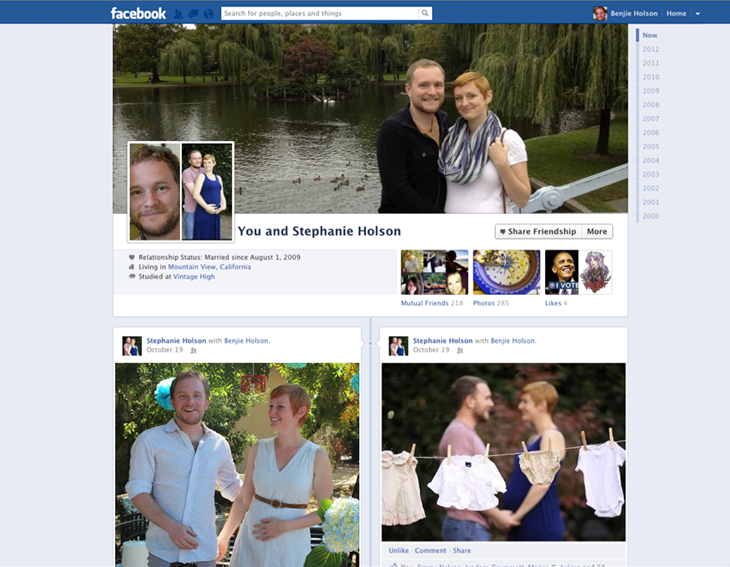
Facebook Friendship Pages gets much-needed, long awaited Timeline face-lift

Friendship Page Screen Shot

Facebook will gradually roll out a new design, inspired by Timeline, to its Friendship Pages.

A fairly forgotten and relatively neglected feature are Facebook’s Friendship Pages. Conversations and activities exclusive between you and a friend are logged and presented in Facebook’s old wall format, but Facebook announced it’s working on a gradual and much-needed face-lift for this feature.

The redesign of the page will parallel Facebook’s Timeline look, including the cover photo, friends, photos, events, and likes. Of course since you’re sharing a page with your friend, all these features will be tailored to you and this person’s mutual relationships and common interests. Photos will show up in the format of images that you and your friend have both been tagged in, and you’ll be able to see the same Facebook pages you’ve liked.

The idea behind Facebook’s Friendship Pages is that they act as a reminder of how, where, and when you and a friend met, or a nostalgic moment. But when the Friendship Timeline is released worldwide, it might encourage users to maintain relationships since the design of Timeline, which emphasizes images, is inherently personalized.

The value in Friendship Pages is more apparent if you’re in a relationship with a significant other. All the memories that you’ve shared are immortalized on a page dedicated to your relationship, where you can track your conversations without digging through your own Timeline history. On the other hand, the last thing any broken-up couple would want to see is a rehash of all the good times.

There are two ways to access your Friendship Page. If you look at a friend’s Timeline, you need to click on a gear icon at the top of their page to open up a dropdown menu. The first option there is “See Friendship,” which will open up the Friendship Page. The second access point is through your friend’s list on your own Timeline. If you click on the box labeled “Friends,” you’ll notice a link titled “See Friendship” that accompanies each of your friend’s profile photos.

If your relationship status isn’t set to single, you can visit facebook.com/us to find you and your significant other’s Friendship Page.

Facebook Timeline and its advertising products have been the primary focus for the network as of late. It’s worth reminding you that the platform has been hard at work with feature updates intended to boost user engagement in its auxiliary services like Facebook Groups, Facebook Messenger, Calendar, and now Friendship Pages.


Source : digitaltrends[dot]com

Oct 25, 2012

How to Get a Job Using Social Media

How to get a job using social media is a recent topic in job seeking conversations. The innovation of social media is allowing people to find work every day. Getting a Job using social media is easier than you think. Social media helps you connect to the right employers because many companies are using social media as a tool to scout for talent. Some job seekers are using the traditional way of finding jobs and it is giving them negative results. Using social media as a tool to find a job enables you to beat the trend of failure. Understanding who you are and how your skills translate into the job market will help you find the job you’ve been waiting for.

Job Search

Flickr image courtesy of glokbell

Social media websites allow you to create a unique profile that showcases your skills. After you have created your profile you can start relationships with other job seekers or people that are employed at the location you want to work at. Realistically, job seekers find and learn about jobs through other people, not so much computers. If you develop a personal relationship with employers through various social media websites your chances of getting hired will increase. Social media benefits not only job seekers but employers because it eliminates cold calling.

Here are some websites that can help you develop relationship with other job seekers and employers.

LinkedIn is a great website for job seekers. When you create a profile, it’s recommended that you upload all your email contacts. LinkedIn allows you to filter your job search to keep the results relevant to your set of skills. With this website, job seekers can perform background research on each company. Finding background research on each company helps job seekers because employers will notice that “homework was done” during interview.

vCard in LinkedIn

Flickr image courtesy of topgold / Bernard Goldbach

Facebook

One the most popular websites on the planet Facebook has a job board overlay known as InTheDoor.com. This tool connects Indeed.com job board database and your Facebook social graph.

Technology has enabled us to apply for jobs on the go. More job seekers are using smart phones like IPhone and Android to look for work. These smart phones can help you look for jobs around the area you are currently located in. If you have an IPhone, you should download an application named Layar. Once this application is installed you should search for a tool name JobAmp Mobile. This allows for a convenient way to search for jobs while you walk around your city.

Having paper resumes isn’t always the best choice when preparing for your job search. A recent survey from OfficeTeam survey, suggested that eventually paper resumes will be replaced by social media and its profiles on networking sites. Profiles let job seekers be creative and really show their uniqueness to employers. Having the right profile helps you stand out in an application pool that is unfortunately increasing every day.

Tags: Social Media Job Hunting, Social Media Jobhunt, Social Media Jobs, Social Media Jobsearch

Source : techtalkafrica[dot]com