Pages

Showing posts with label pulse. Show all posts

Oct 18, 2012

Hands on with the Hisense Pulse, the most affordable Google TV box yet

The Hisense Pulse offers Google TV for $100

Don't let the price tag fool you: Hisense's Pulse Google TV box sports a smart TV interface that is clean, smooth, and usable for everything from live TV to Netflix. And at $100, you won’t be able to find a set-top box much cheaper.

Despite the off-brand name, much has been made of Hisense’s Pulse Google TV box. After hearing about its $100 price point and specs, we scratched our collective heads wondering what the catch was. Well, after some hands-on time with the Pulse, suffice it to say that our heads are still feeling itchy.
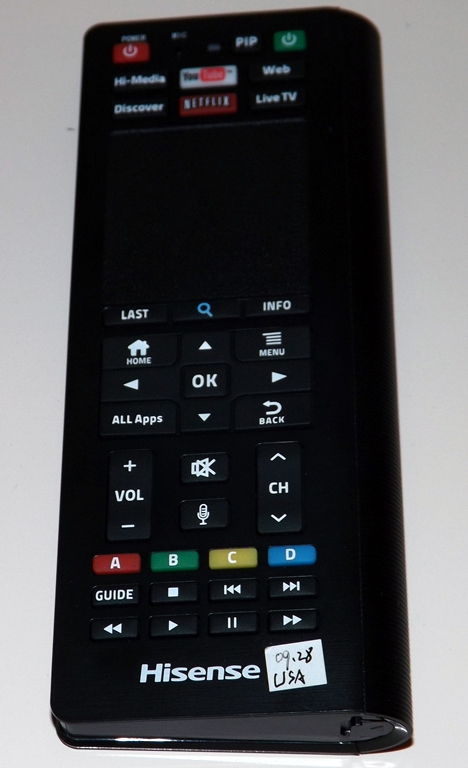
The front side of the remote for Hisense's Pulse Google TV boxWhen we finally got the dual-sided QWERTY keyboard remote in our hands, we expected a herky-jerky, hiccup-prone experience; but what we got was a smooth, responsive version of Hisense’s SmartHub UI, the same interface built into Hisense’s smart TVs. Cycling swiftly through apps like YouTube and Flickster, we wondered aloud how Hisense could afford to offer the Pulse so cheaply. In fact, some of the company’s own employees even confessed that they were as befuddled as we were.

The Pulse simply does not feel like a cheap product, load times are short (slow connection notwithstanding), typing is quick and easy, the trackpad is responsive, and the whole experience felt more or less like browsing the Internet.

Still, if you want to step up the speed and smoothness, the downloadable smartphone app is the way to go. The app (available on Android and iOS) turns your mobile device into a Pulse remote, complete with touch-wheel control and a QWERTY keyboard. Navigating this way feels almost iPod-like, as you swipe your thumb in circles and cycle through content. This method offers ultra-smooth browsing — a bit too smooth for the clumsy thumbed among us.

The back side of the remote for the Hisense Pulse offers a QWERTY keyboard

The Pulse has HDMI, USB, and Ethernet inputs and works with both traditional cable boxes and satellite options. For the former, all it needs is the brand and model number. With those provided, you just hook up the IR blasters (which are included) and you’re ready to go. The Pulse pulls your electronic program guide (EPG) from online, and thus, effectively knows what will be on your TV before you do.

Considering that the typical SmartTV model costs over $100 more than a comparable, less-educated television, we’d have to proclaim the Pulse a solid buy. We were waiting for the other shoe to drop, but for now, the skies seem to be clear. The Pulse will be available in late November, bundled with the remote (originally billed as an add-on) at a suggested price of  $100. 


Source : digitaltrends[dot]com

Aug 9, 2012

Pulse launches Web app tailored for Microsoft’s Windows 8 and Internet Explorer 10

pulse web app

Pulse is mobile-only no more, with today's release of a Web app specially tailored for Microsoft's Windows 8 OS and Internet Explorer 10 browser.

Mobile-only is one of the hot new trends for startups. Instagram, Zite, Flipboard, News.me — all these and others have chosen to ignore the fact that Internet users do still spend time browsing the Internet on a PC. And now, one of them is jumping off the mobile-only bandwagon: News aggregation service Pulse debut its Web app today, with a design that doesn’t sacrifice its appeal as an app.

Pulse launched in 2010, and in the past two years has bolstered its list of publishing partners, while developing cross platform apps for both Apple and Android devices. The service has grown to 15 million users, solely through its mobile apps, who read over 250 million stories per month. But in the past nine months, with the help of Microsoft, Pulse has finally fulfilled the wishes of its users to bring the platform onto the Web.

The Web app acts much like a Web application intended for a tablet device. It’s built in HTML5; and with the backing of Microsoft, the design has been geared toward touch devices – primarily devices that will sport Windows 8. Articles on Pulse’s Web app are tiled by its corresponding images, keeping in line with the user interface of its existing mobile applications — but there’s a motive behind the tiled design.

Pulse is best viewed in Internet Explorer 10, a browser that has been developed with multi-touch gestures in mind, enabling the Web application to mimic responses to a user’s interaction much like a mobile app. For example, users can pinch to resize groups of article tiles on the home page, or side-swipe to open the next story in queue. As smartphone and tablet users, we’ve become accustomed to these simple gestures that we now take for granted, and IE10, with improvements to its Javascript engine, is hustling its way to become the defacto browser for touch-enabled devices.

“Tapping into the capabilities of a modern browser, like IE10, and advancements in Web standards, companies like Pulse are able to provide users with an experience that meets, and may even exceed, what is possible in an app,” Ryan Gavin, senior director of Internet Explorer said in a statement.

After checking out Pulse’s Web app ourselves, we’d even go as far as to say that we may prefer the Web app over its existing mobile apps. While we’ll have to wait until at least October 26 for the first Windows 8 devices to go on sale, today’s release could be a huge step in the right direction for both Microsoft and Pulse.


Source : digitaltrends[dot]com

Pulse launches web-based app, supports gestures on Internet Explorer 10

The popular news aggregating app Pulse has been around for Android and iOS for quite some time and now the service is available on the web as well.

With its spanking new web app, Pulse allows you to log in to your account and sync with the news sites and blogs you already follow and read them via a PC web browser as well. But it doesn’t stop there.

Pulse has apparently struck a deal with Microsoft and its web app works especially well on the latest Internet Explorer 10 on the Winodws 8 platform. It features extras like gestures and cool animations.

All of that is previewed in the promo video below starring a Microsoft Surface tablet. Check it out.

Even if you are not one of Pulse’s 15 million users, you should give it a whirl at Pulse.me and add GSMArena as one of your followed websites.

Do you like what Pulse has done and what do you think might be their next move?


Source : blog[dot]gsmarena[dot]com