Pages

Showing posts with label browser. Show all posts

Nov 7, 2012

Browsing with Chrome now gets you longer battery life

The latest stable release of the popular Chrome for Windows browser from Google now has full GPU acceleration enabled for video decoding.

Dedicated graphics chips draw considerably less power than CPUs when watching videos, which means that your laptop will last that much longer.

In Google’s own tests, with GPU video acceleration enabled the battery lasted 25% longer when watching 1080p videos on YouTube.

Another update brought by this release is a quicker way to access permissions for any website you visit with Chrome. Instead of having to dig through a settings menu for the permissions of a particular website, simply clicking on the new padlock icon in the address bar will give you access to all the permissions available for the current website you’re visiting.

If you have Chrome already, then the update should roll out to you automatically. Otherwise, Chrome for Windows can be found here.


Source : blog[dot]gsmarena[dot]com

Oct 24, 2012

How can the EU accuse Microsoft of stifling competition, but Apple gets a pass?

How can the EU accuse Microsoft of stifling competition, but Apple gets a pass?

Microsoft may be on the hook for up to $7.4 billion thanks to a glitch that stopped offering users a choice over which browser to use, but how come an increasingly dominant Apple has escaped antitrust allegations?

Guess what? Microsoft is the baddie again.

The European Commission has accused Microsoft of ignoring its legal obligations under a 2009 antitrust settlement agreement by failing to offer European users a “browser ballot.” The ballot is supposed to inform European computer users of multiple Web browsers available for the Windows platform and enable them to set a default browser that’s not Internet Explorer. But from February 2011 to July 2012, millions of European users probably did not see the required ballot, meaning Microsoft could potentially be on the hook for many billions of dollars.

What’s the big deal here? Surely most computer users are aware they can download and install any browser they like on their PC? And why is Microsoft required to present a browser ballot and un-bundle Internet Explorer, but Apple can bake its Safari browser (and WebKit) deep into both iOS and OS X without any government scrutiny? What does any of this mean for Microsoft’s tablet-centric Windows RT?

EU browser ballot

EU Browser Ballot

Windows users in Europe have been confronted with a browser choice ballot since 2009 as part of the Microsoft broader antitrust settlement with the European Union. Among other things, Microsoft was accused of abusing Window’s dominant status in the desktop operating system market to give Internet Explorer a major advantage in the browser wars. Microsoft argued bundling IE with Windows was just innovation, and it was no longer meaningful to think of Internet Explorer and Windows as separate things, but European authorities disagreed. Microsoft was required to let PC makers pre-install and ship any browser they liked with Windows (although most stuck with IE), let users uninstall IE if they liked, and offer Windows users a ballot with a choice between a wide variety of other browsers they can download and install. The browser ballot does include IE, but presents browsers randomly to avoid fights over placement. The settlement agreement requires the ballot to be offered through 2014.

Just one problem: When Microsoft released Windows 7 Service Pack 1 in February 2011, Windows stopped showing the browser ballot to many European users. Microsoft has admitted that the browser choice ballot was not displayed, blaming the trouble on a technical error that it corrected within a single business day of hearing about the problem. (However, Microsoft somehow avoided hearing about the problem for almost 18 months.) Microsoft estimated some 28 million Windows 7 PCs that should have seen the browser ballot did not, but the glitch also impacted an unstated number of systems running versions of Windows XP and Vista.

The browser ballot wasn’t the full scope of Microsoft’s settlement with the European Union, and has generally been derided as a weak solution to the larger issue of Microsoft stifling browser competition by bundling Internet Explorer with Windows. However, it is the most public example of changes Microsoft has had to make to avoid antitrust scrutiny, and it may have had an impact: according to StatCounter, Internet Explorer has been eclipsed by both Firefox and Google Chrome in Europe since the browser ballot went into effect.

Microsoft’s settlement with the EU is legally binding. If Microsoft is found to have violated the terms of that settlement, the company could be on the hook for as much as 10 percent of its global annual revenue. For Microsoft’s 2012 fiscal year, that would total up to almost $7.4 billion. The EU could also decide to impose additional requirements on how Microsoft operates within the European Union. For Microsoft, the stakes are high. Microsoft has four weeks to respond and can request an oral hearing. However, the EU will almost certainly see calls to give Microsoft more than a slap on the wrist.

“If companies enter into commitments, they must do what they have committed to do or face the consequences,” noted European Commission President Joaquín Almunia, in a statement. “Companies should be deterred from any temptation to renege on their promises or even to neglect their duties.”

What about Apple?

Whenever we cover news about Microsoft’s legal obligations and what regulatory agencies like the Justice Department and the European Commission have to say about Windows, Internet Explorer, Windows Media Player, and other products, we always get questions about Apple. Why doesn’t Apple have to serve up a browser ballot in OS X? How can Apple bake its Safari browser into iOS (and make it perform better than any third-party browser) without antitrust authorities crying foul? Basically: Why does Microsoft get a hard time while Apple gets a free ride?

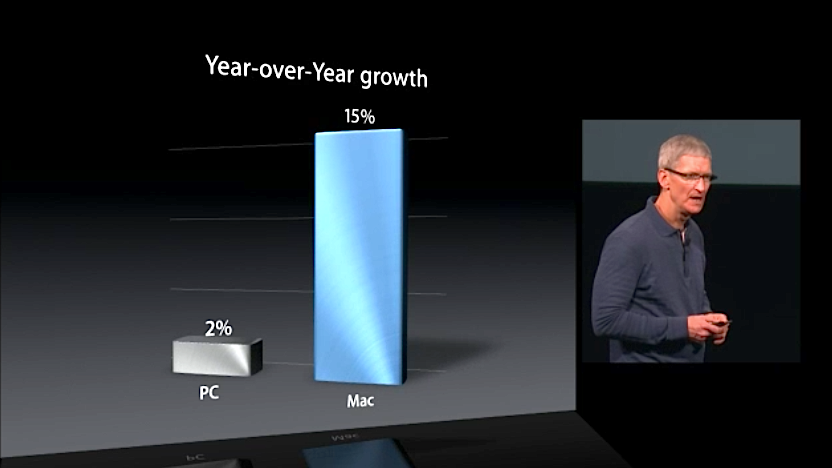
Apple CEO Tim Cook Mac Market Growth Oct 2012

It’s easy to understand why folks ask these questions. After all, at Apple’s high-profile media event yesterday, Apple CEO Tim Cook lauded Apple’s performance in the PC market, noting that Apple not only makes the number one desktop and notebook computers in the U.S. market, but also is seeing its computer business grow about seven times faster than the rest of the PC industry — where the PC world will be lucky to see 2 percent growth for 2012, Apple is looking at 15 percent.

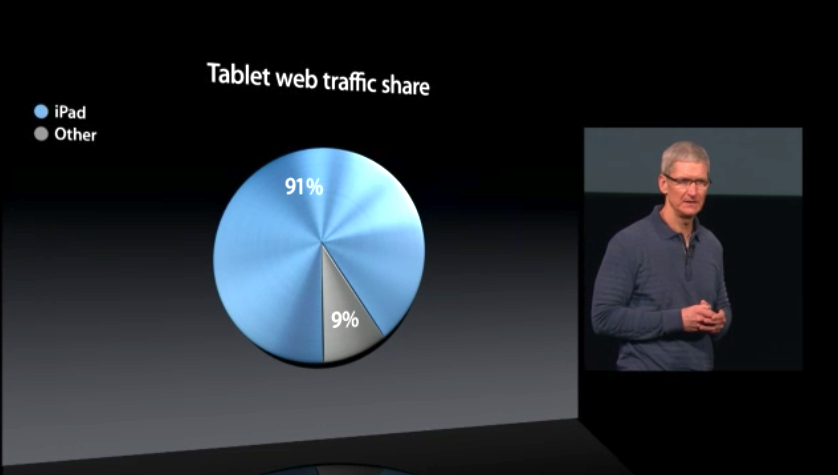
Apple CEO Tim Cook Tablet Web Traffic Oct 2012

And what about Apple’s dominance in other markets? Firms like ABI Research and IHS iSuppli put the iPad’s share of the tablet market at nearly 70 percent for the second quarter of 2012. And since the EU is so concerned about Web browsers, Apple’s CEO Tim Cook trumpeted that iPads are responsible for more than 90 percent of Web browsing traffic from tablets. Why aren’t regulators crying foul over Apple baking Safari so deeply into iOS? Apple even makes it more difficult for third-party iOS browser to compete by consistently rating competing browsers 17+ in the App Store and barring them from using the souped-up Nitro JavaScript engine Safari relies on.

Isn’t Apple’s curated approach to Macs and the iOS ecosystem just another way of saying Apple locks out competition?

Why Apple isn’t getting scrutiny

The reasons Apple skates clear of antitrust scrutiny for its Mac and iOS lines have to do with market share and how the company conducts business.

On the desktop and notebook computer side, Apple may be seeing its computer business grow at a faster rate than the overall PC market, but Apple is not a dominant player. Recent figures from IDC and Gartner don’t even put Apple in the top five PC makers worldwide, and Gartner places Apple third in the U.S. market with a 13.6 percent share. Apple may have the number one desktop and notebook computers in the U.S. market, but it shipped fewer than half the number of computers as HP. What’s more, these figures represent near-historic highs for Apple; it’s tough to argue Apple has somehow been abusing a dominant position in the PC market and needs to be reined in by governments. Moreover, since Apple doesn’t license its operating system, Apple’s computer sales are also representative of OS X’s share of the desktop market. The vast majority of all computers sold from other manufacturers are running Windows — so Microsoft remains the dominant player in the operating systems market.

On the mobile side, the success of the iPhone and the iPad means Apple has a much stronger presence…but guess what? Apple isn’t the market leader in mobile either — that’s Android. According to IDC, in the second quarter of 2012 Android accounted for 68.1 percent of the worldwide smartphone market; Kantar Worldpanel Comtech recently found Android accounted for more than 60 percent of the global smartphone market, and two-thirds of the European mobile market. The iPad does currently account for 70 percent of the tablet market, but remember the iPad got there first, and the market is new enough that being first still carries weight. Amazon, Google, and Samsung are all aggressively marketing Android-based tablets, and Microsoft is about to enter the market with its Surface products.

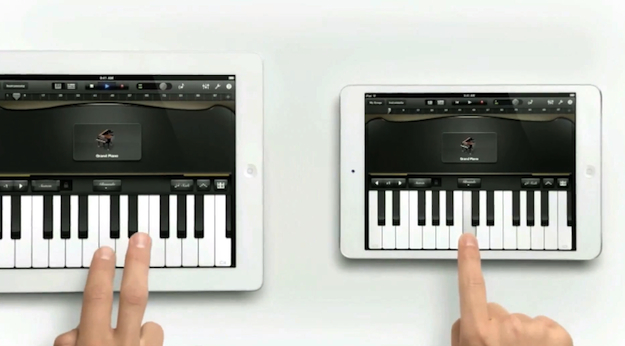
iPad mini ad

But even if the iPad continues to be the dominant tablet line for years to come — and regulators eventually decide smartphones and tablets are separate markets — Apple likely will still not be subject to the kind of antitrust scrutiny visited on Microsoft over the years. Microsoft drew the ire of regulators not just for having a dominant position in the desktop operating system market (that’s not illegal, and neither is a monopoly), but for abusing that position. Among other things, Microsoft cut deals with computer makers to dictate what software could and could not be included on new systems, fiddled with its APIs so Internet Explorer and other Microsoft applications would have an inherent advantage over competitors, and used its Windows monopoly as a distribution channel for Internet Explorer with the intention of wiping out competitors like Netscape.

With one possible exception, Apple isn’t capable of committing these abuses. Apple doesn’t license its operating system, so it can’t strong arm partners who make iOS devices — there aren’t any. Similarly, with Android the dominant mobile operating system, it’s difficult to argue Apple deciding to bundle capabilities into iOS — like Photo Stream and iCloud, for instance — constitutes an abuse. Competitors can (and are) offering similar services for iOS (Dropbox, Instagram, anyone?) and are free to develop for Android, Windows Phone, Windows RT, or even BlackBerry or Symbian if they like.

The one antitrust concern in iOS might be the built-in Safari Web browser. Apple does permit third-party browsers for iOS — Google Chrome Opera Mini, Atomic, Dolphin, and (heck!) iCab are available for iPhone and iPad, although Mozilla recently “retired” Firefox Home. But Safari outperforms the competition by being able to tap into the high-performance just-in-time (JIT) compiler in the Nitro Javascript engine. Although Web apps got the same capability in iOS 5, third-party Web browsers have to rely on a slower JavaScript engine or (in Opera’s case) outsource Javascript to a remote service. Apple also won’t approve a browser that includes a JIT compiler of its own. Apple claims these restrictions are all about security — iOS is more secure than Windows, OS X, and Android in this regard — and Apple gives Safari a pass because Apple can perform rigorous QA on it as part of iOS. However, is does mean that Safari has an inherent advantage on iOS that competitors can’t match. That’s eerily reminiscent of the API adjustments Microsoft made to favor Internet Explorer on Windows.

What might happen to Microsoft?

Steve Ballmer Microsoft

Although Microsoft is undoubtedly in hot water for breaking the browser ballots (and thus the terms of its settlement with the European Commission), few expect the company will be on the hook for billions of dollars over the issue.

Microsoft doesn’t seem to be slithering out of its mistake. “Although this was the result of a technical error, we take responsibility for what happened, and we are strengthening our internal procedures to help ensure something like this cannot happen again,” the company said in a statement. Microsoft has suggested it be required to display the browser choice ballot for an additional 15 months, which would mean European Windows users would see a browser choice screen through at least 2015. The European Commission hasn’t commented on that suggestion, or any possible sanctions against Microsoft.

Looking forward, Microsoft might face difficulties with Windows RT. When Microsoft ships its ARM operating system this week, it will support one and only one Web browser: Internet Explorer 10. Microsoft is denying third-party developers access to components that would be necessary to create a competitive browser on the platform: not just a JIT Javascript compiler, but lots of other internals that just aren’t accessible to Windows RT apps. Microsoft’s reasons for this decision are very similar to Apple’s reasons for denying access to the Nitro engine: stability and security.

However, Microsoft is also unlikely to see any antitrust action over browsers in Windows RT — at least, not anytime soon. Right now, Windows RT accounts for essentially zero percent of the mobile or tablet market, so Microsoft can’t possibly be abusing a dominant position. Competitors might argue Microsoft’s existing antitrust settlements in the United States and the European Union should be extended to Windows RT, but that’s also difficult. In the United States, federal oversight of Microsoft formally concluded in mid-2011. Oversight in the EU is still ongoing — hence the scuffle over the browser ballot — and terms of the settlement could conceivably be applied to ARM-based devices running Windows RT. However, regulators will probably wait to see if Windows RT goes anywhere. After all, Windows Phone has been out for two years, and nobody is worried about Microsoft abusing its monopoly power there.


Source : digitaltrends[dot]com

Oct 10, 2012

RockMelt’s iPad Web Browser Puts Social Media Front and Center

ht rockmelt tk 121010 wblog RockMelts iPad Web Browser Puts Social Media Front and Center

Image credit: RockMelt

In addition to the standard Safari Web browser that comes on the iPad, there are a few others in the App Store. Some of them make browsing faster and add a few features you don’t get with Apple’s, but by and large they look like, well, Web browsers.

RockMelt’s new browser for the iPad, which is being released today, will stand out since it looks nothing like a typical Web browser.

“Everything has been fairly uninspired equivalents of the desktop browser. There’s a URL bar and an open window for the page to load,” Tim Howes, the co-founder and CTO of RockMelt, told ABC News in an interview. “We wanted to build a whole new visual style of the interface.”

And that is what the start-up did. Similar to RockMelt’s desktop Web browser, it is built around social media.  Log in to your Facebook and Twitter accounts and it brings in the articles or sites your friends are sharing in different boxes. From that grid, you can tap to read an article or visit a site. And there’s an added social layer on top of that. You can tap one of RockMelt’s feedback buttons or “emoticodes” — such as “Like,” “LOL,” “Want,” “WTF,” or “AWW.” Pinch the article to shrink it and you’ll be back on your home-screen grid.

Of course, you can still search the Web and type in regular Web addresses by tapping on the buttons in the upper left hand corner. You can also save articles you might want to read later. In those respects it is a full-on browser and not just a news app aggregator, like FlipBoard or News360.

Howes and the CEO of the company, Eric Vishria, previewed the app for me a few weeks ago and I was impressed with the clean layout, the integrated social functionality, and the speed of the experience. Beyond all that, I was impressed with just how different it looks than other browsers out there.

The new RockMelt app will be available for free starting today for the iPad. According to the duo the company is working on bringing versions to the iPhone and other devices, so ultimately your browsing experience can be synced everywhere.


Source : abcnews[dot]go[dot]com

Oct 3, 2012

Nokia releases Xpress for Lumia browser, compresses data by up to 90 percent

Nokia has released the beta version of a new browser called Xpress for Lumia that is based on the same principle as the browser on their Asha phones, which itself was based on the Opera Mini.

The Nokia Xpress for Lumia browser is designed exclusively for Nokia Lumia phones and claims to compress data by up to 90 percent, saving your data, time and money.

Some of the other important features of this browser include:

  • Detailed report on the amount of data that you consumed on the browser. Can be saved as a live tile for quick view.
  • Save sites with RSS feeds in the browser and then view the articles in a magazine style layout.
  • Save pages for offline viewing
  • Save a video on SkyDrive and watch it later
  • Tap on a word on a page and do a quick search on Wikipedia, Bing and YouTube
  • Translate a page to one of the 10 language options available

The browser is currently available for download only from Nokia Beta Labs.


Source : blog[dot]gsmarena[dot]com

Sep 26, 2012

The hard-reset Galaxy S III exploit is already fixed, says Samsung

Yesterday we told you about a nasty USSD hack that can hard reset the Galaxy S III. The code could be entered via the dial pad, the stock browser or accepted via an NFC tag, which made it quite dangerous.

According to Samsung the vulnerability has been already eliminated on the Galaxy S III via an earlier OTA update.

Samsung response went as follows:

“We would like to assure our customers that the recent security issue concerning the GALAXY S III has already been resolved through a software update. We recommend all GALAXY S III customers to download the latest software update, which can be done quickly and easily via the Over-The-Air (OTA) service.”

So if you are postponing some old OTA update you should probably do it right now. The exploit is not present in the Jelly Bean ROM, so you might as well get it via the major update (in case for some reason your region didn’t receive the OTA update in question).

There is no word about the rest of the affected devices, but we guess either they will be updated soon or they already got the fix, too.


Source : blog[dot]gsmarena[dot]com

iOS users more likely to use 3rd party browsers than Android users

The browser war on the desktop is very heated, but in the mobile space things are pretty calm – the overwhelming majority of Android and iOS users use the default browser on their device.

Here’s something you might not have expected though – Chitika, an ad network and data analytics firm, found out that iOS users are more likely to install and use a 3rd party browser than Android users.

A hair over 91% of Android users stick with the Android stock Browser that comes as part of the OS. The number of iOS users who use Safari is “only” 85%. These numbers come from Chitika‘s ad network, measuring a week of US and Canada web traffic.

Apple limits third-party browsers on its iOS platform – basically, they have to use Safari’s rendering engine and a slower version of Safari’s JavaScript engine (it’s the same engine, but third-party apps don’t get to use JIT).

So, almost all third-party browsers on iOS are just repackaged Safari with a different UI and some extra features (the exceptions being mostly Opera Mini-likew compression browser, which render the sites on a remote server) and yet 15% of iOS owners would rather have that than pure Safari.

Chitika found something else that’s quite interesting – of the 15% share of third-party browsers on iOS, only Chrome has a significant share (at 3%) and the other 12% are split between many different browsers, none of which has any statistically significant share.

On Android, however, only the big names have a measurable share. Surprisingly, Opera is the biggest non-default browser on Android, with Chrome having only half its share. The third player, with barely over half a percent share is Firefox.


Source : blog[dot]gsmarena[dot]com

Sep 6, 2012

Grooveshark bypasses app store bans with browser-based mobile app

groove shark ios browser app playlist

In the face of app store bans by Facebook, Google, and Apple bans, Grooveshark has launched an HTML5 mobile browser-based application.

What do you do when you’re banned from the Facebook App Store, Apple’s App Store and Google Play? By launching an in-browser mobile player, of course! And that’s exactly what controversial music streaming service Grooveshark has done.

Long suspected of shady music practices that both music labels and musicians, Grooveshark has been in and out of lawsuits for suspected violations of copyright infringement and failure to pay royalties for years.

grooveshark ios browser appGrooveshark’s browser app has been built in HTML5, and leaves behind crash-prone Adobe Flash. According to the company, users can search, discover, and play more than 15 million songs from any mobile device, or listen to genre-based stations and listen to tracks shared by friends.

In one respect, the app stores bans are a blessing in disguise. Managing the app and implementing new features on the browser app doesn’t require the hard coding and different languages that would otherwise be necessary to maintain native apps for Android, iOS and, soon, Windows Phone 8 devices. Rather, the company will simply have to add additional code depending on the browsers supported.

When testing out the app ourselves, we noticed that the app sticks the user experience that we’re used to from a native app. We can sign into our profile and view our existing content, from saved playlists, to favorites, followers, and users that we’re following. All said, it functions much like it would like a Spotify app. But as a browser app, it has its limitations. Features like the ability to slide your fingers to move pages from left to right or visa-versa is lost, and there’s a slight but noticeable delay when interacting with the app.

If you like the convenience of a button that opens up the app, you can do so by adding the site to your Home Screen on your iPhone.

Unlike Spotify and Pandora, which negotiate and pay for the rights to stream libraries of music from music labels like Universal Music, EMI, Sony and Warner Music Group, Grooveshark enables its users to upload their own music onto its platform and share that content with other Grooveshark users. The company claims that this strategy allows it to bypass the need to pay royalties to musicians and music labels. Theoretically, Grooveshark imparts the accountability of uploading infringing music to its users. Of course in practice, the accountability may ultimately lie with Grooveshark, which claims to abide by the Digital Millennium Copyright Act (DMCA) — a belief backed by the courts on at least one occasion so far.

There hasn’t been an official explanation for why Grooveshark has been banned from app stores, but it’s evident that the very public copyright infringement claims mounting against the service, Apple, Google, and Facebook aren’t taking any chances with supporting Grooveshark. Still, Grooveshark hasn’t been deterred as its browser app first launched in the United States on Wednesday, with an international launch due in the coming months. 


Source : digitaltrends[dot]com

Aug 28, 2012

Firefox 15 for desktop and Android released

Mozilla has released yet another update for the Firefox browser for the desktop as well as for Android. The major change in the desktop browser is that it now supports silent, background updates, which means just like Chrome, Firefox will now download the latest updates in the background and install them without any user intervention.

The Android version, on the other hand, brings an optimized UI for tablets. Other features include faster startup time, redesigned Awesome Bar, enhanced search, ability to close tabs by swiping on them in the tab view, ability to import bookmarks and history from the default web browser, ability to request the desktop version of a website, Find in Page option and support for SPDY networking protocol v3.

One of my main complaint with Firefox for Android remains, however, and that is the weird font rendering, especially on smartphones. Firefox makes all the text absurdly large, which breaks the page layout. You just have to open up reddit and compare it with the font rendering on the stock Android browser to see the difference. Even Chrome does this to some extent but it’s not as bad.

Anyway, you can download the desktop version of Firefox from here and the Android version from here.


Source : blog[dot]gsmarena[dot]com

Mozilla rolls out Firefox 15, updated Android tablet app

Firefox logo in space

Continuing to focus on the development of the modern Web browser, Mozilla launched Firefox 15 with significant improvements.

Detailed within a post on the official company blog earlier today, Mozilla announced the launch of Firefox 15 in addition to a revamped version of Firefox for Android tablet devices running Honeycomb. Among the variety of new features in Firefox 15, this version of Firefox finally adds background updating. After upgrading to Firefox 15, all future upgrades to the Firefox browser will be conducted automatically without the need for any user action. This feature has been widely available within Google Chrome for quite some time and simplifies the updating process for the novice user significantly. The new updating feature basically allows Firefox to automatically download updates to the software, apply the update while the browser is currently in use and load the updated version after the user eventually restarts Firefox. 

Firefox Memory LeaksIn addition to silent updates, Mozilla has also optimized Firefox 15 for any user that has installed a large amount of add-ons by preventing the majority of memory leaks. Prior to this update, memory leaks from both high quality and suspect add-ons would dramatically slow down the browser for users.

According to a blog post created by Nicholas Nethercote, he stated “Over the past year, Mozilla has made great progress in reducing Firefox’s memory consumption.  However, the excessive memory consumption caused by add-ons with memory leaks has remained an ongoing problem. Firefox 15 fixes that problem.  We have confirmed, via in-house testing and from real-world telemetry data, that it prevents the vast majority of leaks that occur in existing add-ons.”

Beyond the memory improvements, the development team behind Firefox 15 has improved support for game creators working with WebGL. After adding support for compressed textures, game developers should be able to utilize higher-resolution textures within 3D games that have been built to play within a Firefox browser window. To prove the concept of 3D gaming within a browser window, the team at Mozilla created a demo of a 3D first person shooter called BananaBread; a game which was running in the Firefox browser without the help of any plugins. However, the game is also playable within any browser that offers the same features; Google Chrome for instance.

Firefox for Android tabletsOn Android tablets, Mozilla has launched a new version of Firefox that offers a significantly faster start-up time as well as faster page loading. After Firefox users upgrade to the new version currently located on the Google Play Store, they can use Firefox Sync to link up personal details from their desktop version of Firefox and find information like bookmarks, browsing history and passwords on the redesigned Awesome screen. 

In addition, Mozilla has added a feature that allows a user to switch between a mobile version and Web version of a site more easily. Within the browser menu, users will find a setting called “Request Desktop Site” and that can be tapped to bring up the Web version of any particular site. Other features that have been added to this new version of the Firefox browser for Android tablets include the ability to use ”ctrl-F” to find something on a page, a tool for selecting text and tabs that can be closed with a simple swipe.


Source : digitaltrends[dot]com

Aug 23, 2012

Chrome for iOS gets updated, adds sharing options

Google has released an update to the Chrome browser for iOS, which brings it to version 21.0.1180.77. The major change in this update is the inclusion of sharing option. Now you can tap the Share button in the drop down menu on the top right and it will give you options to share the page on Google+, email, Facebook and Twitter.

For email and Twitter the app pops up the built-in editing box and for Google+ and Facebook it launches the respective applications, if they are installed on the device. Otherwise it takes you to the App Store page to download them.

Other changes include stability and security improvements and bug fixes. Unfortunately, Google still hasn’t done anything about that hideous icon. Fortunately, you can change it to something better, such as this one. You can download the app itself from the link below.


Source : blog[dot]gsmarena[dot]com

Aug 9, 2012

Pulse launches Web app tailored for Microsoft’s Windows 8 and Internet Explorer 10

pulse web app

Pulse is mobile-only no more, with today's release of a Web app specially tailored for Microsoft's Windows 8 OS and Internet Explorer 10 browser.

Mobile-only is one of the hot new trends for startups. Instagram, Zite, Flipboard, News.me — all these and others have chosen to ignore the fact that Internet users do still spend time browsing the Internet on a PC. And now, one of them is jumping off the mobile-only bandwagon: News aggregation service Pulse debut its Web app today, with a design that doesn’t sacrifice its appeal as an app.

Pulse launched in 2010, and in the past two years has bolstered its list of publishing partners, while developing cross platform apps for both Apple and Android devices. The service has grown to 15 million users, solely through its mobile apps, who read over 250 million stories per month. But in the past nine months, with the help of Microsoft, Pulse has finally fulfilled the wishes of its users to bring the platform onto the Web.

The Web app acts much like a Web application intended for a tablet device. It’s built in HTML5; and with the backing of Microsoft, the design has been geared toward touch devices – primarily devices that will sport Windows 8. Articles on Pulse’s Web app are tiled by its corresponding images, keeping in line with the user interface of its existing mobile applications — but there’s a motive behind the tiled design.

Pulse is best viewed in Internet Explorer 10, a browser that has been developed with multi-touch gestures in mind, enabling the Web application to mimic responses to a user’s interaction much like a mobile app. For example, users can pinch to resize groups of article tiles on the home page, or side-swipe to open the next story in queue. As smartphone and tablet users, we’ve become accustomed to these simple gestures that we now take for granted, and IE10, with improvements to its Javascript engine, is hustling its way to become the defacto browser for touch-enabled devices.

“Tapping into the capabilities of a modern browser, like IE10, and advancements in Web standards, companies like Pulse are able to provide users with an experience that meets, and may even exceed, what is possible in an app,” Ryan Gavin, senior director of Internet Explorer said in a statement.

After checking out Pulse’s Web app ourselves, we’d even go as far as to say that we may prefer the Web app over its existing mobile apps. While we’ll have to wait until at least October 26 for the first Windows 8 devices to go on sale, today’s release could be a huge step in the right direction for both Microsoft and Pulse.


Source : digitaltrends[dot]com