Pages

Showing posts with label price. Show all posts

Nov 10, 2012

Google and ASUS provide money back for 16GB Nexus 7 buyers in the US

If you bought a 16GB Nexus 7 in the US 15 days after it received a price drop, you are in luck. According to Google’s Price Protection policy, if you purchased the 16GB model 15 days after the price cut was announced, that is on October 14, then Google will refund the price difference to you ($50). Unfortunately, no such offer is available to those who purchased the 8GB model.

Meanwhile, ASUS also has its own scheme going on for buyers in Europe who purchased the tablet before October 29. If you are one of the eligible buyers, you will get a €30 (or ₤25 in the UK) voucher, that you can use on ASUS’s online store. ASUS hasn’t mentioned any particular model, so it is apparently available on both the 8GB and 16GB variants.


Source : blog[dot]gsmarena[dot]com

Nov 1, 2012

Consumers accuse lithium-ion battery makers of price fixing in class-action lawsuits

Brammo Empulse electric motorcycle preview li ion battery power

Several of the biggest makers of lithium-ion batteries have been accused of price fixing in a number of class action suits, which could have major implications for the future of electric cars.

As key components in everything from laptops and cell phones to electric vehicles, lithium-ion batteries have never been cheap, but it may have been more than just insatiable demand that has kept them that way over the years. According to the New Jersey Law Journal, at least 10 class actions have been brought against manufacturers of lithium-ion batteries alleging price fixing. Firms named include Panasonic, LG, Sony, Samsung, Sanyo and Hitachi, along with their American subsidiaries in California and New Jersey. The plaintiffs allege that these companies have engaged in price fixing to keep lithium-ion battery prices artificially high since 2000, and that they have controlled at times between 60 and 90 percent of global lithium-ion battery production.

The suit follows in the footsteps of others filed over price fixing of electronic components, such as LCD screens and RAM, and in some cases, the companies involved are the same. The plaintiffs allege that the situation the battery situation mirrors those previous cases in some ways, such as a highly concentrated market, rapid commoditization of new technology, and pricing that seems to defy the effects of fierce competition.

According to court filings, li-ion battery prices fell dramatically between 2000 and 2002 as Korean manufacturers entered the market and competition increased. But in the period following this, prices have risen consistently without even a hiccup during the 2008 economic downturn, evidence, plaintiffs claim, of price fixing.

Breaking up a potential price-fixing racket in lithium-ion batteries could be a significant development for EVs, where prohibitively expensive battery packs have served as an insurmountable stumbling block preventing mass EV implementation. Government programs have helped somewhat in reducing the cost for the consumer, but this spending is controversial, and skeptics see any consumer technology that needs to be propped up with legislation as being impractical in the long run. Prices have been predicted to fall for lithium-ion EV batteries over the next decade, but with sales of EVs falling well short of the high expectations of just two years ago and automakers rethinking their EV strategies, a decade from now might already be too late to save the EV. Should these suits trigger a worldwide drop in lithium-ion battery prices, the potential is there for an EV market which is competitive with standard gasoline-powered cars.


Source : digitaltrends[dot]com

Oct 27, 2012

LG launches 84-inch, Ultra HD television at $19,999

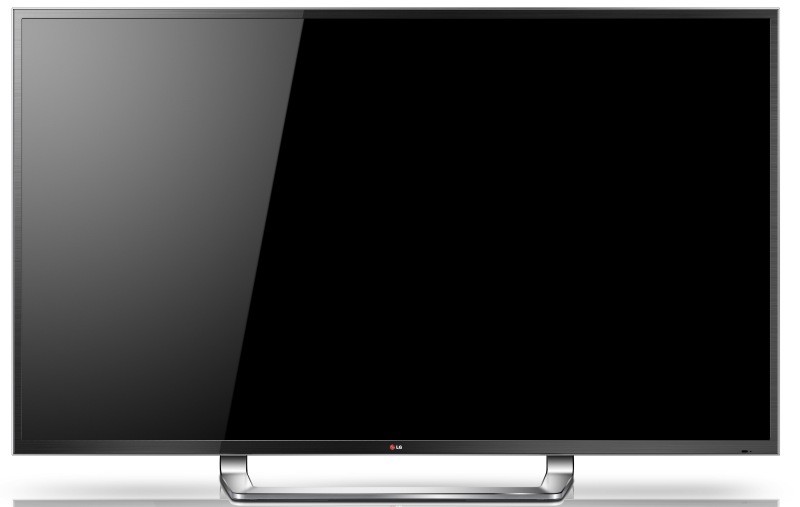
LG Ultra HD 84LM9600 front

Finally transitioning from simply showing off 4K technology at trade shows, LG is now selling an Ultra HD television around the same price as some cars.

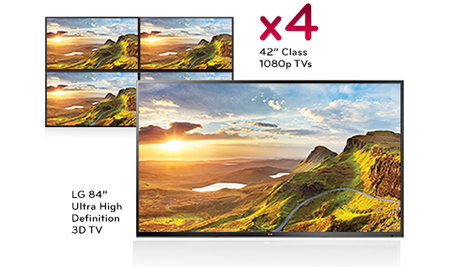
Earlier this week, LG held a launch event in Southern California to debut the company’s first Ultra HD (4K) television at a sizable list price of $19,999. The LG 84LM9600 has a native screen resolution of 3840 x 2160, four times the resolution of a typical 1080p television. While the amount of content available in Ultra HD resolution is incredibly scarce at the moment, the 84-inch LED Ultra HD panel also includes LG’s proprietary “Resolution Upscaler Plus” technology to up-convert 1080p content to the Ultra HD resolution. Regarding size, the 84-inch screen is the equivalent of four 42-inch, 1080p panels stacked in a rectangle shape. 

LG 84LM9600 sideWhile the television does include technology to allow consumers to watch 3D movies, an interesting feature directed at gaming consumers allows two players to play a multiplayer game without the need for split screen. Using glasses that are sold separately, the television is simultaneously displaying two video feeds and each pair of glasses is designed to pick up a specific feed.

In regards to 3D content, LG is including six pairs of flicker-free -glasses with the Ultra HD set. Flicker-free glasses are identical to glasses found within movie theaters, thus it’s inexpensive to add or replace glasses. Similar to other panels in the LG lineup, the company also includes a 2D-to 3D conversion feature with the set.

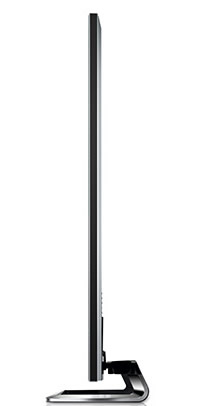
While the massive panel is just 1.57-inches thick, the television is over 150 pounds in weight plus another 25 pounds for the stand. Consumers will have to be careful when wall mounting the LG 84LM9600 which may require professional assistance for installation.

However, consumers won’t have to worry too much about a wired network connection near the home theater as the 84-inch television comes with built in Wi-Fi. The television ties into LG’s Smart TV ecosystem, so consumers will have access to plenty of applications like Netflix, Facebook, Vudu, Skype and Hulu Plus.

LG 84LM9600 sizeThe LG Ultra HD panel includes the gesture system and “Magic remote” found on other LG televisions. Consumers have to make gestures with the remote to interact with menus on the screen in addition to using voice commands. Specific to sound, the television includes a 10-speaker system rated at 50 watts.

The 84-inch panel also has a significant amount of audio and video inputs. Besides four HDMI inputs and three USB 2.0 inputs, the LG set includes an Ethernet port, antenna/cable input, composite audio / video input, component video input, RGB PC input and PC audio input. In addition, there is an optical digital audio output to send audio content to a receiver. 

While the list price on the television set nearly breaks $20,000, the sales price in stores will likely be around $16,999 according to LG management. However, it’s highly unlikely that an online retailer like Amazon will carry the massive television. According to LG’s site, there are currently no online retailers stocking the television yet and it can only be purchased at a handful of high-end home theater stores. To date, the only other Ultra HD television that will be available to consumers this year is Sony’s 84-inch XBR-84X900. However, the list price of Sony’s television is significantly higher. On the Sony store site, the price of the display is $24,999.99.


Source : digitaltrends[dot]com

App of the Week: Make A Zombie 2

ht Zombie kb 121026 wblog App of the Week:  Make A Zombie 2

Image credit: Skunk Brothers

App Name: Make A Zombie 2

Price: Free

Available Platforms: iPhone, iPod Touch, and iPad. This app requires iOS 4.3 or later.

What does this app do? Blood down the side of the mouth, pale and sallow skin, dark circles like inverted half moons under the eyes, maybe even a knife protruding out from a crusty, worm-eaten cheek—really, when you sit down and imagine what makes a zombie look like a zombie, you have a grab bag of options. And now, app developers Skunk Brothers provide even more possibilities for you to design your idea of this walking-dead monster with their latest release of a mix and match app called Make a Zombie 2.

For those of you that missed the previous release, Make A Zombie, this new version, released earlier this month, allows you to create your own zombie by selecting from a variety of features and outfits.

At the start screen, the app presents your canvas–a squat, wide-eyed character against a plain backdrop ready for zombifying. From your iPhone or iPod Touch, tap the arrow on the top right of the screen to peruse outfits and features. Select the icon for hair, for example, and a second row of tiles below displays a handful of choices—long and stringy to short and nubby. You can change the background by tapping on the square tile in the top row of buttons, and then choosing between several colors and textures presented in the second row.

Once you’ve outfitted your zombie, name and save it, tweet it or post it to Facebook by tapping on a button on the bottom left. The app also allows you to save your zombie to a gallery, wherein you can see all of your brains-eating creations displayed in glass jars. For additional features, you can purchase “zombie packs” from the in-app store, such as the Halloween Pack, or the Pirate Zombie Pack, by selecting the shopping cart icon.

Is it easy to set up? Yes, download it from the App Store, but keep in mind it is optimized for iOS 5.

Should I try it? This is all fun. You won’t be challenged, you won’t learn a new word, and you won’t score points or excel to another level. You will, however, get into the Halloween spirit and enjoy designing your very own zombies, maybe even legions of them! The two drawbacks to this app were the ads displayed at the bottom of the screen, and, unlike the previous Make A Zombie version, this one is not available yet for Android.

Let us know if you have any app of the week suggestions on Twitter at @TechThisOutABC.


Source : abcnews[dot]go[dot]com

Oct 23, 2012

Microsoft: Smartphone-style contracts will be the Xbox 720′s bread and butter

xbox 720

In discussing the expansion of the Xbox brand, Microsoft explains that future consoles like the oft-rumored Xbox 720 will be sold at a low price alongside subscription contracts just like the average smartphone.

A new Xbox won’t be the only key to reigniting Microsoft’s stagnating game console business. According to the Windows 8 company, the mobile market will also redefine its living room entertainment business. How? Pricing.

The video game business is changing at speed. Video game retail sales have plummeted year-on-year over the course of 2012. The decline in disc-based game sales is reflective of an increasingly digital market; people are still spending on video games, they’re just downloading them in greater numbers and publishers typically don’t share digital sales data. The decline in devoted gaming machines is the real concern hidden in those poor retail numbers. Microsoft in particular is feeling the heat, with Xbox 360 sales in the last quarter falling 29 percent year-on-year. A brand new console might not reignite Microsoft’s game console business though. All devoted gaming machines are feeling squeezed: The Nintendo 3DS portable’s sales fell 18 percent in September. How do you fix this business?

By subsidizing sales with subscriptions, just like smartphones. Rather than charge $400 or $500 for a new game console upfront, Microsoft plans to sell the Xbox 720 at a low price with an accompanying subscription.

In a discussion with the Wall Street Journal, Microsoft interactive general manager for marketing Matt Barlow said that subscription programs will be the core of future Xbox releases. “This type of program is pivotal to our business,” said Barlow.

Microsoft began testing the subscription market back in May when it released a $99 Xbox 360 that through its chain of Microsoft Stores. The console is cheap, but it comes with a mandatory two-year contract requiring monthly payments of $14.99. That includes Xbox Live Gold, but at $180 per year, the device and service end up costing significantly more than if they were purchased individually at flat rates. Following that test, Microsoft began offering the same package at Best Buy, Toys ‘R’ Us, and GameStop.

Since Microsoft only sold 1.7 million Xbox 360s over the period when the program first went into effect, it clearly didn’t help the aging console. It didn’t need to though. All it needed to prove was that the model was viable for Xbox going forward into the next generation.

The question now: Who will be controlling and collecting that subscription fee? Will it be Microsoft or cable companies like Time Warner and Comcast as a number of industry analysts like Morgan Pachter suspect?


Source : digitaltrends[dot]com

Oct 19, 2012

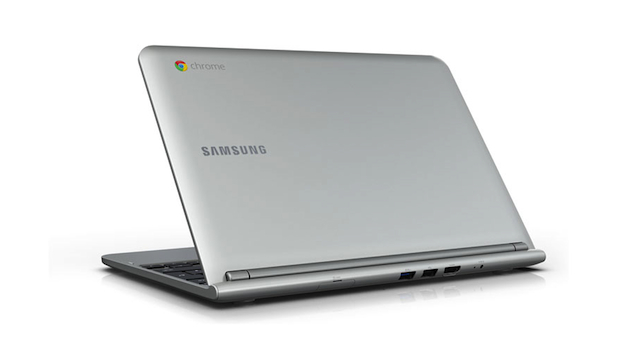
Google and Samsung shun Intel, announce Exynos-powered Chromebook

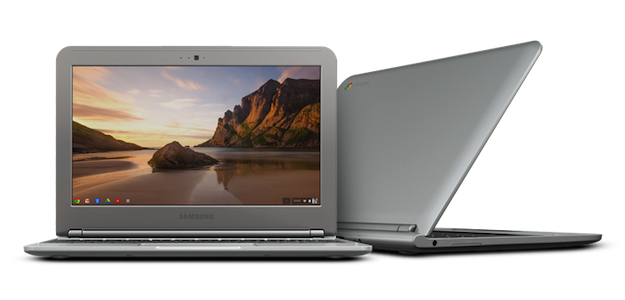
Samsung Chromebook

Samsung has once again partnered with Samsung to produce a laptop running Chrome OS. The new model shuns Intel's chips, and has a very attractive price tag too.

Google has once again collaborated with Samsung to release a laptop with Chrome OS installed. The new model is simply called Chromebook, and is smaller and lighter than the Chromebook 550. It also marks a departure from Intel’s chips, as it’s based on ARM architecture instead.

The new Chromebook has an 11.6-inch screen, smaller than previous models, but with a higher (and more traditional) 1368 x 768 pixel resolution. The Atom processor has been removed and Samsung has installed its own dual-core Exynos 5 Dual chip.

This is exciting for several reasons. Samsung’s Exynos 5 Dual was the first chip to use ARM’s Cortex A15 architecture — the same as Qualcomm’s quad-core Snapdragon S4 Pro — and the Chromebook marks its first appearance after being announced in August. It’s also expected to appear in Samsung ’s next generation tablets and although no clock speed is mentioned for the Chromebook, the chip can run at up to 1.7GHz.

Samsung and Google’s move to ARM is also good news for our wallets, and the Chromebook has been priced at a very competitive $249 in the US and £229 (if purchased online) in the UK.

Samsung Chromebook Rear

For this you get a 16GB SSD that provides a 7-second boot up time, 2GB of RAM, a memory card reader, a pair of USB ports, an HDMI-out, Wi-Fi, a VGA camera, Bluetooth 3.0 and a battery that promises more than 6 hours of use before needing a recharge. The chassis weighs 2.5lbs, or 1.1kg, and measures 20mm thick.

As the whole point of the Chrome OS is to work in the cloud, Google will make up for the pathetic 16GB of onboard storage space by providing a complimentary 100GB chunk of Google Drive space. The small print points out that this is only valid for 2 years, after which time it’ll revert back to standard and you’ll have to pay.

So, the price is good and the spec is interesting, and to help introduce buyers to Chrome OS, Google will promote the new laptop in stores through special “Chrome Zones.” However, with the impending introduction of Windows 8 and all its associated hardware, will the Chromebook get a look in, regardless of its low price?

The new Chromebook is available as a pre-order from Best Buy, Amazon, TigerDirect.com and Newegg.com, or from PC World in the UK right now. According to the latter, it’ll be released on October 19.


Source : digitaltrends[dot]com

Oct 18, 2012

Hands on with the Hisense Pulse, the most affordable Google TV box yet

The Hisense Pulse offers Google TV for $100

Don't let the price tag fool you: Hisense's Pulse Google TV box sports a smart TV interface that is clean, smooth, and usable for everything from live TV to Netflix. And at $100, you won’t be able to find a set-top box much cheaper.

Despite the off-brand name, much has been made of Hisense’s Pulse Google TV box. After hearing about its $100 price point and specs, we scratched our collective heads wondering what the catch was. Well, after some hands-on time with the Pulse, suffice it to say that our heads are still feeling itchy.

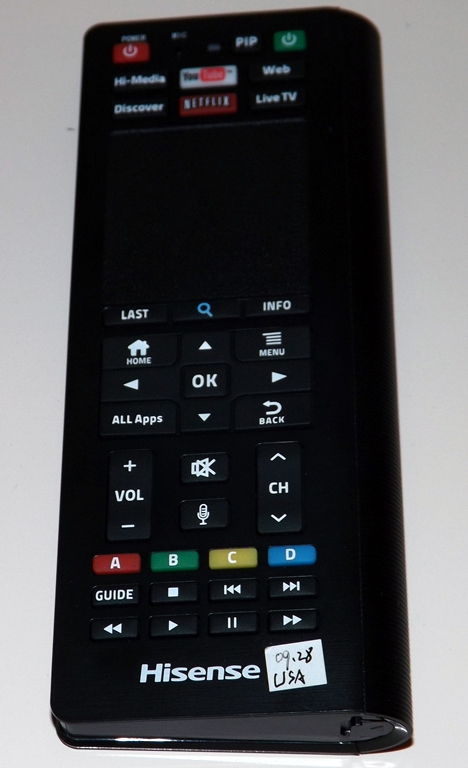
The front side of the remote for Hisense's Pulse Google TV boxWhen we finally got the dual-sided QWERTY keyboard remote in our hands, we expected a herky-jerky, hiccup-prone experience; but what we got was a smooth, responsive version of Hisense’s SmartHub UI, the same interface built into Hisense’s smart TVs. Cycling swiftly through apps like YouTube and Flickster, we wondered aloud how Hisense could afford to offer the Pulse so cheaply. In fact, some of the company’s own employees even confessed that they were as befuddled as we were.

The Pulse simply does not feel like a cheap product, load times are short (slow connection notwithstanding), typing is quick and easy, the trackpad is responsive, and the whole experience felt more or less like browsing the Internet.

Still, if you want to step up the speed and smoothness, the downloadable smartphone app is the way to go. The app (available on Android and iOS) turns your mobile device into a Pulse remote, complete with touch-wheel control and a QWERTY keyboard. Navigating this way feels almost iPod-like, as you swipe your thumb in circles and cycle through content. This method offers ultra-smooth browsing — a bit too smooth for the clumsy thumbed among us.

The back side of the remote for the Hisense Pulse offers a QWERTY keyboard

The Pulse has HDMI, USB, and Ethernet inputs and works with both traditional cable boxes and satellite options. For the former, all it needs is the brand and model number. With those provided, you just hook up the IR blasters (which are included) and you’re ready to go. The Pulse pulls your electronic program guide (EPG) from online, and thus, effectively knows what will be on your TV before you do.

Considering that the typical SmartTV model costs over $100 more than a comparable, less-educated television, we’d have to proclaim the Pulse a solid buy. We were waiting for the other shoe to drop, but for now, the skies seem to be clear. The Pulse will be available in late November, bundled with the remote (originally billed as an add-on) at a suggested price of  $100. 


Source : digitaltrends[dot]com

Oct 17, 2012

Hands on: Dyson DC44 Animal Digital Slim is a mean cleaning machine

Dyson's latest device, the DC44 Animal Digital Slim vacuum, is one of the best handheld cleaners on the market, but is its $400 price tag justified? Our hands-on review investigates the wonders and flaws of this pricey gear to help you decide if this investment is right for your household.

Dyson vacuums have long been one of the pioneers in its own industry, offering an array of high-end equipments that are stylish, functional, and incredibly expensive. As gadget enthusiasts, we could not help but be excited by the latest Dyson Animal Digital Slim model, the DC44, which is portable, wireless, and gets the job done in no time. But at a retail value of $400, it’s admittedly not the most ideal price point for the average family. Here’s a look at what the shiny new gadget offers that most vacuums on the market do not.

Look and feel

At first glance, you have to commend the Dyson DC44, as with all other Dyson products, for being beautifully engineered. Compared to the many handheld vacuums I’ve ever had the opportunity to use, the DC44 is in its own league of craftsmanship. The plastic handle makes it feel like you’re holding an exaggerated, 5-pound staple gun, and the clear vacuum space in the middle lets you see the Dyson-coined “Root Cyclone” motor. According to Dyson, this patented tech spins the dirt into the sides of the dust bin, so in the long run, the device does not damage its filter or lose suction. Never have I felt so cool holding a vacuum, ready to clean my room.

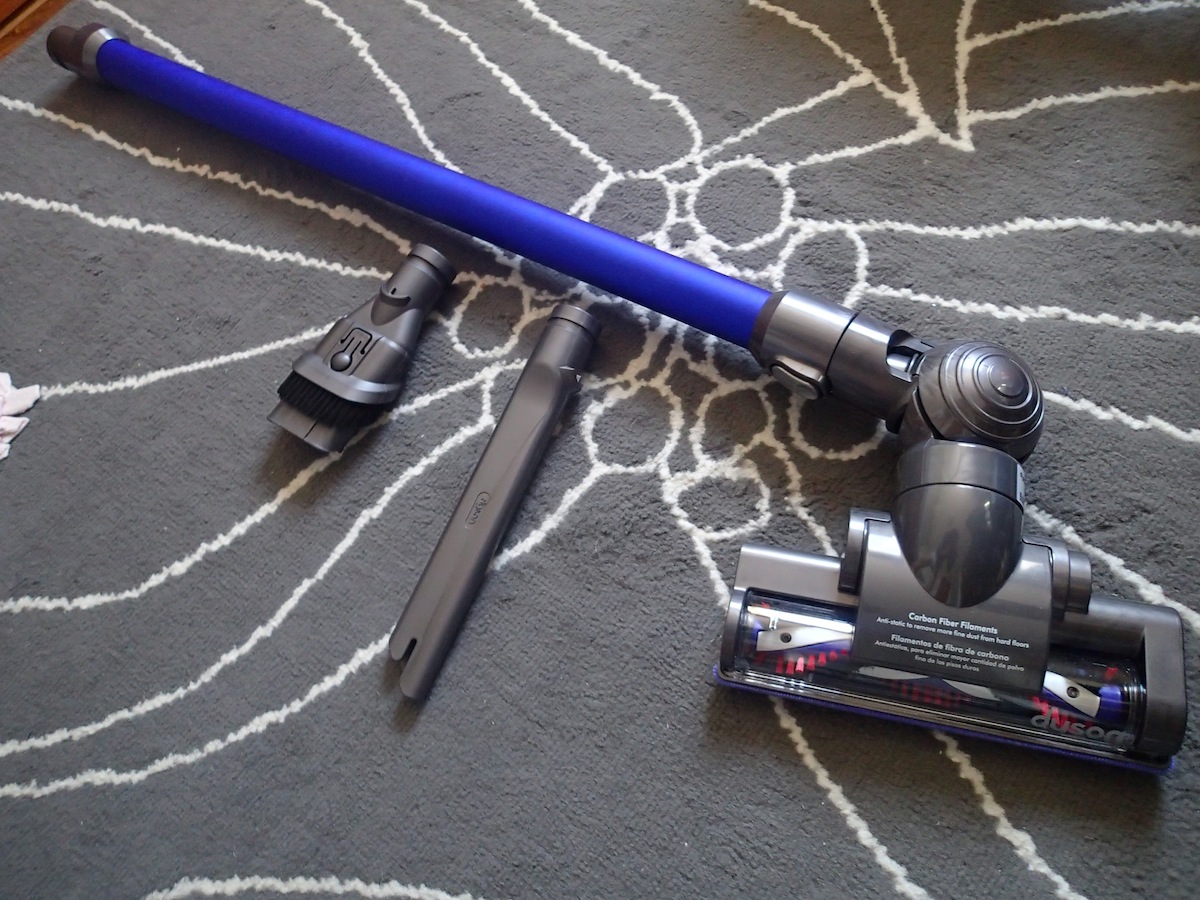
Straight out of the box, the DC44 requires minimal assembly. All you need to do is pick your intended attachment, which ranges from an extended leg for floor work, short cleaner head, crevice tool, and a combination tool that has a large opening and brush. The device comes charged, but if not, each charge takes 1-2 hours and will last you about 15 to 20 minutes. That seems short, but you can clean a decent amount in that time thanks to the power of this so-called Root Cyclone technology.

Utility

Starting with my carpet, I attached the regular cleaner head to the DC44 body and off it goes. The vacuum is loud, but not any louder than your average machine. One sweep of my carpet and you can see the dust beginning to pile inside the bin, and the DC44 is powerful enough that only one swipe is necessarily for a section. I’m so used to going over the same area several times and it became clear why 20 minutes worth of charge is reasonable for one cleaning session. If you need extreme suctioning for a certain trouble spot, you can switch to turbo mode, but it will drop the battery life down to approximately seven minutes. The vacuum will also work on wood floors, sofa covers, and car seats with the right attachment hooked up.

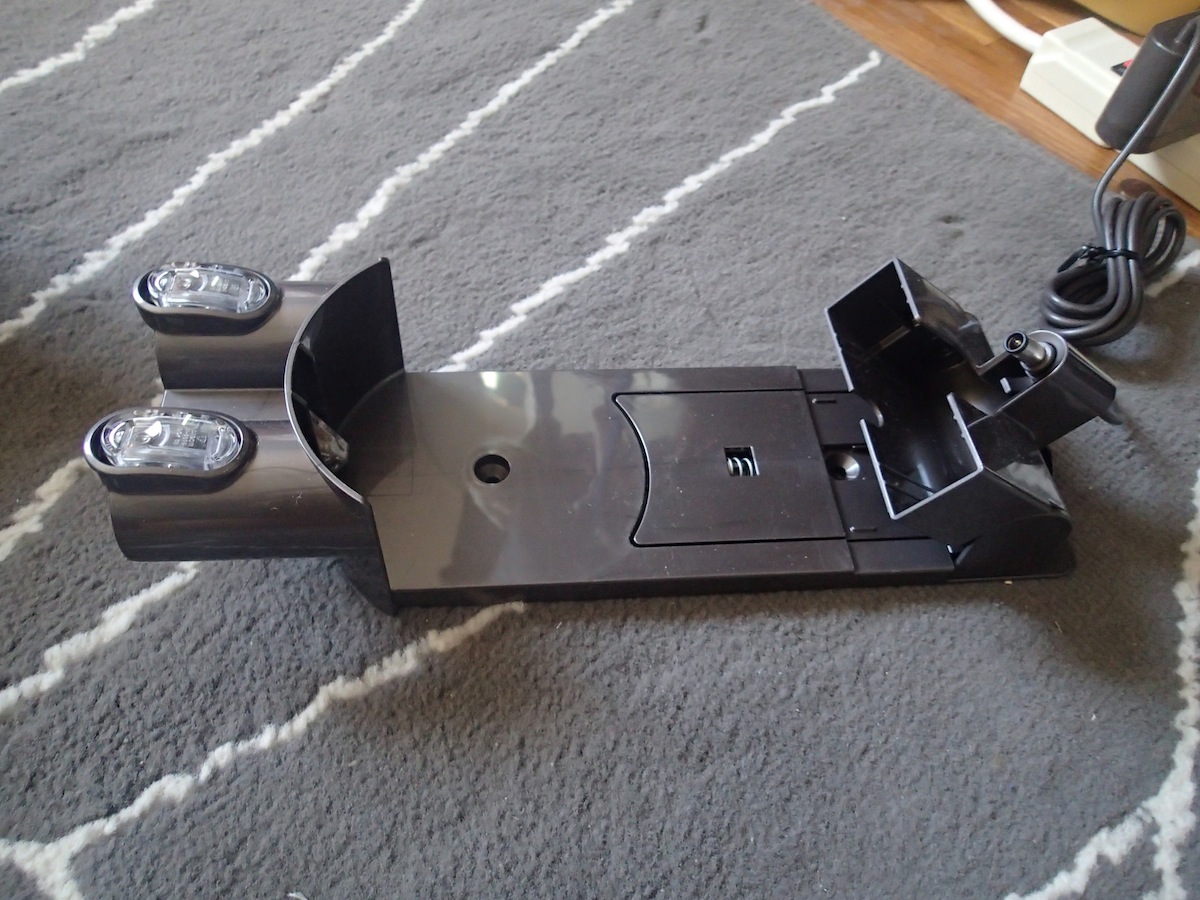
When you’ve killed the battery, prop the device back on the charging station that you can either leave on a surface, or mount to a wall. Plug the cord into the designated slot in the back of the vacuum, and a white light will glow until your battery is all juiced up again. Since the parts are relatively small, storage is not an issue, but you may want to have a nice box to keep all the attachment heads in before you misplace the little pieces. That, or you can keep the combination tool in the car if you know that’s where you’ll use it most often.

Some faults

One of my biggest gripes with the Dyson DC44 Animal Digital Slim is probably my own fault. Guys, this is TMI, but my hair just sheds too damn much. A five-minute vacuum of my carpet and the underside of the cleaner head revealed a tangled mess of hair stuck between the teeth of the brush and the motor roll. In the short run, this won’t mean much if I continually clean it off and yank the pieces out. However, if you forget to do this, or if you are cleaning a large chunk of pet hair, you might run into some trouble with tangled hair clogging up the opening of the vacuum. This could be fixed by using the larger crevice tool, but it just made more sense for me to use a regular cleaner head on my bedroom carpet so this tangle is a bit annoying.

Another issue is the size of the DC44. Yes, the device is made to be compact, but perhaps it’s … too small? After vacuuming for 10 minutes, I found that I have to empty the dust bin before vacuuming again to finish up cleaning my apartment. Or again, maybe my room is just super dirty and I do not vacuum often enough. This item is ideal for those living in small spaces, but homeowners who want a cordless, handheld vacuum cleaner to get the job done in the entire house may have to go for the larger, full-sized Dysons.

Bottom line

So we come back down to the big question: Is spending $400 on this vacuum justifiable? Aside from small issues here and there, the Dyson DC44 Animal Digital Slim is an absolutely superior choice than most handheld vacuums on the market, and would be perfect for small apartment owners. It gets the job done well and fast, and is worth an investment if you aim to use it repeatedly over the course of the next few years. The price tag is impractical for most families, but when you consider the cost of bag replacement, cordless flexibility, and the ability to multitask the vacuum to clean both your car and your home, you’ve got yourself an all-in-one tool that’s pretty much the Apple of the vacuum world, and it’ll be hard to find any other machine that’s nearly as capable as a Dyson.


Source : digitaltrends[dot]com

Oct 15, 2012

A whole lotta clickin’: Microsoft launches its first Surface ad

A week before its new Surface tablet hits the market, Microsoft has launched its first ad for the device, giving nothing away about its price....or anything else for that matter.

OK here we go, it’s lift-off for Microsoft’s Surface ad campaign, a week before the tablet is due to launch.

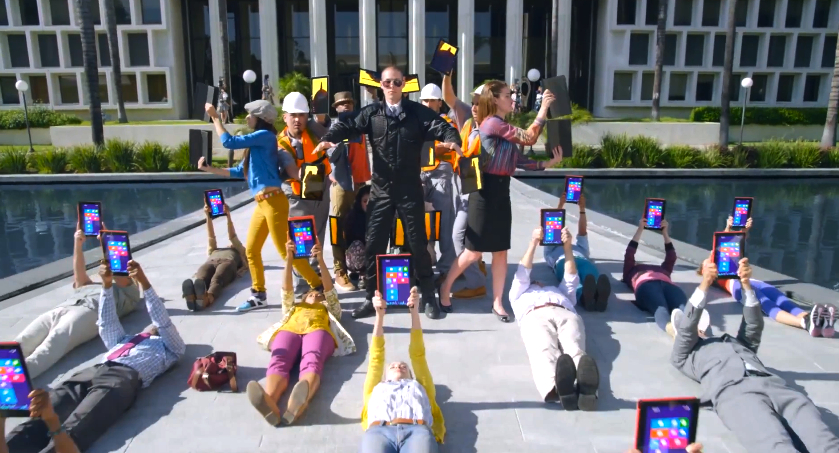
Microsoft’s first ad for its new tablet is a stylish 60-second skit, an all-clicking, all-dancing affair featuring, among others, young families, business workers, dancing schoolgirls, smooching senior citizens and a whole lot of colorful Surface tablets. The wide range of participants in the ad is the Redmond-based company saying, “Hey, this tablet’s for you (oh, and you and you and……).”

It’s more of a teaser than anything else – there’s nothing about specs and no pricing information – designed to create awareness and make those who haven’t heard about Microsoft’s first foray into the tablet world look up and say, “What’s that all about then?”

The ad starts in silence – you might think your video player is on mute at first. Then things start to make sense. It’s all about the click – the click the tablet makes when it connects with its magnetic Touch Cover keyboard; the click it makes when the kickstand is put into action. Within seconds, the screen is filled with a mass of dancing people clicking their tablets to the music. And, well, that’s about it. You can check out the new ad below.

Microsoft’s upcoming Surface tablet has a 10.6-inch display with a 16:9 aspect ratio and comes together with the Touch Cover click-on (yes, it clicks on, did we mention that?) keyboard. The tablet comprises two models, one powered by Windows 8 Pro and a more basic version running Windows RT.

The RT model launches next week while the Surface Pro is expected to be available early 2013.

The Surface’s price tag is still a mystery, though last month Microsoft boss Steve Ballmer dashed hopes of a cut-price tablet when he suggested a likely launch price of between $300 and $800. C’mon Steve, you could’ve narrowed the range a little, no?

Next week looks set to be a busy one in the world of tablet computers, with Apple reportedly unveiling (no, really, it might be happening) its iPad Mini on October 23, three days before the launch of the Surface.


Source : digitaltrends[dot]com

New bundles and an Xbox 360 price drop may make for a very Microsoft Christmas

Not even one month after Sony announced that it would actually raise the retail price of the PlayStation 3 this fall, Microsoft finally lowers the price of its Xbox 360 line to $250. What does the price drop say about Microsoft's future?

How will the Xbox 360 compete with Nintendo’s Wii U for attention this fall? Not with a line up of blockbuster exclusives, and but with a price drop.

The Xbox 360 is quietly enjoying its retail dotage. November will mark the system’s seventh year on shelves, making it positively ancient by video game technology standards. It’s getting just two major exclusive release this fall in Forza Horizon, which will appeal primarily to a niche audience, and Halo 4, a game that isn’t attended by the manic hype that surrounded its predecessor in 2007. Microsoft is opening new services associated with the box, like Xbox Music, and laying the groundwork for the brand’s future with Windows 8, but the Xbox 360 is largely staying quiet going into the always-competitive holidays.

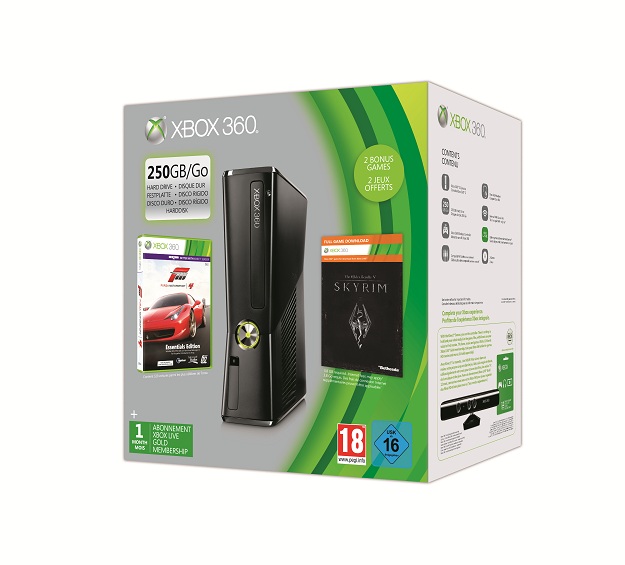
The Xbox 360 is getting a price drop this holiday though. Microsoft isn’t announcing a line wide price drop for all Xbox 360 packages, but its retail partners are. Best Buy, Kmart, GameStop, Amazon, and Target are all selling brand new Xbox 360 bundles that are $50 cheaper than usual. GameStop, for example, is selling a $250 box that comes with a 250GB Xbox 360, a copy of Forza Motorsport 4, and a download voucher for The Elder Scrolls V: Skyrim, alongside another $250 package with a 4GB Xbox 360 and a Kinect. Other retailers are offering similar packages at the same price.

Microsoft is making a number of silent statements with this price drop. The first is that this holiday will be one of the last for the Xbox 360 as Microsoft’s marquee piece of consumer entertainment technology. The $250 price point doesn’t bring the Xbox 360 into the impulse buy, budget region of $199, a price that Microsoft will likely drop to at the beginning of the next fiscal year. That timing may pave the way for Microsoft to release its next console, the Xbox 720 or Durango as it may be called, to control the next fall.

The other statement: We are taking advantage of Sony’s weakness. These are console bundles with significant value to consumers (two games, both of which are recognizable best-sellers from the past few seasons), and they are priced just below Sony’s confusingly priced new PlayStation 3 bundles, which start at $270. Sony also doesn’t have a Halo 4 to move its machine, and the next major PS3 exclusive, God of War: Ascension, won’t be released until March 12.

With this price cut, Microsoft has casually put itself in the best position in the US market for Christmas, and will put its its seasoned console head-to-head with Nintendo’s newest offering. An impressive close to seven years.


Source : digitaltrends[dot]com

Apple rumor overload: 13-inch Retina MacBook Pro, a curvy iMac and an iPad Mini price list

Monday is off to a flying start with a selection of new Apple rumors, including a 13-inch Retina MacBook Pro and an iPad Mini price list.

Monday is off to a flying start with several Apple rumors already “confirmed,” including a 13-inch MacBook Pro with a Retina display, a curvy iMac and an iPad Mini price list for good measure.

Let’s start with the big one. 9to5mac.com has heard from a “consistently reliable source” that Apple will introduced a Retina display-equipped 13-inch MacBook Pro during the iPad Mini’s launch event later this month. It will apparently be thinner and lighter, and offer different combinations of processors and storage options too.

Macrumors.com has found a few potential features for the 13-inch Retina MacBook Pro on a Chinese website, which claims the smaller computer will still have two Thunderbolt ports, a USB port, a headphone socket, an HDMI-out and an SD card reader; just like its bigger brother. There’s also talk of an interesting battery design — although it’s not elaborated upon — and the report is accompanied by a couple of pictures that, frankly, could show absolutely anything.

Before we move on, it’s best to clarify that we’re talking about a product that doesn’t exist being launched at an event that hasn’t been announced for another non-existent product. That said, it’s logical for Apple to produce a 13-inch Retina MacBook Pro, but at the moment we don’t know when that will happen.

The curvy iMac rumors seems to originate from the same Chinese website, where it’s said that the new model will have a curved shell that’s something like “a water droplet,” which sounds more like Samsung’s design philosophy than Apple’s. Naturally, it too is going to arrive at the small “intimate” event apparently set for October 23.

iPad Mini prices

Finally, we’re onto the event’s main attraction, the iPad Mini. A picture supposedly showing a list of iPad Minis that will possibly be stocked by German electronics retailer MediaMarkt has been leaked, complete with prices and basic specs. In addition to the usual 16, 32 and 64GB models, an 8GB iPad Mini appears, each with the choice of a black or white finish, and either Wi-Fi only or “cellular” and Wi-Fi.

The most basic 8GB Wi-Fi iPad Mini is priced at 249 euros, and the top 64GB Wi-Fi with 3G or 4G at 649 euros. A quick currency conversion gives us $322 and $840 respectively, the latter of which will probably have seen wallets everywhere twitch nervously.

Just like all the other iPad Mini rumors, there’s no way to know if this is really a screenshot from MediaMarkt’s computer system, and equally we can’t take those prices as final either, as Apple’s US pricing is often lower than it’s European equivalent.

October 23 is one week away tomorrow, which means that if an event is to take place, Apple will start to send invitations out very soon. We really, really hope it does too; if only to put an end to these infernal iPad Mini rumors.


Source : digitaltrends[dot]com

Oct 12, 2012

Windows 8 prices revealed, you can pre-order it with or without a computer starting today

Today we finally get to see all price options for Microsoft’s next-generation computer OS – the Windows 8. The OS will launch on Oct 26, but you can pre-order it on a DVD right now, if you absolutely need to have a disc. For the rest of us, the update would be available online for download and purchase via the Windows 8 Upgrade Assistant for a cheaper price. The full Windows 8 Pro OS will be downloadable as well when you purchase the license separately.

Oh, yes, and the prices, of course. An online upgrade from Windows XP, Vista or 7 to Windows 8 Pro will cost you $40, as we’ve seen before. That’s a time-limited offer, valid only until January 31, 2013. But there are other options, too.

If you insist on getting the update on a DVD in one of their newly designed product boxes (one of which is pictured above), you will have to shell out $70 (already available for pre-order).

As previously detailed, if you buy a Windows 7 computer right now, come Oct 26 you will be eligible to upgrade your OS, for only $15 in the US, €15 in most of Europe and £15 in the UK. More information and detailed pricing for each country (over 140 worldwide) is available HERE.

If you are into buying a full license for Windows 8, and not just an upgrade, US online store Newegg reveals the prices will go like that:

  • Windows 8 Pro Pack – Product Key Card (no media) – $70
  • Windows 8 (Full Version) – OEM $100
  • Windows 8 Pro (Full Version) – OEM $140

Starting today, we should also be able to pre-order any of the Windows 8 PCs, made by Acer, ASUS, Dell, HP, Samsung and Sony. So far I only had luck with checking out dedicated pages with the offers by Asus, Dell, Sony. I guess your nearest electronics retailer will already have a deal for you. So far, there is no pre-order deals available for Microsoft’s own tablet – the Surface.


Source : blog[dot]gsmarena[dot]com

Oct 3, 2012

4moms Origami Hands-on: Baby stroller or Mars Rover?

4moms Origami Stroller

It's arguably one of the coolest strollers for tech-obsessed parents, but is the big-ticketed price tag worth the investment? Our hands-on with the 4moms Origami stroller finds out.

The 4moms Origami stroller is one of the most unique baby strollers available on the market. Unlike traditional strollers that require manual setup, the item folds and unfolds on its own with just a push of a button. At $850 retail, it’s not cheap; However, it is comparable in price to high-end models from companies like UppaBaby and Bugaboo, and the Origami brings a style all its own to the sidewalk.

Look and feel

4moms origamiBe prepared: You will get noticed. When you take your child for a walk in the Origami, people will stop you. Much in the same way technophiles are stopping strangers when they see an iPhone 5, people are drawn in by the Origami’s looks. From the raised seat for the baby, to the LCD screen, to the daytime running lights, this won’t be confused with a $20 umbrella stroller. It’s even got lights underneath the stroller to illuminate pathways when you’re walking at night. While the stroller body is relatively slim, a small, detachable luggage bag can be clipped on the lower back of the frame for additional storage. The back of the seat also has rooms for a thermos, magazines, stuffed animal, whatever other accessories you might need for your baby.

All the attention this thing gets is fine — exciting, even — but it’s frustrating because you can’t stop every time for every person who asks, “Is that a spaceship?” to show off the feature that will truly blow people’s minds: the one-touch electronic fold.

The wow factor

When you do get to your car, get the baby loaded securely in the car seat, you hope that at least a few of the gawking masses who’ve noticed the Origami are still there when you are ready to fold it up and stow it. With a slight twist, the gray button on the handle begins glowing blue and you know something special is about to happen. Push the now-illuminated button and watch the magic as this full size stroller contracts itself into a horizontal pod, ready to be placed in the back of the car. Press it again and the pod reforms itself into a stroller. Each process takes about 2.5 seconds (it doesn’t help to yell “Autobots, Roll Out!” before you do this, but it doesn’t hurt) to complete but the crowd impression is sure to last way longer. [See video below for a demo.]

More than meets the eye

Onlookers will think you stole a top secret government project like Johnny 5 from Short Circuit, but there’s more to a baby stroller than slick engineering. After all, this is going to be holding your most prized possession, so let’s discuss comfort and handling.

We tested this stroller with my son, Harry, who is 13 months and 22 pounds. He can’t say much beyond “Daddy” and “Book,” but judging by his overall demeanor when riding in the Origami, he seemed very comfortable. The baby rides up a little higher than in most strollers, which is nice for the baby to be able to see better, and for adults who want to see him. One drawback is that the Origami does not fully recline. There is a curved bar underneath the baby seat that prevents a full lay-flat option, which is not ideal for every child.

4moms origami handlebar

The handlebar design of the stroller’s control grip provides an extremely natural way to walk and direct the vehicle, and the suspension is calibrated to provide a pretty smooth ride. You can push it quite easily with one hand.  The pedal brake is easy to use and effective. There are two cup holders for the parent and two cup holders for the child, which is a nice touch. The sunshade also does a good job of protecting your baby from bright sunshine and harmful UV rays. A car seat adapter is available and a pram attachment will be released soon. No word yet on a kickboard for a second child to ride along with you.

Baby tech

The Origami comes equipped with an LCD screen that provides some useful features including a speedometer and an odometer. While you’re not likely to get the Origami up much faster than three or four mph on most walks, it’s nice to see how far you’ve gone at the end of the day. If nothing else, it provides a little extra sense of accomplishment when you realize you walked five miles while running all those errands. 

4moms origami LCD screenThere is also an icon that tells you whether or not there is a baby in the stroller. Now, I’d like to think most new parents will take the extra step of looking at their actual, physical child to ensure he/she is in the carriage rather than depending on their digital doppelgänger, but it actually serves another, more important purpose. Answering the obvious question, “Will this thing fold up with my baby in it?” there is a weight sensor built in (which triggers the digital icon) and we can say definitively, no, the Origami will not fold with a baby in it. (Truth be told, we tested it with a fire extinguisher first!)

The kinetic energy from the spinning wheels also charges the unit, so there’s no need to plug in like an electric car to charge the running lights. In fact, there is an optional kit that allows you to charge your cell phone directly from the Origami itself. That is cool.

Some drawbacks

Unfortunately, with all that tech built into the stroller, the Origami is not light. At 29 pounds, it’s one of the heavier strollers available, and for smaller moms and dads, that can cause some difficulties picking them up to load into their oversize SUVs. That said, getting the stroller in and out of the car will probably be the extent of carrying it for most people. With a ride this smooth, you’ll just want to push it everywhere.

4moms origami foldedThe Origami’s one-touch folding feature is intuitive to use. The stroller comes out of the box charged and ready to go, and assembly takes about two minutes. But remember when we said the unfolding setup was foolproof? Well, maybe it’s too foolproof. The flip side of all that ease is that other children can take one look at this extremely interesting vehicle and figure it out just as quickly. As was the case when my 3-year-old turned the knob and pushed the glowing blue button and leaped into my arms in fright as the stroller transformed before her very eyes. There’s a lock on the underside of the button to prevent these Curious George-type moments, but it’s up to you to remember to lock it.

Bottom line

The 4moms Origami stroller, with its smooth glide and futuristic features, provides a comfortable and eye-catching experience for both child and parent. Again, at $850, it’s not cheap — but for parents who love to be ahead of the curve, it’s a great pick.

[Editor's Note: Sean is the Vice President of Sales at Digital Trends, however, this review is not a paid endorsement from the company. He happened to be the only one at DTNY with a young child to help test the product! The Origami stroller maybe for 4moms, but Sean loves it and he's a dad, so don't fear the brand name!]


Source : digitaltrends[dot]com

Oct 1, 2012

Kindle Paperwhite starts shipping today, the first reviews are in

Shopping for an e-book reader this holiday season is certainly an exciting task, from a geek’s point of view at least. There are interesting offers on all price points and manufacturers and bookstores are vying for your attention. Whatever your price range though, you can’t miss on checking out the Amazon Kindle Paperwhite, which just launched today. Priced at $119 with Special Offers (which means lockscreen ads), this is probably the most sophisticated e-book reader your money can buy right now.

As the first reviews of the Kindle Paperwhite are now rolling in, we get to learn more about this, still US-only, gadget. Here’s a rundown of what’s hot and what not about this new e-reader.

The HOTs

Design-wise, the new Amazon Kindle Paperwhite e-reader is a lot different than the previous gen and that’s good. Gone is the shiny plastic, and the matte, soft touch black material is more than welcome. The Kindle Paperwhite is faster than the Kindle Touch and now about as responsive as the Nook with Glowlight.

The 6-inch screen is of higher resolution. This has led to a higher pixel density, making fonts more legible even at lower sizes. The new capacitive touch technology certainly makes life easier when you are going through the interface and settings. The screen surface has an added texture to make swiping and touching it feel even more tactile. The display certainly lives up to its name and at full brightness of the frontlight, it really looks as white as paper.

To add to the novelty, this year’s Kindle comes with built-in magnet switch, so when you are using it with the original case, the e-book reader would actually wake up as soon as you flip open the cover case.

And, of course, the pièce de résistance – the new system for front lighting is without a doubt the Paperwhite’s key selling feature. You are free to guess how many times I mistakenly called it Paperlight, while drafting this article. It just rolls off the tongue so much easier.

All reviewers agree that the light looks amazingly even and it feels almost as if the light comes from all sides. The new front light is reportedly useful for much more than late night reading. There are some 24 levels of brightness so you will always be able to fine tune it to match the ambient lighting (or the lack of it thereof). And having it on, has a benefit almost everywhere, except perhaps on a bright-lit beach, I guess.


The Kindle Paperwhite (right) compared to the Nook Glowlight (left)

Software-wise, the Kindle Paperwhite features novel perks such as an estimate of the time needed to finish the current chapter or the whole book. X-Ray, another feature, will show you all the major characters or terms throughout the book, though its usefulness is somewhat questionable.


X-ray shows the most frequently featured characters and terms

Twitter and Facebook integration allow you to share the name and link to the book you are reading directly to the social networks.

The NOTs

Modern day gadgets rarely escape reviewers’ scrutiny without warranting a scorning word or two. In this case, tech reviewers found that the relatively thin bezel on the Kindle Paperwhite makes it harder to hold than say, the Nook Simple Touch.

The Paperwhite also could have used some page turn buttons or at least, a single menu button. The storage is also not expandable, unlike the Nook Simple Touch, but honestly, I’ve never had to use a memory card inside my Nook, e-books take up so little space.

The Kindle case prices still seem like a rip-off and I can’t help the feeling that the maker is actually trying to offset the cheap introductory price of the e-book reader with overpriced accessories.

Making your mind

Summing it all up, all reviewers agree the Kindle Paperwhite is a must buy if you are after a new e-book reader. Perhaps, it may not be enough to make you upgrade if you already own the last year’s Kindle Touch or the Nook Simple Touch, but it’s definitely a top pick this holiday season. You just can’t beat the new front-lighting system and Amazon has some of the best prices on e-books these days.

All Kindle Paperwhite e-readers are already available, starting at $119 for the Wi-Fi only version with Special Offers. Unfortunately, there is still no word on when this thing is coming to our side of the ocean.

So what about you, are you getting one?


Source : blog[dot]gsmarena[dot]com

Sep 29, 2012

App of the Week: SportStream

App Name:  SportStream

Price: Free

Available Platforms: iOS, Windows, Desktop

What does this app do?  The Yankees are playing the Blue Jays this weekend and the Red Sox are up against the Orioles. For football fans, the Patriots are playing the Bills and the Jets are playing the 49ers. Pepper in some college football and there’s a lot to keep up with, and likely you are going to do some of that on Facebook or Twitter.

That is where an app like SportStream becomes intriguing. The San Francisco-based company launched its social media app this week for the iPhone, and aims to be the go-to second screen experience for game lovers who want to chat, see stats, follow commentary or tweet their own.  The app allows you to follow several games at once on your phone, tablet or desktop.

Log in with your Facebook or Twitter account and you will see a list of games being played on a given day. Tap on a specific game to follow, such as the Dolphins game against the Cardinals, choose to follow it and the app will display real-time, dynamically updated tweets and posts.

But here’s where SportStream aims to differentiate itself from just your average aggregator:  the app uses a custom-built data engine to cull from a variety of leading contributors, such as journalists, fans, bloggers, and players in order to deliver relevant, meaningful content to users. SportStream CEO Bob Morgan, who worked with his development team to create this tool, sees connecting fans with rich media as an important piece to the app’s success. “We’re excited to see the quality of information and how low-latency it is.”

As you scroll through the conversations, you can reply to a post, retweet, or mark it as a favorite. Select the Chat button at the bottom of the screen and jump into a specific game’s chat room, or tap the Stats button to see scores and play-by-play information, too.

Is it easy to set up? Download the app from the iTunes store and log in with your Facebook or Twitter account. You can also log on by going to their website and navigating from your desktop.

Should I try it?   SportStream elegantly integrates real-time updates on games as well as relevant conversations — a must for those who love to participate through social media.

However, the app has some hefty competition. For example, ESPN ScoreCenter and MLB.com At Bat are also available for Android users and both offer video.

Still, SportStream’s ability to curate and filter quality editorial content and conversations make it watching the game of your choice a fun, smart experience.


Source : abcnews[dot]go[dot]com

Sep 22, 2012

App of the Week: Scout by Telenav

ht scout cc 120921 wblog App of the Week: Scout by Telenav

Telenav

Price: Free ( Scout Plus begins at $2.99)

Available Platforms: iOS, iPhone, iPad, and Andriod

What does this app do?   With the buzz surrounding Google Maps and Apple Maps for iOS 6.0 this week, it’s hard to believe there’s even more noise out there regarding navigation apps, but there is! Telenav, a Sunnyvale, Calif. based company that focuses on navigation services released its Scout app for Android this week.

Scout offers a customizable dashboard for commuters and pedestrians to help you plan, navigate or alter your commute.

The start screen functions as a mobile dashboard divided by a map, a tab labeled “Places” with icon shortcuts for categories such as coffee, gas, ATMs, and nightlife,  and a tab labeled “Drive.”

Tap on the drive option, punch in your destination and Scout will list a few different route suggestions with mileage and drive times at the top of the screen. You also get turn-by-turn navigation and a route tab below lets you check the real-time traffic conditions. You can re-route if you need to by selecting “Avoid Segment.”

At the bottom of the screen, there are icons for your dashboard, maps, places, and customizable extras, such as restaurants you marked as a favorite. The app provides a voice recognition feature, too. Tell it to “Find Donuts”  and you will not only see the places near you that sell those calorie packed circles of tasty goodness, but also reviews and relevant deals. Once you select the location, and the app will scout the route for you.

Is it easy to set up?  Getting started requires a few steps.  Once you download Scout, you are prompted to log in with your email and create an account with scout.me if you do not already have one. You are then presented with an option to upgrade to a few different premium accounts. You can skip this and move ahead to the free app’s feature set.

Should I try it?   Overall, this is app offers some well-executed features such as its voice activation, turn-by-turn navigation as well reviews of restaurants or other destinations you choose to go.  However, you will find the same functionality in Google Maps and Apple Maps. There isn’t much to draw away users who are already entrenched in Google or Apple Maps, but if you are new to mobile navigation apps and want to give it a try, you will find Scout useful.


Source : abcnews[dot]go[dot]com

Sep 21, 2012

Sony: There will be no PlayStation 3 price drop for any model in 2012

new playstation 3 model

Sony explains why neither there's no PlayStation 3 price drop for the new or old slim models this year.

No PlayStation 3 model is getting a price cut this holiday season. Not the new ultra slim models. Not the old slim models.

Speaking with Engadget, Sony VP of marketing John Koller, said that the lack of a price drop at the suggested retail price level is because retailers are already running promotions that lower the price of the console significantly.

“There’s no price drop formally, but the thing that’s been happening in the market over the last year or so is that there’s been so many retail price promotions, and so many different gift card offers, and all those things, being done by all of us (Microsoft, Nintendo, and Sony), that we’ve heard from our consumer, ‘Enough with all these weird price moves. What we really want is content and games and value,’” said Koller.

That’s right: Having two models of PlayStation 3 on shelves, in more than 5 distinct hardware and game bundles, priced everywhere between $250 and over $300, is exactly the sort of clear pricing and value that customers so badly want.

If you squint real hard, you can see a layer of logic in Sony’s decision to release the brand new PlayStation 3 models at higher prices than what’s already on shelves. The company is reeling from two years of profound financial losses, the mediocre launch of a new handheld gaming system, and the cost of purchasing Ericsson’s half of its mobile phone business and trying to relaunch the line in an Apple-dominated market. Kaz Hirai, former head of SCEA and new Sony CEO, needs the PlayStation division to make some cash. Releasing a new system designed to save on production costs at a lower price won’t earn Sony that paper.

Sony desperately needs to expand the PlayStation 3’s audience, though, before the market ceases to exist. If Sony thinks that it can keep people interested in its console for another two years, no matter how full its release schedule is with games like The Last of Us and Beyond: Two Souls, it’s in for a rude awakening. The only thing that can revitalize the PlayStation 3 at his juncture is a price point below $200. If Sony doesn’t want to lower the price of the new models, why not clear out old stock at a $199 price point? Why not release the 12GB flash memory PlayStation 3 in the United States at $199? “The smaller flash drive isn’t coming to North America, and a lot of that reason is the digital consumer. We really want to make sure, out of the box, that there is an option for them to be able to download that content,” said Koller. Then release a branded hard drive expansion along with it, Sony!

This is the face of holiday sales suicide.


Source : digitaltrends[dot]com

Sep 17, 2012

Canon announces EOS 6D full-frame DSLR along with PowerShot G15, S110 and SX50 HS point and shoot cameras

Few days ago we saw Nikon announce their smallest and lightest entry level full-frame camera, the D600, at the $2100 price point. Now, Canon has announced a rival in the form of the EOS 6D, their own smallest and lightest entry-level full-frame DSLR selling for the exact same price.

The Canon 6D uses a 36 x 24mm CMOS sensor with a resolution of 20.2 megapixels. It’s lower than the 24.3 megapixels on the D600 sensor but since the sensors are of the same size, it should theoretically give the Canon an advantage in low light situations, as the individual pixels are larger and thus will collect more light.

The autofocus system on the 6D has 11 points, way lower than the 39 points on the D600. Having said that, Canon claims their AF system on the 6D offers the strongest low-light performance of any of their AF systems till date. Canon trumps the Nikon in the max ISO department, where it can go up to ISO 25,600 whereas the Nikon can only go up to 6,400. Both offer the option to go beyond that limit using software tricks, at which point the 6D goes up to ISO 102,400 and the D600 up to ISO 25,600. It remains to be seen how good the images actually are at those sensitivities, however.

Where the Canon really shines is in having GPS and Wi-Fi built into the camera, whereas on the Nikon you would need to buy separate accessories. It’s also the first Canon EOS to include these features. The 6D also has a slightly better 3.2-inch 1024k dot display, compared to the 3.2-inch 921k dot display. Neither displays, however, swivel or have touchscreen functionalities.

The Canon EOS 6D will sell for $2,099 body-only and for $2,899 with the 24-105mm F/4 L lens. Unlike the D600, though, that launches this week, you’ll have to wait until December to get your hands on the 6D.

The next one is PowerShot G15, part of Canon’s G-series of enthusiast point and shoot cameras that offer the settings and manual modes of a DSLR in a compact body. The G15 has a 12 megapixel, 1/1.7-inch CMOS sensor and a 28-140mm, f/1.8-2.8 lens. The 3.0-inch display has a higher resolution, 920k dot panel compared to the previous G12 but loses the swivel functionality. As before, it has a front dial and full manual control, along with RAW and HDR shooting modes. The G15 can also record 1080p videos.

The PowerShot G15 will go on sale in October for $499.

The PowerShot S110 is the successor to the S100, a point and shoot camera designed for those who don’t want a lot of control options but still expect high quality photos from their camera. The S110 has a slightly updated 12 megapixel sensor from the S100, along with the same 24-100mm, f2.0-5.9 lens and the GPS functionality. What’s new is Wi-Fi and a touchscreen functionality for the 3.0-inch, 461k dot display.

The PowerShot S110 will go on sale in October for $499 and will be sold in black and white.

Lastly, we have the PowerShot SX50 HS, a super zoom camera with a mind-boggling 50x optical zoom. The lens in question is a 24-1200mm equivalent with f3.4-6.5 aperture. Behind this lens sits a 1/2.3-inch, 12.1 megapixel BSI-CMOS sensor. The SX50 HS has a 4.5-stop optical image stabilizer, 1080p video recording with HDMI out, 2.8-inch, 461k dot LCD, as well as manual and RAW shooting modes.

The PowerShot SX50 HS will go on sale in October for $479.


Source : blog[dot]gsmarena[dot]com
Sep 16, 2012

Steve Ballmer suggests Surface tablet will be priced similar to the iPad

Microsoft Surface tablet and Steve Ballmer

Steve Ballmer hinted that Microsoft's yet-to-be-released Surface tablet would most likely fall within the same price range as Apple's iPad.

Squashing our collective dreams of a $200 Surface tablet, Microsoft CEO Steven Ballmer implied a price more comparable to the iPad than the Kindle Fire in a recent interview with Seattle Times.

Ballmer said the “sweet spot” for the PC market runs somewhere between $300 and $800. Not exactly a concrete price for the company’s first Windows 8 tablet, but at least it’s a ballpark number — even if it varies by $500.

Microsoft’s CEO elaborates on his opinions of budget-minded tablets in the interview:

“I think most people would tell you that the iPad is not a superexpensive device. … (When) people offer cheaper, they do less. They look less good, they’re chintzier, they’re cheaper.

If you say to somebody, would you use one of the 7-inch tablets, would somebody ever use a Kindle (Kindle Fire, $199) to do their homework? The answer is no; you never would. It’s just not a good enough product. It doesn’t mean you might not read a book on it….”

We’re not surprised Microsoft is holding off on naming a specific price for its upcoming tablet. Having an undisclosed price provides a market advantage, a chance to see what the iPad Mini will cost if its released next month. Then Microsoft can release the Surface with a competitive price that truly reflects the market.

Right now, you can get an iPad for anywhere between $400 to $800, depending on which generation, storage size, and connectivity options you choose. Based on this pricing, our guess would have the Surface RT priced around the lower side of the iPad pricing. Meanwhile, the Surface Pro — aimed at a more professional market — would cap out near the high-end of that spectrum.

If Microsoft wanted to be extra gutsy, it could always undercut the iPad and price the base model of the Surface RT at less than $400, but more than $200. That way it could still be marketed as a superior product to 7-inch tablets — as Ballmer seems to want — while still being more affordable than the cheapest iPad.

Regardless of pricing, however, Ballmer seems to have complete faith in the success of Windows 8 as a whole.

“I’m not paid to have doubts. (Laughs.) I don’t have any. It’s a fantastic product,” Ballmer told Seattle Times in the same interview.

What do you think the ideal price for Microsoft’s Surface tablet would be? Do you think it will be a success no matter what it’s priced at?


Source : digitaltrends[dot]com

Sep 14, 2012

JAYS of Sweden adds Scandinavian flavor to your headphones, we go ears-on

JAYS of Sweden brings a rare, but welcome Scandinavian approach to personal audio products. The Stockholm-based company offers headphones which along with being well-made, sport an affordable price.

Quite frankly, my only experience with Scandianavian-flavored headphones has been trying out Bang & Olufsen headphones in a store. The goodies from the Danish company are well known for their quality and design, but also come with hefty price tag. In the case of JAYS of Sweden, I got a chance to try out the a-JAYS One+ and the a-JAYS Four. Both headsets are priced slightly above the $50 range, which was enough to get me curious.

The a-JAYS Four earbuds are specifically designed to work with Apple products. Naturally, they do sport a three-button remote control and a built-in microphone for making phone calls.

The a-JAYS Four headphones offer one of the cleanest designs I have encountered. The headset is utilitarian all the way with no unnecessary distractions. A couple of contrasting JAYS signs grace the headset, which comes available in black or white.


a-JAYS Four live photos

Build quality is great. The headphones feature a 5mm wide tangle-free cable and an L-shaped connector, both of which are well made and ready to take plenty of abuse.

There are no complaints on the ergonomics’ side either. At 14 grams, the a-JAYS Four headphones are among the lightest I have used. The retail package includes five different sizes for the ear sleeves, so finding the right fit was not a problem.

And now the most important part – the sound. The a-JAYS Four feature 8.6mm speakers with frequency response ranging between 20 Hz and 21 000 Hz. Sensitivity and impedance are 96dB and 16 Ohms at 1kHz. The headphones produced fine sound with a well-balanced high and mid-range. Bass was good and punchy as well, but we’ve come to expect such a thing from much cheaper headphones.

The a-JAYS One+ on the other hand is an entry-level headset, compatible with any smartphone, sporting a 3.5mm jack. The headphones feature a single-button configuration to go with the built-in microphone.

Design and build quality of the a-JAYS One+ headphones are virtually identical to those of their a-JAYS Four siblings, save for the button configuration. The same goes for the ergonomics and weight – the a-JAYS One+ weigh 14 grams, too.


a-JAYS One+ live shots

In order to make up for the one-button configuration, the a-JAYS One+ headphones come with an optional application for Android smartphones. It allows you to apply custom controls to the music player through the headphones’ only button.


The dedicated Android app

Sound-wise, the a-JAYS One+ is slightly less capable than its Apple-loving sibling. The headphones pack practically the same size speaker, sensitivity and impedance. The frequency response range of 20 Hz – 18 000 Hz however is slightly more limited. The resulting sound is more bass oriented, compared to the one produced by the a-JAYS Four headset.


Source : blog[dot]gsmarena[dot]com