Pages

Showing posts with label standard. Show all posts

Nov 5, 2012

What! Windows RT hogs 16GB of Microsoft’s 32GB Surface tablet

surface rt tablet microsoft

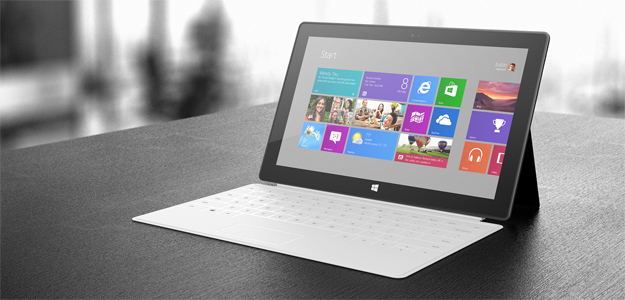
We originally thought Microsoft was being generous with 32GB storage standard for the Surface RT, but it turns out only 16GB of that is available to users. The rest of the storage is taken up by Windows RT and Microsoft Office.

If you thought a $500 Microsoft Surface RT with 32GB of storage was too good to be true (compared to the iPad’s 16GB for the same price) then we’re here to say you’re right. If that was your dream then you may want to start amassing memory cards because Microsoft had to use half of that 32GB for Windows RT, Microsoft Office, and other software.

Microsoft broke the news in a new post titled, “Surface disk space FAQ”, outlining exactly how much space on the Surface RT is available for apps, music, videos, and photos. According to the FAQ, the 32GB version has 16GB of free space and the 64GB version will have 46GB free. We are hoping this isn’t a universal issue for all Windows RT devices, but keep it in mind next time you read about a Windows RT device with an attractive storage size.

Another part of the FAQ explains that 32GB is actually 29GB when using it in the real world. Silly us for trusting the quoted storage sizes. Here’s the official explanation:

The advertised local disk size is shown using the decimal system, while Windows displays the disk size using the binary system. As a result, 1 GB (in decimal) appears as about 0.93 GB (in binary). The storage capacity is the same, it’s just shown differently depending on the how you measure a GB (decimal or binary).

At least Microsoft was kind enough to feature expandable memory through microSD cards that can hold up to 64GB of extra data. There’s also a standard USB port if you are in need of something in the terabyte range for a massive media collection.

Still, Microsoft routinely boasts that the Surface has double 16GB of storage when only 16GB is available to users. Windows RT has enough uncertainty surrounding it with its basically useless classic desktop and nearly empty app store. It doesn’t need this storage drama added to the mix. The Microsoft engineer quoted last month saying Surface RT users would have 20GB of space available only makes things more uneasy.

With iOS and Android optimized for mobile storage sizes, we kind of expected Windows RT to be relatively svelte in terms of gigabytes. It wouldn’t be surprising if Microsoft addressed the size of Windows RT in a future update. Perhaps it will prune it down as time passes and eventually — fingers crossed — phase out the legacy features and classic desktop altogether.

What do you think of Microsoft’s misstep? Is expandable memory enough to make up for less internal storage?


Source : digitaltrends[dot]com

Oct 23, 2012

The name less traveled by: Sony to stick with 4K while the industry turns to Ultra High Definition

Is Sony being stubborn by refusing to conform to the industry standard and use the Ultra High Definition denomination?

Just after news broke that the CEA had standardized the “Ultra High Definition” moniker for the products formerly known as 4K TVs, so too did the news that Sony would be sticking with the 4K title. It would be easy to dismiss this as Sony being obstinate, and to argue that 4K is now a misnomer, but many are sympathizing with the company’s position, which is that it doesn’t want to confuse its customers with the switcheroo.

Its not difficult to understand how Sony’s competitors could be worried about the prospect of their own customers improperly drawing a distinction between Ultra High Definition TVs and 4K TVs. Analysts, however, have also pointed out that, with 8K technology in the pipeline, the industry shouldn’t be using penultimate sobriquets for technologies that could eventually be usurped. It’s also clear that Sony has simply attached the 4K term to more products than virtually anyone else, and consequently, has more to lose by its being phased out. It has created 4K camera’s, a studio that delivers 4K movies, and a 4K-based post-production process, this in addition to a TV and projector that are labeled 4K. All-in-all, it’s clear the whole UHD decision presents a problem for Sony that an industrial-sized bottle of whiteout simply won’t fix.

Despite Sony’s uncomfortable position – rock on one side, hard place on the other – sometimes in business, you’re forced to bite the bullet. Microsoft’s Xbox made an enormous investment in HD-DVDs, as did its consumers - but Blu-Ray won out. A name change just isn’t that devastating to brand like Sony, and you have to wonder if it’s worth bad PR, or creating a lingering issue out of news story that should  have been one news-cycle long. Still, though the move may annoy those who initially called for the standardization, Sony says it must do what’s best for Sony; after all, you don’t become an industry leader by being afraid to go rogue once in awhile. For now, they will continue to market their existing products as 4K and they plan to attach the 4K UHD label to all future releases.


Source : digitaltrends[dot]com

Sep 13, 2012

Apple launches Lightning to microUSB adapter for EU

The newly announced iPhone 5 introduced a smaller but still proprietary Lightning USB port. It’s different from the microUSB standard required by the EU Commission, so Apple once again had to come up with a workaround.

Yes, I am talking another adapter – Lightning to microUSB.

The adapter is small, unlike the 30pin-to-Lightning one available in the USA for $30.

The Lightning to microUSB gadget costs £15 or €19 in the EU Apple Stores and is compatible with the iPhone 5, iPod Touch 5th gen and iPod nano 7th gen. We were hoping that this will come included in the EU retail packages, but based on current evidence, it appears that this is not going to happen.


Source : blog[dot]gsmarena[dot]com

Aug 29, 2012

Top 10 Printers For Apple Mac PC’s

The majority Mac users are happy with their machines. The problem begins when they can’t configure their machine with gadgets from other producers. Perhaps, it is the highest standard of Mac that doesn’t appear to incorporate the ordinary features of a strange constituent. The proof is the better performance of Mac machines when employed with parts, which are completely well-suited with Apple configuration. The following are some of the best printers that work faultlessly with Mac PCs.

Canon MP 560
For a selling price of only one hundred fifteen dollars, this all-in-one printer is a typical deal for customers. This printer is valuable for printing very huge amounts. Its double tray employs auto-document feeder that is administered by a big multipurpose two inch LCD display. The reader of media card is well prepared to manage most kinds of USB devices, MMC, micro SD cards, and memory sticks.

Epson Stylus NX420
This is among the best Wifi enabled printers. It is produced to scan and print best quality images. With an approximate scanning ability close to 2400 dpi, red eye removals and auto image correction, the 4 ink cartridge reacts with speeds starting from three point three ISO ppm to six point four ISO ppm. It is a very helpful instrument for Mac users who may desire their images to dry immediately. All images and photos can directly be printed using memory cards without using the computer.

Lexmark C510N
It is produced for business users; it prints documents with an image quality of 2400 dpi. The 500 MHZ processor administers the mechanics of picture resolution to provide excellent outcomes at a speed of 8 ppm in color and 30 ppm in monochrome.

Samsung ML 2525 W
If you aren’t happy with printer’s noise, this is among the silent gadgets accessible for Mac clients. This printer is very simple to arrange and can print heavy graphics with no blotching. As said by the producer, the toner cartridge mostly lasts following printing of nearly 2500 pages. A wireless connectivity, USB, Ethernet, and small footprint make it a very important machine.

Epson Artisan 710
This printer isn’t only compatible with any MAC PC on design; however, it also offers quick laser quality at a speed of 9 ppm. Two sided automatic printing and two paper trays can print everything from custom-made CD to coloring books. For instance, the 4 x 6 inch photos of ultra high definition can be printed in below ten seconds.

Canon L170 Laser Fax Printer
This is the most important type of laser fax printer for businesses that are small. It can simply print heavy pictures with a speed of nineteen ppm. Very large memory and the G3 fax speed adds to directory search options and 32 speed dials. This is a moveable printer, which is able to print high quality pictures resembling its desktop siblings.

Brother HL 5370 Black & White
If you ever require a simple yet great printer to deliver uppermost quality monochrome outcomes then there is not anything better than this printer. Mac customers may like its fast printing speed and easy setup. The automatic duplex printing attribute can print double sided papers with a 32 ppm speed. This printer comes with a one year guarantee and is loaded with features, for instance 32 bit memory, built-in wireless, and 300 sheet standard paper capacities.

Brother HL-2140 Personal Laser Printer
This high-class resolution printer is able to print twenty three pages in a minute. The two hundred fifty paper tray can manage most kinds of legal papers. It is well-suited with both Mac and Windows, users will be pleased to become aware of toner saving mode.

Konica Minolta Magicolor 1600W
The lightweight and compact design of this printer is equally appreciated like its performance. Using the technology of plug and play, it can create both color and B&W prints. Its USB printer interface is able to print at 20 ppm speed. With an utmost capacity of two hundred sheets and sixteen MB memory, it is in fact a great value for your money.


Source : techtalkafrica[dot]com