Pages

Showing posts with label process. Show all posts

Nov 6, 2012

Obama tweets his most retweeted tweet ever as news networks call election for Democrats

President Obama looking stoic

Barack Obama and his campaign team took to Twitter Tuesday night to thank supporters for turning out to vote, with Obama tweeting his most retweeted tweet ever in the process.

Barack Obama has taken to Twitter to thank his supporters for turning out to vote and returning him (almost certainly) to office for another four years.

At the time of writing, all the major American news networks are calling the presidential election for Obama, with a number of key swing states projected to fall to the Democrats.

At around 11.15pm ET, Obama’s campaign team tweeted, “This happened because of you. Thank you.”

Another came a minute later: “We’re all in this together. That’s how we campaigned, and that’s who we are. Thank you. -bo” The inclusion of “-bo” The inclusion of -bo apparently indicates a personal tweet from Obama himself.

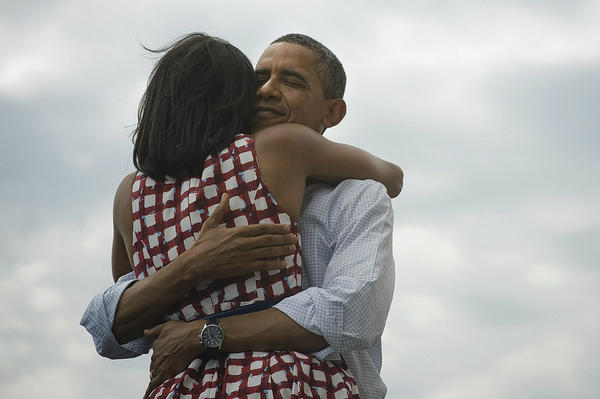
The campaign team then tweeted a photo (below) of Obama hugging wife Michelle, accompanied by the words, “Four more years.” Twitter has just reported that this has already become @BarackObama’s most tweeted retweet ever – at the time of writing this stands at 314,000 – not bad for a tweet posted 40 minutes ago. The account has 22.1 million followers.
However, Mitt Romney’s Twitter account has so far stayed silent, with the last tweet posted around 3pm ET. “With your help, we will turn our country around and get America back on the path to prosperity. Please vote today,” it said.

Earlier in the evening, Twitter announced that Election Day had already become the most tweeted about event in US political history.


Source : digitaltrends[dot]com

Nov 4, 2012

How To Convert Word to PDF

The process of converting a Word file into a PDF file is relatively simple, and it all depends on what version of the Microsoft Word software you are working with. Older versions are set up slightly different from newer versions, and Mac software runs somewhat differently than Windows software.

The first step you need to accomplish this task is determining which version of Word you are working with. Obviously if you are using a Mac computer, then you are using the Mac version of the software. The same with the Windows version. To figure out what version you are using besides its operating platform, simply log in to the software. As it opens up it should give you version information. If it does not or it goes by too quickly to read, you can also get it once you are fully logged in. Just go to the Word tab in the top drop down menu, and select About Word from the menu that opens up. This should have the information you need.

If you are using something like Word 2007, then your word will have has a big round button, known officially as the “Office button”, and unofficially as the “pizza button”.

Word 2010 will have a square blue button, known officially as the “File button”, and unofficially as the “pizza box” as shown below

Once you have determined what version of Word you have, you can go about creating or opening a document that you can save as a PDF. Some Word formatting will not translate properly to other formats, though most crossover to PDF better than they will to .RTF or .TXT. Once your document is ready, make sure to save it as a Word .DOC or .DOCX file, just in case something happens and you need a copy in the future.

After creating and saving your document, it is time to convert it into a PDF. If you have Word for Mac or an older version of Word for Windows, you can try this method. Go to the File tab at the top of the screen. When the menu drops down, select the Print option. In the window that opens up, select PDF as your printer, or the PDF menu if it is separate. This should give you another option to Save as PDF. Once you select this, it will let you create a document name as well as Author and Keywords if you wish. Fill out the information you need and click Save. The document is now a PDF file.

In Word 2007, the conversion process is handled somewhat differently. Instead of choosing the Print option from the File drop down menu, you will click on Save As. In the window that opens up you can select the PDF option. Create a title for the document and adjust any settings as needed. After that click the Publish button. Your document will be converted into PDF. This method does require a Microsoft converter in the Word software. If your software did not come with it or if it is not working properly you may need to download a new version online.

Tags: PDF to Word, PDF2Word, Word to PDF, Word2PDF

Source : techtalkafrica[dot]com

Oct 27, 2012

Lock down your email with SafeGmail’s military-grade encryption

SafeGmail locks down Gmail with PGP encryption

Sending sensitive personal information over email is a dangerous security misstep that could make you increasingly vulnerable to hackers. But SafeGmail plugin for Chrome takes the risk out of the whole process by encrypting your messages with military-grade security.

We should all know by now that Web-based email from a company like Google or Microsoft is anything but secure. Never should you share sensitive personal data, like your credit card number or Social Security Number, through an email — that’s just basic privacy protection stuff. Unfortunately, not doing so can be a huge pain when it comes to getting things done. Fortunately for Gmail users, there is now an easy solution: SafeGmail, a free Chrome extension that lets you quickly encrypt any message with military-grade data encryption called “Pretty Good Privacy” or PGP.

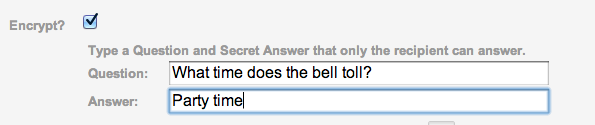
Here’s how it works: Once you’ve installed SafeGmail (it takes one click), simply sign into Gmail and start a new email message. Below the “Subject” field, you’ll see a new check box next to which reads “Encrypt?” Click the box, and you’ll be asked to enter in a question and an answer.

In order for the recipient of your email to read the message, she or he will have to know the answer to the question, and input it correctly. If the person doesn’t know the answer, they won’t have access to the email, so don’t get too clever — there’s no point to this whole thing if you have to send a separate email or text message with the answer to your security question. That said, you also don’t want to make the question too easy — only the recipient should know the answer.

When you’re ready to send, hit the new “Send + Encrypt” button at the top of the window, and the encryption process will begin. This can take a slightly longer time than you might expect, if you have a slower-than-average Internet connection, but shouldn’t be bad with standard broadband access.

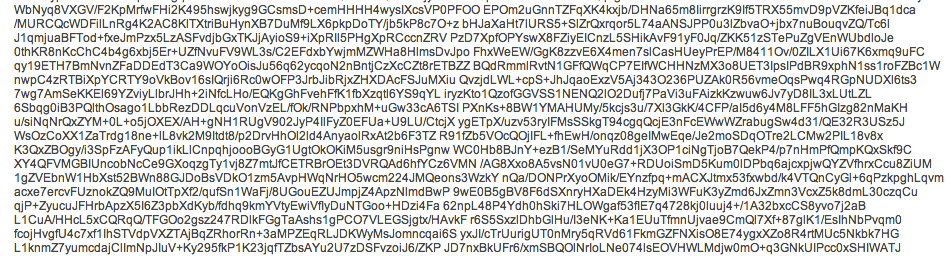
When your recipient receives the encrypted email, it will include a link to SafeGmail’s system, where he or she will have to correctly answer the question. Assuming that happens, a new window will load asking the recipient in copy and paste a string of characters — the encrypted message — into a text box. The length of this string will change depending upon the length of the message. So if you’re verbose, expect to make your recipient copy and paste a massive block of text. After the encrypted message is pasted into the text field, the recipient just clicks “Show My Mail” and voila! The message is readable.


Because the decryption process is done within your browser, SafeGmail never actually access the message, so you don’t have to worry about their servers getting hacked either. And once the decrypted message it’s closed, it will be re-encrypted for both you and whomever you sent the email to. After a certain period of time, the message will expire.

Watch a quick video about how SafeGmail works below:


Source : digitaltrends[dot]com

Sep 3, 2012

Alleged redesigned Apple earphones spotted in Vietnam

It seems Apple is in the process of upgrading their iconic white earphones. I use ‘iconic’ only to describe the design, because when it comes to sound quality they sound about as good as a doctor’s stethoscope.

The pair you see above were spotted in Vietnam, the country famous for leaking Apple products well before launch (among other things). Gone is the flat, symmetrical design of the previous earphones that fired the sound straight into the side of your ears instead of into the ear canal. These have a more ear friendly design that should also fit more snugly and have a port for directing sound straight into your ear canal. There is also a port on the side possibly for bass reflex.

This will be the fourth redesign of these earphones since they were first introduced with the original iPod back in 2001. Hopefully, these bring with them improved drivers and better audio quality, assuming they are real. You will find more images in the source link below.


Source : blog[dot]gsmarena[dot]com

Aug 27, 2012

YouTube silently rolls out episode listings for original programming

youtube episode guide feature

YouTube has released a new episode guide feature that will simplify the process of watching subsequent episodes.

YouTube is undoubtedly showing signs of heeding the needs of its original programming channels. Digital Trends has noticed a notable change on the video pages for episodic series that should make browsing YouTube that much more convenient.

youtube episode guide feature close upThe silently introduced feature, known to YouTube’s source code as “watch context,” enables users to browse through a list of the episodes in a series. The feature can be found within a box on the top right corner, above “Suggestions” on a video’s page. In the example above, only two subsequent episodes are listed, with a header identifying the show’s season number. The bottom of the box displays a link that leads to the show’s main page, listing all episodes available.

Before the introduction of this feature, content creators have been adding URLs of other episodes in the body of the video’s description, or including annotations at the end of each video typically through an in-video link. Otherwise, if a link to the next episode was not included, viewers would have to manually search for relevant episodes or hope they appear under recommended videos.

From what we can tell, the “watch context” box only accompanies an episodic series. Of course, this feature was built for the specific purpose of navigating one series at a time, but the decision to add a new feature exclusively for web series begs us to wonder if it’s foreshadowing the future of YouTube. How many other native features made just for original programming channels and relevant videos are currently in the works?

It isn’t news that YouTube is cautiously evolving into an original programming hub. But in our opinion, it’s seems Google has been reluctant to design an interface that would be devoted to the needs of its channel partners — at least not in one fell swoop. YouTube’s existing interface can be best described as a jack-o- all-trades; it meets the basic needs for viewing original programming and non-Web series videos. The design is made to ensure all content creators and their products are visible on YouTube. New features such as playlists and episode guides are just some of what YouTube has introduced to benefit both viewers and creators.

While the “watch context” box should come as a blessing to YouTube users, at the end of the day, it’s still about revenue for Google. Advertisers are generally more attracted to premium content, and will pay premium dollars for placement within episodes. With these motivations, new features like the episode guide will contribute to maximizing time spent on continuously watching premium content. We will expect more add-ons that will keep users hooked on YouTube to pop up in the near future.


Source : digitaltrends[dot]com
Seven profitable opportunities for sensors that could reshape our world

alderaban nao robot sensors

Sensors can make your house more efficient, cars safer, ads smarters, and they’ll make the next generation of entrepreneurs a tidy profit in the process.

Soon, there will be more sensors in the world than all the phones and computers combined. But there’s a problem: Many of the people who know sensors aren’t entrepreneurial (they’re engineers), and most of the people who are entrepreneurial haven’t yet realized the huge extent to which sensors will change the world.

Translation: This may be your big opportunity.

To illustrate what sensors can do, Michael Hinshaw and I included this intentionally very long paragraph in our recent book:

Today, digital sensors can:

  • monitor your tire pressure and avoid dangerous blowouts;
  • analyze the gait of elderly citizens and warn of falls before they occur;
  • follow the gaze of shoppers and identify which products they examine – but don’t buy – in a store;
  • monitor which pages readers of a magazine read or skip;
  • float in the air over a factory and independently monitor the plant’s emissions;
  • detect impacts in the helmet of an athlete and make it impossible for them to hide potential serious blows to their brains;
  • reveal when a dishwasher, refrigerator, computer, bridge, or dam is about to fail;
  • trigger a different promotion as a new customer walks by a message board;
  • analyze the duration and quality of your sleep;
  • warn drivers that they are about to fall asleep;
  • prevent intoxicated drivers from operating a motor vehicle;
  • warn a person before he or she has a heart attack;
  • detect wasted energy in both homes and commercial buildings;
  • warn a parent or boss when anger is creeping into their voice, to help prevent them from saying or doing things they will later regret;
  • tell waiting customers how far away the pizza delivery guy is from their house;
  • analyze the movements of employees through a factory to detect wasted time and efforts;
  • trigger product demonstrations or interactive manuals when a customer picks up or examines a product;
  • congratulate an athlete when she swings a tennis racquet properly or achieves an efficient stride while running. 

 The big question is: What will you do with them tomorrow? Here are seven ways you can personally profit from sensors:

1.) Add sensors to any dumb object, and give it the ability to act intelligently. Without a sensor, when the water filter in your refrigerator gets too old, you keep using it anyway. Add a sensor, and your refrigerator tells you to stop using it. Find something that bugs people with its stupidity, and make it smart.

2.) Learn to program a robot. Robots are moving collections of sensors, and some of the wisest folks among us are learning how to program the software that controls robots. This video from Aldebaran highlights the talents of an incredibly versatile robot with facial- and speech-recognition capabilities.

electricfoxy move wearable sensor clothing3.) Help people improve their athletic performance with sensors. The Move project at ElectricFoxy is studying ways to do this, and over at Sense of the Future we have identified over 200 health and fitness apps that use sensors.

4.) Make computers – and everything else – simpler to use. One way might be by incorporating gestural interfaces, like what Prime Sense is developing. We are getting very close to the day when our technology becomes so advanced that it disappears. Personally, I can’t wait to throw away all our remote controls.

5.) Build a new business around sensors. My friend likes to windsurf, so he uses a sensor on the buoy outside his favorite harbor to show him when the winds top 20 mph. He does this via a service called iWindsurf, which is basically a collection of sensors placed along the coastline. Where could you place sensors to deliver a valuable new service to a group of people with a strong interest? For example, I’d pay $5 to get a video of my son scoring a soccer goal, so someone might want to mount sensors and a camera in the crossbar of soccer goals and sell the videos to parents.

6.) Increase safety with sensors. Without a sensor, your car will run over the tricycle your son left behind your real wheel. With a sensor, your car will warn you not to back up. How can you use sensors to make the world safer, or at least your corner of it?

emotiv neuroheadset brain control sensors7.) Use your brain (better). Brain-Computer Interfaces (BCIs) are sensors for your brain. Right now they are mainly used in research labs, but a few companies like Emotiv have headsets you can buy today, and more are on the way. There are lots of overblown claims what these devices can do — most still require dorky, greasy caps — but anything that helps train your brain is a good thing.

I’ve just scratched the surface. For the next few days, imagine that everywhere you go everything has a sensor inside it. What would you want it to tell you, and when? Even better, what entrepreneurial opportunity can you create? There are millions of possibilities.

Bruce Kasanoff is a speaker, author and innovation strategist who tracks sensor-driven innovation at Sense of the Future. Kasanoff and co-author Michael Hinshaw teamed up to explore more of the opportunities unearthed by sensors in Smart Customers, Stupid Companies.


Source : digitaltrends[dot]com
Aug 20, 2012

Early Facebook investor Peter Thiel unloads majority of his shares

Peter Thiel, one of Facebook's biggest early investors, has sold the majority of his shares in the company, making around $400 million in the process. The move may cause further concern among other investors in the social networking site, who've seen Facebook's stock lose more than half its value since the company went public in May.

One of Facebook’s biggest early investors has sold off the majority of his shares in the company, wasting little time following the expiration of the first lock-up period last Thursday.

According to a Forbes report, Peter Thiel off-loaded 20.06 million of his roughly 25 million shares, netting him somewhere in the region of $400 million. The information was obtained from a Securities and Exchange Commission financial document.

Facebook shares have plummeted in value since the social networking giant went public in May. On Monday, their value dropped below $19, less than half of the $38 launch price.

Despite the fall, Thiel has still made a pretty penny, having invested $500,000 in Facebook in its early days back in 2004, a time when it was still called ‘Thefacebook’.

The end of the first lock-up agreement means early employees and investors holding a combined total of 271 million shares can now sell if they wish to do so, just as Thiel did.

More lock-up agreements will end between now and November, allowing for the potential sale of 1.9 billion shares. In November alone, a further 1.2 billion more shares will become eligible for sale. When that happens, things could go either way for Facebook.

“This date becomes the greatest wildcard,” Brian Wieser of Wall Street research group Pivotal told the Guardian last week. He said much will rest on the social networking site’s next lot of financial results, due in October.

“They may be able to navigate through this. The more they can convince Wall Street of the merits of their story, the more they are likely to generate demand for the shares,” Wieser added.

Concern has been growing among investors about whether the social networking site has the means to generate serious revenue from mobile advertising – an area in which it has so far been struggling to make an impact – with growing numbers of Facebook users turning to handsets and tablets to access the site.


Source : digitaltrends[dot]com