Pages

Showing posts with label laptop. Show all posts

Oct 19, 2012

Google and Samsung shun Intel, announce Exynos-powered Chromebook

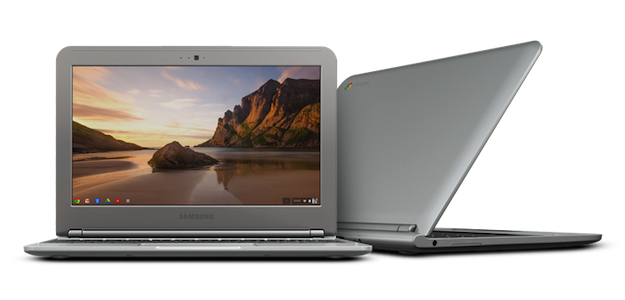
Samsung Chromebook

Samsung has once again partnered with Samsung to produce a laptop running Chrome OS. The new model shuns Intel's chips, and has a very attractive price tag too.

Google has once again collaborated with Samsung to release a laptop with Chrome OS installed. The new model is simply called Chromebook, and is smaller and lighter than the Chromebook 550. It also marks a departure from Intel’s chips, as it’s based on ARM architecture instead.

The new Chromebook has an 11.6-inch screen, smaller than previous models, but with a higher (and more traditional) 1368 x 768 pixel resolution. The Atom processor has been removed and Samsung has installed its own dual-core Exynos 5 Dual chip.

This is exciting for several reasons. Samsung’s Exynos 5 Dual was the first chip to use ARM’s Cortex A15 architecture — the same as Qualcomm’s quad-core Snapdragon S4 Pro — and the Chromebook marks its first appearance after being announced in August. It’s also expected to appear in Samsung ’s next generation tablets and although no clock speed is mentioned for the Chromebook, the chip can run at up to 1.7GHz.

Samsung and Google’s move to ARM is also good news for our wallets, and the Chromebook has been priced at a very competitive $249 in the US and £229 (if purchased online) in the UK.

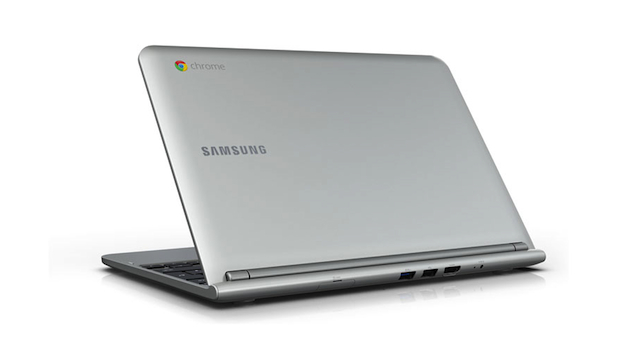
Samsung Chromebook Rear

For this you get a 16GB SSD that provides a 7-second boot up time, 2GB of RAM, a memory card reader, a pair of USB ports, an HDMI-out, Wi-Fi, a VGA camera, Bluetooth 3.0 and a battery that promises more than 6 hours of use before needing a recharge. The chassis weighs 2.5lbs, or 1.1kg, and measures 20mm thick.

As the whole point of the Chrome OS is to work in the cloud, Google will make up for the pathetic 16GB of onboard storage space by providing a complimentary 100GB chunk of Google Drive space. The small print points out that this is only valid for 2 years, after which time it’ll revert back to standard and you’ll have to pay.

So, the price is good and the spec is interesting, and to help introduce buyers to Chrome OS, Google will promote the new laptop in stores through special “Chrome Zones.” However, with the impending introduction of Windows 8 and all its associated hardware, will the Chromebook get a look in, regardless of its low price?

The new Chromebook is available as a pre-order from Best Buy, Amazon, TigerDirect.com and Newegg.com, or from PC World in the UK right now. According to the latter, it’ll be released on October 19.


Source : digitaltrends[dot]com

Sep 6, 2012

Western Digital announces its thinnest external drive with USB 3.0

My Passport Edge for Mac

Excellent for anyone that hates to travel with a laptop bag, Western Digital has announced a new hard drive that can slip into a pocket.

Explained in detail within a Western Digital press release today, the popular hard drive manufacturer has announced a new 500GB My Passport Edge drive for both PC and Mac computers. The PC drive is just 0.5 inches thick and the Mac drive, encased in an all-metal housing, is even smaller at 0.4 inches thick. Comparing that thickness to a popular smartphone, the Mac drive is barely thicker than Apple’s iPhone 4S. In addition to the slim body style, the drives are fairly light and don’t weigh significantly more than a standard smartphone. Either drive could easily be slipped into a pants pocket for transport and include shock tolerance features for rougher handling. In addition, both drives come equipped with a USB 3.0 interface for speedy file transfers compared to the older USB 2.0 standard.

My Passport Edge versus laptop sizeThe PC version of the My Passport Edge drive has a slightly different design with a light gray color on top along with a familiar pattern of dark gray circles around the logo. The PC version of the drive also ships with Western Digital’s SmartWare software that allows the user to setup automated backups in order to recover data in case of a hard drive crash in the user’s main desktop or laptop PC.

The drive has been formatted in NTFS for use with the Windows operating system. The 500GB version of the drive includes a three-year warranty from Western Digital and is currently priced at a MSRP of $109.99. 

The Mac version of the My Passport Edge drive was designed to blend into Apple’s lineup of Macbooks and offers a solid black top with a brushed aluminum finish around the edges. According to Western Digital, the drive is compatible with Apple’s Time Machine for data backup and have been formatted in HFS+. While My Passport Edge for Mac also comes with a three-year warranty, the drive is priced at a higher MSRP of $119.99. However, both drives can be purchased at a discounted rate when using the “Where to Buy” feature on the Western Digital site.


Source : digitaltrends[dot]com

Sep 4, 2012

Leaked: One million iOS device identifiers stolen from FBI laptop

hacker-keyboard

A file containing one million Apple UDID codes has been leaked, after it was allegedly stolen from an FBI agent's laptop earlier this year.

Operation AntiSec has made a return, this time leaking a file containing 1,000,001 unique device identifier numbers, or UDIDs, for Apple devices. The hackers are claiming that the data was stolen from a laptop belonging to the FBI, and that in total, it contained more than 12 million UDID numbers.

The file containing the data was accompanied by a longer than usual Pastebin post, which claims that in March, a Dell laptop belonging to “Supervisor Special Agent Christopher K. Stangl,” who works for the FBI’s Regional Cyber Action Team, was compromised using a Java vulnerability and a variety of files downloaded from it.

One was the above list of 12,367,232 UDID numbers, along with other personal data such as user names, Push Notification tokens, telephone numbers, address and the originating device.

According to the post, the personal data has been removed prior to uploading, but the UDID, notification token, device name and device type apparently remains. Forbes.com’s Andy Greenberg downloaded and decrypted the file, and found it contains a massive collection of 40-character strings, all of which could pass for Apple UDID codes.

Real UDID codes?

As you’d expect, the leak raises more questions than it answers. To whom do the UDID’s belong too, and why — presuming the information on the source is accurate — would the FBI have a single file listing 12 million of them.

While labeling its existence as proof of a conspiracy will be popular, there is an equally good chance the file is part of an investigation, or was supplied to the FBI quite innocently. There’s also the chance it didn’t come from the FBI at all, but from a developer. It’s also not the first time AntiSec has targeted Apple.

In its Pastebin text, Anonymous says that the “FBI is using your device info for a tracking people project or some sh*t,” and calls for UDID codes and similar device-identifying numbers to be “erradicated (sic) from any device on the market in the future.”

Apple’s use of UDID numbers has caused controversy in the past, with even Apple telling developers to stop tracking users using the codes. UDIDs themselves don’t carry personal data, but can be combined with other information to aid device tracking and monitoring.

Over at Hacker News, at least two contributors claim to have found UDID codes relating to their personal iOS devices. One lives in the USA and the other in the UK, but no common link between them or the apps they have installed has been established.

Interestingly, Cydia developer Jay Freeman (AKA Saurik) adds to the conversation, saying that 16.7-percent of the UDID’s in the file come from jailbroken iOS devices, according to his research.

FBI Agent

As for Special Agent Christopher Stangl, it appears he exists, which potentially adds some weight to Anonymous’ claims. There is a LinkedIn profile for someone under that name, who works for the FBI and has that job title; plus in 2009, FBI Agent Chris Stangl made a video for Cyber Security Awareness Week at NYU.

His name also appears on an FBI email list published on the Internet earlier this year, which led to hackers listening into a conference call discussing the activities of LulzSec and Anonymous. It’s speculated that these addresses were phished and led to a compromised website, where a Java vulnerability was exploited.

Anonymous has said it won’t be providing any further details, but hopes that due to the large amount of leaked information, “someone should care about it.” While we’re not expecting much from the FBI, it’ll be interesting to see if Apple provides a response.


Source : digitaltrends[dot]com

Aug 30, 2012

Toshiba’s Windows 8 PCs include ‘laptablet,’ ultrawidescreen notebook, Ultrabooks

Toshiba Satellite U925t laptop tablet laptablet

Windows 8 will bring out some variety in Toshiba laptop line, with announcements including a “laptablet” with sliding keyboard, a super wide notebook with a 21:9 aspect ratio, and more Ultrabooks.

Toshiba has shown that it’s prepared for Windows 8 by revealing five launch products. The most revolutionary of these is the Satellite U925t “laptablet,” which we’ve already had hands-on time with, but the company has also announced four other products.

Toshiba Satellite U845W widescreen laptopOne is a familiar but unusual sight – the Satellite U845W. Toshiba’s ultra-wide laptop will be largely the same as before. It will have the same 1792 x 768 display and the same internal hardware. Toshiba claims it makes a particularly good laptop for Windows 8 because of its extra-wide display and large touchpad with Windows 8 gesture support.


Toshiba Satellite U925 media laptop windows 8This older product is joined by the Satellite U945, a previously announced Ultrabook. It will pack a 14-inch display, low-voltage Intel Core processors and a 32GB solid state drive backed up by a 500GB mechanical unit. Thickness comes in at .78 inches and weight is a bit under four pounds. As with the U845W, the U945 will have full Windows 8 gesture support.

Another new laptop in the pipe is the Satellite P845t. This 14-inch model is not an Ultrabook, but a standard multimedia laptop. As such, it offers a Core i5 processor instead of a slower, low-voltage version. Other features include Windows 8 gesture support, a 750GB hard drive and Harman/Kardon stereo speakers.

toshiba LX825 all in one desktop windows 8 pcLast and least portable is the LX835. This all-in-one computer boasts a 23-inch 1080p touchscreen with full gesture support. It also has an optional TV tuner, Onkyo surround sound speakers, HDMI-In (useful for connecting a console or tablet) and third-generation Intel processors. This new entry will compete head-to-head with HP’s TouchSmart and Lenovo’s IdeaCentre all-in-ones.

All of these new products will be hitting store shelves the day Windows 8 launches – October 26. Pricing is unannounced.


Source : digitaltrends[dot]com

Top five laptop-buying mistakes

row of laptops buying guide

Don’t click “buy” before you read the top five laptop-buying mistakes we see all the time, from going googly eyed over glossy screens to springing for overlooking one of the most important features.

Buying a new laptop is a daunting process. It’s also an exciting one. You may find that shopping gives you a bit of a buzz in your stomach or puts a smile on your face. There are so many cool laptops to choose from – and one will soon be yours!

Excitement isn’t all bad, but it can cause lapses in judgment. I see this happen all the time. Often the mistakes will be made by people who did the right research and came to the right conclusions – up to the moment they hit “add to cart.”

Sometimes these mistakes work out, but they can lead to laptop that’s entirely unsuited for what the buyer wanted to use it for. Let’s take a look at five commonly made mistakes, and how to avoid them.

Mistake #1: Thinking with your eyes

Laptops have had keyboards and touchpads for years, but there haven’t been many new developments. As a result, new buyers rarely put the user interface near the top of their priority lists.

That’s a shame, because all of our interaction with a laptop travels through our hands. Apple is the only company that seems embrace this fact, which is why its retail stores work so well: You can step into one, feel a MacBook, use the keyboard, and discover it for yourself.

laptop trackpad interfaceThere can be dramatic differences between the user interfaces on laptops, and you don’t even need to spend a lot of money to ensure you get one you like. The Lenovo ThinkPad Edge E530, for example, has a great keyboard, good touchpad and includes a trackpointer. Using this laptop day-to-day is an excellent experience, yet the laptop can be had for as little as $499.

You may not want to make your final purchase at a brick-and-mortar store, but you should at least step into one before making a decision. Try out different keyboards. Use different touchpads. See how they feel, then make a choice.

Mistake #2: Choosing the wrong size

A college student recently asked me for laptop buying advice. However, spurred on by a parent’s promise of nearly unlimited funds, he purchased before we had time to talk — and bought a massive gaming laptop. I grinned and nodded as he excitedly told me about it, but I was really thinking “Do you have any idea what that thing weighs?”

Consumers often succumb to the allure of laptops that are too big – or too small – for their needs. These outliers are cool, extreme and less common than other models. For good reason. Laptops with a display larger than 15.6 inches are huge and difficult to move around, while those with a display smaller than 13.3 inches are cramped and uncomfortable.

If portability is not important to you, buy a 15.6-inch notebook. If portability is important, buy a 13.3- to 14-inch system. Laptops that are smaller or larger target niche buyers. There are some people who really do need small laptops, and some people who really can use a gaming behemoth. But the chance you’re one of the few is slim.

Mistake #3: Mesmerized by glossy displays

Most of today’s laptops come with glossy displays. These displays make colors appears more vivid and look nice in retail stores, particularly when the display is turned off. They also can make a laptop impossible to use in a brightly lit room. Outdoor use? Hah! That’s a good one.

macbook pro glossy display laptop screenConsumers often take gloss as a given because it’s so rare to find anti-glare displays in stores, but they do exist, and can be had at affordable prices. The Lenovo ThinkPad Edge line provides anti-glare displays on a budget, as do Dell’s Precision laptops and HP’s ProBook line.

You can also sometimes find matte displays on other laptops, but usually only as an option on the manufacturer’s website. If you see a laptop in store that you like, go home and search online to see if the same model — or a similar one — is available with a matte coat.

Mistake #4: Got no game

Intel has committed itself to improving integrated graphics, but so far it’s only been able to keep pace with the increasing demands of new games. The company’s latest Intel HD 4000 component, which is standard in any laptop with a third-gen Intel Core processor, is notably quicker than the preceding Intel HD 3000. But games have becoming more demanding, as well, canceling most of the improvement.

If you want to play new 3D games on your laptop, you must consider an optional GPU from Nvidia or AMD. There are many different options. Check out Notebook Check’s GPU list if you’re curious about relative performance.

High-end gaming GPUs are obviously the quickest, but even a basic discrete GPU can double the performance of Intel HD 4000. You can expect to pay $100 to $200 extra if the GPU is an option, but some laptops come with discrete graphics standard. Lenovo and Acer are two companies known for packing fast GPUs into affordable laptops.

Mistake #5: Loading up on RAM

Manufacturers love RAM. It can be easily be expressed in a number, and bigger numbers are better. It’s also absurdly cheap, so packing in some extra gigabytes is an easy way to rake in extra profit.

computer ram laptop guideTruth be told, you don’t need more than 4GB of RAM. There are exceptions, but they are rare, and the people who do need more than 4GB already know it.

Don’t consider anything above 4GB a benefit. If a laptop has more, that’s great, but don’t factor it in your purchasing decision.

Conclusion

Buying a laptop is complex, but you can find the tools you need to be successful. Our reviews here at Digital Trends are a good start. We’ll walk you through every feature of a notebook and how it performed in our hands-on testing, from display quality to performance.

We take an in-depth look at every laptop we receive. Everything from the user interface to the display to performance is evaluated.

Remember that you have options. You don’t have to buy that 17.3-inch laptop your local retailer is selling for a song. Hunt around the Internet a bit and you’re almost certain to find a similar price on something more suitably sized. The wrong laptop is never a good deal, no matter how appealing the price.

[Photo credits: Laptops: Jurgen Ziewe/Shutterstock; Trackpad: Fabio Alcini/Shutterstock; RAM dodi31/Shutterstock]


Source : digitaltrends[dot]com

Toshiba unveils Windows 8 Satellite U920T ultrabook, we take it for a spin

Toshiba announced a new ultrabook on IFA – the Windows 8-running Satellite U920T. It is a convertible with sliding keyboard, which can easily transform from a tablet to a laptop.

The device features a 12.5-inch IPS touch display (up to 5 fingers) with 1366×768 resolution and you can choose between Intel Core i3 or i5 internals.


Toshiba Satellite U920T

You can opt for up to 256GB SSD drive and up to 8GB DDR3 RAM. The rest of the specs include Wi-Fi, Bluetooth, GPS, HDMI port, compass, gyroscope and ambient-light sensor.


Toshiba Satellite U920T

Toshiba Satellite U920T weighs about 1.45 kg and is 19.9mm thick. The 128GB SSD version of the U920T will cost €940, but the availability details are yet to be confirmed.


Toshiba Satellite U920T


Source : blog[dot]gsmarena[dot]com

Aug 24, 2012

Samsung teases possible Windows 8 notebook/tablet hybrid in cryptic new video

Samsung Tablet Hybrid Video

A Samsung video could show a Transformer-style tablet/laptop hybrid running Windows 8, set for launch at the IFA 2012 show.

Samsung has released a teaser video for a forthcoming Windows 8 machine, but concentrates more on images showing what it calls the “evolution of technology” than the device itself. For this reason, it’s a mystery as to exactly what the new product will be.

Published on the Samsung Notebook YouTube channel, one could assume we’re seeing a notebook, but when taking a closer look at the video, there are some areas that indicate it’s going to be something more exciting.

Pause the video below at 25-seconds and you’ll see what appears to be the screen bezel, but its glossy finish suggests that it could be a tablet rather than a laptop. CNet UK agrees, and speculates that Samsung may release an Asus Transformer-style tablet with a keyboard dock.

The image above shows the keyboard, but doesn’t give anything else away, however the other snap below shows something considerably more intriguing. At first glance, it could be the cover to a port, but why would Samsung highlight such a mundane feature in its teaser video?

It wouldn’t; so what if it’s the top of an S-Pen stylus, like that found on the Galaxy Note 10.1, just waiting to be unsheathed?

Samsung Tablet Hybrid Video 2

If you’re thinking this is all very unlikely, Samsung previewed just such a device at the Computex show in Taiwan just before the summer. It was named the Series 5 Hybrid, and it had a detachable 11-inch tablet screen section, plus a keyboard dock with a very similar layout to that seen above.

The S-Pen stylus was indeed included, and Windows 8 was the operating system in question. Other possible features include a 1080p screen resolution, an 8-megapixel camera and 3G connectivity.

Yes, the video says the design of what we’re seeing could be subject to change, but Samsung is expected to reveal its new notebook during the IFA 2012 show next week, so there isn’t much time to start tweaking it between now and then.

The IFA show begins on August 31 and runs until September 5, however Samsung has scheduled two press conferences just before it begins, on August 29 and August 30.


Source : digitaltrends[dot]com

Aug 23, 2012

One Laptop Per Child (7 Years Later) Infographic

One laptop per child is aimed at providing each child with not just a laptop that is low cost, low power and connected but a rugged one for that matter as stated in their mission statement, OLPC’s mission is to empower the world’s poorest children through education. I can personally recall seven years ago when this project was launched, it seems like yesterday, One laptop per Child was built on 5 major principles:

  1.  Focus on early education
  2. No One gets left out
  3. Connect to the internet
  4. Free to grow and adapt
  5. The Kids keep the laptops

Nearly seven years ago, Nicholas Negroponte unveiled his plan for a $100 laptop computer for children in developing countries. This developed into the One Laptop Per Child project, which produces low-cost laptops for developing countries. What has been accomplished since then? The interesting infographic below is from Muhammed Saleem of OnlineColleges.net, it gives you idea of what has happened since the last seven years and I hope you’ll find it interesting

One Laptop Per Child 7 Years Later
Compiled By: OnlineColleges.net


Source : techtalkafrica[dot]com

Aug 13, 2012

Opinion: Are you ready for the physical Web?

virtual reality glasses augmented reality physical web

The Web might not just be a place you visit on your laptop anymore. Wearable computers and ubiquitous sensor networks promise to bring the benefits of connectivity to all aspects of life in the near future.

You are sitting in a park when a small child tugs on your pant leg and warns you not to step on the magical creatures under your bench. Odds are she doesn’t have a vivid imagination; she’s just playing The Hidden Park, an iPhone app.

In this game, kids point an iPhone around the park, and they follow a map that tells them where the magical creatures live. They have to solve riddles and puzzles, and they take pictures along the way — which can serve as “proof” to doubting adults that we are not alone.

Welcome to the early signs of the “physical Web,” where everything in our world is as digital and interconnected as the Web is today. It will change your career and your life, so let’s take a quick tour.

The Webcam Social Shopper lets people turn any webcam into a mirror, so you can find clothes online and hold them up to see how they will look on you.

ping social networking garmentElectric Foxy takes things a step further, by connecting clothing with technology. The company is experimenting with Ping, a ring that gives you feedback when you exercise, and Move, a line of clothing designed for athletes and dancers to help them understand precisely the movements of their bodies.

Not every innovation will necessarily represent a step forward for society. A Japanese gadget enthusiast hooked up a Kinect (from Microsoft Xbox 360) sensor to a pair of video glasses and created a virtual girlfriend named Hatsune Miku, who follows him around. She’s a pretty good, if somewhat creepy dancer; no word on how good the developer is.

Here’s one thing I’m pretty sure about: Looking through a computer will be dramatically different than looking at a computer. You look at your laptop and smartphone, but when companies start offering smart glasses we will literally look at the world through computers.

When this happens, Hatsune will have lots of competition. Zombies, athletes, movie stars, game tokens, fact sheets, cooking demonstrations, and, yes, advertisements will be everywhere. At this point, we all will have three choices: ignore the changes, dig deeper, or escape the real world.

#1 Ignore the changes

Since my intention is to write about entrepreneurial opportunities arising from technology, this isn’t the option I’d recommend. Sure, you could stick your head in the sand and reject new technologies. But the people likely to do that stopped reading five paragraphs ago.

#2 Dig deeper

The Physical Web will bring humanity closer to the truth than we have ever been before. I don’t mean “the meaning of life” truth. I mean the truth as in, “Is it time to water my garden?” or “How long will it take me to drive from my office to home if I leave right now?”

bigartmob art mobile augmented reality appNearly everything will have data connected to it, or will become data itself. BigArtMob lets people position art — from graffiti to museum art — onto a map, where people can then access it and it can become the foundation for, say, personalized art tours.

You probably know that smart glasses are nearly here. More than 17 million people have watched Google’s Project Glass video showing how data will be overlaid on nearly everything you see.

This data will make you smarter, which is another reason not to choose option number one. If you do, everyone else could be smarter than you.

Of course, you won’t need to don a pair of smart glasses to benefit from the physical Web. You could instead just connect sensors around your home, yard and office… and then tell your stuff what to tell you.

To get a sense (no pun intended) of what this will be like, stop by IFTTT. Here you can already tell the Web what to tell you. For example, I use IFTTT to send me a text every time the word “snow” is in the forecast in Vermont. Even better interfaces will spring up for sensors.

#3 Escape the real world

Watch for escapism to get a lot more powerful.

I have no inside information whatsoever, but you can bet that one of the first power users of smart glasses will be the porn industry, which is always the first to embrace new tech. “In your face” will take on a whole new meaning.

So if you buy your teenager a pair of smart glasses, you might also want to think about limiting what he or she can do with them.

Game companies will be close behind porn merchants, with new offerings that bring zombies, aliens and monsters into the real world. Players will be able to hunt and “kill” real-life people and animals, as well as imaginary characters that the rest of us don’t see.

occulus rift kickstarter virtual reality glassesI’m not a fan of movies or TV shows in which the viewers get to choose the ending, but I wouldn’t be surprised to see new types of entertainment spring up that allow people to escape far away from everyday life. As I write this, the Oculus Rift virtual-reality headset is blowing the doors off its $250,000 funding goal on Kickstarter. The headset will bring gamers inside the game, in a way no device has done before.

And it’s a pretty safe bet that by this time next year even Oculus Rift will seem tame.

So what does this mean for your career and your life? Keep in mind three things as you make decisions about what to buy, where to work, and how to invest your savings. The emerging physical Web will:

1.) Link devices to other devices, plus devices to people and vice versa.

2.) Cause sensors to be built into nearly everything, and they will be connected, too.

3.) Let you tell all this stuff what to do, and what to tell you.

Bruce Kasanoff is a speaker, author and innovation strategist who tracks sensor-driven innovation at Sense of the Future. Kasanoff and co-author Michael Hinshaw teamed up to explore more of the opportunities unearthed by disruptive forces in Smart Customers, Stupid Companies.
Source : digitaltrends[dot]com