Pages

Showing posts with label wallet. Show all posts

Nov 2, 2012

Leaked screenshots show Google Wallet is getting a physical Google Wallet Card

google wallet card

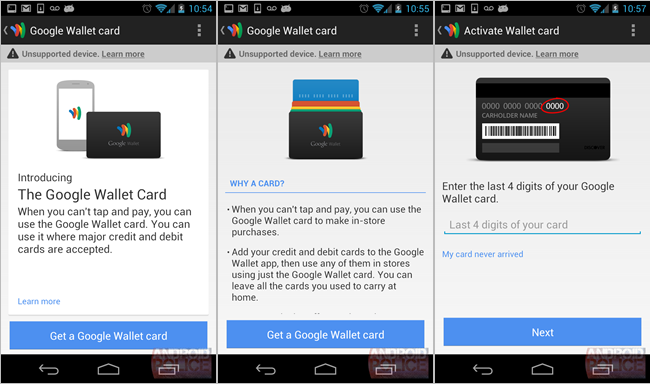
Leaked screenshots of an update to Google's Wallet App that hasn't been pushed yet shows evidence that a physical Google Wallet Card will be made available for instances where you can't make purchases with your NFC-enabled Android phone.

Digital wallet services are flooding the market, despite the many barriers between them and consumers pockets. Apparently, Google is trying to alleviate some of this existing friction with a tangible solution. Android Police received an anonymous tip and series of screenshots showing off a Google Wallet app promoting a physical Google Wallet card. According to the screenshots, the Google Wallet Card will be a physical credit card used in lieu of the multiple credit cards you have in your physical wallet.

The screenshots might have been taken by someone who had early access to an updated Google Wallet app, and it shows off a leaked informational page explaining the advantages of a Google Wallet Card. The cards are likely intended for brick-and-mortar shops that haven’t adopted NFC reading terminals or even iPad-based solutions. 

The card is supposed to bridge the gap between the new and old payment systems we’re stuck in. On one hand it’s a credit card like any other, but it digitally stores all of your existing cards so you can leave the multiple pieces of plastic at home. Users will defer to the Google Wallet app to indicate which credit card stored on the physical Google Wallet Card they want to swipe.

There are a few advantages to this system. For instance, if you lose your wallet, you’re not forced to cancel all your cards. In fact, “you only need to cancel your Google Wallet Card (not every card in your wallet).” You’ll also probably be able to request a new Google Card with the press of a button in the Google Wallet app. Some bonus security measures appear to include 24/7 fraud monitoring, and the ability to remotely disable your card at any time.
google wallet withdrawing money

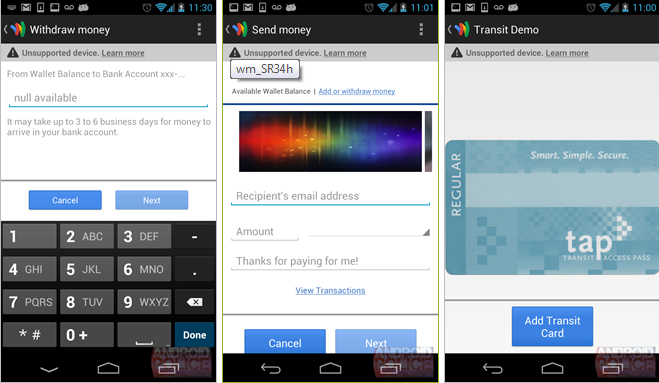
The second part of the leak introduces withdrawing money or sending money to a “Wallet Balance,” which seems to be a debt-like account where you can store, send, or spend money. It may suggest being able to soon use the Google Wallet Card as a debit card itself, independent of the stored credit cards. Finally, the screen shot shows evidence of the ability to add a transit card, like a New York City Metro Card for instance.

Of course until Google gets back to us we’re merely speculating, but the screenshots are incredibly telling: Google is aggressively entering this market and competing with the likes of Square and even more so Apple Passbook.


Source : digitaltrends[dot]com

Sep 23, 2012

Passbook is the coolest iOS 6 feature you can’t use

We've have plenty of unpacking to do this week, what with the iPhone 5 and everything new in iOS 6 - including Passbook, the digital wallet with high potential but little payoff... so far.


There are a lot of great (and not-so-great) things about iOS 6, and Passbook falls somewhere in between. Apple first introduced us to its digital wallet back at WWDC, a clean, unified payment system on your iPhone that kept track of your various loyalty cards and respective balances. The image showed off accounts with Target, Fandago, Starbucks, Amtrak, United, among others. It looked simple, easy, obvious.

And it would be – or rather, will be – once brands get on board. But consider the stock image Apple keeps showing off with Passbook something of a wish list for the time being.

When iOS 6 officially dropped this week, the native Passbook app showed up on the home page, and I hope I’m not the only one to experience the disappointment of selecting the icon only to be bounced to the App Store where I was given a choice of four apps I could add to the wallet. On Wednesday, the only options were Fandango, Live Nation, Lufthansa, and MLB.com At Bat. Not exactly a stellar lineup for launch day.

passbook nowBut things are already getting better: Open your Passbook, hit the App Store prompt, and you’ll find a much better variety at your disposal. Now, American Airlines, Sephora, Belly Card, Target, United Airlines, American Express, and Walgreens are all now working with Passbook to bring you digital payment and account handling services – that’s a pretty impressive bump since opening day, and the list is continuing to grow. A number of other outlets have announced they’ll be hitting Passbook soon, including Starbucks (within weeks) and a variety of theme parks. A few b2b brands, like Tello, have also announced they’ll be building tools to help brands manage their Passbook integration 

You have to give Apple its due on filling out the selection as quickly as possible – however, there are some other significant kinks, and they mostly boil down to a huge lack of instruction on how this thing works. After you’re bounced to the App Store and it’s made (at best) moderately clear these are the Passbook-friendly apps, you download a few. Then you’d expect upon re-opening Passbook that they would be there, right? Wrong. Oh, so wrong. They simply are installed on your screen, like any other app, with no indication on the iPhone’s part how you get them into your new, iOS digital wallet.

In order for these apps to sit in your Passbook a la that pretty little stock image we keep seeing from Apple, it appears you have to use them first. But nowhere is this made explicitly clear in Passbook or the participating apps. There’s currently no way to be in Passbook and immediately load apps into the wallet – which seems like the most obvious way to create a seamless, easy user experience.

And then there’s this problem:

passbook bug

Occasionally when you hit the App Store prompt from Passbook, you’ll get the above message. When you exit out of Passbook and shut it down, however, you’ll be able to get into the App Store on it’s own. Frustrating? You bet. Macworld found a fix you can check out here, but that’s just a glitch a finished product shouldn’t have.

Reviews about how it actually works have been varied. Given the fact that compatible apps are still being introduced, the Passbook testing has been timid. For the most part, however, early users found the process complicated and buggy.  

Passbook could be great, and it’s almost certain that bug fixes are on the way. But right now, veteran mobile wallet Lemon’s quick and easy camera capture for card storage is far superior, as is PassSource, where you can log in via desktop for set up purposes. Passbook assume that we can go all-digital, all at once, but did so without partners totally in place of a unified system. Oh, and also, we still have physical wallets full of cards that we need to do something about. It’s messy, it’s buggy, it’s broken – in short, Passbook has big dreams and decent potential, but right now it’s simply an unfinished product on Apple’s part, and the nicest thing anyone can say about it is that it’s a work in progress. 

[Additional reporting by Francis Bea]


Source : digitaltrends[dot]com

Sep 21, 2012

Starbucks coming to Apple’s Passbook before October

Coffee giant Starbucks is the latest company to announce its intention to integrate its app with Apple's new Passbook mobile wallet feature.

When Apple unveiled the latest version of its mobile operating system back in June, its new Passbook app was trumpeted as one of its main features.

Passbook acts as a kind of digital wallet, a place for users to store and organize tickets, boarding passes, store cards and coupons.

iOS 6 launched this week, introducing millions of owners of Apple’s iPhone to the new app. Of course, it’s useless without companies supporting it, and the early indications are that, over time, plenty of businesses will go with it.

A number of airlines, for example, are thought to be gearing up to integrate with Passbook – American Airlines has already confirmed its intention – while today Starbucks announced it would be offering Passport support by the end of this month.

The news came via the coffee chain’s Twitter feed on Friday. Many regular Starbucks customers may already be paying for their drinks using the company’s existing app, which also allows users to manage their Starbucks Card balance, top up their card, and send friends eGifts, among other things. In 2011, the Starbucks app, available for iPhone, Android and BlackBerry devices, accounted for 26 million transactions.  

Passbook integration could make the process of handing over your hard-earned readies even simpler, with, for example, the app opening automatically when the phone detects its owner’s arrival at a store. But if you’re a fan of Starbuck’s current app, which evidently already has some pretty major functionality, does integration with Passbook sound like such a big deal?

For a closer look at Passbook and its chances of becoming a true digital wallet, be sure to check out Geoff Duncan’s in-depth piece on the new app here.


Source : digitaltrends[dot]com

Sep 1, 2012

Get great discount on iOS and Android games on occasion of Labor Day

While America gets ready to celebrate Labor Day on September 3, you should get your wallet ready cause here comes another sale for games on iOS and Android.

The following titles are on sale right now, with the sale lasting through the weekend till Monday. So make sure you take advantage of the offer as soon as you can. Do note that some of the discounts may not be available in all regions.

For iPhone

Madden 2012

Fight Night Champion

The Sims 3

Risk

Battlefield Bad Company 2

The Sims Medieval

Dead Space

FIFA 2012

Mass Effect Infiltrator

Burnout Crash

For iPad

Ultimate Mortal Kombat 3

Flight Control HD

Mirrors Edge

Sim City Deluxe

Risk

Shift 2 Unleashed

Battleship HD

Fifa Soccer 2012

Need for Speed Hot Pursuit HD

Dead Space

Battlefield Bad Company 2 HD

Madden 2012

Real Racing 2 HD

Monopoly

NBA Jam

Tetris

Mass Effect Infiltrator

Burnout Crash

For Android

There could also be some other discounted titles that I may have missed out on. Feel free to mention them in the comments below.


Source : blog[dot]gsmarena[dot]com

Aug 30, 2012

Hands-on with Loop Attachment Mummy iPhone 4 case: Wrap your phone with silicone

Loop Attachment Mummy iPhone case pink

For those who want to carry their cards and cash without a wallet, the Mummy iPhone case has a fun feature for slipping necessities underneath.

My high school Spanish teacher had a wallet that was covered in duct tape. The thing looked like it was falling apart, but he claimed bandaging it in durable material kept the wallet sturdy and made it look cheap, so no one would want to steal it or the contents inside. At the time, the concept of wrapping your gadget anything didn’t make sense to me. Why would anyone think this design concept could be… desirable?

It’s probably because most wrap designs didn’t look anything like Loop Attachment’s Mummy iPhone case. There comes a certain point of utility, design, and durability where all three aspects mesh in-sync to form a product that’s actually wanted by the people. In our hands-on, we dig into what we love about this iPhone 4/4S case and what could be improved.

Look and feel

Loop attachment iPhone alternate view

Available in a giant array of colors, the Loop Attachment Mummy case is, off the bat, hip, trendy, and just looks minimal but cool. The silicone body is flexible, and simply fits over your iPhone by a light stretch over the four corners. Pre-made slots are cut out for the power, volume, and hold buttons while the entire lower end for the cords is mostly open. This means dockability with your home stereos and no fussing to get the battery charger plugged in. In the back, you’ll find the bandaged, mummy straps randomly hugging the body of your iPhone. The camera area is almost untouched, leaving no material to incur possible flash interference with the iPhone’s camera lens. 

On the hand, the silicone feels soft and comfortable to grip. It makes the iPhone 4 much less delicate to the touch, and easier to handle without the fear of dropping and destroying the glass. The lightweight body also adds virtually no difference to the iPhone, which is an added plus for those who dislike bulkiness. I also love that the Loop logo is not overwhelming or obnoxious, and blends quite seamlessly on the silicone.

Utility

The Mummy case may look like it has random straps along the back, but rest assured, these placements were no accident. The thickness of the silicone is the perfect size for a raised bumper in the front, allowing you to place your phone screen size down without any damage. The back also leaves enough room for you to pull the straps slightly apart and stick your I.D. card, credit cards, or a few dollar bills within. Much like the Speck SmartFlex Card case we’ve seen several months ago, the idea is for you to go out with your necessities all in one place. This way, you don’t have to lug a purse around if you’re out in a bar or a concert.

Loop Attachment Mummy iPhone case colorsThe difference between the Speck case and the Mummy is, because the straps are much more flexible, you can fit more than just three cards in the back. Still, we don’t recommend you overdo it before the silicone becomes too loose. From what I can tell, storing your credit cards on the back of your phone does not to interfere with their magnetic strips but discontinue use if you experience any problem.

We don’t have many gripes about the Mummy case other than the silicone tends to be a bit of a dust magnet, and that the bandage design leaves parts of your iPhone exposed. Still, because the thickness is just right, your phone should still be pretty protected since the silicone keeps it at least a few millimeters away from the iPhone’s surface. Keep in mind, however, that if you toss your phone in a bad and a set of keys happen to scratch your phone from within, that might still be an issue.

Bottom Line

Loop attachment mummy iphone case backWhile I personally like the idea of a bandaged iPhone — certainly much more than I liked my teacher’s duct tape wallet — this is an iPhone case I would switch to on special occasions. The Mummy makes a great accessory for replacing your wallet for the night, and is interesting enough to draw conversations about the design. At $25, it is also moderately priced for a comfortable case with a neat function.

The Loop Attachment Mummy iPhone case is available now in 10 different colors. Loop Attachment also sells the case in themed bundle, such as the Chicago set that contains the colors of the city’s official flag. A set of three Mummy cases will set you back $60 – not bad for a interchangeable accessory for the whole family.


Source : digitaltrends[dot]com