Pages

Showing posts with label choice. Show all posts

Nov 19, 2012

UK rethinks awful opt-in web porn filter, comes up with a marginally better idea

After giving consideration to an opt-in Internet content filter, where users would have to request access to adult material, the UK government may announce an active choice system instead before the end of this month.

The debate over whether Internet service providers should be automatically blocking adult content on the Web in the UK continues, however this weekend, news of a slightly tweaked plan has broken.

British Prime Minister David Cameron is said to be pushing forward with a new set of proposals, which veer away from the opt-in schemes from before — where the filter would be active unless you asked for it to be switched off — to a slightly more sensible opt-out system.

Referred to as active choice, the idea is that anyone who buys a new computer or signs-up with a new ISP will be asked whether children will have access to the computer. If the answer is yes, users will be guided through the installation of a filter, before answering a series of questions to set its sensitivity.

To stop cheeky under-18s from bypassing the filter before installation, unnamed measures will be implemented to confirm the person’s age from the start. The proposal may be announced before December.

Filters for the technically naive

Details on the new filter come from a report published by the Daily Mail, a UK newspaper with a poor reputation which has been pushing its own Block Online Porn campaign for a while, despite publishing questionable content itself on a regular basis.

It cites studies that say one in three children under the age of 10 have viewed pornographic material online, while four out of five aged between 14 and 16 do so on a regular basis.

While the new plans go against the blanket op-out schemes previously being considered, the Daily Mail is still claiming this as a victory, despite the system being nowhere near as restrictive as it wanted.

Internet filters appeal to the technically naive, but there’s no guarantee they’ll work. One of the reasons a filter is being considered is to assist parents with no knowledge of computers or the Internet (and obviously, no wish to learn) help stop their children accessing adult content. Except filters are easily avoidable by those with a modicum of know-how, i.e. the kids.

Filters are often ineffectual

There are also problems with filters not only blocking the wrong content, but failing to block that which it’s supposed to. For example, last year a well-known adult video website still appeared to users behind TalkTalk’s HomeSafe filter, as the message the site had been blocked only appeared in a box usually reserved for an advert.

TalkTalk is still the only major ISP in the UK to provide a cross-platform Internet filter, although Sky and Virgin Media have both agreed in principle to implement the government’s plans in the future, should they become mandatory. For now though, both let users choose what can be viewed online in the privacy of their own homes.

It’s becoming increasingly likely that a government enforced filter will be introduced in the UK in the future. While worrying, if one really must be introduced, this latest version is the least insidious discussed so far.


Source : digitaltrends[dot]com

Oct 24, 2012

How can the EU accuse Microsoft of stifling competition, but Apple gets a pass?

How can the EU accuse Microsoft of stifling competition, but Apple gets a pass?

Microsoft may be on the hook for up to $7.4 billion thanks to a glitch that stopped offering users a choice over which browser to use, but how come an increasingly dominant Apple has escaped antitrust allegations?

Guess what? Microsoft is the baddie again.

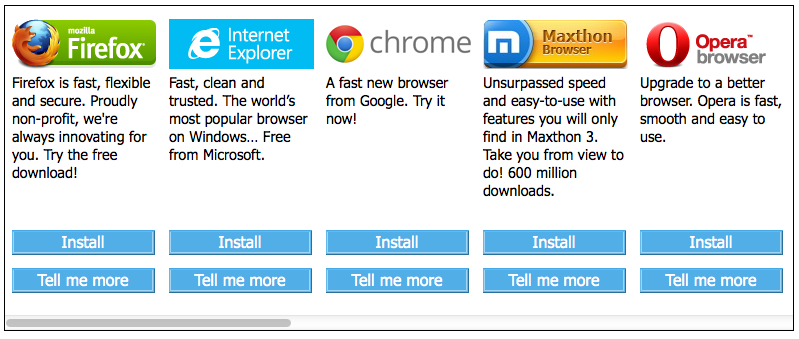
The European Commission has accused Microsoft of ignoring its legal obligations under a 2009 antitrust settlement agreement by failing to offer European users a “browser ballot.” The ballot is supposed to inform European computer users of multiple Web browsers available for the Windows platform and enable them to set a default browser that’s not Internet Explorer. But from February 2011 to July 2012, millions of European users probably did not see the required ballot, meaning Microsoft could potentially be on the hook for many billions of dollars.

What’s the big deal here? Surely most computer users are aware they can download and install any browser they like on their PC? And why is Microsoft required to present a browser ballot and un-bundle Internet Explorer, but Apple can bake its Safari browser (and WebKit) deep into both iOS and OS X without any government scrutiny? What does any of this mean for Microsoft’s tablet-centric Windows RT?

EU browser ballot

EU Browser Ballot

Windows users in Europe have been confronted with a browser choice ballot since 2009 as part of the Microsoft broader antitrust settlement with the European Union. Among other things, Microsoft was accused of abusing Window’s dominant status in the desktop operating system market to give Internet Explorer a major advantage in the browser wars. Microsoft argued bundling IE with Windows was just innovation, and it was no longer meaningful to think of Internet Explorer and Windows as separate things, but European authorities disagreed. Microsoft was required to let PC makers pre-install and ship any browser they liked with Windows (although most stuck with IE), let users uninstall IE if they liked, and offer Windows users a ballot with a choice between a wide variety of other browsers they can download and install. The browser ballot does include IE, but presents browsers randomly to avoid fights over placement. The settlement agreement requires the ballot to be offered through 2014.

Just one problem: When Microsoft released Windows 7 Service Pack 1 in February 2011, Windows stopped showing the browser ballot to many European users. Microsoft has admitted that the browser choice ballot was not displayed, blaming the trouble on a technical error that it corrected within a single business day of hearing about the problem. (However, Microsoft somehow avoided hearing about the problem for almost 18 months.) Microsoft estimated some 28 million Windows 7 PCs that should have seen the browser ballot did not, but the glitch also impacted an unstated number of systems running versions of Windows XP and Vista.

The browser ballot wasn’t the full scope of Microsoft’s settlement with the European Union, and has generally been derided as a weak solution to the larger issue of Microsoft stifling browser competition by bundling Internet Explorer with Windows. However, it is the most public example of changes Microsoft has had to make to avoid antitrust scrutiny, and it may have had an impact: according to StatCounter, Internet Explorer has been eclipsed by both Firefox and Google Chrome in Europe since the browser ballot went into effect.

Microsoft’s settlement with the EU is legally binding. If Microsoft is found to have violated the terms of that settlement, the company could be on the hook for as much as 10 percent of its global annual revenue. For Microsoft’s 2012 fiscal year, that would total up to almost $7.4 billion. The EU could also decide to impose additional requirements on how Microsoft operates within the European Union. For Microsoft, the stakes are high. Microsoft has four weeks to respond and can request an oral hearing. However, the EU will almost certainly see calls to give Microsoft more than a slap on the wrist.

“If companies enter into commitments, they must do what they have committed to do or face the consequences,” noted European Commission President Joaquín Almunia, in a statement. “Companies should be deterred from any temptation to renege on their promises or even to neglect their duties.”

What about Apple?

Whenever we cover news about Microsoft’s legal obligations and what regulatory agencies like the Justice Department and the European Commission have to say about Windows, Internet Explorer, Windows Media Player, and other products, we always get questions about Apple. Why doesn’t Apple have to serve up a browser ballot in OS X? How can Apple bake its Safari browser into iOS (and make it perform better than any third-party browser) without antitrust authorities crying foul? Basically: Why does Microsoft get a hard time while Apple gets a free ride?

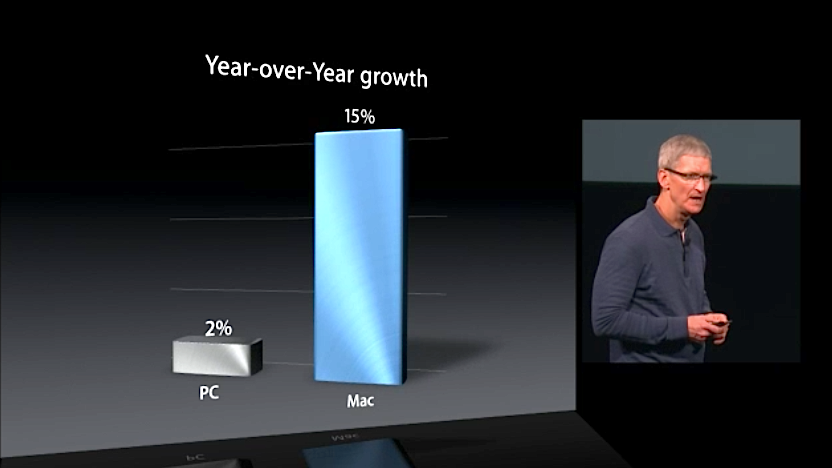
Apple CEO Tim Cook Mac Market Growth Oct 2012

It’s easy to understand why folks ask these questions. After all, at Apple’s high-profile media event yesterday, Apple CEO Tim Cook lauded Apple’s performance in the PC market, noting that Apple not only makes the number one desktop and notebook computers in the U.S. market, but also is seeing its computer business grow about seven times faster than the rest of the PC industry — where the PC world will be lucky to see 2 percent growth for 2012, Apple is looking at 15 percent.

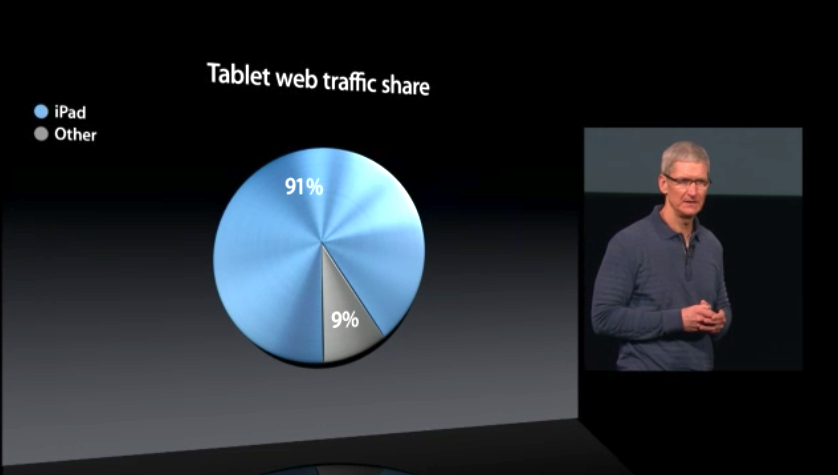
Apple CEO Tim Cook Tablet Web Traffic Oct 2012

And what about Apple’s dominance in other markets? Firms like ABI Research and IHS iSuppli put the iPad’s share of the tablet market at nearly 70 percent for the second quarter of 2012. And since the EU is so concerned about Web browsers, Apple’s CEO Tim Cook trumpeted that iPads are responsible for more than 90 percent of Web browsing traffic from tablets. Why aren’t regulators crying foul over Apple baking Safari so deeply into iOS? Apple even makes it more difficult for third-party iOS browser to compete by consistently rating competing browsers 17+ in the App Store and barring them from using the souped-up Nitro JavaScript engine Safari relies on.

Isn’t Apple’s curated approach to Macs and the iOS ecosystem just another way of saying Apple locks out competition?

Why Apple isn’t getting scrutiny

The reasons Apple skates clear of antitrust scrutiny for its Mac and iOS lines have to do with market share and how the company conducts business.

On the desktop and notebook computer side, Apple may be seeing its computer business grow at a faster rate than the overall PC market, but Apple is not a dominant player. Recent figures from IDC and Gartner don’t even put Apple in the top five PC makers worldwide, and Gartner places Apple third in the U.S. market with a 13.6 percent share. Apple may have the number one desktop and notebook computers in the U.S. market, but it shipped fewer than half the number of computers as HP. What’s more, these figures represent near-historic highs for Apple; it’s tough to argue Apple has somehow been abusing a dominant position in the PC market and needs to be reined in by governments. Moreover, since Apple doesn’t license its operating system, Apple’s computer sales are also representative of OS X’s share of the desktop market. The vast majority of all computers sold from other manufacturers are running Windows — so Microsoft remains the dominant player in the operating systems market.

On the mobile side, the success of the iPhone and the iPad means Apple has a much stronger presence…but guess what? Apple isn’t the market leader in mobile either — that’s Android. According to IDC, in the second quarter of 2012 Android accounted for 68.1 percent of the worldwide smartphone market; Kantar Worldpanel Comtech recently found Android accounted for more than 60 percent of the global smartphone market, and two-thirds of the European mobile market. The iPad does currently account for 70 percent of the tablet market, but remember the iPad got there first, and the market is new enough that being first still carries weight. Amazon, Google, and Samsung are all aggressively marketing Android-based tablets, and Microsoft is about to enter the market with its Surface products.

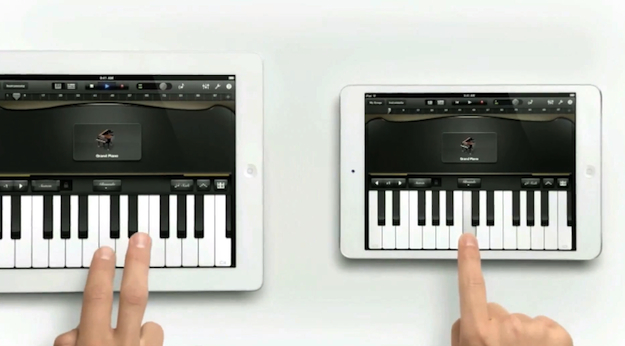
iPad mini ad

But even if the iPad continues to be the dominant tablet line for years to come — and regulators eventually decide smartphones and tablets are separate markets — Apple likely will still not be subject to the kind of antitrust scrutiny visited on Microsoft over the years. Microsoft drew the ire of regulators not just for having a dominant position in the desktop operating system market (that’s not illegal, and neither is a monopoly), but for abusing that position. Among other things, Microsoft cut deals with computer makers to dictate what software could and could not be included on new systems, fiddled with its APIs so Internet Explorer and other Microsoft applications would have an inherent advantage over competitors, and used its Windows monopoly as a distribution channel for Internet Explorer with the intention of wiping out competitors like Netscape.

With one possible exception, Apple isn’t capable of committing these abuses. Apple doesn’t license its operating system, so it can’t strong arm partners who make iOS devices — there aren’t any. Similarly, with Android the dominant mobile operating system, it’s difficult to argue Apple deciding to bundle capabilities into iOS — like Photo Stream and iCloud, for instance — constitutes an abuse. Competitors can (and are) offering similar services for iOS (Dropbox, Instagram, anyone?) and are free to develop for Android, Windows Phone, Windows RT, or even BlackBerry or Symbian if they like.

The one antitrust concern in iOS might be the built-in Safari Web browser. Apple does permit third-party browsers for iOS — Google Chrome Opera Mini, Atomic, Dolphin, and (heck!) iCab are available for iPhone and iPad, although Mozilla recently “retired” Firefox Home. But Safari outperforms the competition by being able to tap into the high-performance just-in-time (JIT) compiler in the Nitro Javascript engine. Although Web apps got the same capability in iOS 5, third-party Web browsers have to rely on a slower JavaScript engine or (in Opera’s case) outsource Javascript to a remote service. Apple also won’t approve a browser that includes a JIT compiler of its own. Apple claims these restrictions are all about security — iOS is more secure than Windows, OS X, and Android in this regard — and Apple gives Safari a pass because Apple can perform rigorous QA on it as part of iOS. However, is does mean that Safari has an inherent advantage on iOS that competitors can’t match. That’s eerily reminiscent of the API adjustments Microsoft made to favor Internet Explorer on Windows.

What might happen to Microsoft?

Steve Ballmer Microsoft

Although Microsoft is undoubtedly in hot water for breaking the browser ballots (and thus the terms of its settlement with the European Commission), few expect the company will be on the hook for billions of dollars over the issue.

Microsoft doesn’t seem to be slithering out of its mistake. “Although this was the result of a technical error, we take responsibility for what happened, and we are strengthening our internal procedures to help ensure something like this cannot happen again,” the company said in a statement. Microsoft has suggested it be required to display the browser choice ballot for an additional 15 months, which would mean European Windows users would see a browser choice screen through at least 2015. The European Commission hasn’t commented on that suggestion, or any possible sanctions against Microsoft.

Looking forward, Microsoft might face difficulties with Windows RT. When Microsoft ships its ARM operating system this week, it will support one and only one Web browser: Internet Explorer 10. Microsoft is denying third-party developers access to components that would be necessary to create a competitive browser on the platform: not just a JIT Javascript compiler, but lots of other internals that just aren’t accessible to Windows RT apps. Microsoft’s reasons for this decision are very similar to Apple’s reasons for denying access to the Nitro engine: stability and security.

However, Microsoft is also unlikely to see any antitrust action over browsers in Windows RT — at least, not anytime soon. Right now, Windows RT accounts for essentially zero percent of the mobile or tablet market, so Microsoft can’t possibly be abusing a dominant position. Competitors might argue Microsoft’s existing antitrust settlements in the United States and the European Union should be extended to Windows RT, but that’s also difficult. In the United States, federal oversight of Microsoft formally concluded in mid-2011. Oversight in the EU is still ongoing — hence the scuffle over the browser ballot — and terms of the settlement could conceivably be applied to ARM-based devices running Windows RT. However, regulators will probably wait to see if Windows RT goes anywhere. After all, Windows Phone has been out for two years, and nobody is worried about Microsoft abusing its monopoly power there.


Source : digitaltrends[dot]com

Oct 19, 2012

Why I won’t be buying a Windows RT tablet (And why Microsoft doesn’t mind)

surface rt tablet microsoft

Windows RT tablets will be crippled out of the gate by a lack of applications, making holding off a wise choice for smart consumers.

Microsoft yanked back the veil obscuring its Surface RT tablet earlier this week, and if you ask me, it’s the finest example of tablet hardware that we’ve seen to date. Microsoft poured a ton of mental and engineering resources into the Surface, and it shows; the Surface tablet and its oh-so-attractive Touch Cover keyboard is one of just three tablets to ever make me drool with desire. It even has Office 2013! And the new-look Windows is actually kind of awesome on mobile devices once you make a few tweaks.

Even still, I won’t be buying a Surface RT tablet on October 26th. The same goes for any Windows RT tablet. There’s no chance. Nada, nil, zero.

My reluctance doesn’t have anything to do with pricing concerns. Some people think the Surface RT is overpriced at $500 to start, but not me. The Surface RT is a top-tier piece of hardware worthy of a top-tier price point. My concerns lie in Windows RT’s crippled nature, and before you grab your pitchforks, they have nothing to do with the Modern-style overhaul.

Here’s the kicker, though: Microsoft doesn’t need me or you or anybody to buy Windows RT tablets on October 26th. They can be a complete flop in the short term and still be a massive success in the long run.

Let me explain.

Why I won’t buy a Windows RT tablet

In a word: apps.

Windows RT and Windows 8 may look the same on the surface (get it?), but they’re two totally different beasts under the hood. Windows 8 runs on x86-based processors, which means it can run both the new Modern-style Windows apps as well as the programs currently available for Windows 7 PCs.

Windows RT, on the other hand, runs on the ARM-based processors — such as the Qualcomm Snapdragon and Nvidia’s Tegra 3 — that thoroughly dominate the mobile gadget world. That makes Windows RT tablets incompatible with the legion of programs written for past generations of Windows-based operating systems. Basically, Windows RT can only run the new Modern-style apps.

Modern-style apps can only be purchased through the Windows Store, and as it stands today, there simply aren’t enough Windows apps — either in quality or quantity — to make purchasing a Windows RT tablet worthwhile. Not even the breathtaking Microsoft Surface RT with its baked-in Office app.

windows app store microsoft surface tabletThe vast majority of 4,326 current Windows Store apps are tablet-style games or instantly forgettable novelties. (Fart Soundboard, anyone?) Aside from standout apps by Netflix, Evernote and Slacker, most of the must-have essentials aren’t there. I’ve spoken to several developers about the situation; it seems as though quite a few apps are waiting in the wings, set to appear in the Windows Store when it officially launches on October 26, but I don’t expect the Windows Store selection to skyrocket out of the gate.

That’s a big problem

Windows 8 devices can lean on the current Windows programs we know and love until the Modern-style apps hit full speed. Windows RT tablets don’t have that luxury.

Knowing that, the little flaws in Windows’ new Modern-style apps take on a whole new light. Intel CEO Paul Otellini was recently reported as saying that Microsoft is releasing Windows 8 before it’s ready — a statement that Intel didn’t exactly deny — and I’m inclined to agree with him. As a whole, Windows 8 is a joy on a tablet, but odd little quirks occasionally prove frustrating.

Those rough edges could be a whole post in and of themselves — tune in next week! — but let’s talk about a particular frustration that highlights Windows RT’s issues: The native Mail app’s complete lack of POP3 support. A recent update to the Mail app fleshed out support for the vastly superior IMAP protocol, but if your email provider only provides POP3 remote access (as is the case with many Internet Service Providers, including Comcast and Fairpoint) you’re in trouble.

Windows 8 users can just switch to desktop mode, download Thunderbird or one of the dozens of other freely available POP-compatible classic Windows programs, and start slinging messages in no time. Windows RT users are just screwed unless they switch to a webmail service or perform complex workarounds that Everyday Joe would never figure out for himself.

Nope, Windows RT just isn’t worth the hassle. Gimme a Nexus 7 for half the price instead.

Getting Over the Hump

Manufacturers aren’t stupid. They know Windows RT tablets will be limited at the outset. That’s why we’re seeing an overload of x86-based Windows 8 devices, but only a handful of Windows RT tablets. And that’s totally fine; Windows RT tablets will have their day in the sun. Microsoft’s very future depends on becoming as mobile-friendly as possible — and the company knows it.

Even if Windows tablets fizzle from the get-go, Windows 8 will still be installed on damn near every PC and laptop sold after October 26. Even if traditional computer sales are somewhat lagging, hundreds of millions of them are sold year in and year out.

win8 metro microsoft surfaceNothing attracts developers faster than a massive user base; Windows’ tremendous desktop presence will eventually draw them like flies, and Microsoft is doing everything it can to make developing Windows apps as painless as possible. Modern-style apps and their associated Live Tiles are the heart of the new Windows experience, and those apps will come. There’s no way the major software and service providers will leave the world’s most popular desktop operating system by the wayside.

Sure, those Modern-style Windows apps might be developed to satisfy the hordes of PC users clamoring for Modern-ized versions of classic Windows programs, but they’ll work just as well on mobile devices — regardless of whether those devices run on ARM or Intel processors. Microsoft and its partners don’t need to sell a single Windows RT tablet; a year or two down the line the Windows Store will be packed with Metro apps even if Microsoft’s initial mobile ambitions flop.

It’s genius.

So no, I won’t be buying a Surface RT tablet on October 26, even though the thought of holding it makes my fingers twitch with excitement. Microsoft’s mobile future — its entire future — hinges more on what I will be doing that day, anyway: Taking advantage of the dirt-cheap upgrade offers to upgrade some of my secondary PCs to Windows 8.


Source : digitaltrends[dot]com

Oct 18, 2012

Tweetbot for Mac is finally here… but it costs $20 and is in limited supply thanks to Twitter’s API restrictions

tweetbot for mac

Tweetbot for Mac launched today, but Twitter's new API guidelines has left Tapbot with no choice but to sell a limited number of copies for $20.

Tweetbot’s Mac app finally launched in the Mac App Store today, but there’s a catch: Tweetbot for Mac will cost you $20, which is actually a reasonable price considering the circumstances.

The circumstances are these: Mark Jardine of Tweetbot developer Tapbots explains that Tweetbot for Mac will cost $20 “because of Twitter’s recent enforcement of token limits.” Tweetbot only has a limited number of user tokens it can implement and is therefore limited to hosting a small number of users — and because that potential pool of users will be restrained, the company has to charge a higher price. “These tokens dictate how many users Tweetbot for Mac can have,” Jardine says. While initially Tweetbot said it was working closely with Twitter as a result of the API restrictions, collaboration seems to have fallen to the wayside as alpha testing was squeezed out and later the Tapbots developers headed to App.net to try their luck there. 

Despite the bumpy road, the Mac client is finally  here, although there are some strings attached. One thing to note is that the number of Mac tokens available to Tweetbot are independent of the tokens available for Tweetbot for iOS users, which should be a relief to all the Tweetbot iPhone users out there who want the app for their desktop too. Once the number of tokens available for Tweetbot on Mac are used up, however, Tapbots will discontinue further sales — so you may want to act fast. 

An estimated fewer than 100,000 individual user tokens will be made available to Tweetbot based on Twitter’s API guideline Version 1.1. Existing third-party Twitter apps will be offered an additional 200 percent of the app’s current user token, but since Tweetbot for Mac is launching today without an existing user base, this unfortunately won’t apply.

To expand the number of tokens available Twitter explains that it reviews requests on a case-by-case basis. Jardine is aware of this and at the end of his announcement points to Twitter’s support account saying, “feel free to let Twitter know how you feel about it.”

If you were an early participant in the alpha or beta trial of the Tweetbot Mac app but have no intention of purchasing an account, Tapbots is kindly asking these testers to “please do us a huge favor and Revoke access.” With limited tokens available on Tweetbot for Mac, it frees up more space immediately for buyers.

With new stipulations attached to distributing this (and once-free) software, we have to wonder what may  happen to buyers that stop using Tweetbot for Mac. We reached out to Tapbots to find out if the company would possibly consider buying back accounts from inactive users. We will update you with their response.


Source : digitaltrends[dot]com

Oct 10, 2012

Rumor: Armie Hammer may play Batman in Justice League movie

The Lone Ranger

Once again, Armie Hammer is Warner Bros.' top choice to play Batman in a still-hypothetical Justice League movie.

According to a recently published report on Digital Spy, actor Armie Hammer (pictured above at right) is being strongly considered for the role of Batman in Warner Bros. inevitable film based on DC Comics’ Justice League superhero team. 

If that sounds familiar to you, it’s not because we’re reprinting old stories in some kind of ill-conceived “Digital Trends Greatest Hits” initiative. Hammer was originally the top candidate for the Batman role back when Mad Max director George Miller was attached to the Justice League project. That attempt to get this movie made fell apart a few years ago, yet Warner Bros. is determined to pick up a slice of that sweet superhero team movie cash generated by The Avengers earlier this year, and will not rest until someone, somewhere is filming a big-budget Justice League feature film.

As for why Hammer once again leads the list of names vying for the Bruce Wayne/Batman role in this film, Digital Spy’s unnamed insider source claims that Hammer’s recent ascent to the fringes of the Hollywood A-list has put him “back on WB’s radar.” Hammer will next appear as the titular lawman in Disney’s Lone Ranger feature film alongside Johnny Depp, which is undeniably a pretty major role (even if Depp’s silly, borderline-racist crow hat will inevitably overshadow Hammer’s performance).

In case you’re wondering if Hammer’s hypothetical Batman might officially replace the fan-favorite Batman portrayed by Christian Bale in Christopher Nolan’s recently-concluded Batman trilogy, don’t worry: According to the anonymous source, Hammer’s version of the character will only be used in this initial Justice League film and any sequels it might spawn. Unless plans change, Hammer won’t be appearing in any solo Batman adventures.

Finally, Digital Spy claims that the Justice League film will include a relatively standard roster for the superteam. Though the Justice League (and its innumerable spin-off groups) has seen hundreds of members over its half-century-plus in existence, this initial Justice League movie will focus on the core group of Superman, Batman, Wonder Woman, The Green Lantern, Martian Manhunter and The Flash. No, we have no idea which iterations of The Flash or Green Lantern Warner Bros. plans to use, but we’ll let you know as soon as we hear anything more concrete than just “our shadowy informant said…”.

Working under the assumption that these rumors are all true, this news doesn’t so much fill us with joyful anticipation as it raises questions in our comic book-addled brains. As much as we like Hammer — other than the Trent Reznor score, his work as the Winklevoss Twins in David Fincher’s The Social Network was easily our favorite part of that film — he simply seems too young and soft to properly portray Batman. Yes, Bruce Wayne grew up in a mega-wealthy family and has never wanted for money, but there’s a certain edge to the character that seems minor but is, in fact, one of his defining traits. Christian Bale was able to pull this off flawlessly, but so far Hammer has yet to do anything that suggests he might have that certain killer instinct that makes Bruce Wayne more than just your average playboy.

More crucially, if Hammer is cast, and his Batman is used solely in Justice League movies, what happens when The WB wants to start churning out new Batman films? Will they go back on their plan? Will they find another actor? Assuming the latter, won’t the public be confused by two entirely separate Batmen coming from the same production studio? Objectively speaking, one of them has to be better than the other, so in that case the studio would be running the risk of overshadowing its own projects and cannibalizing any potential audience either franchise might attract.

Whatever happens, this film isn’t scheduled to hit theaters until at least 2015, so Warner Bros. certainly has lots of time to figure things out. In the mean time, as usual, we invite you to visit the comments section below to either vilify this rumored news, or figuratively clap like one of those wind-up cymbal monkeys. Whichever more accurately conveys your current emotional state.


Source : digitaltrends[dot]com

Aug 13, 2012

Eight Tips for Extending the Life of Your Iphone Battery

One of the most powerful and coolest phones is the iPhone. It may probably be the most popular choice among consumers today. However, just like any other smart phone, iPhone does not truly excel in battery life. An average iPhone user will recharge his phone every 2 or 3 days. A very intensive iPhone user will recharge his phone every day!

There are ways you can do to preserve your iPhone’s battery life. Here are eight tips for extending the life of your iPhone battery:

1. Keep your iPhone’s Wi-Fi switched off.
If the iPhone’s Wi-Fi is switched on, it will always look for open hotspots. Hence, it will surely drain your battery life. To switch it off, go to Settings -> Wi-Fi -> Slide the toggle to off.

2. Reduce your screen’s brightness.
The brighter your screen, the more power it uses. Keep your screen dimmer so your battery will consume less energy. Furthermore, it is advisable that you turn auto-brightness on. Your iPhone has “ambient light sensor” that adjusts the screen’s brightness depending on the light around the sensor.

To reduce screen’s brightness, go to Settings -> Brightness.
To turn Auto-brightness on, go to Settings -> Brightness -> Slide the toggle to on.

3. Turn off Location Services.

The built-in GPS is a cool feature of the iPhone as this lets your phone know where you are. It can also give you the driving instructions to a restaurant and other places. Furthermore, apps such as Maps, Facebook and Siri also frequently use your location information. Of course, like any other service that sends information over a network, battery power is required. It will surely drain your battery without you noticing.

To turn Location Services off, go to Settings -> General -> Location Services -> Slide the toggle to off.

4. Turn off Push Notifications.
Push notifications are the pop-ups that appear on your screen when buddies your friends check-in somewhere or when new data becomes available. Turning off this feature will reduce the number of times the phone connects over a network.

To turn off Push Notifications, go to Settings -> Notifications. Select the apps that use this service heavily, and toggle those apps’ alert style to None.

5. Turn Bluetooth off.
Bluetooth is useful for users with wireless earphones or headsets. However, transmitting data wirelessly can drain your battery. It is advisable that you only turn on the Bluetooth when you need it.
To turn Bluetooth off, go to Settings -> General -> Bluetooth -> Slide the toggle to off.

6. Turn Equalizer off.
Equalizer is a feature that adjusts music to decrease treble, increase bass and other music adjustments. If you are not an audiophile, it is better that you turn this off.
To turn Equalizer off, go to Settings -> Music -> EQ -> Choose Off.

7. Get rid of apps that still run in the background.
Multitasking is a really great feature of iPhone. But, of course, you can do that much multitasking. Some apps that are in your multitasking dock still continue to run. Hence, these apps can consume battery power.

To get rid of the apps that still run in the background, double tap Home button. Choose the app in your multitasking dock that you want to stop running. Hold finger down on the chosen app. Wait for it to start to wiggle. Tap the red minus symbol of the chosen app.

8. Put your iPhone through one full charge cycle every month.
To do this, charge your iPhone up to 100%. Then, let the battery of your phone completely drain.

This Guest post was written by Kelly who is a freelance writer that loves to share tech tips. You can have a look at her site where you can obtain some att uverse coupon code.


Source : techtalkafrica[dot]com