Pages

Showing posts with label options. Show all posts

Nov 19, 2012

New paint jobs for Galaxy Note II and Galaxy S III mini might be coming soon

The Samsung Galaxy S III launched with only two color options but Samsung added new colors over time. Rumor has it that it’s now turn for the Galaxy Note II and Galaxy S III mini to get new paintjobs.

The Galaxy Note II and Galaxy S III mini will get three new color options each and they’re somewhat different (in name at least) from the colors that the Galaxy S III is available in.

The Samsung Galaxy Note II will get Amber Brown, Topaz Blue and Ruby Wine versions in addition to the currently available Titanium Gray, Marble White. The units with new paintjobs will come out in 2013.

The Galaxy S III mini will get Titanium Gray, Garnet Red and Onyx Black colors, the first two of which match color options for the big Galaxy S III. The Galaxy S III has a black version too, but that’s called Sapphire Black and there might or might not be a difference. Anyway, the new colors for the S III mini will be available in December or early next year.

The new versions for the Galaxy Note II and Galaxy S III mini haven’t been officially confirmed, but if the rumor is true, they will all be showcased at CES next year.


Source : blog[dot]gsmarena[dot]com

Nov 9, 2012

Best Microsoft Surface tablet cases and accessories

Microsoft covers surface tablet

What kind of cases and covers, or Microsoft Surface accessories are available on the market right now? Join us as we take a look at some great options for the Surface with Windows RT and the Surface with Windows 8 Pro.

If you’ve been tempted by Microsoft’s new Surface tablets then you’ll probably be on the lookout for a new case and maybe some accessories. There’s no denying that the magnesium shell and Gorilla Glass 2 screen look tough – just check out the skateboard demo – but that doesn’t mean you won’t want some protection or a practical bag to carry your shiny new tablet in.

We’re also going to take a look at the options out there for Microsoft Surface accessories. There are a couple of adapters that might prove essential and everyone could use some extra storage. The choices for cases are limited, partly perhaps because the Surface tablet has a built-in kickstand (something that cases and covers often offer) and partly because manufacturers are unsure how popular it will be.

Anyone still undecided about the new tablets should check out our Microsoft Surface with Windows RT review to find out how it stacks up.

Touch Cover ($120)

microsoft touch cover surface tablet

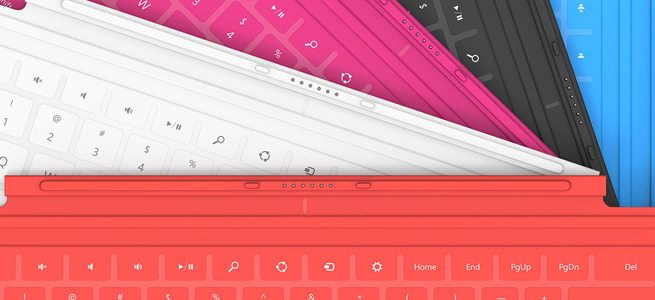
This super-slim, pressure-sensitive keyboard doubles up as a protective cover. It also has a trackpad and some handy Windows shortcut keys. It snaps into place with a magnetic seal that’s quite strong. It’s great to have a keyboard cover that’s only 3.5mm thick and weighs just 0.46 pounds, but there is a drawback. Most reviews have pointed out that it is uncomfortable to type on because it is so flat and unresponsive. The color choices of cyan, magenta, and red are also going to put some people off, but don’t worry they come in black and white as well.

Type Cover ($130)

It is bigger and it only comes in black, but for serious typists the mechanical keys of the Type Cover are going to be far preferable to the Touch Cover keyboard. It is still only 6mm thick and it weighs 0.55 pounds. It also has the trackpad and shortcut keys and it clicks on with the same magnetic attachment. The Type Cover really makes the Surface feel like a laptop and it’s much easier to get used to than the Touch Cover which makes it well worth the extra $10.

Incipio Padded Nylon Sleeve ($40)

A nylon sleeve isn’t going to offer major protection from bumps, but it will keep dust and scratches at bay. The close-seamed zipper has a neoprene lining and rubberized pulls for ease of use and comfort.  The inner lining is soft, faux-fur which provides some cushioning from bumps and there’s a handy external pocket with a zipper for extras. It comes in a range of two-tone color combinations and it’s one of the few options on the market right now designed specifically for the Surface.

Surface HD Digital AV Adapter or Surface VGA Adapter ($40 each)

If you were expecting to find any extras beyond the power supply in your Microsoft Surface box then you’ll be disappointed. Many will consider these pricey adapters to be essential, and they are described as “proprietary”. For $40 a piece you can get an adapter for any HDMI-compatible display or one for any VGA-compatible display. This is definitely the simplest way to see your Surface content on a big screen or through a projector. Don’t feel that you have to splash out for the official adapter, though, because the Surface has a standard micro-HDMI port so any HDMI-to-micro-HDMI cable will do and if you shop around there’s no need to spend more than $5.

SanDisk microSD Memory Card ($10 to $60)

Since there is actually only 16GB free in a 32GB Microsoft Surface you might be looking for extra storage sooner than expected. The Surface supports microSD, SDHC, and SDXC memory cards. You can pick one up from Amazon at about $10 for 16GB up to about $60 for a 64GB card. You’ll find the memory card slot behind the kickstand. For cheap storage without any added bulk a memory card is your best bet.

Thumb drive or flash drive ($10 to $60)

The Surface tablets also have a USB port. The RT has a USB 2.0 port and the Surface with Windows 8 Pro has a USB 3.0 port. If you invest in a fast flash drive you’ll be able to transfer files quickly and easily. You can back up emails or documents and you can watch movies or listen to music. These handy accessories are a cost-effective and convenient way to boost your storage capacity and they’re great for transferring files from your old PC or laptop. They come in all shapes and sizes and you can find a comparison via the link above. If you need more space then consider an external hard drive instead.

Bluetooth Headset ($50 to $150)

With support for Bluetooth 4.0 you could choose any Bluetooth headset to use with your Surface. The tablets do have built-in dual digital mics, stereo speakers, and a camera, but some people prefer a headset when they Skype. Whether you want to go for the Plantronics Voyager Legend or something from Jawbone, Motorola, or Aliph, really depends on your requirements and your budget.

Xbox 360 Controller ($40)

All the gamers out there will be glad to learn that the Surface tablet supports wired Xbox 360 controllers. It won’t work with wireless controllers, but just like any Windows PC, if you plug a wired Xbox 360 controller into the USB you’ll be able to play games with it. This is more exciting for the Windows 8 Pro version of the Surface tablet because it will support a lot more games. It will be interesting to see whether Microsoft tries to make XBLA games available as it pushes more cross-compatibility with the Xbox 360 in your living room. The second screen app soon to be released on Windows 8 and RT, Xbox SmartGlass looks like the first step.

More ideas

The fact that the Surface tablets boast USB ports and have Bluetooth support means there is already a long list of potential Surface accessories. There’s no need to wait for a bunch of dedicated accessories to be released. You may well find your existing mouse or Bluetooth headphones will work with your new tablet. Post a comment and tell us about your favorite Surface accessories so far.


Source : digitaltrends[dot]com

Nov 8, 2012

Spoiled for choice: BMW planning six new diesel models for the U.S.

2013 BMW 7 Series

BMW is reportedly working on a full line of diesels, including three sedans, two crossovers, and a station wagon, for North America. Will they offer buyers more options or just poach sales from BMW's hybrids?

In greening up its image, BMW has two choices: push the diesel engines it already sells in droves in Europe, or continue to promote its “ActiveHybrid” powertrain. The Bavarian company seems to be choosing “all of the above.” Even with hybrid versions of all of its sedans, BMW is reportedly planning to launch a full line of diesels in North America.

A slide showing release dates for six diesel models, reportedly taken from a BMW North America meeting, was leaked on the F30Post forum. If it’s legitimate, Americans can expect an onslaught of diesel Bimmers beginning next year.

The first car listed is a 3 series sedan, which will arrive in the first half of 2013. It will be followed by a 3 series wagon in the second half of next year. The diesel will be the second engine option for the wagon, which launches next May as a 328i with BMW’s 2.0-liter turbocharged inline-four, but not the inline-six found in 335i sedan models.

Rounding out 2013 will be a diesel 5 Series sedan and a new X5d. The 5 Series will debut in the third quarter of 2013, with the X5d following at the end of the year.

In 2014, BMW will launch a diesel version of its flagship 7 Series model, along with an X3d version of the company’s medium-sized crossover. Both models are scheduled to arrive in the first half of 2014.

It’s a little early to tell which engines will power each of these new diesel BMWs, but the company’s 3.0-liter inline-six is a good bet for most of them. It’s essentially a diesel version of BMW’s ubiquitous gasoline six, and it powers the current X5d. In that crossover, it produces 265 horsepower and 425 pound-feet of torque in that crossover.

A smaller, four-cylinder diesel is also a possibility, especially on the smaller X3d and the 3 Series wagon, which will only be offered with four-cylinder gasoline power.

Experimenting with diesels shows that BMW is in the same state of confusion as its German luxury rivals when it comes to green technology. After years of campaigning for diesel power, Audi launched the A8 hybrid in Europe, and built an A6L plug-in hybrid concept. Mercedes-Benz has the S400 Hybrid and its Bluetec diesels and, of course, all three companies are experimenting with battery-electric vehicles.2012-bmw-3-series options

For its part, BMW will have hybrid versions of its three sedans, along with a full line of diesels. In Europe, diesels and hybrids coexist like this, but diesel is also the fossil fuel of choice for most European buyers.

In America, diesel is still an obscure technology; it’s viewed as a high-mileage alternative to gasoline, not the norm. So, depending on EPA ratings and price, it’s possible that buyers looking for a fuel efficient luxury car might cross-shop a diesel with a hybrid. At least they won’t have to go far if they’re already at a BMW dealer.


Source : digitaltrends[dot]com

Oct 25, 2012

How To Download Songs From Youtube

You have a couple of options to download songs from Youtube. There are numerous websites that offer this service, websites like vidtomp3.com, video2mp3.net or listentoyoutube.com can be helpful. What you’ll first need to do is to go to youtube website, search for the song you want. You would then go up to the URL bar and copy that URL.

YouTube Screenshot

Flickr image by clarissamendiola@att.net

Your next step would be to find a website that offers the service of converting a video into audio. Next would be to paste the URL you originally copied into the space provided. You can usually convert to standard or high quality depending on your preference. The video to audio conversion should only take a minute or so, unless the song is very long, or you have a slow connection. A download link would appear and you are all done once downloaded.

There are also software programs that do this for you as well. Making the process quicker and easier. Depending on how many videos you want to convert and your technical expertise level, this may be an option for you to consider. Another benefit of getting a program that converts for you is that it gives you more options. You can choose the file type to convert to, and can even record videos you have watched previously. You can also change the quality to multiple levels, depending on preference. There are either standalone software programs or toolbars that you can also have on your internet browser for this. You basically only need to know how to use a computer to be able to use either option.

Keep in mind, with either option, downloading a complete album off of youtube, or a very long song, will take a while. Especially if it is of higher quality. Some of the free websites will only allow a certain size of file to be downloaded. If this is the case, you would certainly want to invest in a program that can download and convert the videos for you.

Please note that songs will not be converted if the link is broken or if the song is damaged or corrupt.

Tags: Youtube Downloads, Youtube Free Downloads, Youtube Songs

Source : techtalkafrica[dot]com

Oct 12, 2012

Windows 8 prices revealed, you can pre-order it with or without a computer starting today

Today we finally get to see all price options for Microsoft’s next-generation computer OS – the Windows 8. The OS will launch on Oct 26, but you can pre-order it on a DVD right now, if you absolutely need to have a disc. For the rest of us, the update would be available online for download and purchase via the Windows 8 Upgrade Assistant for a cheaper price. The full Windows 8 Pro OS will be downloadable as well when you purchase the license separately.

Oh, yes, and the prices, of course. An online upgrade from Windows XP, Vista or 7 to Windows 8 Pro will cost you $40, as we’ve seen before. That’s a time-limited offer, valid only until January 31, 2013. But there are other options, too.

If you insist on getting the update on a DVD in one of their newly designed product boxes (one of which is pictured above), you will have to shell out $70 (already available for pre-order).

As previously detailed, if you buy a Windows 7 computer right now, come Oct 26 you will be eligible to upgrade your OS, for only $15 in the US, €15 in most of Europe and £15 in the UK. More information and detailed pricing for each country (over 140 worldwide) is available HERE.

If you are into buying a full license for Windows 8, and not just an upgrade, US online store Newegg reveals the prices will go like that:

  • Windows 8 Pro Pack – Product Key Card (no media) – $70
  • Windows 8 (Full Version) – OEM $100
  • Windows 8 Pro (Full Version) – OEM $140

Starting today, we should also be able to pre-order any of the Windows 8 PCs, made by Acer, ASUS, Dell, HP, Samsung and Sony. So far I only had luck with checking out dedicated pages with the offers by Asus, Dell, Sony. I guess your nearest electronics retailer will already have a deal for you. So far, there is no pre-order deals available for Microsoft’s own tablet – the Surface.


Source : blog[dot]gsmarena[dot]com

Oct 1, 2012

Samsung details new Galaxy Note II features in a lenthy video

Samsung has released a new, almosty eight minute long video to demonstrate all the new features on the Galaxy Note II. The video showcases the large display, the new multitasking options and the built-in applications that you can use with the stylus.

First of all, we see the new Gallery features Samsung has added to the Note II to take advantage of the bigger display. You have two new Gallery views and can now create folders and drag and drop images between them.

Next you see all the cool things you can do with the stylus. You can go through all the images in a folder inside the Gallery and preview videos, simply by hovering the stylus over them. You can also hover the stylus over the progress bar in a video and get a quick preview. Similarly, you can hover over the calendar entries to see more details without opening them and hover over emails to see their contents.

Samsung has also added new multitasking options, with a multitasking tray that you can dock in any side of the screen. You can then bring up applications and have up to two of them on the screen at once and copy paste content between them. The ability to play video over other apps has been carried over from the Galaxy S III.

Lastly, the Galaxy Note II comes with a bunch of applications that let you do stuff like drawing and taking notes on the screen with the stylus. The phone helps you out by offering templates and recognizing your handwriting, as well as shapes and equations.

One last new feature is the ability to bring up a window on the screen where you can scribble a symbol and write your text, and depending upon the application that has been assigned to the symbol, the phone will then open the respective app and enter your handwritten text.

You can catch all the features in action in the video below.


Source : blog[dot]gsmarena[dot]com

Sep 21, 2012

So you hate iOS 6 Maps? Here are your best alternative options

There's been heavy backlash to the new Apple Maps, and if you're one of the angry hoards, check out some of the best alternative GPS options available in the App Store.

best alternative ios maps

Now that iOS 6 has forced Google Maps off the… well, map, and infiltrated our home bar with Apple Maps, it’s high time we stake some claim over the ecosystem. Word is that Google is trying to get its proprietary maps app out the door and onto the iPhone as quickly as possible, but there’s some holdup.
In the meantime, here are a few alternative mapping options that could easily give Apple Maps a run for its money.

MotionX GPS Drive — $0.99

This GPS app has a 4+ rating and features pretty deep social integration – if that’s something you’re into. You can check-in directly from MotionX GPS Drive as well as use Wikipedia and Local Search directly. There are lots of little extras like a parking spot marker and live compass as well. Now the maps – what actually matter – aren’t really the most aesthetically pleasing. They’re busy and a little childish-looking, but they get the job done: The app has live traffic maps, turn-by-turn voice directions, and active lane guidance for confusing routes. 

MapQuest – Free

Mapquest is a veteran (albeit an ailing one) of the mapping market. That said, its app has been a popular one even before Apple Maps came in and blew the door wide open for new competitors. It’s turn-by-turn functionality won it plenty of users even when Google Maps had top billing, and its price – free – made it a popular choice among more expensive options. The app also has live traffic integration, re-routes you in real-time if need be, and while the maps aren’t as easy-on-the-eyes as Google or Apple Maps, they are fairly familiar and do a good job to cut down on clutter and keep things simple and clean.

Waze – Free

You may have heard the name Waze mentioned a handful of times within the last few days: The social maps platform has been working with Apple on iOS 6’s Maps, and apparently, has some not-so-flattering things to say about the new product. But all that aside, Waze has made a name for itself as an iPhone GPS alternative. It includes real-time traffic information, route learner so it knows your common destinations, and even a feature that finds you the cheapest gas on your trip. The UI isn’t going to win may style points, but it’s hey — it’s free and feature-full, so you’ll have to take what you can get.

GPS by Telenav — Free

First things first: If you’re used to the clean-cut look of Google Maps, you’ll have to forgive this app’s cartoonish look. After you’ve gotten over this hurdle, start looking a little deeper below the surface. Turn-by-turn directions, cheap gas spots, and traffic are all here. It’s a fairly simple little app, but the location plotting should be more accurate.

Garmin Street Pilot — $0.99

Garmin brings you quite a bit in this affordable app. In addition to 3D imaging, turn-by-turn, and social network check-ins, the app also has public transit information available for major metropolitan areas. This is arguably the biggest flaw in Apple new Maps feature, and luckily most of us can use this to replace that serious oversight. Of course, there are subscription fees enforced after your first 30 day of use, but if you’re seriously missing the function but loving the look of Apple Maps, Street Pilot might be worth the extra cash.

Forever Map by Skobbler — $2.99

The Skobbler platform uses the OpenStreetMaps for its data set, a company that’s been getting increasing attention for the work its doing with mapping the world we know. Forever Map is the premium version of what the Skobbler team has been able to do with all that information. Maps load incredibly quickly, and you can save maps as well so that  you don’t have to worry about losing any directions during travel (an especially big coup for international travelers). The maps themselves look rather plain and ordinary, but it’s an upgrade from some of the child-oriented products we’ve seen.


Source : digitaltrends[dot]com

Aug 28, 2012

Samsung Galaxy S3 gets new color options

More color options are now available for the Samsung Galaxy S3, including Amber Brown and Garnet Red to complement the new season.

Just in time for fall, Samsung has added nature-inspired color options to the Galaxy S3 line for those who prefer a little more vividness than the classic white or blue hardware colors. The four new colors make one of the hottest Androids on the market look more personalized, allowing users to add a hint of persona in their gadget choices. Two of the more significant colors are Amber Brown and Garnet Red, hues that draw from a gem-like origin. It’s an interesting color choice seeing as how most smartphones today go with the classic colors of white, black, or gray. The last time we’ve seen lots of colors on a cellphone body was back in an era before the iPhone came out. Remember Sony Ericsson’s Walkman phones, anyone?

The other two colors are also more on the classic side, adding Titanium Grey and Sapphire Black for those who want a modern, sophisticated look. The available colors will depend on carrier and region so you may have to contact your local provider to inquire.

“By expanding the colour range of of the Galaxy S III we are continuing to evolve the Minimal Organic design theme of the handset,” said Vice President and lead designer of the Galaxy S3 at Samsung Minhyouk Lee.

Of course, if you’re one who is indecisive about color options, you can always opt for hardcases that mimic a natural look of the Galaxy S3 while providing added protection. That way, you can always change things up just when a look feels to get a bit old. We recently reviewed the Speck CandyShell Galaxy S3 case and that’s a good option to start. Check out our list of Best Samsung Galaxy S3 Cases as well to see which suits your style best.


Source : digitaltrends[dot]com

Aug 22, 2012

Introducing Instagram 3.0: Photo Maps

Instead of delivering new filtering options with the next version of Instagram (don’t worry, those are also in-the-works), the popular photo-editing tool creators have decided to take what’s become one of the world’s most popular apps in a whole new direction. Says Instagram CEO, Kevin Systrom, “Instagram 2.0 with its new filters, etc. was all about the user’s production experience. Instagram 3.0 is about a new kind of browser experience, Photo Maps.”

With the new version, Instagram developers hope to create a more narrative experience for users. Up until now, users have uploaded their shots and their shots alone – with no real background, story or structure to go along with the images. Now, however, a new kind of location data will serve towards creating a unique map of the pictures and thereby allow users to express their stories-through-pictures more lucidly (and more interestingly). Users will even be able to extract photos from the past, tack on a location to the photo and essentially revive it with a whole lot more chutzpah. Sound a lot like Facebook’s Timeline? It just may be – in fact, word through the tech journalist grapevine is that this strategy may in fact be a mobile-based rebuttal to the giant social network’s new format, since Instagram 3.0 will be available on both iOS and Android phones.

Photo Maps will allow users to organize their life-stories by geo-tagging the images they upload – the map will then be displayed on a user’s profile. Says Systrom, “In the beginning, social media was thought of as this ephemeral medium — you put something out in the world and it falls off people’s feeds in an hour or two. But really photos get more valuable as time goes on, they become points for nostalgia…up until not, we made it too difficult to access [the old photos]…We want to let you browse through [them] in a fast…manner, and we realized that the way to organize them wasn’t time, but [location].”

In addition to Photo Maps, Instagram 3.0 delivers a revamped Explore tags and user profiles and hashtag and location pages. Users will notice larger photo grids, never-before-offered infinite scrolling, and the ability to report comments as abuse or spam, which is key since Instagram has reportedly had some major issues in the spam department as it has grown. Not long ago, the company also added likes and comments to a chic, updated interface as well.

How exactly does it work? After a user approves his or her photos, a new Photo Map browsing mode shows up on each profile you follow (which means yours, too). The new mode will appear nest to Grid mode and List mode. When a user taps on the Photo Map, he is launched into a map view which organizes snapshots by location. Zoom in, and the shots are divided into more specific groupings according to deeper location.

Ready for it? You can download the new update here:

The writer of this article, Janice Bevilacqua, is an avid content provider for CPS Central, a retailer of extended warranty solutions for electronics. Her niche is primarily technology and gadget related topics. 


Source : techtalkafrica[dot]com

Aug 15, 2012

Gamescom 2012: Hands-On with Call of Duty: Black Ops 2′s multiplayer

Call of Duty: Black Ops 2

The future of war never looked so good: We go hands-on with Treyarch’s Call of Duty: Black Ops 2, and break down the load out options and the killstreak replacement.

Activision and developer Treyarch kicked off Gamescom 2012 with a bang, literally. The game developer revealed a ton of new information about the multiplayer experience for Call of Duty: Black Ops II (although there’s a lot still left under the hood for future reveals). Most importantly, the developer offered hands-on gameplay on four of the multiplayer maps, allowing media to get some quality time with the future of warfare.

“Coming off Black Ops the team was energized and they thrived on the creative freedom of exploring a new time period of 2025 with new weapons and vehicles and how that translated to gameplay, especially with the multiplayer experience,” said Mark Lamia, Treyarch Studio Head. “Drones, robotics, and artificial intelligence all play a vital role in warfare, and provide powerful combinations of power in multiplayer. Call of Duty: Black Ops II is the most ambitious and best multiplayer game we’ve ever made. The team is building off the success of Black Ops, but challenging the fundamentals of gameplay.”

While the campaign mode of the game will feature key missions set in the 1980s, the multiplayer experience will be set exclusively in 2025. This has allowed the separate multiplayer team at Treyarch (the developer has three massive teams working on each component of the game – campaign, zombies, and multiplayer) to delve into the current battlefield technology and extrapolate how it would appear a decade from now.

According to Treyarch Game Design Director David Vonderhaar, this futuristic setting gave his team a bigger sandbox to play with. Black Ops II has a new Score Streaks system replacing the Kill Streaks from the last game, which is closer to the support killstreaks in Modern Warfare 3 than the traditional killstreaks. This will introduce approximately 20 new upgrade rewards that players can access and use in combat, dynamically altering the strategies involved on the battlefield.

New Weapons of Destruction

“We’re introducing a new arsenal of rewards like the Guardian, which is a group crowd control mechanic,” said Vonderhaar. “The military uses something similar to this today, but it needs a Humvee with an upgraded frame and a trailer to carry a giant battery. Since we’re set in 2025, we’ve made it a portable turret. Technically, it’s non-lethal. But if you stand in the radius of that turret for long, you’re definitely going to get cooked.”

Black Ops 2 Hands on

Another futuristic reward comes in the form of an AGR (Autonomous Ground Robot). It’s a high level score streak reward that allows the player to jump in and control the walking turret on-the-fly. Whenever you jump out, the AI controls this powerful beast.

“It comes in a supply drop canister and a helicopter drops it and it bursts out of its container, powers on and goes out autonomously and starts wrecking people,” said Vonderhaar. “You can pull it up on the data pad by pressing X and you can take control of it at any time. This thing’s a complete beast, although if an enemy player is equipped correctly with an EMP (Electro Magnetic Pulse) grenade, you can deal with it. But it’s a lot of fun to play with.”

Vonderhaar said the Hellstorm Missile Score Streak reward perfectly illustrates how the team thought about keeping players engaged with rewards at all times, while adding new interactions to those rewards so players can have risk/reward gameplay around the decisions they’re making on the battlefield. This devastating missile has a secondary fire that increases the area of effect while risking prevision. If you can get a team clustered together, the burst can be devastating to a squad. But it’s not an easy move to pull off.

Another Score Streak comes in the form of an Escort Drone, a futuristic version of the unmanned weapons that are currently flying the skies in hotspots around the globe. This AI-controlled drone is constantly in contact with the player. They tell you they’re wheeled up, they’re coming down, and they’ll let you know how they’re behaving on your behalf. They add a nice level of immersion to the complexities of the battle and give you the sense of a bigger war, as well as a big brother in the sky.

Customizable Gameplay

“When we started development of this game, we were inspired by the need to challenge all core assumptions of what cows are sacred in the multiplayer game,” said Vonderhaar. “The common theme was that the power of the game belongs in the hands of players. Every gameplay system has been re-examined to make sure that we give the player the utmost control of the system.”

The new Create-A-Class system actually has its roots in an old fashioned board game. The team created several versions of a board game in paper form for each of the core systems, which allowed them to evaluate and test core systems. They decided to move away from the rigidly structured content in favor of a giant bucket with no categories that players could use to build the class they wanted to have.

CoD Black Ops 2

The system is called Pick 10, and it allows you to take 10 pieces of equipment from anything – weapons, perks, equipment, etc. – and build your experience. You don’t even have to take a primary weapon. If you don’t want a grenade, it doesn’t matter, everything costs one of these allocation points. Of course, there are some Wild Cards. Treyarch allows players to extend system rules and use these Wild Cards like extra lethal grenades, third attachments for weapons, or double perks, but each of these also takes up one of those 10 slots. This means every time you go into battle, it can be a truly unique experience.

The entire experience has been designed to be visually intuitive, which will allow anyone to easily jump in and explore the system. The grid is a visual representation of all the content you have available. You pick your primary firearm from a weapons carousel, going left or right to pick a particular gun and up and down to change categories. I picked an AN94, which is good in combat because the first two rounds of each burst are fired at a faster rate — this benefits those players who can handle the trigger really well.

In keeping with that theme, attachments are also in a grid format. The laser site illustrates how the team thought about the weapons system because there are no perks that modify the behavior of a gun. You have to take an attachment and add it to the weapon. Since this is 2025, Treyarch added a millimeter scanner into the optic of the gun as one attachment, which sends a pulse wave through the map. This will allow you to see them through smoke. And in heat of battle, any second or advantage you get is a massive one.

Black Ops 2 MPIf at any point during this customization process you change your mind and you want to add something like a foregrip, you can. The game will show you the 10 items, so you can trade and stay at the right number by removing a grenade to add the foregrip.

The game also offers secondary perks through Greed Cards, which introduce new things like “Ghost” to the mix, which allows you to move without being detected by enemy UAVs, but you have to be moving for it to work. There are no perk pros in Black Ops II, and Vanderhaar said although everything is tunable, no one perk overly dominates a category, which ensures there’s plenty of diversity.

During combat, tactical grenades come in handy. A shock charge grenade can be used as an alarm system by players. If you throw them out by doors and entrances to an area, anyone coming through will get temporarily electrocuted. That gives players a few extra seconds to take them down.

Treyarch’s multiplayer rewards desirable gameplay, encouraging players to follow objectives. Now, the points you earn are for more than bragging rights in a leader board. Vonderhaar explained that with a UAV being worth 375 points, players can’t simply get a flag capture and two kills to start the UAV spam. There’s a value to each objective — for example a kill is worth 100 points, but capturing a flag in domination could earn you 250 points. The attempt to capture the flag is 100 points, completing the objective is an extra 150. That gives you two and a half kills worth of points. In contrast, to scale the points based on objective, taking out a Dragon Fly rewards players with only 50 points.

“These are key design changes where everything has a score requirement, but they’re not strict,” said Vonderhaar. “You can earn multiple score streaks at the same time. Guys helping teammates are going to be earning rewards.

Four New Multiplayer Maps

Call of Duty Black Ops 2 -- Aftermath map

Treyarch offered four playable multiplayer maps at Gamescom, which fans will be able to play throughout this weekend. There’s Aftermath, Countdown, Turbine, and Yemen. Each map featured different gameplay elements that opened up multiplayer strategies.

Aftermath shows off the destruction in the game with a torn-up Los Angeles, likely the aftermath of the campaign shown at E3 that saw the city wasted. This is a mid-sized stage with a lot of different routes to explore. There are interior areas that lead to high vantage points, as well as underground routes that take you into the basements of demolished buildings. Also adding depth to this map are large exterior streets.

Call of Duty Black Ops 2 -- Cargo map

Another mid-sized map, Cargo, is an ever-changing experience thanks to giant cranes that are picking up and moving crates around a dock area. This movement is constantly opening up new areas to explore, or hide, as they provide cover too. And there are some great vantage points for snipers to camp up in the buildings surrounding the central shipping container area. Filled with tunnels and narrow walkways, this map showcased some fast-paced gameplay with more of an arena feel.

The Yemen map seemed like it was designed for shotgun fans. In contrast to the previous described maps, it’s been designed for close-quarters combat. This Middle Eastern backdrop offers urban alleyways and claustrophobic corridors for in-your-face fighting. Building ledges also open up the ability to sneak around out of enemy sight for surprise attacks.

Call of Duty Black Ops 2 -- Turbine map

The largest of the maps shown, Turbine harkens back to Modern Warfare 2’s Afghan map. This huge map seems like it was designed for new team-oriented objective modes. Giant wind turbines fill the backdrop of this dusty map, which features a crashed airplane at its center. Everything in the game, including that plane wreck, can be climbed upon. There’s even a mounted rifle on a ledge that can be used to obliterate enemies. Factor in a pair of interior spaces, and this map offers a lot of depth.

Call of Duty Black Ops 2 -- Yemen mapLet’s be honest, Treyarch could have phoned it in with Black Ops II. These days, the Call of Duty franchise is all but guaranteed to sell a billion dollars of software each fall. But the team has really outdone themselves, delving into what works – and doesn’t – with multiplayer. With plenty of development time left, even at this stage, this multiplayer experience blows away previous Call of Duty games. And keep in mind, it’s just one part – albeit a very large part – of the new Black Ops II experience.

WEAPONS, EQUIPMENT, AND PERKS

Black Ops 2Assault Rifles

• AN-94

• SMR

• M8A1

• Type 25

• SA58

• Sig 556

• SCAR-H

Shotguns

• m1216

• Seiga 12

• R870-MCS


• LSATLight Machine Guns

• QBB-LSW

• Mk 48

Sniper Rifles

• DSR-50

• SVU-AS

• Ballista

• Special

• Assault Shield

Sub-Machine Guns

• MP7

• Chicom QCB

• PDW-57

• Skorpion EVO 3

• MSMC

• Secondary Weapons

Launchers

• SMAW

• RPG

• FJH-18AA

• Pistols

• KAP-40

• Tac-45

• Executioner

• u23-R

No Weapon Equipped

• Combat Knife

Primary Attachments (Assault Rifle Only)

• Reflex Scope

• ACOG

• Target Finder — Sight which highlights enemies when they enter the field-of-view

• Hybrid Optic

• Suppresser

• Fast Mag

• Adjustable Stock

• Quickdraw

• Grenade ScannerMillimeter Scanner

• Grenade Launcher

• Select Fire

• FMJ

• Extended Clip

Secondary Attachments (Pistol Only)

• Reflex

• Suppressor

• Extended Clip

• Fast Mag

• FMJ

• Dual Wield

• Laser Sight

Perk 1

• Flak Jacket — Take less explosive damage.

• Ghost — Cannot be detected by enemy UAVs while moving.

• Blind Eye — Unaffected by AI-controlled perks.

• Hardline — Receive bonus score points.

• Lightweight — Move faster, take no damage from falling.

Perk 2

• Hard-wired — Immune to counter-UAV and enemy EMPs.

• Scavenger — Replenish ammo and grenades from fallen enemies.

• Cold-blooded — Resistance to targeting systems including Dual Band, Target Finder, Sensor Grenades and player-controlled aircraft.

• Toughness — Flinch less when shot.

• Fast Hands — Swap grenades faster, use grenades and equipment faster, and safely throw back frag grenades.

Perk 3

• Engineer — Show enemy equipment in the world, delay explosives and re-roll and booby trap care packages.

• Dead Silence — Move silently.

• Extreme Conditioning — Sprint for a longer duration.

• Tactical Mask — Reduce the effect of flash, concussion and shock charges.

• Awareness — Enemy movements are easier to hear.

• Dexterity — Climb ladders and mantle over objects faster, recover from melee faster and aim faster after sprinting.

Lethal Grenades

• Grenade — Produces lethal radius damage upon detonation.

• Semtex — Grenade that sticks to surfaces before detonating.

• Combat Axe — Retrievable axe that causes instant death upon impact.

• Claymore — Directional antipersonnel mine that triggers a proximity-based explosion.

• C4 — Plastic explosive device that can be set and triggered remotely.

• Bouncing Betty — Proximity mine that launches into the air before detonating. Can be avoided by crouching or going prone.

Tactical Grenades

• Sensor Grenade

• Flashbang

• Concussion

• Shock Charge — A deployable charge which stuns enemies that enter its proximity.

• EMP Grenade

• Tactical Insertion

• Smoke Grenade

• Black Hat PDA — Hack equipment and care packages, or disable enemy vehicles.

• One additional point can be spent on any tactical grenade to bring two of the same type into battle when you spawn.

Wildcards

• Primary Gunfighter — Allows a 3rd attachment for the primary weapon.

• Secondary Gunfighter — Allows a 2nd attachment for the secondary weapon.

• Overkill — Take a primary weapon as your secondary weapon.

• Danger Close — Take a second Lethal.

• Perk 1 Greed — Take a second Perk 1.

• Perk 2 Greed — Take a second Perk 2.

• Perk 3 Greed — Take a second Perk 3.

• Tactician — Take a Tactical grenade in place of your lethal Grenade.

Scorestreaks

• RCC — 325 points — A remote-controlled car packed with explosives.

• UAV — 375 points — Shows enemies on the mini-map.

• Hunter Killer — 400 points — Airborne drone that seeks out and destroys a nearby target.

• Care Package — 450 points — Air drop a random Scorestreak.

• Counter-UAV — 475 points — Temporarily disables enemy radar.

• Guardian — 500 points — Projects microwave field which stuns and impairs enemies.

• Hellstorm Missile — 525 points — An air-to-surface missile which can be scattered into a cluster bomb whilefalling.

• Lightning Strike — 550 points — Launch a coordinated lightning strike on three locations.

• Death Machine — 600 points — Your own personal handheld mini-gun.

• Sentry Gun — 650 points — An automatic sentry gun which can be remote-controlled.

• War Machine — 700 points — Grenade launcher with rapid, semi-automatic firing.

• Dragonfire — 725 points — Remote-controlled quad-rotor with lightweight machine gun.

• AGR — 800 points — Air drop an autonomous ground robot that searches for and destroys enemies and can be remote controlled.

• Stealth Chopper — 850 points — Call in a stealth helicopter which does not appear on the enemy’s mini-map.

• Orbital VSAT — 900 points — Shows both enemy position and direction on the mini-map, cannot be shot down.

• Escort Drone — 1000 points — Get personal air support from an escort drone.

• Warthog — 1025 points — Jet aircraft that provides close air support with several strafe runs.

• EMP Systems — 1050 points — Temporarily disables enemy electronics.

• Lodestar — 1150 points — Lase missile targets remotely from the Lodestar.

• VTOL Warship — 1200 points — Be the gunner of a powerful VTOL Warship.

• Canine Unit — 1275 points — Attack dogs that hunt down the enemy.

• Swarm — 1400 points — Call in a swarm of lethal Hunter Killer drones that search and destroy enemies


Source : digitaltrends[dot]com