Pages

Showing posts with label websites. Show all posts

Nov 5, 2012

How To Keep your Online Accounts Safe and Secure

If you’ve just started an Internet business, or love being online for long hours, you’ll have to keep track of lots of different accounts on many websites. They might be social networking sites, instant messengers, forums, membership sites, or resources sites. Managing all these online accounts can be very difficult unless you possess a very sharp memory. You should never register all your online accounts with the same username or password. This is one of the best ways to keep your online accounts safe because if anybody finds out your login or password, they can hijack most of your online accounts. You should use different login and password for each of your account.

How to create a safe password?

You should use random characters for your passwords, but if you are unable to remember them, you can use password manager. It is not a good idea to let your browser remember all your passwords because hackers can hack your OS and get your usernames and passwords. Aside from that, if something worse happens to your PC, you can lose them forever.

Use password managers 

You can use password managers as they are not only safe, but can also help you in coming up with random passwords for use, and will remember them for future use. Best of all, they are safe, as all your data is encrypted and even if some hacker is able to log into your computer, they won’t be able to access your confidential data. You can also make a file with all your passwords, and store it elsewhere for safety. Some password managers even allow users to synchronize their data with their secure online servers. This helps you in accessing your passwords even when you are working on a different computer. In any case, you should avoid writing your usernames and password somewhere on paper. This can be risky because anybody can read the information if you fail to keep it safely. One Password manager I can recommend is Roboform, there are several others that are equally as good

Beware of phishing scams!

There are many websites on the Internet that have been made to steal personal information and data stored on computers. This is done using cookies and viruses. Some sites are designed exactly like other famous websites where you have accounts. For instance, PayPal constantly reminds its users that it never asks for usernames and passwords from its users. Yet, you may sometimes get emails that appears to have been sent by PayPal, which says that your account may have been compromised and that you should immediately change your password by clicking on the link and log into your PayPal account. This is called phishing scam that is designed by a con to get your personal details.

You should never share any of your personal information on any site that you are not sure of. Although most of the websites are run by hardworking and honest people, but you are not sure of the ways they handle your personal information. Therefore, if you don’t know much about them, and how they will handle your personal details, you should not share any with them. When searching for some products, services or information, use only one search engine, such as Google. If Google finds any dubious website, it will warn you beforehand on its search result page. Lastly, you should never respond to strange emails that come from sources you do not know. You should never click on links in these emails.

Tags: Internet Account Safety, Internet Account Security, Online Account Safety, Online Account Security

Source : techtalkafrica[dot]com

How to Watch Internet Videos on TV

The web is flooded with various interesting websites that allow anyone to effortlessly download video streams, watch movie series, or even live concerts online. Even so, it is still incomparable to watch them with a wide-screen television. The good news is here. With today’s innovative technology, it is possible to enjoy unlimited internet privileges through Internet TV.

Choose from the modern gadgets and bring your favourite Internet features to your living room. The most popular consumer choice is the Apple TV. Its specification includes high definition multimedia interface (HMDI) which allows for the transfer of digital data to a compatible audio digital device such as projectors and digital television. Apple supports internet features and in-channel search from Netflix, iTunes, and YouTube. The average cost of Apple unit is around $99.

Apple TV -Update

Apple TV 2G (2010)
Flickr image courtesy of methodshop.com and nakagawa

Roku: For a cheaper option, the Roku player is available for 50 bucks. Supported internet features include: Hulu Plus, Netflix, Amazon, and YouTube. Like Apple, it also operates with an HMDI output connection but not packed with a HMDI cable. You can buy this for $10 or less from online stores. If you have already bought a high-end TV but it does not include HMDI support in its product description, then a Roku player is the best choice. It is the only media player with a component output which permits the access of digital data from computers for devices without an HMDI feature.

Roku XR and my cheap ass DVD player

Flickr image courtesy of robertnelson

See Also: How To Safely Watch Free TV Shows Online

Google TV, Image Courtesy of C Udeze

Boxee Box

Image provided by Stratageme.com

Consumers who are particular about media resolution often prefer Boxee Box or Google TV. Both offer better image resolution. Users can save on the extra cost of purchasing HMDI cables because specifications for both devices are included. However, configurations differ among machines. Unlike Apple or Roku which uses an on-screen keyboard, Boxee Box comes with a QWERTY style remote control to let you search with ease. Google Box has more to give. Aside from this feature, it also allows search for on-air TV shows or broadcasts. While Boxee Box supports YouTube, Google supports other features like Netflix and Amazon.

The above-mentioned media gadgets have wireless and Ethernet ports for internet connection but if you get a Vudu box; you need to buy wireless kit to use the Wi-Fi feature. Vudu allows you to connect with streaming video sites and YouTube.

Hulu Plus has the most important US TV networks: the ABC, NBC, etc. Netflix offers full-length movies and online television access.

You can enjoy unlimited streaming with Netflix facilities at only $8 per month. Meanwhile, Amazon offers pay-per-view services for an array of television shows such as live sporting events and new movies recently out in different cinemas.

iTunes sells videos, music, and even offers pay-per-view options. If you are looking for more selection and themes of video clips, find them from YouTube.

Itunes

youtube

Purchasing the right unit is the key to successfully combine the Internet with your favorite TV. Always ask for the TV specifications before opting to buy one. LCD and plasma televisions often come with VGA input and HMDI support features. In fact, you can still connect your TV to the Internet without spending or subscribing to anything. All your TV unit really needs is a particular adapter or wireless media extender.

Tags: Internet to TV, Internet TV, Internet Videos, Watching Movies via Internet

Source : techtalkafrica[dot]com

Nov 4, 2012

How To Convert PDF to Word

One of the most common ways to convert a PDF file into a word processor file is through free services on the internet. There are many websites which offer free conversions from a PDF file to word processor file, and they also offer backwards conversions. These websites offer professional services and fast download speeds for your files.

Many users would think that this would compromise the security of their files, however they do not steal or read any of your converted files. Many often regard these free online services as safe and helpful, which is why they remain popular and in service even today. These websites also offer online services which allow you to download a program to convert PDF files to word processor documents, and they also offer services which convert other files in case a situation like that arises.7

One cool and easy way to convert your PDF files to word is by sending it to Adobe, the developers of Adobe PDF, all you have to do is to send the Adobe PDF as a MIME attachment in an e-mail message to Adobe:

If you wish to convert your files to plain text, e- mail the PDF file to pdf2txt@adobe.com
If you wish to convert to HTML, e-mail the file to pdf2html@adobe.com

All converted Adobe PDF documents will be sent back to the sender as MIME attachments

A more complicated method to converting a PDF file to a word processor file is to simply rewrite it. Many users of PDF programs and word often try to avoid this method, as it is very time consuming and can often take hours to complete. Another reason why this method isn’t conventional is simply because you will have to switch between the PDF file and the word processor file in order to type it out. Once again this method consumes too much time, and many people looking to convert their files simply resort to using the free online services mentioned above.

Though if you can type fairly fast and don’t mind switching between the files constantly, then this method can be an easy way to convert a PDF to a word file. A simple way to fix switching between pages over and over is to simply turn each page into a window, and place them next to each other on your monitor. This will allow you to see both pages at the same type, making typing it more efficient. Many new operating systems these days offer a window minimization function which allows you to create multiple windows at once to increase work and visual output. Taking advantage of your computer’s systems can help you convert a PDF file to a wordprocessor file manually. Using this method is much safer and more secure than any other method.

Tags: PDF to Word, PDF2Word, Word to PDF, Word2PDF

Source : techtalkafrica[dot]com

Oct 26, 2012

How Can I Block Websites in Mozilla Firefox?

A lot of people have been working on the problem of blocking websites since the dawn of the internet era. There are a few ways to go about this, and people have spent an equally long time finding countermeasures. You can either go with a site-by-site basis, or a bulk package that is preconfigured to block common bad sites. There are ways to go about either, and they can be combined with ease.

The single most common website blocker is Adblock Plus. Adblock, a plugin available for most browsers, is primarily designed to block ads. It is one of the most popular methods out there, and you can black list entire sites rather than just the ad sections. Adblock is not the best choice to block entire sites, but you can use it that way. Its main advantage is that you can have great control, like blocking access to sites or sections of sites on some pages but not others.

FayerWayer en Firefox sin Adblock Plus

Webpage visited With Adblock Plus off

FayerWayer en Firefox con Adblock Plus

Webpage visited with Adblock Plus on

Flickr images courtesy of guido_cc

Another simple easy way to block sites is with another plug-in, Blocksite. Figuring out how to use Blocksite is much easier than with Adblock, Although Adblock is far more popular. Blocksite does one thing and one thing only, it lets you create a black or white list to filter what sites you can use. This will even prevent you from clicking on links to those sites in the links. A blacklist simply prevents you from using sites included in the list, and is the most popular blocking method. A whitelist is more severe, you can only use the sites in the whitelist if you make one. This option is best if you only want to visit a handful of sites and are fine with manually adding exceptions. To see how to use the plug-in, you enter the preferences, and select the main options such as, blacklist or whitelist, and enabled. Then, click “add” to add a website. The filter list supports the “*” symbol, which is a wild card. It means anything can go there of any length, adding “*.com” would filter every .com site on the internet.

Step 1

Step 2

Step 3

Images made available by Wips.com s.r.o. via mozilla

The last resort to make absolutely certain that your computer will never go to a particular website is to modify your “hosts” file. This is not recommended, as it is complicated. If you forget how to do it, you’ll have a hard time figuring out what change later. If you want to do it, the change will mean that no program can go to that website domain name.

In your windows directory, usually at c:windowssystem32driversetc , you will find a file called “hosts”. Open this file with notepad. It will give you instructions on how to add a website. Add the site you wish to block and set the number to, 127.0.0.1, which tells the computer that you are the website. This will prevent it from leaving your machine.

As a final note, this does not filter the site’s IP address, something even more advanced. If you get that far in you might need an expert.

Tags: Mozilla Firefox, Website Blocking

Source : techtalkafrica[dot]com

Oct 25, 2012

How To Download Songs From Youtube

You have a couple of options to download songs from Youtube. There are numerous websites that offer this service, websites like vidtomp3.com, video2mp3.net or listentoyoutube.com can be helpful. What you’ll first need to do is to go to youtube website, search for the song you want. You would then go up to the URL bar and copy that URL.

YouTube Screenshot

Flickr image by clarissamendiola@att.net

Your next step would be to find a website that offers the service of converting a video into audio. Next would be to paste the URL you originally copied into the space provided. You can usually convert to standard or high quality depending on your preference. The video to audio conversion should only take a minute or so, unless the song is very long, or you have a slow connection. A download link would appear and you are all done once downloaded.

There are also software programs that do this for you as well. Making the process quicker and easier. Depending on how many videos you want to convert and your technical expertise level, this may be an option for you to consider. Another benefit of getting a program that converts for you is that it gives you more options. You can choose the file type to convert to, and can even record videos you have watched previously. You can also change the quality to multiple levels, depending on preference. There are either standalone software programs or toolbars that you can also have on your internet browser for this. You basically only need to know how to use a computer to be able to use either option.

Keep in mind, with either option, downloading a complete album off of youtube, or a very long song, will take a while. Especially if it is of higher quality. Some of the free websites will only allow a certain size of file to be downloaded. If this is the case, you would certainly want to invest in a program that can download and convert the videos for you.

Please note that songs will not be converted if the link is broken or if the song is damaged or corrupt.

Tags: Youtube Downloads, Youtube Free Downloads, Youtube Songs

Source : techtalkafrica[dot]com

Oct 24, 2012

Interest in Pinterest: Virtual pinboard site breaks into top 50 chart of most-visited websites

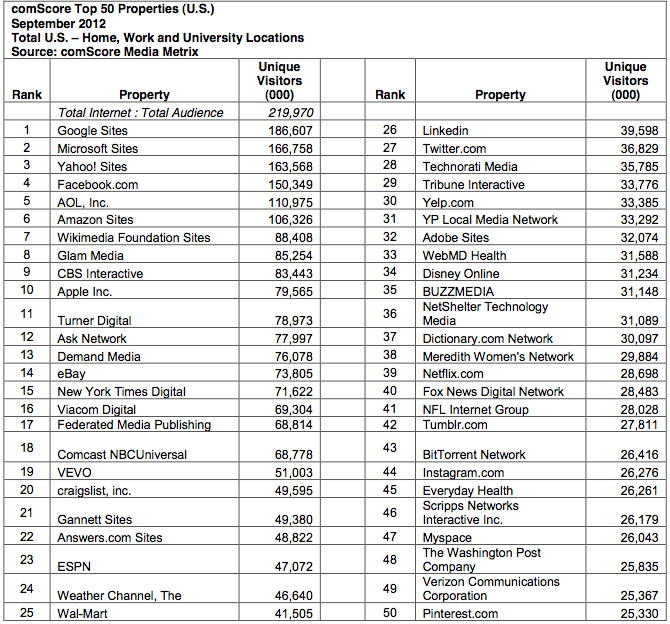
There seems to be growing interest in Pinterest, with the site appearing for the first time in a top 50 chart for most-visited websites.

Research firm comScore on Wednesday released web activity data for the month of September, with fast-growing social networking start-up Pinterest edging into its top 50 chart of most visited US websites for the very first time.

Coming in at number 50 with over 25 million visitors during last month, the site still has some way to go to catch the likes of Facebook (placed 4th with 150 million visitors), LinkedIn (26th with 39 million visitors) and Twitter (27th with 36 million visitors), but it’s certainly a start.

Pinterest’s entry into the top 50 chart comes a short time after some significant changes at the firm. In August, it ended its invitation-only model, enabling anyone to join. In the same month the site, which allows users to easily share items of interest discovered on the Web by ‘pinning’ images to a board, launched free apps for Android devices and Apple’s iPad.

Google topped comScore’s list, though its 186 million visitors were across all of its sites. The same goes for Microsoft, in second place with 166 million visitors and Yahoo, in third spot with 163 million visitors.

Among news-based sites, the New York Times ranked highest at number 15 with 71 million visitors.

The research firm noted that back-to-schoolers wasted little time in getting down to business, pointing out a significant increase in Web traffic to education-oriented sites.

“Students and teachers were back in the classroom in September, resulting in a surge in traffic to education sites that earned it the number 1 spot on the top-gaining categories chart,” Jeff Hackett, comScore’s executive vice president, said.

With the economy still in a precarious state and many Americans on the lookout for attractive money-saving deals, incentive sites also saw a pick-up in traffic in September, with the category growing by 7 percent to 24.6 million visitors. Zulily topped the category with 3 million visitors, followed by SlickDeals with 2.5 million.

You can check out the full details of comScore’s report here (pdf).

[via Cnet]


Source : digitaltrends[dot]com

Oct 11, 2012

Sparknotes – An Online Resource For Students & Scholars

Part of what we will be doing on this site from time to time is to bring you some of those very special, maybe lesser known apps, tools, websites that are making a big difference, last time we featured the award winning Urban Dictionary, today will be on Sparknotes, this will be featured in our new Directory of Apps, the whole thing will start making sense by the time we start putting a few things together here, hopefully by November 2012

What Exactly is Sparknotes?

Sparknotes is an excellent website for those who are looking to supplement their reading with perspectives from other scholars. Sparknotes has a large variety of books available online and can greatly increase your understanding of a novel and also give you insight from other people who may view the novel differently from you.

Sparknotes is a simple website to use, it offers different reviews of a book ranging from an overall synopsis to detailed character description and plot explanation. While sparknotes should never be used to completely replace reading a novel, it is actually very useful as a supplement to reading a book. When you finish reading a novel you may be interested in how other people viewed the plot. Also, understanding the theme of a novel can be made easier with the use of sparknotes.

More often than not, people will have some confusion with some aspect of a novel after finishing the book. Usually it can be difficult to remember characters that may have been mentioned relatively little in the book but played a major role in development of the plot.

Reading through the many explanations and descriptive articles available on sparknotes refreshes your mind on the minor details in a novel and can greatly increase your ability to perform better on tests or essays that may be required after reading a novel. Besides the studying aspect, the best benefit of this website is simply being able to understand different points of view. Reading a perspective from a scholar on a novel can give you a different insight on the novel and can either change your perspective completely or enhance your view with details that you may not have recognized earlier.

Themes, motifs and symbols are also available on sparknotes. This is useful for picking up on different messages the author tried to send to the reader that may not have been easy to comprehend, allowing you to receive the full experience from reading a book. There is even a quiz section offered which allows you to test yourself and prepare for any exams that may be given on a book required by your school or university, ensuring that you perform as well as possible on these tests. There are also Sparknotes apps for android and iOS devices available for download

Overall, sparknotes is a great website for enhancing your understanding on a book and receiving insight that you may have never understood otherwise. As a supplement to conventional book reading, this website can greatly increase your appreciation of reading as is perfect for scholars and regular students alike whereever you are which is why are are featuring it today at Tech Talk Africa.

Report an error

Tags: 1984 sparknotes, frankenstein sparknotes, hamlet sparknotes, macbeth sparknotes, sparknotes, sparknotes.com

Source : techtalkafrica[dot]com

Sep 25, 2012

TouchWiz-specific hack can hard reset Galaxy S III and other Galaxy phones through their web browsers

Samsung Galaxy smartphones with the TouchWiz UI skin are susceptible to a USSD code hack, which triggers an unstoppable factory reset. The hack itself is easily triggered from malicious websites, QR codes or sent by NFC and wipes users’ phones immediately.

In order to successfully run onto a Samsung Galaxy smartphone, the hack must be either dialed in directly in the phones dialer or opened from a website using the stock browser.

Among the devices affected by the USSD code hack are the Galaxy S Advance, the Galaxy Ace, the Galaxy S II and the Galaxy S III. As far as we know Samsung is currently investigating the issue and is likely to come up with a fix or a statement soon.

Meanwhile, you can see the exploit in action demonstrated in the video below.

When tested on devices running pure Android or another user interface skin, the USSD code hack doesn’t do anything, so Galaxy Nexus users need not panic.


Source : blog[dot]gsmarena[dot]com

Sep 24, 2012

7 Common Threats in WordPress and Their Solutions

WordPress is undoubtedly the most popular content management system in the world. Millions of websites around the world are being powered by this CMS thanks to its usability and scalability. But this popularity has also made WordPress a happy hunting ground for the hackers. Hundreds of security issues have been unearthed and fixed over the years as newer versions of the CMS tightens screws on these security threats. However, since WordPress is used as a blogging tool by many newbies but for them security threat increases due to lack of awareness. Here we shall take a look at some of the common WordPress security threats and their solutions.

1. Password Hacking

This is the most common problem that most WordPress users around the world talk about. Having your WordPress website hacked can do a lot of damage to your image and to your brand. A professional hacker can gain access to the administrative section of your website and install scripts which can steal your data or damage the whole server. People fall victim due to the habit of using easy to remember passwords such as their names, phone numbers and date of birth.

Solution

- It is important that you set a password which isn’t predictable and has a combination of alphabets, numbers and special characters for example [ndyx#189@]. Also you should always uncheck the ‘Remember Me’ box when using a public computer.

2. Themes and Plugins

Since WordPress is an open source platform, there are a number of free plugins and themes available which enhance the functionality of your website. This allows a lot of malicious themes and plugins to circulate in the system which can compromise the security of your website by hacking information, interrupting services and redirecting traffic causing a lot of harm to your site as well as the users.

Solution

– Always download themes and plugins from trusted sources, preferably the WordPress site itself. Keep the themes and plugins updated with the latest security patches whenever they are available. Remove unused themes and plugins from your server as they act as breeding ground for threats. Remember, if you are using the same WordPress set up for too long without any update you are inviting trouble!

3. Database Access using Root Account

WordPress stores content and web files in one database and when you make use of more than one application, separate databases are created. These databases can be accessed through the WordPress root account which are saved on the server or web hosting account. Any hacker who cracks into your root account gets complete access to all your databases creating a security issue.

Solution

– To overcome this problem you need to create dedicated accounts to access each database instead of using the root account. Although this might seem a laborious job, this can go a long way in securing your website.

4. SQL Threat

There are two core components which power a WordPress website – the database and the PHP script which runs the system. This makes the website vulnerable as hackers can make use of SQL injection to gain access to the database. This allows them to steal sensitive information such as customer data etc.

Solution

–You can prevent SQL injections by changing the default database tables prefix and customizing with strict rules which shall be used to access your .htaccess file hosted on your web server.

5. Database Permission

This is nothing but a set of rules which allows a web application to access and modify the secured parts of your database. Many people make the grave mistake of setting database permission too low which can easily be exploited by the hacker to gain control of the website.

Solution

– You need to set strict permission for web applications to access your database by updating the rights privileges. You can customize the set of permissions required for each type of application to access your database thus keeping the malicious web applications at bay.

6. Operating System Vulnerabilities

Most of us focus on securing the WordPress website taking all necessary precaution and often ignoring the source operating system and the infrastructure that is used to manage the website. Your computer or laptop is a major source of security issues to your WordPress website.

Solution

– Good food is always prepared in a clean kitchen and thus you need to secure the infrastructure at your end. Use a strong anti-virus and Internet firewall for your desktop/laptop to secure your website.

7. Database Backup

The best of the security measures can go awry when the website falls prey to professional hackers who always look to outsmart developers and break through the security cordon often exploiting the database.

Solution

– Backup your WordPress website religiously on a regular basis as this will help you restore the website quickly in case it has been hit by the bad guys. Backing up the site once a week is advisable. No web development platform in this world is full proof in terms of security. In fact, a WordPress website is as secure as you want it to be. Keep the above things in mind while developing or managing your WordPress site and it will shield against external threats easily.

This guest post is contributed by Jeff Thomson. He is working as a wordpress developer with MarkupBox.com. Markupbox.com is a specialized PSD to HTML Conversion Company, backed with years of experience and diligent professionals. MarkupBox offers PSD to HTML, PSD to WordPress, and other conversion services like PSD to Joomla, PSD to Magento, PSD to Email, PSD to Drupal, PSD to CSS and much more.

Tags: Internet Security, Online Security, Web Security, WordPress

Source : techtalkafrica[dot]com

Sep 7, 2012

Google blacklists sites run by family of British politician

Google has placed almost twenty websites owned and operated by the wife, sister and mother of a prominent British politician on a black list after an investigation has found that they have been illegally harvesting other people's content in order to increase search rankings and hit rate.

Here’s a story for those who feel letdown by American politicians and the moral standing of same: While it’s true that our elected officials have been known to cheat, lie and generally fail to live up to the standards that they themselves try and portray themselves of possessing in order to win our votes, we can at least take some small amount of solace in the fact that none have yet found themselves embarrassed by Google announcing that it has blacklisted their family following revelations of copyright infringement. Somewhere in the United Kingdom, Conservative politician – and newly named co-chairman of the entire Conservative Party – Grant Shapps only wishes that he could say the same.

Shapps has found himself facing the public embarrassment of Google placing a network of up to nineteen separate sites officially owned and operated by numerous members of his family (His wife, his sister and in a somewhat unlikely turn of events, his 75-year-old mother) on a blacklist after it has been discovered that the sites engage in a process known as “spinning and scraping” to steal content from other sites in order to increase their own Google Search rankings.

To make matters more embarrassing for the politician, a company that he himself founded has been revealed to sell software that allows others to do the same thing. The Guardian newspaper last week revealed that for just $497, TrafficPaymaster would create websites that would do well in Google rankings – by spinning and scraping their way to something resembling success.

Although company policy prevents Google from officially commenting directly on the Shapps situation, the company did release a statement in which it said that it “take[s] copyright very seriously and invest significant time and money in keeping advertisers and publishers that violate our policies out of our network,” adding that it “bans ads and advertisers involved in activities that infringe on copyright from using our systems and prohibits publishers that violate copyright from participating in AdSense.”

In addition from being blacklisted from future AdSense or related advertising programs, an anonymous source within Google has also said that the sites owned and operated by the Shapps will “be naturally demoted by our search algorithms.”

Responding to the news, a spokesman for Shapps sought to distance the politician from the charges. “Grant Shapps derives no income, dividends, or other income from this business, which is run by his wife, Belinda, with a registered office in Pinner in north-west London,” the spokesman explained. “He is quite simply not involved in this business. Mrs Shapps runs her own online business, uses freelancers, moderators and programmers to post on forums, generate products and maintain a help desk.” For her part, Shapps’ wife Belinda didn’t exactly help matters by refusing comment and redirecting all questions on the matter to Conservative Party headquarters.


Source : digitaltrends[dot]com

Aug 29, 2012

25 Best Websites of 2012

25 Best Websites of 2012

The Internet has become a major source of entertainment, social media, ideas and tools. This year, many new sites have blown up and become the big hit. Other sites have continue on to be some of the most visited sites for years. Here are the best websites of 2012:
1. Google:
With Gmail, google voice and google plus, everything from searching, communicating and sharing interesting ideas is available on one site.
2. Twitter:
Twitter’s popularity is growing, especially in 2012. Twitter is a place to share what;s up in your life quick and easy.

3.Facebook:
The number one social media site provides everything from sharing news, photos, and much more with your friends.

4.Youtube:
Youtube is still growing in popularity, and is taking place of the TV with awesome media.

5.Tumblr:
Tumblr is a major blogging site for teens and adults looking to share their interests.

6.Pintrest:
Pintrest blew up just this year. It allows you to “pin” your favorite pictures and things, and create your own portfolio of what you love.

6.Yahoo news:
People love to catch up on the latest news, and Yahoo is the place to do it this year.

7.Pandora:
Pandora is an interesting way to find new music. It gives you new songs to listen to based on your music taste.

8.Yahoo! Omg!:
The best site for gossip and news in the Hollywood lights!

9.Amazon:
Amazon is the perfect place to purchase all you want for a cheaper price. It’s the worlds largest e-commerce website.

10.Brotips:
Brotips is a fun and quirky site filled with tips for guys in a picture form. It’s entertaining and fun to read.

11.Dropbox:
A free service allowing you to share and save your photos, documents and more in one place.

12.Wikipedia:
Wikipeda is still a top website in 2012 for all of the information you could ever need.

13.Craigslist:
Craigslist is a way to shop in your area for used or new products, or even things such as homes and cars.

14.Flickr:
Love photography? Flckr is the best place to post your pictures and view others without copyright problems.

15.Metrolyrics:
Metrolyrics is a simple spot to find lyrics.

16.Hubpages:
An easy way to publish and earn money.

17.About:
About is a guide to all you need to know, whether you need information on ab workouts or the the top schools in the country.

18.Paypal:
Paypal is the safest place to store your money, send it and use it to purchase online.

19.Photobucket:
Store your photos and share with others on photobucket.

20.Groupon:
An easy website to find great deals and discounts on items, events and vacations.

21.Match.com:
Now you can search online and become compatible with someone nearby through match!

22.Allrecipes.com:
The best site for a wide selection of amazing recipes.

23.Hulu.com:
Watch your favorite TV shows and movies online, some even for free, with Hulu.

24.Etsy:
Etsy is a new site dedicated to selling and buying handmade goods.

25.Livestrong.com:
Find health and exercise tips for any sport!


Source : techtalkafrica[dot]com

Aug 13, 2012

Arrival Of Google Panda Marks The Beginning Of Content Revolution

The year 2012 has been extremely eventful for Google. With over four updates in the name of Google Panda  and Penguin, Google managed to filter hundreds and hundreds of websites through its advanced ranking factor. Each update was modified as per the results of the previous filter. In this article, I am going to highlight a few things that explain the nature of Google’s Panda in some light. Also, the article will talk about certain measures one can take to keep safe from the search engine ranking disaster.

The Objective

With its recent algorithm updates, Google has attempted to add a slight touch of “human” monitoring to its web relevance algorithms. The system has added factors such as content readability, site bounce rates, and genuine relevance to map the quality of a website. Fortunately, Google has achieved a healthy percentage of success in this attempt. Google Panda has managed to identify user-friendly websites than just web-crawler-friendly websites.

Websites’ Elements That Google Panda Dislikes

Google Panda works like cops. It is not responsible for honoring good quality content but for identifying and punishing poor-quality content. It does not allow low quality websites (having useless links, duplicate content etc), to rank. Unlike other Google algorithms, for Google Panda, keywords is not everything. Hence, if a website has poor quality content or duplicate content on most of its pages then it will definitely go down in the search engine rankings. Now what we need to focus here on, is what exactly defines low quality content.

  • Duplicate content : First of all, it is duplicate content. Google Panda hates plagiarism. It does not believe in providing same information again and again by changing a few words here and there to get a pass from plagiarism detectors.  It needs, fresh, informative and genuine content.
  • Quality of links : Secondly, Google Panda looks at quality of links, a website has received. Also, it will judge the content quality of the sites which are linked to the page. Hence, having safe links of genuine websites that do make sense to your website, is very crucial. Naturally, this is a major challenge for most SEO services providers and website owners.
  • Advertisements:  All SEO services experts and website owners must refer to the fact that the count of advertisements on your page can disturb your page rankings. It is quite surprising to note that Google Panda  may also hurt a high-quality content website’s ranking, if it has extensive Google AdWords program. The idea is to balance advertisements and content on each and every page of a website. This is why most experts suggest to seek assistance of professional Google Panda and Penguin compliant SEO services. 

Avoiding the Panda Slap

The search engine optimization industry calls Google Panda punishment- Panda slap. If you get hit by Panda slap, then not only your Google rankings go down but you also are forced to deal with the whopping loss of 50% of your regular traffic. This will definitely result in a major blow on your overall revenue. Hence, it is imperative to keep safe from low quality articles and weak links.

The conclusion

Google brought Panda algorithm to keep the Internet space free from the crowd of scraper sites. It does that by punishing the websites from which such content is scraped. So, every website owner looking forward to getting ranked must come up with healthy websites. Good quality content, ideal linking and balanced advertising are the initial stepping stones that one must cover.


Source : techtalkafrica[dot]com