Pages

Showing posts with label computer. Show all posts

Nov 7, 2012

Domain Privacy Options: Free or Premium

In recent years, purchasing an Internet domain and launching a website have become incredibly easy and affordable, even for people who aren’t computer experts. With just a few clicks, anyone can reserve a URL and purchase hosting for their site; this is usually inexpensive, particularly for savvy shoppers who take advantage of a godaddy promo code or other discount during checkout.

Despite this, some parts of the domain registration process, including decisions about domain privacy, may still seem a little mysterious to neophytes. This article explains the distinction between free privacy options and premium “who is” privacy controls sold by firms such as GoDaddy.com.

Domain registrars are legally obligated to collect personal information about their customers, and to make that information publicly available in databases called “WHOIS” directories. Many people, however, are reluctant to provide this information due to concerns that it will be harvested by identity thieves, scammers and other unscrupulous individuals. Consequently, many prefer to pay an extra fee for “private registration”, by which their chosen domain registrar is given legal ownership of the domain. It is therefore the registrar’s information that’s listed in the WHOIS directory, rather than details about the individual controlling the domain.

Paid domain privacy options usually cost around $10 per year; many companies offer discounts to customers who purchase privacy for several years at a time. Others waive the fee entirely if the customer also purchases or transfers several domains at once. There are also free domain privacy services that claim to provide similar protection, and many people are confused about which type of privacy protection is right for them.

There is no single answer. Do a little research and try to answer this question: does the company providing the privacy protection sell its customers’ contact information to other organizations? Many people are horrified to learn that domain privacy providers list their own information on a site’s WHOIS record, but will sell their clients’ REAL information to other businesses!

Remember that domain privacy firms DO collect your personal information because they’re legally required to do so; however, they are NOT obligated to divulge this information unless compelled by a court order. Some companies are fiercely protective of their customers’ privacy, but others will divulge the true WHOIS information with only a little outside pressure. Investigating this will help you choose wisely.

It’s important to understand that there are also several “do-it-yourself” privacy options for domain owners who don’t want to pay for a private WHOIS listing. Individuals concerned about releasing their name and home address may elect to rent a P.O. Box and register their domains using that contact information. The WHOIS database lists a contact email address for each domain owner; many don’t wish to reveal this information because they don’t want to offer their email up to potential spammers and phishers. The solution to this is simple; set up a separate email address for the WHOIS listing. You can even have the incoming messages forwarded to your regular email inbox, eliminating the need to log into multiple accounts every day.

BIO: Daria Cortese is a freelance writer and technology enthusiast who lives near Philadelphia with her husband and five cats.

Tags: Domain Privacy, Free Domains, Premium Domains

Source : techtalkafrica[dot]com

Nov 5, 2012

How You Can Hide the Data on your Computer

If you share a computer but do not want anyone deleting, viewing or changing your files you may want to hide them. There are a number of ways to protect your files, you need to find one that fits your needs.

Hidden Folder Options
With any version of windows there is the option to hide files and folder. This is not a very effective method of securing or hiding your files, but it needs to be mentioned.

To do this in windows, right click on a file or folder you want to hide. Select “Properties” from the menu. Check the box for “Hidden” then click the apply button.

This makes the selected file or folder hidden. The down side to this method is anyone wanting to see the hidden folder or files can just change the “Folder Options” settings to “Show hidden files and folders”. This might fool your 5 year old but most likely not anyone else that wants to find your hidden files.

A somewhat better option is a program that will hide files for you. These programs run in the background and are not noticed by the computer users unless they know the “hot key” you set to access the program. A “hot key” is any combination of key strokes set up to run a command for you. One example of this type of program would be Supreme Folder Hider .

This is a shareware program so while it is free to download you must pay for the full options. These type programs are better than nothing, but there are better options for keeping your files safe.

Encryption
Encryption does not technically hide your files. But it will make them so only the person with a password is able to view or change them.

To encrypt your files you will need encryption software. There are many types of encryption softwares, some are free some can be quite expensive. With most free versions your encryption options will probably be fine for keeping the kids out. If you prefer heavy duty protection with options that let you control multiple user access you will have to pay for a program. An example of a pay type encryption program would be WinMagic .

Folder Locks
If encryption is not for you then you might want to look at a “folder lock” type software. Folder locking software does basically what it says. You create a folder and apply the lock software to the folder.

From that point on it takes a password to access the folder or any files you store in that folder. A program like Folder Protect can easily hide all of your sensitive files and folders.

These are your most common options for protecting the data on your computer. It is up to you to make the decision. How much protection does your data deserve or need. Once you have made that decision you can use one of my links, or use your favourite search engine and get that important data protected.

No tags for this post.
Source : techtalkafrica[dot]com

Oct 23, 2012

Asus Launches Dual-Screen ‘Taichi’ Notebook

It probably wasn’t the best day for a computer maker to unveil new devices, as everything would inevitably be overshadowed by Apple’s concurrent unveiling of new iPads.  Nevertheless, Asus pushed forward with an event in New York City, where they introduced a slew of new Windows 8 notebooks and tablet-notebook hybrids.  Existing product lines were updated, like the Zenbook family of Ultrabooks, while entirely new lines were launched.

The standout product was the Taichi, an Ultrabook featuring two HD screens, one on the inside of the notebook lid and the other on the outside.  The inside screen functions like a regular display while the outer screen is a touchscreen.  When closed, the Taichi can be used as a tablet (with included stylus).  In the open position, it functions as a typical laptop, with the focus placed on the inner screen and keyboard.

Asus made some interesting user case scenarios for the dual screens, which can simultaneously display either the same content on both screens or different content on each.  For business professionals, the inner and outer screens could potentially be used during presentations, with one screen facing the user and the other facing clients. At home, parents can work using the inner display and keyboard, while kids watch a movie on the outer screen.  It’s a unique concept and a creative departure from similar Windows 8 notebooks with single screens that flip or twist to become tablet touchscreens.

The Taichi’s dual screens measure 11.6 inches and the device will be offered in three different configurations, with either an Intel Core i5 or Core i7 processor.  All will have 4GB of memory and an Intel HD 4000 graphics processor and either 128GB or 256GB of SSD storage.  Starting price is $1,299 and availability begins this November.


Source : abcnews[dot]go[dot]com

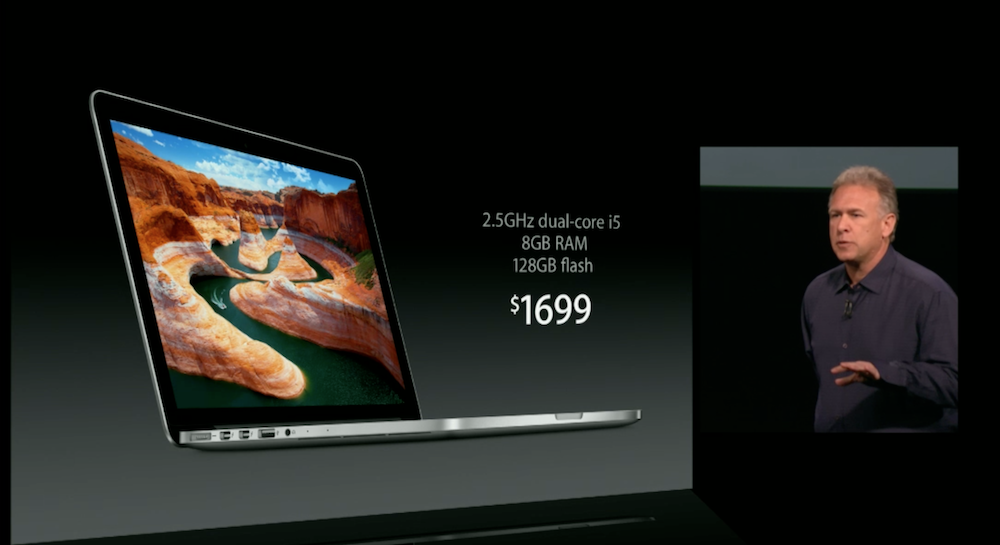
13-inch Macbook Pro with Retina display unveiled

Apple has given it's Macbook Pro a refresh with a Retina display. The new computer is smaller and more powerful then previous Macbooks, with increased RAM, an optical drive, and the highly touted Retina display.

As expected, Apple announced a new addition to the MacBook family. Starting today, a 13-inch Macbook Pro equipped with the Retina display will be available to consumers. The newest installment of Apple laptops got a full refresh from past Macbook model. In standard Apple fashion, it did it’s best to fit more in less.

The first noticeable change comes in size. The Macbook Pro with Retina display measures in with a  .75-inch thickness, making it 1/5th thinner than the older model. This new thin look translates to the weight as well. Apple says this is its lightest Macbook ever, weighing in at 3.5 pounds.

The changes continue inside the new Macbook Pro. A new standard of 8GB of RAM comes loaded in to the laptop, along with an optical drive. The processor will be a Core i5 or i7 and the system will be powered by asymmetric lithium-ion batteries. Hard drives are available with up to 768GB of storage, which will a be solid state drive. The computer will feature stereo speakers, pushing sound out from each side, and dual microphone plugins. A new HD camera will broadcast your FaceTime sessions.

Of course, the main attraction here is the Retina display. Apple has always been proud of it display, and this one is no exception. Phil Schiller showed off the display, bragging of its 4,096,000 pixel display. By comparison, he said that is almost double the pixels of an HDTV. The numbers delivered were impressive, including a 29 percent higher contrast ratio, 75 percent reduced reflection, and IPS panel that gives a 178 degree viewing angle.

The standard model of the Mackbook Pro with Retina display will come with 8GB of RAM and 128GB of flash storage for $1700. Other models are also available, all starting today. Expect to see ads for the computer run during the holiday season about as often as political ads are running now.


Source : digitaltrends[dot]com

Oct 19, 2012

‘We can hear you having sex’: Messages to neighbors via Wi-Fi network names a growing trend, report says

Wi-Fi aerial (shutterstock)

An increasing number of computer users setting up Wi-Fi in their homes are reportedly sending out messages to annoying neighbors via their wireless network names.

The creation of the Internet has meant that the options are now vast for those people who’d rather not use their vocal cords to communicate with another person, preferring instead to engage in more indirect methods of communication – they can, for example, send an email, an instant message, an SMS, or a text. Communicating through the name of your wireless network can also be added to the list, a method which is a fast-growing trend, according to a BBC report on the subject.

When someone sets up a wireless network at home, they’re prompted to give it a name so it can be easily identified. That name will be seen by anyone within range who searches for a wireless network using a computer or mobile device.

In most cases, these names are nothing out of the ordinary, something like “Bob1” or “mycomputer123”. However, recently more and more people are using their network names to send out messages to neighbors.

According to the BBC, many of the names relate to noisy neighbor issues. “Stop wearing heels”, “Stop slamming the door” and simply “shut up” are listed as examples. Perhaps these are the work of desperate people for whom a polite face-to-face request failed, or maybe they simply tremble at the thought of direct confrontation with their noisy neighbor.

Sex, or noisy sex, is also the subject of some network names. “We can hear you having sex” is a common one, while “Stop having so much sex” is also listed.

Naming networks in this manner is the digital equivalent of sticking an anonymous note into the mailbox of whoever’s causing offense, except that this way the offender won’t necessarily know it’s him or her being targeted (unless the network name includes a house or apartment number – or even the person’s name). Also, the offender needs to be fiddling about with their wireless settings in order to see the list of nearby networks, something they most likely don’t often do.

So, no, it certainly won’t ever be the most effective form of communication, though for many it is, one assumes, a bit of fun and an additional way of trying to get their message across.

Seen any interesting network names in your neighborhood recently? Got a good one yourself?

[Image: Pavel Ignatov / Shutterstock]


Source : digitaltrends[dot]com

Oct 12, 2012

Windows 8 prices revealed, you can pre-order it with or without a computer starting today

Today we finally get to see all price options for Microsoft’s next-generation computer OS – the Windows 8. The OS will launch on Oct 26, but you can pre-order it on a DVD right now, if you absolutely need to have a disc. For the rest of us, the update would be available online for download and purchase via the Windows 8 Upgrade Assistant for a cheaper price. The full Windows 8 Pro OS will be downloadable as well when you purchase the license separately.

Oh, yes, and the prices, of course. An online upgrade from Windows XP, Vista or 7 to Windows 8 Pro will cost you $40, as we’ve seen before. That’s a time-limited offer, valid only until January 31, 2013. But there are other options, too.

If you insist on getting the update on a DVD in one of their newly designed product boxes (one of which is pictured above), you will have to shell out $70 (already available for pre-order).

As previously detailed, if you buy a Windows 7 computer right now, come Oct 26 you will be eligible to upgrade your OS, for only $15 in the US, €15 in most of Europe and £15 in the UK. More information and detailed pricing for each country (over 140 worldwide) is available HERE.

If you are into buying a full license for Windows 8, and not just an upgrade, US online store Newegg reveals the prices will go like that:

  • Windows 8 Pro Pack – Product Key Card (no media) – $70
  • Windows 8 (Full Version) – OEM $100
  • Windows 8 Pro (Full Version) – OEM $140

Starting today, we should also be able to pre-order any of the Windows 8 PCs, made by Acer, ASUS, Dell, HP, Samsung and Sony. So far I only had luck with checking out dedicated pages with the offers by Asus, Dell, Sony. I guess your nearest electronics retailer will already have a deal for you. So far, there is no pre-order deals available for Microsoft’s own tablet – the Surface.


Source : blog[dot]gsmarena[dot]com

Sony revamps its computer line-up, here are the prices for the new models

Sony is busy revamping its computer lineup, bringing new devices in several categories. The VAIO Tap 20 and VAIO Duo 11 will be firsts for the US market, but more importantly we have pricing and launch dates.

Along with the additions of the new models, there’s one line that has been showed the door – the awesome (and wallet-punching) VAIO Z is nowhere to be found on the new roster.

The VAIO T13 Ultrabook is not new, but Sony is adding a touchscreen option. It will cost you $100 extra over the $630 starting price. The new T Series ultrabook is the T14, which weighs 1.71kg and packs an optical drive. Its pricing starts at $670.

The VAIO Duo 11 hybrid will be priced at $1,100 for the base model and will go on sale this month. You can check out our hands-on for more info.

The VAIO Tap 20 is Sony’s first all-in-one PC for the US and will pack a battery so you can also use it as a massive 20″ Windows 8 tablet. It too goes on sale in October with an $880 price tag.

There is going to be an L-Series all in one, too, starting at $1200 along with new E-Series (11″, 14″, 15″ and 17″, $500-$730) and S-Series (13″ and 15″, $800-$1200). The E14P is getting a $100 touchscreen option, while the 17″ model is new to the E-Series, not just a refresh.


Source : blog[dot]gsmarena[dot]com

Oct 11, 2012

Growing number of Americans ‘dual screened’ debates last week

When you watched Mitt Romney and Barack Obama debate against each other last week, did you do so on television, on your computer, or both at the same time? A new survey suggests that, if you went for the latter option, you weren't alone.

If you’re planning on tuning into tonight’s US Vice Presidential Debate between current VP Joe Biden and Republican challenger Paul Ryan, then here’s a question: How are you planning on tuning in? After all, although the debate will be carried live by multiple television channels (including ABC, CBS, Fox, NBC and PBS, as well as Fox News, CNN and MSNBC), it’ll also be streamed live online in multiple locations as well, and aired on the radio. Which venue and format is the preferred one for checking out the political conversation of the evening?

The reason I ask is that the Pew Research Center for the People and the Press have looked into the ways in which people watched last week’s first Presidential Debate between Mitt Romney and Barack Obama, and discovered that more and more people than ever before appear to be using multiple methods for watching at the same time. According to Pew, 56 percent of those polled said that they watched the debate live, with 11 percent of those watchers admitting to being what the research body calls “dual screeners” – viewers who watched the event on television and followed it online at the same time.

The survey contacted 1006 adults in the US between October 4 (the day after the debate) and October 7 to ask about their viewing habits when it came to the debate. It found that, of the 56 percent who said that they watched the debate live (563 people, assuming that the 56 is a rounded figure), 85 percent of them watched the debate exclusively on television. That figure breaks down, as you might expect, to skew heavily in the older age ranges: Of viewers 65 and older, 98 percent of them watched solely on television, with 89 percent of those aged 40 through 64 years old. Only 67 percent of viewers aged between 18 and 39 restricted themselves to television. The younger demographic was more friendly to online viewing, with 10 percent of the 18-39 group watching only online, and 22 percent watching both television and online simultaneously, compared with 10 percent of the 40-64 group, and 2 percent of the 65 and above group (No-one in that latter group said that they watched the debate online only, and only 1 percent of those in the 40-64 group watched solely via Internet).

(For those who are curious, there was no noticeable pattern in the political affiliations of viewers when it came to their method of viewing; democrats, republicans and independents alike essentially watched television, online and both in equal numbers.)

Overall, the survey found that traditional media can feel confident about the way it’s measuring up to the Internet, with more than twice as many respondents also saying that they watched more traditional sources (Television, radio, newspapers) than digital in terms of overall debate coverage, 78 percent against 36 for digital (Maybe they were waiting for the Bad Lip Reading remix). While traditional media may be in trouble in the larger scheme of things, apparently it still feels like the best choice for people when it comes to political news.


Source : digitaltrends[dot]com

Sep 24, 2012

Should you build your next PC?

Build your own PC header computing

Building your own computer can help you learn about PCs, get exactly what you want, and sometimes even save money. But it can also be an impractical, expensive nightmare for the wrong person. Here's how to find out which side you fall on.

Peek in any computer hardware forum, you’ll run into a hoard of happy enthusiasts who build their own PCs instead of buying from major manufacturers. These are the hardware hardcore. Ask them about whether you should consider building your own PC and you’ll receive an predictable answer: Of course you should!

Building your own PC is a step towards an entire new realm of geekdom. Most people thinking of embarking down that path understand it’s scary and exciting and, to a certain crowd, pretty damn cool. But it also can be a difficult path that may not lead to the result you expected. Rather than offering a step-by-step guide to actually building a PC, let’s take a look at how the process works, and some of the questions you should sort out before you decide to undertake it.

How much do I need to know?

If you’ve never built a PC before, you will find the idea of putting one together daunting. You have to both research the parts and put them together once they arrive. What if you fail? What if you mess up and order the wrong part?

New builders should not spend too much time trying to come up with a unique or unusual build. This means buying a simple, affordable mid or full ATX tower. Part selection should also stick to tried-and-true standards. There are plenty of build guides available from reputable enthusiast sites like The Tech Report and Anandtech.

computer components build your own pcPutting together components isn’t incredibly difficult. Standardization of hardware over the years, along with improvements in how Windows handles drivers, has made it possible for virtually all components in a modern PC to work at a basic level by just plugging them in. Common standards include fool-proof mechanisms to prevent improper installation. For instance, it’s essentially impossible to improperly install RAM or a video card because of notches in the slot which must line up with those on the hardware. All you really need is a screwdriver and some patience.

Don’t let fears about the complexity of putting a PC together stop you. There are reasons why building a PC is a bad idea, but this isn’t one of them. Anyone with a basic understanding of PC hardware can do it.

Staying cool

The biggest “gotcha” that could trip you up is one you might not have expected:  your processor’s cooler.

computer components processor cooler pcInstalling Intel’s stock cooler is notoriously tricky. It uses a ridiculous push-pin system that is hard to install even if you know what you’re doing. If you are serious about DIY, we highly recommend purchasing a third-party processor cooler that secures with a backplate and screws. It will save a major headache and do a better job of cooling your processor.

Is it really cheaper?

Most people assume that the difficulty of building a PC is the reason why they shouldn’t do it. We disagree. Price is a better argument against doing it yourself.

Enthusiasts love to point out that you can save hundreds, even thousands, by building your own system. This is true if you are looking at an expensive computer. But most people aren’t. Most people want a capable PC that can run productivity applications well and perhaps play a few games.

This is the market where the OEMs thrive. Dell will sell you an Inspiron 660 with a Core i3 processor for $449. We can’t find a combination of similar hardware (plus Windows, which is usually $99 for a OEM copy) that can’t be purchased for less. A veteran value-shopper might be able to scrounge up some savings, though we doubt they’d beat Dell by much.

Most buyers with a budget under $600 should forget about the do-it-yourself route. You’ll receive more for your money by going through a manufacturer. The price equation only tips noticeably in favor of DIY if you are considering a PC that normally sells for $1,000 or more.

No one to call

All of the parts that you buy for your DIY build will have warranties. In some cases the warranties will be better than what you’d receive if you buy a pre-built PC. What you won’t have, however, is support.

Building your own computer means troubleshooting your own computer. If something goes wrong you’ll have to rely on your own knowledge. This extends to not only hardware but also, in most cases, Windows. People who build their own PCs usually go with the OEM copy of Windows because it’s the same software and costs $80 less. What’s the catch? Microsoft provides no official support for OEM licenses. That’s up to the manufacturer, and the manufacturer is you.  

computer components ribbon cable build your own pc diySome consider self-support to be part of the journey. Others consider it an annoyance. You can usually find out what camp you fall in by remembering what you’ve done in the past. If your response to a problem is to pick up the phone, building a PC will require some adjustment. Phone calls will be off the table. Instead you will have to mess with settings, look up possible solutions and narrow down the problem using trial and error.   

Lack of support is worse for people who don’t own a second PC. A single-computer household will be stuck trying to look up answers on smartphones. That’s not much fun. Managing your own desktop PC is much easier if you own a laptop as well.   

Bringing it all together

Bottom line: The people who should build their own PC sare also the people who care the most about their computers.

Constructing your own PC with your own hands gives you intimate knowledge of what is inside and how it works. Troubleshooting can be a pain, but finding your own solutions usually provides insight into the complexities of PC hardware.

People who view their PC primarily as a tool, on the other hand, should stay away from DIY. Enthusiasts love to justify their builds by claiming they save money, but those claims are often misleading. There’s not much money to save when building a basic, inexpensive PC, and whatever value is found via DIY is lost as soon as something goes wrong and there’s no one to call.

Building a PC is a project of passion. Despite what many enthusiasts say, it’s not really about money or choice. It’s about a love of computing and PC hardware. This should make it clear whether building your own is – or isn’t – for you.


Source : digitaltrends[dot]com

How will Sony’s PlayStation 4 protect account info? By scanning your DNA

sony playstation 4 patent

A new Sony Computer Entertainment patent describes the biological lengths Sony will go to to profile its users.

Microsoft’s Kinect can recognize your voice and face. “Big deal!” says Sony. The PlayStation 4 will be able to recognize your fingerprints, irises, and DNA in addition to your mug and pipes. Based on new Sony patents, the company is going to make user identification a whole lot more complex.

A new Sony Computer Entertainment patent titled “Process and Apparatus for Automatically Identifying User of Consumer Electronics” was published on Thursday, and PlayStation Lifestyle detailed the contents in a new report.

The technology will use biometric information to allow access to online accounts and even specific devices like a game console. “[Suitable] biometric sensors include fingerprint sensors, hand sensors, face recognition systems, iris scanners retinal scanners, voice pattern analyzers, and DNA analyzers.” The images in the patent show diagrams of game controllers, mobile phones, and a PC mouse where the buttons on each are actually sensors compiling the data.

The purpose of the technology described is manifold. First is user protection. Any saved sensitive information—particularly credit card details like those stolen during the PlayStation Network hack in 2011—would be protected in a device that could only be biologically activated by the owner. The second purpose is anti-piracy. The technology ensures that only one account on a given device can access paid for content. If that isn’t insidious enough, the patent also describes how the tech can be used to better target users with tailored advertising.

“[A] user profile may be generated… user behavior may be monitored and information gleaned from patterns of user behavior may become part of the profile,” reads the patent, “The profile can be used to tailor the operation of the device to a particular user… In the case of a video game console, the user profile may include information about particular types of games that the user downloads… Embodiments of the invention can be used to prevent unauthorized sharing of online accounts.”

It’s similar to the abilities of the Kinect as shown off in early promotional videos of the device when it was still called Project Natal, only far more terrifying in their physical invasiveness.

There have been many rumors about the restrictions Sony will place on its next PlayStation. Some rumors suggest that Sony will even attempt to block the use of used games on the device. Tying a game to someone’s DNA would certainly do the trick.


Source : digitaltrends[dot]com

Sep 5, 2012

Is it time to say goodbye to Java?

cyber attack

A new raft of Java vulnerabilities raise the question: Should everyday computer users to ditch Java?

Java is a nearly-ubiquitous technology that has played an important role in the development of the Internet and cross-platform applications. It has offered a mature, net-savvy development framework for everything from high-end server applications and desktop applications (like OpenOffice) to mobile phones and interactive applications embedded in Web pages.

However, in recent months Java has come under fire. Java was once a fundamental technology included with almost every computer; however, Apple stopped shipping Java by default on new Macs almost two years ago, most Linux distributions don’t include Java by default, and even the latest versions of Windows don’t come with a stock Java installation. Why? Because, despite being a mature cross-platform technology, Java never really took off for desktop applications.

Worse, Java’s stature has been further cut down by a series of high-profile security exploits: the Mac-specific Flashback trojan relied on Java to spread itself, and (after months of apparent foot-dragging) database giant Oracle has just released a new Java update to patch multiple vulnerabilities currently being exploited by cybercriminals. Most recently, Java may also have been an attack vector in the 12 million iPhone and iPad device identifiers allegedly stolen from an FBI agent’s notebook earlier this year.

Is it time for everyday computer users to finally say goodbye to Java on their systems? How is that done? And what about people who have a legitimate need to use Java?

Nature of the beast

Java Logo

The Java situation is complicated — and is made more complicated by terminology. The security issues making headlines this week concern only a small part of the broader Java universe: It’s important not to paint with broad strokes and label everything related to Java as a massive security risk.

First, there’s confusion about what exactly is Java. Java is a programming language, like BASIC, Pascal, C, and C# (originally from Microsoft, now an open standard) and Apple’s Objective C. Programmers use Java to write programs, just like they’d use any other language. Java has actually been around more than 20 years, although it first started getting a lot of attention in 1995 when Sun released its first Java platform. Java is hardly a new kid on the block.

The idea behind Java was to create a high-level language with no platform-specific implementation dependencies. Rather than compiling to native code (say, for Windows, Mac OS or Unix) Java compiles to “bytecode” that runs on virtual machines. All JVMs are designed to run the same Java bytecode the same way, regardless of platform. That means a programmer can write a Java application that program should run on any platform with a compatible Java virtual machine. Voilà The Holy Grail of modern computing: a program that runs the same on every platform.

To put a Java application (or applet, as they’re called) into a Web browser, you need a third item: a Java browser plug-in. Like other plug-ins, a Java browser plug-in executes within a Web browser application and generally acts like an intermediary between the Java virtual machine available on the computer and the Java code on a website. Java plug-ins run applets in a security “sandbox” that’s supposed to prevent applets from doing anything harmful on a user’s system. However, the Java VM is a complicated system, plug-ins can be complicated, and Web browsers are enormously complicated. The interaction of these three Java components plus Web browser applications can have security implications — and that’s where we’re seeing the current spate of problems.

Notice what’s not a part of Java? JavaScript. Despite the unfortunate name similarity, the JavaScript client-side scripting engines built into modern Web browsers have nothing to do with Java. JavaScript has had its own share of security gaffes over the years, but turning off JavaScript will do nothing to protect users from security issues in Java — and vice versa.

Unplugging versus uninstalling

hacker keyboard

Complex modern software applications can have security issues at any step along the way. Java applications aren’t immune to security problems any more than applications written in other languages. No matter what language an application was written in, you need to hope that the developer updates its software promptly to close off security holes when they’re found. As development platforms and frameworks go, Java is actually in relatively good shape on the security front: After all, it’s had the better part of two decades to get its act together.

However, the so-called “drive-by” exploits involving Java that can compromise a person’s computer just by automatically loading a Java applet on a website rely on the Java plug-in. Plug-ins have long been popular targets of malware authors: Adobe’s Flash and Acrobat Reader plug-ins are also very common sources of security issues.

The good news is that these drive-by exploits can all be foiled by disabling the Java plug-in in your browser — no need to uninstall the Java runtime (or virtual machine). That’s handy if you do Java development or use one of the mainstream applications that do rely on the Java runtime:

  • Adobe Creative Suite 5.5 and 6
  • OpenOffice (and descendants like LibreOffice)
  • CrashPlan Pro
  • Wuala
  • Vuze (a BitTorrent client)
  • Runescape
  • Minecraft

That’s not counting specialized applications used by banks, universities, and corporations that rely on Java. For instance, anyone who runs software from Oracle probably needs Java.

Disabling the Java plug-in in browsers

Internet Explorer

You can disable the Java plug-in in every major Web browser without removing Java from your system.

Internet Explorer

Disabling Java in Internet Explorer is unnecessarily difficult. The United States Computer Emergency Readiness Team (US-CERT) offers detailed instructions for (mostly) disabling Java in Internet Explorer; however, they are not for the non-technical or faint of heart. A safer recommendation is to remove Java entirely (if you don’t need it) or switch to a different browser (like Chrome or Firefox) if you do.

To remove Java from Windows, go to Control Panel then Programs, find “Java” in the program list, and click Uninstall.

Firefox

  1. Choose Tools > Add-ons (or, in Windows 7 and Vista, click the Firefox button and choose Add-ons).
  2. Select the Plug-ins tab
  3. Find the Java plug-in in the list (it’ll have a name like Java(tm) Platform SE with version numbers).
  4. Click Disable.

Google Chrome

  1. Type chrome://plug-ins into the location bar and press Enter
  2. Locate the Java plug-in
  3. Click the Disable link

Safari (Mac OS X and Windows)

  1. In Safari, go to Preferences > Security
  2. Uncheck the Enable Java checkbox

Opera

  1. Type opera:plug-ins into the location bar and press Enter
  2. Locate the Java plug-in and click Disable.

Other options

Mac OS X Java Preferences

This is all fine and dandy for folks who don’t need Java on their systems, or who never need to use a Java applet on a Web page. However, if your situation or job makes Java impossible to avoid, here are some other options:

Use a second browser solely for Java

If you absolutely must use Java in a browser, consider dedicating a browser specifically to that task, and use another browser for all your other Web tasks. If you’re on Windows, you could use Internet Explorer for your Java-specific site(s) or pages (since Java is so fiendishly difficult to disable in IE), but install and use something like Firefox or Chrome (with Java disabled) as your primary browser for everything else. Similarly, there’s no reason you can’t run (say) Safari and Chrome side-by-side, one just for your Java needs, and the other for everything else. Be sure to set the browser with Java disabled as your primary browser, so it’s what opens when you click a link in email or a friend’s Facebook page. This setup isn’t ideal, but with a little care it can insulate you from risk without ripping Java out of your system.

Mac OS X

In Mac OS X, you can prevent Java applets from loading in all your Web browsers. Go to Applications > Utilities > Java Preferences, select the General tab, and uncheck “Enable applet plug-in and Web Start applications.” (Note: if you don’t have Java installed on your Mac, opening Java Preferences will prompt you to install it. Click “Not Now” to exit.)

Mac OS X is unique in that it will automatically disable Java applets in all browsers if users go 35 days without loading one. It’s a security measure Apple introduced for Mac OS X 10.6.8 and later in the wake of the Flashback trojan.

Is Java’s time done?

Java isn’t going to be going away anytime soon. It’s still used by some mainstream desktop applications, as well as a number of specialized apps, particularly in science and medicine. Moreover, Java is very much a leading technology for server software and mobile phones. Although Apple’s iOS doesn’t rely on Java, Google’s Android certainly does, and there are even hundreds of millions of feature phones in the world running it.

However, Java’s days as a de facto part of every major operating system seem to be over. Mainstream operating systems have stopped including Java by default, offering it only as an optional add-on for folks who need it.

Perhaps the saddest thing is that, for all of Java’s potential, few mainstream computer users will notice when it’s gone.


Source : digitaltrends[dot]com

Sep 1, 2012

Mac OS X Mountain Lion Vs Windows 8: Is it an OS war?

We will witness another revolution in the year 2012 in computer operating system field. As far as the recent discussions are concerned, it is said that the release date of two new OS clashes in the coming months of this year. They are Mac’s OS X Mountain Lion and Microsoft Windows 8. With these OS releasing side by side, a war has been declared as to who impresses the users more than the other.

Android App Reviews usually remains in the highlights through the year, but the release of the OS have taken all the limelight recently.

Microsoft has said that it will release their OS Windows 8 on the 26th of October this year and it is expected that Mac OS X Mountain Lion will be released probably in the month of August this year. Both the companies have tried to provide as much features they can give through their respective OS. Let us find out the similarities as well as the dissimilarities between these two great giants.

  • Appearance: Apart from traditional features such as task bar, Windows explorer and start menu Windows 8 also have the new start screen where the icons are found in the square and rectangle form. One will even find the ‘Live Tiles’ here that enables every user to know the message notification or app related news, it appears in the live tile and there is no need of opening the app. The information gets displayed in the form of slideshow on the tile. In addition to that, Metro Style UI makes the Windows 8 look more pleasant and colorful that is hardly found in the other versions of Windows.
  • On the other hand, Mac OSX Mountain Lion has a very usual and typical desktop to offer to its viewers. One will find a similar thing like that of live tile in windows 8 here known as Launch Pad. The apps are found in the form of grid in the iPad and further condensed to different icons. While we make a comparison, Windows 8 steals the show as far as the look of both the OS is concerned. The feature of Live Tile present in Windows 8 makes all the difference.
  • Application Market: As far as the availability of the apps is concerned, Mac’s OS X Mountain Lion has a lot more compared to Windows 8 store. The apps offered by Mac are categorized properly and the user can even purchase or download them with the help of a single click. On the other hand, the Windows store has less app compared to Mac. But the store is still very attractively and smartly designed.
  • Cloud Storage facility: Both the competitors offer a cloud storage facility to its users which has become a necessary feature now. In case of Mac, it is called iCloud. It allows the users to have control over their documents, apps, profiles of game centers by giving them just one user id and password. The feature of single log-in works in case of Mac. In Windows, the cloud storage is called SkyDrive. With the help of this, the user can access the apps from anywhere and the company further claims that this cloud storage will prove to be the most effective among all the others.
  • File Management: In case of Mac, the Finder app helps in customization and file searching. The files are automatically sorted out while the user searches for it according to type, name creation date etc. But in Windows 8 the file searching can be done in the start menu itself. The results seem to appear in the right side of the screen itself. 

The comparison between the two giant OS seems quite interesting. Once they are released in the market, it will be clear as to who gains more popularity.

So for the time being, keep aside the android app reviews and concentrate on finding out more differences in the feature of this two OS. It is then you can finally end up purchasing the best of the two.

Author Bio: Olawale is the founder of iTechWit.com where he writes about iphone 5 rumours and mockups. His current project is Search4Mobile.com


Source : techtalkafrica[dot]com

Aug 24, 2012

New IKEA catalogs feature computer renders, moving away from still photography

In an attempt to cut costs and have more creative freedom, IKEA is pushing toward computer-generated press images rather than photography.

If you’ve ever looked at an IKEA catalog wondering how impossibly flawless the model rooms look, it might be because those pictures aren’t actually stills of a real showroom. According to reports from the Wall Street Journal, IKEA is now pushing toward 3D renderings of marketing pictures instead of real photographs — making our interior design dreams that much more difficult to attain.

The shift toward CGI renderings will both help IKEA cut production costs and think more imaginatively. ”With real photography you’re constrained by the four walls,” Anneli Sjogren, Head of Photography at IKEA, said. “A kitchen has to be built in a week or two and then torn down the following week to make room for a bedroom shoot… everything has to run like clockwork.”

Calling it a “clever way to save money,” Sjogren said with photoshoots, teams would toss out props for the previous shoots, making the entire process wasteful. With virtual renderings, artists can design entire sets for various rooms and adjust the color to appeal to particular audience. For example, American IKEA customers might find darker wood more modern while Europeans might prefer lighter wood hues. Designing the photos in 3D allows for artists to manipulate the changes without setting up new photoshoots.

This year, about 12 percent of photographs found in IKEA catalogs were created virtually. IKEA hopes to increase this margin up to 25 percent by next year. But will you miss the real life photograph?

IKEA real v 3d photographs

If you can’t tell the difference between these two pictures, then probably not. One of the photos above is a real set while the other is a digital creation. The ability to make virtual renderings will also help IKEA cut down the time it takes to create a full catalog, which can run up to 10 months from concept to publication. IKEA’s first stab at 3D photographs began in 2005 with just three interns who specialized in graphic design for their graduate school thesis. Now, the Swedish furniture company is collaborating with photo schools to teach its staff of 285 photographers, carpenters, and interior designers more complex computer skills.

And in case you were wondering, the right photo is the 3D-rendered image. To see more photos of real versus fake IKEA photographs, check them out at the Wall Street Journal.


Source : digitaltrends[dot]com

Aug 19, 2012

Thoughts into motion: Amazing brain-controlled devices that are already here

Brain-computer interfaces are quickly becoming more advanced and accessible, and some of the ways they're being used are truly mind-boggling.

Why toil with the pressing of buttons or tilting of joysticks when controlling something can be as simple as thinking about it? This kind of technology may sound like the stuff of science fiction, but in reality, it’s actually been around for decades. The development of electroencephalography (EEG) technology can be traced back to the 1920′s, but it wasn’t until recently that we figured out a way to use neurofeedback to control electronic devices. Nowadays, we can use brain-computer interfaces (BCI’s) to control everything from prosthetic limbs, to robotic arms, cars, and even things as simple as your computer’s cursor. 

In the past couple years, BCI technology has expanded in leaps and bounds. Not only are sensor technologies becoming more advanced, but companies like Emotiv and NeuroSky are working to make BCI headsets more affordable and available to consumers. Software development kits are available for most major EEG headsets, which means developers everywhere can tinker with the technology and help to expand its uses. Here’s a look at some of the latest developments in the world of mind control, including many you can buy today.

MindSet (2007)

To give you a sense of chronology, we’ll take a step back and start with some of the earliest consumer applications of BCI. About five years ago, NeuroSky created the MindSet, the first affordable EEG headset. Up until this point, dry sensor technology wasn’t easily accessible or easy to use. It shipped with an early version of NeuroBoy, a game where you use thoughts to trigger telekinetic powers to manipulate objects and accomplish tasks. NeuroSky has since released a newer EEG headset called the MindWave, which despite looking newer, is essentially the same technology without headphones.

MindFlex (2009)

Back in 2009, NeuroSky partnered with Mattel to make MindFlex — a game where players are taksed with moving a ball through an obstacle course using nothing more than their thoughts. The game was a huge commercial success, and surely helped to put NeuroSky on the map. Today the company’s chips are used in a number of different EEG headsets, and they have rapidly growing app store filled with games from developers who have taken advantage of the company’s free SDK. 

Emotiv EPOC (2011)

About a year ago, Emotiv released its own take on the EEG headset. Using an array of 14 different sensors and two gyroscopes, it can pick up four different mental states, 13 conscious thoughts, a range of different facial expressions, and head movement in any direction. Like NeuroSky, it also has a software development kit — the only difference is that this one isn’t free. Although we haven’t used it first hand, its list of features suggests that it’s the most advanced EEG headset available to consumers. 

Necomimi headset (2011)

This one is a bit on the strange side. Made by the Japanese company Neurowear, this headset uses a dry electrode to sense your attentiveness, which is then expressed by the headset’s ears. If you’re feeling scatterbrained and out of it, the ears will droop. When you’re on point, they’ll perk up, and when you’re happy or excited, they’ll wiggle to show your mood. Although we don’t expect these to become the next fashion craze, but Necomimi’s idea to express emotion through accessories is one that could definitely become more common in the future.

Toyota PXP Bicycle

Back in 2011, Toyota embarked on a project with Parlee Cycles (dubbed the Prius X Parlee) that aimed to blend classic design principles with modern technology in a bicycle. The end result was a beautiful bike with some seriously cool features. It has a dock on the handlebars that you can plug an iPhone into, allowing you to track your speed and get navigational information. But even better than that, the bike allows you to shift gears with nothing more than a thought. Just pop on the helmet that’s retrofitted with an Emotiv EPOC headset, and you’re ready to roll. 

Sure, Google has proven that cars can drive with minds of their own, but that’s a whole different ball game than controlling a car with your own mind. German company BrainDriver has created a program using Emotiv’s SDK that allows a driver to pilot a car without actually touching the steering wheel or pedals. Instead, the EEG sensor is programmed to pick up on conscious thoughts like “left” or “forward” and wirelessly beam them to a custom-built automated control system that pushes pedals and turns the steering wheel. Although it’s not legally roadworthy just yet, its a good proof of concept that has helped establish BCI as a legitimate interface worthy of further exploration.

Board of Imagination

Before they got the idea to control a skateboard with their minds, the tinkerers over at Chaotic Moon Labs created what they called ‘The Board of Awesomeness” — a motorized skateboard that was retrofitted with an Xbox Kinect and controlled with gestures. But apparently waving their hands around in order to make it go was too 2011 for them, so they swapped motion control for BCI to create the “Board of Imagination.” Check out the video where the pilot — who goes by the name Whurley — explains how easy the board is to use. All you have to do is imagine a point somewhere ahead of you, imagine yourself being there, and the board moves forward. 

SWARM Extreme: Brainwave controlled AR.Drone Parrot 

With bikes, cars, and skateboards all covered, it seems that it was only a matter of time before someone took brainwave control to the skies. A couple students at Northeastern University College of Computer and Information Science have done just that, and built a program that allows them to fly the popular AR.Drone Parrot via BCI. With nothing more than their brainwaves, these guys can remotely control the flight path of one or multiple quadcopter drones. If this catches on, perhaps that the days of the boxy two-joystick controller with a long antenna will soon be behind us.

Software

In addition to the various hardware that can be controlled by thought, more and more mind-controlled software and games keep popping up every day. The two big players in the BCI game are definitely Emotiv and NeuroSky, and both have digital storefronts where you can purchase games and software applications made by various developers and studios. There are a bunch of them out there, but here are a few of the more interesting ones.

UpCake

You’ve gotta love game developers who follow through on silly ideas. The goal of UpCake is to maneuver a flying cupcake upward as high as you can. Concentration is key as you’ll have to overcome various hindering forces as the levels get harder. It’s designed to work with Android, so you can literally filter your brainwaves through Ice Cream Sandwich to levitate a cupcake. What a world we live in.

28 Spoons Later 

Whoever thought this one up is a genius. The premise is that a zombie is trying to eat your brain, but he’s a civilized zombie, so he can only do so with a spoon. To avoid having your brains eaten, you’ll need to use your Matrix-like brain powers to bend the spoon and render it useless to Mr. Zombie. I’m guessing the key to success is taking that little bald-headed kid’s advice: “do not try to bend the spoon; that’s impossible. Only try to realize the truth — there is no spoon. Then you will see that it is not the spoon that bends, it is only yourself.” What an awesome blend of pop culture references and next-gen technology.

 SubConch 

SubConch is a mind-controlled synthesizer. How awesome is that? The software allows you to control various musical properties (volume, pitch, LFO speed, LFO depth, modulation frequency, wave shape, and reverb) by linking them to certain cognitive thoughts, emotions, or even facial expressions. For example, you could set the pitch to change when you feel frustration, or increase the reverb by simply thinking “reverb up.” Imagine in the future when this kind of tech becomes more polished, and allows you to directly translate the music in your head into a live performance that others can hear.

These may be some impressive devices, but they really represent just the tip of the iceberg. If you’re looking for more cool things you can control with your brain, we suggest checking out what Emotiv and NeuroSky have available in their stores, or checking out Neruogadget, a site dedicated to covering the latest products and developments in BCI. 


Source : digitaltrends[dot]com

Aug 7, 2012

People, not passwords: The real lesson from Mat Honan’s iCloud hack nightmare

No computer system is ever safe due to one simple fact: Humans are imperfect.

Late Monday, Wired editor Mat Honan posted a detailed account about how lapses in Amazon and Apple technical support security enabled a “hacker” to flush his entire digital life down the toilet.

Amazon, you see, revealed the last four digits of one of Honan’s credit cards to the hacker, who pretended to be Honan on the phone. This allow the hacker to then call AppleCare with the information needed to change his iCloud password, and thus gain access to a dizzying array of accounts and devices. Honan’s iPhone, iPad, and MacBook Air were all remotely wiped. Gmail access gave the hacker access to his Twitter account, and that of Gizmodo, Honan’s former employer. As you would expect, havok ensued. And now much of the technology journalism world — yours truly included — is using Honan’s experience as a warning to beef up your passwords.

Honan’s story is well worth the read. But if you come out of it having learned anything, it should be this: Your password is not the biggest problem with computer security. People are.

Yes, weak passwords are a massive trouble spot. More than 20 years after the invention of the World Wide Web, people are still using phrases like “password” or “123456″ as the key to their online lives. In fact, it’s laughably easy-to-guess passwords like these that are used most often. And anyone who employs such foolishness has nothing and no one but themselves to blame when their accounts get hijacked.

But when you talk to computer security experts, foolish passwords are not considered the weakest door in the vault.

“The weakest point in any computer system is between the seat and the keyboard.” This phrase or its equivalent is something I have heard repeatedly while speaking with cybersecurity experts over the years, and Honan’s experience proves its truth. As our lives become increasingly digitized and more information about ourselves gets stored on computer systems operated by either businesses or the government, it becomes a point we all need to take seriously.

So remember this: No matter how good your password or how secure a system, there is always a weak point in every system due to the sad fact that humans are so often imperfect, malicious, and dumb.

Comic via Saturday Morning Breakfast Cereal (SMBC)


Source : digitaltrends[dot]com