Pages

Showing posts with label policy. Show all posts

Nov 10, 2012

Google and ASUS provide money back for 16GB Nexus 7 buyers in the US

If you bought a 16GB Nexus 7 in the US 15 days after it received a price drop, you are in luck. According to Google’s Price Protection policy, if you purchased the 16GB model 15 days after the price cut was announced, that is on October 14, then Google will refund the price difference to you ($50). Unfortunately, no such offer is available to those who purchased the 8GB model.

Meanwhile, ASUS also has its own scheme going on for buyers in Europe who purchased the tablet before October 29. If you are one of the eligible buyers, you will get a €30 (or ₤25 in the UK) voucher, that you can use on ASUS’s online store. ASUS hasn’t mentioned any particular model, so it is apparently available on both the 8GB and 16GB variants.


Source : blog[dot]gsmarena[dot]com

Nov 5, 2012

Copyright infringing tweets now withheld, not removed

troll wannabe

Twitter changed its legal policy, citing transparency, for tweets taken down by DMCA complains. Twitter now withholds suspected tweets instead of removing them altogether.

Twitter has begun handling DMCA copyright notices in a new way. In a tweet, Twitter announced that the practice of outright removing tweets has been shelved. Instead, the site will notify the offending tweeters with a notice indicating that the tweet has been marked for a DMCA takedown.

We now offer more #transparency in processing copyright reports by withholding Tweets, not removing. Learn more: support.twitter.com/articles/15795.

— Jeremy K. (@jer) November 3, 2012

In the past, Twitter would completely remove the infringing tweet, and retweets and responses would disappear along with it. The new tactic will replace the tweet with a reason explaining its removal, while keeping everything else intact.

To recap the type of content that Twitter will remove, Twitter’s tweet linked to its Copyright and DMCA Policy page which outlines what’s considered copyright infringement:

“Twitter will respond to reports of alleged copyright infringement, such as allegations concerning the unauthorized use of a copyrighted image as a profile photo, header photo, or background, allegations concerning the unauthorized use of a copyrighted image uploaded through our photo hosting service, or Tweets containing links to allegedly infringing materials.”

The way Twitter is handling DMCA takedowns parallel’s Google’s DMCA notifications that show up at the bottom of search results. Results removed from Google results are replaced with an explanation, the number of results removed, and a link to the report from the party responsible for filing the complaint.

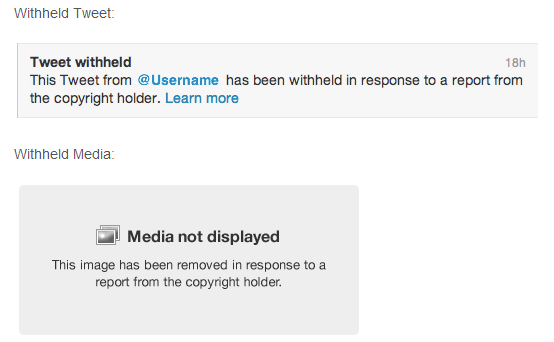
To give you an idea of what the tweets will look like Twitter will replace the infringing content with the following explanation:

withheld tweets

“This Tweet from [@username] has been withheld in response to a report from the copyright holder. Learn more: support.twitter.com/articles/15795#”

In the past, infringing tweets would be removed and clicking on a URL of where the tweet used to live, would instead open up a 404 page indicating that the content has been removed altogether.

The change helps to manage the transparency that Twitter wishes to maintain with its content moderating practices, as explained in its policy page:

“In an effort to be as transparent as possible regarding the removal or restriction of access to user-posted content, we clearly mark withheld Tweets and media to indicate to viewers when content has been withheld.”

As a company that’s steadily evolving into a content hub for publishing the latest news, there’s a delicate balance between users and complaining publishers that needs to be maintained to keep both parties relatively happy. Removing content outright discourages users from using Twitter as a content distribution platform, while of course failing to acknowledge and comply with DMCA complaints subjects Twitter to lawsuits. This is one strategy that provides transparency for DMCA takedown notices for all parties involved, including the readers and retweeters of the tweets. It’s also a strategy that can help identify baseless complaints, which has in fact been a common practice on Google.


Source : digitaltrends[dot]com

Sep 30, 2012

Terms & Conditions: Skype’s limits on ‘unlimited,’ blocked countries, forbidden uses and more

terms & conditions skype voip

Skype manages to keep its terms of use and privacy policy as slimmed down as possible -- but they're still beasts.

Check out the full Terms & Conditions archive.

When you think of online video calls, the first thing you probably think of is Skype. And now, thanks to being purchased by Microsoft, the service is in front of more eyes than ever. But because Skype’s business is international by nature — cheap calls to other countries are a main reason to use the service — its terms of service are a bit more complication than many other companies. Fortunately, Microsoft has given Skype’s terms and privacy policy a total revamp to make them easier for users to digest. But since we all know you’re probably not going to look at them anyway, let’s break down the most important bits.

Terms of Use

The Skype Terms of Use is a behemoth, so we’re going to keep this limited to only the most crucial aspects of the service.

Emergency calls

Right at the start of the terms, Skype explains that it does not provide access to most emergency services, like 911 here in the U.S. Because of this, the company makes very clear that Skype software is “not a replacement for your primary telephone service,” and that “it is your responsibility to purchase… traditional wireless (mobile) or fixed line telephone services that offer access to emergency services.”

The only counties where Skype users can access emergency services are the U.K. and Australia. Still, Skype warns that trying to make an emergency call through a computer is probably a bad idea, so do it some other way, if at all possible.

Careful what you say

Skype explains that, basically, you can say and do whatever you want over a Skype call. However, just for safety’s sake, the company technically forbids users from doing the following while using Skype:

  • Transmitting copyrighted content
  • Saying anything obscene, libellous, threatening, or otherwise criminal
  • No porn
  • No advertising
  • No spamming
  • No hurting children
  • No denial of service (DoS) or distributed denial of service (DDoS) attacks

If you do any of these things, and Skype finds out about it (through a user report, or it ending up on YouTube, etc.), your account will probably be blocked.

Pay up

Call rates: While calls made with Skype are often less expensive than those made using a mobile phone or a landline, it still costs money. Unless you pay for a Skype subscription, you will be charged a connection fee, as well as the per-minute rate for your call. (See those rates here.)

Skype Credits: To pay for Skype calls, you have to purchase Skype Credits. However, if you don’t use those credits for 180 days, they will go into “inactive” status. To reactivate your Credits, log in to your account, and click here.

Refunds: If you buy Skype Credits, you can get a refund for unused Credits within 15 days. After that, you can only get a refund if you’ve purchased a Skype subscription.

Wrong number

If the no emergency services access thing wasn’t enough to make you realize that Skype shouldn’t be your only phone, there’s also this: Your Skype phone number (either an Online Number or Skype to Go Number) are not yours. You may not transfer them to another phone — in fact, you’re forbidden from even trying to do that. So don’t.

Unlimited (kind of)

If you’ve purchased a Skype unlimited subscription, beware that your calls are not actually “unlimited” — after two hours of gabbing away, you’ll have to hang up and redial.

No Skype for you

A number of countries or Internet service providers (ISPs) have blocked VoIP services like Skype altogether. These countries include places like Ethiopia, a number of countries in the Middle East, some Mexican ISPs, and a number of Asian countries.

Fortunately, here in the U.S., we have the Federal Communications Commission’s Net neutrality rules, which prohibit ISPs from blocking VoIP. But if you live in a place without such rules, it’s your responsibility to find out whether Skype is legal or allowed. Annoyingly, Skype does not provide a definitive list of which countries and ISPs block VoIP services.

Privacy Policy

Skype has done a fine job of making its privacy police nice and clear. But like the terms of use, it’s a massive document that could be distilled down even further.

What Skype knows

The company says simply says that it “may gather and use information about you,” and has outlined quite a few examples. However, it says that it might collect more information about you than what it details here, which is just slightly disturbing. Still, I suggest you take a look at the full list. But here’s a brief rundown:

  • Identification info (name, address, email, telephone number)
  • Credit card info
  • All profile data (age, gender, country of residence, etc.) 
  • Content of instant messaging communications, voicemails, and videomails
  • Location data from your smartphone or mobile carrier
  • URLs that appear in your mood message
  • IP address
  • List of contacts

Why it needs to know

Skype explains that it only collects your data to provide its services to you, or improve its services. But that’s not the whole story here.

Skype’s business itself is not based primarily on advertising, which means that the company will never “sell, rent, trade or otherwise transfer any personal and/or traffic data or communications content.” However, because Skype is owned my Microsoft, you are effectively handing over that data to the Big M and its subsidiaries. This also means your non-personally identifying data (age, country of residence, etc.) might be used to serve up target ads through Microsoft Advertising and a list of other ad networks.

In short, if you use Skype, you are entering into the vast Microsoft business ecosystem, which reaches far and wide. To opt out of receiving targeted Microsoft Advertising, click here. To opt out of Skype-specific ads, click here.

Taking charge

If you want to edit or delete your personal information, you may do so through your Skype profile. Any IMs or voicemails through Skype will be deleted after a period of 30 to 90 days, unless a the government or court has properly requested that Skype retain the data, or Skype needs it to fulfill some aspect of its service.

Conclusion

Overall, Skype’s terms and privacy policy are fairly straight forward, especially considering its many functionalities and the vast geographical spread of its users. Considering the number of countries that have banned VoIP service, however, it would be helpful if Skype made it easy to find out which countries are on the list, especially for the many travelers that presumably use Skype to keep in touch while abroad.


Source : digitaltrends[dot]com

Sep 23, 2012

Terms & Conditions: Evernote puts you in charge

Terms & Conditions evernote privacy

Evernote uses its terms of service and privacy policy to put users in charge of their data and information security.

Check out the full Terms & Conditions archive.

Launched in 2008, Evernote started as a “productivity tool.” But it has since grown into something much more — a virtual extension of your brain. For those of you not yet in the know, Evernote allows you to store nearly anything you want to remember — photos, receipts, Web pages, recipes, voice recordings, you-name-it — and access those “memories” through a mobile app or on the Web. You can also share “notebooks” with whomever you like. It’s quite handy, especially if you live a busy, active life, with plenty of stuff you want to remember.

But using a service that literally mimics your memory means putting a lot of trust in Evernote not to misuse or abuse the vast amounts of inherently personal data users upload to its servers. And to do that properly, you’re going to need to understand Evernote’s sweeping terms of service and privacy policy. Let’s boil things down to the most important bits.

Terms of Service

Evernote has already done the job of summarizing its terms of service into three main bullet points, which is extremely helpful. These points are:

  • Your Data is Yours
  • Your Data is Protected
  • Your Data is Portable

To learn more about what exactly Evernote means about all this, you can read this extremely explicit, clear, and downright encouraging blog post from Evernote CEO Phil Libin.

While helpful, these points don’t quite tell the whole story. Here’s the rest of what you should know about Evernote’s ToS.

Intruder alert!

Evernote kicks off its ToS with a “Use of Service” section, a dense paragraph that basically says that if you discover any “unauthorized use” of your account, you have to tell Evernote about it. And if you don’t, the company is not responsible if someone steals or deletes your data.

Legal shmeagle

One curious portion of the “Use” section is that you must be “of legal age to form a binding contract” to use Evernote, which in the U.S. means you technically have to be 18-years-old to sign up. Google also has this provision in its terms, meaning anyone under 18 can’t use any Google products. In reality, of course, no company pays much attention to this rule. And Evernote later explains that you can use the service if you’re over 13-years-old. So don’t fret, teens. You may be breaking the law by using Evernote, but nobody cares.

Own it

Evernote has the fantastic policy that you own the rights to everything you upload to its service, and the company promises not to use your stuff to make money. Further, if you decided to ditch Evernote, you can take all of your data with you.

That said, you are on your own if you upload (and share) copyrighted content and get served with a lawsuit — Evernote will not help you in any way.

Contact at your own risk

If you contact Evernote with some ingenious way to improve the product, Evernote may (or may not) use the information you provide however it sees fit, be it for marketing material, or to tell the world about what dumb ideas you have. (Kidding!) It also automatically owns that idea. So if you come up with something brilliant, don’t just email it to the company willy nilly.

Avoid the following

Evernote lists a bunch of stuff you can’t do, but nothing that surprising. All of it simmers down to these forbidden activities. Don’t use Evernote to:

  • Make money
  • Scam people
  • Spam people
  • Abuse, stalk, or harass people
  • Share copyrighted content that you don’t own
  • Spread viruses
  • Do anything else that’s illegal
  • Spread naked pictures or porn (even homemade stuff) publicly, though you can upload whatever you want to your private notebooks

If you find anyone doing any of these activities listed above, you can rat them out to Evernote.

Nuts & bolts

Most of the second half of Evernote’s ToS include a bunch of basic explanations of things that don’t really need explaining. So let’s just sum up the potentially important bits:

  • Evernote uses some other third-party institutions to do business (like server providers, banks, etc), and your account information may be passed on for general business purposes.
  • Evernote may make changes to its services at anytime, so don’t freak out like a Facebook user if that happens.
  • Evernote may serve you ads sometimes. If you click them, any data you provide is between you and the advertiser.

Evernote might send you marketing material or other emails from time to time. If you want to opt-out of marketing emails, visit Evernote.com and click: Settings > Personal Settings > Contact Preferences, uncheck all the boxes, and click “Save Changes.”

Evernote marketing

Privacy policy

Privacy and security are of the utmost importance to Evernote, as is evidenced by their privacy policy and other corporate explanations of their practices. As such, there’s not much here you need to worry about, so I’ll keep this short and sweet.

Collect yo’self

Like all digital services, some personal information is collected by Evernote. But it’s really just the bare minimum to provide the service. Here’s what you can expect Evernote to know about you, either because you provided the information by signing up, or through cookies and tracking pixels:

  • Name
  • Email address
  • Billing information (if you pay for a premium account)
  • IP address
  • Demographic data (like occupation)
  • Location information
  • Device data (whether you’re using a mobile phone, Mac, PC, etc, to access Evernote)
  • What stuff you click on while visiting Evernote’s website
  • Whether or not you’ve opened an email from Evernote

Feeling used

Of course, the information above is collected for a reason. The company may use or share it in a number of ways, which include:

  • To contact you about offers (unless you opt-out)
  • To obey the law (e.g. if served a judicial subpoena for your data by a U.S. court)
  • To investigate possible illegal activity from your account
  • If you sign up for Evernote through the website of a third-party affiliate

Maximum security

Seeing as Evernote can be (and often is) used to store things like passwords, financial data, and credit card numbers, the company’s security practices are probably the most important part of the whole business. (After all, we wouldn’t use Evernote if we thought it be easy for our personal stuff to get into the hands of hackers.) Here’s what Evernote does to protect your info:

  • All passwords are encrypted, and are not directly stored on Evernote’s servers
  • All the stuff you upload is encrypted over SSL (the Internet’s standard)
  • Servers are physically protected, and only a select number of approved employees have access to those servers (a very important part of data security that many average Web users fail to take into consideration)
  • Your data is never observed by Evernote, or used for data mining, or to provide targeted advertising, which limits the possibility of a security breach
  • Evernote’s PC and Mac desktop clients allow you to further encrypt your extra-sensitive notebooks and protect them with a password that is never transmitted to Evernote (further limited the chance of a hacker snagging it)

Here’s a video about how that last bit works:

Conclusion

Overall, Evernote’s terms of service and privacy policy are straightforward, and provide little surprises. However, despite the helpful bullet points listed at the top, the terms of service is particularly long and dense. So I doubt many (read: any) users have actually read them. (I certainly wouldn’t if it weren’t my job.) As the company’s user base grows, however, I would love to see Evernote move in the direct of companies like Tumblr and Microsoft, both of which have made a serious effort to dumb-down their legalese for us non-attorney types.

I reached out to Evernote for comment on this story, but they were not able to get back to me straight away. I will update this space as soon as I hear back. 


Source : digitaltrends[dot]com

Aug 26, 2012

Terms & Conditions: Facebook’s ‘Data Use Policy’ explained

Facebook's privacy policy, known as the "Data Use Policy," explained in simple terms -- with some helpful links added in to let you better control your privacy.

Welcome to the first edition of Terms & Conditions, a weekly column where we break down the tangled mess of online sites’ and services’ terms of service, privacy policies, and other lawyerly mumbojumbo, into language anyone can understand. This week, we’re tackling a doosey: Facebook’s privacy policy, also known as the “Data Use Policy.”

Given its history of brushing aside users’ privacy concerns, Facebook has broken its Data Use Policy into multiple parts, in an apparent attempt to make it easier to understand. It has also excluded many of the enigmatic legal phrases often used in privacy policies. Still, at about 8,700 words, the document remains nearly impenetrable. Let’s simplify things a bit, shall we?

Part 1. Your privacy, information, and (vaguely) how it is used

What Facebook knows about you

This one is simple: Facebook can record and access all information you share on Facebook — all of it. (Though it cannot always share that information with advertisers or other third-parties — more on this later.) It can also access information other Facebook users share about you on Facebook. Lastly, it can access a variety of information from the websites you visit through its “Like” button — even if you’re not logged into Facebook at the time. In fact, you don’t even have to have a Facebook account at all for the social network to scoop up certain bits of data.

Here is a quick-as-possible list of the information Facebook is probably collecting on you:

  • Name
  • Age
  • Gender
  • Email address
  • Networks
  • Photos and videos
  • Tags and facial data (for Tag Suggestions)
  • Which profiles you look at
  • Who you chat with through Facebook Messenger
  • Relationship status
  • “Likes” (anytime you click the “Like” button on Facebook or a third-party website)
  • Lists of favorite things (movies, music, books, etc)
  • Political affiliation
  • Which websites you visit and when
  • Anything you purchase with Facebook Credits
  • Browser type
  • Operating system type
  • IP address
  • GPS location
  • User ID number
  • Username

Public vs. private

Your public data: Facebook allows you to make certain information private, or to make all of your information public. However, even if you adjust your privacy settings to make everything private, some information is public, no matter what you do. All public information can be seen by anyone, even if they do not have a Facebook account. And “anyone” includes other websites, games, and various Web applications. Always-public information – what Facebook refers to as your “basic info” — includes:

  • Name
  • Profile pictures 
  • Cover photos
  • Gender
  • Username
  • User ID
  • Comments made on public websites that use Facebook’s commenting plug-in
  • Comments made on public websites through Facebook’s commenting plug-in about you by other people

Aside from those details, the rest of the information you choose to share with Facebook can be made private to a greater or lesser degree. Facebook also does a fairly good job of explaining how information you share publicly may be used. From the Data Use Policy:

Choosing to make your information public also means that this information:

  • can be associated with you (i.e., your name, profile pictures, cover photos, timeline, User ID, username, etc.) even off Facebook;
  • can show up when someone does a search on Facebook or on a public search engine;
  • will be accessible to the Facebook-integrated games, applications, and websites you and your friends use; and
  • will be accessible to anyone who uses our APIs such as our Graph API.

Your private data: Facebook allows you to make most of the information you share private. What “private” means is up to you. You can either share with all your friends, or use the “customize” sharing option accessible on each status update box, which lets you share the status update or photo with certain people, but not others. To learn how to check or update your privacy settings, click here.

“How Facebook uses your data” (or something like that)

Facebook is, by all measures, an advertising company — that is how it makes money. The way it sells advertising is by collecting all of the aforementioned information about its users, then using that data to sell target ads — ads that you are more likely to click on than ads made for just anyone.

As part of its Data Use Policy, Facebook outlines the situations for which it reserves the right to use your information, and some examples of how that information may be used. Notice I said “outline” — not “explains,” “details,” or any other word that means Facebook actually tells you anything worthwhile here. Also, notice that I said “some examples” — Facebook does not tell us all of the ways it may use your data. Just some cute examples.

This is easily one of the most important parts of Facebook’s Data Use Policy — it has “data use” right in the name! It is also easily the most confusing, worthless part of the whole bloody document.

So, what does Facebook use your information for? This: “We use the information we receive about you in connection with the services and features we provide to you and other users like your friends, our partners, the advertisers that purchase ads on the site, and the developers that build the games, applications, and websites you use.”

What “in connection with” means here remains disturbingly vague. Facebook rattles off a few examples, but does not enumerate each and every way it may use your information.

It does, however, say that all of the information you provide to Facebook — i.e. everything you do on Facebook, or anything one of your friends do on Facebook that links with your data — is available to the company. Facebook also reserves the right to use your data, as long as it has either:

  • received your permission
  • told you it would do so (through the Data Use Policy) 
  • or removed any personally identifiable information, such as your name

In short, Facebook reserves the right to use your information however it sees fit, as long as it is “in connection with the services and features” it provides. What “services” or “features” mean, well, take a guess.

Bottom line: This section is extremely vague, and should make you wary about having a Facebook account at all.

Deactivate vs. Delete

Facebook allows for two levels of cutting ties with the social network: deactivation, which simply puts your account on pause; and deletion, which completely removes all of your data from Facebook and its servers.

Deactivate: If you simply deactivate your account, you will still appear in your friends’ “friends list,” which means that information can still be accessed by Facebook or any third-party website, game, or application that gain access to your friends’ contact lists. You can also easily reactivate your account at any time.

To deactivate your account, click here.

Delete: Deleting your account is permanent, and cannot be undone once you do so. MOST of you data will be deleted from Facebook’s servers — but the process takes up to 90 days to complete. (Why it takes so long, Facebook doesn’t say.) But beware: Even if you delete your account, certain information — like all of you conversations with other Facebook users, or group posts — will remain on the site, as they are not exclusively associated with your account. So keep that in mind.

To permanently delete your account, click here.

Part 2. Sharing

Facebook like button

This is one area where things get tricky. As mentioned above, you have the ability to choose how (most of) your information is shared. Problem is, your friends also have that ability — and some of the information they share includes data about you.

For example, even if you have your privacy settings marked to the tightest possible option, others can still see comments you leave on status updates, photos, links, or videos that they share; the person who posted it controls who sees the update and all related comments.

Also, even if you hide your friends list, you will appear on your friends’ lists, which may be publicly available.

In short, any content that is about you, but controlled by someone else, is out of your hands — so keep that in mind.

Facebook allows you to control the privacy setting for each status update. Here are the instructions Facebook gives, which explain how this works:

Whenever you post content (like a status update, photo or check-in), you can select a specific audience, or even customize your audience. To do this,

  • simply click on the sharing icon and choose who can see it. Choose this icon if you want to make something Public. Choosing to make something public is exactly what it sounds like. It means that anyone, including people off of Facebook, will be able to see or access it.
  •  Choose this icon if you want to share with your Facebook Friends.
  •  Choose this icon if you want to Customize your audience. You can also use this to hide your story from specific people.
If you tag someone, that person and their friends can see your story no matter what audience you selected. The same is true when you approve a tag someone else adds to your story.

Facebook also notes here that you should “always think before you post, especially because “information you share on Facebook can be copied or re-shared by anyone who can see it.” Sage advice indeed.

Contact infoFacebook lets you find people by searching an email address or phone number that has been associated with that user’s Facebook account. However, you can change your privacy settings so that only your current friends can find you this way (or friends of friends, or anyone who has that information). To change this, click on “How you connect” here, and choose your setting on the first option in the pop-up window.

Facebook also allows people to find you through their contact importer, which imports people you have connected with through, say, Gmail.

Mobile accessNot surprisingly, information you reveal to Facebook may be accessible through your friends’ mobile devices (either in an app, or through Facebook’s mobile website). This information can — as you should know by now — be re-shared by your friends through their mobile devices.

Friends sharing with you

Links and tags: Surprise! Your Facebook friends can share links with you. One way this is done is by “tagging” the link they share with your name. You can either choose to review each link a friend tags you in, automatically approve every link, or it up so that certain people can tag you automatically, while other’s have to have your approval first. To set this, choose the “Timeline and tagging” option in your privacy settings, and select your preference.

Tagging in either a message or a comment thread only allows those with permission to view that information can see the tag.

Groups: You have the choice whether or not to join a Facebook Group. Once you have, however, anyone in that group can invite you to subgroups. Your name will appear as “invited” to the subgroup until you opt in or out.

Pages: Just assume that everything you do that’s associated with a Facebook Page — which are public, and are often used by business and publications — is public. “Liking” a Page is a public endorsement of it, and your Facebook friends may see that you’ve “Liked” a particular page in their News Feed. Comments on Pages are also public — so be careful what you say on a Page.

Activity log: Facebook lets you see some of the activity associated with your Facebook account, such as websites or products you have “Liked,” or links you’ve shared. To view this, click on your “Activity Log,” which appears just below your cover image on your Timeline. From that page, you can “unlike” or delete each action.

Part 3. Websites and third-party apps

Facebook Platform: This is a service offered by Facebook that allows websites, games, and other third-party applications to access your Facebook information.

Apps and your info: A big way your personal Facebook information is spread around the Web is through apps — both those that you personally use, as well as those that your friends use.

Before you install an app, you must approve it. Each app requests to access (and store on its own servers) parts of your Facebook data. Some apps want little access; some want a lot. But remember: Apps can often access your information simply because a friend of yours approved the app. Facebook gives you the ability to restrict the types of data your friends’ apps may access — but you have to un-check each category of info individually under the “Apps, Games and Websites” part of your privacy settings. To do so, edit your settings under the “How people bring your info to apps they use” subsection.

Logging in with Facebook: When you choose to log in to a third-party website with your Facebook credentials, Facebook provides that website with your Facebook User ID, but does not give that site your email address. Some sites may automatically connect you with your Facebook account if you use the same email address to log in to both.

Social plug-ins: Facebook describes social plug-ins as a “little piece of Facebook” embedded on other websites. The most prevalent social plug-in is the “Like” button and the “Share” button. Anytime you visit a website with any Facebook social plug-in (i.e. most websites) while still logged into Facebook, Facebook receives information about your visit to that site (your name, browser, IP address, date and time of your visit, etc.) Some of this information is shared with Facebook even if you are not logged in, or don’t have a Facebook account.

Facebook gets this info by installing cookies on your computer (more on this below). These cookies are used to show you ads on and off of Facebook. Facebook says it does not use the information to make a “profile” on you or your browsing habits — but it may be used without your personally identifying details, or as part of a group of data “to improve ads generally and information we receive to study, develop or test new and existing products or services.” That data is kept for 90 days.

Instant personalization: Facebook has partnered with a number of websites, like Rotten Tomatoes, to provide “instant personalization.” This means that, if you’re logged into Facebook, one of these partner websites can access your “public information,” as well as your User ID and friends list. This gives you the ability to comment on the site, and see how your Facebook friends have used the site.

The sites Facebook have partnered with are:

  • Bing – Social Search
  • Pandora – Personalized Music
  • TripAdvisor – Social Travel
  • Yelp – Friends’ Local Reviews
  • Rotten Tomatoes – Friends’ Movie Reviews
  • Clicker – Personalized TV Recommendations
  • Scribd – Social Reading
  • Docs – Document Collaboration
  • Zynga – Social Games (The Ville, Zynga Slingo and 7 other games)
  • Kixeye – Social Games (War Commander and Battle Pirates)
  • EA – Social Games (SimCity Social)

To turn off instant personalization, click “edit settings” under the “Instant personalization” subsection in the Apps, Games and Websites portion of the privacy settings. (You may have to close a video about instant personalization before you can actually access the privacy setting.) Once you’ve closed the obnoxious pop-up video, uncheck the box at the bottom of the screen.

Note: If you have already visited an instant personalization-enabled site with the feature allowed, then that site (and Facebook) may still have your data from those visits stored.

Search engines: You can choose whether to have your Facebook profile show up in search engines, like Google. This option is enabled automatically. To turn it off, click here, and un-check the “enable public search” box at the bottom,

>> Next page: Advertising, Facebook tracking, and odds & ends


Source : digitaltrends[dot]com

Aug 21, 2012

AT&T FaceTime restrictions may be at odds with FCC net neutrality rules

AT&T iPhone owners who want FaceTime will need to upgrade to a Mobile Share plan, but this new policy may be against the FCC's new net neutrality rules.

AT&T already announced that it would be rolling out shared data plans for their new mobile customers, but it looks like the separation between subscribers won’t just be how their data is distributed–application use may have limits as well.

We reported last month that AT&T may be planning on limiting access to FaceTime for iPhone owners based on their data service. Unfortunately for AT&T, it looks as though this may be in violation of FCC rules on net neutrality.

What we know about the limits

As of last week, AT&T made it known that using FaceTime over its 3G and 4G mobile network — a feature that will become available with iOS 6 in the fall — will be available only for shared data plan users. Users who are gripping tight to their tiered and unlimited plans will only be able to use the video chat app while connect to a Wi-Fi network. As wireless carriers are known to do, this limit in functionality is likely a push to get users to sign up for the new shared plans.

What we know about the law

According to Public Knowledge’s senior staff lawyer John Bergmayer (via NY Times), this attempt to prohibit use of a particular application puts AT&T in violation of the FCC’s rules on net neutrality. He refers to the Open Internet Rules, specifically one that states that mobile providers cannot “block applications that compete with the provider’s voice or telephony services.” The fact that the FCC used the term “telephony” aside, this raises a legitimate question as to the legality of AT&T’s app block. Mr. Bergmayer stated that there is “no technical reason why one data plan should be able to access FaceTime, and another not.”

While the FCC is currently not making a comment on this case, there is some precedent already set on the issue that may give us an indication as to how this will play out. Back in July, the FCC ruled that Verizon couldn’t block tethering applications in the Google Play store. Verizon tried to institute that blockage because apps made available a service that Verizon was charging for. Because of the FCC’s ruling, tethering apps are now available for Verizon customers.

What it means for other service providers

If AT&T is allowed to put up a firewall to prevent certain users from accessing an individual application, a somewhat startling statement will be made. Does this mean that other applications will see a similar block, like Skype on Windows Phones or other third party applications on any given service? It conjures up a somewhat frightening scenario in which app access becomes a tiered system. Only top data subscribers get access to top apps. If AT&T puts limits up on a game like Angry Birds, there could be riots in the street, but what about less popular texting apps or products like Google Voice, which directly conflict with AT&T’s services?

At the moment, this FaceTime debate only concerns AT&T users. Sprint has stated that it has no intention of charging extra for FaceTime access. Verizon has also not made any indication that it will put similar limits on iOS 6′s flagship video chat program. If nothing else, this may just give AT&T iPhone owners a reason to leave for another carrier. Then again, iPhone users have lived with Wi-Fi only FaceTime for this long. Maybe they don’t really need to video chat on 3G or 4G.


Source : digitaltrends[dot]com

Aug 13, 2012

Etsy updates its prohibited items list: No more black market organs here

Etsy policy guidelines ban human organs

After extensive research of "offbeat and fascinating topics," Etsy has updated its policy to prohibit a slew of products "not in the Etsy spirit."

We weren’t quite aware that Etsy had become the black market of the Internet… so much so that the online shopping site had to update its policy guidelines to prohibit a slew of items formerly available on its marketplace. Last week, Etsy made an announcement via its blog that it will be limiting the types of “offbeat and fascinating” items users can attempt to sell, including human body parts and drug paraphernalia.

The crackdown come after the Etsy team’s extensive research and conclusion that organs, drugs, tobacco, explosives, and motor vehicles just aren’t exactly in the spirit of Etsy. “We want to maintain Etsy as a marketplace that is safe for both shoppers and sellers. In many cases, items on the prohibited list may be subject to complex legal regulations or restrictions that vary greatly by location,” the blog post reads. “While we understand that it is possible for certain items to be carefully and legally bought and sold, Etsy is just not the right venue for them.”

In effect as of August 8th, users will no longer be able to buy or sell hazardous objects, from smokeable products like tobacco alternatives to flammable items such as sparklers and matches. Tobacco-related accessories such as water pipes, bubblers, oil domes, hash skillets, vaporizers, and ash catchers have all also been added to the prohibited items list. Incenses are still fine by Etsy.

What’s even odder in this “Don’t” list is the limit of selling human organs and remains, including “skulls, bones, articulated skeletons, bodily fluids, preserved tissues or organs, and other similar products.” Teeth and hair, however, are perfectly okay even though those are still pretty weird things to buy online. Still, we have to wonder: Who exactly was looking to Etsy for second-hand kidneys? We can sort of understand buying crochet spleens or maybe even a colon plush for the sake of teaching your kids anatomy, but the real deal is just much too creepy.

Shop owners who have been affected by this update will be notified by Etsy directly. The site will ask that the sellers either take down the now-prohibited item or update the listing to make the product compliant with new rules, such as selling tobacco pipes without carburetors. Shoppers who come across stores selling questionable items are also asked to report the listing to Etsy to help the site extensively review its marketplace products.


Source : digitaltrends[dot]com