Pages

Showing posts with label skype. Show all posts

Nov 14, 2012

Microsoft plugs absurd Skype security hole

skype-large-logo

Microsoft has closed off a major security hole in Skype that allowed anyone to gain access to your account with only your email address. The entirely avoidable problem highlights the opposing goals of "user experience" and "safety."

Microsoft has blocked a major Skye security hole that allowed anyone to access your account with only your email address. The only problem now is that it shouldn’t have existed in the first place.

First posted on a Russian forum some months ago – but apparently ignored by Microsoft until today – the security flaw worked like this: Someone creates a new Skype account with your email address, the one associated with your Skype account. In doing so, this person now has the ability to reset the password of both the new account and your actual account, thus gaining access while also blocking you out.

The security flaw percolated to the surface earlier today on Reddit, and was later recreated by writers at The Next Web, who successfully gained access to the Skype accounts of two other TNW employees. Microsoft responded quickly by shutting down the password reset page entirely.

“We have had reports of a new security vulnerability issue,” wrote engineer Leonas Sendrauskas on the Skype security blog. “As a precautionary step we have temporarily disabled password reset as we continue to investigate the issue further. We apologize for the inconvenience but user experience and safety is our first priority.”

The problem here is that “user experience” and “safety” are diametrically opposed goals. Skype made the user experience of resetting a password less of a hassle by allowing a person to do so with only an email address. But clearly this was not a safe way to do things.

As avoidable as this whole debacle is, we feel for Skype, and every other online system that requires a login: Achieving a balance between user experience and safety is extremely difficult. Imposing meaningful online security means putting roadblocks in the way of people who are trying to use your service. Creating an easy user experience often means ditching security precautions. No matter which way you go, something has to give.

Regardless, it may still be a good idea to beef up your Skype security while Microsoft investigates a fix. The only way to do this is change the email address associated with your Skype account to something nobody else knows (which probably means creating an entirely new email account). Once you’ve done that, simply login (assuming you still can), go to Profile > Edit > add new email address. Click Save. Then go to Edit again, and set the new email address as your primary email, then save again. Then enter your password and click the Enter button. Then go back and delete the previous email.

How’s that for user experience?


Source : digitaltrends[dot]com

Nov 5, 2012

Microsoft killing Windows Live Messenger, will replace it with Skype

Microsoft is reportedly putting Windows Live Messenger to rest, and replacing the messaging client with Skype.

We got a first glimpse of Microsoft’s plans for their $8.5 billion purchase of Skype late last month when Microsoft enabled Facebook, Hotmail, and Windows Live logins through Skype. Now The Verge has caught wind from his sources that Microsoft may be taking this a step further by replacing Windows Live Messenger with Skype altogether.

The announcement that Windows Live Messenger will be put to rest after thirteen years since its founding, first introduced as MSN Messenger in 1999, may come as early as this week. The report adds that Windows Live Messenger’s backend is slowly being integrated into Skype, which means that the only change for existing Windows Live users is that they’ll have to login through Skype’s client.

Skype has already been married into Windows 8 as a default native app to the Microsoft operating system, and Microsoft is free to do with Skype as it wishes — so the decision makes sense. The news of Windows Live Messenger’s retirement however isn’t official just yet and users have yet to be notified of Microsoft’s intentions, so as for the answer to how tightly integrated Skype will be with Microsoft’s products, we’ll have to update you once we hear back from a spokesperson.

Windows Live Messenger has been in use by 300 million users per month in 2010, although we suspect that number has dwindled due to new competition Google Talk and Hangouts, Facebook Messenger, and of course the many mobile messaging apps on the market today. Skype’s CEO, Tony Bates revealed the latest figures show it had 250 million monthly users in May of this year.

Skype has been subject to a number of face lifts as of late. We’ve been content with the majority of the updates, but there have been just a couple of caveats. For instance all of the cross-platform integration means the Skype contact list is consequently flooded with friends, so users are either left to clean up with lists, deal with it, or forego using the new login integrations altogether. 

But the pros outweigh the cons. Messaging Facebook and Live Messenger friends on the Skype client is admittedly a far better experience. Skype acts as a prompt to video call friends you otherwise might not using Facebook. 

Pushing Windows Live Messenger clearly wasn’t in the forefront of Microsoft’s mind with the service since it’s Skype acquisition. With a robust messaging and video calling service like Skype, Microsoft has room to offer more comprehensive monetization strategies, like its conversation ads rolled out in June, as it doubles up Skype’s user base with existing Messenger users.


Source : digitaltrends[dot]com

Oct 19, 2012

Startup Six3 hits the video market with a new take on the messaging app

six3 be together

Telefonica-backed startup Six3 wants to bring video messaging to the masses with its new app -- which lies somewhere between Skype and Viddy.

UK-based, 14-month-old startup Six3 wants to shake up the messaging platform by adding video the mix, and with a backer like Telefonica, the largest telecommunications companies in the world, it might just be able to. There isn’t a direct competitor with any existing mobile app out there, so Six3 describes itself as a hybrid between Whatsapp and Viddy and hopes to be a game changer that opens up a market of users communicating strictly through short video messages.

There are undoubtedly countless messaging and video sharing apps out there, which Six3’s CEO and co-founder Tim Grimsditch categorizes into three buckets. First there are one-to-one video chatting services, but Grimsditch says that the growth for those companies is slow since users “tend to stick to very tight circles using that service.”

In bucket two are the Instagram-for-video apps. The most well known in this market are services like Viddy or Mobli. Those apps, however, are about producing quality content. Six3 is about bite-sized messages and quick communication.

The third bucket is filled by the all-in-one communication services like Whatsapp and Skype. These apps tend to “focus all of their energy behind a piece of their service that they’re famous for,” says Grimsditch. The video part of a messaging service like Whatsapp, he explains, is weak. “We’re a tiny team with small resources, yet our video messages are twice as fast as Whatsapp.”

Internationally, particularly in Asia, there’s been a lot of experimentation with new types of chat apps — a popular one being WeChat. Its users are so accustomed to its unique voice messaging feature that I was told few WeChat users in China even send text messages anymore. Six3 wants to do something similar by targeting an untapped niche. “[We're] a platform to communicate with video messages in a way that’s easy, mobile, lets people decide on private or public messaging, and lets people use it within their existing network,” says Grimsditch.

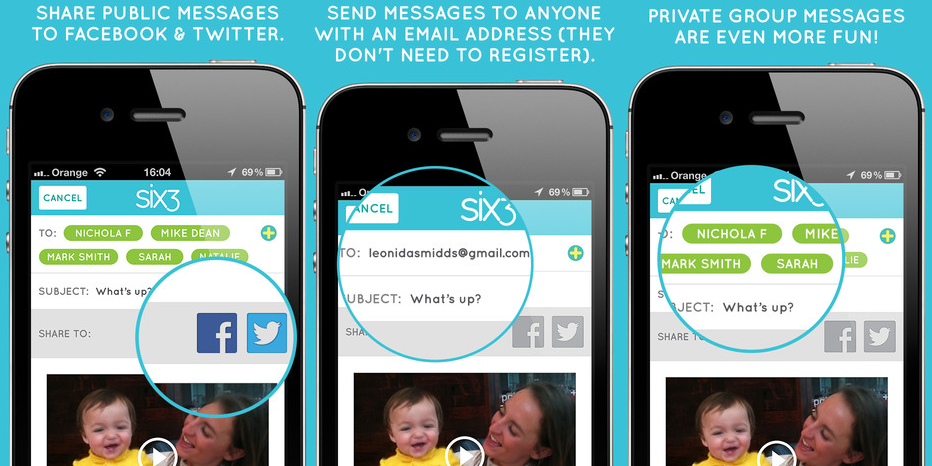
Using the app is as simple. You can select a colored filter, record your video for a maximum of 63 seconds (which is where Six3’s name comes from), select the video’s recipients (via email, address book contacts, Twitter, Facebook, or other Six3 users), and press “Send.”

six3 messaging to

To take social a step further, Six3 announced a deeper Facebook integration yesterday at the Dublin Web Summit’s START conference, where the company was recognized as one of the “world’s 100 most promising early stage startups.” The update adds the ability for users to send private Six3 video messages to individual Facebook friends or share them publicly to your Facebook Timeline, while offering a faster and more seamless user experience. “It makes it incredibly easy to create good looking 63 second long video, share it through Six3, Twitter or Facebook, and respond to the video,” explains Grimditch.

The app will remain free for as long as it exists and you can find it in the App Store (the Android version is in the works), but Six3 will be experimenting with a few revenue models. The ones that Grimsditch was comfortable describing include charging users to archive messages for those important clips that you might have an emotional attachment to as well as the possibility of creating sell premium options like color filters or other visual effects as in-app purchases.

To many developers’ benefit, smartphone owners aren’t particularly app-loyal. Grimsditch is well aware of this and hopes to jostle competitors and become not jut a trend, but a staple app in the sea of 700 million smartphones. “The reality is that we’re just getting started and the dust isn’t going to settle in this market for years and years. So I think you’re going to see many years of explosive innovation, and we’re absolutely planning to be at the forefront of that.”


Source : digitaltrends[dot]com

Sep 30, 2012

Terms & Conditions: Skype’s limits on ‘unlimited,’ blocked countries, forbidden uses and more

terms & conditions skype voip

Skype manages to keep its terms of use and privacy policy as slimmed down as possible -- but they're still beasts.

Check out the full Terms & Conditions archive.

When you think of online video calls, the first thing you probably think of is Skype. And now, thanks to being purchased by Microsoft, the service is in front of more eyes than ever. But because Skype’s business is international by nature — cheap calls to other countries are a main reason to use the service — its terms of service are a bit more complication than many other companies. Fortunately, Microsoft has given Skype’s terms and privacy policy a total revamp to make them easier for users to digest. But since we all know you’re probably not going to look at them anyway, let’s break down the most important bits.

Terms of Use

The Skype Terms of Use is a behemoth, so we’re going to keep this limited to only the most crucial aspects of the service.

Emergency calls

Right at the start of the terms, Skype explains that it does not provide access to most emergency services, like 911 here in the U.S. Because of this, the company makes very clear that Skype software is “not a replacement for your primary telephone service,” and that “it is your responsibility to purchase… traditional wireless (mobile) or fixed line telephone services that offer access to emergency services.”

The only counties where Skype users can access emergency services are the U.K. and Australia. Still, Skype warns that trying to make an emergency call through a computer is probably a bad idea, so do it some other way, if at all possible.

Careful what you say

Skype explains that, basically, you can say and do whatever you want over a Skype call. However, just for safety’s sake, the company technically forbids users from doing the following while using Skype:

  • Transmitting copyrighted content
  • Saying anything obscene, libellous, threatening, or otherwise criminal
  • No porn
  • No advertising
  • No spamming
  • No hurting children
  • No denial of service (DoS) or distributed denial of service (DDoS) attacks

If you do any of these things, and Skype finds out about it (through a user report, or it ending up on YouTube, etc.), your account will probably be blocked.

Pay up

Call rates: While calls made with Skype are often less expensive than those made using a mobile phone or a landline, it still costs money. Unless you pay for a Skype subscription, you will be charged a connection fee, as well as the per-minute rate for your call. (See those rates here.)

Skype Credits: To pay for Skype calls, you have to purchase Skype Credits. However, if you don’t use those credits for 180 days, they will go into “inactive” status. To reactivate your Credits, log in to your account, and click here.

Refunds: If you buy Skype Credits, you can get a refund for unused Credits within 15 days. After that, you can only get a refund if you’ve purchased a Skype subscription.

Wrong number

If the no emergency services access thing wasn’t enough to make you realize that Skype shouldn’t be your only phone, there’s also this: Your Skype phone number (either an Online Number or Skype to Go Number) are not yours. You may not transfer them to another phone — in fact, you’re forbidden from even trying to do that. So don’t.

Unlimited (kind of)

If you’ve purchased a Skype unlimited subscription, beware that your calls are not actually “unlimited” — after two hours of gabbing away, you’ll have to hang up and redial.

No Skype for you

A number of countries or Internet service providers (ISPs) have blocked VoIP services like Skype altogether. These countries include places like Ethiopia, a number of countries in the Middle East, some Mexican ISPs, and a number of Asian countries.

Fortunately, here in the U.S., we have the Federal Communications Commission’s Net neutrality rules, which prohibit ISPs from blocking VoIP. But if you live in a place without such rules, it’s your responsibility to find out whether Skype is legal or allowed. Annoyingly, Skype does not provide a definitive list of which countries and ISPs block VoIP services.

Privacy Policy

Skype has done a fine job of making its privacy police nice and clear. But like the terms of use, it’s a massive document that could be distilled down even further.

What Skype knows

The company says simply says that it “may gather and use information about you,” and has outlined quite a few examples. However, it says that it might collect more information about you than what it details here, which is just slightly disturbing. Still, I suggest you take a look at the full list. But here’s a brief rundown:

  • Identification info (name, address, email, telephone number)
  • Credit card info
  • All profile data (age, gender, country of residence, etc.) 
  • Content of instant messaging communications, voicemails, and videomails
  • Location data from your smartphone or mobile carrier
  • URLs that appear in your mood message
  • IP address
  • List of contacts

Why it needs to know

Skype explains that it only collects your data to provide its services to you, or improve its services. But that’s not the whole story here.

Skype’s business itself is not based primarily on advertising, which means that the company will never “sell, rent, trade or otherwise transfer any personal and/or traffic data or communications content.” However, because Skype is owned my Microsoft, you are effectively handing over that data to the Big M and its subsidiaries. This also means your non-personally identifying data (age, country of residence, etc.) might be used to serve up target ads through Microsoft Advertising and a list of other ad networks.

In short, if you use Skype, you are entering into the vast Microsoft business ecosystem, which reaches far and wide. To opt out of receiving targeted Microsoft Advertising, click here. To opt out of Skype-specific ads, click here.

Taking charge

If you want to edit or delete your personal information, you may do so through your Skype profile. Any IMs or voicemails through Skype will be deleted after a period of 30 to 90 days, unless a the government or court has properly requested that Skype retain the data, or Skype needs it to fulfill some aspect of its service.

Conclusion

Overall, Skype’s terms and privacy policy are fairly straight forward, especially considering its many functionalities and the vast geographical spread of its users. Considering the number of countries that have banned VoIP service, however, it would be helpful if Skype made it easy to find out which countries are on the list, especially for the many travelers that presumably use Skype to keep in touch while abroad.



Source : digitaltrends[dot]com

Aug 31, 2012

New malware bot affects IM services like Facebook Chat and Google Talk

Malware bot infecting IM clients found by McAfee

A malware bot uses instant messaging services like Facebook Chat, Skype, and Google Talk to spread through as many computers as it can.

We’re not trying to add to the general internet paranoia present in today’s online ecosystem (not to say it isn’t warranted). Having said that, knowledge is power and the more we know about the threats out there, the better we can protect ourselves. Since most of us are connected to the internet in some capacity at all times, contracting a virus isn’t exactly difficult. Especially with the popularity of social media, it’s a wonder there hasn’t been a piece of malware that took advantage of the large number of instant messaging services before now. 

This particular nasty bit of software sets itself apart from its predecessors with its impressive ability to spread using many different IM systems. Google Talk, Facebook Chat, Skype, MSN Messenger, Yahoo Messenger, Pidgin, and ICQ (if anyone still uses it) are all vulnerable to the bot.

No doubt due to its enormous number of users, Facebook is the initial point of contact with a vulnerable PC. The malware usually carries a file name like “Picture.JPG_www.facebook.com”. The botnet sends users a seemingly interesting video link, sifting through their friend list with an AJJX command in order to make the link seem like it comes from a friend, family member, or coworker. According to McAfee, if that first user clicks on the link then the malware is able to gain a foothold in their computer. From there, a remote attacker can send commands to the malware and direct its actions. Using the list of IM clients above, the infected computer attempts to entice more contacts into clicking the video link so it may spread even further.

It has a few more tricks up its sleeve as well. It can bypass your Windows Firewall by using the command line or adding itself to the list of allowed programs. The malware then adds itself to the list of programs opened at start up. A copy of the malware is dropped into the Windows folder, hidden, and marked as read-only. Be sure to check your Public folder, Windows folder, or Program Files folder for “mdm.exe” if you’re worried you’ve been infected. And finally, to make sure it’s safe and sound, the malicious software checks for and disables any antivirus software, Yahoo Updates, and Windows updates. The Internet Explorer start page, along with Chrome and Firefox’s preference files are also modified to give the malware easy access to its needs.

Fortunately, if you know a bit about computers, the malware can be easily vanquished. You simply need to kill any instances of the virus in Task Manager and remove the start-up entry to avoid having it reload with the next computer restart. Alternately, McAfee’s Scan and Repair tool should do the trick. For now, just be extra careful when opening video links that seem a little suspicous even if they’re sent by your closest friend. If you’re extra paranoid, you could always call them up and confirm they really sent it.


Source : digitaltrends[dot]com

Aug 22, 2012

Skype app update for iOS adds photo sharing ability

The Skype application for iOS has been updated and now boasts the ability to let you send images to your contacts, something that you could only do through the desktop client before. There is no size limit on the images you upload so you can upload as big an image as you want, provided you have a suitable data plan.

Other changes include performance improvements, updated privacy settings, minor visual improvements and bug fixes.

You can download the Skype app for iOS from here.


Source : blog[dot]gsmarena[dot]com

Aug 17, 2012

Windows 8 version of Skype leaked, shows off its “Modern” styling

An upcoming version of Skype for Windows 8 has leaked showing off an interface optimized for touch interfaces (read: tablets).

It’s styled using the Metro Modern UI, characteristic of the upcoming Microsoft platform.

Some highlights include the ability to pin favorite contacts, as well as use pay-as-you-go and monthly payment options for landlines.

The app runs smoothly and with almost no issues with its updated interface. When chatting with different contacts, the background changes to let you easily identify who you’re talking to.

The app preview is in very polished, so we are hoping to see it released in the very near future.


Source : blog[dot]gsmarena[dot]com