Ford’s new EV+ cleverly extends emissions-free driving by learning your driving habits through a combination of smartphone application and GPS.
Ford knows hybrid and plug-in hybrid owners want to spend the greatest possible amount of time driving in EV (electric-only) mode, leaving the gasoline engine at rest for as long as possible. Not only is an extended EV mode both eco-friendly, it also makes the most of the energy stored in the on-board batteries and saves on gasoline.
Eager to accommodate eco-minded customers and further separate itself from the competition, two Ford engineers developed a way to use GPS signals, allowing C-MAX Energi (plug-in hybrid) and Fusion Energi to remain in EV for extended periods of time.
Virtually everyone has a daily routine: driving from home to work in the mornings and from work to pick up the kids at school in the afternoon, then stopping by the store before finally heading home. What if, Ford engineers wondered, your car could recognize your familiar stomping grounds and extend your EV range?
EV+ works by cleverly harnessing the already built-in GPS unit included within each Ford model fitted with Sync. Ford uses the SmartGauge app, which is standard on all Ford plug-in hybrids, to determine if the vehicle is near (within an 1/8th of a mile) a frequently visited location. When the system recognizes a frequently visited location, it will leave the gasoline engine off, ignite the EV+ light on the dashboard so the driver knows the system has been engaged, and squeeze what it can out of the remaining on-board battery power.
Ford hasn’t divulged exactly how the EV+ works, but from what we can gather, the system limits throttle response thereby drawing less juice and prolonging the electric driving range. This in turn allows the batteries to drain down more readily than they normally would, assuming you will soon be home and able to charge it up.
For customers who find the idea of their vehicle actively tracking and interacting with their daily routine a bit unsettling, the EV+ system memory can be erased with the push of a button or fully disabled.
While the system is downright ingenious and will certainly save countless numbers of gallons of gas for drivers each year, we wonder what the added stress on the battery packs will be. If the system is normally designed to shutdown and revert to a standard gas/electric drive mode at a given level of remaining battery charge, what will be the outcome of drawing more power from the battery pack?
In spite of our skepticism, we’re pleased to see Ford using big-bother technologies to improve fuel economy, even if it seems a bit weird at the outset.
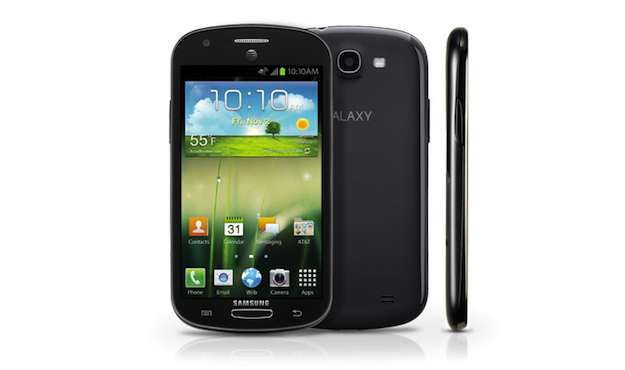
AT&T has provided more details about the Samsung Galaxy Express, set to be released onto the network next week. Aimed at first-time smartphone owners, it has 4G LTE connectivity and a sensible price tag.
Previously announced in September, AT&T has now provided some more details about the Samsung Galaxy Express, it’s latest mid-range Android smartphone. The network is pushing the Galaxy Express as being suitable for first-time smartphone owners, or those who’re planning to upgrade from a basic device.
It’s making it an attractive proposition too, as it has slapped a $100 price tag on the front, provided you scrawl your signature on the bottom of a two-year contract. For that, you’ll get a curvy, Galaxy Ace 2-alike device that will happily connect to AT&T’s 4G LTE network.
The specification, while not quite up to the standard of the current crop of superphones, is still intriguing, particularly the screen. It measures 4.5-inches, a fairly unusual size, and one that’s shared by devices such as the Nokia Lumia 920, the Motorola Atrix HD and the Huawei Honor 2. It’s a Super AMOLED Plus panel too, meaning it’s the same as that seen on the Galaxy S2, and not the often unfairly maligned PenTile display used on the Galaxy S3.
Inside is a 1.5GHz, dual-core processor of currently unknown parentage, which should see the Android 4.0 Ice Cream Sandwich operating system perform well. There’s no information on the amount of RAM, nor any clues on how much internal memory will be found inside the Galaxy Express, although a microSD card slot is present.
A 5-megapixel camera sits on the real panel, and other features include GPS, Bluetooth and a 2,000mAh battery.
Anyone interested in the Galaxy Express will be pleased to know it’s going to be available from AT&T on November 16. It’s also part of an AT&T offer where you’ll get $100 off a second Samsung smartphone when you buy a Galaxy-branded device with a new contract.
Should small business owners invest in a mobile version of their business website or not has been a serious matter of debate for quite a long time. It depends on one’s personal opinions, ideas and perceptions when it comes to investing resources for a mobile version website, but the statistics show a desperate need of such a step.
The need for mobile version websites has been knocking at the door for the past couple of years. However, with the recent advancement in mobile technology and introduction of different tablets and iPads, etc. investing your time and resources in designing a mobile version website has almost become an imperative decision to take.
Why is it Necessary for Small Businesses to Invest in a Mobile Version of their Website?
It is necessary for small businesses to invest in a mobile version of their website, mainly because it is an absolute need of time right now. Moreover, as the time goes on, this need is going to become bigger only. For the past couple of years, using mobile devices for surfing on the internet and doing business have become a growing trend. In the past 2 years, this ratio has been increased by 500%. Moreover, for doing online shopping or business, 43% of the people use their mobile phones and devices. This means that if your website does not have a mobile version, then you lose around 43% of your potential customers – which is too big a number to ignore.
Among all the business types, small businesses need to invest their time and resources in a mobile version of their website as soon as possible. Unlike the big giants, small businesses face fierce competition because of too many sellers and no dominancy of their brand name. Having your mobile website can give you a great edge over your competitors, and you can even knock them out.
This theory can be supported and justified by the following two facts:
1. Approximately, 93% of all the small businesses do not have a mobile version of their websites. In short, 93% of small business websites cannot be rendered properly on a mobile phone or a mobile device. This means that by having a mobile version of your website, you can jump ahead of those 93% small businesses. 2. After having a bad mobile experience with a small business website, approximately 40% of consumers shift to their direct consumers for the same type of transaction. This means that you can easily snatch an average of 40% share of customers from your direct competitors if they do not have a good mobile website. To gain such a high level of customer base, a small business needs to invest tons of money on advertisement and marketing.
Negative Impacts of Not Having a Mobile Compatible Website:
Following are some negative impacts of not having a mobile compatible website for your small business:
• Approximately 23% of your possible customers are not likely to do business with you if you do not have a properly working mobile website. • You will not be exposed to local searches done using mobile devices, and approximately 51% of people use their mobile phones for local searches. • You lose approximately 43% of smartphone users who use their smartphones for online shopping. • You lose another 57% of your customers, who do not recommend doing business with an organization who does not have a mobile version of their website.
Conclusion:
In short, a mobile version of your website has become an absolute necessity for your survival. Sooner or later, you will have to step up and make a mobile version website. So, why not invest your resources now?
Today’s author, Matt Fuller, works for Website Hotline, and specializes in small business web design.
Tesla's new Supercharger stations will provide fast charging for Tesla owners. The opening of six of these stations in California is a big step toward making the EV practical for longer trips.
Range is something of an issue for EV owners, even those who bought their electric cars from Tesla. The EV start-up, which offers the highest-capacity battery packs in the business, is looking to offer a way to make longer road trips plausible without having to install internal combustion range extenders to its cars. Enter the Tesla Supercharger station, of which Tesla has now opened six in California. These are public charging stations for Tesla owners which will not only deliver a partial charge extremely quickly, but are also free to use.
The principal behind these stations is fairly simple. Batteries can be charged very quickly when they are nearly depleted, and this is what the Supercharger station does. Tesla owners can replenish their batteries to point where they have 150 out of the 265 miles of range which the Model S is capable of in just 30 minutes with a Supercharger. Topping it off the rest of the way requires standard charging, but 150 miles is quite a lot for just 30 minutes of charging, and Tesla has placed the stations in high traffic areas between large cities in California with the intent of getting owners of their EVs that extra bit of distance needed to get to their destination.
The Supercharger charging equipment connects directly to the car’s battery, bypassing the onboard charging system. It charges at 90 kW, and is 4.7 times faster than the already-quick home charging stations which Tesla will install for you when you buy a Model S. The stations are located not just along routes where they are deemed most useful, but also near restaurants, shops and other such locations which will help you to kill 30 minutes while you wait for your EV to charge.
The chain of stations makes it possible to travel by EV from Los Angeles all the way to San Francisco with just a couple of relatively quick charging stops. Tesla says that their plan is to extend the model across the whole country, making charging pipelines from coast to coast and across Canada as well. As an added eco bonus, the tops of the stations are covered in solar panels, thus sidestepping the problem of dirty electricity generation. Nationwide implementation will be a much more difficult undertaking, but assuming that everything goes according to plan with these first stations, it’s not an insurmountable goal.
There are more than 3 million Galaxy Note II owners out there, and to make sure that they get the full potential out of their phablet, Samsung has launched no less than five new videos showcasing the device’s power.
As you know from our in-depth review of the Note II, it comes with the S Pen, on which Samsung emphasizes a lot in the new hands-on videos of the device.
The videos are quite lengthy too, with a combined running time of a little more than 30 minutes. So, waste no time, get some snacks and enjoy the hands-on videos below.
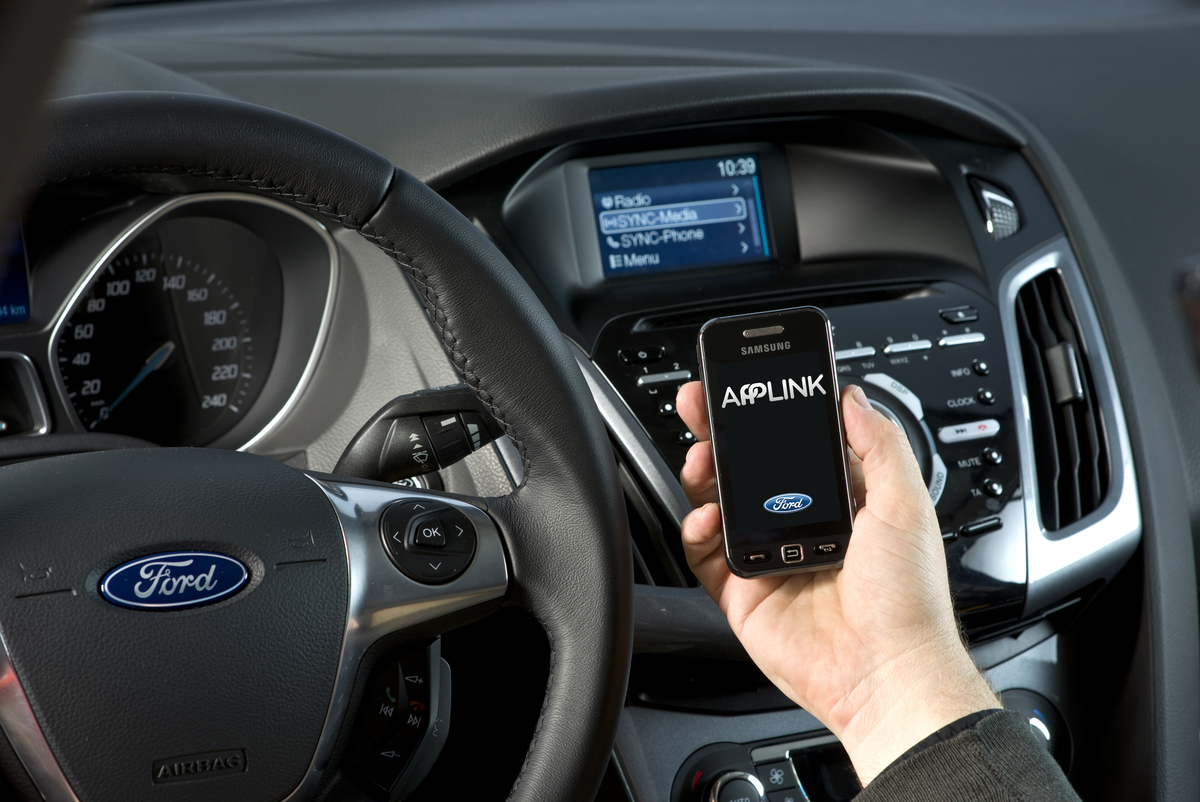
Owners of select Ford vehicles can now use the same Scout app from their smartphones to navigate in the car thanks to Ford Sync's AppLink integration.
If you’re anything like us, you have a favorite navigation app on your smartphone or computer. The issue arises when you get into your car and have to deal with a completely different navigation system. All the settings, features, and ease of use provided by your smartphone-based navigation are nullified in your car — not to mention the fact that you’ll need to pay a separate fee for the nav system in your car.
Thankfully, Ford and Scout (a customizable navigation app from Telenav) have solved this issue. Scout, a daily navigation app available for both iPhone and Android, distinguishes itself from its competitors by offering not only turn-by-turn directions, but also recommendations on where to go, how to get there, and where to go once you’re there.
Ford has made Scout accessible in several 2012 and 2013 Sync AppLink-equipped Ford models, including; Fiesta; Focus; Fusion; Mustang; F-150; Super Duty; E-Series; and Expedition.
For $24.99 per year or $4.99 per month, users can download the premium Scout app. Sync allows Scout users to utilize the app’s distinctive features through “Car Connect,” relaying directions by way of voice commands projected through the vehicle’s audio system through and the radio display.
The premium Scout app also offers traffic updates with automatic re-routing, traffic camera information, speed-trap listings, speed-limit alerts, and lane assist.
Scout is immediately available for Android on AT&T, Verizon, and Sprint networks through Google Play.
Remember the Multi-Window feature that debuted on the Galaxy Note II? As it turns out the Galaxy S III owners might get a chance to join the multitasking action with the upcoming Android 4.1.2 update.
According to SamMobile, the update is coming in December and in addition to the Multi-Window functionality will also bring bug fixes and stability improvements.
For those unfamiliar with the feature, it allows you to have two applications open on the screen at any one time and operate both at the same time. It works great on the 5.5-inch Galaxy Note II, but we’ll see how well it’ll work on the Galaxy S III once the update hits the device.
RIM CEO Thorsten Heins has hit back at a recent NY Times article that interviewed a number of disgruntled BlackBerry owners. In a letter published by the newspaper on Wednesday, Heins accused the piece of lacking balance and said there were still "millions of BlackBerry fans out there."
RIM CEO Thorsten Heins must have had smoke coming out of his ears when he read a New York Times article on Monday entitled The BlackBerry as Black Sheep.
His company is struggling, for sure, but he’s hoping it can turn things around with the launch of its next-generation operating system, BlackBerry 10, early next year. Until then, he needs to hold on to his customers, and prevent the company’s image from being bashed about any more than it is right now. His heart will have sunk when he read the NY Times piece.
It pretty much ripped into the phone maker, interviewing users who had apparently become embarrassed about pulling their BlackBerry phone out of their bag. “I’m ashamed of it,” said one, who claimed to hide her device under her iPad for fear of being judged by clients.
Another said she wanted to “take a bat to it,” which, let’s be honest, seems like something of an overreaction when it comes to feelings about a mobile device. There were a few favorable words towards the end of the piece from a BlackBerry owner called Mr. Fenton who said he couldn’t understand what all the fuss was about when it came to the iPhone, but in case the reader might start to think that perhaps RIM’s phones weren’t so bad after all, the article finished off with someone called Mr. Mindel laying the boot in, saying, “I’m considering removing my BlackBerry battery, pouring in cement, and using the BlackBerry as an actual paperweight.” You get the picture.
So imagine Heins in his office earlier this week, NY Times in hand, reading this article. Of course he wasn’t going to let this go without saying something. He hammered out a response and on Wednesday the newspaper published it.
In his letter, Heins accused the publication of lacking “the balance your readers expect,” before going on to explain that carriers and partners around the world have recently told him “there are millions of BlackBerry fans out there who not only find great value in their device, but also pride in being a BlackBerry owner.”
He says that he takes reports of dissatisfaction among BlackBerry users very seriously, adding that he was encouraged by the supportive comments received in response to the NY Times article.
After trotting out a couple of stats, Heins ends his letter confirming that RIM is on track to deliver BlackBerry 10 in the first quarter of 2013, and offers thanks to “the customers who have remained loyal to the BlackBerry platform.” He also says RIM is looking forward to “winning back many who have left.”
Heins is all too aware that having nothing to show for at least another 10 weeks gives BlackBerry bashers ample time to keep on bashing, and that what RIM must do is keep current users on board while trying to put a positive spin on a very difficult situation. Of course, there will be those who say RIM has done a decent job of beating itself up in recent years with various PR blunders and missteps, but Heins is steering the ship now and is doing everything in his power to save the company from collapse.
RIM has launched an update for the BlackBerry PlayBook bringing it OS to version 2.1. Owners of the tablet now have a reason to celebrate, as it brings some pretty cool new features.
One of them is sending SMS messages right from the tablet via the updated BlackBerry Bridge. It’s been optimized and as a result runs faster than before. Another neat, and rather overdue addition is that the email, contacts and calendar apps got portrait mode support.
Additionally, the support for Android apps is further enhanced with multi-window applications for better multitasking, as well as added camera support and even in-app purchases. Business users haven’t been ignored in this update either, and there are ton of new features for them including improvements for the Print to Go app, better folder and sync management, streamlined setup for better software update experience and more.
The update is currently available for the Wi-Fi versions of the PlayBook, while the 4G LTE units will get it next month, when it gets carrier approval.
Monday brought the latest update of Google’s mobile operating system, Android 4.1, to Samsung Galaxy 3S owners. While owners of the arguably most popular Android device are already enjoying the update to Jelly Bean, other Samsung consumers will have their sweet tooth satisfied soon. Well, kind of.
The Korean manufacturer is ready to roll out Jelly Bean to at least fifteen of their phones and tablets. Included on the list are the following:
Galaxy Tab 7.0 Plus
Galaxy Tab 2 7.0
Galaxy Tab 2 10.1
Galaxy S Advance
Galaxy S Duos
Galaxy S2
Galaxy S2 LTE
Galaxy Note
Galaxy Note 10.1
Galaxy Music
Galaxy Chat
Galaxy Ace Plus
Galaxy Ace 2
Galaxy Beam
Galaxy Mini 2
When will these devices finally get to install the latest installment of the Android OS? As soon as, well… soon. Samsung has given us device names, but no official date or timeframe for the arrival of Jelly Bean. Rumor has it if you can guess how many jelly beans Samsung has in a jar in their office, they will give you an early update. But that could also be a rumor we just made up (and it is).
It’s known that the aluminum shell of the iPhone 5 has been plagued by chipping issues and that has certainly made a lot of iPhone 5 owners quite unhappy. One of them even wrote an email to Apple’s Senior VP of Worldwide Marketing Phil Schiller and much to his surprise, he got a response.
9to5Mac has verified the authenticity of the email, but this is hardly the response the user was hoping to get. Phil Schiller’s message to the affected users is a quite clear “Deal with it”.
Any aluminum product may scratch or chip with use, exposing its natural silver color. That is normal.
That’s not that surprising, considering that Apple was aware of the issues prior to releasing the smartphone to the public.
So, iPhone 5 owners, there you have it – if you want to keep your new Apple smartphone in a mint condition, you should probably invest in a case or just be really really careful. And you shouldn’t expect any sympathy from Apple or its Senior Vice President of Marketing.
Now, according to CNet UK, a Samsung spokesperson has indicated that the Jelly Bean update will be out in October. No confirmed date was given, but a less-than eight week wait is certainly “very soon” in the land of Android updates.
As with most software updates, it’ll be SIM-free Galaxy S3 owners that will see Android 4.1 first, as networks need to test the software before approving it for use.
That said, Orange and T-Mobile UK may have a head start here, as it will be launching the Galaxy S3 LTE on its new EE 4G network in the coming weeks, and Android 4.1 Jelly Bean will come pre-installed on the new device.
With approval already given for that model, Jelly Bean for the quad-core 3G version of the phone must only need a glance before it’s ready to send out to eager customers.
CNet’s report doesn’t mention any dates for the Galaxy Note or the Galaxy Note 10.1, both of which Samsung has promised will receive a Jelly Bean update too.
As for US versions of the Galaxy S3, an October release for Jelly Bean may be wishful thinking, but if you’re confident enough, there are custom versions of the software available, including a custom ROM for the Verizon S3 and a leaked official build for the T-Mobile variant.
We know Samsung is hard at work on the Galaxy S3’s update though, as leaks of the software have become more frequent, with SamMobile.com recently posting a build from September 9.
Described as “very much near perfect,” the still pre-release OS is clearly close to being signed off. The site is so confident, it believes Samsung may start the rollout as soon as next week.
While this sounds a little too good to be true, it’s still looking like Samsung won’t disappoint Galaxy S3 owners who’re keen for some Jelly Bean this year. We’re still waiting for its official statement before getting too excited though.
There’s another way in which Resident Evil 6 is following Call of Duty: Black Ops 2’s lead: Downloadable content for the game is coming to Xbox 360 before any other platform.
Microsoft’s Xbox 360 Japan Twitter feed (via Kotaku) made the announcement on Friday morning.
Now Capcom hasn’t weighed in on this just yet. We’ve reached out to Capcom’s American office to see if this is true for all territories, just Japan, or whether it was just a poorly phrased Tweet. We’ll update this when we hear from them.
It isn’t, however, unlikely especially if the downloadable content in question is for the game’s competitive Mercenaries mode. Timed exclusive DLC is the closest thing to a console exclusive publishers are willing to make in this day and age. Capcom is after all already offering a plethora of exclusive DLC bonuses through retailers GameStop, Best Buy, and Amazon.
The last few days brought great news to Samsung Galaxy S III owners. Three official Jelly Bean ROMs leaked in quick succession, with the latest having yesterday as its build date. And seeing the kind of interest those leaks are enjoying, we’re guessing many of you are wondering if it’s time to jump ship to ICS.
Whether or not to leave your stable ROM for a beta version of a more functional and cooler looking one has always been a tough decision, but here’s hoping we’ll help you with it by giving you more details on what you are getting and at what cost.
The build version
Let’s start with the downsides of the beta release. In fact the latest leaked ROM (build number XXDLH6) only has one major issue, and it’s a rather big deal. We flashed it on two different Galaxy S III units and both of them had issues with their Wi-Fi connectivity. It refused to work with some hotspots and it was painfully slow on most of the others.
Unless you have a data plan that you can fall back to this is quite the usability issue and it’s the main reason why you might want to stay away from this build for now. Everything else seemed to work fine, or at least for us it did.
Here is a rundown of the software goodies that might make you want to live with the shoddy Wi-Fi and get the beta running on your Samsung Galaxy S III right now. You can see them in action in the following video that we prepared for you.
We start with Project Butter that we all heard so much about. Truth is it doesn’t make too great a difference on a powerhouse like the Galaxy S III. The smartphone’s UI was always really fluid and you need to look really close to spot the differences. Still, the app drawer animation is now even smoother and so are the other transition effects around the menu.
There are several changes and tweaks to the UI layot as well. The settings section has been reorganized and Google Now is on board. The notification area has been updated as well and there are a few new TouchWiz goodies too.
Google Now gets activated with a press-and-hold of the menu button. You can either type or talk to it and the app will give you one of its info cards (if available) and read you its contents aloud (you can disable this from the app settings if you don’t need it). If there’s no card to help with the answer to your question Google now will initiate a Google Search.
Google Now in action
The notification area has a few tricks to show off – brightness control, reorganized status bar (it now shows a bigger clock and the date) on top and expandable notifications.
The notification area • Expand a notification
The settings menu has been reorganized – the voice settings, the lockscreen and accounts options are now brought to the top – you no longer need to dig into the menu to find them.
The new Settings organization
The latest version of TouchWiz offers updated apps and a few new widgets. The latter are part of the Mode change setting where you can choose two types of homescreens – Basic and Easy.
Choosing the Easy mode
The two modes offer a pre-defined set of widgets. Basic is the default one and we all have already seen it – every Galaxy S III (ICS-powered) comes with this arrangement out of box.
The Easy mode replaces the default widgets with a few completely new ones – they are very big and give you quick access to the most important functions straight from your homescreen (no menu digging).
The best part of those two modes though is that you customize both as you please and your Galaxy S III will save the changes. That way you can easily create two different layouts, e.g. work and fun or travel and home and alternate between them quickly.
And while we are talking about widgets, we should talk about their new behavior – they now support automatic resize and reshuffling. Let’s say you are trying to add a new widget on a homescreen, but the ones you’ve already put there need to be repositioned. Well, they’ll do that automatically for you. If the widget you are trying to add is bigger than the available space but supports resize then it will automatically shrink to fit into the free area. Cool, right?
The new widgets • interacting with widgets is easier
As you’ve probably guessed there is no Flash support on board, but you can always try and sideload the Jelly Bean-compatible APK that the guys over at XDA-Developers cooked up.
No Flash support for Jelly Bean
You are surely familiar with the awesome trick called pop-up play. In case you need a refresh though – it brings the video you are currently playing to a small floating window and you can use other apps on the phone while still watching this video. The new firmware allows you to resize this pop-up window for even further customization.
Using the pop-up play
The Jelly Bean update replaces the S Memo app with a newer one called S Note lite. It does the same as what S Note did, but adds a few new features. You can record sounds and attach them to the note directly, and you can also add most of the common multimedia formats quite easily.
The S Note lite
Offline voice typing premieres with the Jelly Bean update too. You can download the languages you need (about 20MB per language pack) and use voice recognition without an internet connection. It’s quite handy when you are abroad.
The offline voice support
The performance has been bumped up as well, or at least as far as web browsing is concerned. There’s no major changes to the CPU and GPU results in the benchmarks we ran, but the Jelly Bean Galaxy S III scored higher than its ICS sibling on the JavaScript tests.
Linpack
Higher is better
Galaxy S III Android 4.0.4 ICS 177.1
Galaxy S III Android 4.1 JB 185.8
BenchmarkPi
Lower is better
Galaxy S III Android 4.0.4 ICS 344
Galaxy S III Android 4.1 JB 349
NenaMark 2
Higher is better
Galaxy S III Android 4.0.4 ICS 58.8
Galaxy S III Android 4.1 JB 58.5
GLBenchmark Egypt 720p offscreen
Higher is better
Galaxy S III Android 4.0.4 ICS 103
Galaxy S III Android 4.1 JB 99
SunSpider
Lower is better
Galaxy S III Android 4.0.4 ICS 1447
Galaxy S III Android 4.1 JB 1179
BrowserMark
Higher is better
Galaxy S III Android 4.0.4 ICS 169, 811
Galaxy S III Android 4.1 JB 157, 176
All in all the Samsung Galaxy S III Jelly Bean update seems to offer quite a lot of new features and we can’t see many people being left disappointed by it. We’ll be doing a detailed preview in the following days, shedding even more light on the new features and optimizations, so stay tuned and feel free to post any questions you want answered in the comments section below.
AT&T iPhone owners who want FaceTime will need to upgrade to a Mobile Share plan, but this new policy may be against the FCC's new net neutrality rules.
AT&T already announced that it would be rolling out shared data plans for their new mobile customers, but it looks like the separation between subscribers won’t just be how their data is distributed–application use may have limits as well.
We reported last month that AT&T may be planning on limiting access to FaceTime for iPhone owners based on their data service. Unfortunately for AT&T, it looks as though this may be in violation of FCC rules on net neutrality.
What we know about the limits
As of last week, AT&T made it known that using FaceTime over its 3G and 4G mobile network — a feature that will become available with iOS 6 in the fall — will be available only for shared data plan users. Users who are gripping tight to their tiered and unlimited plans will only be able to use the video chat app while connect to a Wi-Fi network. As wireless carriers are known to do, this limit in functionality is likely a push to get users to sign up for the new shared plans.
What we know about the law
According to Public Knowledge’s senior staff lawyer John Bergmayer (via NY Times), this attempt to prohibit use of a particular application puts AT&T in violation of the FCC’s rules on net neutrality. He refers to the Open Internet Rules, specifically one that states that mobile providers cannot “block applications that compete with the provider’s voice or telephony services.” The fact that the FCC used the term “telephony” aside, this raises a legitimate question as to the legality of AT&T’s app block. Mr. Bergmayer stated that there is “no technical reason why one data plan should be able to access FaceTime, and another not.”
While the FCC is currently not making a comment on this case, there is some precedent already set on the issue that may give us an indication as to how this will play out. Back in July, the FCC ruled that Verizon couldn’t block tethering applications in the Google Play store. Verizon tried to institute that blockage because apps made available a service that Verizon was charging for. Because of the FCC’s ruling, tethering apps are now available for Verizon customers.
What it means for other service providers
If AT&T is allowed to put up a firewall to prevent certain users from accessing an individual application, a somewhat startling statement will be made. Does this mean that other applications will see a similar block, like Skype on Windows Phones or other third party applications on any given service? It conjures up a somewhat frightening scenario in which app access becomes a tiered system. Only top data subscribers get access to top apps. If AT&T puts limits up on a game like Angry Birds, there could be riots in the street, but what about less popular texting apps or products like Google Voice, which directly conflict with AT&T’s services?
At the moment, this FaceTime debate only concerns AT&T users. Sprint has stated that it has no intention of charging extra for FaceTime access. Verizon has also not made any indication that it will put similar limits on iOS 6′s flagship video chat program. If nothing else, this may just give AT&T iPhone owners a reason to leave for another carrier. Then again, iPhone users have lived with Wi-Fi only FaceTime for this long. Maybe they don’t really need to video chat on 3G or 4G.
Now, there’s a new one, with a build date of August 14, which brings some fixes and cool new features to Samsung’s Android flagship. Users that have flashed the new ROM report improvements in the notification area, the addition of Dormant Mode as well as bug-fixes for Google Now. The cool TouchWiz-exclusive Pop Up Play video window can now also be resized.
If you’re eager to flash the latest official Galaxy S III Jelly Bean ROM, follow the source link below and read the instructions. As always, approach with care and know that flashing ROMs manually almost certainly invalidates your warranty.