Pages

Showing posts with label email. Show all posts

Nov 14, 2012

Microsoft plugs absurd Skype security hole

skype-large-logo

Microsoft has closed off a major security hole in Skype that allowed anyone to gain access to your account with only your email address. The entirely avoidable problem highlights the opposing goals of "user experience" and "safety."

Microsoft has blocked a major Skye security hole that allowed anyone to access your account with only your email address. The only problem now is that it shouldn’t have existed in the first place.

First posted on a Russian forum some months ago – but apparently ignored by Microsoft until today – the security flaw worked like this: Someone creates a new Skype account with your email address, the one associated with your Skype account. In doing so, this person now has the ability to reset the password of both the new account and your actual account, thus gaining access while also blocking you out.

The security flaw percolated to the surface earlier today on Reddit, and was later recreated by writers at The Next Web, who successfully gained access to the Skype accounts of two other TNW employees. Microsoft responded quickly by shutting down the password reset page entirely.

“We have had reports of a new security vulnerability issue,” wrote engineer Leonas Sendrauskas on the Skype security blog. “As a precautionary step we have temporarily disabled password reset as we continue to investigate the issue further. We apologize for the inconvenience but user experience and safety is our first priority.”

The problem here is that “user experience” and “safety” are diametrically opposed goals. Skype made the user experience of resetting a password less of a hassle by allowing a person to do so with only an email address. But clearly this was not a safe way to do things.

As avoidable as this whole debacle is, we feel for Skype, and every other online system that requires a login: Achieving a balance between user experience and safety is extremely difficult. Imposing meaningful online security means putting roadblocks in the way of people who are trying to use your service. Creating an easy user experience often means ditching security precautions. No matter which way you go, something has to give.

Regardless, it may still be a good idea to beef up your Skype security while Microsoft investigates a fix. The only way to do this is change the email address associated with your Skype account to something nobody else knows (which probably means creating an entirely new email account). Once you’ve done that, simply login (assuming you still can), go to Profile > Edit > add new email address. Click Save. Then go to Edit again, and set the new email address as your primary email, then save again. Then enter your password and click the Enter button. Then go back and delete the previous email.

How’s that for user experience?


Source : digitaltrends[dot]com

Nov 8, 2012

With Twitter accounts hacked, users urged through email to change passwords

Twitter usernames and passwords leaked — but you don't have to worry

This morning Twitter sent out a network-wide email to its users whose accounts were compromised, and urged them to change their passwords.

Users have been calling out Twitter for its vulnerable account authentication for some time now, but the social network still remains mum about the apparent holes in its security. Today Twitter was finally subject to its largest attack, which due to its scale, forced the company to send user-wide alerts via email notifying its users that their accounts have been compromised.

In an email sent this early this morning, Twitter had acknowledged that accounts had been compromised by a third-party site, and urged its users to change their passwords. We checked Twitter and noticed that many compromised accounts were used to tweet spam, but the original users have been able to regain access to them.

Here’s what Twitter said in the email:

“Twitter believes that your account may have been compromised by a website or service not associated with Twitter. We’ve reset your password to prevent others from accessing your account.

You’ll need to create a new password for your Twitter account. You can select a new password at this link: https://twitter.com/pw_rst/…

As always, you can also request a new password from our password-resend page: https://twitter.com/account/resend_password

Please don’t reuse your old password and be sure to choose a strong password (such as one with a combination of letters, numbers, and symbols).

In general, be sure to:

Always check that your browser’s address bar is on a https://twitter.com website before entering your password. Phishing sites often look just like Twitter, so check the URL before entering your login information!

Avoid using websites or services that promise to get you lots of followers. These sites have been known to send spam updates and damage user accounts.

Review your approved connections on your Applications page at https://twitter.com/settings/applications. If you see any applications that you don’t recognize, click the Revoke Access button.

For more information, visit our help page for hacked or compromised accounts.

-The Twitter Team”

Earlier last month, Dennis Jones and his Twitter handle @blanket was hacked, which lead him to discover a mature black market for hacked Twitter, Minecraft, and YouTube accounts. Each account can sell for as little as $60. Digging deeper, we discovered that hacking Twitter accounts as basically become child’s play. Many “hackers” are simply teenagers who browse forums like hackforums.net. These communities are full of tutorials that can guide anyone step-by-step through taking over coveted Twitter handles. These forums are also a proliferating marketplace for selling or trading programs used in malicious virtual attacks, including cracking passwords.

We reached out to Twitter and inquired about how many accounts have been compromised, and who was responsible for the attack. We’ll update you once a spokesperson gets back to us.


Source : digitaltrends[dot]com
Nov 5, 2012

Hotmail no more: Gmail is now the world’s most used email service

Pity poor Hotmail, finally ousted from worldwide email service control by Google's Gmail after eight years of competition.

Sorry, Microsoft: The rein of Hotmail is finally over, with the long-lived email service finally being knocked off of the top spot when it comes to the most-used email service on the Internet last month by Google’s Gmail offering.

Originally launched on July 4 1996 as one of the first web-based email services – Its launch was tied to American Independence Day, as the service promoted itself as offering users “freedom” from ISP-based email and email addresses -  Hotmail was purchased a year later by Microsoft for an estimated $400 million, and rebranded as MSN Hotmail (Later becoming “Windows Live Hotmail” in 2006/2007). Despite becoming the butt of many online jokes for its ubiquitous quality and age, Hotmail has been continually revised, upgraded and refined by Microsoft, with the company even going so far as to introduce an “all-new” update a year ago that mimicked many of the features that won users over to Google.

That, sadly, wasn’t enough to allow the service to maintain user dominance. According to a ComScore report for October – first made public by GigaOm – Gmail usage finally rose above that of Hotmail last month worldwide. This isn’t the first time that this shift has been reported; Google quietly boasted about it happening way back in June of this year, in the middle of a blog post about cloud computing when it announced that it had “more than 425 million active users globally.” However, ComScore disagreed with that number more than a little, claiming at the time that it only had 289 million users active worldwide. ComScore Vice President Andrew Lipsman explained the discrepancy by saying that “there are going to be some users that are left out” of its calculations, as it only tracks home and business use, meaning that Internet access via smartphone or other mobile device, or Internet cafe access, would be missing from their figures (Google, when asked about the difference in estimates, commented that it doesn’t comment on third-party numbers).

Now, however, it appears to be official: Gmail is the king of web-based email services even by third-party metrics. This, apparently, is down to a fall in email provider numbers overall, with Gmail’s simply seeing less attrition than either Hotmail or Yahoo and coming out stronger as a result (It’s perhaps worth noting that Microsoft introduced Outlook.com as its Hotmail replacement in July; I wonder whether adding Outlook and Hotmail users together for October would provide Microsoft with overall control of the market?). 

It’s less of a contest when it comes to American email service use, and more of a surprise who wins that particular battle: Yahoo, which has 40.8 percent of the US market, compared with Gmail’s 36.7 percent, or to put that in real numbers, a 7 million user difference between the two (Hotmail languished in far third place, with 18.9 percent of the US market).


Source : digitaltrends[dot]com
Nov 1, 2012

Why won’t my email work in Windows 8′s Mail app?

Why won't my email work in windows 8 gmail

So you've upgrade to Windows 8 and are now wondering why your email isn't working in Windows 8's Mail app? We know why, and we also know how to help.

If you’re one of the millions of people who rely on your Internet provider for an email address, you’re in for a shock when you upgrade to Windows 8. Brace yourself; there’s a very good chance that your ISP-provided email address (jan@comcast.net, or mike@verizon.net, for example), won’t work with Windows 8′s Mail app.

Windows 8 supports an up-and-coming email protocol called IMAP, but many Internet service providers — such as Time Warner, Comcast and Fairpoint — only offer email access through a Web browser or through an older email protocol called POP. Unlike the email applications in earlier generations of Windows, the new Mail app doesn’t include POP mail support.

You could still check your email on the Web, or hop into Desktop mode and set up a classic-style email client like Thunderbird (assuming you aren’t running a limited Windows RT tablet), but neither of those options sink their claws into Windows 8 with the same intensity as the native Mail app. The Windows 8 Mail app integrates with the operating system’s People list and pops up system-wide notifications when you receive new messages; the alternatives don’t. There aren’t any Windows 8 Mail apps available in the Windows Store, either.

Don’t panic, though; all is not lost. Thanks to the Mail app’s support for webmail services like Outlook.com and Gmail, it’s possible to work around the crippling lack of POP functionality. It’ll take jumping through a hoop or two, and there is one big “gotcha!” involved, but you should be receiving your ISP-provided POP messages in minutes.

Here’s how to read your POP mail in Windows 8, with a helping hand from Gmail. Fear not; we’ll guide you through every step of the way.

Configure your Gmail account to work with your POP account

1. Create a Gmail account. If you don’t have a Gmail account already, head over to mail.google.com and whip one up. I recommend giving your account a decent-sounding handle — maybe your name? – instead of something silly. You’ll see why at the end. Make sure you’re signed into the account to continue.

add pop3 account gmail set up email on windows 82. Enter Gmail’s email account options. Click on the gear icon in the upper right-hand corner, then select “Settings.” In the Setting page, select the “Accounts and Import” tab along the top, then click the “Add a POP3 mail account you own” link in the “Check mail from other accounts (using POP3)” section. A new Window opens.

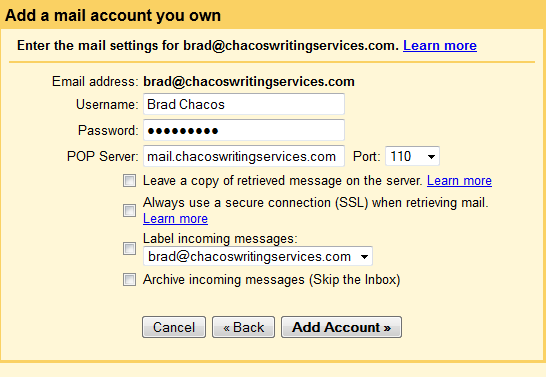
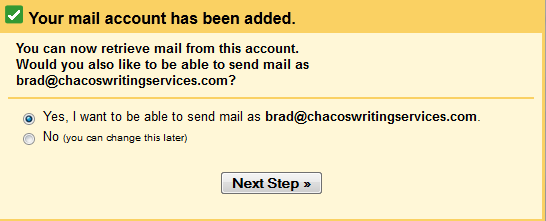
add new account gmail set up mail in windows 83. Configure Gmail to read your incoming POP mail. Enter your POP email account address on the first screen, then click Next and enter your incoming POP settings as specified by your Internet provider. (Don’t know this info? Search for “<your provider’s name> POP email settings”, sans quotes.) If you already had an active Gmail account, you might want to check the box that labels messages coming from the new POP account. Click Next, then confirm that you want to be able to send messages from the account as well.

gmail account added set up email in windows 84. Configure Gmail to send outgoing POP mail. Confirm your outgoing email settings, then continue. On the next screen, leave the “Send through Gmail” option. Then, tell Gmail to send a verification message to your email address. Either click the link in the message, or copy and paste the verification code into the last box. Now you’re good to go.

Configure the Windows 8 Mail app to read your Gmail account

connect gmail set up email in windows 85. Add a new account to the Mail app. Open up the Windows 8 Mail app, bring up the Charm Bar, then select “Settings.” In the Settings Menu, click on “Accounts,” then select “Google” from the list.

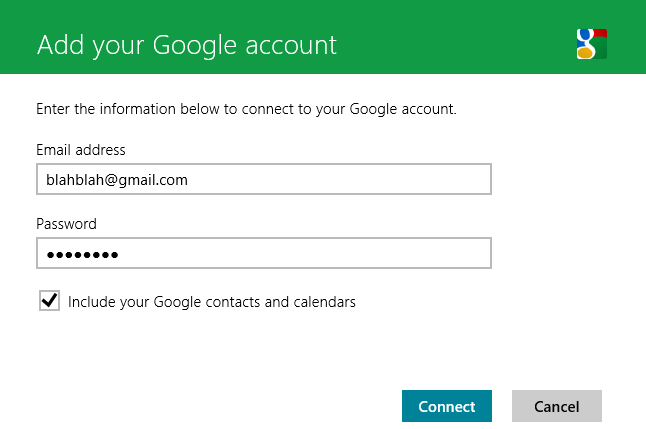
6. Add your Google Account. Enter your Gmail account name and password. Optionally checking the box will import your Google Calendar and Contacts. Voilà! Your Gmail account appears in the Mail app, complete with incoming messages from your POP account. Now, Windows 8 will send you a notification when you receive a new email.

Now for the bad news…

The above all sounds good and well, but here’s the rub: when you send an outgoing email, it will use your Gmail email address, not your POP provider’s email address — even if you’re replying to a message sent to your POP account. There’s no way around it; we tried mucking around in Gmail’s Web-based settings, the Mail app’s outgoing server settings, and everything else we could think of — all to no avail. Now you see why I suggested selecting a halfway professional-sounding Gmail account name.

That shouldn’t matter too much, though. You’ll still be receiving the messages sent to your POP account, and your contacts should still be able to receive your messages just fine despite the new Gmail handle. If tricky spam filters start snagging your outgoing messages, just sign into your POP account’s Web-based interface and send out a message telling your friends to look for messages from your new Gmail account. If your POP account doesn’t have a Web interface, sign into the Gmail website and send the message that way; you’ll find your POP email account listed as an option in the “From” line when you compose a new message.

Elegant? Not at all. But Windows 8 hides a lot of little flaws and awkward annoyances underneath its beautiful, multicolored surface, and hey — at least this fix works. Happy emailing!


Source : digitaltrends[dot]com
Oct 27, 2012

Lock down your email with SafeGmail’s military-grade encryption

SafeGmail locks down Gmail with PGP encryption

Sending sensitive personal information over email is a dangerous security misstep that could make you increasingly vulnerable to hackers. But SafeGmail plugin for Chrome takes the risk out of the whole process by encrypting your messages with military-grade security.

We should all know by now that Web-based email from a company like Google or Microsoft is anything but secure. Never should you share sensitive personal data, like your credit card number or Social Security Number, through an email — that’s just basic privacy protection stuff. Unfortunately, not doing so can be a huge pain when it comes to getting things done. Fortunately for Gmail users, there is now an easy solution: SafeGmail, a free Chrome extension that lets you quickly encrypt any message with military-grade data encryption called “Pretty Good Privacy” or PGP.

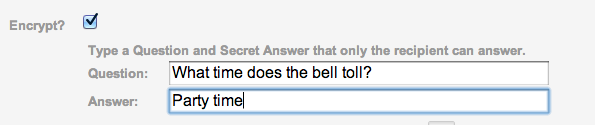
Here’s how it works: Once you’ve installed SafeGmail (it takes one click), simply sign into Gmail and start a new email message. Below the “Subject” field, you’ll see a new check box next to which reads “Encrypt?” Click the box, and you’ll be asked to enter in a question and an answer.

In order for the recipient of your email to read the message, she or he will have to know the answer to the question, and input it correctly. If the person doesn’t know the answer, they won’t have access to the email, so don’t get too clever — there’s no point to this whole thing if you have to send a separate email or text message with the answer to your security question. That said, you also don’t want to make the question too easy — only the recipient should know the answer.

When you’re ready to send, hit the new “Send + Encrypt” button at the top of the window, and the encryption process will begin. This can take a slightly longer time than you might expect, if you have a slower-than-average Internet connection, but shouldn’t be bad with standard broadband access.

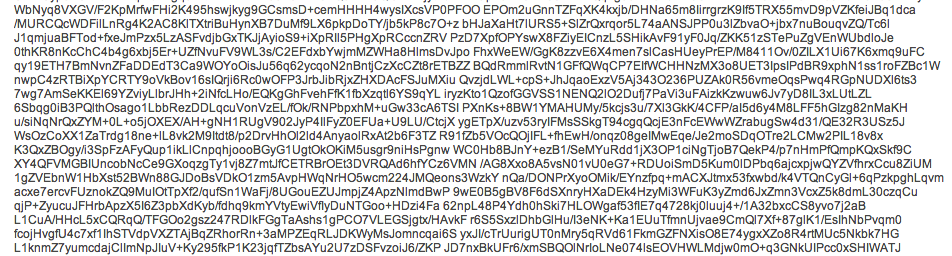
When your recipient receives the encrypted email, it will include a link to SafeGmail’s system, where he or she will have to correctly answer the question. Assuming that happens, a new window will load asking the recipient in copy and paste a string of characters — the encrypted message — into a text box. The length of this string will change depending upon the length of the message. So if you’re verbose, expect to make your recipient copy and paste a massive block of text. After the encrypted message is pasted into the text field, the recipient just clicks “Show My Mail” and voila! The message is readable.


Because the decryption process is done within your browser, SafeGmail never actually access the message, so you don’t have to worry about their servers getting hacked either. And once the decrypted message it’s closed, it will be re-encrypted for both you and whomever you sent the email to. After a certain period of time, the message will expire.

Watch a quick video about how SafeGmail works below:


Source : digitaltrends[dot]com
Oct 26, 2012

A field trip to the Facebook black market in which we buy 1.5 million accounts and email addresses for $5

facebook black market

There's a black market for just about everything, including your private Facebook ID, email address, name and it costs just $5. After one IT specialist found he could net a million users' account information, we had to go and see for ourselves. To no one's surprise, it's very real and very easy.

The seedy underbelly of Facebook has surfaced yet again thanks to Bogomil Shopov, an online IT marketing and community management professional from Bulgaria, who recently was able to purchase one million names, email addresses, and Facebook profile IDs. 

While browsing the Web for free marketing tools and guides for his business, or “zero budget marketing,” as he told me, Shopov was led to Gigbucks. Gigbucks is an “e-commerce” platform similar to Fiverr, where buyers can purchase services or products for as little has $5 or as much as $50. But what he stumbled on was an offer for one million Facebook accounts and their email addresses that were mined from a Facebook app. Out of curiosity, Shopov purchased the Excel list for $5 and shortly thereafter received the list as promised. He recognized that the header was Turkish, indicating that the developers responsible for procuring the user information were from Turkey, but the accounts were primarily of users located in the United States, Canada, and the UK.

After publishing his blog post detailing the transaction, Facebook reached out to Shopov via phone to find out how exactly he’d gotten his hands on all this data. And when we checked out the URL again today, we noticed that the offer had been taken down from Gigbucks. Shopov told us that Gigbucks’s administrators notified him last night that the offer was removed, likely at the request (read: demand) of Facebook.

As Facebook has introduced more seamless interactions into Facebook Connect and its Open Graph apps, it’s become more difficult to know what you’re giving up and what you’re giving access to; it’s all much less noticeable than it used to be. Users may not realize that it’s rather simple for developers to mine your information; too many of us assume that third-party Facebook app developers won’t use your information like this. “The data that we voluntarily provide to social networks, even as we police our privacy settings, is becoming increasingly vulnerable,” says Robert Leshner, founder of Safeshephard. “It’s not Facebook or even LinkedIn that we have to worry about,” Leshner adds. “It’s the weakest link in the privacy chain, and right now that’s third-party apps. The walled garden of Facebook isn’t very well walled off – it’s crumbling.”

How third-party developers do this is by creating apps (that may or may not offer value) for the sole purpose of collecting user data, a practice we’ve talked about before. When you first use a Facebook app, a page pops up that describes the information you’re permitting the developer to access. Your email address, name, user ID, gender, and other basic information is fair game — and if it gets into the wrong hands, can then be aggregated into a tidy list and sold off.

There’s a rather large incentive among blackhat marketers to pay for this valuable list of real email addresses and Facebook accounts (Facebook, after all, has made a name for itself as the proprietor of real identities). These addresses can be used to boost the number of followers on Facebook pages (through invitations), or Facebook users can be placed on email lists. It can also be used to target these specific users based on email addresses, phone numbers, and user ID. Note that you can find the Facebook account associated with an email address simply by typing the email into Facebook’s search bar, similarly to how a researcher previously discovered the Facebook profiles associated with the phone numbers.

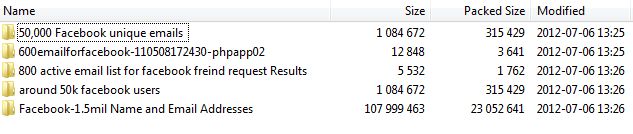
A simple Web query reveals an expansive and thriving underground market for Facebook IDs linked to email addresses. It’s reminiscent of the market for hacked Twitter accounts that we reported on earlier this month. In fact, we were able to purchase a couple of these lists for a little as $5 each. Like Shopov, we were sent a .rar file with several .txt files listing over 1.5 million email addresses, names, and Facebook profile IDs. And yes, it really was that easy.

What one of the sellers revealed to us just how prevalent and common the practice of buying and selling this data is: He purchased a list of 32 million email addresses and Facebook accounts from his friends and repackaged the list into sets of between one and two million email addresses to resell. There also appears to be some reusing and recycling going on, as we realized we’d purchased duplicate lists from two different sellers.

With our increasing reliance on using Facebook or other social networks to access third-party applications, our data can be easily misused and profited from by third-parties. Before you allow an app access to your information next time around, you might want to be more mindful.

We reached out to Facebook and will update you with their response.


Source : digitaltrends[dot]com
Sep 24, 2012

Apple Maps link redirect to Google Maps when you share them

Apple Maps in iOS 6 lets you drop a pin and share the location over email, SMS or social networks. The recipient can click on these links and open the point described in the URL. It seems for now, though, Apple is choosing to let people open these links in Google Maps.

This comes as no surprise considering the Apple Maps are only available on iOS 6 devices so it’s better to let people open the link in what is arguably the best and most popular mapping service in the world. If you do have an iOS 6 device, then it would open within the Apple Maps application.

There does seem to be an issue on iOS 6 devices at the moment, where certain apps tend to open the link within Google Maps in the browser whereas others open it correctly within the Maps application. This probably has more to do with those applications and an update should fix the issue.


Source : blog[dot]gsmarena[dot]com