Pages

Showing posts with label specs. Show all posts

Nov 14, 2012

Wireless Router Buying Guide

Wireless router buying guide

We separate marketing from reality to outline the specs and features you need in a wireless router.

Wireless Router Buying Guide

Looking to set up a network in your home so you can connect all your PCs to your broadband Internet service, share data files, and stream audio and video between rooms? Don’t know what equipment you need? Confused by the spec charts for the gear you know you need? Skeptical of the pie-in-the-sky performance claims? We can help.

We’ll assume you already have broadband Internet access (via DSL, cable TV, or whatever solution you might have). The next thing you need is a wireless router that will go between your broadband Internet device (i.e. your DSL or cable modem) and one of your PCs. (Or between your modem and data switch if you already have a more elaborate network). We’re suggesting a wireless model because you don’t want to string Ethernet cable around your home unless you absolutely have to; besides, a wireless router is the best way to access the Internet using your smartphone. And if you ever discover you absolutely must have a wired connection, the router will have a built-in switch to handle it.

Features and wireless networking standards

Now let’s talk about the features you should look for in a wireless router. Just like smartphones, new wireless networking standards are coming out more often than ever. The current standard is 802.11n. Just about every router you can find on store shelves these days should comply with this standard, and this spec typically appears at the top of the list of features printed on the box, so it shouldn’t be hard to find when you go shopping.

There are, however, two new standards now in development that will soon make 802.11n old news: 802.11ac, and 802.11ad. The latter is still a few months off, but 802.11ac routers are already available, such as Buffalo’s AC1300, or D-Link’s DIR 865L. This new standard supplements 802.11n and offers considerably faster speeds, but the problem is that this standard isn’t supported by any of the devices most people currently own. So basically, if you get an 802.11ac router, it’ll probably still be backward compatible with all your 802.11n hardware, but you’ll have to wait for a while before you can get your hands on a device that can actually utilize your router’s 802.11ac capabilities.

Because of this rapid progress in wireless networking standards, if you have older wireless gear, you’ll want to make sure that any new router you buy will remain compatible with whatever previous IEEE standard your other hardware is based on (examples include 802.11a, 802.11b, and 802.11g). And if you want further assurance that your wireless router will work with other wireless devices you already own (wireless network adapters, media-streaming boxes and so on), look for the Wi-Fi Alliance’s Wi-Fi Certified logo. The alliance’s 300 member companies conduct extensive interoperability testing to ensure that products claiming to adhere to 802.11 specifications are in fact compatible.

Wi-Fi network speeds

You should take manufacturers’ speed declarations with a colossal grain of salt. For example, you’ll encounter many claims of “theoretical” maximum bandwidth of 300 or 450Mb/sec (megabits per second), but you’ll never see throughput that high in realistic environments in which walls, doors, appliances, and other barriers separate your router from its client devices. When transferring files using TCP/IP (the most common file-transfer protocol that Windows computers use), you’ll more likely achieve speeds of 100Mb/sec at close range – much less than that at longer distance.

The 300Mb/sec claims aren’t fabrications; they’re just not based on real-world conditions. Fortunately, most wireless routers manufactured in compliance with the 802.11n standard should be capable of streaming high-definition video over a reasonable distance, provided there aren’t too many obstacles in the path between the router and its client.

All wireless routers have built-in switches for making hard-wired network connections, but cheaper routers will have switches rated at only 100Mb/sec. You won’t regret spending a few extra dollars to buy a model with a gigabit switch (that’s 1,000Mb/sec). A gigabit switch won’t make downloading files from the Internet any faster (the fastest cable modems currently deliver only 50MB/sec to 60Mb/sec), but it will make a significant difference in the speed at which you can move files across hard-wired network connections inside your home.

Wireless data security

Wireless networks are as insecure as they are convenient – if you don’t take steps to secure your network, just about any troublemaker within range can eavesdrop on your online activities, leech off your Internet connection, access any of the files stored on your computers, infect your systems with viruses, and cause all sorts of other problems.

If you’re operating an older router that’s limited to WEP (Wired Equivalent Privacy) security, however, you might as well not have any security at all. Cracking WEP security is literally child’s play. The router you buy should support at least WPA2 (the second implementation of the Wi-Fi Protected Access protocol), but every device you add to your network must also support WPA2 for this to work. Your network is only as secure as the least-secure device that’s connected to it.

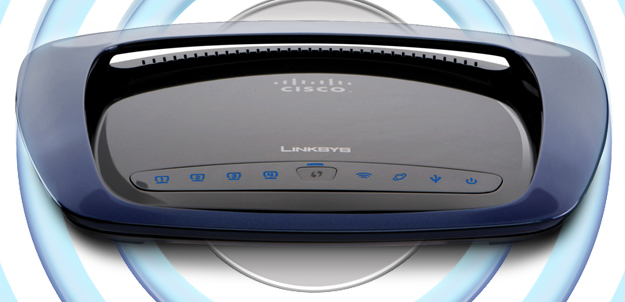
Linksys WRT610NDual-band and tri-band routers

Manufacturers have sold dual-band routers for years, but now many are starting to roll out tri-band routers as well. What does all this ‘dual’ and ‘tri’ business mean? Dual-band typically means that the router is equipped with two radios: one that operates on the 2.4GHz frequency band, and one that runs on the 5.0GHz frequency band. This enables you to set up two separate wireless networks, which is nice to have if you want to use one network exclusively for transferring data files and the other for streaming media, for example. Make sure you read the fine print though – some dual-band routers only have one radio that can operate on either the 2.4GHz or 5.0GHz bands, but not both at the same time. Netgear’s WNDR4500 or Linksys EA4500 are both capable of running on the 2.4GHz and 5.0GHz bands simultaneously.

Tri-band routers are a bit of a new thing, and chances are you’ll have some trouble finding one to purchase. If you’re reading this in 2014 or later however, tri-band routers will likely be ubiquitous by now. Essentially, these routers have a third radio that operates on the currently unlicensed 60GHz frequency band. Using a new technique to beam the radio signal directly to the antennas of connected devices (a process called beamforming) allows some of these routers to achieve data throughput rates of 7Gbps – considerably faster than the measly 300Mbps that 802.11n routers are capable of. 

If you’re only looking to get basic internet access and don’t need all these bells and whistles, you can save a bit of money by going with a single-band N router like the Securifi Almond, or a D-Link DIR-636. 

Quality of Service

Despite the label, Quality of Service (QoS) is not related to the quality of your Internet connection; rather, it’s a set of mechanisms within the router’s firmware that reserves certain resources for different applications. If you rely on a VoIP (Voice over Internet Protocol) service, such as Vonage, for telephone service, QoS allows you to configure the router to assign that data flow higher priority. So if someone in your home is downloading a large file while you’re talking on the phone, the quality of your call won’t degrade.

QoS can also be used to optimize your network’s performance with online games, video streaming, and similar applications. QoS can’t increase your network’s bandwidth or speed up your Internet access, but it can make the best use of the online resources you do have.

D-Link-DIR-855USB connections

The last router feature we’ll examine is USB support. You’ll find USB ports on many routers, but it’s important to find out what that port is used for. On some routers, it’s merely a means of transferring setup information (network ID and password, for example) from the router to a client via a USB memory key. Better routers will allow you to plug in a USB mass-storage device to add NAS (network-attached storage) functionality. Plug a large USB hard drive into your router and every device on your network will have access to that storage resource – it’s like having a cheap server. A good number of routers on the market have USB support, like Netgear’s WNDR4500 for example.

What to spend: price vs. performance

Let’s sum up with a discussion of prices. Depending on the type you get, you can spend anywhere from $35 to nearly $200 on a wireless router. 802.11ac routers will likely cost you a bit more, but the cheapest products will likely sacrifice advanced features such as Quality of Service, USB connectivity, and dual- or tri- radios. They might also be more difficult to set up and may not have strong tech support on tap. If you run into problems. If you don’t need those features and are confident in your own skills, those shortcomings won’t matter.

A cheap router that delivers subpar performance, however, is no bargain. Product reviews will give you a hint as to what you can expect, but setting one up in your own home is the only sure way of knowing how the router will perform in your unique environment. When you buy yours, make sure the retailer you do business with offers a liberal return policy if you’re not satisfied. 


Source : digitaltrends[dot]com

Oct 29, 2012

Hands on with HTC’s Windows Phone 8S

We take the Windows Phone 8S by HTC a test ride. Though it runs on lower-end specs, this T-Mobile phone appears to still pack a punch.

Though its often most fun to write about the fanciest and most expensive smartphones on the market, not everyone can afford them Luckily, there are a growing class of 2nd tier phones that still manage to provide a competitive experience. During my time with the Windows Phone 8S by HTC, it appears to be just such a device. The 8S has 4GB of internal storage, 512MB of RAM, and a 5-megapixel rear camera, but its 1GHz dual-core Snapdragon S4 processor is no slouch. I’m also a fan of its 4-inch 800 x 480 pixel screen. The resolution isn’t high and the RAM isn’t plentiful, but the phone appears to run Windows Phone 8 quite responsively. Overall, it should have a slight edge over many Windows Phone 7.5 devices on the market today. And hey, it comes in a number of pretty colors. T-Mobile will be carrying the 8S in the coming weeks.


Source : digitaltrends[dot]com

Oct 19, 2012

iPhone 5 vs iPhone 4S: Our in-depth comparison

iPhone 5 vs iPhone 4s header

The iPhone 5 is here. But is it worth the money to upgrade from the iPhone 4S? Check out the specs and decide for yourself.

The iPhone 5 is the latest entry in Apple’s smartphone line. Whether you are filled with desire or feeling a little underwhelmed by its lack of evolution, there’s no doubt about the demand. With over 5 million sold in the first three days, Apple has another smash hit on its hands. Even with supply issues, Apple is expected to sell around 50 million iPhone 5 handsets by the end of the year.

If you are looking to upgrade, there’s no doubt the iPhone 5 will be on your radar, but what about last year’s iPhone? The iPhone 4S was no slouch and if you picked one up you may be wondering whether an upgrade to the latest model is really worthwhile. Alternatively you may want to take advantage of the deep discounts the old iPhone models enjoy whenever a new kid hits the block.

Join us as we break down the iPhone 5 versus iPhone 4S comparison into individual categories to help you make the right choice.

Before we get started you might want to check out our full iPhone 5 review and our iPhone 4S review. Just remember that those review scores are a product of their times and relate to what was available on the open market when each phone was released.

Design and construction

There’s really no mistaking the distinctive look of the iPhone line, but it has evolved and matured a great deal since the original 2007 release. The iPhone 5 looks a lot like an iPhone 4S that has had a growth spurt. It is 4.87 inches tall compared to 4.5 inches and it is 0.30 inches thick compared to 0.37 inches. When you pick it up you’re struck by how light it feels. The iPhone 5 weighs just 3.95 ounces, which is almost a full ounce lighter than the iPhone 4S.

A larger screen and a slimmer form factor have been achieved without compromising on the materials and quality. The iPhone 5 has a brushed aluminum back instead of glass. It is also significantly tougher than its predecessor and has been trouncing the competition in drop tests.

The controls are much the same. The familiar home button is present and correct, the power button is ever so slightly smaller on the iPhone 5, and a Nano-SIM has replaced the Micro-SIM in the iPhone 4S. You’ll also notice that the lightning port is significantly smaller than the old 30-pin dock connector.

Winner: iPhone 5

Feel

With two devices so similar the feel comes down to a couple of minor points. The iPhone 5 is lighter and yet it still feels like a premium construction. The brushed aluminum backing is also more comfortable than the glass backing you’ll find on the iPhone 4S, not to mention less prone to smears and fingerprints. The only place where the iPhone 5 falls down is the power button. Despite the fact that the phone is taller, Apple has left the power button on the top and it may now be a bit of a stretch for some people.

Winner: iPhone 5

Screen quality

You have a 4-inch Retina display versus a 3.5-inch ‘Retina’ LCD display. Both are rated at 326ppi. The iPhone 5 is 1136×640 pixels and the 4S is 960 x 640 pixels. That extra height definitely counts, although in the short term, many apps will have a black band at the top and bottom rather than stretch to fit the new resolution. Movies can now play in 16:9 without letterboxing, which is great.

The iPhone 5 doesn’t just have a taller screen, though; it also boasts warmer colors, greater clarity in direct sunlight, and wider viewing angles.

Winner: iPhone 5

Operating system

If you’ve made the upgrade to iOS 6 on your iPhone 4S, then you’re running the same operating system as the iPhone 5. That extra display height enables the iPhone 5 to display an extra row of icons and more content in some apps, but there’s really no other difference between the two phones.

Usually there is a new, exclusive software feature with a new iPhone release. The iPhone 4 got FaceTime and the iPhone 4S got Siri, but the iPhone 5 doesn’t really have anything particularly notable, except for a new Maps app and Passbook (which we’re still struggling to figure out).

Winner: iPhone 5 (for its extra icons)

Audio and video

In terms of content, you have exactly the same options, but there are a couple of differences when it comes to audio and video. As mentioned before, the taller screen allows for 16:9 movies to play on your iPhone 5 when you view it horizontally, which is a nice improvement.

Then there’s the new EarPods that ship with the iPhone 5. They are designed to fit your ears more comfortably and they offer much better sound quality than the earphones that came with the iPhone 4S. The bass is better, although true audiophiles will still want to buy good quality earphones or headphones separately. Another tweak is that the audio jack has been moved to the bottom of the iPhone 5 probably because the new lightning port opened up some space there.

Winner: iPhone 5

Cameras

On paper, you have exactly the same 8-megapixel rear-facing camera, but in practice the iPhone 5 does boast a few improvements. For ideal lighting conditions you’ll be hard-pressed to see any difference, but in low light conditions the iPhone 5 camera comes into its own. The LED flash seems to be better and there’s less noise in shots. There have also, apparently, been improvements to its HDR capabilities.

They both support 1080p video recording, but only the iPhone 5 can take photos while you are recording video. The basic quality is also slightly improved thanks to better noise reduction, white balance, and image stabilization, but the difference is subtle. Improved compression means that HD video on the iPhone 5 is 20 percent smaller.

Two other differences worth mentioning are that the iPhone 5 camera is faster to capture a photo and that the new sapphire crystal lens is incredibly tough, making it difficult to scratch.

When we flip over to the front-facing FaceTime camera there’s an obvious improvement. A 1.2-megapixel camera capable of 720p video recording has replaced the VGA camera.

Winner: iPhone 5

Hardware specifications

The iPhone 5 is obviously a jump up from the iPhone 4S when it comes to raw processing power. The new A6 processor is way faster than the A5. The RAM has also been increased from 512MB to 1GB. The phone boots up faster; it loads apps faster; it runs games faster. The improvement in general performance is very noticeable.

Winner: iPhone 5

Voice and LTE data service

The iPhone 5 boasts three noise-cancelling microphones for improved call clarity. It also supports HD Voice, but not on Sprint’s network. We’re still waiting to hear whether any carriers stateside will support HD Voice, but it has been confirmed on 20 carriers elsewhere in the world, including Everything Everywhere in the UK.

Now you can also enjoy 4G LTE on your iPhone and the improvement is vast. If you use a lot of data then this will be a major enticement for you. Even for casual web browsers the increased speeds for web pages opening are immediately noticeable. How much of a benefit that LTE support is for you depends on your carrier and where you live, but those LTE networks are growing larger every day so it’s a great feature to have.

Winner: iPhone 5

Charging/connecting accessories

At last we reach a category where the iPhone 4S can win. The decision to switch to the new lightning port for the iPhone 5 means that all your old accessories aren’t compatible. The Lightning to 30-pin Adapter will cost you $30. If you want to splash out for a replacement charger setup then you’re looking at $38 versus $30 for the iPhone 4S. If you have a range of docks and other accessories that you’re attached to then this is just an extra cost.

Winner: iPhone 4S

Battery life

When it comes to basic 3G talk time, both devices are rated at 8 hours. However, the iPhone 5 will give you 8 hours of browsing on LTE or 3G, versus 6 hours of 3G browsing on the 4S. It also squeezes an extra hour of Wi-Fi browsing in at 10 hours and it should support an extra 25 hours of standby time, according to Apple website.

In practice you aren’t going to notice much of a difference in battery life, but the fact it has a bigger screen and it’s lighter makes that slight improvement for the iPhone 5 quite impressive.

Winner: iPhone 5

Overall winner: iPhone 5

The iPhone 5 is clearly the overall winner, as you would expect. The real question is how much better is it? It really depends on what you want from your phone. If you are set on an iPhone, but you don’t need cutting edge performance and you want to save a bit of cash then the iPhone 4S could be the better choice for you. Everyone else should go for the iPhone 5.

Is it worth upgrading from the iPhone 4S? Well, probably not. You get all the benefits of iOS 6 anyway and the iPhone 5 really isn’t a major leap forward. A few employees here at Digital Trends still use the iPhone 4S with iOS 6 and it doesn’t feel noticeably slower, as phones sometimes do after being upgraded. If you still have a year on your contract, we recommend you wait it out and check out the iPhone 6.

Winners by category:

• Design and construction: iPhone 5
• Feel: iPhone 5
• Screen quality: iPhone 5
• User interface: iPhone 5
• Operating system: iPhone 5
• Audio and video: iPhone 5
• Cameras: iPhone 5
• Hardware specifications: iPhone 5
• Voice and LTE data service: iPhone 5
• Charging and connecting accessories: iPhone 4S
• Battery life: iPhone 5

10 to one makes it pretty clear: the iPhone 5 is better than the iPhone 4S.


Source : digitaltrends[dot]com

Sep 3, 2012

Nokia Lumia 920 and 820 to include wireless charging

nokia lumia 920 and 820

Leaked hardware specs for the Nokia Lumia 920 and Lumia 820 indicate the smartphones will sport wireless charging capabilities.

At the Nokia World event on September 5, Nokia will announce the debut of two smartphones: The Lumia 920 and Lumia 820. The Verge has the scoop on the hardware specs, and it looks like wireless charging will debut as a primary feature of both devices. 

Confirmed images of the Lumia 920 have been circulating around the Internet for some time now. And from what we can tell, the Lumia 920 would sport a 4.5-inch HD display, but other details have remained behind closed doors. Today, The Verge was the first to report the latest Lumia 920 specs. The Lumia 920 will have a 1.5 GHz dual-core processor, 1GB of RAM, and come with 32GB of storage. The 4.5-inch display has also been confirmed.

As for the smartphone’s camera, Nokia calls it a “Pureview camera,” which debuted in the Nokia Pureview 808. That device boasted an impressive 41 megapixel camera (which in reality takes 35 and 38 megapixel photographs). But that megapixel monster will not be in the Lumia 920. Instead, the device will be outfitted with an 8 megapixel rear camera. The front facing camera will be fitted with a 1.3 megapixel camera.

The Lumia 820, on the other hand, whose images have also been leaked, will come with a 4.3-inch screen, 8GB of storage that can be expanded with a microSD card, a 1.5 GHz dual-core processor, and 1GB of RAM. In other words, the Lumia 920 and 820 are very similar handsets.

Interestingly, the devices will be equipped with a wireless charging strip that will enable the Lumia 920 and its Lumia 820 to be charged wirelessly. The technology that Nokia will be reportedly using for wireless charging is the Qi wireless power standard, which makes it compatible with other Qi wireless charging accessories.

It’s unclear at this time whether wireless charging has been built in or users will be required to purchase an external cover for the feature to work. We’re leaning toward the former, and expect the wireless charging pad to come pre-packaged with the smartphones.

We’re expecting that both Nokia smartphones will begin selling to consumers sometime after the Windows Phone 8 launch on October 26.

See pictures of the wireless charging pad below:

nokia lumia 920 chargingnokia lumia charging


Source : digitaltrends[dot]com

Aug 29, 2012

Apple offers up to $345 for 4S prior to iPhone 5 launch

iPhone 4S trade-in

Got an iPhone 4S? Looking to buy an iPhone 5? Apple is willing to pay you up to $345 for your old 4S handset, depending on its condition and specs.

Of course, Apple hasn’t yet made any official announcement on the subject of its next-generation iPhone; the company will, as usual, make no mention of it until it actually comes to mention it on stage in front of a crowd of adoring, expectant fans. That’s how Apple works. It likes to keep you hanging on. And hanging on.

The heavily smoking iPhone rumor mill is currently turning so fast that it’s in danger of coming loose and rolling out of view, but as things stand, it seems fairly well agreed upon among Apple-watchers that the phone, possibly called the iPhone 5 (or simply the ‘new iPhone’, or something else altogether…) will be unveiled on September 12 and go on sale September 21.

The company has also given a subtle hint that things are afoot with the news it’s now offering to buy your iPhone 4S from you for $345, because of course, as soon as the latest device shows up, you won’t be wanting the old model anymore, will you?

The Next Web happened upon the offer, which is part of Apple’s buy-back scheme, officially known as the Apple Recycling Program. A spick-and-span 64GB 4S phone will net you $345 – albeit in the form of an Apple gift certificate.

You’ll need to fill out a short online questionnaire to see how much it’s worth – eg. Has it been water damaged? Does the battery fully charge? Any scratches? If you’ve treated it like you would a newborn baby (ie. with great care), then you might be able to secure top dollar, but who really has such a perfect-looking phone?

Bear in mind that the online questionnaire is just a guide – a full assessment is made by Apple once it receives the handset. Of course, if your answers are honest and accurate, there’s no reason why you shouldn’t receive a gift certificate equivalent to what the online evaluator came up with. Of course, you’d be wise to check out other trade-in options, such as Gazelle, which might offer a better price.

Once the next-generation iPhone is unveiled, do you think your 4S is suddenly going to feel extremely old?


Source : digitaltrends[dot]com

Aug 28, 2012

Say hello to the LG Optimus G: A quad-core, LTE, Android powerhouse

Hold on to your hats, LG has just revealed the Optimus G and it’s a beauty. This Android flagship is packing an impressive set of specs.

Move over Samsung. Out of the way, Apple. LG has an announcement to make. Introducing the LG Optimus G – an impressively powerful Android smartphone that could blow away the current competition. This release marks a clear assault on the premium end of the Android handset market. Currently dominated by HTC and Samsung, the high-end Android smartphone market has not been a happy hunting ground for LG, but that could change.

The Optimus G appears to be lightning fast. It’s the first phone to feature Qualcomm’s Snapdragon S4 Pro Quad-Core processor and the newest generation Adreno 320 GPU. You can enjoy that smooth frame rate on a 4.7-inch WXGA True HD IPS+ display with a resolution of 1280 x 768 pixels at an impressive 320ppi pixel density.

Drawing on the expertise of its other divisions, the touchscreen uses LG Display technology for better visibility, greater strength, and an extremely slim form factor. (LG Display will probably be supplying the touchscreens for the iPhone 5.) Thanks to LG Chem, the 2,100 mAh battery is designed to take more charges than its rivals.

If you think that’s enough, then be prepared to be even more impressed. The LG Optimus G has a 13-megapixel rear-facing camera, a 1.3-megapixel front-facing camera, 32GB of internal memory, 2GB of RAM, and it supports 4G LTE, Bluetooth 4.0, Wi-Fi, A-GPS, DLNA, NFC, and everything else you would expect in a high-end release — all in a frame that’s only 8.45mm thick, or a bit thinner than the iPhone 4S.

To help it stand out further from the crowd, we have several additional features. Live Zooming offers the ability to zoom in and out while viewing video. Dual Screen Dual Play, means easy screen mirroring on your TV, but also allows you to view one thing on the phone and another on the TV. You can also take photos with a voice command – the oddly named Cheese Shutter. You can jot memos on screenshots thanks to QMemo. Finally, Time Catch Shot allows you to “select and save the best shot among the images taken just before the shutter button is depressed.”

In short, the LG Optimus G looks awesome. There are only two “buts” in this announcement. Firstly, it runs Android 4.0 (Ice Cream Sandwich) rather than Android 4.1 (Jelly Bean). Secondly, it will be released in South Korea first in September with a worldwide release to follow, but no exact dates or pricing information have been released yet.


Source : digitaltrends[dot]com