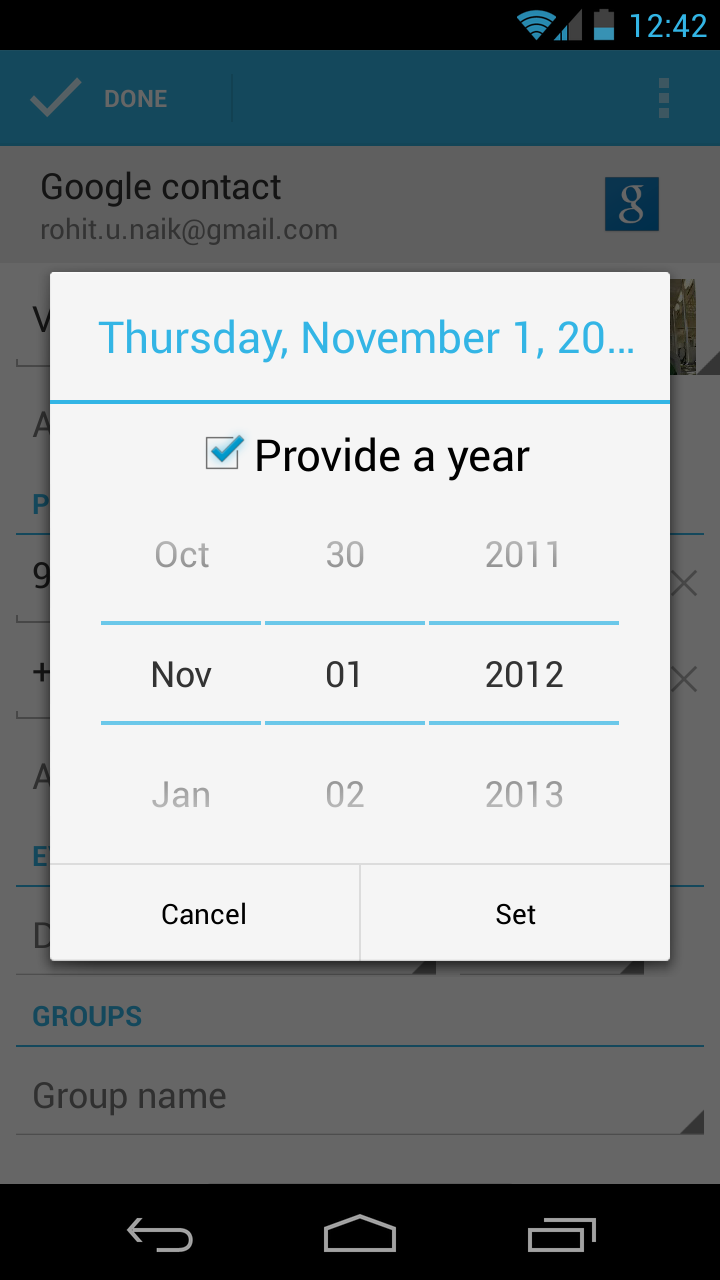
A bug in Google's Android 4.2 (Jelly Bean) mobile operating system has caused the entire month of December to disappear. But fear not: Google has recognized the issue, which we hope means a fix will arrive soon.
Sorry, kids, Christmas is cancelled this year – at least, that’s what Google’s Android 4.2 (Jelly Bean) mobile operating system is telling users. As first reported by AndroidPolice on Saturday, Google accidentally left out the entire month of December in its most recent Android update. Fortunately for users, a fix is likely coming soon. (We hope.)
The absence of December in the Jelly Bean calendar is especially disruptive to the People (contacts) app, since birthdays, reminders, or any other notes related to the month of December cannot be added (since December does not currently exist). The flaw comes built in to the new Nexus 4 and Nexus 10 devices, as well as new or upgraded versions of the Nexus 7 tablet and Galaxy Nexus smartphones.
The no-December flaw was first noted in an Android bug-tracker forum on November 14. It has since been confirmed by a number of users from around the world. But it wasn’t until Saturday, November 17, that Google acknowledged that December 2012 was missing from Jelly Bean.
All said, this is a relatively minor bug – more a source of mild annoyance than catastrophic mayhem. (If, on the other hand, Apple had left out December in iOS, there would surely be nothing short of Hell to pay for the Cupertino giant.) Alas, Google’s roll-out-fix-later modus operandi has likely saved it from too much wrath, if not a dose of embarrassment.
Still, Google has yet to comment on when a fix is due. But we would guess that an update will arrive before December does.
Apple is trying to add Android 4.1, Jelly Bean, and the Galaxy Note 10.1 to yet another patent infringement court case against Samsung in California.
Apple argued yesterday that Samsung’s Galaxy Note 10.1 tablet and the Android 4.1 Jelly Bean operating system infringe on its patents and should be added to an existing California lawsuit against Samsung.
Appearing in a federal court in San Jose, before U.S. Magistrate Judge Paul S. Grewal, Apple’s lawyers sought to expand the lawsuit against Samsung with additional patent infringement claims. This follows Samsung’s attempt to add patent infringement claims against the new iPhone 5 back on October 1.
The judge has not issued a ruling yet.
Most notable among Apple’s claims is the inclusion of Google’s Android 4.1 operating system, also known as Jelly Bean. Apple insisted that the Galaxy Nexus is the only phone with Jelly Bean that it is seeking to add to the patent complaint, for now. The implications of this are serious for Google and it’s the first time that Apple has included the Android platform specifically in its cases against Samsung.
It seems the Cupertino-based company is also now looking to add devices with a stylus, such as the Galaxy Note 10.1, and Apple’s attorney mentioned adding a further 17 devices that could use a stylus, but don’t ship with one.
Google has released the stock Jelly Bean Calendar application on the Play Store that can now be installed by anyone with a device running Android 4.0.3 and above.
This is great for someone who has an Android device with a custom calendar application, such as the ones Samsung and HTC like to install on their devices, but want to use the stock Calendar app that you find on Nexus devices.
If you already had this application pre-installed on your device, you would have an update waiting for you in Play Store. This means that Google can now update the app through the Play Store, rather than through the next version of Android, whenever that happens. After the update, you’ll notice that the app now has a new icon. Other than that, the application is identical to the previous version.
The app is live on the store and you can download or update it from the link below.
After ASUS started rolling out the Android 4.1 update for its Transformer tablets yesterday, Acer is now following up with a Jelly Bean update of their own for their Iconia Tab A700.
Several users from Germany and US are reporting receiving the update on the xda-developers forum. Most of them are reporting improved performance thanks to Jelly Bean.
If you have this tablet, check to see if the update is available for your device. If not, it should be coming shortly.
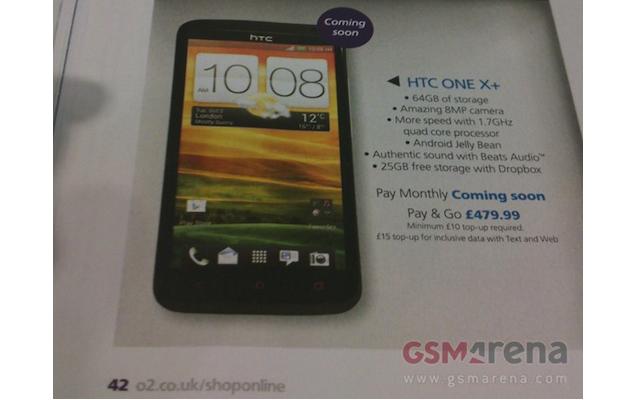
A new set of leaks show the HTC One X+ coming soon, equipped with a 1.7GHz processor and Android 4.1 Jelly Bean.
An updated version of the HTC One X has been leaked, named the HTC One X+, and it will bring with it several important changes to the company’s flagship Android smartphone.
GSMArena.com has published a picture of the One X+, complete with a list of specifications, apparently taken from a brochure for UK network O2. The phone has a bubble with the words “coming soon” written above it, but no fixed release date.
There are two key changes listed. The first is the processor, which in the European version of the One X is a 1.5GHz, quad-core Nvidia Tegra 3, but in the One X+ it will be clocked at 1.7GHz.
It’s not stated whether this will still be a Tegra 3, but a previous leak in August showed a benchmark figure for an HTC phone believed to be the One X+ being set with a 1.7GHz Tegra 3, so it seems likely the chip will remain the same.
The second big change is with the operating system, as the One X+ will come with Android 4.1 Jelly Bean already installed, rather than 4.0 Ice Cream Sandwich seen on current One X devices. Jelly Bean is still a rarity outside of the Nexus 7 tablet, and the One X+ could be among the very first smartphones to come with the OS pre-installed, joining the likes of the Samsung Galaxy Note 2.
An increase to 64GB of internal storage is also listed, along with Beats Audio, 25GB of free Dropbox space and an 8-megapixel camera.
Pocket-Lint.com has been sent an image of the front and rear of the One X+ too, which shows that the design hasn’t been changed, and the 4.7-inch, HD display will almost certainly be the same too.
O2’s advert provides a Pay As You Go price of £479, or around $780. HTC has yet to make the One X+ official, but if UK networks are busily adding the phone to their catalogs, we can’t have long to wait.
Now sticking to that statement, the company has started rolling out the update to the TF201, as is being reported by Engadget. As for the TF700T, it is yet to get the update but it shouldn’t be long before it too gets to enjoy some of the Jelly Bean goodness.
Meanwhile, owners of the cheaper Transformer Pad TF300T are well settled in with their Jelly Bean update by now, which they received last month.
Intel is busy with IDF and while it’s mostly focusing on its next generation CPU architecture, Haswell, there was some good news about Android too. Namely, that Android 4.1 Jelly Bean has been ported to work with the smartphone-oriented Atom processor.
There are a number of devices that use the Z2460 chip, including the Lenovo K800, Orange Santa Clara, Lava XOLO X900, ZTE Grand X IN and soon, a brand new droid from Motorola.
As usual, the update is not instantly available – it first has to pass carrier acceptance testing before it’s pushed out to users. Once that’s done Jelly Bean should be seeded as an over-the-air update.
So, there’s a good chance that the Motorola phone will run Jelly Bean at launch. If rumors are to be believed, the device that will be announced on September 18 will be a RAZR M version with an Atom CPU. It will also be the first Atom-powered phone from a mainstream maker, so Intel might actually start claiming some market share.
There are a couple of new Atom processors on the way, codenamed Merrifield, which will use a 22nm manufacturing process (vs. 32nm for the current Medfield chips). That will improve power efficiency, but the first Merrifield devices are expected in early 2013, so we’re most likely looking at a standard Medfield for the new Motorola smartphone.
Now, according to CNet UK, a Samsung spokesperson has indicated that the Jelly Bean update will be out in October. No confirmed date was given, but a less-than eight week wait is certainly “very soon” in the land of Android updates.
As with most software updates, it’ll be SIM-free Galaxy S3 owners that will see Android 4.1 first, as networks need to test the software before approving it for use.
That said, Orange and T-Mobile UK may have a head start here, as it will be launching the Galaxy S3 LTE on its new EE 4G network in the coming weeks, and Android 4.1 Jelly Bean will come pre-installed on the new device.
With approval already given for that model, Jelly Bean for the quad-core 3G version of the phone must only need a glance before it’s ready to send out to eager customers.
CNet’s report doesn’t mention any dates for the Galaxy Note or the Galaxy Note 10.1, both of which Samsung has promised will receive a Jelly Bean update too.
As for US versions of the Galaxy S3, an October release for Jelly Bean may be wishful thinking, but if you’re confident enough, there are custom versions of the software available, including a custom ROM for the Verizon S3 and a leaked official build for the T-Mobile variant.
We know Samsung is hard at work on the Galaxy S3’s update though, as leaks of the software have become more frequent, with SamMobile.com recently posting a build from September 9.
Described as “very much near perfect,” the still pre-release OS is clearly close to being signed off. The site is so confident, it believes Samsung may start the rollout as soon as next week.
While this sounds a little too good to be true, it’s still looking like Samsung won’t disappoint Galaxy S3 owners who’re keen for some Jelly Bean this year. We’re still waiting for its official statement before getting too excited though.
A new Jelly Bean test ROM for the Samsung Galaxy S III leaked today. The ROM version is DLI1 and the build date is today – September 3.
We already tried it out on our unit and it behaves notably better than the previous Jelly Bean leaked ROMs. However, there’s still the occasional force close, so this most certainly isn’t the final version of the ROM that will be seeded to the users. Some of the apps, like S Note are also missing, but those should be back in the next builds, we guess.
There are still things Samsung need to do on the Jelly Bean update, but we guess the final release is indeed just around the corner.
Hit the source link if you are interested in giving this ROM a try. There’s a neat tutorial there that will guide you through the flashing process, but you should proceed at your own risk as this move will most certainly void your warranty.
During its IFA 2012 press conference, Samsung confirmed that an Android 4.1 Jelly Bean update would be coming to the Galaxy S3 "very soon."
The journey began in December last year, when Samsung announced it would be bringing the then latest version of Android, Ice Cream Sandwich, to a variety of its Galaxy smartphones and tablets in early 2012.
As one of those devices was the best-selling Galaxy S2, this news garnered plenty of attention, but sadly, Samsung’s less than precise timing caused all sorts of problems. Owners became frustrated at the lack of Ice Cream Sandwich on their beloved phones, and Samsung worked as hard to placate the masses as it did on the update itself.
Even the mid-March confirmation of the update’s arrival was mismanaged, as networks still had to test it, plus in some cases the usually first-on-the-list SIM-free device owners had to wait longer than those with locked phones. It was all a bit of a disaster.
No sooner was Samsung’s nightmare over before it began again, as Google announced Android 4.1 Jelly Bean a short while after the flagship Galaxy S3 phone went on sale…with Ice Cream Sandwich installed.
Jelly Bean on the Galaxy S3, Galaxy Note and Galaxy Note 10.1
But Samsung has learned its lesson, as there was no mention of it coming in the next month, before Christmas or even just “in 2012,” with the spokesperson preferring to say only that it’s coming “very soon.”
If Samsung is sensible, it won’t say anything else until the update is about to make its way to the networks, when it’ll be out of Samsung’s hands. Any speculation will down to the press to make.
Android 4.1 Jelly Bean is a modest yet interesting update, with a variety of features that should work well on the quad-core Galaxy S3, and you can read all about them in our guide here.
So when could “very soon” mean? Well, soon is defined as a short time, and the addition of very emphasizes this, which in Samsung’s world could mean between now and next year. As with all Android updates, patience is needed, but at least we know it’s coming.
It’s no secret Samsung has been investing quite a lot of effort in the the Galaxy S III Jelly Bean update development recently. Numerous ROMs have already leaked online with the latest being having a build number of XXLH8.
So, what’s really happening inside Samsung’s labs and when we can expect to see the Galaxy S III Jelly Bean update going live?
Each new Jelly Bean test ROM shows significant improvement in performance, some minor UI changes and tons of bug fixes. Even though the latest LH8 seems pretty good at first, it still has a few bugs inside and needs some polishing.
Samsung is holding a pre-IFA press conference tomorrow and it will reveal when the Galaxy S III (both US and international) Jelly Bean will come out. The Samsung Galaxy S II and Galaxy Note updates are also already in development and are scheduled to come in Q4 (which starts in October, so here’s hoping).
We’ll probably know more once the Samsung’s pre-IFA event finishes tomorrow eventing. We will be there to cover it live for you, so stick around.
The last few days brought great news to Samsung Galaxy S III owners. Three official Jelly Bean ROMs leaked in quick succession, with the latest having yesterday as its build date. And seeing the kind of interest those leaks are enjoying, we’re guessing many of you are wondering if it’s time to jump ship to ICS.
Whether or not to leave your stable ROM for a beta version of a more functional and cooler looking one has always been a tough decision, but here’s hoping we’ll help you with it by giving you more details on what you are getting and at what cost.
The build version
Let’s start with the downsides of the beta release. In fact the latest leaked ROM (build number XXDLH6) only has one major issue, and it’s a rather big deal. We flashed it on two different Galaxy S III units and both of them had issues with their Wi-Fi connectivity. It refused to work with some hotspots and it was painfully slow on most of the others.
Unless you have a data plan that you can fall back to this is quite the usability issue and it’s the main reason why you might want to stay away from this build for now. Everything else seemed to work fine, or at least for us it did.
Here is a rundown of the software goodies that might make you want to live with the shoddy Wi-Fi and get the beta running on your Samsung Galaxy S III right now. You can see them in action in the following video that we prepared for you.
We start with Project Butter that we all heard so much about. Truth is it doesn’t make too great a difference on a powerhouse like the Galaxy S III. The smartphone’s UI was always really fluid and you need to look really close to spot the differences. Still, the app drawer animation is now even smoother and so are the other transition effects around the menu.
There are several changes and tweaks to the UI layot as well. The settings section has been reorganized and Google Now is on board. The notification area has been updated as well and there are a few new TouchWiz goodies too.
Google Now gets activated with a press-and-hold of the menu button. You can either type or talk to it and the app will give you one of its info cards (if available) and read you its contents aloud (you can disable this from the app settings if you don’t need it). If there’s no card to help with the answer to your question Google now will initiate a Google Search.
Google Now in action
The notification area has a few tricks to show off – brightness control, reorganized status bar (it now shows a bigger clock and the date) on top and expandable notifications.
The notification area • Expand a notification
The settings menu has been reorganized – the voice settings, the lockscreen and accounts options are now brought to the top – you no longer need to dig into the menu to find them.
The new Settings organization
The latest version of TouchWiz offers updated apps and a few new widgets. The latter are part of the Mode change setting where you can choose two types of homescreens – Basic and Easy.
Choosing the Easy mode
The two modes offer a pre-defined set of widgets. Basic is the default one and we all have already seen it – every Galaxy S III (ICS-powered) comes with this arrangement out of box.
The Easy mode replaces the default widgets with a few completely new ones – they are very big and give you quick access to the most important functions straight from your homescreen (no menu digging).
The best part of those two modes though is that you customize both as you please and your Galaxy S III will save the changes. That way you can easily create two different layouts, e.g. work and fun or travel and home and alternate between them quickly.
And while we are talking about widgets, we should talk about their new behavior – they now support automatic resize and reshuffling. Let’s say you are trying to add a new widget on a homescreen, but the ones you’ve already put there need to be repositioned. Well, they’ll do that automatically for you. If the widget you are trying to add is bigger than the available space but supports resize then it will automatically shrink to fit into the free area. Cool, right?
The new widgets • interacting with widgets is easier
As you’ve probably guessed there is no Flash support on board, but you can always try and sideload the Jelly Bean-compatible APK that the guys over at XDA-Developers cooked up.
No Flash support for Jelly Bean
You are surely familiar with the awesome trick called pop-up play. In case you need a refresh though – it brings the video you are currently playing to a small floating window and you can use other apps on the phone while still watching this video. The new firmware allows you to resize this pop-up window for even further customization.
Using the pop-up play
The Jelly Bean update replaces the S Memo app with a newer one called S Note lite. It does the same as what S Note did, but adds a few new features. You can record sounds and attach them to the note directly, and you can also add most of the common multimedia formats quite easily.
The S Note lite
Offline voice typing premieres with the Jelly Bean update too. You can download the languages you need (about 20MB per language pack) and use voice recognition without an internet connection. It’s quite handy when you are abroad.
The offline voice support
The performance has been bumped up as well, or at least as far as web browsing is concerned. There’s no major changes to the CPU and GPU results in the benchmarks we ran, but the Jelly Bean Galaxy S III scored higher than its ICS sibling on the JavaScript tests.
Linpack
Higher is better
Galaxy S III Android 4.0.4 ICS 177.1
Galaxy S III Android 4.1 JB 185.8
BenchmarkPi
Lower is better
Galaxy S III Android 4.0.4 ICS 344
Galaxy S III Android 4.1 JB 349
NenaMark 2
Higher is better
Galaxy S III Android 4.0.4 ICS 58.8
Galaxy S III Android 4.1 JB 58.5
GLBenchmark Egypt 720p offscreen
Higher is better
Galaxy S III Android 4.0.4 ICS 103
Galaxy S III Android 4.1 JB 99
SunSpider
Lower is better
Galaxy S III Android 4.0.4 ICS 1447
Galaxy S III Android 4.1 JB 1179
BrowserMark
Higher is better
Galaxy S III Android 4.0.4 ICS 169, 811
Galaxy S III Android 4.1 JB 157, 176
All in all the Samsung Galaxy S III Jelly Bean update seems to offer quite a lot of new features and we can’t see many people being left disappointed by it. We’ll be doing a detailed preview in the following days, shedding even more light on the new features and optimizations, so stay tuned and feel free to post any questions you want answered in the comments section below.
Just a couple of days after the last Jelly Bean-ed Touch Wiz update for the international Galaxy S IIIleaked we got a new one.
The new build, version XXDLH6, is available for download and is flashable via ODIN.
The official update can’t be far behind these unofficial leaks with the most likely scenario pointing to it getting announced at the IFA floor at the end of the month.
You can download the Jelly Bean update over at the source link but keep in mind that it isn’t official yet so installing it voids your warranty and if you don’t know what you are doing you might brick your device.
Users of the ASUS Transformer Pad TF300 got treated to a nice surprise today, as the manufacturer has begun seeding the promised update to Google’s latest Android Jelly Bean 4.1 over the air.
Expectedly the Adobe Flash functionality will disappear with the new OS version. The TF300 users however, will get treated to Google’s latest Android additions and that buttery smooth browsing experience, which has quite a few people talking these days.
In case you are an owner of the ASUS Transformer Pad TF300 and have received and the update, feel free to drop us a line with your experience in the comments section below.
Now, there’s a new one, with a build date of August 14, which brings some fixes and cool new features to Samsung’s Android flagship. Users that have flashed the new ROM report improvements in the notification area, the addition of Dormant Mode as well as bug-fixes for Google Now. The cool TouchWiz-exclusive Pop Up Play video window can now also be resized.
If you’re eager to flash the latest official Galaxy S III Jelly Bean ROM, follow the source link below and read the instructions. As always, approach with care and know that flashing ROMs manually almost certainly invalidates your warranty.
Back at the Google I/O keynote where Google announced Android 4.1, Jelly Bean, one of the new features for the Play Store that Google talked about was Smart App Updates. This is basically delta updates for your apps, which means whenever there is a new update available for your installed apps, the Play Store will only download whatever is new within the APK instead of downloading the entire app all over again.
According to Google, Smart App Updates are only a third in size, which means you save a lot of time and data in updating apps. This feature has now been activated on the Google Play Store and some apps are already making use of it.
Smart App Updates is part of the Play Store application and is available to users of Gingerbread and above. You can check out a video of it in action below.
One of the key features in Android 4.1, Jelly Bean is that it automatically encrypts paid applications with a device specific ID, which ensures an app downloaded on once device can only be used on that particular device. This was created to combat the rampant piracy that has been seen on the Android platform.
Unfortunately, while the idea is excellent, the execution is not, as several developers and users of paid apps have found out.
The problem exists with the way the encrypted applications are downloaded and installed. In Jelly Bean, Google Play Store installs the application in the /mnt/asec folder (which is encrypted) instead of the /data/apps folder. When the OS boots, a service cache is generated for all the installed apps. Unfortunately, this process happens before the /mnt/asec folder is mounted, because of which the the OS cannot find the settings and other user profile data for the app, which causes the paid apps to reset and their data to be cleared every time the phone is rebooted.
There doesn’t seem to be any real solution to this problem at present, which has resulted in the encryption feature being disabled by Google. Since this is something only found in Jelly Bean, those running older versions of Android were never affected by it.
While it might seem like an oversight on Google’s part, as Android Policementions, Google was aware of this issue since last month and instead of acting on it on a priority basis it was relegated to a medium priority status, something to be fixed in the next version of Android.
Hopefully, the system will be fixed and be back online. Not that it matters, because even with a fully functioning system Google can’t stop the various ways in which you can pirate on Android.