Pages

Showing posts with label battery. Show all posts

Nov 19, 2012

Samsung Galaxy Premier goes through out battery life test, here go the results

The Samsung Galaxy Premier is the latest in the line of Samsung droids to undergo out battery test gauntlet, and the dual-core 1.5 GHz device showed some great battery endurance – especially in regards to video playback.

Lets take a look at how this mini powerhouse performs in other areas as well, including talk time and web browsing.

The Premier features the same 2100 mAh battery found on its older brother, the Samsung Galaxy S III, yet it only has to power half the amount of CPU cores . Understandably, we expected good battery performance, and we weren’t disappointed.

We saw some good talk time figures, with the Galaxy Premier even slightly exceeding its manufacturer-rated talk time.


Talk time

  • Motorola RAZR MAXX (ICS)
    21:18
  • Motorola DROID RAZR MAXX
    20:24
  • Motorola RAZR i
    20:07
  • Samsung Galaxy Note II N7100
    16:57
  • LG Optimus G
    15:30
  • HTC One X+
    13:31
  • Huawei Ascend P1
    12:30
  • Samsung Galaxy Note
    12:14
  • Samsung I8530 Galaxy Beam
    11:58
  • Samsung Galaxy Premier
    11:30
  • HTC Windows Phone 8X
    11:07
  • Samsung Wave 3 S8600
    11:07
  • HTC Desire X
    11:03
  • HTC One X (AT&T, LTE)
    10:35
  • Samsung I9300 Galaxy S III
    10:20
  • Samsung I9300 Galaxy S III (JB)
    10:15
  • HTC One V
    10:00
  • Meizu MX 4-core
    10:00
  • HTC One X
    9:57
  • HTC One S
    9:42
  • Samsung I9103 Galaxy R
    9:40
  • HTC Sensation XL
    9:30
  • Nokia Lumia 710
    9:05
  • Motorola Atrix HD
    9:04
  • HTC Vivid
    9:02
  • HTC Rhyme
    8:48
  • Apple iPhone 5
    8:42
  • LG Optimus 3D Max P720
    8:42
  • Sony Ericsson Xperia neo V
    8:41
  • Meizu MX
    8:39
  • Samsung Galaxy S II
    8:35
  • Samsung Galaxy S Duos
    8:28
  • Nokia Lumia 800
    8:25
  • Samsung Galaxy Nexus
    8:23
  • HTC Desire V
    8:20
  • Samsung Captivate Glide
    8:20
  • Sony Xperia T
    8:15
  • HTC Rezound (LTE)
    8:10
  • Samsung Galaxy Note (LTE)
    8:02
  • LG Optimus Vu
    7:57
  • LG Optimus 4X HD
    7:41
  • Apple iPhone 4S
    7:41
  • Samsung i937 Focus S
    7:25
  • HTC Evo 4G LTE (LTE)
    7:21
  • Samsung Galaxy S Blaze 4G
    7:14
  • Sony Xperia acro S
    7:09
  • Samsung Rugby Smart I847
    7:09
  • Sony Ericsson Xperia Pro
    6:57
  • Nokia N9
    6:57
  • HTC Radar
    6:53
  • Samsung Galaxy Ace Duos
    6:53
  • BlackBerry Curve 9380
    6:52
  • Samsung Galaxy Pocket
    5:54
  • Nokia Lumia 900 for AT&T (LTE)
    5:53
  • Sony Xperia ion LTE
    5:52
  • Sony Xperia P
    5:33
  • Nokia 808 PureView
    5:16
  • LG Nitro HD (LTE)
    5:16
  • HTC Titan II (LTE)
    5:10
  • BlackBerry Bold 9790
    5:00
  • Pantech Burst
    4:46

The Premier comes with Android 4.1 Jelly Bean preinstalled, which means great web browsing performance out of box. The Premier came in at 6 hours and 40 minutes of browser performance, which is better than what we got for the S III.

Web browsing

  • Apple iPhone 5
    9:56
  • Motorola RAZR MAXX (ICS)
    9:12
  • Apple iPad mini
    9:05
  • Samsung Galaxy Note II N7100
    8:48
  • HTC One X+
    7:56
  • Motorola DROID RAZR MAXX
    7:23
  • HTC Radar
    7:17
  • Motorola RAZR i
    7:06
  • Apple iPhone 4S
    6:56
  • HTC One V
    6:49
  • Samsung Galaxy Premier
    6:40
  • Motorola Atrix HD
    6:40
  • BlackBerry Curve 9380
    6:40
  • Samsung I9300 Galaxy S III (JB)
    6:27
  • Samsung i937 Focus S
    6:15
  • HTC Windows Phone 8X
    6:01
  • Sony Xperia ion LTE
    5:56
  • Samsung Rugby Smart I847
    5:53
  • Pantech Burst
    5:51
  • Samsung Galaxy S Blaze 4G
    5:45
  • HTC Desire V
    5:44
  • HTC Evo 4G LTE
    5:41
  • Samsung Wave 3 S8600
    5:34
  • Sony Xperia T
    5:33
  • Samsung Captivate Glide
    5:33
  • Samsung I8530 Galaxy Beam
    5:28
  • Samsung Galaxy Note LTE
    5:24
  • Samsung Galaxy S Duos
    5:23
  • HTC Sensation XL
    5:20
  • Meizu MX 4-core
    5:19
  • Samsung I9300 Galaxy S III
    5:17
  • Sony Xperia acro S
    5:16
  • HTC Rezound
    5:16
  • HTC Desire X
    5:16
  • LG Optimus G
    5:15
  • HTC Rhyme
    5:08
  • Samsung I9103 Galaxy R
    5:07
  • HTC One X (AT&T)
    5:03
  • Sony Ericsson Xperia Pro
    4:50
  • LG Optimus Vu
    4:49
  • HTC Vivid
    4:46
  • Samsung Galaxy Ace Duos
    4:45
  • Meizu MX
    4:35
  • Nokia N9
    4:33
  • Samsung Galaxy S II
    4:24
  • Sony Ericsson Xperia neo V
    4:20
  • HTC One X
    4:18
  • Nokia 808 PureView
    4:14
  • LG Optimus 3D Max P720
    4:10
  • Nokia Lumia 900 for AT&T
    4:10
  • Nokia Lumia 800
    4:07
  • HTC Titan II (LTE)
    4:05
  • HTC One S
    4:03
  • BlackBerry Bold 9790
    4:02
  • LG Nitro HD
    4:00
  • LG Optimus 4X HD
    3:59
  • Sony Xperia P
    3:59
  • Nokia Lumia 710
    3:51
  • Samsung Galaxy Pocket
    3:47
  • Samsung Galaxy Note
    3:35
  • Huawei Ascend P1
    3:23
  • Samsung Galaxy Nexus
    3:01

As we said, video playback is where the Premier really shines. It was able to keep going for just under 13 hours with it, which is better than even some tablets out there. We’re not sure, but perhaps the PowerVR SGX544 GPU on the Premier is more efficient at decompressing video than the Mali-400MP on the Galaxy S III, which it outperformed by almost 3 hours.

Video playback

  • Motorola RAZR MAXX (ICS)
    16:35
  • Motorola DROID RAZR MAXX
    14:17
  • Apple iPad mini
    12:51
  • Samsung Galaxy Premier
    12:51
  • Samsung Galaxy Note II N7100
    11:27
  • Apple iPhone 5
    10:12
  • Samsung I9300 Galaxy S III
    10:01
  • Nokia 808 PureView
    9:53
  • Samsung I8530 Galaxy Beam
    9:42
  • Samsung Rugby Smart I847
    9:34
  • HTC One S
    9:28
  • Samsung I9300 Galaxy S III (JB)
    9:27
  • Apple iPhone 4S
    9:24
  • HTC Evo 4G LTE
    9:07
  • Nokia N9
    8:40
  • Samsung Galaxy Note
    8:25
  • HTC One X+
    8:11
  • Motorola RAZR i
    8:11
  • Samsung Galaxy S II
    8:00
  • Samsung i937 Focus S
    7:55
  • Samsung Wave 3 S8600
    7:52
  • Sony Ericsson Xperia neo V
    7:45
  • Huawei Ascend P1
    7:38
  • Samsung Galaxy S Blaze 4G
    7:33
  • Samsung Galaxy Note LTE
    7:30
  • LG Optimus G
    7:16
  • Meizu MX 4-core
    6:33
  • HTC Windows Phone 8X
    6:27
  • HTC Desire V
    6:26
  • HTC One X (AT&T)
    6:26
  • Samsung Galaxy Ace Duos
    6:25
  • LG Optimus Vu
    6:23
  • Samsung I9103 Galaxy R
    6:21
  • HTC Sensation XL
    6:12
  • Samsung Galaxy Pocket
    6:06
  • Samsung Captivate Glide
    6:04
  • Sony Xperia ion LTE
    6:03
  • Samsung Galaxy Nexus
    6:02
  • Sony Xperia T
    6:01
  • Motorola Atrix HD
    6:01
  • HTC Vivid
    6:00
  • HTC Radar
    5:54
  • Nokia Lumia 800
    5:52
  • HTC Titan II
    5:50
  • BlackBerry Bold 9790
    5:47
  • HTC One X
    5:45
  • Sony Ericsson Xperia Pro
    5:44
  • Sony Xperia acro S
    5:38
  • HTC Desire X
    5:38
  • Pantech Burst
    5:38
  • Meizu MX
    5:27
  • HTC Rhyme
    5:23
  • HTC One V
    5:20
  • Nokia Lumia 900 for AT&T
    5:18
  • BlackBerry Curve 9380
    5:09
  • HTC Rezound
    5:03
  • Samsung Galaxy S Duos
    4:30
  • Sony Xperia P
    4:30
  • LG Nitro HD
    4:17
  • LG Optimus 4X HD
    4:14
  • LG Optimus 3D Max P720
    3:28
  • Nokia Lumia 710
    3:27

Finally, standby performance is right on par with what you’d expect from a device with these specifications – it doesn’t seem to be doing too many battery-draining activities while it’s in standby. All of our tests give it a very respectable 51h endurance rating.


Source : blog[dot]gsmarena[dot]com

Nov 5, 2012

How to maximize your iPhone’s battery life

iPhone Battery Large

Get the most out of your iPhone battery by following these steps, which should see you return the phone to it's charger less often.

It’s one of those first-world problems that we’re all trying to solve: How to make the battery on our iPhone last just that little while longer. Thanks to Apple’s wisdom, we can’t pull the battery and replace it with a fully charged one, so we have to examine our usage and the phone’s activities to extend the amount of time between charges.

The basics

Battery life can be increased just by familiarizing yourself with the Settings menu and toggling a few switches, some of which are fairly obvious, while others not so. Let’s get started: Open the Settings menu, and pay close attention.

  • Wi-Fi: This one is an easy one: If you don’t need it or are using 3G/4G, then turn off Wi-Fi. The convenience of not having to switch it on and off isn’t a fair trade for the power it uses while searching for networks.
  • Bluetooth: Another obvious one, but leaving Bluetooth on when you aren’t using it causes considerable battery drain.
  • Location Services: This one needs some consideration, as some apps — Maps for example — require location services to be active, so you may want to explore the Location Services menu (found under Privacy in iOS 6) and only turn off those you don’t use on a regular basis. For example, does IMDb and Ocarina really need to know where you are?
  • Time Zone: While you’re digging about in the Privacy menu, scroll down and tap System Services, where you’ll find a range of options including the chance to turn off automatic time-zone changes. In iOS 5 this was found to be a power hog, so if you don’t need it, turn it off. In fact, while you’re there, turn off Location-based iAds and Diagnostics too.
  • Push: Whether it’s Push emails or Push notifications, your phone will be chatting to the network on a regular basis with both activated, and therefore using precious power. Email accounts can be individually set up for Push data, so switch off those that you don’t always need to check, or if you’re serious about saving battery power, turn them all to “manual.” You’ll find these options under Settings, Mail/Contacts/Calendars and Fetch New Data. For notifications, there’s an entire menu dedicated to them in iOS 6, and each app that offers Push notifications can be activated or crucially, deactivated. Like Push emails, if you’re serious about your iPhone’s battery, turn all but the essentials off.
  • Brightness: Turn Auto-Brightness on, but at the same time drag the brightness slider down as low as you dare. This will save significant energy.

iPhone App TrayIntermediate level

By managing Wi-Fi, Bluetooth, Push, and the brightness of your iPhone’s screen, you’re well on your way to a longer lasting battery. But if you want more, then you’ll want to try these suggestions, although the effect won’t be as great as those described above.

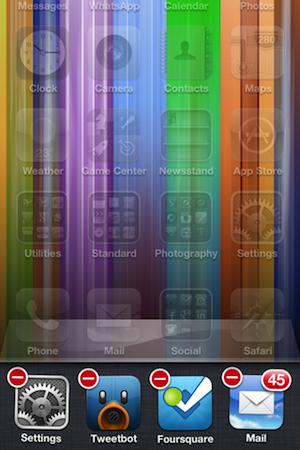
  • Manually Close Apps: This is a controversial one, as Apple will tell you that apps living in the app tray are in stasis, and shouldn’t drain your battery at all. Possibly, but many users will know certain apps still draw power when in this state. So, double tap the Home button, hold down an icon to enter “jiggly” mode, and close everything using the little “x.”
  • Siri: If you never ask Siri a question, shut her down under the Settings menu. She doesn’t do much unless you ask her something, but one less active feature can only be a good thing.
  • Screen Lock: Make sure your phone locks itself — which turns off the screen — after one minute. The less time it’s idle with the screen on, the better. Do this under Settings, General, and Auto-Lock.
  • iCloud: This works in a similar way to Push, where data is being transmitted from your phone to Apple’s servers in the background. If you don’t need to back up to iCloud, turn it off under iCloud in the Settings menu. You can also individually select what’s backed up too, and the fewer there are, the less time it takes. Plus, there’s the added benefit of using less iCloud storage space too.

For the hardcore among you

So, you’ve done all that you can, but the charger still beckons. Then it’s time to get serious. If you want your battery to last, really last; then sacrifices need to be made.

  • Cellular Data: No arguing, if you don’t need it, head to Settings, General then Cellular and turn it off. If calls are unimportant, putting the iPhone into Airplane mode will really stretch the battery’s life too. You’ll just be left holding the equivalent of an iPod Touch.
  • External Battery Packs: You may not be able to change the battery, but you can add a battery to the iPhone instead. There are many long-life battery packs available — mostly using the 30-pin connector, but that will change over time — where you sacrifice size and weight in return for a heavy duty battery case plugged into your slim and light iPhone.

Finally, if you want the best from your battery; look after it. Regular charging patterns are good for phone batteries, and continually having it at 10-percent and only charging it halfway will shorten its lifespan, and provide poor performance. Modern Li-ion batteries may not have the same issues as older Ni-cad cells, but that doesn’t mean they don’t respond to proper treatment.


Source : digitaltrends[dot]com

Oct 19, 2012

Prototype E Ink Android phone puts your AMOLED screen to shame (but only in direct sunlight)

Onyx E Ink Smartphone

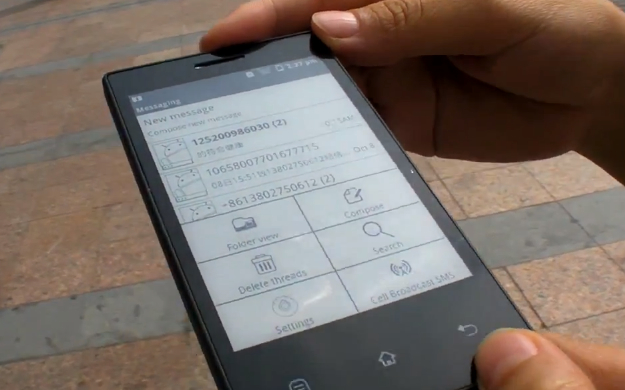
Onyx International, a company known for its range of e-readers, has shown off a prototype Android smartphone with an E Ink display. While the outdoor legibility and battery life are both excellent, the screen does let it down in other areas.

As every owner knows only too well, smartphone screens are difficult to view in direct sunlight, and while pushing the brightness up to maximum can help, it doesn’t do wonders for the battery life.

Here’s an interesting solution to the problem from a company named Onyx International, a smartphone with an E Ink screen. Onyx has plenty of experience in the world of E Ink screens, as it produces the Boox series of e-readers. The handset is only a prototype at the moment, but you can see a working version in the video below, where its screen is compared to a Galaxy Nexus.

The result is spectacular, as the Nexus device just looks like it’s turned off the entire time, while the Onyx phone’s display is crisp and sharp, despite being viewed outdoors. This probably won’t come as a surprise to anyone who has used an e-reader over the past few years, and the superior performance of an E Ink screen in sunlight formed the basis of a recent Amazon Kindle ad campaign.

Surprisingly, the Onyx phone runs Google Android, which has been extensively modified to run on a monochrome screen, but as you can see, the core functionality is still there. Because E Ink screens only take little sips of battery power, the standby time on the prototype is a week. Try that on any other smartphone.

There are, however, one or two little drawbacks. E Ink displays aren’t known for their speed, and sure enough the refresh rate is terribly slow, meaning any multimedia or gaming would be impossible. Viewing text webpages is good though.

While it’s an impressive technical feat and the use of an E Ink screen on a phone certainly has its benefits, the thought of enduring those long refresh times and not being able to do the things that almost all other smartphones can do, would probably make ownership too frustrating. After all, If I wanted a long standby time, a monochrome screen and little else, I’d buy a basic feature phone.

Take a look at the video showing the phone in action and see what you think.


Source : digitaltrends[dot]com

Oct 18, 2012

Battery maker A123 Systems declares bankruptcy

A123 Systems battery pack

Unable to weather the fallout from a major recall, A123 will sell its EV battery division to Johnson Controls Inc.

A123 Systems, builder of batteries for Fisker and other car companies, declared bankruptcy earlier this week. The company will sell its EV battery division to Johnson Controls Inc., so the car brands it supplied shouldn’t be affected.

A123 slid into insolvency after defaulting on a large loan payment. The company had bet its future on a deal with Wanxiang Group Corporation, a Chinese car parts company, that had planned to invest $465 million in A123 before the deal fell through.

The Massachusetts-based company was $376 million in debt and $459.8 million in assets.

Johnson Controls will take over battery production at A123’s three factories (two in Michigan, one in China) and assume ownership of all of its intellectual property. Johnson will pay A123 a total of $125 million, including $72.5 million in post-bankruptcy financing, for the EV battery division.

Johnson may also be paying for a bit of a mess. A123 has been in financial trouble for several months because of a scandalous recall of Fisker Karma batteries.

When a Karma shut down during Consumer Reports testing, the problem was traced back to defective battery packs made at A123’s Livonia, Michigan plant. Production at Livonia was suspended, and the company ended up spending $51.6 million to replace the Karma batteries, and $15.2 million to replace other customers’ batteries.

The Consumer Reports debacle was one of two high profile recalls that involved A123 batteries. In December 2011, Fisker recalled 239 Karmas because of badly placed hose clamps that could have caused coolant leaks and fires. The hose clamps were part of sealed battery packs that Fisker received from A123.

Despite the recalls, A123 still has a few important clients. General Motors will be using A123 batteries in the Chevrolet Spark EV, and BMW uses batteries from A123’s China plant in its ActiveHybrid vehicles. Fisker has not indicated that it will switch battery makers.


Source : digitaltrends[dot]com

Oct 15, 2012

This cellphone makes a better use of a sugar rush than you ever will

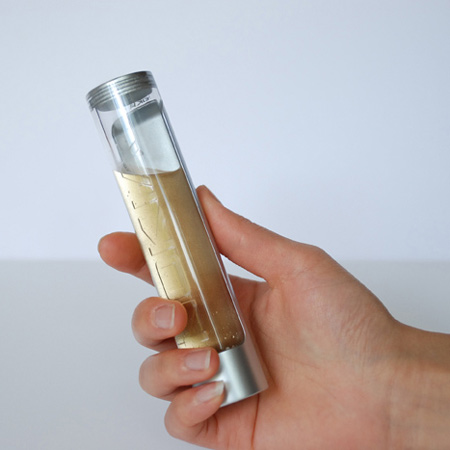
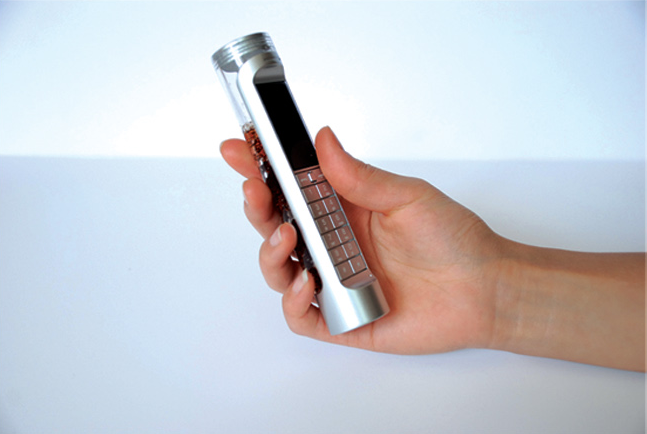
A concept phone utilizes sugary drinks as the power source for a cellphone, making the battery biodegradable.

I’ve been trying to quit soda for the past few weeks thanks to too many hours on Reddit and constant streams of photos that displayed how much sugar was in a can of Coke. As a result, there are untouched cans of soda sitting my fridge with no one to claim them, but it felt irresponsible if I just gave them to the kids next door. If only this eco-friendly concept cellphone existed. The design, by China-based Daizi Zheng, claims that a Nokia phone could be powered solely on sugary drinks. Now there’s an interesting use of leftover Coke that’s much more excitable than cleaning the rust off my pennies.

According to Zheng’s thesis, the phone would contain a chemical board that can form a reaction to utilize sugar enzymes and carbohydrates and convert them into electric power. The phone would work with most sugary drinks; in fact, more sugar means longer battery life. When the sugar and carbs are all used up as battery, you’re left over with a liquid that’s biodegradable, and the phone can be cleaned, refilled, and reused once again.

“Bio-batteries are fully biodegradable and have, on a single charge, a potential life-span three to four times longer than conventional lithium batteries,” Zheng writes on his website. Keep in mind, however, this design would be used with a basic, barebone phone, so no sticky touchscreen and apps here.

Coke powered nokia phone leftover liquidSince the design aims to be environmentally-friendly, it’s probably better to use straight sugar water than Coke or other packaged sodas, considering how they tend come in plastic bottles or cans — both of which are already pretty expensive to recycle. Still, it would be cool if the phone doubled as a drink bottle so you can choose to either gulp your soda or conserve it for more phone battery. This rationale would force the user to pick between drinking an unhealthy beverage or forgo it for the sake of your gadget’s usability. However, since the sugar disappears as the phone uses up the battery, it is unlikely that the soda you do end up drinking from the phone would taste any good. We also have to wonder if the fizzy noise would interfere with your sugar high calls.

It’s an interesting approach at multi-purposing a notorious food item, and such a gadget would make a neat science experiment for kids to learn about the wonders (and potential harms) of what sugary drinks means to them, and the chemical world.


Source : digitaltrends[dot]com

Oct 14, 2012

The alleged battery of the upcoming Apple iPad Mini emerges in leaked photos

Alleged photos of the battery unit set to power the yet to be revealed Apple iPad Mini have emerged. The images reveal a 4490mAh battery, packing 16.7Whr of energy, running at 3.72 volts.

The above numbers mean that the alleged battery unit of the upcoming Apple slate is roughly three times larger than the iPhone 5′s battery, and about one third of the third generation iPad’s capacity.

While the images of the battery are not guaranteed to be authentic, the markings on the unit are consistent with the ones of the current Apple products. We will likely get the full scoop at the iPad Mini’s unveiling, which will likely happen on October 23.


Source : blog[dot]gsmarena[dot]com
Oct 10, 2012

Motorola RAZR i battery life test concludes, results are inside

We’ve just concluded our in-depth review of the Motorola RAZR i and its Intel Atom Medfield chipset inside and now it’s time to shine a light on its battery performance.

The Motorola RAZR i achieved some pretty good scores in all of our tests, but its talk time endurance was partucularly impressive.

Here we go – the call test is where the new Intel-designed modem really shines. The Motorola RAZR i got a whopping 20 hours and 7 minutes, climbing to third spot in our call test chart and making top 3 a Moto exclusive territory. More impressively it managed to match the achievement of its MAXX siblings with a battery that has a 1300 mAh smaller capacity.

Talk time

  • Motorola RAZR MAXX (ICS)
    21:18
  • Motorola DROID RAZR MAXX
    20:24
  • Motorola RAZR i
    20:07
  • Samsung Galaxy Note II N7100
    16:57
  • Huawei Ascend P1
    12:30
  • Samsung Galaxy Note
    12:14
  • Samsung I8530 Galaxy Beam
    11:58
  • Samsung Wave 3 S8600
    11:07
  • HTC One X (AT&T, LTE)
    10:35
  • Samsung I9300 Galaxy S III
    10:20
  • Samsung I9300 Galaxy S III (JB)
    10:15
  • HTC One V
    10:00
  • Meizu MX 4-core
    10:00
  • HTC One X
    9:57
  • HTC One S
    9:42
  • Samsung I9103 Galaxy R
    9:40
  • HTC Sensation XL
    9:30
  • Nokia Lumia 710
    9:05
  • Motorola Atrix HD
    9:04
  • HTC Vivid
    9:02
  • HTC Rhyme
    8:48
  • Apple iPhone 5
    8:42
  • LG Optimus 3D Max P720
    8:42
  • Sony Ericsson Xperia neo V
    8:41
  • Meizu MX
    8:39
  • Samsung Galaxy S II
    8:35
  • Nokia Lumia 800
    8:25
  • Samsung Galaxy Nexus
    8:23
  • HTC Desire V
    8:20
  • Samsung Captivate Glide
    8:20
  • Sony Xperia T
    8:15
  • HTC Rezound (LTE)
    8:10
  • Samsung Galaxy Note (LTE)
    8:02
  • LG Optimus Vu
    7:57
  • LG Optimus 4X HD
    7:41
  • Apple iPhone 4S
    7:41
  • Samsung i937 Focus S
    7:25
  • HTC Evo 4G LTE (LTE)
    7:21
  • Samsung Galaxy S Blaze 4G
    7:14
  • Sony Xperia acro S
    7:09
  • Samsung Rugby Smart I847
    7:09
  • Sony Ericsson Xperia Pro
    6:57
  • Nokia N9
    6:57
  • HTC Radar
    6:53
  • Samsung Galaxy Ace Duos
    6:53
  • BlackBerry Curve 9380
    6:52
  • Samsung Galaxy Pocket
    5:54
  • Nokia Lumia 900 for AT&T (LTE)
    5:53
  • Sony Xperia ion LTE
    5:52
  • Sony Xperia P
    5:33
  • Nokia 808 PureView
    5:16
  • LG Nitro HD (LTE)
    5:16
  • HTC Titan II (LTE)
    5:10
  • BlackBerry Bold 9790
    5:00
  • Pantech Burst
    4:46

The RAZR i got stellar results in the web browsing department as well. The 2000 mAh Li-Ion battery under the RAZR i’s Kevlar vest was able to pump out 7 whole hours of non-stop browsing, which is not particularly kind to smartphones with AMOLED Screen.

Web browsing

  • Apple iPhone 5
    9:56
  • Motorola RAZR MAXX (ICS)
    9:12
  • Samsung Galaxy Note II N7100
    8:48
  • Motorola DROID RAZR MAXX
    7:23
  • HTC Radar
    7:17
  • Motorola RAZR i
    7:06
  • Apple iPhone 4S
    6:56
  • HTC One V
    6:49
  • Motorola Atrix HD
    6:40
  • BlackBerry Curve 9380
    6:40
  • Samsung I9300 Galaxy S III (JB)
    6:27
  • Samsung i937 Focus S
    6:15
  • Sony Xperia ion LTE
    5:56
  • Samsung Rugby Smart I847
    5:53
  • Pantech Burst
    5:51
  • Samsung Galaxy S Blaze 4G
    5:45
  • HTC Desire V
    5:44
  • HTC Evo 4G LTE
    5:41
  • Samsung Wave 3 S8600
    5:34
  • Sony Xperia T
    5:33
  • Samsung Captivate Glide
    5:33
  • Samsung I8530 Galaxy Beam
    5:28
  • Samsung Galaxy Note LTE
    5:24
  • HTC Sensation XL
    5:20
  • Meizu MX 4-core
    5:19
  • Samsung I9300 Galaxy S III
    5:17
  • Sony Xperia acro S
    5:16
  • HTC Rezound
    5:16
  • HTC Rhyme
    5:08
  • Samsung I9103 Galaxy R
    5:07
  • HTC One X (AT&T)
    5:03
  • Sony Ericsson Xperia Pro
    4:50
  • LG Optimus Vu
    4:49
  • HTC Vivid
    4:46
  • Samsung Galaxy Ace Duos
    4:45
  • Meizu MX
    4:35
  • Nokia N9
    4:33
  • Samsung Galaxy S II
    4:24
  • Sony Ericsson Xperia neo V
    4:20
  • HTC One X
    4:18
  • Nokia 808 PureView
    4:14
  • LG Optimus 3D Max P720
    4:10
  • Nokia Lumia 900 for AT&T
    4:10
  • Nokia Lumia 800
    4:07
  • HTC Titan II (LTE)
    4:05
  • HTC One S
    4:03
  • BlackBerry Bold 9790
    4:02
  • LG Nitro HD
    4:00
  • LG Optimus 4X HD
    3:59
  • Sony Xperia P
    3:59
  • Nokia Lumia 710
    3:51
  • Samsung Galaxy Pocket
    3:47
  • Samsung Galaxy Note
    3:35
  • Huawei Ascend P1
    3:23
  • Samsung Galaxy Nexus
    3:01

And finally the video test for all those people who spend a lot of time traveling and like watching videos on their smartphones during the trips. The Intel Atom-sporting RAZR’s got you covered with 8 solid hours and 11 minutes of video playback, which isn’t a top score but definitely one to be respected.

Video playback

  • Motorola RAZR MAXX (ICS)
    16:35
  • Motorola DROID RAZR MAXX
    14:17
  • Samsung Galaxy Note II N7100
    11:27
  • Apple iPhone 5
    10:12
  • Samsung I9300 Galaxy S III
    10:01
  • Nokia 808 PureView
    9:53
  • Samsung I8530 Galaxy Beam
    9:42
  • Samsung Rugby Smart I847
    9:34
  • HTC One S
    9:28
  • Samsung I9300 Galaxy S III (JB)
    9:27
  • Apple iPhone 4S
    9:24
  • HTC Evo 4G LTE
    9:07
  • Nokia N9
    8:40
  • Samsung Galaxy Note
    8:25
  • Motorola RAZR i
    8:11
  • Samsung Galaxy S II
    8:00
  • Samsung i937 Focus S
    7:55
  • Samsung Wave 3 S8600
    7:52
  • Sony Ericsson Xperia neo V
    7:45
  • Huawei Ascend P1
    7:38
  • Samsung Galaxy S Blaze 4G
    7:33
  • Samsung Galaxy Note LTE
    7:30
  • Meizu MX 4-core
    6:33
  • HTC Desire V
    6:26
  • HTC One X (AT&T)
    6:26
  • Samsung Galaxy Ace Duos
    6:25
  • LG Optimus Vu
    6:23
  • Samsung I9103 Galaxy R
    6:21
  • HTC Sensation XL
    6:12
  • Samsung Galaxy Pocket
    6:06
  • Samsung Captivate Glide
    6:04
  • Sony Xperia ion LTE
    6:03
  • Samsung Galaxy Nexus
    6:02
  • Sony Xperia T
    6:01
  • Motorola Atrix HD
    6:01
  • HTC Vivid
    6:00
  • HTC Radar
    5:54
  • Nokia Lumia 800
    5:52
  • HTC Titan II
    5:50
  • BlackBerry Bold 9790
    5:47
  • HTC One X
    5:45
  • Sony Ericsson Xperia Pro
    5:44
  • Sony Xperia acro S
    5:38
  • Pantech Burst
    5:38
  • Meizu MX
    5:27
  • HTC Rhyme
    5:23
  • HTC One V
    5:20
  • Nokia Lumia 900 for AT&T
    5:18
  • BlackBerry Curve 9380
    5:09
  • HTC Rezound
    5:03
  • Sony Xperia P
    4:30
  • LG Nitro HD
    4:17
  • LG Optimus 4X HD
    4:14
  • LG Optimus 3D Max P720
    3:28
  • Nokia Lumia 710
    3:27

At the end the Intel-designed modem got another chance to shine and it took it. The RAZR i turned out to be excellently efficient at stand-by, which allowed it to get an endurance score of 64h.This means that if you were to use the smartphone for an hour of talking, an hour of web browsing and an hour of video playback per day, you’d need to charge it once every 64 hours.

Still, the breakdown shows that if you use your smartphone for web-browsing and video playback more than you do for actual telephony, than you are probably going to get shorter discharge times.


Source : blog[dot]gsmarena[dot]com
Sep 29, 2012

SpareOne emergency phone: One battery, 15-year charge, now in waterproof bag

SpareOne Emergency Phone waterproof bag

When you can't rely on your smartphone battery to last forever, use the SpareOne emergency phone as backup.

Tis the season for new smartphone announcements. Whether you are a diehard gadgeteer or a general consumer shopping for a new phone, one of the most important thing you want to learn about a product is how long the battery lasts. You never know when you will need to make calls during emergency situations. Luckily, you don’t always have to rely on smartphones in case of long term power outages. The SpareOne emergency cellphone is your perfect backup, running on a single AA battery and can reportedly last up to 15 years with 10 hours of talk time.

SpareOne Emergency PhoneWe received a demo unit of the SpareOne phone and it’s as bare as an emergency phone gets. The candybar style device has all the buttons in the front, is extremely lightweight, and comes complete with the one AA battery it needs to power on. You’ll need to insert your own micro SIM card to make calls, but 911 will always work with or without a SIM. SpareOne recently released the device with a new waterproof, floating bag so your one emergency won’t get destroyed, making it durable in an all-weather situation.

While it’s not a particularly fancy gadget, it does seem like a fairly useful one to have sitting in your emergency shelf. If necessary, the phone also doubles as an torchlight and and last up to 24 hours with the single AA battery. Though the idea is for SpareOne to be an emergency backup phone, the device could make for a good starter phone for younger kids whom you don’t believe has the responsibility of owning a smartphone just yet — but should still have cellphone access at the minimum. It could also make for a good rugged, traveling phone for when you take outdoor trips and don’t want to ruin your fancy iPhone 5. Of course, the only problem you’ll run into in these situations is having to actually remember your contacts’ phone numbers or carry a phonebook … and when was the last time anyone did either?

If you’re intrigued, SpareOne emergency phone is available for purchase now at $120 apiece.


Source : digitaltrends[dot]com

Sep 11, 2012

Battery test for the Sony Xperia acro S is complete here are the results

The Sony Xperia acro S is a rugged dual-core droid with an IP57 certification, but how tough is its battery? It has a capacity of 1910mAh, which is certainly not bad for a phone with a 4.3″ screen.

With the extra durability the acro S offers, you might be tempted to take it outside the safe confines of the city and go hiking in the woods. Will the battery last you long enough to call for help if anything goes wrong?

Well, we measured the talk time at 7 hours and 9 minutes, which exactly matches the official specs. It’s not the best result we’ve seen, but it does better than most of its Xperia siblings.

Talk time

  • Motorola RAZR MAXX (ICS)
    21:18
  • Motorola DROID RAZR MAXX
    20:24
  • Huawei Ascend P1
    12:30
  • Samsung Galaxy Note
    12:14
  • Samsung I8530 Galaxy Beam
    11:58
  • Samsung Wave 3 S8600
    11:07
  • HTC One X (AT&T, LTE)
    10:35
  • Samsung I9300 Galaxy S III
    10:20
  • HTC One V
    10:00
  • Meizu MX 4-core
    10:00
  • HTC One X
    9:57
  • HTC One S
    9:42
  • Samsung I9103 Galaxy R
    9:40
  • HTC Sensation XL
    9:30
  • Nokia Lumia 710
    9:05
  • Motorola Atrix HD
    9:04
  • HTC Vivid
    9:02
  • HTC Rhyme
    8:48
  • LG Optimus 3D Max P720
    8:42
  • Sony Ericsson Xperia neo V
    8:41
  • Meizu MX
    8:39
  • Samsung Galaxy S II
    8:35
  • Nokia Lumia 800
    8:25
  • Samsung Galaxy Nexus
    8:23
  • Samsung Captivate Glide
    8:20
  • HTC Rezound (LTE)
    8:10
  • Samsung Galaxy Note (LTE)
    8:02
  • LG Optimus Vu
    7:57
  • LG Optimus 4X HD
    7:41
  • Apple iPhone 4S
    7:41
  • Samsung i937 Focus S
    7:25
  • HTC Evo 4G LTE (LTE)
    7:21
  • Samsung Galaxy S Blaze 4G
    7:14
  • Sony Xperia acro S
    7:09
  • Samsung Rugby Smart I847
    7:09
  • Sony Ericsson Xperia Pro
    6:57
  • Nokia N9
    6:57
  • HTC Radar
    6:53
  • Samsung Galaxy Ace Duos
    6:53
  • BlackBerry Curve 9380
    6:52
  • Samsung Galaxy Pocket
    5:54
  • Nokia Lumia 900 for AT&T (LTE)
    5:53
  • Sony Xperia ion LTE
    5:52
  • Sony Xperia P
    5:33
  • Nokia 808 PureView
    5:16
  • LG Nitro HD (LTE)
    5:16
  • HTC Titan II (LTE)
    5:10
  • BlackBerry Bold 9790
    5:00
  • Pantech Burst
    4:46

Web browsing is not something you’re likely to do in the forest, but the 5 hours and 16 minutes achieved by the Sony Xperia acro S are a pretty decent result nonetheless. We have seen better though – the Xperia ion LTE did a little better with the same battery and chipset and bigger screen.

Web browsing

  • Motorola RAZR MAXX (ICS)
    9:12
  • Motorola DROID RAZR MAXX
    7:23
  • HTC Radar
    7:17
  • Apple iPhone 4S
    6:56
  • HTC One V
    6:49
  • Motorola Atrix HD
    6:40
  • BlackBerry Curve 9380
    6:40
  • Samsung i937 Focus S
    6:15
  • Sony Xperia ion LTE
    5:56
  • Samsung Rugby Smart I847
    5:53
  • Pantech Burst
    5:51
  • Samsung Galaxy S Blaze 4G
    5:45
  • HTC Evo 4G LTE
    5:41
  • Samsung Wave 3 S8600
    5:34
  • Samsung Captivate Glide
    5:33
  • Samsung I8530 Galaxy Beam
    5:28
  • Samsung Galaxy Note LTE
    5:24
  • HTC Sensation XL
    5:20
  • Meizu MX 4-core
    5:19
  • Samsung I9300 Galaxy S III
    5:17
  • Sony Xperia acro S
    5:16
  • HTC Rezound
    5:16
  • HTC Rhyme
    5:08
  • Samsung I9103 Galaxy R
    5:07
  • HTC One X (AT&T)
    5:03
  • Sony Ericsson Xperia Pro
    4:50
  • LG Optimus Vu
    4:49
  • HTC Vivid
    4:46
  • Samsung Galaxy Ace Duos
    4:45
  • Meizu MX
    4:35
  • Nokia N9
    4:33
  • Samsung Galaxy S II
    4:24
  • Sony Ericsson Xperia neo V
    4:20
  • HTC One X
    4:18
  • Nokia 808 PureView
    4:14
  • LG Optimus 3D Max P720
    4:10
  • Nokia Lumia 900 for AT&T
    4:10
  • Nokia Lumia 800
    4:07
  • HTC Titan II (LTE)
    4:05
  • HTC One S
    4:03
  • BlackBerry Bold 9790
    4:02
  • LG Nitro HD
    4:00
  • LG Optimus 4X HD
    3:59
  • Sony Xperia P
    3:59
  • Nokia Lumia 710
    3:51
  • Samsung Galaxy Pocket
    3:47
  • Samsung Galaxy Note
    3:35
  • Huawei Ascend P1
    3:23
  • Samsung Galaxy Nexus
    3:01

Watching a scary movie while you’re alone in a tent somewhere is probably not a good idea, but you’ll only manage to get through the first four Friday the 13th movies anyway. The Sony Xperia acro S lasted 5 hours and 38 minutes, which puts it near the bottom end of our charts.

Video playback

  • Motorola RAZR MAXX (ICS)
    16:35
  • Motorola DROID RAZR MAXX
    14:17
  • Samsung I9300 Galaxy S III
    10:01
  • Nokia 808 PureView
    9:53
  • Samsung I8530 Galaxy Beam
    9:42
  • Samsung Rugby Smart I847
    9:34
  • HTC One S
    9:28
  • Apple iPhone 4S
    9:24
  • HTC Evo 4G LTE
    9:07
  • Nokia N9
    8:40
  • Samsung Galaxy Note
    8:25
  • Samsung Galaxy S II
    8:00
  • Samsung i937 Focus S
    7:55
  • Samsung Wave 3 S8600
    7:52
  • Sony Ericsson Xperia neo V
    7:45
  • Huawei Ascend P1
    7:38
  • Samsung Galaxy S Blaze 4G
    7:33
  • Samsung Galaxy Note LTE
    7:30
  • Meizu MX 4-core
    6:33
  • HTC One X (AT&T)
    6:26
  • Samsung Galaxy Ace Duos
    6:25
  • LG Optimus Vu
    6:23
  • Samsung I9103 Galaxy R
    6:21
  • HTC Sensation XL
    6:12
  • Samsung Galaxy Pocket
    6:06
  • Samsung Captivate Glide
    6:04
  • Sony Xperia ion LTE
    6:03
  • Samsung Galaxy Nexus
    6:02
  • Motorola Atrix HD
    6:01
  • HTC Vivid
    6:00
  • HTC Radar
    5:54
  • Nokia Lumia 800
    5:52
  • HTC Titan II
    5:50
  • BlackBerry Bold 9790
    5:47
  • HTC One X
    5:45
  • Sony Ericsson Xperia Pro
    5:44
  • Sony Xperia acro S
    5:38
  • Pantech Burst
    5:38
  • Meizu MX
    5:27
  • HTC Rhyme
    5:23
  • HTC One V
    5:20
  • Nokia Lumia 900 for AT&T
    5:18
  • BlackBerry Curve 9380
    5:09
  • HTC Rezound
    5:03
  • Sony Xperia P
    4:30
  • LG Nitro HD
    4:17
  • LG Optimus 4X HD
    4:14
  • LG Optimus 3D Max P720
    3:28
  • Nokia Lumia 710
    3:27

In the end, the Sony Xperia acro S lasts just over 36 hours before you’d need to charge it. This is if you do an hour of calls on a 3G network, watch video for an hour and then browse the web for another hour every 24 hours.


Source : blog[dot]gsmarena[dot]com

Sep 6, 2012

Amazon upgrades Kindle Fire, presents a brand-new Kindle Fire HD

Amazon didn’t forget the Kindle Fire tablets either. The old Kindle fire gets a hardware upgrade – a new faster processor, double the RAM and longer battery life. With the new parts the Kindle Fire is now 40% faster. It costs $159 and will hit the shelves on September 14.

Amazon also announced Kindle Fire HD. It’s a powerful tablet with an 7.0 or 8.9-inch 1920×1200 IPS display. It’s based on the TI OMAP4470 chipset with a 1.5GHz dual-core ARM Cortex-A9 processor and PowerVR SXG544 graphics plus a separate dedicated 2D graphics core.

The display on the Kindle Fire HD offers 25% less glare and full spectrum color at all angles.


More info about the screen

Kindle Fire HD also comes with stereo speakers plus exclusive Dolby Digital Plus audio engine for excellent audio output. There is dual-band (two antennas) Wi-Fi on board as well. The internal memory is 16GB.


Some of the new features

The new features already introduced within the Kindle Paperwhite for the ebook reader will be here too. But here will be even more – like the X-Ray for movies (IMDB-powered). You can touch on some of the actors while watching a movie and see their names and bios.


More features

You can now sync game saves with the Whispersync so you can continue playing where you left off regardless of the device. A few new apps will come in help too – Facebook, Skype (video-chats will be possible thanks to the front-facing HD camera) and updated email client.

The 7-inch Kindle Fire HD will launch on September 14 for $199, while the 8.9-inch model will become available on September 20 for $299.


Source : blog[dot]gsmarena[dot]com
Sep 3, 2012

How To Improve Your iPod Battery Life

Learning how to improve your iPod battery life gives you more opportunity to maximize the use of your iPod. It is a hassle for someone listening to music or podcast when all of a sudden, the battery dies. Here are some tips that you can do to extend the battery life of your iPod, and prevent it from dying quickly:

1. Minimize the Backlight Timer

The backlight consumes almost 30% of the battery. It is one of the biggest causes of battery drain, so better minimize the time in consumes. You can go to Settings then choose Backlight Timer to adjust the time.

2. Use minimum brightness

The brighter the iPod screen is, the more energy it consumes. You can use the minimum possible brightness that you can see, to extend the battery life. Adjust this setting by going to Settings then Brightness.

3. Turn off the clicker confirmation audible feedback

When using the click wheel or touch screen interface, turn off the audible feedback to minimize power consumption. Just go to Settings then Clicker then choose Off.

4. Use hold switch

By using the hold switch, you can let the iPod ignore the accidental input.

5. Pause if you are not listening

Do not let the iPod play when not used. Pause whenever you are not listening for a bit.

6. Avoid changing tracks

Avoid skipping tracks forward or backward. Utilize the playlist efficiently.

7. Turn off the Equalizer

When the Equalizer is calculating and modifying the music, it significantly drains the battery life. Turn off the Sound Check and EQ by going to Settings then EQ then choose Off.

8. Use mp3 compression

It is better to play sounds in mp3 format since they can save battery life. Moreover, they are smaller in file size so they occupy lesser space in the hard drive.

9. Do not expose the iPod in the hot temperature

Heat can degrade the performance of the battery so keep your iPod away from a hot car or sun.

10. Update the software often

Software developers often fix bugs and improve the iPod software. New updates minimize the use of the battery so always update your iPod whenever there is a new version.

What To Do When iPod Battery Dies

There are few options that you can do when the battery of your iPod dies. You can go ahead and buy a new one if you want, but there might be more affordable options. Apple has a battery replacement program but it is somewhat expensive. For cheaper options, look for other retailers that sell battery replacements. Alternately, you can check out cheaper external backup batteries.

By following simple tips, you can extend the battery life of your iPod. However, if your iPod battery dies, look for cheaper ways to find a replacement.

Author Bio: Vince Cinelli has owned every generation of the iPod, as well as each iPhone and iPad model.  He specializes in writing tips about Apple products, such as iPhone repair and switching from a PC.

Tags: iPod, iPod Battery

Source : techtalkafrica[dot]com

Sep 1, 2012

Here’s the full breakdown of Motorola Atrix HD’s battery life test

The Motorola Atrix HD entered our battery test track right after we crowned our new champion – the GSM flavored, Android ICS booting Motorola RAZR MAXX. The AT&T exclusive device packs a truly impressive spec sheet, but is powered by a relatively modest 1780mAh. That’s why we were cautious with our expectations towards the Kevlar dressed handset.

The Motorola Atrix HD did fairly well in the telephony section of the battery trial. It posted a time of 9 hours and 4 minutes. The latter is not the best we’ve encountered, but is nevertheless a respectable achievement.

Talk time

  • Motorola DROID RAZR MAXX
    20:24
  • Huawei Ascend P1
    12:30
  • Samsung Galaxy Note
    12:14
  • Samsung I8530 Galaxy Beam
    11:58
  • Samsung Wave 3 S8600
    11:07
  • HTC One X (AT&T, LTE)
    10:35
  • Samsung I9300 Galaxy S III
    10:20
  • HTC One V
    10:00
  • Meizu MX 4-core
    10:00
  • HTC One X
    9:57
  • HTC One S
    9:42
  • Samsung I9103 Galaxy R
    9:40
  • HTC Sensation XL
    9:30
  • Nokia Lumia 710
    9:05
  • Motorola Atrix HD
    9:04
  • HTC Vivid
    9:02
  • HTC Rhyme
    8:48
  • LG Optimus 3D Max P720
    8:42
  • Sony Ericsson Xperia neo V
    8:41
  • Meizu MX
    8:39
  • Samsung Galaxy S II
    8:35
  • Nokia Lumia 800
    8:25
  • Samsung Galaxy Nexus
    8:23
  • Samsung Captivate Glide
    8:20
  • HTC Rezound (LTE)
    8:10
  • Samsung Galaxy Note (LTE)
    8:02
  • LG Optimus Vu
    7:57
  • LG Optimus 4X HD
    7:41
  • Apple iPhone 4S
    7:41
  • Samsung i937 Focus S
    7:25
  • HTC Evo 4G LTE (LTE)
    7:21
  • Samsung Galaxy S Blaze 4G
    7:14
  • Samsung Rugby Smart I847
    7:09
  • Sony Ericsson Xperia Pro
    6:57
  • Nokia N9
    6:57
  • HTC Radar
    6:53
  • Samsung Galaxy Ace Duos
    6:53
  • BlackBerry Curve 9380
    6:52
  • Samsung Galaxy Pocket
    5:54
  • Nokia Lumia 900 for AT&T (LTE)
    5:53
  • Sony Xperia ion LTE
    5:52
  • Sony Xperia P
    5:33
  • Nokia 808 PureView
    5:16
  • LG Nitro HD (LTE)
    5:16
  • HTC Titan II (LTE)
    5:10
  • BlackBerry Bold 9790
    5:00
  • Pantech Burst
    4:46

The handset’s web browsing time of 6 hours and 40 minutes is nothing short of impressive, given the Atrix HD’s gorgeous 720p screen. The smartphone’s achievement is not far from the best in business and is a clear showcase of the energy efficiency of the Qualcomm Snapdragon S4 chipset’s power efficiency.

Web browsing

  • Motorola DROID RAZR MAXX
    7:23
  • HTC Radar
    7:17
  • Apple iPhone 4S
    6:56
  • HTC One V
    6:49
  • Motorola Atrix HD
    6:40
  • BlackBerry Curve 9380
    6:40
  • Samsung i937 Focus S
    6:15
  • Sony Xperia ion LTE
    5:56
  • Samsung Rugby Smart I847
    5:53
  • Pantech Burst
    5:51
  • Samsung Galaxy S Blaze 4G
    5:45
  • HTC Evo 4G LTE
    5:41
  • Samsung Wave 3 S8600
    5:34
  • Samsung Captivate Glide
    5:33
  • Samsung I8530 Galaxy Beam
    5:28
  • Samsung Galaxy Note LTE
    5:24
  • HTC Sensation XL
    5:20
  • Meizu MX 4-core
    5:19
  • Samsung I9300 Galaxy S III
    5:17
  • HTC Rezound
    5:16
  • HTC Rhyme
    5:08
  • Samsung I9103 Galaxy R
    5:07
  • HTC One X (AT&T)
    5:03
  • Sony Ericsson Xperia Pro
    4:50
  • LG Optimus Vu
    4:49
  • HTC Vivid
    4:46
  • Samsung Galaxy Ace Duos
    4:45
  • Meizu MX
    4:35
  • Nokia N9
    4:33
  • Samsung Galaxy S II
    4:24
  • Sony Ericsson Xperia neo V
    4:20
  • HTC One X
    4:18
  • Nokia 808 PureView
    4:14
  • LG Optimus 3D Max P720
    4:10
  • Nokia Lumia 900 for AT&T
    4:10
  • Nokia Lumia 800
    4:07
  • HTC Titan II (LTE)
    4:05
  • HTC One S
    4:03
  • BlackBerry Bold 9790
    4:02
  • LG Nitro HD
    4:00
  • LG Optimus 4X HD
    3:59
  • Sony Xperia P
    3:59
  • Nokia Lumia 710
    3:51
  • Samsung Galaxy Pocket
    3:47
  • Samsung Galaxy Note
    3:35
  • Huawei Ascend P1
    3:23
  • Samsung Galaxy Nexus
    3:01

Things began to go south for the Motorola Atrix HD in the video playback section of our battery test. The smartphone’s time of 6 hours and 1 minute is far from the best we’ve seen.

Video playback

  • Motorola DROID RAZR MAXX
    14:17
  • Samsung I9300 Galaxy S III
    10:01
  • Nokia 808 PureView
    9:53
  • Samsung I8530 Galaxy Beam
    9:42
  • Samsung Rugby Smart I847
    9:34
  • HTC One S
    9:28
  • Apple iPhone 4S
    9:24
  • HTC Evo 4G LTE
    9:07
  • Nokia N9
    8:40
  • Samsung Galaxy Note
    8:25
  • Samsung Galaxy S II
    8:00
  • Samsung i937 Focus S
    7:55
  • Samsung Wave 3 S8600
    7:52
  • Sony Ericsson Xperia neo V
    7:45
  • Huawei Ascend P1
    7:38
  • Samsung Galaxy S Blaze 4G
    7:33
  • Samsung Galaxy Note LTE
    7:30
  • Meizu MX 4-core
    6:33
  • HTC One X (AT&T)
    6:26
  • Samsung Galaxy Ace Duos
    6:25
  • LG Optimus Vu
    6:23
  • Samsung I9103 Galaxy R
    6:21
  • HTC Sensation XL
    6:12
  • Samsung Galaxy Pocket
    6:06
  • Samsung Captivate Glide
    6:04
  • Sony Xperia ion LTE
    6:03
  • Samsung Galaxy Nexus
    6:02
  • Motorola Atrix HD
    6:01
  • HTC Vivid
    6:00
  • HTC Radar
    5:54
  • Nokia Lumia 800
    5:52
  • HTC Titan II
    5:50
  • BlackBerry Bold 9790
    5:47
  • HTC One X
    5:45
  • Sony Ericsson Xperia Pro
    5:44
  • Pantech Burst
    5:38
  • Meizu MX
    5:27
  • HTC Rhyme
    5:23
  • HTC One V
    5:20
  • Nokia Lumia 900 for AT&T
    5:18
  • BlackBerry Curve 9380
    5:09
  • HTC Rezound
    5:03
  • Sony Xperia P
    4:30
  • LG Nitro HD
    4:17
  • LG Optimus 4X HD
    4:14
  • LG Optimus 3D Max P720
    3:28
  • Nokia Lumia 710
    3:27

Overall, the Motorola Atrix HD for AT&T achieved an endurance rating of 36 hours in our battery test. This means that you will need to charge the device after about a day and a half if you use it for an hour each of telephony, web browsing and video playback every day.


Source : blog[dot]gsmarena[dot]com